Layout
by
orngjce223,
CC-BY
ZabConf2015 – Sept 11 2015
---
Raymond Kuiper
Working the API like a Unix Pro
Layout
by
orngjce223,
CC-BY
Quick introduction
● @RaymondKuiper
● Zabbix user since 2006, never looked back
● q1x on Freenode (fnd me in #zabbix)
● Proud to work for these guys:
Layout
by
orngjce223,
CC-BY
Sysadmins <3 Automation
Layout
by
orngjce223,
CC-BY
Automation in Zabbix
Layout
by
orngjce223,
CC-BY
How to automate via the API?
Layout
by
orngjce223,
CC-BY
API bash script using Curl
Pros:
● Seems nice and easy at frst
● You can show of your mad curl skills
Layout
by
orngjce223,
CC-BY
API bash script using Curl
Cons:
● No object awareness
● Honestly, it's a PITA
Layout
by
orngjce223,
CC-BY
Develop an API based tool
Pros:
● Perfect solution to your problem
● Highly efcient code
Layout
by
orngjce223,
CC-BY
Develop an API based tool
Cons:
● Takes time and efort to develop (and
debug) a ftting solution
● Not very fexible unless you invest heavily
in development (monolithic)
● Gets very complex, very fast. You might
need a developer to maintain it
Layout
by
orngjce223,
CC-BY
Use a CLI tool
(Zabcon and friends)
Pros:
● Can be used in shell scripts
● Can be used quickly, no need for direct
API code
Layout
by
orngjce223,
CC-BY
Use a CLI tool
(Zabcon and friends)
Cons:
● Learning a new CLI language
● Limited to the functionality the developer
thought was useful
Layout
by
orngjce223,
CC-BY
My solution?
Layout
by
orngjce223,
CC-BY
*nix
The IT swiss army knife
Layout
by
orngjce223,
CC-BY
*nix
The IT swiss army knife
“The whole is greater than the sum of its
parts.”
― Aristotle
Layout
by
orngjce223,
CC-BY
Introducing:
the Zabbix Gnomes
Layout
by
orngjce223,
CC-BY
Zabbix Gnomes
https://github.com/q1x/zabbix-gnomes
Layout
by
orngjce223,
CC-BY
Zabbix Gnomes
~/.zbx.conf
[Zabbix API]
username=johndoe
password=verysecretpassword
api=https://zabbix.mycompany.com/path/to/zabbix/frontend/
no_verify=true
Layout
by
orngjce223,
CC-BY
Zabbix Gnomes
Making them work together
Layout
by
orngjce223,
CC-BY
Ex. 1: Hostgroup Templates
Scenario:
● Hosts in the host group 'App Servers' should
be linked to 'Template App Customapp'
● $someone keeps forgetting to link that
template to newly deployed App servers
● Post-it notes about this don't seem to work
Layout
by
orngjce223,
CC-BY
Ex. 1: Hostgroup Templates
user@localhost$ ./zghostfinder.py 'App Servers'
app-server-001
app-server-002
...
app-server-042
app-server-043
(Finds hosts in a host group)
Layout
by
orngjce223,
CC-BY
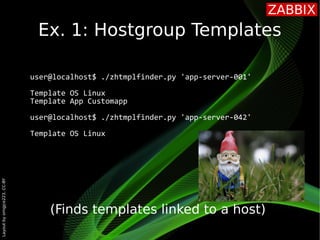
Ex. 1: Hostgroup Templates
user@localhost$ ./zhtmplfinder.py 'app-server-001'
Template OS Linux
Template App Customapp
user@localhost$ ./zhtmplfinder.py 'app-server-042'
Template OS Linux
(Finds templates linked to a host)
Layout
by
orngjce223,
CC-BY
Ex. 1: Hostgroup Templates
user@localhost$ ./zhtmpllinker.py
usage: zhtmpllinker.py [-h]
(-H HOSTNAMES [HOSTNAMES ...] | -G
HOSTGROUPS [HOSTGROUPS ...])
-t TEMPLATES [TEMPLATES ...]
user@localhost$ ./zhtmpllinker.py -G 'App Servers' 
-t 'Template App Customapp'
(Links templates to hosts)
Layout
by
orngjce223,
CC-BY
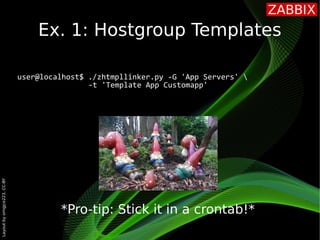
Ex. 1: Hostgroup Templates
user@localhost$ ./zhtmpllinker.py -G 'App Servers' 
-t 'Template App Customapp'
*Pro-tip: Stick it in a crontab!*
Layout
by
orngjce223,
CC-BY
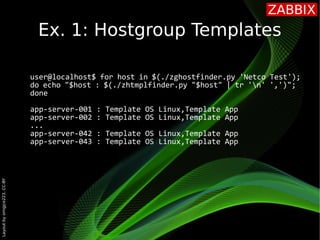
Ex. 1: Hostgroup Templates
user@localhost$ for host in $(./zghostfinder.py 'Netco Test');
do echo "$host : $(./zhtmplfinder.py "$host" | tr 'n' ',')";
done
app-server-001 : Template OS Linux,Template App
app-server-002 : Template OS Linux,Template App
...
app-server-042 : Template OS Linux,Template App
app-server-043 : Template OS Linux,Template App
Layout
by
orngjce223,
CC-BY
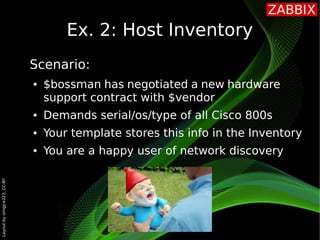
Ex. 2: Host Inventory
Scenario:
● $bossman has negotiated a new hardware
support contract with $vendor
● Demands serial/os/type of all Cisco 800s
● Your template stores this info in the Inventory
● You are a happy user of network discovery
Layout
by
orngjce223,
CC-BY
Ex. 2: Host Inventory
user@localhost$ ./zhinvswitcher.py
usage: zhinvswitcher.py [-h] (-H HOSTNAMES [HOSTNAMES ...]
| -G HOSTGROUPS [HOSTGROUPS ...]
| --all-hosts) … [-m MODE] …
(Switches Inv. Mode on hosts)
user@localhost$ ./zhinvswitcher.py -G “Cisco Devices” -m auto
(See also ZBXNEXT-1241)
Layout
by
orngjce223,
CC-BY
Ex. 2: Host Inventory
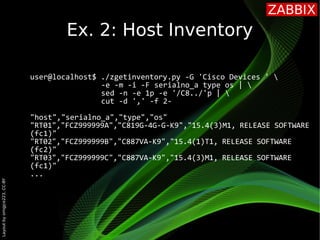
user@localhost$ ./zgetinventory.py
usage: zgetinventory.py [-h] (-H HOSTNAMES [HOSTNAMES ...]
| -G HOSTGROUPS [HOSTGROUPS …]) …
[-m] [-i] … (-A | -F FIELDS [FIELDS ...])
(Gets Zabbix inventory information)
Layout
by
orngjce223,
CC-BY
Ex. 2: Host Inventory
user@localhost$ ./zgetinventory.py -G 'Cisco Devices ' 
-e -m -i -F serialno_a type os | 
sed -n -e 1p -e '/C8../'p | 
cut -d ',' -f 2-
"host","serialno_a","type","os"
"RT01","FCZ999999A","C819G-4G-G-K9","15.4(3)M1, RELEASE SOFTWARE
(fc1)"
"RT02","FCZ999999B","C887VA-K9","15.4(1)T1, RELEASE SOFTWARE
(fc2)"
"RT03","FCZ999999C","C887VA-K9","15.4(3)M1, RELEASE SOFTWARE
(fc1)"
...
Layout
by
orngjce223,
CC-BY
Ex. 3: Emailing Graphs
Scenario:
● $colleague needs daily CPU graphs
● Can't be bothered with browsing the GUI
every morning before getting cofee
● You'd like to help him reach his mailbox quota
Layout
by
orngjce223,
CC-BY
Ex. 3: Emailing Graphs
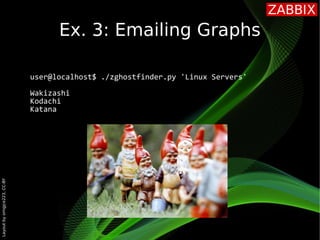
user@localhost$ ./zghostfinder.py 'Linux Servers'
Wakizashi
Kodachi
Katana
Layout
by
orngjce223,
CC-BY
Ex. 3: Emailing Graphs
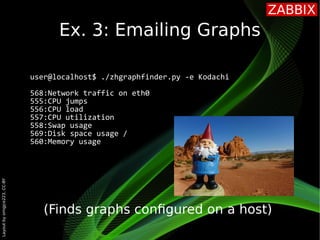
user@localhost$ ./zhgraphfinder.py -e Kodachi
568:Network traffic on eth0
555:CPU jumps
556:CPU load
557:CPU utilization
558:Swap usage
569:Disk space usage /
560:Memory usage
(Finds graphs confgured on a host)
Layout
by
orngjce223,
CC-BY
Ex. 3: Emailing Graphs
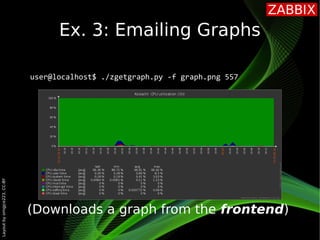
user@localhost$ ./zgetgraph.py -f graph.png 557
(Downloads a graph from the frontend)
Layout
by
orngjce223,
CC-BY
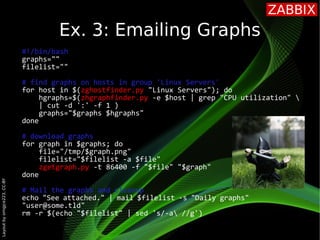
#!/bin/bash
graphs=""
filelist=""
# find graphs on hosts in group 'Linux Servers'
for host in $(zghostfinder.py "Linux Servers"); do
hgraphs=$(zhgraphfinder.py -e $host | grep "CPU utilization" 
| cut -d ':' -f 1 )
graphs="$graphs $hgraphs"
done
# download graphs
for graph in $graphs; do
file="/tmp/$graph.png"
filelist="$filelist -a $file"
zgetgraph.py -t 86400 -f "$file" "$graph"
done
# Mail the graphs and cleanup
echo "See attached." | mail $filelist -s "Daily graphs"
"user@some.tld"
rm -r $(echo "$filelist" | sed 's/-a //g')
Ex. 3: Emailing Graphs
Layout
by
orngjce223,
CC-BY
Things to think about
Layout
by
orngjce223,
CC-BY
Questions?

Raymond Kuiper - Working the API like a Unix Pro