Defend Yourself
& Your Agency
Against Ransomware
• What is Ransomware?
• How does it affect you?
• Real world example
• What to do if you are a victim of
Ransomware?
• General Security Best Tips
Agenda
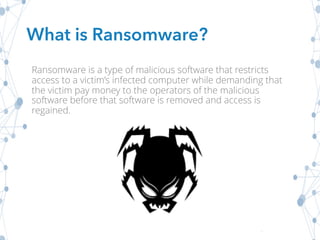
What is Ransomware?
Ransomware is a type of malicious software that restricts
access to a victim’s infected computer while demanding that
the victim pay money to the operators of the malicious
software before that software is removed and access is
regained.
ü Prevent you from accessing your operating system
ü Encrypt all of your files
ü Prevent you from running an application (like a browser)
ü Disrupt your use of a smart TV, smart watch, or other
smart appliances
Once one of the above happens, there is no guarantee that
paying the demanded ransom will restore your machine back
to normal.
Ransomware CAN:
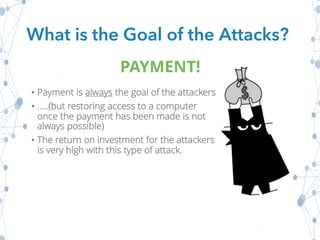
• Payment is always the goal of the attackers
• …..(but restoring access to a computer
once the payment has been made is not
always possible)
• The return on investment for the attackers
is very high with this type of attack.
What is the Goal of the Attacks?
PAYMENT!
Reason #1:
Ease of use
Reason #2:
Propagation of Bitcoins
(an increasingly common type of internet currency that is
often demanded as ransom due to its untraceable nature)
Reason #3:
Often, the ransom the attackers demand to clean up the
damage is cheaper than hiring a security team to attempt
to remove the malware.
Why Has it Become so Popular?
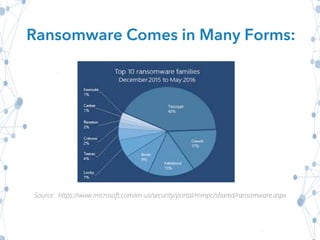
Source: https://www.microsoft.com/en-us/security/portal/mmpc/shared/ransomware.aspx
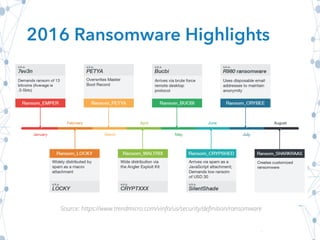
Ransomware Comes in Many Forms:
2016 Ransomware Highlights
Source: https://www.trendmicro.com/vinfo/us/security/definition/ransomware
Attackers can restrict access to an infected
computer
How?
By…
• Encrypting the hard drive with a
encryption key known only to the
attackers
• Taking control of the operating system
using a vulnerability present in the
operating system and then displaying a
message to the user telling them they
have been locked out
How Does it Affect YOU?
Real World Example
Target Spotlight:
Large Hospitals
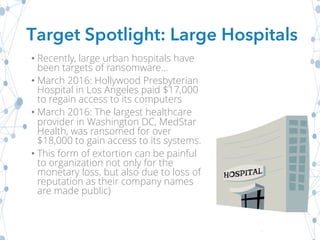
• Recently, large urban hospitals have
been targets of ransomware...
• March 2016: Hollywood Presbyterian
Hospital in Los Angeles paid $17,000
to regain access to its computers
• March 2016: The largest healthcare
provider in Washington DC, MedStar
Health, was ransomed for over
$18,000 to gain access to its systems.
• This form of extortion can be painful
to organization not only for the
monetary loss, but also due to loss of
reputation as their company names
are made public)
Target Spotlight: Large Hospitals
Real World Example
Ransomware Spotlight:
CryptoLocker
How was it made?
• This ransomware was propagated using malicious email
attachments. It also used an existing botnet called “Zeus” for
command and control of the malicious software.
What did it do?
• CryptoLocker would encrypt certain types of files that were
stored locally or on mounted network drives using a public
encryption key. CryptoLocker targeted computers running
Windows.
Ransomware Spotlight: CryptoLocker
Why was it hard to recover encrypted data?
• The private key that could decrypt the data was stored on the
botnet’s command and control servers. The malware was
easy to remove…but that wasn’t the point. Once the data was
encrypted, the damage was done.
What was the ransom threat?
• Then the private key needed to decrypt their data would be
deleted…or the ransom would increase by a significant
amount
Ransomware Spotlight: CryptoLocker
How was it beaten?
• The original version of CryptoLocker was taken down when an
international operation consisting of law enforcement agencies,
security companies, and academic researchers was able to
destroy the ZeuS botnet which had been used to propagate
CryptoLocker.
• “Operation Tovar” was able to sever the ZeuS botnet from its
“command-and-control” servers. These servers had been used
to send commands to machines infected with CryptoLocker and
other forms of malware.
• Security firms were then able to create a portal called “Decrypt
CryptoLocker”, which enabled over 500,000 victims to submit a
file encrypted by CryptoLocker. The portal would then test that
file against all of the encryption keys that had been stored by the
command-and-control servers to find the one that would decrypt
the victim’s files.
Ransomware Spotlight: CryptoLocker
Keep an eye out
• ...Updated versions of CryptoLocker and many other forms of
ransomware have now become popular amongst cyber
criminals, so the threat still remains.
Ransomware Spotlight: CryptoLocker
What if YOU Were the Victim?
If your computer has been locked by
malware or the files have been encrypted…
What if YOU Were the Victim?
Step 1:
Don’t click on ANYTHING!
What if YOU Were the Victim?
Step 2:
Don’t believe scare tactics!
Older versions of ransomware would often claim that you
had done something illegal with your computer. This is a
scare tactic to trick victims into paying the ransom and not
alerting the authorities.
…Don’t believe it!
What if YOU Were the Victim?
Step 3:
If at all possible, don’t pay the ransom!
The fewer people and organizations that pay, the less likely
That ransomware will stay as profitable as it is now.
Option 1:
• If you feel you are technically savvy, you can visit Microsoft’s
website for steps that might help decrypt your files.
Option 2:
• If you don’t feel comfortable trying that, we recommend taking
your computer to a well known computer repair shop that has
experience with removing ransomware and restoring files.
General Security Tips:
Implementing a multiple layer of defense technique is required to
defend computers against the crippling effects of ransomware.
Recommendation?
Implement User Education
Train your staff in security awareness best practices, especially
email and malware!
What to Know About Malicious Software Detection Tools
ü**Keep in Mind**...While these tools are useful, they may
not be able to stop the most recent versions of this malicious
software because they are only able to identify the versions of
the malicious software they recognize
üKeep all of your software up to date, especially your browsers
üIf possible, have a pop-up blocker running on your browsers
General Security Tips:
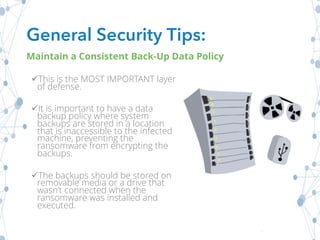
üThis is the MOST IMPORTANT layer
of defense.
üIt is important to have a data
backup policy where system
backups are stored in a location
that is inaccessible to the infected
machine, preventing the
ransomware from encrypting the
backups.
üThe backups should be stored on
removable media or a drive that
wasn’t connected when the
ransomware was installed and
executed.
General Security Tips:
Maintain a Consistent Back-Up Data Policy
Additional Resources
• Get your free Ransomware Toolkit
• Learn more about our Security Awareness Training
Program
• Check out our blog for more security awareness tips

Get Smart about Ransomware: Protect Yourself and Organization

  • 1.
    Defend Yourself & YourAgency Against Ransomware
  • 2.
    • What isRansomware? • How does it affect you? • Real world example • What to do if you are a victim of Ransomware? • General Security Best Tips Agenda
  • 3.
    What is Ransomware? Ransomwareis a type of malicious software that restricts access to a victim’s infected computer while demanding that the victim pay money to the operators of the malicious software before that software is removed and access is regained.
  • 4.
    ü Prevent youfrom accessing your operating system ü Encrypt all of your files ü Prevent you from running an application (like a browser) ü Disrupt your use of a smart TV, smart watch, or other smart appliances Once one of the above happens, there is no guarantee that paying the demanded ransom will restore your machine back to normal. Ransomware CAN:
  • 5.
    • Payment isalways the goal of the attackers • …..(but restoring access to a computer once the payment has been made is not always possible) • The return on investment for the attackers is very high with this type of attack. What is the Goal of the Attacks? PAYMENT!
  • 6.
    Reason #1: Ease ofuse Reason #2: Propagation of Bitcoins (an increasingly common type of internet currency that is often demanded as ransom due to its untraceable nature) Reason #3: Often, the ransom the attackers demand to clean up the damage is cheaper than hiring a security team to attempt to remove the malware. Why Has it Become so Popular?
  • 7.
  • 8.
    2016 Ransomware Highlights Source:https://www.trendmicro.com/vinfo/us/security/definition/ransomware
  • 9.
    Attackers can restrictaccess to an infected computer How? By… • Encrypting the hard drive with a encryption key known only to the attackers • Taking control of the operating system using a vulnerability present in the operating system and then displaying a message to the user telling them they have been locked out How Does it Affect YOU?
  • 10.
    Real World Example TargetSpotlight: Large Hospitals
  • 11.
    • Recently, largeurban hospitals have been targets of ransomware... • March 2016: Hollywood Presbyterian Hospital in Los Angeles paid $17,000 to regain access to its computers • March 2016: The largest healthcare provider in Washington DC, MedStar Health, was ransomed for over $18,000 to gain access to its systems. • This form of extortion can be painful to organization not only for the monetary loss, but also due to loss of reputation as their company names are made public) Target Spotlight: Large Hospitals
  • 12.
    Real World Example RansomwareSpotlight: CryptoLocker
  • 13.
    How was itmade? • This ransomware was propagated using malicious email attachments. It also used an existing botnet called “Zeus” for command and control of the malicious software. What did it do? • CryptoLocker would encrypt certain types of files that were stored locally or on mounted network drives using a public encryption key. CryptoLocker targeted computers running Windows. Ransomware Spotlight: CryptoLocker
  • 14.
    Why was ithard to recover encrypted data? • The private key that could decrypt the data was stored on the botnet’s command and control servers. The malware was easy to remove…but that wasn’t the point. Once the data was encrypted, the damage was done. What was the ransom threat? • Then the private key needed to decrypt their data would be deleted…or the ransom would increase by a significant amount Ransomware Spotlight: CryptoLocker
  • 15.
    How was itbeaten? • The original version of CryptoLocker was taken down when an international operation consisting of law enforcement agencies, security companies, and academic researchers was able to destroy the ZeuS botnet which had been used to propagate CryptoLocker. • “Operation Tovar” was able to sever the ZeuS botnet from its “command-and-control” servers. These servers had been used to send commands to machines infected with CryptoLocker and other forms of malware. • Security firms were then able to create a portal called “Decrypt CryptoLocker”, which enabled over 500,000 victims to submit a file encrypted by CryptoLocker. The portal would then test that file against all of the encryption keys that had been stored by the command-and-control servers to find the one that would decrypt the victim’s files. Ransomware Spotlight: CryptoLocker
  • 16.
    Keep an eyeout • ...Updated versions of CryptoLocker and many other forms of ransomware have now become popular amongst cyber criminals, so the threat still remains. Ransomware Spotlight: CryptoLocker
  • 17.
    What if YOUWere the Victim? If your computer has been locked by malware or the files have been encrypted…
  • 18.
    What if YOUWere the Victim? Step 1: Don’t click on ANYTHING!
  • 19.
    What if YOUWere the Victim? Step 2: Don’t believe scare tactics! Older versions of ransomware would often claim that you had done something illegal with your computer. This is a scare tactic to trick victims into paying the ransom and not alerting the authorities. …Don’t believe it!
  • 20.
    What if YOUWere the Victim? Step 3: If at all possible, don’t pay the ransom! The fewer people and organizations that pay, the less likely That ransomware will stay as profitable as it is now.
  • 21.
    Option 1: • Ifyou feel you are technically savvy, you can visit Microsoft’s website for steps that might help decrypt your files. Option 2: • If you don’t feel comfortable trying that, we recommend taking your computer to a well known computer repair shop that has experience with removing ransomware and restoring files.
  • 22.
    General Security Tips: Implementinga multiple layer of defense technique is required to defend computers against the crippling effects of ransomware. Recommendation? Implement User Education Train your staff in security awareness best practices, especially email and malware!
  • 23.
    What to KnowAbout Malicious Software Detection Tools ü**Keep in Mind**...While these tools are useful, they may not be able to stop the most recent versions of this malicious software because they are only able to identify the versions of the malicious software they recognize üKeep all of your software up to date, especially your browsers üIf possible, have a pop-up blocker running on your browsers General Security Tips:
  • 24.
    üThis is theMOST IMPORTANT layer of defense. üIt is important to have a data backup policy where system backups are stored in a location that is inaccessible to the infected machine, preventing the ransomware from encrypting the backups. üThe backups should be stored on removable media or a drive that wasn’t connected when the ransomware was installed and executed. General Security Tips: Maintain a Consistent Back-Up Data Policy
  • 25.
    Additional Resources • Getyour free Ransomware Toolkit • Learn more about our Security Awareness Training Program • Check out our blog for more security awareness tips