Name : Aditya Jamkhande
Current Organization : Tata Consultancy Services
Position : Senior Security Analyst
1Ransomware_by_Aditya_Jamkhande
2
by_Aditya_Jamkhande
Few Basics (a short video on
Bitcoin)
Ransomware_by_Aditya_Jamkhande 3
What is a Ransomware
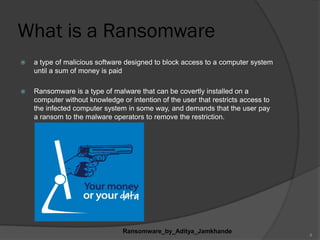
 a type of malicious software designed to block access to a computer system
until a sum of money is paid
 Ransomware is a type of malware that can be covertly installed on a
computer without knowledge or intention of the user that restricts access to
the infected computer system in some way, and demands that the user pay
a ransom to the malware operators to remove the restriction.
Ransomware_by_Aditya_Jamkhande
4
Ransomware_by_Aditya_Jamkhande 5
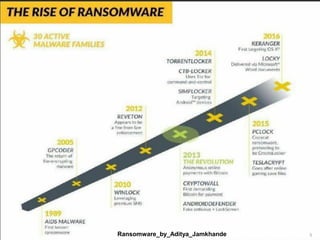
History
 The first known Ransomware was the 1989 “AIDS” Trojan (also
known as “PC Cyborg”) written by Joseph Popp
 Extortionate ransomware became prominent in May 2005
 By mid-2006, worms such as Gpcode, TROJ.RANSOM.A,
Archiveus, Cryzip and MayArchive began utilizing more
sophasticated RSA encryption schemes, with ever-increasing Key-
sizes
 In 2011,a ransomware worm imitating the windows product
activation notice surfaced
 In February 2013, a ransomware worm based off the Stamp.Ek
exploit kit surfaced
 In July 2013, an OS X-specific ransomware worm came into action
 Cryptolocker has raked in around 5 million dollars and still counting
since the end of 2013
Ransomware_by_Aditya_Jamkhande 6
Terminology and Propagation
 The cryptovirology form of the attack has ransomware systematically
encrypt files on the system's hard drive, which becomes intractable to
decrypt without paying the ransom for the decryption key.
 (Cryptovirology is a field that studies how to use cryptography to design
powerful malicious software.)
 Other attacks may simply lock the system and display messages intended
to coax the user into paying.
 Ransomware typically propagates as a Trojan, whose payload is disguised
as a seemingly legitimate file.
Ransomware_by_Aditya_Jamkhande 7
How Cyber criminals / Hackers install
ransomware?
 Ransomware generates a pop-up window, webpage or email
warning from what looks like an official authority
 Ransomware is usually installed when you open
- A malicious email attachment
- Click a malicious link in
1. an email message
2. an instant message
3. on social networking site
 Ransomware can even be installed when you visit a
malicious site
Ransomware_by_Aditya_Jamkhande 8
Types of Ransomware
 Encryption Ransomware
 Lock Screen Ransomware
 Master Boot Record (MBR) Ransomware
Ransomware_by_Aditya_Jamkhande 9
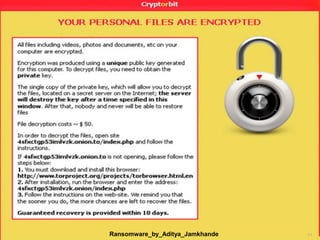
Encryption Ransomware
 Encrypts personal files/folders (e.g., the contents of
you‟re my documents folder-documents, spreadsheets,
pictures, videos)
 Files are deleted once they are encrypted and
generally there is a text file in the same folder as the
now-inaccessible files with instructions for payment.
 You may see a lock screen but not all variants show
one
 Instead you may only notice a problem when you
attempt to open your files
 This type is also called „file encryptor‟ ransomware
Ransomware_by_Aditya_Jamkhande 10
Ransomware_by_Aditya_Jamkhande 11
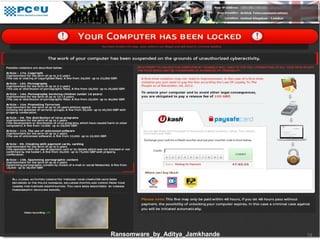
Lock Screen Ransomware
 „Locks‟ the screen and demands payment
 Presents a full screen image that blocks all the
other windows
 This type is called „WinLocker‟ ransomware
 No personal files are encrypted
Ransomware_by_Aditya_Jamkhande 12
Ransomware_by_Aditya_Jamkhande 13
Master Boot Record (MBR)
Ransomware
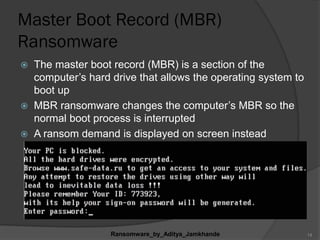
 The master boot record (MBR) is a section of the
computer‟s hard drive that allows the operating system to
boot up
 MBR ransomware changes the computer‟s MBR so the
normal boot process is interrupted
 A ransom demand is displayed on screen instead
Ransomware_by_Aditya_Jamkhande 14
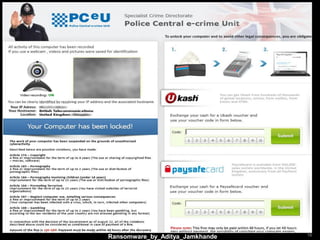
Reveton
 In 2012, a major ransomware worm known as Reveton began to spread.
 It is also known as "police trojan".
 Its payload displays a warning purportedly from a law enforcement agency.
 claiming that the computer had been used for illegal activities, such as
downloading pirated software, promoting terrorism, copyright etc.
 The warning informs the user that to unlock their system they would have to pay
a fine.
 To increase the illusion that the computer is being tracked by law enforcement,
the screen also displays the computer's IP address and footage from a
computer's webcam.
Ransomware_by_Aditya_Jamkhande 15
Ransomware_by_Aditya_Jamkhande 16
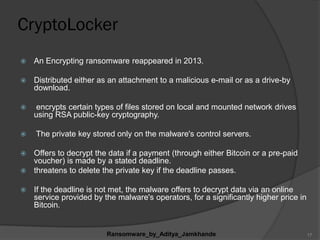
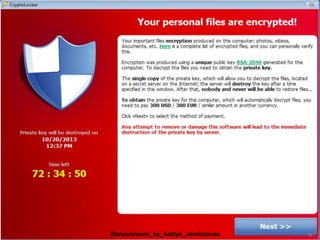
CryptoLocker
 An Encrypting ransomware reappeared in 2013.
 Distributed either as an attachment to a malicious e-mail or as a drive-by
download.
 encrypts certain types of files stored on local and mounted network drives
using RSA public-key cryptography.
 The private key stored only on the malware's control servers.
 Offers to decrypt the data if a payment (through either Bitcoin or a pre-paid
voucher) is made by a stated deadline.
 threatens to delete the private key if the deadline passes.
 If the deadline is not met, the malware offers to decrypt data via an online
service provided by the malware's operators, for a significantly higher price in
Bitcoin.
Ransomware_by_Aditya_Jamkhande 17
Ransomware_by_Aditya_Jamkhande 18
How to prevent ransomware ?
 Keep all of the software on your computer up to date.
 Make sure automatic updating is turned on to get all
the latest Microsoft security updates and browser-
related components (Java, Adobe, and the like).
 Keep your firewall turned on.
 Don't open spam email messages or click links on
suspicious websites. (CryptoLocker spreads via .zip
files sent as email attachments, for example.)
Ransomware_by_Aditya_Jamkhande 19
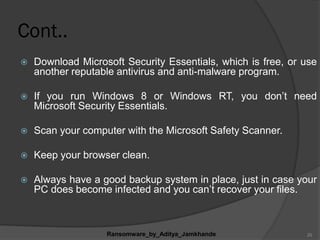
Cont..
 Download Microsoft Security Essentials, which is free, or use
another reputable antivirus and anti-malware program.
 If you run Windows 8 or Windows RT, you don‟t need
Microsoft Security Essentials.
 Scan your computer with the Microsoft Safety Scanner.
 Keep your browser clean.
 Always have a good backup system in place, just in case your
PC does become infected and you can‟t recover your files.
Ransomware_by_Aditya_Jamkhande 20
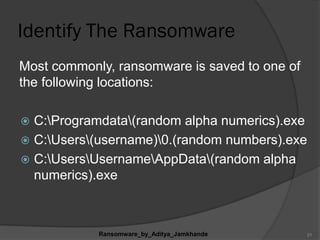
Identify The Ransomware
Most commonly, ransomware is saved to one of
the following locations:
 C:Programdata(random alpha numerics).exe
 C:Users(username)0.(random numbers).exe
 C:UsersUsernameAppData(random alpha
numerics).exe
Ransomware_by_Aditya_Jamkhande 21
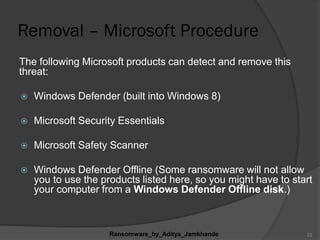
Removal – Microsoft Procedure
The following Microsoft products can detect and remove this
threat:
 Windows Defender (built into Windows 8)
 Microsoft Security Essentials
 Microsoft Safety Scanner
 Windows Defender Offline (Some ransomware will not allow
you to use the products listed here, so you might have to start
your computer from a Windows Defender Offline disk.)
Ransomware_by_Aditya_Jamkhande 22
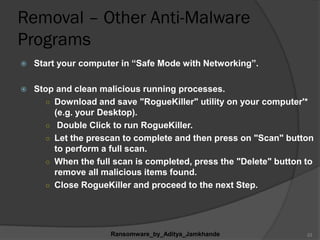
Removal – Other Anti-Malware
Programs
 Start your computer in “Safe Mode with Networking”.
 Stop and clean malicious running processes.
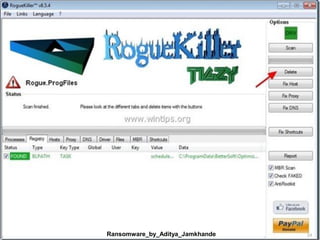
○ Download and save "RogueKiller" utility on your computer'*
(e.g. your Desktop).
○ Double Click to run RogueKiller.
○ Let the prescan to complete and then press on "Scan" button
to perform a full scan.
○ When the full scan is completed, press the "Delete" button to
remove all malicious items found.
○ Close RogueKiller and proceed to the next Step.
Ransomware_by_Aditya_Jamkhande 23
Ransomware_by_Aditya_Jamkhande 24
Clean Remaining Malicious Threats
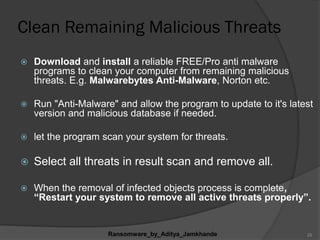
 Download and install a reliable FREE/Pro anti malware
programs to clean your computer from remaining malicious
threats. E.g. Malwarebytes Anti-Malware, Norton etc.
 Run "Anti-Malware" and allow the program to update to it's latest
version and malicious database if needed.
 let the program scan your system for threats.
 Select all threats in result scan and remove all.
 When the removal of infected objects process is complete,
“Restart your system to remove all active threats properly”.
Ransomware_by_Aditya_Jamkhande 25
Delete Cryptolocker Hidden Files
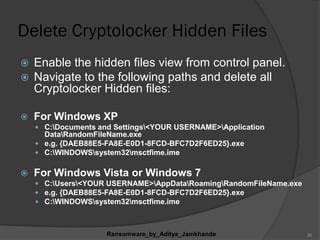
 Enable the hidden files view from control panel.
 Navigate to the following paths and delete all
Cryptolocker Hidden files:
 For Windows XP
 C:Documents and Settings<YOUR USERNAME>Application
DataRandomFileName.exe
 e.g. {DAEB88E5-FA8E-E0D1-8FCD-BFC7D2F6ED25}.exe
 C:WINDOWSsystem32msctfime.ime
 For Windows Vista or Windows 7
 C:Users<YOUR USERNAME>AppDataRoamingRandomFileName.exe
 e.g. {DAEB88E5-FA8E-E0D1-8FCD-BFC7D2F6ED25}.exe
 C:WINDOWSsystem32msctfime.ime
Ransomware_by_Aditya_Jamkhande 26
Delete Temporary files
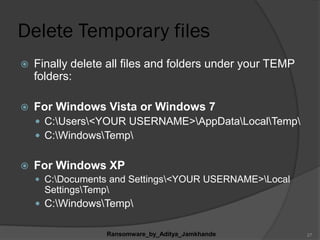
 Finally delete all files and folders under your TEMP
folders:
 For Windows Vista or Windows 7
 C:Users<YOUR USERNAME>AppDataLocalTemp
 C:WindowsTemp
 For Windows XP
 C:Documents and Settings<YOUR USERNAME>Local
SettingsTemp
 C:WindowsTemp
Ransomware_by_Aditya_Jamkhande 27
File Restore- Shadow Copies
 Navigate to the folder or the file that you want to restore in a
previous state and right-click on it.
 From the drop-down menu select “Restore Previous Versions”. *
 Notice* for Windows XP users: Select “Properties” and then the
“Previous Versions” tab.
 Then choose a particular version of folder or file and the press the:
 “Open” button to view the contents of that folder/file.
 “Copy” to copy this folder/file to another location on your computer (e.g. you
external hard drive).
 “Restore” to restore the folder file to the same location and replace the
existing one.
Ransomware_by_Aditya_Jamkhande 28
Removing Reveton
 Name- Trojan:W32/Reveton and Trojan:W32/Urausy
 Boot the system into 'Safe Mode with Command
Prompt.'
 In the command prompt, type "regedit" and press
Enter.
 Look for the following registry values and remove
them.
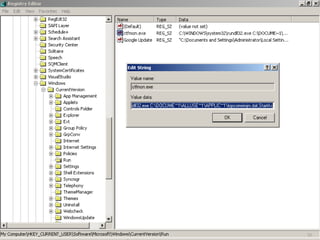
For Reveton, delete the "ctfmon.exe" registry value
from
HKEY_CURRENT_USERSoftwareMicrosoftWindow
sCurrentVersionRun
Ransomware_by_Aditya_Jamkhande 29
30
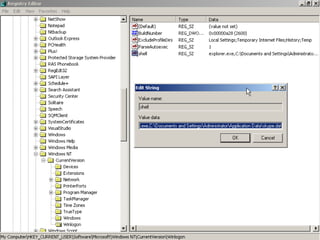
For Urausy, delete the "shell" registry value from
HKEY_CURRENT_USERSoftwareMicrosoftWindowsNTCurrentVersionWinlogon
ONLY IF these two conditions are met:
1. The "shell" registry value is located under HKEY_CURRENT_USER
and Not “ HKEY_LOCAL_MACHINE”.
WARNING! Deleting the "shell" value if it is listed under HKEY_LOCAL_MACHINE may break the Windows system.
2. There is a reference to a .dat file (e.g. skype.dat) in the value data.
 Reboot the system again, this time into Normal mode.
 Finally, run a full computer scan to repair any remaining
files.
Ransomware_by_Aditya_Jamkhande 31
32
Defensive Measures
 Backup and Recovery
 Patch Regiment
 Follow the principle of Least Privilege
(People / Software / Network)
Ransomware_by_Aditya_Jamkhande 33
Conclusion
 When it comes to malware attacks, knowledge is
the best possible weapon to prevent them. Be
careful what you click!! Preventive measures
should be taken before ransomwares establish
strong hold. Keeping all the software updated and
getting latest security updates might help to
prevent the attacks. Use of antivirus and original
software is highly recommended. Creating
software restriction policy is the best tool to prevent
a Cryptolocker infection in the first place in
networks.
Ransomware_by_Aditya_Jamkhande 34
References
 http://www.microsoft.com/security/resources/ransomware-
whatis.aspx
 http://www.microsoft.com/security/portal/mmpc/shared/ransomware.
aspx
 http://www.sophos.com/en-us/support/knowledgebase/119006.aspx
 http://us.norton.com/ransomware
 http://en.wikipedia.org/wiki/Ransomware
For details in removal and recovery solutions visit:
http://www.wintips.org/how-to-remove-cryptolocker-ransomware-and-
restore-your-files/
http://www.f-secure.com/en/web/labs_global/removal/removing-
ransomware
35
36
Ransomware_by_Aditya_Jamkhande 37

Null mumbai Session on ransomware by_Aditya Jamkhande

  • 1.
    Name : AdityaJamkhande Current Organization : Tata Consultancy Services Position : Senior Security Analyst 1Ransomware_by_Aditya_Jamkhande
  • 2.
  • 3.
    Few Basics (ashort video on Bitcoin) Ransomware_by_Aditya_Jamkhande 3
  • 4.
    What is aRansomware  a type of malicious software designed to block access to a computer system until a sum of money is paid  Ransomware is a type of malware that can be covertly installed on a computer without knowledge or intention of the user that restricts access to the infected computer system in some way, and demands that the user pay a ransom to the malware operators to remove the restriction. Ransomware_by_Aditya_Jamkhande 4
  • 5.
  • 6.
    History  The firstknown Ransomware was the 1989 “AIDS” Trojan (also known as “PC Cyborg”) written by Joseph Popp  Extortionate ransomware became prominent in May 2005  By mid-2006, worms such as Gpcode, TROJ.RANSOM.A, Archiveus, Cryzip and MayArchive began utilizing more sophasticated RSA encryption schemes, with ever-increasing Key- sizes  In 2011,a ransomware worm imitating the windows product activation notice surfaced  In February 2013, a ransomware worm based off the Stamp.Ek exploit kit surfaced  In July 2013, an OS X-specific ransomware worm came into action  Cryptolocker has raked in around 5 million dollars and still counting since the end of 2013 Ransomware_by_Aditya_Jamkhande 6
  • 7.
    Terminology and Propagation The cryptovirology form of the attack has ransomware systematically encrypt files on the system's hard drive, which becomes intractable to decrypt without paying the ransom for the decryption key.  (Cryptovirology is a field that studies how to use cryptography to design powerful malicious software.)  Other attacks may simply lock the system and display messages intended to coax the user into paying.  Ransomware typically propagates as a Trojan, whose payload is disguised as a seemingly legitimate file. Ransomware_by_Aditya_Jamkhande 7
  • 8.
    How Cyber criminals/ Hackers install ransomware?  Ransomware generates a pop-up window, webpage or email warning from what looks like an official authority  Ransomware is usually installed when you open - A malicious email attachment - Click a malicious link in 1. an email message 2. an instant message 3. on social networking site  Ransomware can even be installed when you visit a malicious site Ransomware_by_Aditya_Jamkhande 8
  • 9.
    Types of Ransomware Encryption Ransomware  Lock Screen Ransomware  Master Boot Record (MBR) Ransomware Ransomware_by_Aditya_Jamkhande 9
  • 10.
    Encryption Ransomware  Encryptspersonal files/folders (e.g., the contents of you‟re my documents folder-documents, spreadsheets, pictures, videos)  Files are deleted once they are encrypted and generally there is a text file in the same folder as the now-inaccessible files with instructions for payment.  You may see a lock screen but not all variants show one  Instead you may only notice a problem when you attempt to open your files  This type is also called „file encryptor‟ ransomware Ransomware_by_Aditya_Jamkhande 10
  • 11.
  • 12.
    Lock Screen Ransomware „Locks‟ the screen and demands payment  Presents a full screen image that blocks all the other windows  This type is called „WinLocker‟ ransomware  No personal files are encrypted Ransomware_by_Aditya_Jamkhande 12
  • 13.
  • 14.
    Master Boot Record(MBR) Ransomware  The master boot record (MBR) is a section of the computer‟s hard drive that allows the operating system to boot up  MBR ransomware changes the computer‟s MBR so the normal boot process is interrupted  A ransom demand is displayed on screen instead Ransomware_by_Aditya_Jamkhande 14
  • 15.
    Reveton  In 2012,a major ransomware worm known as Reveton began to spread.  It is also known as "police trojan".  Its payload displays a warning purportedly from a law enforcement agency.  claiming that the computer had been used for illegal activities, such as downloading pirated software, promoting terrorism, copyright etc.  The warning informs the user that to unlock their system they would have to pay a fine.  To increase the illusion that the computer is being tracked by law enforcement, the screen also displays the computer's IP address and footage from a computer's webcam. Ransomware_by_Aditya_Jamkhande 15
  • 16.
  • 17.
    CryptoLocker  An Encryptingransomware reappeared in 2013.  Distributed either as an attachment to a malicious e-mail or as a drive-by download.  encrypts certain types of files stored on local and mounted network drives using RSA public-key cryptography.  The private key stored only on the malware's control servers.  Offers to decrypt the data if a payment (through either Bitcoin or a pre-paid voucher) is made by a stated deadline.  threatens to delete the private key if the deadline passes.  If the deadline is not met, the malware offers to decrypt data via an online service provided by the malware's operators, for a significantly higher price in Bitcoin. Ransomware_by_Aditya_Jamkhande 17
  • 18.
  • 19.
    How to preventransomware ?  Keep all of the software on your computer up to date.  Make sure automatic updating is turned on to get all the latest Microsoft security updates and browser- related components (Java, Adobe, and the like).  Keep your firewall turned on.  Don't open spam email messages or click links on suspicious websites. (CryptoLocker spreads via .zip files sent as email attachments, for example.) Ransomware_by_Aditya_Jamkhande 19
  • 20.
    Cont..  Download MicrosoftSecurity Essentials, which is free, or use another reputable antivirus and anti-malware program.  If you run Windows 8 or Windows RT, you don‟t need Microsoft Security Essentials.  Scan your computer with the Microsoft Safety Scanner.  Keep your browser clean.  Always have a good backup system in place, just in case your PC does become infected and you can‟t recover your files. Ransomware_by_Aditya_Jamkhande 20
  • 21.
    Identify The Ransomware Mostcommonly, ransomware is saved to one of the following locations:  C:Programdata(random alpha numerics).exe  C:Users(username)0.(random numbers).exe  C:UsersUsernameAppData(random alpha numerics).exe Ransomware_by_Aditya_Jamkhande 21
  • 22.
    Removal – MicrosoftProcedure The following Microsoft products can detect and remove this threat:  Windows Defender (built into Windows 8)  Microsoft Security Essentials  Microsoft Safety Scanner  Windows Defender Offline (Some ransomware will not allow you to use the products listed here, so you might have to start your computer from a Windows Defender Offline disk.) Ransomware_by_Aditya_Jamkhande 22
  • 23.
    Removal – OtherAnti-Malware Programs  Start your computer in “Safe Mode with Networking”.  Stop and clean malicious running processes. ○ Download and save "RogueKiller" utility on your computer'* (e.g. your Desktop). ○ Double Click to run RogueKiller. ○ Let the prescan to complete and then press on "Scan" button to perform a full scan. ○ When the full scan is completed, press the "Delete" button to remove all malicious items found. ○ Close RogueKiller and proceed to the next Step. Ransomware_by_Aditya_Jamkhande 23
  • 24.
  • 25.
    Clean Remaining MaliciousThreats  Download and install a reliable FREE/Pro anti malware programs to clean your computer from remaining malicious threats. E.g. Malwarebytes Anti-Malware, Norton etc.  Run "Anti-Malware" and allow the program to update to it's latest version and malicious database if needed.  let the program scan your system for threats.  Select all threats in result scan and remove all.  When the removal of infected objects process is complete, “Restart your system to remove all active threats properly”. Ransomware_by_Aditya_Jamkhande 25
  • 26.
    Delete Cryptolocker HiddenFiles  Enable the hidden files view from control panel.  Navigate to the following paths and delete all Cryptolocker Hidden files:  For Windows XP  C:Documents and Settings<YOUR USERNAME>Application DataRandomFileName.exe  e.g. {DAEB88E5-FA8E-E0D1-8FCD-BFC7D2F6ED25}.exe  C:WINDOWSsystem32msctfime.ime  For Windows Vista or Windows 7  C:Users<YOUR USERNAME>AppDataRoamingRandomFileName.exe  e.g. {DAEB88E5-FA8E-E0D1-8FCD-BFC7D2F6ED25}.exe  C:WINDOWSsystem32msctfime.ime Ransomware_by_Aditya_Jamkhande 26
  • 27.
    Delete Temporary files Finally delete all files and folders under your TEMP folders:  For Windows Vista or Windows 7  C:Users<YOUR USERNAME>AppDataLocalTemp  C:WindowsTemp  For Windows XP  C:Documents and Settings<YOUR USERNAME>Local SettingsTemp  C:WindowsTemp Ransomware_by_Aditya_Jamkhande 27
  • 28.
    File Restore- ShadowCopies  Navigate to the folder or the file that you want to restore in a previous state and right-click on it.  From the drop-down menu select “Restore Previous Versions”. *  Notice* for Windows XP users: Select “Properties” and then the “Previous Versions” tab.  Then choose a particular version of folder or file and the press the:  “Open” button to view the contents of that folder/file.  “Copy” to copy this folder/file to another location on your computer (e.g. you external hard drive).  “Restore” to restore the folder file to the same location and replace the existing one. Ransomware_by_Aditya_Jamkhande 28
  • 29.
    Removing Reveton  Name-Trojan:W32/Reveton and Trojan:W32/Urausy  Boot the system into 'Safe Mode with Command Prompt.'  In the command prompt, type "regedit" and press Enter.  Look for the following registry values and remove them. For Reveton, delete the "ctfmon.exe" registry value from HKEY_CURRENT_USERSoftwareMicrosoftWindow sCurrentVersionRun Ransomware_by_Aditya_Jamkhande 29
  • 30.
  • 31.
    For Urausy, deletethe "shell" registry value from HKEY_CURRENT_USERSoftwareMicrosoftWindowsNTCurrentVersionWinlogon ONLY IF these two conditions are met: 1. The "shell" registry value is located under HKEY_CURRENT_USER and Not “ HKEY_LOCAL_MACHINE”. WARNING! Deleting the "shell" value if it is listed under HKEY_LOCAL_MACHINE may break the Windows system. 2. There is a reference to a .dat file (e.g. skype.dat) in the value data.  Reboot the system again, this time into Normal mode.  Finally, run a full computer scan to repair any remaining files. Ransomware_by_Aditya_Jamkhande 31

  • 32.
  • 33.
    Defensive Measures  Backupand Recovery  Patch Regiment  Follow the principle of Least Privilege (People / Software / Network) Ransomware_by_Aditya_Jamkhande 33
  • 34.
    Conclusion  When itcomes to malware attacks, knowledge is the best possible weapon to prevent them. Be careful what you click!! Preventive measures should be taken before ransomwares establish strong hold. Keeping all the software updated and getting latest security updates might help to prevent the attacks. Use of antivirus and original software is highly recommended. Creating software restriction policy is the best tool to prevent a Cryptolocker infection in the first place in networks. Ransomware_by_Aditya_Jamkhande 34

  • 35.
    References  http://www.microsoft.com/security/resources/ransomware- whatis.aspx  http://www.microsoft.com/security/portal/mmpc/shared/ransomware. aspx http://www.sophos.com/en-us/support/knowledgebase/119006.aspx  http://us.norton.com/ransomware  http://en.wikipedia.org/wiki/Ransomware For details in removal and recovery solutions visit: http://www.wintips.org/how-to-remove-cryptolocker-ransomware-and- restore-your-files/ http://www.f-secure.com/en/web/labs_global/removal/removing- ransomware 35
  • 36.
  • 37.