RabbitMQ
message broker
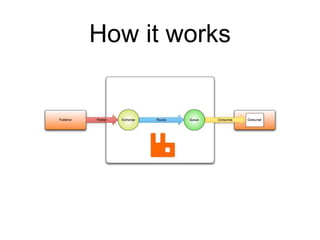
How it works
Producer
• Also known as Publisher
• Part of user application
• Publishes messages to exchange (with routing key)
Exchange
• Exchanges messages between producer and queues
• Queue(s) selection depends on
• Exchange type
• Queue bindings
• Routing key the message is published with
Exchange types
• Direct - match exact routing keys
• Topic - match pattern routing keys
• Fanout - match all routing keys (ignores them)
• Headers - match exact message headers (all or any)
Bindings
• Also known as Routes
• Connection between exchange and queue/exchange
• Exchange can be bound to multiple queues
• Queue can be bound to multiple exchanges
• Exchange/Queue can be bound by multiple bindings
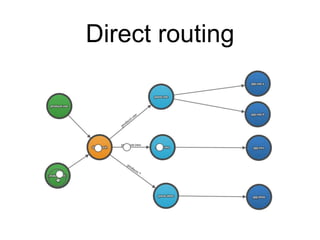
Direct routing
Direct routing
• Example: ImageProcessorExchange
• Image file path is sent in message body
• ImageWatermarkQueue - `image.watermark`
• Stores paths of images to watermark
• Consumer applies watermark to images
• ImageResizeQueue - `image.resize`
• Stores paths of images to watermark
• Consumer resizes images
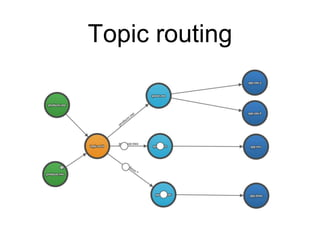
Topic routing
Topic routing
• Example: LoggerExchange <channel>.<log level>
• FileLoggerQueue - `#`
• Stores all message
• Consumer logs message to file
• SmsLoggerQueue - `*.critical`, `*.emergency`
• Stores all critical and emergency messages
• Consumer sends alert SMS to IT support phone
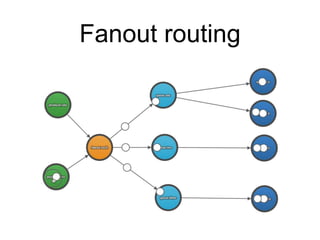
Fanout routing
Fanout routing
• Example: OrderCreatedExchange
• OrderCreatedSMSQueue
• Consumer sends SMS message to customer
• OrderCreatedMailQueue
• Consumer sends mail to customer
• OrderCreatedExportQueue
• Consumer exports order to ERP system
Headers routing
• Example: FileUploadExchange
• Message with `format` header and file content in body
• ImageUploadQueue - `format=jpeg`, `format=png`
• Stores jpeg and png image files
• Consumer resizes, applies watermark and saves image
• VideoUploadQueue - `format=mp4`, `format=avi`
• Stores mp4 and avi video files
• Consumer resamples video to multiple resolutions
• Another VideoResampleExchange can be used to faster resampling
Queue
• FIFO - first in first out
• Stores messages until consumed by consumer
• Every queue is bind to default exchange
• Queue name is used as routing key
• Can be used for Dead Letter Exchange or RPC
Consumer
• Part of user application
• Consumes messages from queue
• Needs to acknowledge message
• Only if the message’s delivery mode is persistent
• Multiple instances can be used for faster processing
Message acknowledgement
• Acknowledge
• Reject
• Drop
• Re-queue (infinite loops may occur)
• Use Dead Letter Exchange instead
Questions?
we are not finished yet
Dead Letter Exchange
DLX
Dead Letter Exchange
• Allows safe rejecting messages
• not using re-queue (infinite loops)
• moves them to another queue
• Move messages back after you fix issue causing reject
• Messages can be moved back automatically after delay
Dead Letter Exchange
• While declaring queue `queue.one` use arguments
• x-dead-letter-exchange: `` //default exchange
• x-dead-letter-routing-key: `queue.one.dlx`
• Declare additional queue `queue.one.dlx`
• Now every time message from `queue.one` is rejected
(without re-queue) it is automatically dead lettered to
`queue.one.dlx`.
Dead Letter Exchange
• To automatically move messages back to original queue
you need to declare `queue.one.dlx` with dead letter
arguments routing back to original queue
• Now when `queue.one.dlx` message is rejected it will be
moved back to queue `queue.one`
• To automatically reject message after delay declare queue
`queue.one.dlx` with argument `x-message-ttl`. As value
use timeout in milliseconds
Remote Procedure
Call
RPC
Remote Procedure Call
• Sometimes you need to wait for response
• Useful for multiple (time consuming) calculations at same
time
• 10s and 15s calculations will last 15s instead of 25s
Remote Procedure Call
• RPC client (Publisher)
• generates temporary queue
• publishes message to RPC server’s exchange
• with generated queue name in message header
• starts consuming generated queue (timeout is
recommended)
Remote Procedure Call
• RPC server (Consumer)
• processes message from RPC client
• publishes response to default exchange
• using generated queue name from message header
as routing key
Questions?
Thanks!
Vít Kutný
https://vitkutny.cz

RabbitMQ - message broker

  • 1.
  • 2.
  • 3.
    Producer • Also knownas Publisher • Part of user application • Publishes messages to exchange (with routing key)
  • 4.
    Exchange • Exchanges messagesbetween producer and queues • Queue(s) selection depends on • Exchange type • Queue bindings • Routing key the message is published with
  • 5.
    Exchange types • Direct- match exact routing keys • Topic - match pattern routing keys • Fanout - match all routing keys (ignores them) • Headers - match exact message headers (all or any)
  • 6.
    Bindings • Also knownas Routes • Connection between exchange and queue/exchange • Exchange can be bound to multiple queues • Queue can be bound to multiple exchanges • Exchange/Queue can be bound by multiple bindings
  • 7.
  • 8.
    Direct routing • Example:ImageProcessorExchange • Image file path is sent in message body • ImageWatermarkQueue - `image.watermark` • Stores paths of images to watermark • Consumer applies watermark to images • ImageResizeQueue - `image.resize` • Stores paths of images to watermark • Consumer resizes images
  • 9.
  • 10.
    Topic routing • Example:LoggerExchange <channel>.<log level> • FileLoggerQueue - `#` • Stores all message • Consumer logs message to file • SmsLoggerQueue - `*.critical`, `*.emergency` • Stores all critical and emergency messages • Consumer sends alert SMS to IT support phone
  • 11.
  • 12.
    Fanout routing • Example:OrderCreatedExchange • OrderCreatedSMSQueue • Consumer sends SMS message to customer • OrderCreatedMailQueue • Consumer sends mail to customer • OrderCreatedExportQueue • Consumer exports order to ERP system
  • 13.
    Headers routing • Example:FileUploadExchange • Message with `format` header and file content in body • ImageUploadQueue - `format=jpeg`, `format=png` • Stores jpeg and png image files • Consumer resizes, applies watermark and saves image • VideoUploadQueue - `format=mp4`, `format=avi` • Stores mp4 and avi video files • Consumer resamples video to multiple resolutions • Another VideoResampleExchange can be used to faster resampling
  • 14.
    Queue • FIFO -first in first out • Stores messages until consumed by consumer • Every queue is bind to default exchange • Queue name is used as routing key • Can be used for Dead Letter Exchange or RPC
  • 15.
    Consumer • Part ofuser application • Consumes messages from queue • Needs to acknowledge message • Only if the message’s delivery mode is persistent • Multiple instances can be used for faster processing
  • 16.
    Message acknowledgement • Acknowledge •Reject • Drop • Re-queue (infinite loops may occur) • Use Dead Letter Exchange instead
  • 17.
  • 18.
  • 19.
    Dead Letter Exchange •Allows safe rejecting messages • not using re-queue (infinite loops) • moves them to another queue • Move messages back after you fix issue causing reject • Messages can be moved back automatically after delay
  • 20.
    Dead Letter Exchange •While declaring queue `queue.one` use arguments • x-dead-letter-exchange: `` //default exchange • x-dead-letter-routing-key: `queue.one.dlx` • Declare additional queue `queue.one.dlx` • Now every time message from `queue.one` is rejected (without re-queue) it is automatically dead lettered to `queue.one.dlx`.
  • 21.
    Dead Letter Exchange •To automatically move messages back to original queue you need to declare `queue.one.dlx` with dead letter arguments routing back to original queue • Now when `queue.one.dlx` message is rejected it will be moved back to queue `queue.one` • To automatically reject message after delay declare queue `queue.one.dlx` with argument `x-message-ttl`. As value use timeout in milliseconds
  • 22.
  • 23.
    Remote Procedure Call •Sometimes you need to wait for response • Useful for multiple (time consuming) calculations at same time • 10s and 15s calculations will last 15s instead of 25s
  • 24.
    Remote Procedure Call •RPC client (Publisher) • generates temporary queue • publishes message to RPC server’s exchange • with generated queue name in message header • starts consuming generated queue (timeout is recommended)
  • 25.
    Remote Procedure Call •RPC server (Consumer) • processes message from RPC client • publishes response to default exchange • using generated queue name from message header as routing key
  • 26.
  • 27.