Introduction to Apache ActiveMQ Artemis
田邊 義真(たなべ よしまさ)
第二十回 #渋谷java
 @emaggame  morec.at
 このドキュメントのリポジトリ
1
Agenda
Why Messaging
Apache ActiveMQ Artemis
Getting Started
2
Why Messaging
Asynchronous Messaging Passing
Decoupling between Producers and Consumers
Routing by Broker
e.g. Selector, Security and Flow Control
3
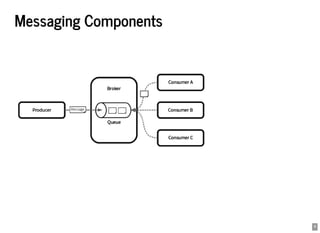
Messaging Components
4
Orchestration vs Choreography
5
Broker Implementations
: Java
: Scala, Java
: Erlang
…
Apache ActiveMQ Artemis 
Apache Kafka
RabbitMQ
6
Apache ActiveMQ Artemis
High Performance
Flexible Clustering & HA
Multi Protocols Support
7
High Performance
Evaluating persistent, replicated message queues - SoftwareMill
8
High Performance
Journal Implementations: Message Persistence
Java NIO
Linux Asynchronous IO
Memory mapped
Apache ActiveMQ Artemis File Journal (Default) - Apache ActiveMQ Artemis User Manual
9
Flexible Clustering & HA
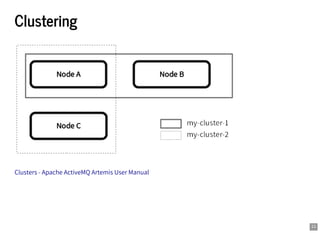
Clustering
TCP / UDP /
Server-Side Message Load Balancing
Client-Side Load balancing
Message Redistribution
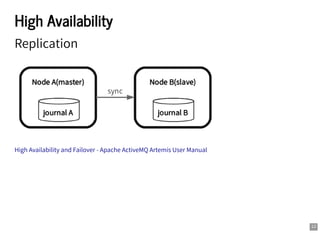
High Availability
Replication
Shared Store
JGroups
10
Clustering
Clusters - Apache ActiveMQ Artemis User Manual
11
High Availability
Replication
High Availability and Failover - Apache ActiveMQ Artemis User Manual
12
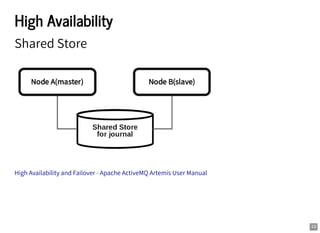
High Availability
Shared Store
High Availability and Failover - Apache ActiveMQ Artemis User Manual
13
Multi Protocols Support
AMQP
OpenWire
MQTT
STOMP
HornetQ
HTTP(Tunnel / REST Interface)
14
Getting Started
1. Create a Broker
2. Run the Broker
3. Run Clients(Producer / Consumer)
15
Create a Broker
$ ${ARTEMIS_HOME}/bin/artemis create mybroker
[... some interactions e.g. username, password ...]
done! Your system can make 0.5 writes per millisecond, your journ
You can now start the broker by executing:
"/path/to/artemis/mybroker/bin/artemis" run
Or you can run the broker in the background using:
"/path/to/artemis/mybroker/bin/artemis-service" start
16
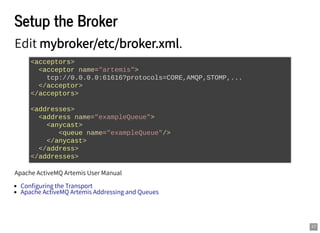
Setup the Broker
Edit mybroker/etc/broker.xml.
Apache ActiveMQ Artemis User Manual
<acceptors>
<acceptor name="artemis">
tcp://0.0.0.0:61616?protocols=CORE,AMQP,STOMP,...
</acceptor>
</acceptors>
<addresses>
<address name="exampleQueue">
<anycast>
<queue name="exampleQueue"/>
</anycast>
</address>
</addresses>
Configuring the Transport
Apache ActiveMQ Artemis Addressing and Queues
17
Run the Broker
$ cd mybroker
$ bin/artemis run
_ _ _
/  ____| |_ ___ __ __(_) _____
/ _ | _  __|/ _  / | |/ __/
/ ___  | / |_/ __/ |/| | |___ 
/_/ _| ______|_| |_|_|/___ /
Apache ActiveMQ Artemis 2.3.0
[...]
18
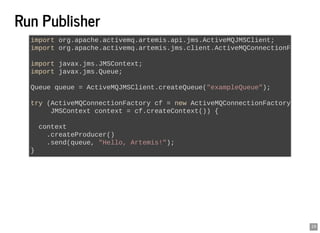
Run Producer
import org.apache.activemq.artemis.api.jms.ActiveMQJMSClient;
import org.apache.activemq.artemis.jms.client.ActiveMQConnectionF
import javax.jms.JMSContext;
import javax.jms.Queue;
Queue queue = ActiveMQJMSClient.createQueue("exampleQueue");
try (ActiveMQConnectionFactory cf = new ActiveMQConnectionFactory
JMSContext context = cf.createContext()) {
context
.createProducer()
.send(queue, "Hello, Artemis!");
}
19
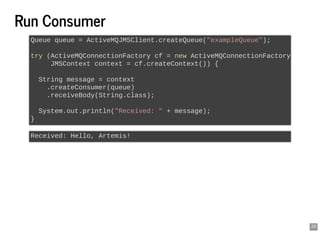
Run Consumer
Queue queue = ActiveMQJMSClient.createQueue("exampleQueue");
try (ActiveMQConnectionFactory cf = new ActiveMQConnectionFactory
JMSContext context = cf.createContext()) {
String message = context
.createConsumer(queue)
.receiveBody(String.class);
System.out.println("Received: " + message);
}
Received: Hello, Artemis!
20
REST Interface
Producer
Consumer
$ curl -XPOST -H 'Content-Type: application/json' 
http://localhost:8080/queues/orders/create -d '
{
"order" : "Test Order"
}'
$ curl -XPOST http://localhost:8080/queues/orders/pull-consumers
{
"order" : "Test Order"
}
REST Interface - Apache ActiveMQ Artemis User Manual
21
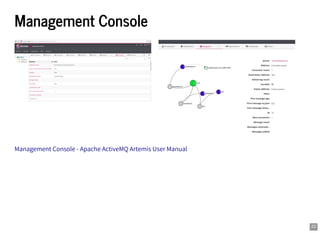
Management Console
Management Console - Apache ActiveMQ Artemis User Manual
22
Summary
High Performance
Flexible Clustering & HA
Multi Protocols Support
23
Resources
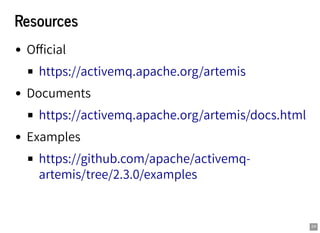
Official
Documents
Examples
https://activemq.apache.org/artemis
https://activemq.apache.org/artemis/docs.html
https://github.com/apache/activemq-
artemis/tree/2.3.0/examples
24

Introduction to Apache ActiveMQ Artemis