
Asynchronous - decoupling applications by separating sending and 
receiving data 
Reliability - persistence, delivery acknowledgements, publisher confirms, 
and high availability 
Flexible Routing - messages are routed through exchanges before 
arriving at queues 
Highly Available Queues - queues can be mirrored across several 
machines in a cluster 
Multi-protocol - RabbitMQ supports messaging over a variety of 
messaging protocols 
Many Clients - there are RabbitMQ clients for almost any language 
Management UI - RabbitMQ ships with an easy-to use management UI 
Plugin System - RabbitMQ ships with a variety of plugins extending it in 
different ways, and you can also write your own.
Producing - means just sending. A program that sends 
messages is a producer. 
Queue is the name for a mailbox. It lives inside RabbitMQ. 
Messages can be stored only inside a queue. 
Consuming - receiving. A consumer is a program that mostly 
waits to receive messages.
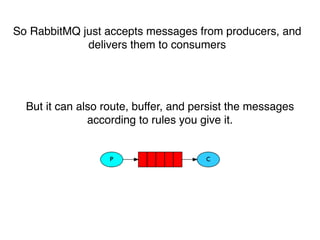
So RabbitMQ just accepts messages from producers, and 
delivers them to consumers 
But it can also route, buffer, and persist the messages 
according to rules you give it.
Let’s try it
Queues 
A worker process running in the background will pop the tasks 
and eventually execute the job 
Made for easily parallelise work. We can add more workers at 
any time and that way, scale easily 
Let’s see how it works
Message acknowledgments 
Once RabbitMQ delivers a message to the customer it 
immediately removes it from memory 
But what will happened if the message goes to worker and will 
not process correctly? 
An ack(nowledgement) is sent back from the consumer to tell 
RabbitMQ that a particular message has been received, 
processed and that RabbitMQ is free to delete it.
• ack is disabled by default, you can enable it like this: 
:manual_ack => true 
•Message durability 
ch.queue("hello", :durable => true) 
•Fair dispatch 
ch.prefetch(1)
Exchanges 
The core idea in the messaging model in RabbitMQ is that the 
producer never sends any messages directly to a queue, it’s 
send it to exchanges 
• direct, 
• topic 
• headers 
• fanout 
sudo rabbitmqctl list_exchanges
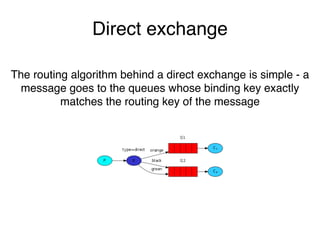
Direct exchange 
The routing algorithm behind a direct exchange is simple - a 
message goes to the queues whose binding key exactly 
matches the routing key of the message
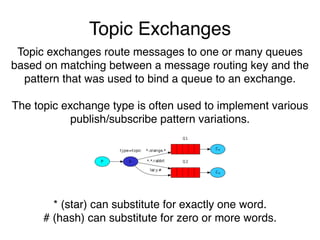
Topic Exchanges 
Topic exchanges route messages to one or many queues 
based on matching between a message routing key and the 
pattern that was used to bind a queue to an exchange. 
The topic exchange type is often used to implement various 
publish/subscribe pattern variations. 
* (star) can substitute for exactly one word. 
# (hash) can substitute for zero or more words.
Fanout exchange 
It just broadcasts all the messages it receives to all the queues 
it knows
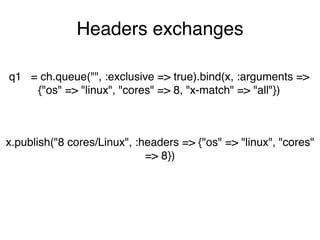
Headers exchanges 
q1 = ch.queue("", :exclusive => true).bind(x, :arguments => 
{"os" => "linux", "cores" => 8, "x-match" => "all"}) 
x.publish("8 cores/Linux", :headers => {"os" => "linux", "cores" 
=> 8})
Bindings 
Relationship between exchange and a queue is called a 
binding 
queue.bind("exchange") 
This can be simply read as: the queue is interested in 
messages from this exchange

Rabbitmq basics

  • 2.
    Asynchronous - decouplingapplications by separating sending and receiving data Reliability - persistence, delivery acknowledgements, publisher confirms, and high availability Flexible Routing - messages are routed through exchanges before arriving at queues Highly Available Queues - queues can be mirrored across several machines in a cluster Multi-protocol - RabbitMQ supports messaging over a variety of messaging protocols Many Clients - there are RabbitMQ clients for almost any language Management UI - RabbitMQ ships with an easy-to use management UI Plugin System - RabbitMQ ships with a variety of plugins extending it in different ways, and you can also write your own.
  • 3.
    Producing - meansjust sending. A program that sends messages is a producer. Queue is the name for a mailbox. It lives inside RabbitMQ. Messages can be stored only inside a queue. Consuming - receiving. A consumer is a program that mostly waits to receive messages.
  • 4.
    So RabbitMQ justaccepts messages from producers, and delivers them to consumers But it can also route, buffer, and persist the messages according to rules you give it.
  • 5.
  • 6.
    Queues A workerprocess running in the background will pop the tasks and eventually execute the job Made for easily parallelise work. We can add more workers at any time and that way, scale easily Let’s see how it works
  • 7.
    Message acknowledgments OnceRabbitMQ delivers a message to the customer it immediately removes it from memory But what will happened if the message goes to worker and will not process correctly? An ack(nowledgement) is sent back from the consumer to tell RabbitMQ that a particular message has been received, processed and that RabbitMQ is free to delete it.
  • 8.
    • ack isdisabled by default, you can enable it like this: :manual_ack => true •Message durability ch.queue("hello", :durable => true) •Fair dispatch ch.prefetch(1)
  • 9.
    Exchanges The coreidea in the messaging model in RabbitMQ is that the producer never sends any messages directly to a queue, it’s send it to exchanges • direct, • topic • headers • fanout sudo rabbitmqctl list_exchanges
  • 10.
    Direct exchange Therouting algorithm behind a direct exchange is simple - a message goes to the queues whose binding key exactly matches the routing key of the message
  • 11.
    Topic Exchanges Topicexchanges route messages to one or many queues based on matching between a message routing key and the pattern that was used to bind a queue to an exchange. The topic exchange type is often used to implement various publish/subscribe pattern variations. * (star) can substitute for exactly one word. # (hash) can substitute for zero or more words.
  • 12.
    Fanout exchange Itjust broadcasts all the messages it receives to all the queues it knows
  • 13.
    Headers exchanges q1= ch.queue("", :exclusive => true).bind(x, :arguments => {"os" => "linux", "cores" => 8, "x-match" => "all"}) x.publish("8 cores/Linux", :headers => {"os" => "linux", "cores" => 8})
  • 14.
    Bindings Relationship betweenexchange and a queue is called a binding queue.bind("exchange") This can be simply read as: the queue is interested in messages from this exchange