




Moderator
Don Pearson
Chief Strategy Officer
Inductive Automation
Today’s Agenda
• Introduction to Ignition
• Understand What Alarms Are For
• Don't Let Alarms Get Out of Control
• Organize Your Alarms
• Prioritize Your Alarms
• Shelve & Disable Alarms When Necessary
• Consolidate Alarms
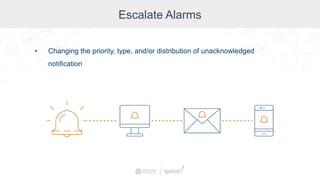
• Escalate Alarms
• Remote Alarm Notification
• Q&A
About Inductive Automation
• Founded in 2003
• HMI, SCADA, MES, and IIoT software
• Installed in 100+ countries
• Over 1,500 integrators
• Used by 44% of Fortune 100 companies
Learn more at: inductiveautomation.com/about
Used By Industries Worldwide
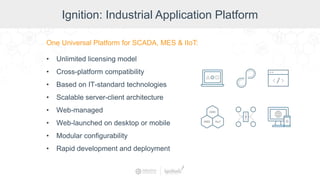
Ignition: Industrial Application Platform
One Universal Platform for SCADA, MES & IIoT:
• Unlimited licensing model
• Cross-platform compatibility
• Based on IT-standard technologies
• Scalable server-client architecture
• Web-managed
• Web-launched on desktop or mobile
• Modular configurability
• Rapid development and deployment
Presenter
Travis Cox
Co-Director of Sales Engineering,
Inductive Automation
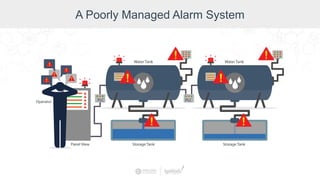
A Poorly Managed Alarm System
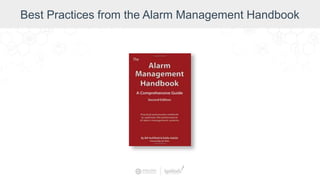
Best Practices from the Alarm Management Handbook
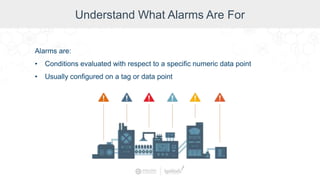
Understand What Alarms Are For
Alarms are:
• Conditions evaluated with respect to a specific numeric data point
• Usually configured on a tag or data point
Understand What Alarms Are For
Basic Alarm Terms:
• Active or Clear
• Alarm Notification
• Alarm Journal
Understand What Alarms Are For
Alarms:
• Tell when something is wrong in your system
• Must be managed carefully
• Can cover up the real problem when there are too
many of them
Don't Let Alarms Get Out of Control
How to Best Use Alarms:
• For problems that require action
• To easily identify an issue
• Use alarms sparingly
Don't Let Alarms Get Out of Control
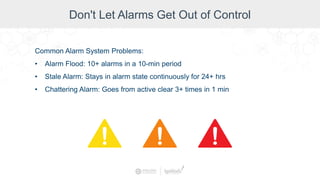
Common Alarm System Problems:
• Alarm Flood: 10+ alarms in a 10-min period
• Stale Alarm: Stays in alarm state continuously for 24+ hrs
• Chattering Alarm: Goes from active clear 3+ times in 1 min
Don't Let Alarms Get Out of Control
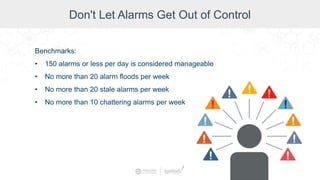
Benchmarks:
• 150 alarms or less per day is considered manageable
• No more than 20 alarm floods per week
• No more than 20 stale alarms per week
• No more than 10 chattering alarms per week
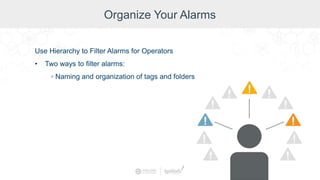
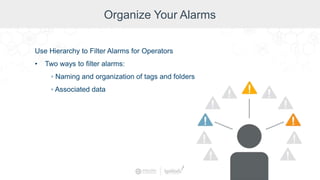
Organize Your Alarms
Use Hierarchy to Filter Alarms for Operators
• Two ways to filter alarms:
◦ Naming and organization of tags and folders
Organize Your Alarms
Use Hierarchy to Filter Alarms for Operators
• Two ways to filter alarms:
◦ Naming and organization of tags and folders
◦ Associated data
Demo: Alarm Filtering
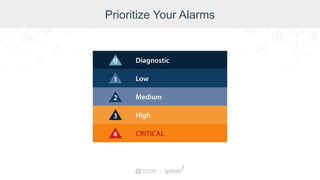
Prioritize Your Alarms
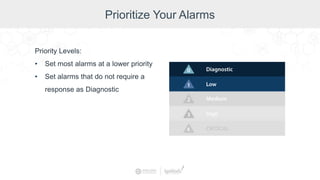
Priority Levels:
• Set most alarms at a lower priority
• Set alarms that do not require a
response as Diagnostic
Demo: How to Prioritize an Alarm
Shelve and Disable Alarms When Necessary
Shelving:
• Temporarily silencing an alarm
Shelve and Disable Alarms When Necessary
Disabling
• Stopping an alarm from being evaluated
• Can be used for nuisance alarms
(upstream/downstream)
Shelve and Disable Alarms When Necessary
State-Based Alarming (a.k.a. Alarm Flood Suppression):
• Disable alarms for machines that are intentionally turned off
• Alarm settings dynamically adjusted to match proper settings for each
state
• Before using state-based alarming, assess whether your process is a
good candidate for it.
Demo: Shelving and Disabling Alarms
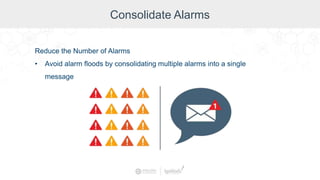
Consolidate Alarms
Reduce the Number of Alarms
• Avoid alarm floods by consolidating multiple alarms into a single
message
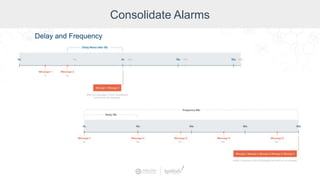
Consolidate Alarms
Delay and Frequency
Demo: Alarm Consolidation
Escalate Alarms
• Changing the priority, type, and/or distribution of unacknowledged
notification
Escalate Alarms in Ignition
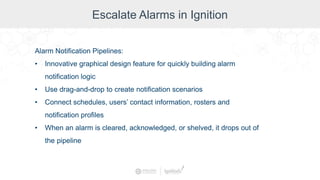
Alarm Notification Pipelines:
• Innovative graphical design feature for quickly building alarm
notification logic
• Use drag-and-drop to create notification scenarios
• Connect schedules, users’ contact information, rosters and
notification profiles
• When an alarm is cleared, acknowledged, or shelved, it drops out of
the pipeline
Demo: Alarm Escalation
Remote Alarming in Ignition
Remote Alarm Notification:
• Configure tags on one gateway
• Alarms sent through a central gateway
• Manage Email, Voice, and SMS equipment from a central location
and provide those services to a multitude of Gateways
Demo: Remote Alarm Notification
Maintain Your Improved Alarm System
• Create an alarm philosophy document
• Create a master alarm database (alarm
rationalization)
• Document, communicate, and approve all
changes to the alarming system
• Audit your overall alarm management work
processes continuously
Best Practices Recap
• Think about alarms and manage them carefully.
• Use filtering to organize alarms.
• Prioritize alarms (most should be diagnostic).
• Know how and when to shelve alarms.
• Disable nuisance alarms when necessary.
• Consolidate alarms to reduce alarm floods.
• Use escalation to notify team members selectively.
• Maintain the system with document, database, and regular
audits.
Design Like a Pro Series
Available at: inductiveautomation.com/resources
Questions & Comments
Jim Meisler x227
Vannessa Garcia x231
Vivian Mudge x253
Account Executives
Myron Hoertling x224
Shane Miller x218
Ramin Rofagha x251
Maria Chinappi x264
Dan Domerofski x273
Lester Ares x214
800-266-7798 x247
Melanie Moniz
Director of Sales:
Jeff Osterback x207
Travis Cox
Co-Director of Sales Engineering:
x229
travis@inductiveautomation.com
Design Like a Pro: Alarm Management

Design Like a Pro: Alarm Management

  • 2.
    Moderator Don Pearson Chief StrategyOfficer Inductive Automation
  • 3.
    Today’s Agenda • Introductionto Ignition • Understand What Alarms Are For • Don't Let Alarms Get Out of Control • Organize Your Alarms • Prioritize Your Alarms • Shelve & Disable Alarms When Necessary • Consolidate Alarms • Escalate Alarms • Remote Alarm Notification • Q&A
  • 4.
    About Inductive Automation •Founded in 2003 • HMI, SCADA, MES, and IIoT software • Installed in 100+ countries • Over 1,500 integrators • Used by 44% of Fortune 100 companies Learn more at: inductiveautomation.com/about
  • 5.
  • 6.
    Ignition: Industrial ApplicationPlatform One Universal Platform for SCADA, MES & IIoT: • Unlimited licensing model • Cross-platform compatibility • Based on IT-standard technologies • Scalable server-client architecture • Web-managed • Web-launched on desktop or mobile • Modular configurability • Rapid development and deployment
  • 7.
    Presenter Travis Cox Co-Director ofSales Engineering, Inductive Automation
  • 8.
    A Poorly ManagedAlarm System
  • 9.
    Best Practices fromthe Alarm Management Handbook
  • 10.
    Understand What AlarmsAre For Alarms are: • Conditions evaluated with respect to a specific numeric data point • Usually configured on a tag or data point
  • 11.
    Understand What AlarmsAre For Basic Alarm Terms: • Active or Clear • Alarm Notification • Alarm Journal
  • 12.
    Understand What AlarmsAre For Alarms: • Tell when something is wrong in your system • Must be managed carefully • Can cover up the real problem when there are too many of them
  • 13.
    Don't Let AlarmsGet Out of Control How to Best Use Alarms: • For problems that require action • To easily identify an issue • Use alarms sparingly
  • 14.
    Don't Let AlarmsGet Out of Control Common Alarm System Problems: • Alarm Flood: 10+ alarms in a 10-min period • Stale Alarm: Stays in alarm state continuously for 24+ hrs • Chattering Alarm: Goes from active clear 3+ times in 1 min
  • 15.
    Don't Let AlarmsGet Out of Control Benchmarks: • 150 alarms or less per day is considered manageable • No more than 20 alarm floods per week • No more than 20 stale alarms per week • No more than 10 chattering alarms per week
  • 16.
    Organize Your Alarms UseHierarchy to Filter Alarms for Operators • Two ways to filter alarms: ◦ Naming and organization of tags and folders
  • 17.
    Organize Your Alarms UseHierarchy to Filter Alarms for Operators • Two ways to filter alarms: ◦ Naming and organization of tags and folders ◦ Associated data
  • 18.
  • 19.
  • 20.
    Prioritize Your Alarms PriorityLevels: • Set most alarms at a lower priority • Set alarms that do not require a response as Diagnostic
  • 21.
    Demo: How toPrioritize an Alarm
  • 22.
    Shelve and DisableAlarms When Necessary Shelving: • Temporarily silencing an alarm
  • 23.
    Shelve and DisableAlarms When Necessary Disabling • Stopping an alarm from being evaluated • Can be used for nuisance alarms (upstream/downstream)
  • 24.
    Shelve and DisableAlarms When Necessary State-Based Alarming (a.k.a. Alarm Flood Suppression): • Disable alarms for machines that are intentionally turned off • Alarm settings dynamically adjusted to match proper settings for each state • Before using state-based alarming, assess whether your process is a good candidate for it.
  • 25.
    Demo: Shelving andDisabling Alarms
  • 26.
    Consolidate Alarms Reduce theNumber of Alarms • Avoid alarm floods by consolidating multiple alarms into a single message
  • 27.
  • 28.
  • 29.
    Escalate Alarms • Changingthe priority, type, and/or distribution of unacknowledged notification
  • 30.
    Escalate Alarms inIgnition Alarm Notification Pipelines: • Innovative graphical design feature for quickly building alarm notification logic • Use drag-and-drop to create notification scenarios • Connect schedules, users’ contact information, rosters and notification profiles • When an alarm is cleared, acknowledged, or shelved, it drops out of the pipeline
  • 31.
  • 32.
    Remote Alarming inIgnition Remote Alarm Notification: • Configure tags on one gateway • Alarms sent through a central gateway • Manage Email, Voice, and SMS equipment from a central location and provide those services to a multitude of Gateways
  • 33.
    Demo: Remote AlarmNotification
  • 34.
    Maintain Your ImprovedAlarm System • Create an alarm philosophy document • Create a master alarm database (alarm rationalization) • Document, communicate, and approve all changes to the alarming system • Audit your overall alarm management work processes continuously
  • 35.
    Best Practices Recap •Think about alarms and manage them carefully. • Use filtering to organize alarms. • Prioritize alarms (most should be diagnostic). • Know how and when to shelve alarms. • Disable nuisance alarms when necessary. • Consolidate alarms to reduce alarm floods. • Use escalation to notify team members selectively. • Maintain the system with document, database, and regular audits.
  • 37.
    Design Like aPro Series Available at: inductiveautomation.com/resources
  • 39.
    Questions & Comments JimMeisler x227 Vannessa Garcia x231 Vivian Mudge x253 Account Executives Myron Hoertling x224 Shane Miller x218 Ramin Rofagha x251 Maria Chinappi x264 Dan Domerofski x273 Lester Ares x214 800-266-7798 x247 Melanie Moniz Director of Sales: Jeff Osterback x207 Travis Cox Co-Director of Sales Engineering: x229 travis@inductiveautomation.com