
Sajal Agarwal, August 31, 2016
Quote Automation: Faster Supplier Identification
and Bid Execution for Your Procurement Needs
Public
© 2016 SAP SE or an SAP affiliate company. All rights reserved. 2Public
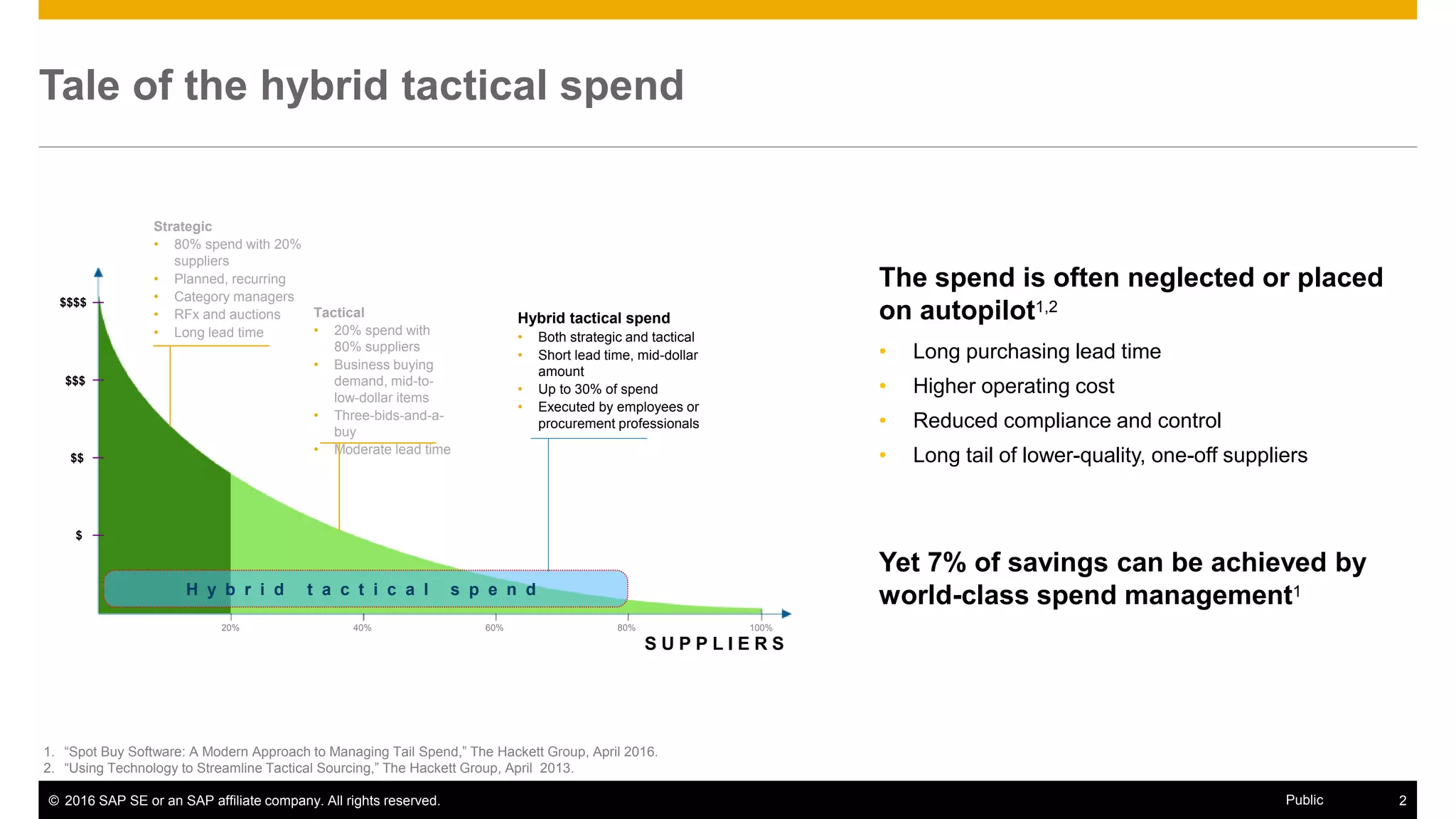
Tale of the hybrid tactical spend
H y b r i d t a c t i c a l s p e n d
Strategic
• 80% spend with 20%
suppliers
• Planned, recurring
• Category managers
• RFx and auctions
• Long lead time
Tactical
• 20% spend with
80% suppliers
• Business buying
demand, mid-to-
low-dollar items
• Three-bids-and-a-
buy
• Moderate lead time
Hybrid tactical spend
• Both strategic and tactical
• Short lead time, mid-dollar
amount
• Up to 30% of spend
• Executed by employees or
procurement professionals
20% 40% 60% 80% 100%
$
$$
$$$
S U P P L I E R S
1. “Spot Buy Software: A Modern Approach to Managing Tail Spend,” The Hackett Group, April 2016.
2. “Using Technology to Streamline Tactical Sourcing,” The Hackett Group, April 2013.
• Long purchasing lead time
• Higher operating cost
• Reduced compliance and control
• Long tail of lower-quality, one-off suppliers
The spend is often neglected or placed
on autopilot1,2
Yet 7% of savings can be achieved by
world-class spend management1
$$$$
© 2016 SAP SE or an SAP affiliate company. All rights reserved. 3Public
• Moderate spend amount (€5,000 to €1 million per project)
• Low complexity, short cycle time
• Often nonrepetitive rush orders that require quick turnaround
• Typically in undermanaged, underserved categories
• Often starts in an ERP system by a nonprocurement buyer, after
discovering that needed item/service is unavailable in company catalog
• Buyers generally lack effective methods to source these categories
Common characteristics
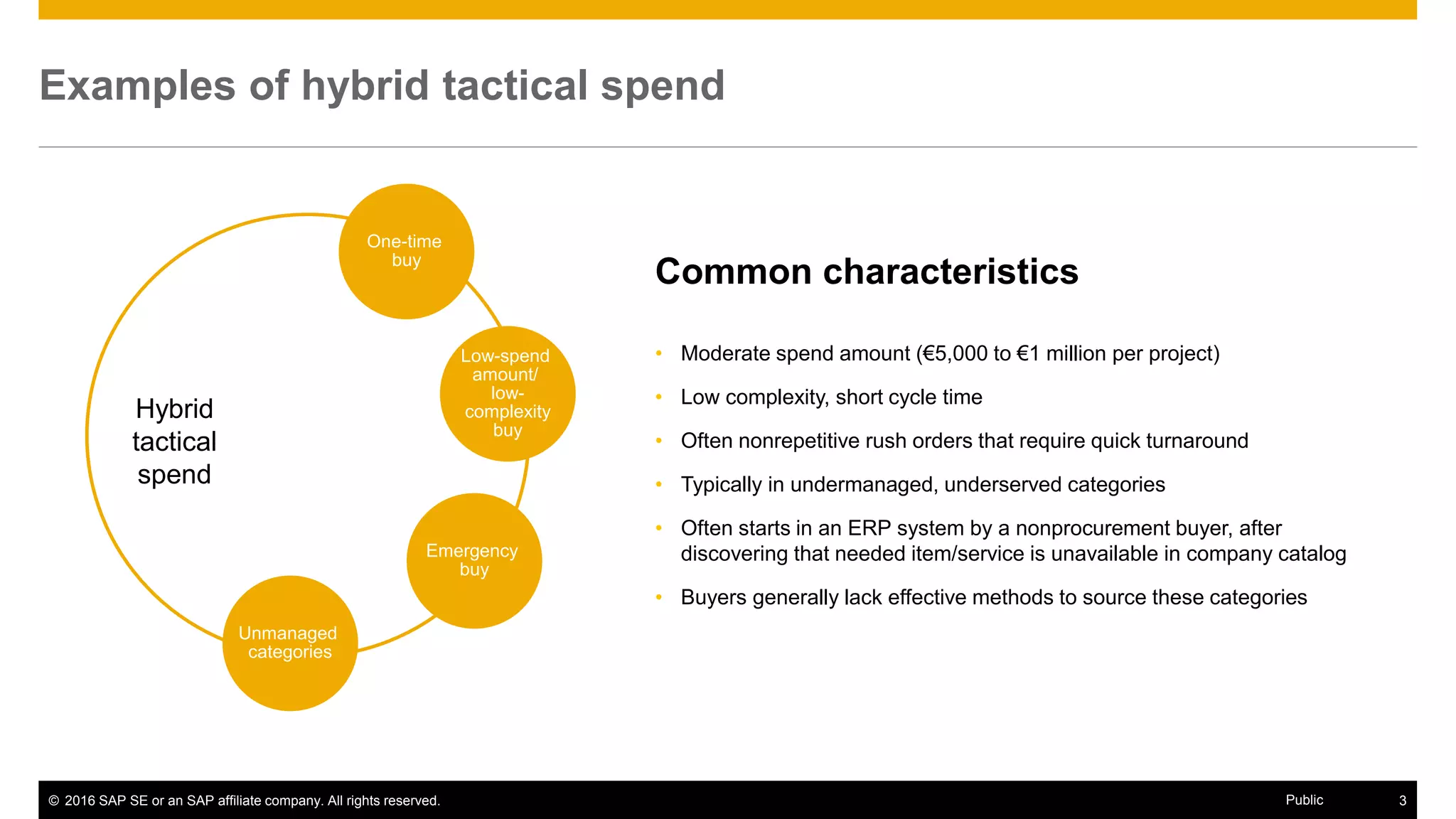
Examples of hybrid tactical spend
Hybrid
tactical
spend
One-time
buy
Low-spend
amount/
low-
complexity
buy
Emergency
buy
Unmanaged
categories
© 2016 SAP SE or an SAP affiliate company. All rights reserved. 4Public
Both buyers and suppliers need an effective tool
• Unable to meet quick turnaround time
• Difficult to compare quotes across huge vendor
master
• Difficult to find new suppliers to comply with
“three-bids-and-a-buy” policy
• Difficult to execute repeat buys in fluctuating
markets with high vendor turnover
• Lack of visibility into unmanaged spend
• Difficult to get a foot in the door for new businesses
or geographies
• Difficult to showcase new products/services
• Lack of access and visibility to gain repeat business
• Difficult to manage bids through manual processes
• Lack of information and fairness to bid for
opportunities
Buyer challenges Supplier challenges
© 2016 SAP SE or an SAP affiliate company. All rights reserved. 5Public
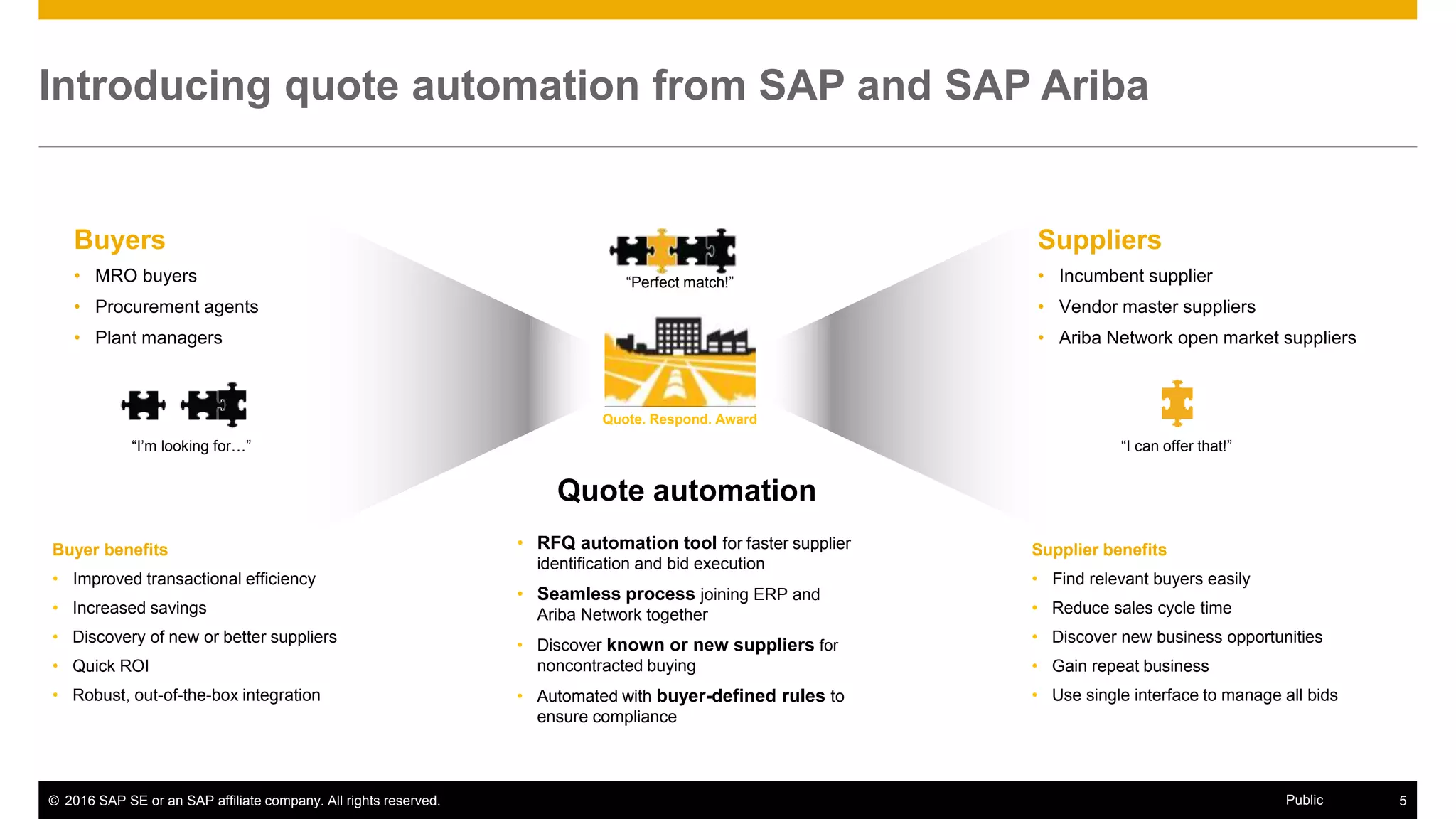
Quote automation
• RFQ automation tool for faster supplier
identification and bid execution
• Seamless process joining ERP and
Ariba Network together
• Discover known or new suppliers for
noncontracted buying
• Automated with buyer-defined rules to
ensure compliance
Introducing quote automation from SAP and SAP Ariba
Quote. Respond. Award
Suppliers
• Incumbent supplier
• Vendor master suppliers
• Ariba Network open market suppliers
Buyers
• MRO buyers
• Procurement agents
• Plant managers
“I’m looking for…” “I can offer that!”
“Perfect match!”
Buyer benefits
• Improved transactional efficiency
• Increased savings
• Discovery of new or better suppliers
• Quick ROI
• Robust, out-of-the-box integration
Supplier benefits
• Find relevant buyers easily
• Reduce sales cycle time
• Discover new business opportunities
• Gain repeat business
• Use single interface to manage all bids
© 2016 SAP SE or an SAP affiliate company. All rights reserved. 6Public
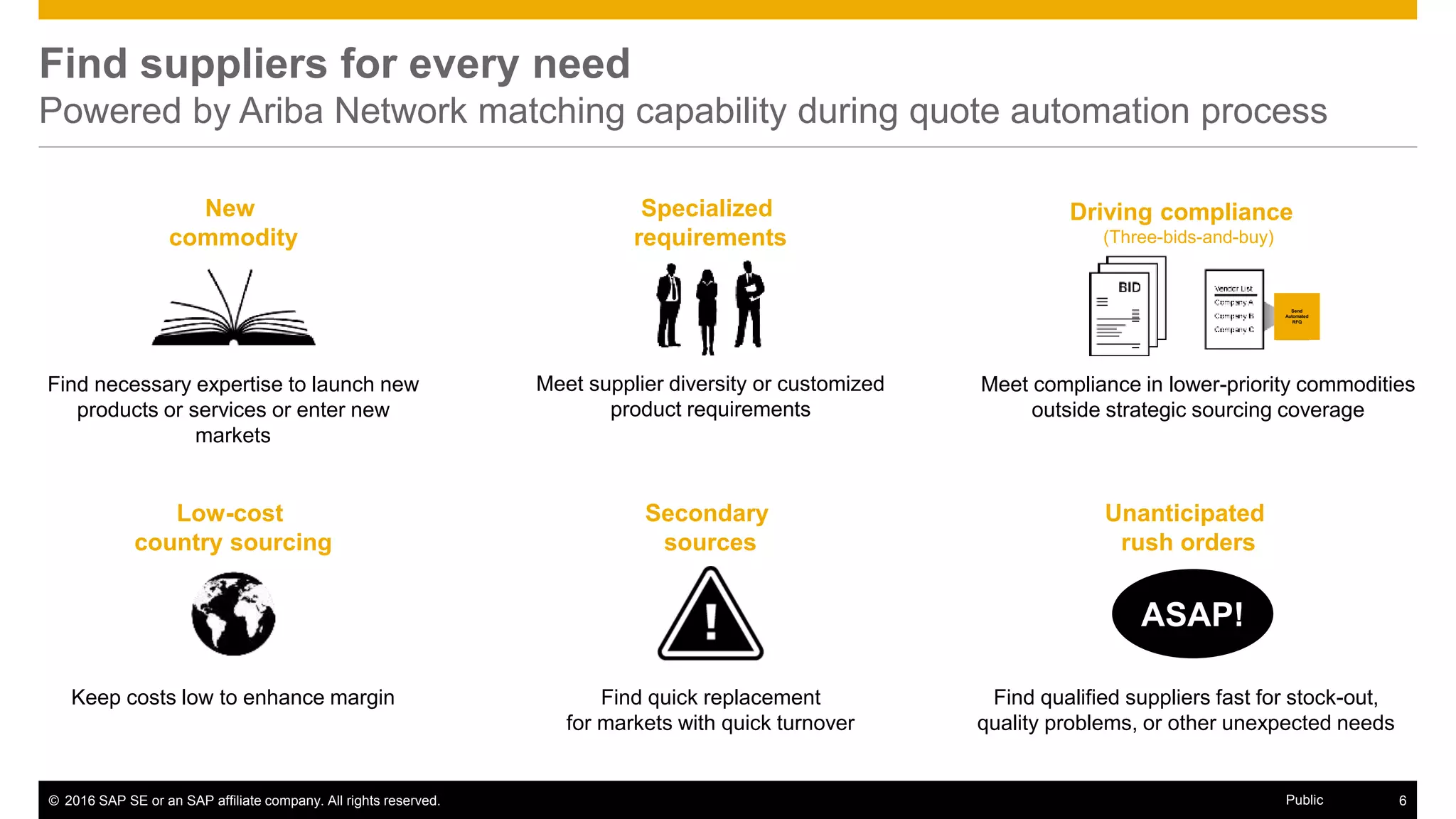
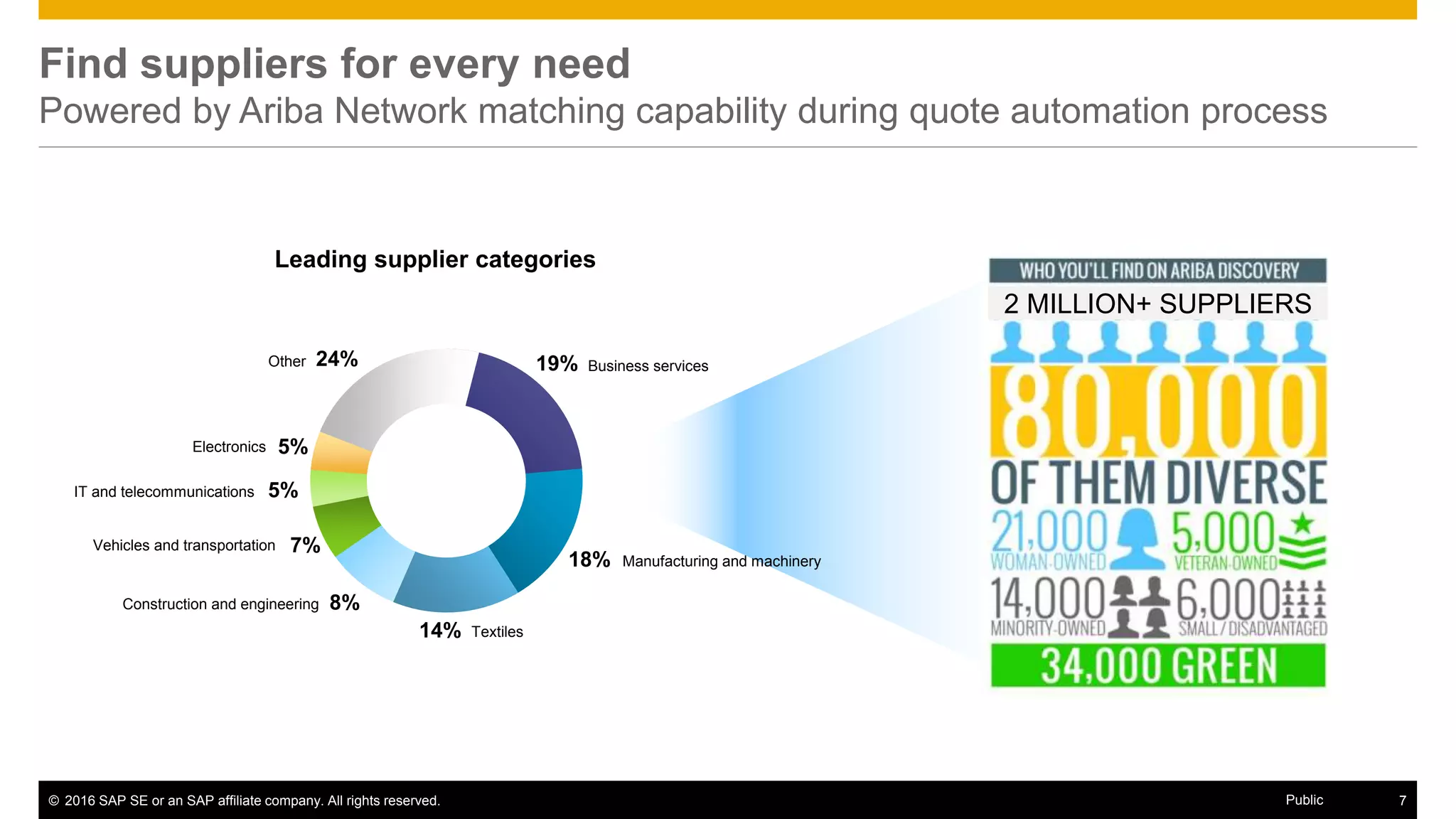
Find suppliers for every need
Powered by Ariba Network matching capability during quote automation process
Driving compliance
(Three-bids-and-buy)
Unanticipated
rush orders
Secondary
sources
Low-cost
country sourcing
Specialized
requirements
New
commodity
Find qualified suppliers fast for stock-out,
quality problems, or other unexpected needs
Find quick replacement
for markets with quick turnover
Meet compliance in lower-priority commodities
outside strategic sourcing coverage
Meet supplier diversity or customized
product requirements
Find necessary expertise to launch new
products or services or enter new
markets
Keep costs low to enhance margin
ASAP!
Send
Automated
RFQ
© 2016 SAP SE or an SAP affiliate company. All rights reserved. 7Public
2 MILLION+ SUPPLIERS
Find suppliers for every need
Powered by Ariba Network matching capability during quote automation process
Manufacturing and machinery
Other
Electronics
IT and telecommunications
Vehicles and transportation
Business services
Construction and engineering
Textiles
5%
5%
7%
8%
18%
19%24%
14%
Leading supplier categories
Product Demo
© 2016 SAP SE or an SAP affiliate company. All rights reserved. 9Public
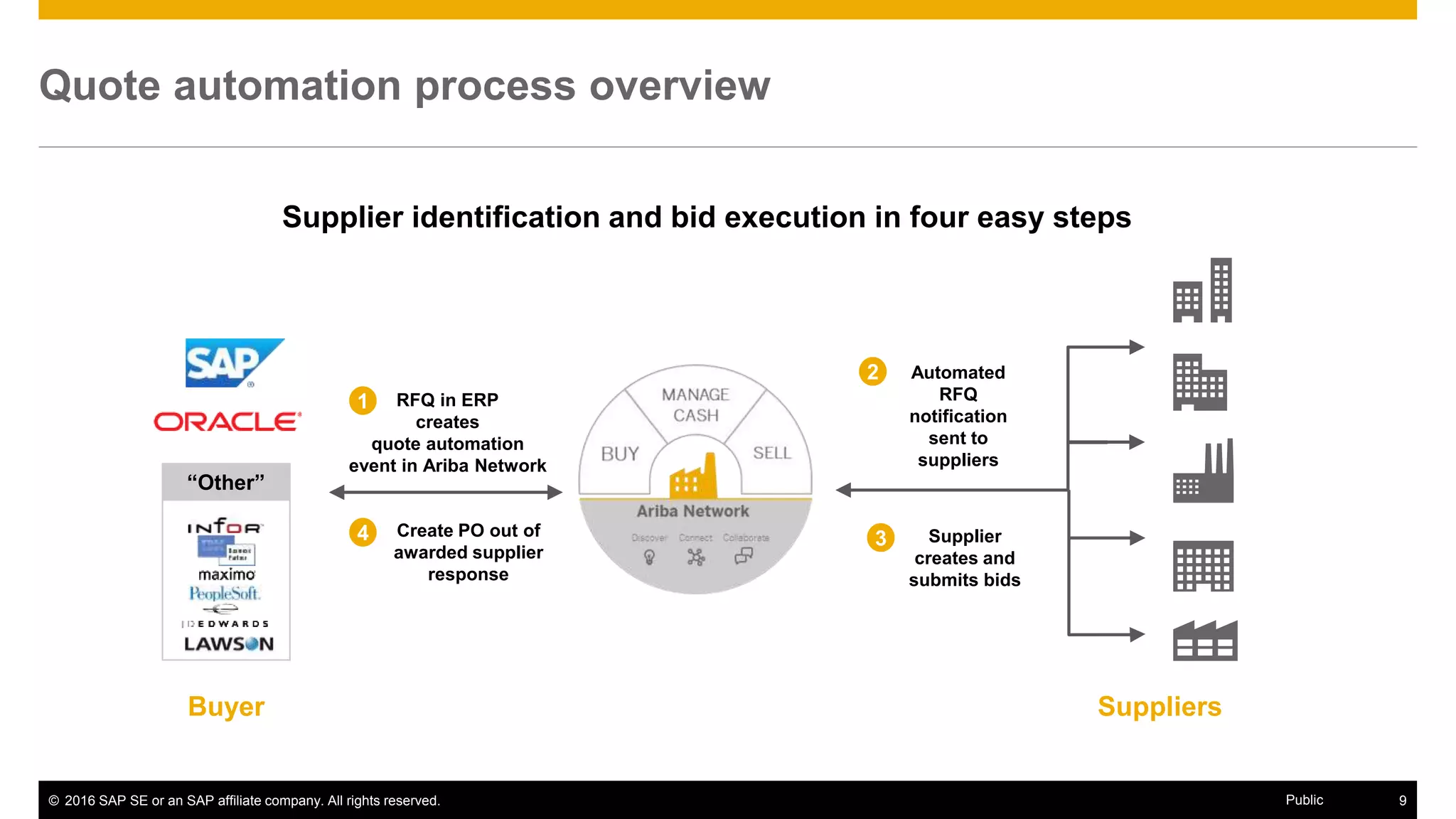
Quote automation process overview
SuppliersBuyer
RFQ in ERP
creates
quote automation
event in Ariba Network
1
Create PO out of
awarded supplier
response
4
2 Automated
RFQ
notification
sent to
suppliers
3 Supplier
creates and
submits bids
“Other”
Supplier identification and bid execution in four easy steps
© 2016 SAP SE or an SAP affiliate company. All rights reserved. 10Public
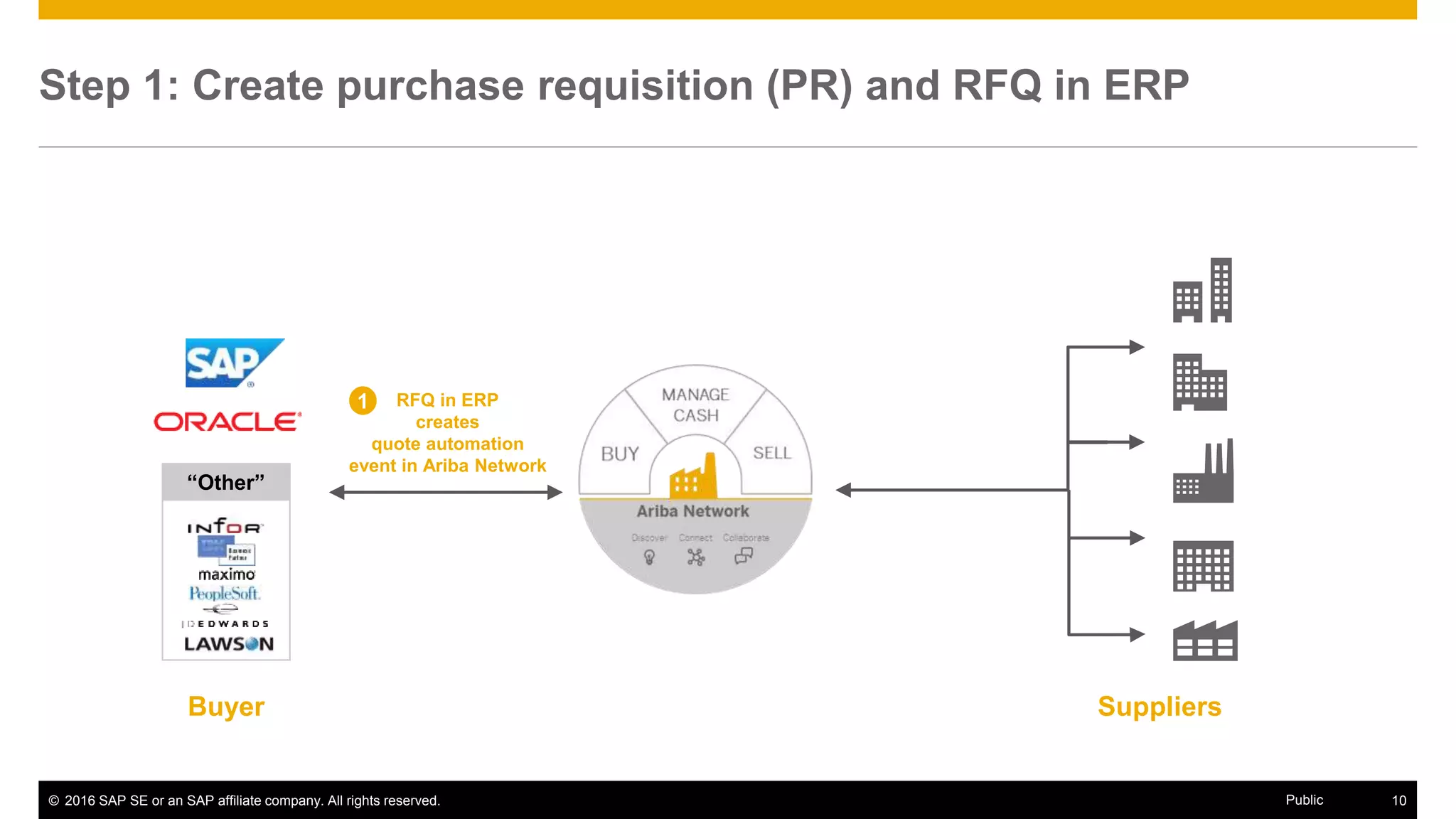
Step 1: Create purchase requisition (PR) and RFQ in ERP
SuppliersBuyer
RFQ in ERP
creates
quote automation
event in Ariba Network
1
“Other”
© 2016 SAP SE or an SAP affiliate company. All rights reserved. 11Public
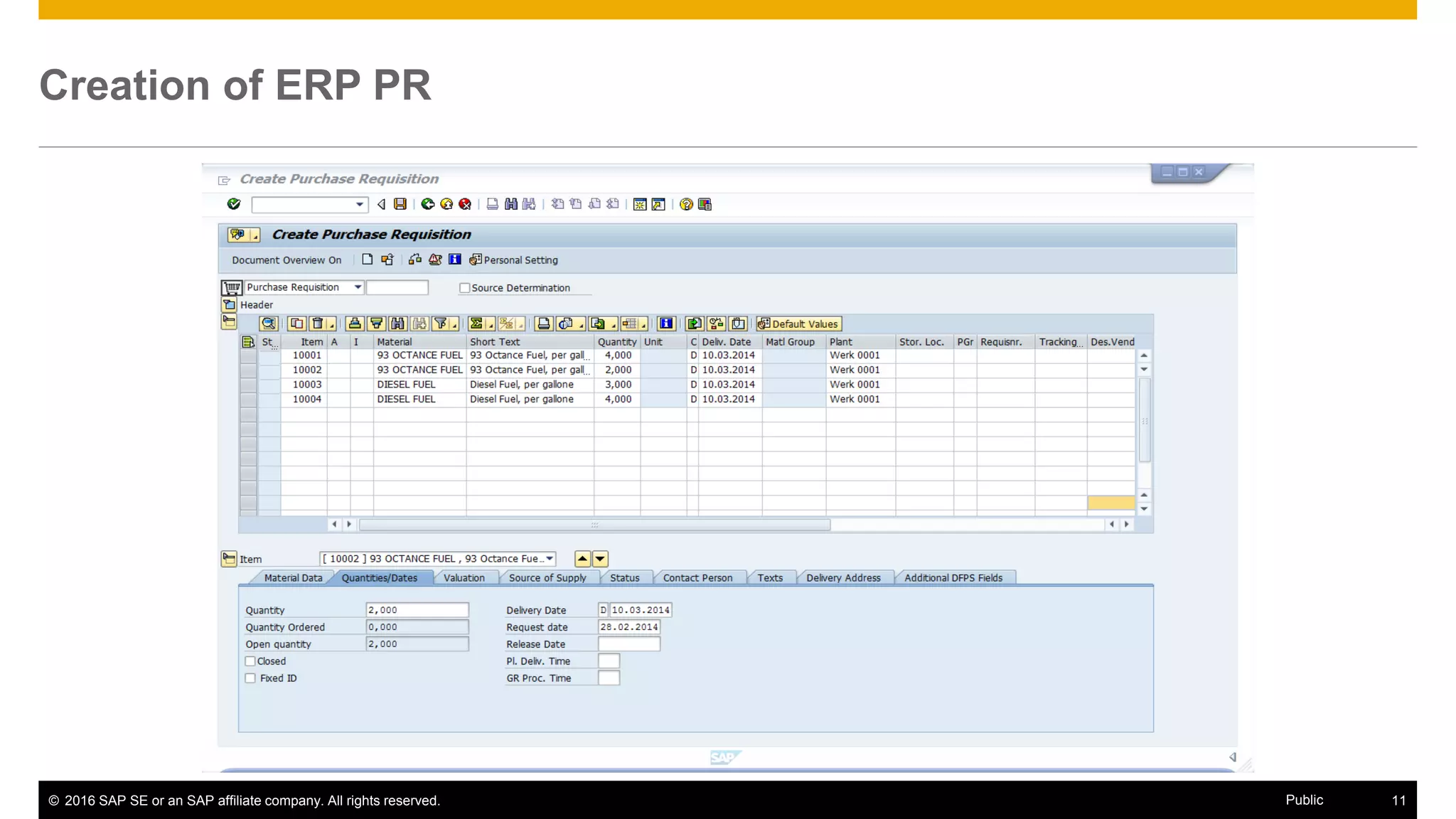
Creation of ERP PR
© 2016 SAP SE or an SAP affiliate company. All rights reserved. 12Public
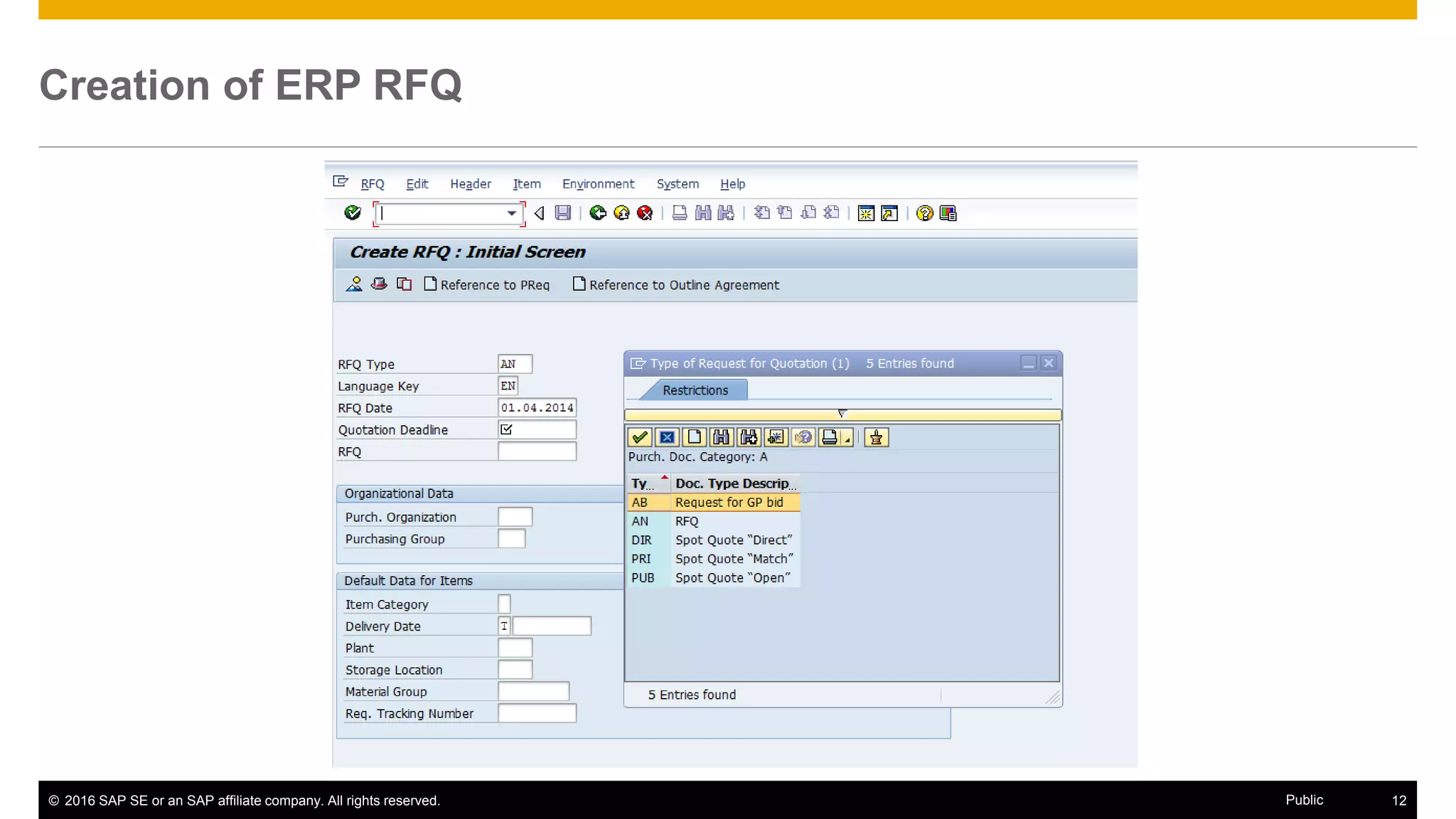
Creation of ERP RFQ
© 2016 SAP SE or an SAP affiliate company. All rights reserved. 13Public
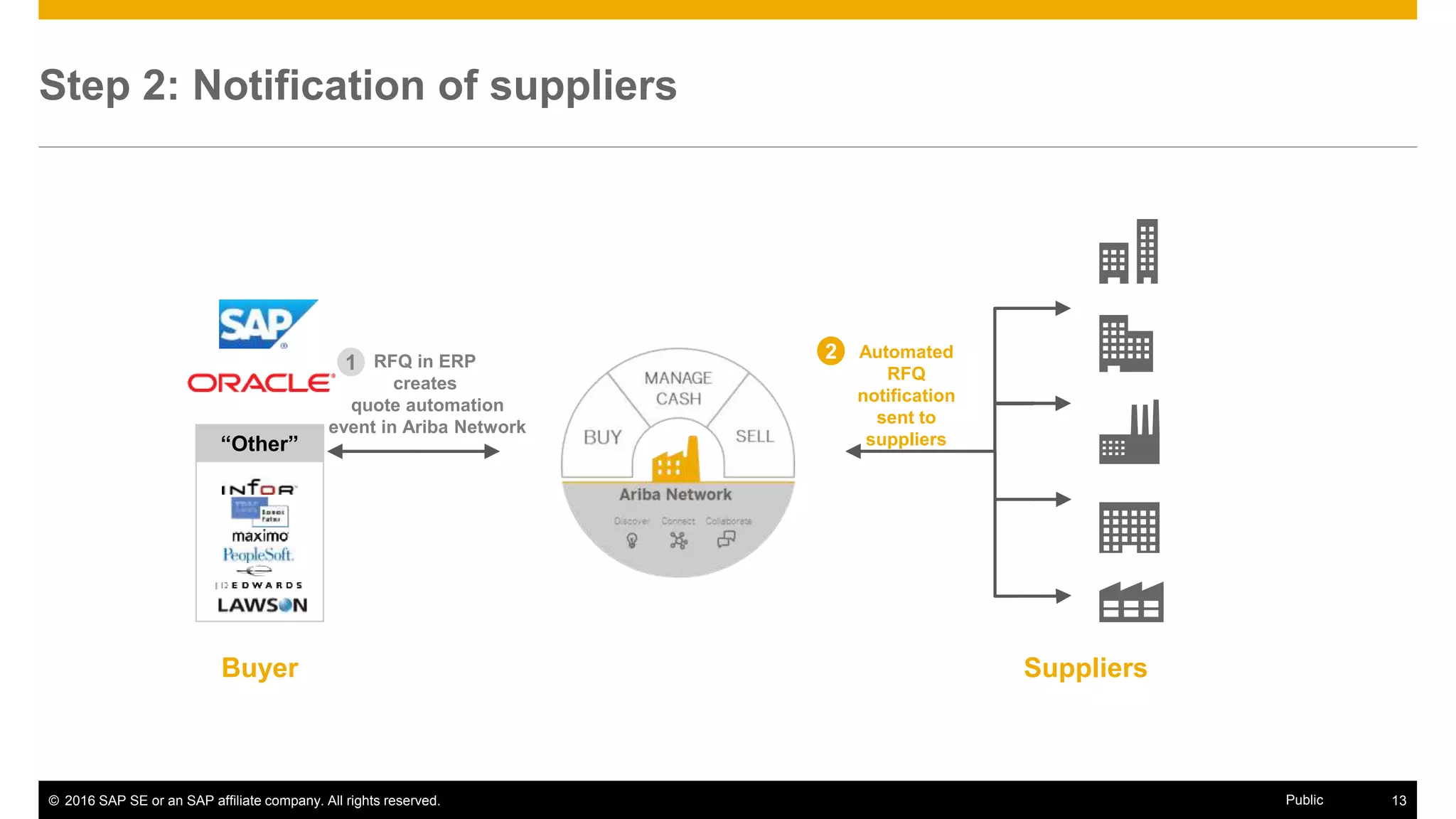
Step 2: Notification of suppliers
SuppliersBuyer
RFQ in ERP
creates
quote automation
event in Ariba Network
1
“Other”
2 Automated
RFQ
notification
sent to
suppliers
© 2016 SAP SE or an SAP affiliate company. All rights reserved. 14Public
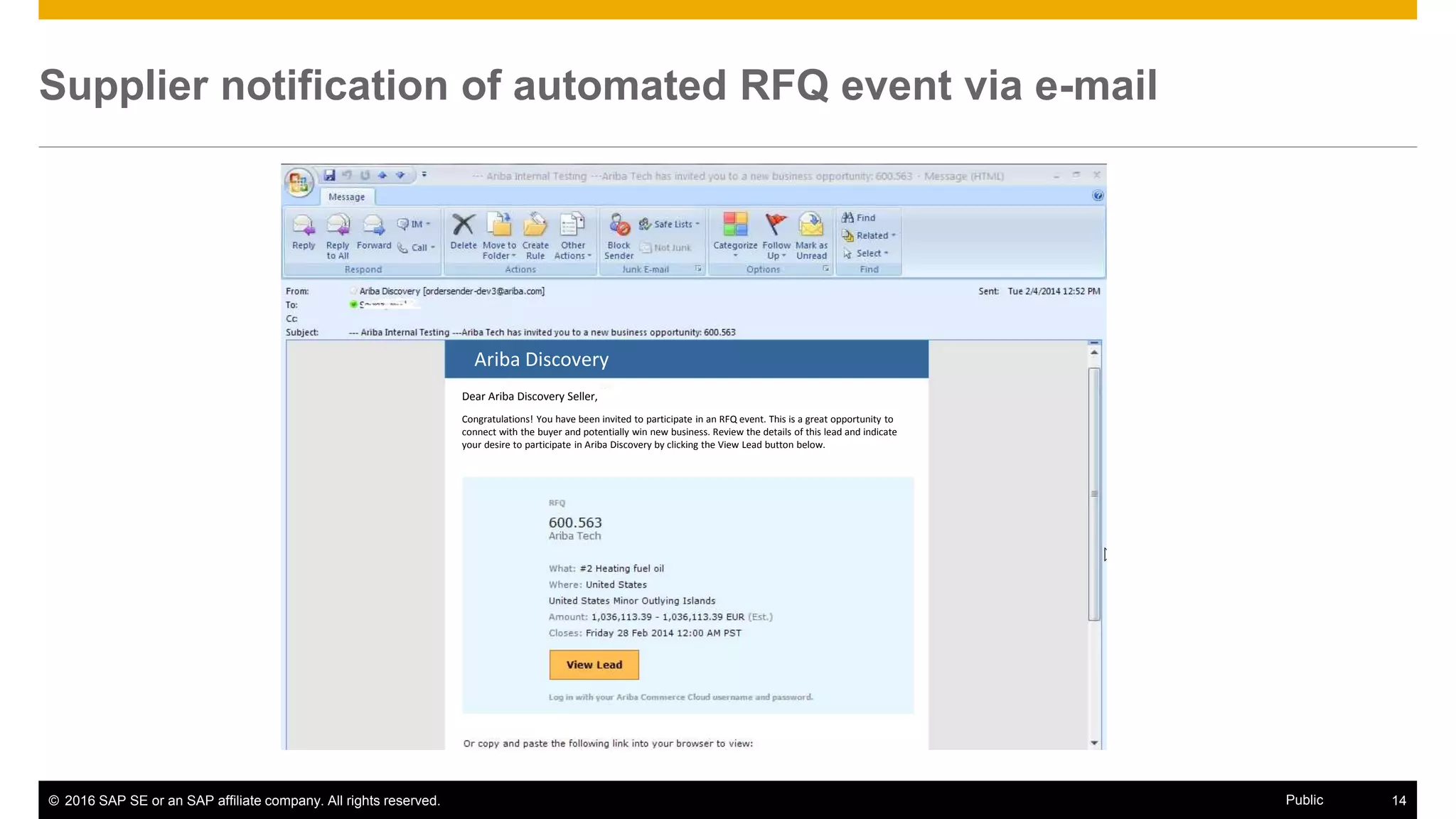
Supplier notification of automated RFQ event via e-mail
Ariba Discovery
Dear Ariba Discovery Seller,
Congratulations! You have been invited to participate in an RFQ event. This is a great opportunity to
connect with the buyer and potentially win new business. Review the details of this lead and indicate
your desire to participate in Ariba Discovery by clicking the View Lead button below.
© 2016 SAP SE or an SAP affiliate company. All rights reserved. 15Public
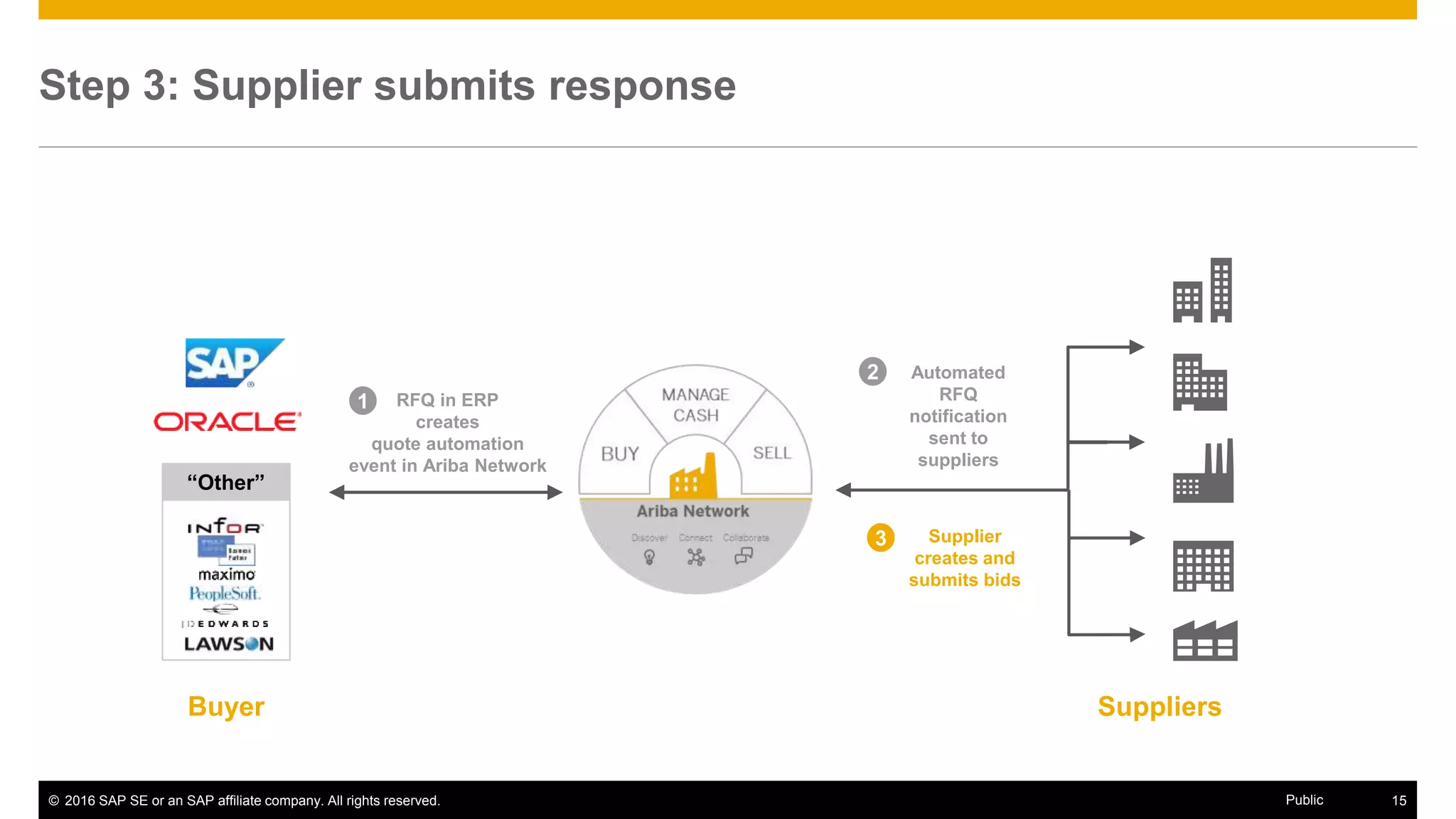
Step 3: Supplier submits response
SuppliersBuyer
RFQ in ERP
creates
quote automation
event in Ariba Network
1
2 Automated
RFQ
notification
sent to
suppliers
3 Supplier
creates and
submits bids
“Other”
© 2016 SAP SE or an SAP affiliate company. All rights reserved. 16Public
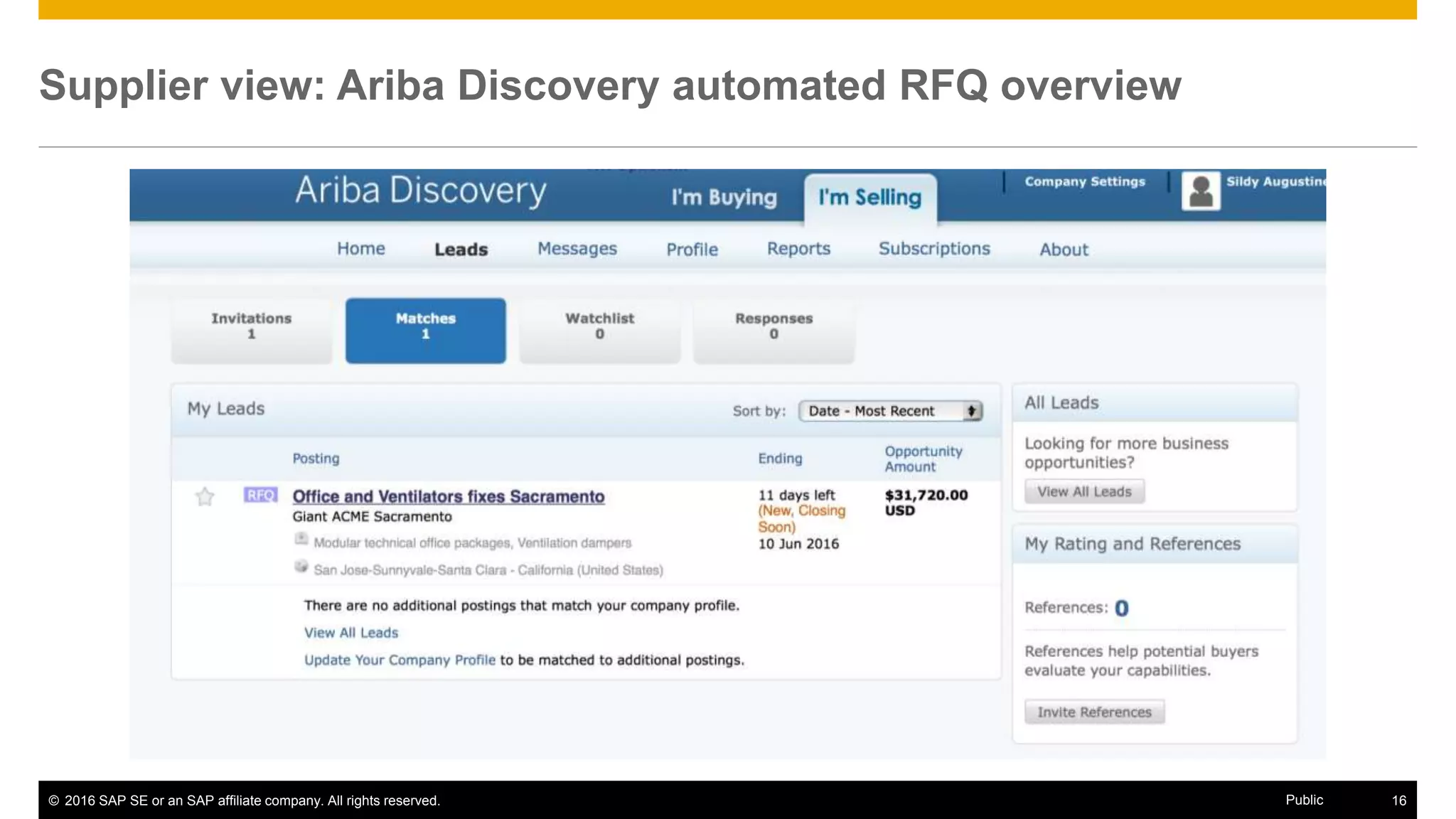
Supplier view: Ariba Discovery automated RFQ overview
© 2016 SAP SE or an SAP affiliate company. All rights reserved. 17Public
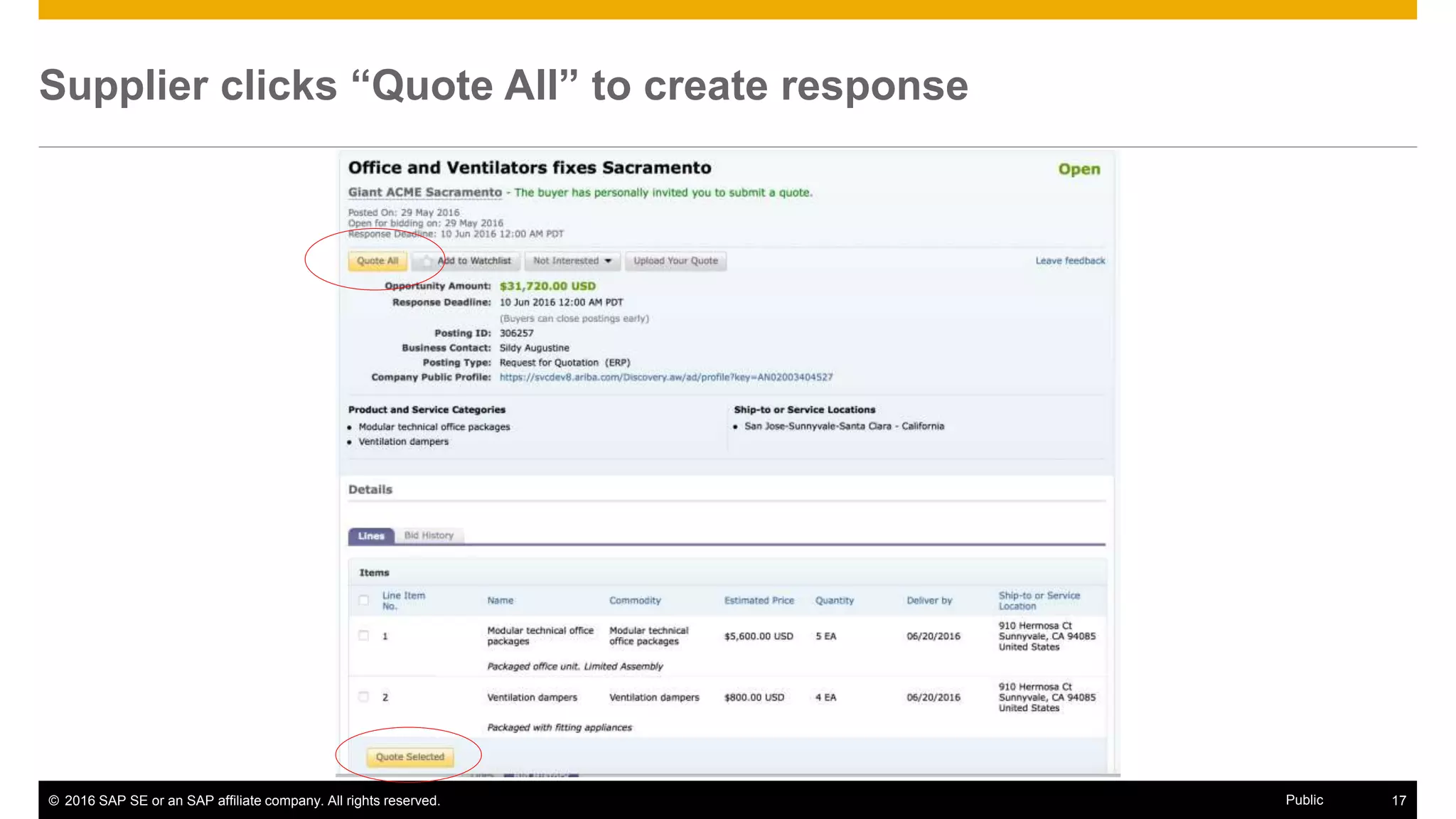
Supplier clicks “Quote All” to create response
© 2016 SAP SE or an SAP affiliate company. All rights reserved. 18Public
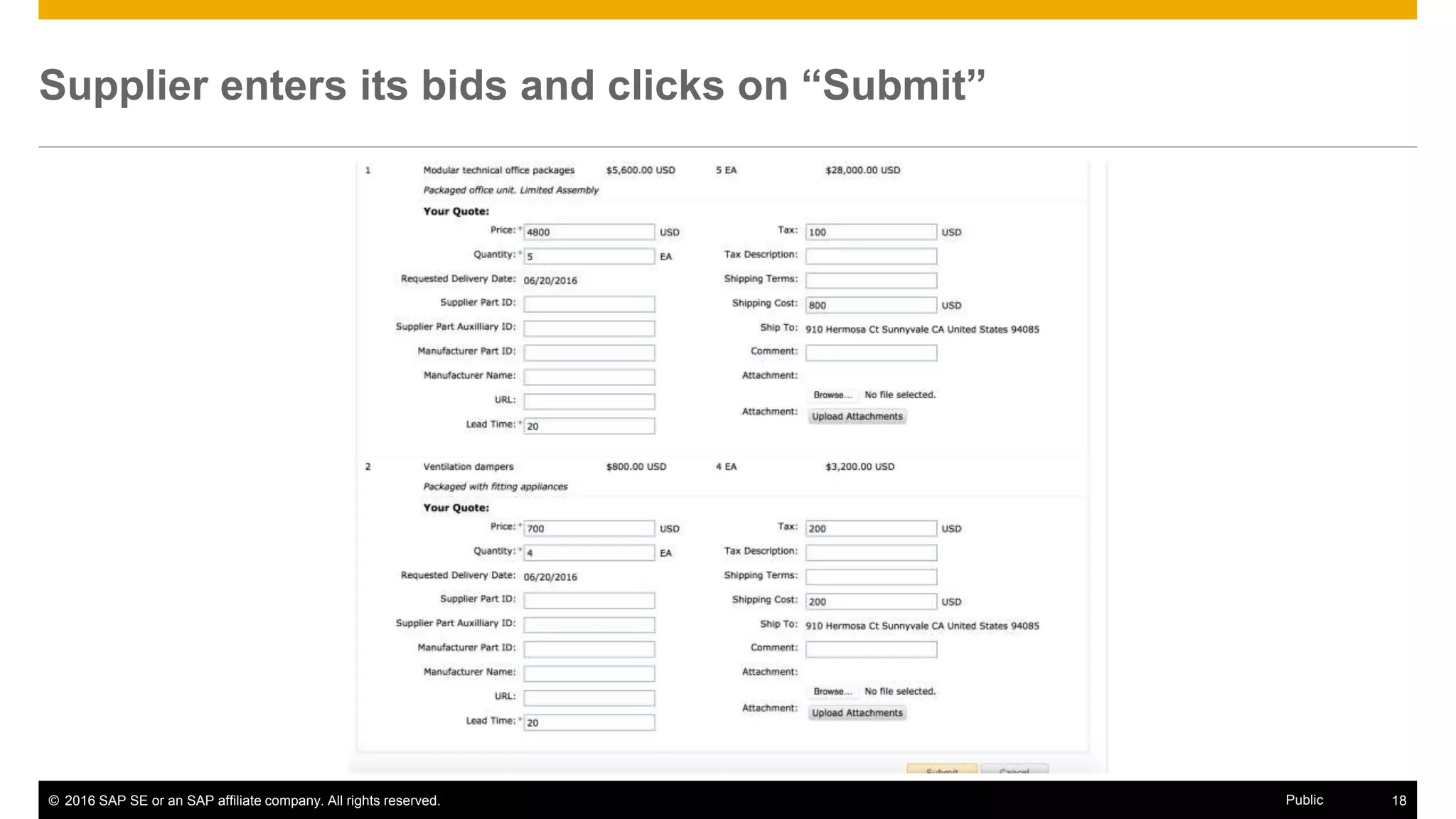
Supplier enters its bids and clicks on “Submit”
© 2016 SAP SE or an SAP affiliate company. All rights reserved. 19Public
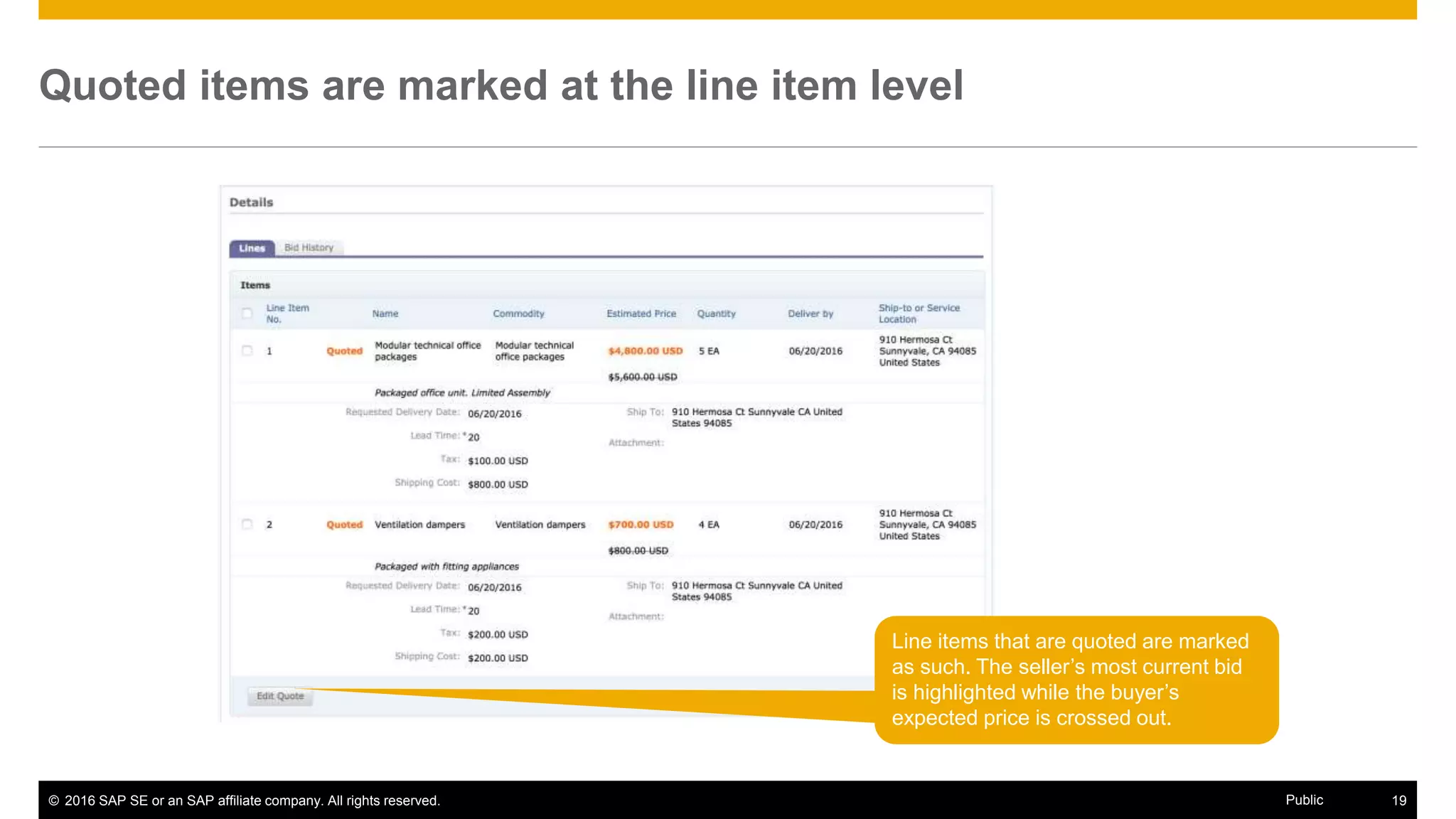
Quoted items are marked at the line item level
Line items that are quoted are marked
as such. The seller’s most current bid
is highlighted while the buyer’s
expected price is crossed out.
© 2016 SAP SE or an SAP affiliate company. All rights reserved. 20Public
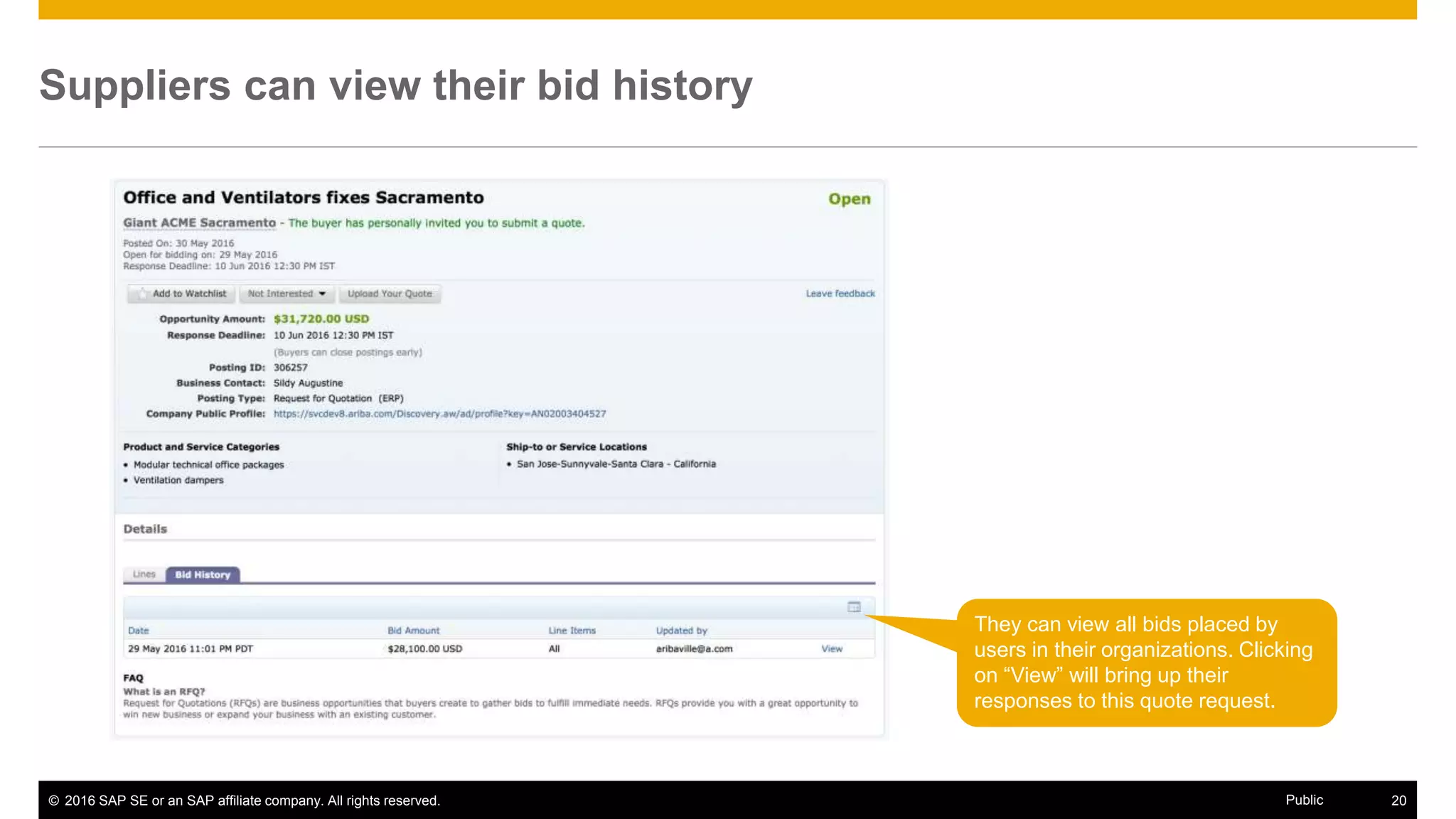
Suppliers can view their bid history
They can view all bids placed by
users in their organizations. Clicking
on “View” will bring up their
responses to this quote request.
© 2016 SAP SE or an SAP affiliate company. All rights reserved. 21Public
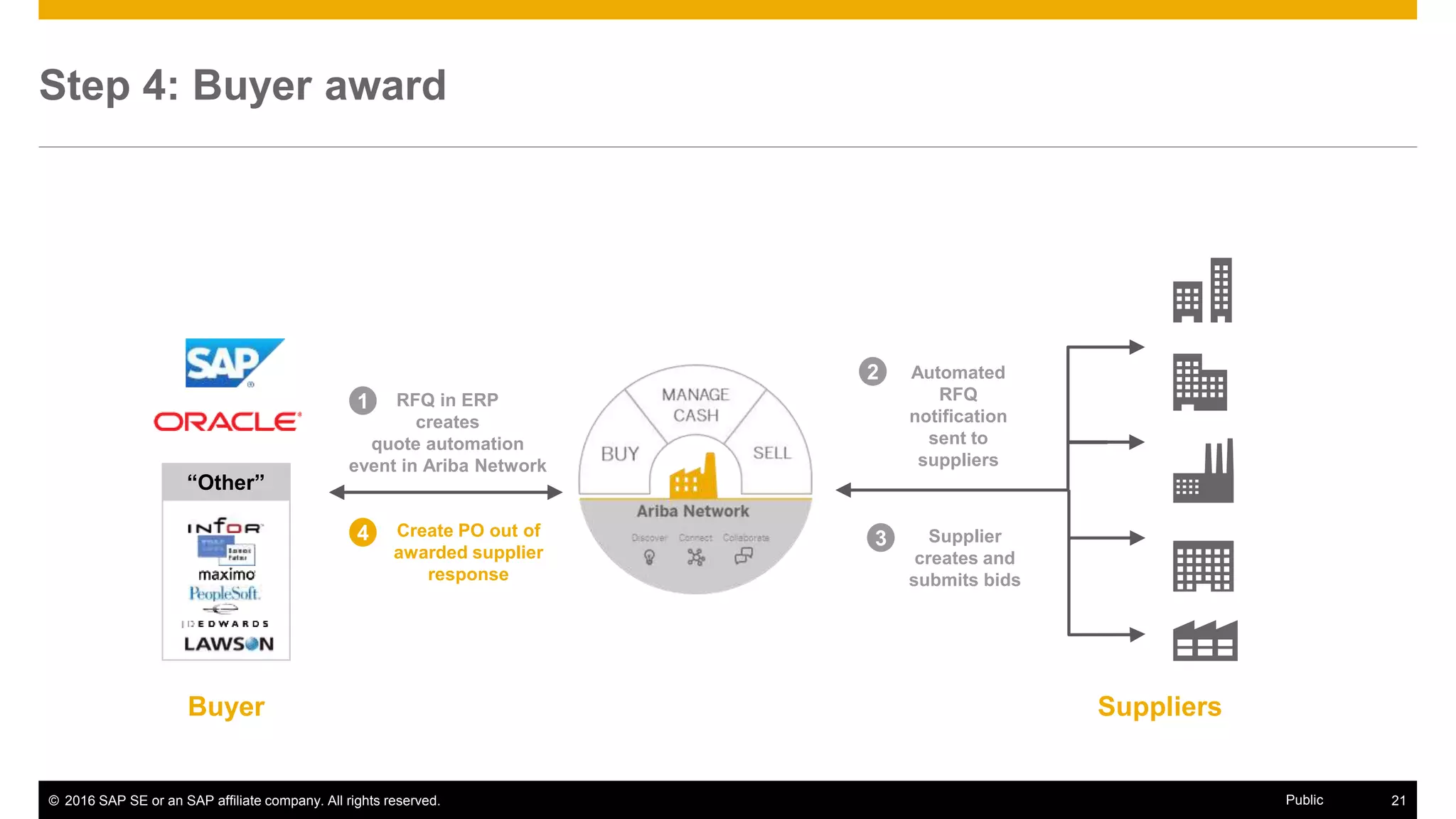
Step 4: Buyer award
SuppliersBuyer
RFQ in ERP
creates
quote automation
event in Ariba Network
1
Create PO out of
awarded supplier
response
4
2 Automated
RFQ
notification
sent to
suppliers
3 Supplier
creates and
submits bids
“Other”
© 2016 SAP SE or an SAP affiliate company. All rights reserved. 22Public
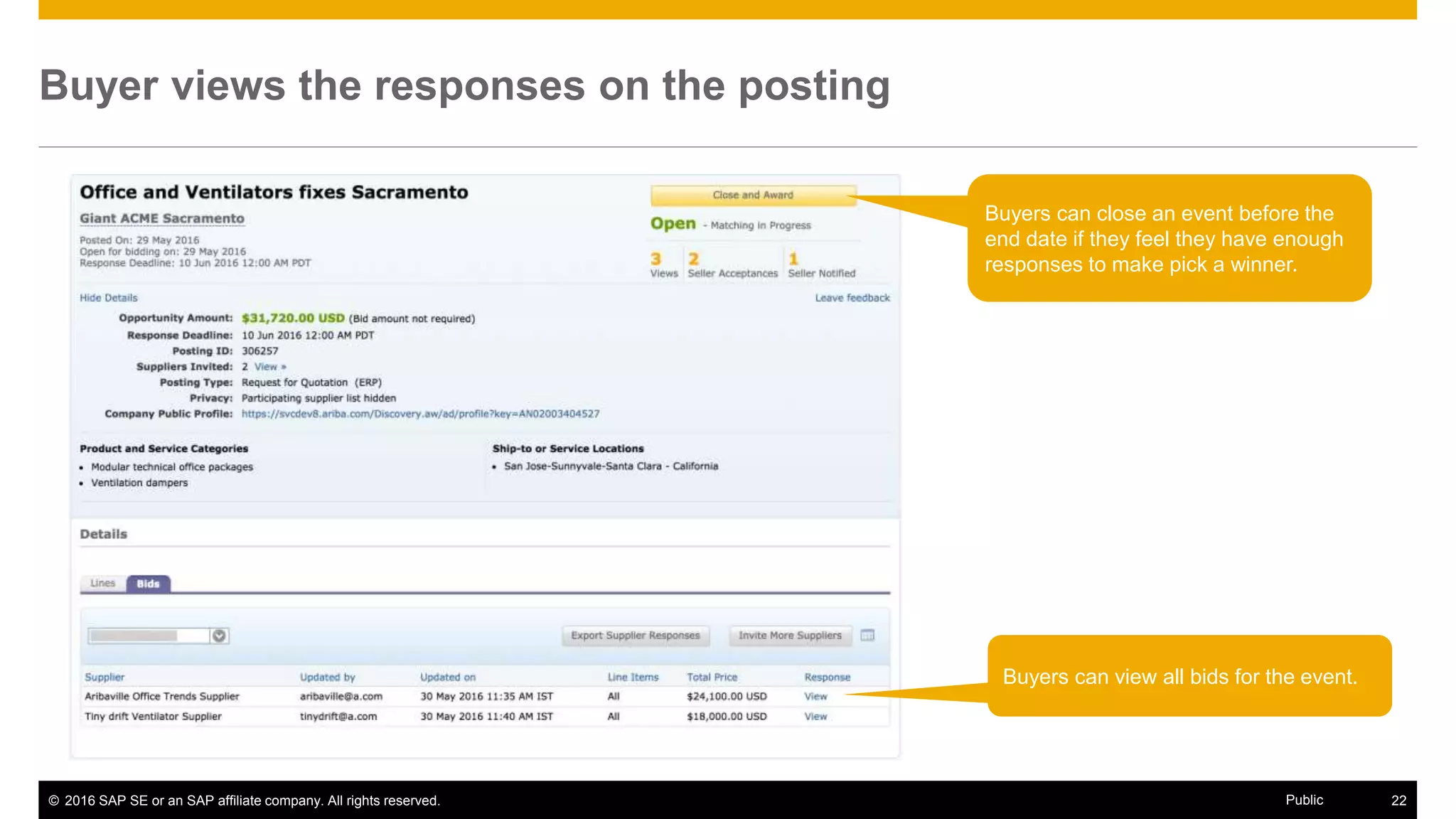
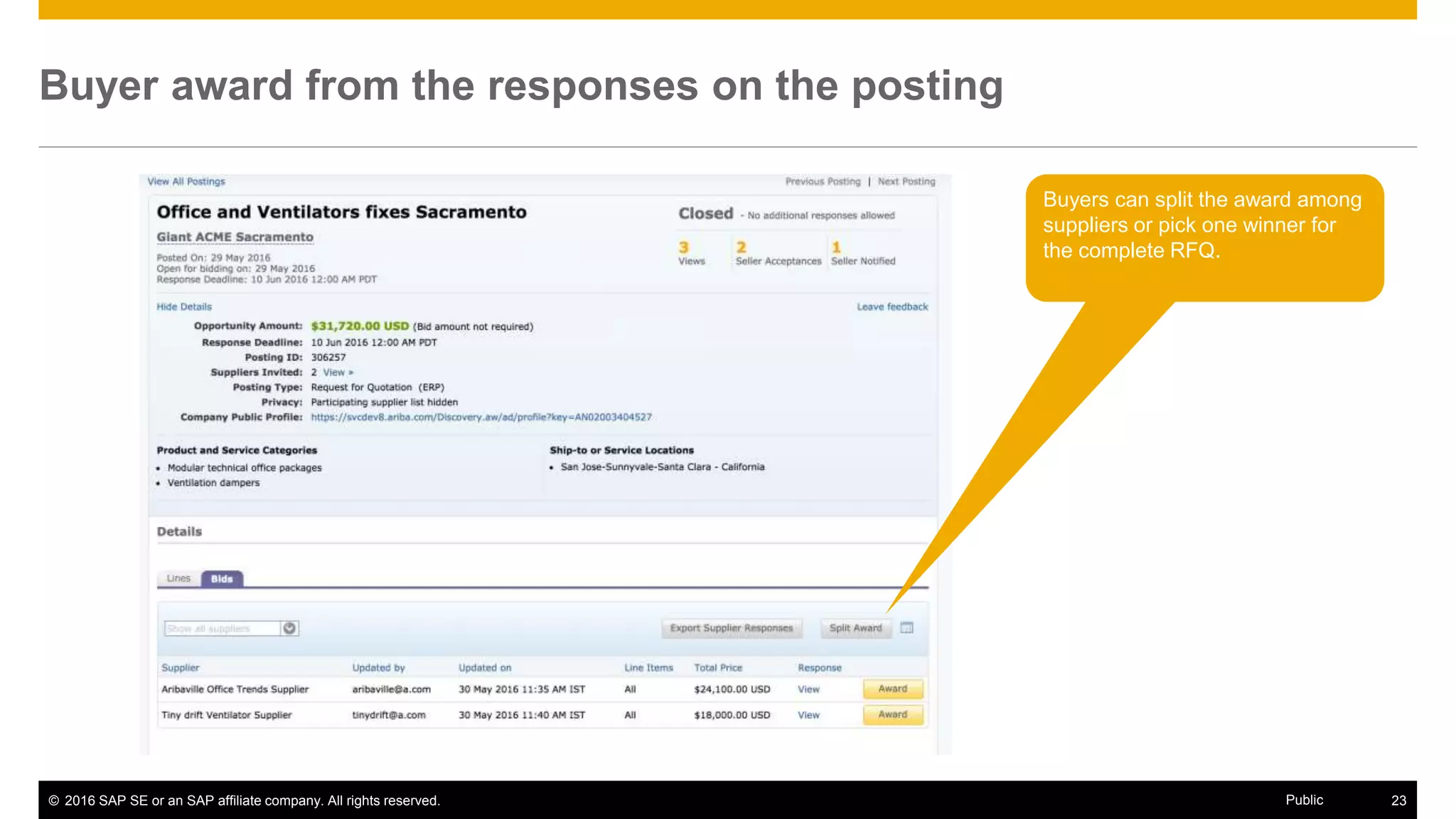
Buyer views the responses on the posting
Buyers can view all bids for the event.
Buyers can close an event before the
end date if they feel they have enough
responses to make pick a winner.
© 2016 SAP SE or an SAP affiliate company. All rights reserved. 23Public
Buyer award from the responses on the posting
Buyers can split the award among
suppliers or pick one winner for
the complete RFQ.
© 2016 SAP SE or an SAP affiliate company. All rights reserved. 24Public
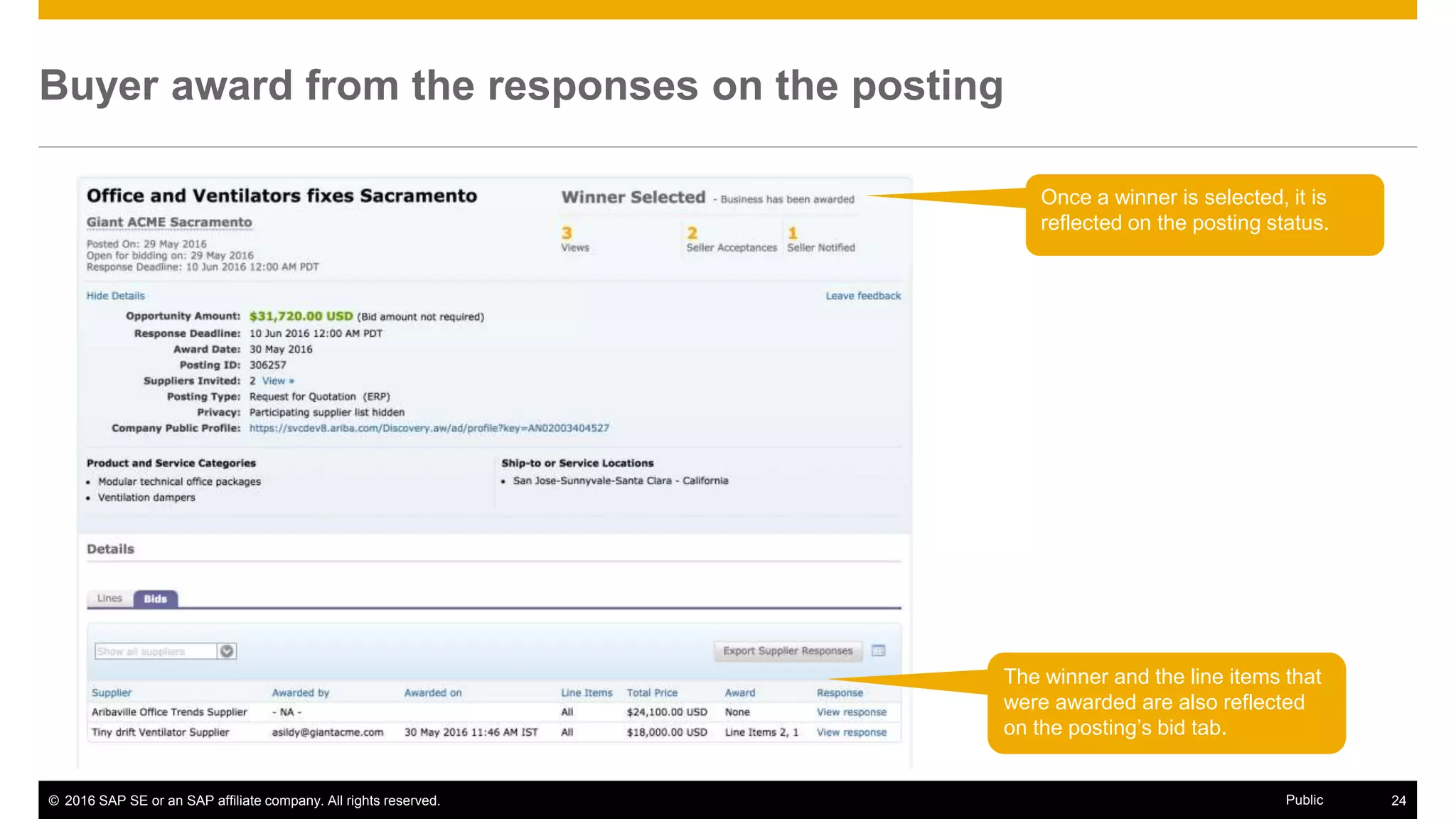
Buyer award from the responses on the posting
Once a winner is selected, it is
reflected on the posting status.
The winner and the line items that
were awarded are also reflected
on the posting’s bid tab.
© 2016 SAP SE or an SAP affiliate company. All rights reserved. 25Public
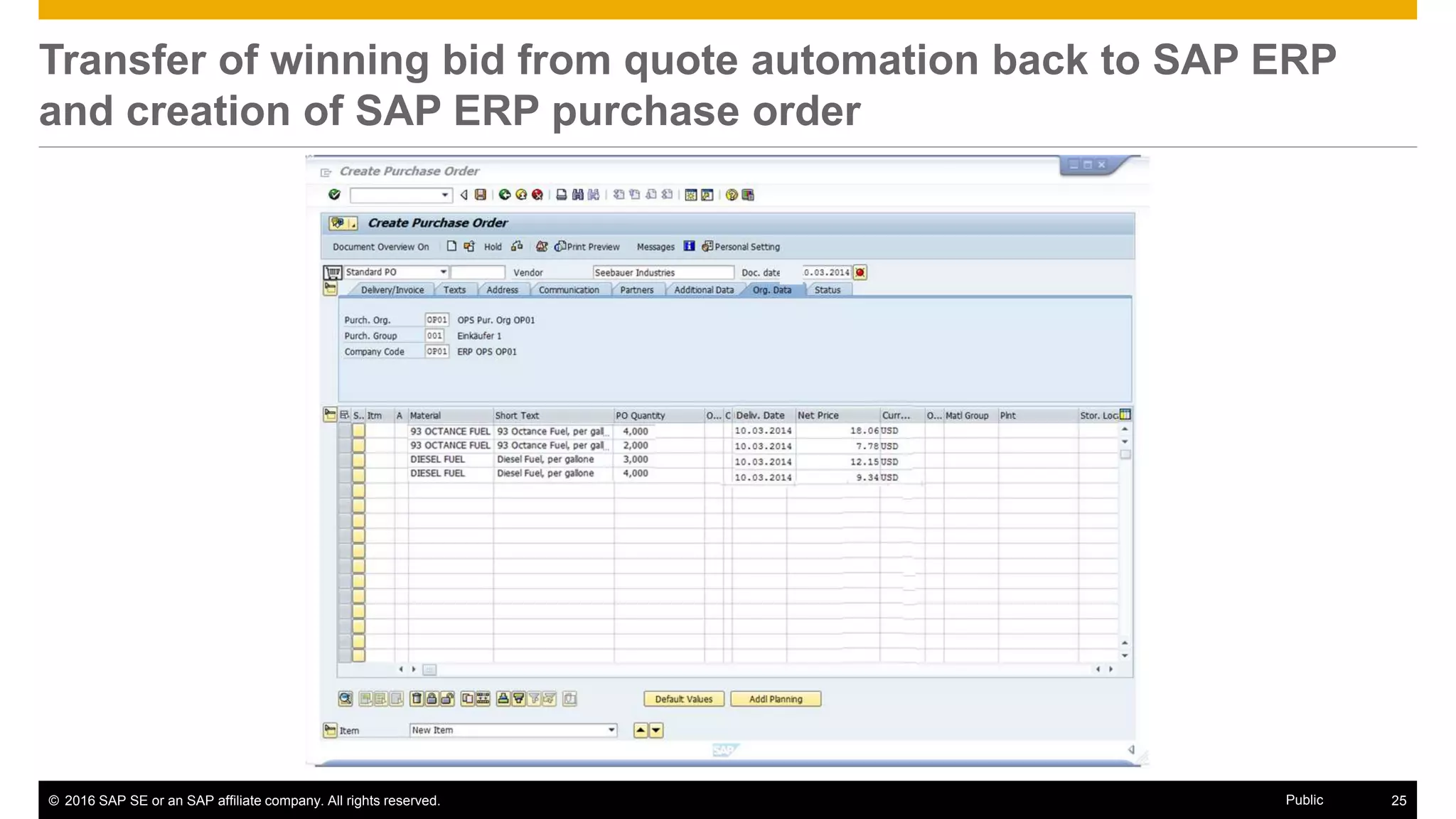
Transfer of winning bid from quote automation back to SAP ERP
and creation of SAP ERP purchase order
© 2016 SAP SE or an SAP affiliate company. All rights reserved. 26Public
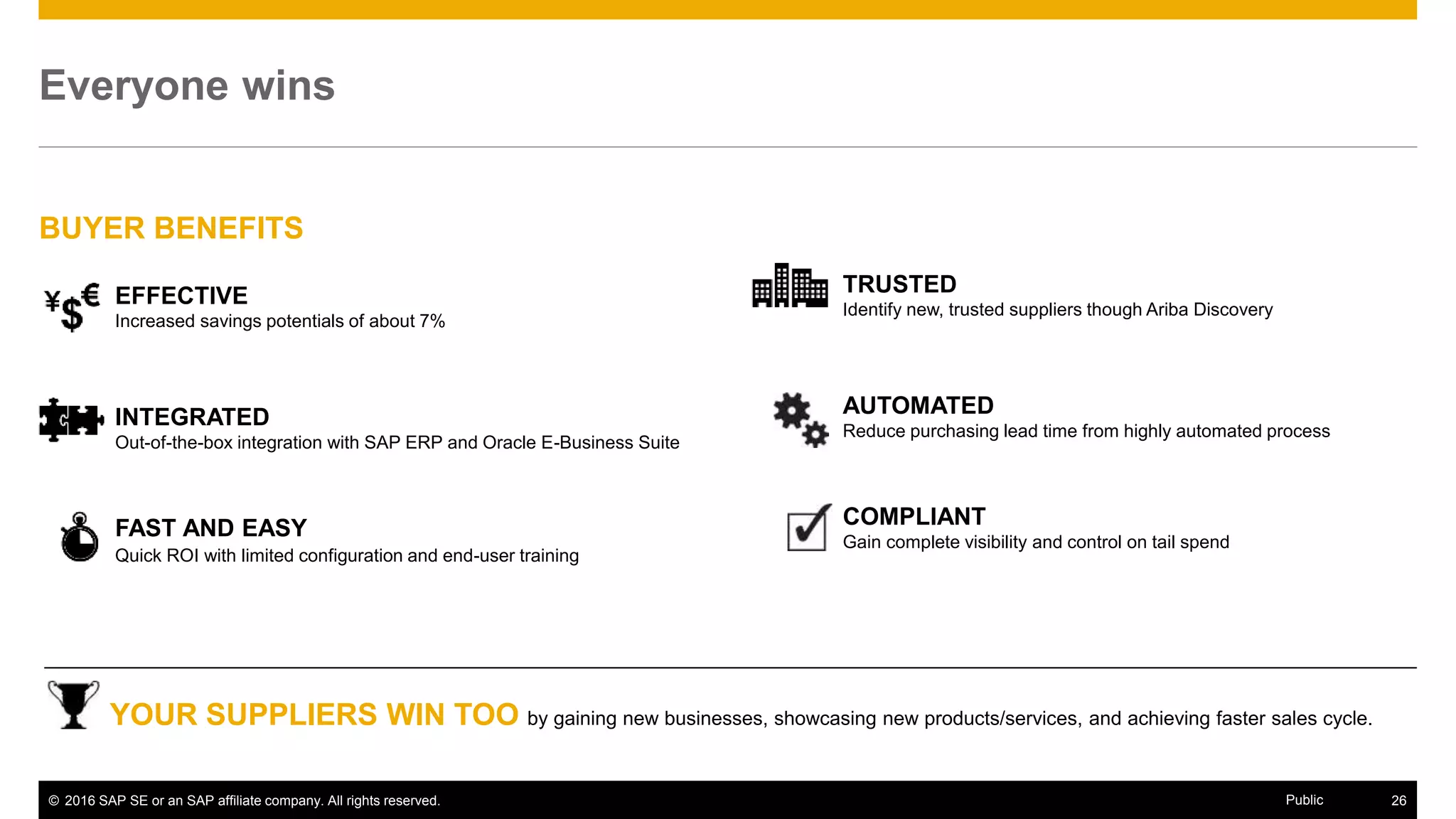
FAST AND EASY
Quick ROI with limited configuration and end-user training
TRUSTED
Identify new, trusted suppliers though Ariba Discovery
EFFECTIVE
Increased savings potentials of about 7%
Everyone wins
COMPLIANT
Gain complete visibility and control on tail spend
INTEGRATED
Out-of-the-box integration with SAP ERP and Oracle E-Business Suite
AUTOMATED
Reduce purchasing lead time from highly automated process
BUYER BENEFITS
YOUR SUPPLIERS WIN TOO by gaining new businesses, showcasing new products/services, and achieving faster sales cycle.
© 2016 SAP SE or an SAP affiliate company. All rights reserved. 27Public
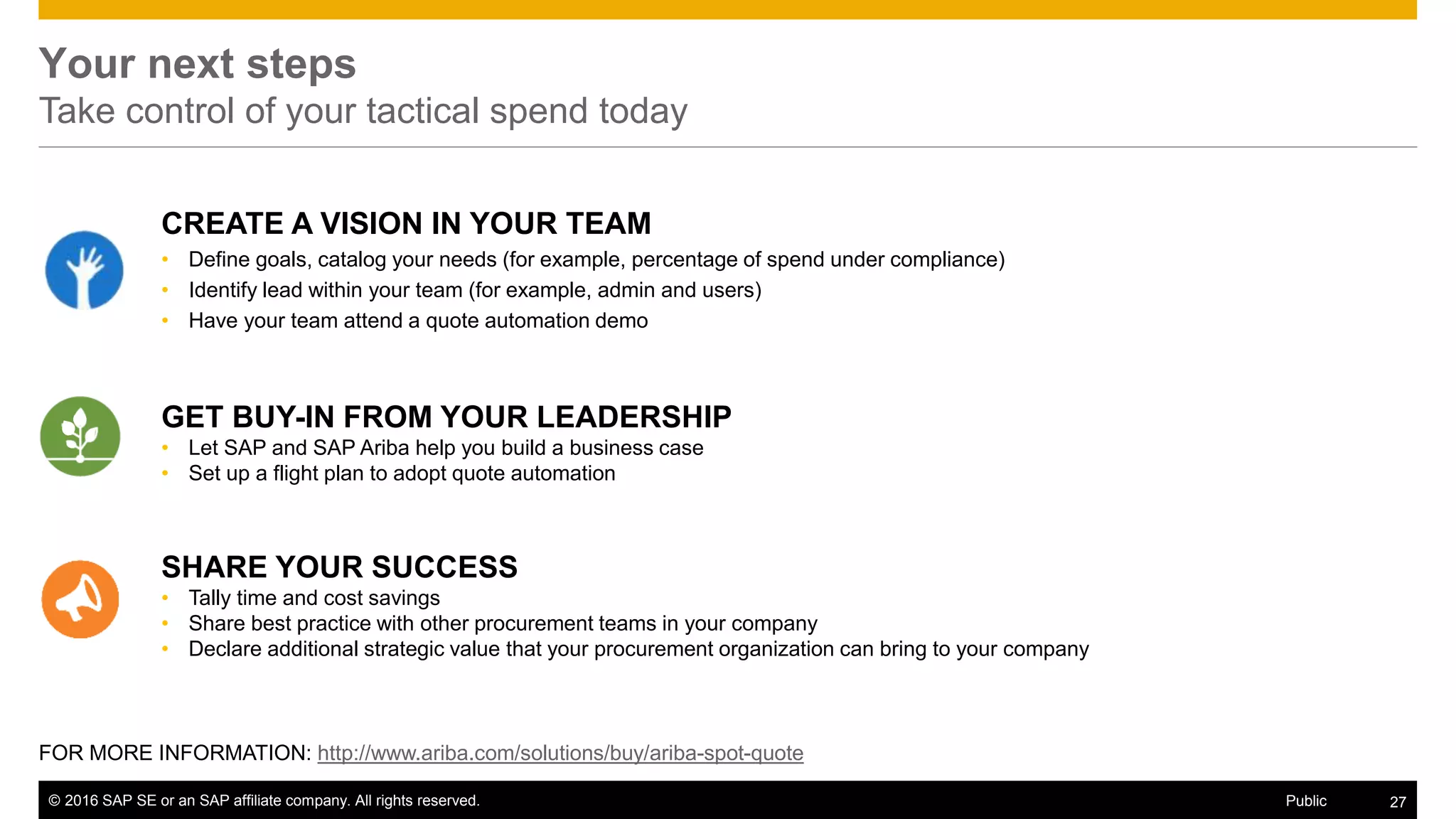
Your next steps
Take control of your tactical spend today
GET BUY-IN FROM YOUR LEADERSHIP
• Let SAP and SAP Ariba help you build a business case
• Set up a flight plan to adopt quote automation
SHARE YOUR SUCCESS
• Tally time and cost savings
• Share best practice with other procurement teams in your company
• Declare additional strategic value that your procurement organization can bring to your company
CREATE A VISION IN YOUR TEAM
• Define goals, catalog your needs (for example, percentage of spend under compliance)
• Identify lead within your team (for example, admin and users)
• Have your team attend a quote automation demo
27© 2016 SAP SE or an SAP affiliate company. All rights reserved. Public
FOR MORE INFORMATION: http://www.ariba.com/solutions/buy/ariba-spot-quote
Thank you
Contact information:
Sajal Agarwal
Director, Product Marketing
sajal.agarwal@sap.com
#SAPAribaLive
© 2016 SAP SE or an SAP affiliate company. All rights reserved. 29Public
Appendix
Business and Integration Process Flows
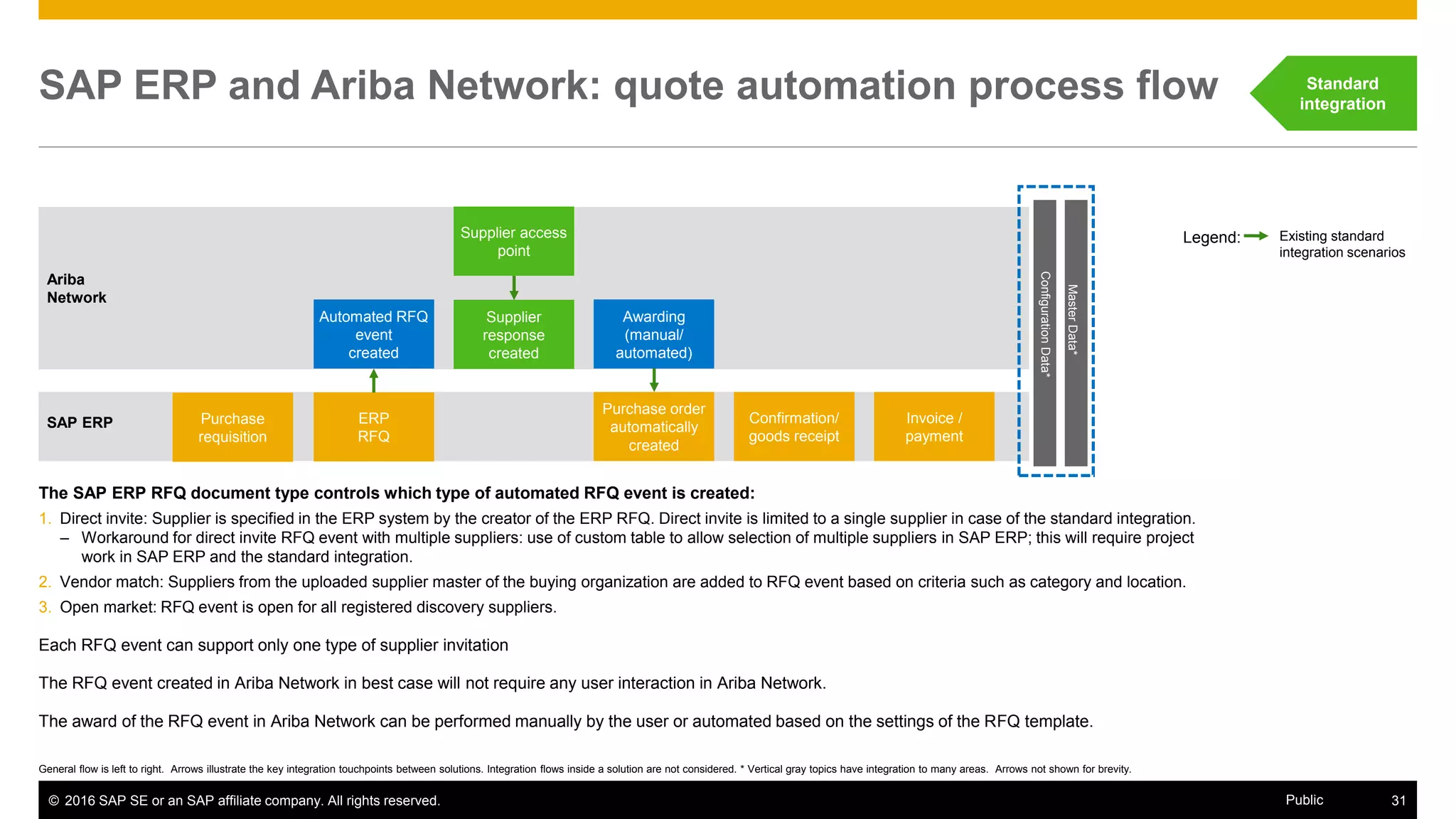
© 2016 SAP SE or an SAP affiliate company. All rights reserved. 31Public
Ariba
Network
Purchase order
automatically
created
Confirmation/
goods receipt
Supplier access
point
Automated RFQ
event
created
Invoice /
payment
Purchase
requisition
ERP
RFQ
Legend: Existing standard
integration scenarios
SAP ERP and Ariba Network: quote automation process flow
General flow is left to right. Arrows illustrate the key integration touchpoints between solutions. Integration flows inside a solution are not considered. * Vertical gray topics have integration to many areas. Arrows not shown for brevity.
SAP ERP
MasterData*
ConfigurationData*
Supplier
response
created
Awarding
(manual/
automated)
Standard
integration
The SAP ERP RFQ document type controls which type of automated RFQ event is created:
1. Direct invite: Supplier is specified in the ERP system by the creator of the ERP RFQ. Direct invite is limited to a single supplier in case of the standard integration.
– Workaround for direct invite RFQ event with multiple suppliers: use of custom table to allow selection of multiple suppliers in SAP ERP; this will require project
work in SAP ERP and the standard integration.
2. Vendor match: Suppliers from the uploaded supplier master of the buying organization are added to RFQ event based on criteria such as category and location.
3. Open market: RFQ event is open for all registered discovery suppliers.
Each RFQ event can support only one type of supplier invitation
The RFQ event created in Ariba Network in best case will not require any user interaction in Ariba Network.
The award of the RFQ event in Ariba Network can be performed manually by the user or automated based on the settings of the RFQ template.
© 2016 SAP SE or an SAP affiliate company. All rights reserved. 32Public
Quote automation connectivity options
Suppliers
Buyer
Quote automation
SAP Process
Integration
Add-on SAP Process
Integration
SAP adapter
SAP adapter
Oracle Fusion
Middleware
Oracle
adapter
Hubspan
Open adapter
Bundled
services
Customer
adapter
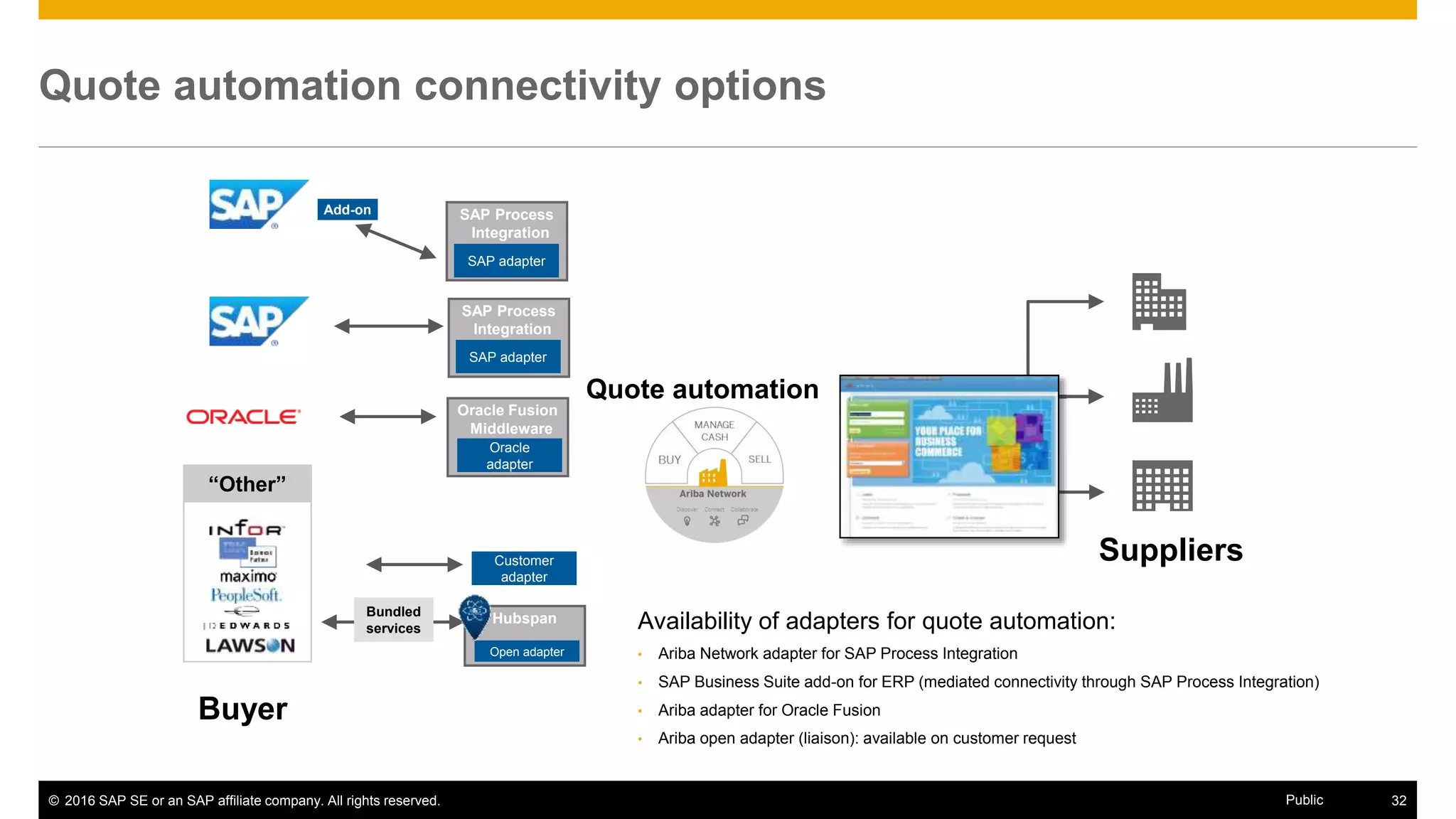
Availability of adapters for quote automation:
• Ariba Network adapter for SAP Process Integration
• SAP Business Suite add-on for ERP (mediated connectivity through SAP Process Integration)
• Ariba adapter for Oracle Fusion
• Ariba open adapter (liaison): available on customer request
“Other”

Quote Automation: Faster Supplier Identification and Bid Execution for Your Procurement Needs

  • 1.
    Sajal Agarwal, August31, 2016 Quote Automation: Faster Supplier Identification and Bid Execution for Your Procurement Needs Public
  • 2.
    © 2016 SAPSE or an SAP affiliate company. All rights reserved. 2Public Tale of the hybrid tactical spend H y b r i d t a c t i c a l s p e n d Strategic • 80% spend with 20% suppliers • Planned, recurring • Category managers • RFx and auctions • Long lead time Tactical • 20% spend with 80% suppliers • Business buying demand, mid-to- low-dollar items • Three-bids-and-a- buy • Moderate lead time Hybrid tactical spend • Both strategic and tactical • Short lead time, mid-dollar amount • Up to 30% of spend • Executed by employees or procurement professionals 20% 40% 60% 80% 100% $ $$ $$$ S U P P L I E R S 1. “Spot Buy Software: A Modern Approach to Managing Tail Spend,” The Hackett Group, April 2016. 2. “Using Technology to Streamline Tactical Sourcing,” The Hackett Group, April 2013. • Long purchasing lead time • Higher operating cost • Reduced compliance and control • Long tail of lower-quality, one-off suppliers The spend is often neglected or placed on autopilot1,2 Yet 7% of savings can be achieved by world-class spend management1 $$$$
  • 3.
    © 2016 SAPSE or an SAP affiliate company. All rights reserved. 3Public • Moderate spend amount (€5,000 to €1 million per project) • Low complexity, short cycle time • Often nonrepetitive rush orders that require quick turnaround • Typically in undermanaged, underserved categories • Often starts in an ERP system by a nonprocurement buyer, after discovering that needed item/service is unavailable in company catalog • Buyers generally lack effective methods to source these categories Common characteristics Examples of hybrid tactical spend Hybrid tactical spend One-time buy Low-spend amount/ low- complexity buy Emergency buy Unmanaged categories
  • 4.
    © 2016 SAPSE or an SAP affiliate company. All rights reserved. 4Public Both buyers and suppliers need an effective tool • Unable to meet quick turnaround time • Difficult to compare quotes across huge vendor master • Difficult to find new suppliers to comply with “three-bids-and-a-buy” policy • Difficult to execute repeat buys in fluctuating markets with high vendor turnover • Lack of visibility into unmanaged spend • Difficult to get a foot in the door for new businesses or geographies • Difficult to showcase new products/services • Lack of access and visibility to gain repeat business • Difficult to manage bids through manual processes • Lack of information and fairness to bid for opportunities Buyer challenges Supplier challenges
  • 5.
    © 2016 SAPSE or an SAP affiliate company. All rights reserved. 5Public Quote automation • RFQ automation tool for faster supplier identification and bid execution • Seamless process joining ERP and Ariba Network together • Discover known or new suppliers for noncontracted buying • Automated with buyer-defined rules to ensure compliance Introducing quote automation from SAP and SAP Ariba Quote. Respond. Award Suppliers • Incumbent supplier • Vendor master suppliers • Ariba Network open market suppliers Buyers • MRO buyers • Procurement agents • Plant managers “I’m looking for…” “I can offer that!” “Perfect match!” Buyer benefits • Improved transactional efficiency • Increased savings • Discovery of new or better suppliers • Quick ROI • Robust, out-of-the-box integration Supplier benefits • Find relevant buyers easily • Reduce sales cycle time • Discover new business opportunities • Gain repeat business • Use single interface to manage all bids
  • 6.
    © 2016 SAPSE or an SAP affiliate company. All rights reserved. 6Public Find suppliers for every need Powered by Ariba Network matching capability during quote automation process Driving compliance (Three-bids-and-buy) Unanticipated rush orders Secondary sources Low-cost country sourcing Specialized requirements New commodity Find qualified suppliers fast for stock-out, quality problems, or other unexpected needs Find quick replacement for markets with quick turnover Meet compliance in lower-priority commodities outside strategic sourcing coverage Meet supplier diversity or customized product requirements Find necessary expertise to launch new products or services or enter new markets Keep costs low to enhance margin ASAP! Send Automated RFQ
  • 7.
    © 2016 SAPSE or an SAP affiliate company. All rights reserved. 7Public 2 MILLION+ SUPPLIERS Find suppliers for every need Powered by Ariba Network matching capability during quote automation process Manufacturing and machinery Other Electronics IT and telecommunications Vehicles and transportation Business services Construction and engineering Textiles 5% 5% 7% 8% 18% 19%24% 14% Leading supplier categories
  • 8.
  • 9.
    © 2016 SAPSE or an SAP affiliate company. All rights reserved. 9Public Quote automation process overview SuppliersBuyer RFQ in ERP creates quote automation event in Ariba Network 1 Create PO out of awarded supplier response 4 2 Automated RFQ notification sent to suppliers 3 Supplier creates and submits bids “Other” Supplier identification and bid execution in four easy steps
  • 10.
    © 2016 SAPSE or an SAP affiliate company. All rights reserved. 10Public Step 1: Create purchase requisition (PR) and RFQ in ERP SuppliersBuyer RFQ in ERP creates quote automation event in Ariba Network 1 “Other”
  • 11.
    © 2016 SAPSE or an SAP affiliate company. All rights reserved. 11Public Creation of ERP PR
  • 12.
    © 2016 SAPSE or an SAP affiliate company. All rights reserved. 12Public Creation of ERP RFQ
  • 13.
    © 2016 SAPSE or an SAP affiliate company. All rights reserved. 13Public Step 2: Notification of suppliers SuppliersBuyer RFQ in ERP creates quote automation event in Ariba Network 1 “Other” 2 Automated RFQ notification sent to suppliers
  • 14.
    © 2016 SAPSE or an SAP affiliate company. All rights reserved. 14Public Supplier notification of automated RFQ event via e-mail Ariba Discovery Dear Ariba Discovery Seller, Congratulations! You have been invited to participate in an RFQ event. This is a great opportunity to connect with the buyer and potentially win new business. Review the details of this lead and indicate your desire to participate in Ariba Discovery by clicking the View Lead button below.
  • 15.
    © 2016 SAPSE or an SAP affiliate company. All rights reserved. 15Public Step 3: Supplier submits response SuppliersBuyer RFQ in ERP creates quote automation event in Ariba Network 1 2 Automated RFQ notification sent to suppliers 3 Supplier creates and submits bids “Other”
  • 16.
    © 2016 SAPSE or an SAP affiliate company. All rights reserved. 16Public Supplier view: Ariba Discovery automated RFQ overview
  • 17.
    © 2016 SAPSE or an SAP affiliate company. All rights reserved. 17Public Supplier clicks “Quote All” to create response
  • 18.
    © 2016 SAPSE or an SAP affiliate company. All rights reserved. 18Public Supplier enters its bids and clicks on “Submit”
  • 19.
    © 2016 SAPSE or an SAP affiliate company. All rights reserved. 19Public Quoted items are marked at the line item level Line items that are quoted are marked as such. The seller’s most current bid is highlighted while the buyer’s expected price is crossed out.
  • 20.
    © 2016 SAPSE or an SAP affiliate company. All rights reserved. 20Public Suppliers can view their bid history They can view all bids placed by users in their organizations. Clicking on “View” will bring up their responses to this quote request.
  • 21.
    © 2016 SAPSE or an SAP affiliate company. All rights reserved. 21Public Step 4: Buyer award SuppliersBuyer RFQ in ERP creates quote automation event in Ariba Network 1 Create PO out of awarded supplier response 4 2 Automated RFQ notification sent to suppliers 3 Supplier creates and submits bids “Other”
  • 22.
    © 2016 SAPSE or an SAP affiliate company. All rights reserved. 22Public Buyer views the responses on the posting Buyers can view all bids for the event. Buyers can close an event before the end date if they feel they have enough responses to make pick a winner.
  • 23.
    © 2016 SAPSE or an SAP affiliate company. All rights reserved. 23Public Buyer award from the responses on the posting Buyers can split the award among suppliers or pick one winner for the complete RFQ.
  • 24.
    © 2016 SAPSE or an SAP affiliate company. All rights reserved. 24Public Buyer award from the responses on the posting Once a winner is selected, it is reflected on the posting status. The winner and the line items that were awarded are also reflected on the posting’s bid tab.
  • 25.
    © 2016 SAPSE or an SAP affiliate company. All rights reserved. 25Public Transfer of winning bid from quote automation back to SAP ERP and creation of SAP ERP purchase order
  • 26.
    © 2016 SAPSE or an SAP affiliate company. All rights reserved. 26Public FAST AND EASY Quick ROI with limited configuration and end-user training TRUSTED Identify new, trusted suppliers though Ariba Discovery EFFECTIVE Increased savings potentials of about 7% Everyone wins COMPLIANT Gain complete visibility and control on tail spend INTEGRATED Out-of-the-box integration with SAP ERP and Oracle E-Business Suite AUTOMATED Reduce purchasing lead time from highly automated process BUYER BENEFITS YOUR SUPPLIERS WIN TOO by gaining new businesses, showcasing new products/services, and achieving faster sales cycle.
  • 27.
    © 2016 SAPSE or an SAP affiliate company. All rights reserved. 27Public Your next steps Take control of your tactical spend today GET BUY-IN FROM YOUR LEADERSHIP • Let SAP and SAP Ariba help you build a business case • Set up a flight plan to adopt quote automation SHARE YOUR SUCCESS • Tally time and cost savings • Share best practice with other procurement teams in your company • Declare additional strategic value that your procurement organization can bring to your company CREATE A VISION IN YOUR TEAM • Define goals, catalog your needs (for example, percentage of spend under compliance) • Identify lead within your team (for example, admin and users) • Have your team attend a quote automation demo 27© 2016 SAP SE or an SAP affiliate company. All rights reserved. Public FOR MORE INFORMATION: http://www.ariba.com/solutions/buy/ariba-spot-quote
  • 28.
    Thank you Contact information: SajalAgarwal Director, Product Marketing sajal.agarwal@sap.com #SAPAribaLive
  • 29.
    © 2016 SAPSE or an SAP affiliate company. All rights reserved. 29Public Appendix
  • 30.
  • 31.
    © 2016 SAPSE or an SAP affiliate company. All rights reserved. 31Public Ariba Network Purchase order automatically created Confirmation/ goods receipt Supplier access point Automated RFQ event created Invoice / payment Purchase requisition ERP RFQ Legend: Existing standard integration scenarios SAP ERP and Ariba Network: quote automation process flow General flow is left to right. Arrows illustrate the key integration touchpoints between solutions. Integration flows inside a solution are not considered. * Vertical gray topics have integration to many areas. Arrows not shown for brevity. SAP ERP MasterData* ConfigurationData* Supplier response created Awarding (manual/ automated) Standard integration The SAP ERP RFQ document type controls which type of automated RFQ event is created: 1. Direct invite: Supplier is specified in the ERP system by the creator of the ERP RFQ. Direct invite is limited to a single supplier in case of the standard integration. – Workaround for direct invite RFQ event with multiple suppliers: use of custom table to allow selection of multiple suppliers in SAP ERP; this will require project work in SAP ERP and the standard integration. 2. Vendor match: Suppliers from the uploaded supplier master of the buying organization are added to RFQ event based on criteria such as category and location. 3. Open market: RFQ event is open for all registered discovery suppliers. Each RFQ event can support only one type of supplier invitation The RFQ event created in Ariba Network in best case will not require any user interaction in Ariba Network. The award of the RFQ event in Ariba Network can be performed manually by the user or automated based on the settings of the RFQ template.
  • 32.
    © 2016 SAPSE or an SAP affiliate company. All rights reserved. 32Public Quote automation connectivity options Suppliers Buyer Quote automation SAP Process Integration Add-on SAP Process Integration SAP adapter SAP adapter Oracle Fusion Middleware Oracle adapter Hubspan Open adapter Bundled services Customer adapter Availability of adapters for quote automation: • Ariba Network adapter for SAP Process Integration • SAP Business Suite add-on for ERP (mediated connectivity through SAP Process Integration) • Ariba adapter for Oracle Fusion • Ariba open adapter (liaison): available on customer request “Other”