Introduction.
Operations on Queue.
Array representation of Queue.
Type of Queue
Circular Queue.
Applications of Queue.
A data structure is a particular way of
organizing data in a computer so that it can
be used efficiently.
Different kind of data structure suits for
the different kind of applications.
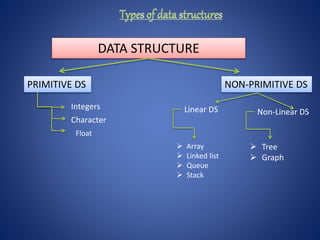
DATA STRUCTURE
PRIMITIVE DS NON-PRIMITIVE DS
Integers
Character
Float
Linear DS Non-Linear DS
 Tree
 Graph
 Array
 Linked list
 Queue
 Stack
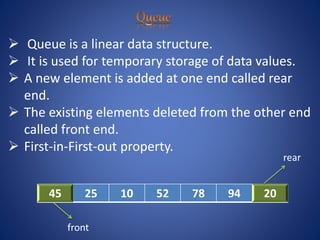
 Queue is a linear data structure.
 It is used for temporary storage of data values.
 A new element is added at one end called rear
end.
 The existing elements deleted from the other end
called front end.
 First-in-First-out property.
45 25 10 52 78 94 20
front
rear
1.Insertion :
Placing an item in a queue is called “insertion
or enqueue”, which is done at the end of the
queue called “rear”.
2.Deletion :
Removing an item from a queue is called
“deletion or dequeue” , which is done at the
other end of the queue called “front”.
12 9 7 18 5
A[0] A[1] A[2] A[3] A[5] A[6]
Queue
rearfront
12 9 7 18 5 14
9 7 18 5 14
Queue after insertion of new element rearfront
Queue after deletion of an element
rearfront
Algorithm:- enqueue
Input:-queue[Max],FRONT,REAR,VALUE
Output:-queue of elements
Begin:-
STEP:1- IF REAR= MAX-1
Print “Queue is OVERFLOW”
Return.
STEP:2- If (FRONT=-1)
FRONT=FRONT+1
STEP:3- REAR = REAR+1
queue[REAR] = VALUE
STEP:4- END.
INITIALLY
REAR = -1
FRONT =-1
Algorithm:- de_queue
Input:- queue[MAX],REAR,FRONT
Output:-deleted data ITEM
Begin:-
Step:1-If (REAR=-1)
Print “Queue is UNDERFLOW”
Return.
Step:2-ITEM=queue[FRONT]
Step:3-If (REAR=FRONT)
{
REAR=FRONT=-1
}
Else
FRONT=FRONT+1
Step:4- print deleted data ITEM
END.
Circular Queue
INTRODUCTION
 Circular queue are used to remove
the drawback of LINEAR queue.
 Last element of the queue is
connected back with first element of
the queue.
 It is also called as “Ring buffer”.
STEP-1 If FRONT = (REAR+1)%MAX
write OVERFLOW
go to step 4
STEP-2 If (REAR=FRONT = -1)
{
REAR = FRONT = +1
}
Else
REAR = (REAR +1)%MAX
STEP-3 CQ[REAR] = NUM
STEP-4 EXIT
STEP-1 If FRONT = -1
write UNDERFLOW
go to step 3
STEP-2 ITEM =c_queue[FRONT]
STEP-3 If (FRONT = REAR)
{
FRONT = REAR= -1
}
Else{
FRONT = (FRONT +1)%MAX
}
STEP-3 EXIT
 Real world applications
 Cashier line in any store.
 Waiting on hold for tech support.
 people on an escalator.
 Checkout at any book store.
“TO MAKE AN END IS TO
MAKE A beginning”.
END OF PRESENTATION
 Thank you for your kind attention.

Queue

  • 2.
    Introduction. Operations on Queue. Arrayrepresentation of Queue. Type of Queue Circular Queue. Applications of Queue.
  • 3.
    A data structureis a particular way of organizing data in a computer so that it can be used efficiently. Different kind of data structure suits for the different kind of applications.
  • 4.
    DATA STRUCTURE PRIMITIVE DSNON-PRIMITIVE DS Integers Character Float Linear DS Non-Linear DS  Tree  Graph  Array  Linked list  Queue  Stack
  • 5.
     Queue isa linear data structure.  It is used for temporary storage of data values.  A new element is added at one end called rear end.  The existing elements deleted from the other end called front end.  First-in-First-out property. 45 25 10 52 78 94 20 front rear
  • 6.
    1.Insertion : Placing anitem in a queue is called “insertion or enqueue”, which is done at the end of the queue called “rear”.
  • 7.
    2.Deletion : Removing anitem from a queue is called “deletion or dequeue” , which is done at the other end of the queue called “front”.
  • 8.
    12 9 718 5 A[0] A[1] A[2] A[3] A[5] A[6] Queue rearfront 12 9 7 18 5 14 9 7 18 5 14 Queue after insertion of new element rearfront Queue after deletion of an element rearfront
  • 9.
    Algorithm:- enqueue Input:-queue[Max],FRONT,REAR,VALUE Output:-queue ofelements Begin:- STEP:1- IF REAR= MAX-1 Print “Queue is OVERFLOW” Return. STEP:2- If (FRONT=-1) FRONT=FRONT+1 STEP:3- REAR = REAR+1 queue[REAR] = VALUE STEP:4- END. INITIALLY REAR = -1 FRONT =-1
  • 10.
    Algorithm:- de_queue Input:- queue[MAX],REAR,FRONT Output:-deleteddata ITEM Begin:- Step:1-If (REAR=-1) Print “Queue is UNDERFLOW” Return. Step:2-ITEM=queue[FRONT] Step:3-If (REAR=FRONT) { REAR=FRONT=-1 } Else FRONT=FRONT+1 Step:4- print deleted data ITEM END.
  • 11.
    Circular Queue INTRODUCTION  Circularqueue are used to remove the drawback of LINEAR queue.  Last element of the queue is connected back with first element of the queue.  It is also called as “Ring buffer”.
  • 12.
    STEP-1 If FRONT= (REAR+1)%MAX write OVERFLOW go to step 4 STEP-2 If (REAR=FRONT = -1) { REAR = FRONT = +1 } Else REAR = (REAR +1)%MAX STEP-3 CQ[REAR] = NUM STEP-4 EXIT
  • 13.
    STEP-1 If FRONT= -1 write UNDERFLOW go to step 3 STEP-2 ITEM =c_queue[FRONT] STEP-3 If (FRONT = REAR) { FRONT = REAR= -1 } Else{ FRONT = (FRONT +1)%MAX } STEP-3 EXIT
  • 14.
     Real worldapplications  Cashier line in any store.  Waiting on hold for tech support.  people on an escalator.  Checkout at any book store.
  • 15.
    “TO MAKE ANEND IS TO MAKE A beginning”. END OF PRESENTATION  Thank you for your kind attention.