Queue
6-2
Introduction
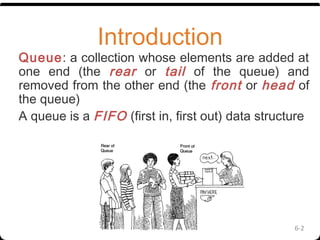
Queue: a collection whose elements are added at
one end (the rear or tail of the queue) and
removed from the other end (the front or head of
the queue)
A queue is a FIFO (first in, first out) data structure
6-3
Conceptual View of a
Queue
Front of queue
Adding an element
New element is added to
the rear of the queue
6-4
Conceptual View of a
QueueRemoving an element
Element is removed from
the front of the queue
Components of Queue
• Front is a variable which refers to first position in
queue.
• Rear is a variable which refers to last position in
queue.
MaxQueue is variable that
describes
maximum number of elements in a queue.
6-6
Uses of Queues in Computing
For any kind of problem involving FIFO data
Printer queue
Keyboard input buffer
Queue Operation
Two basic operations are associated with queue:
1.“Insert” operation is used to insert an element into a
queue. (From the rear)
2. 2. “Delete” operation is used to delete an element
from a queue. (From the Front)
Steps in Insertion operation:
•Queue can be added when it’s not full
•If queue is empty then front and rear is added
by 1. For the contrary, rear is added by 1.
Insertion Operation
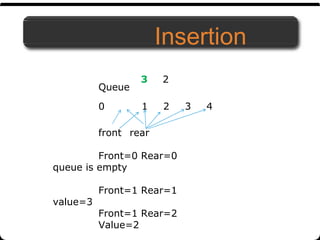
Insertion
front rear
Front=0 Rear=0
queue is empty
Front=1 Rear=1
value=3
Front=1 Rear=2
Value=2
Queue
0 1 2 3 4
3 2
Algorithm of Insertion
Algorithm-Insertion
Write an algorithm to add an “item“ in a queue ‘Q’.
1.IF R=N THEN
Print “Overflow”
Return
Else
R=R+1 [End of IF Structure]
2.[Insert Item]
Q[R]=“item”
IF F=0 THEN
F=1
END IF
Steps in deletion operation:
•Queue of element can be deleted when its
elements is not empty.
•When the element is deleted from the queue
then subtract the rear pointer with 1.
Deletion
Algorithm for deletion
Algorithm-Insertion
Write an algorithm to add an “item” in a queue.
Step 1: If FRONT = 0 then
Write “Queue is Underflow”           
Step 2: Delete QUEUE [FRONT]
Step 3: If FRONT = REAR then
FRONT = 0           
REAR = 0           
Else           
FRONT = FRONT + 1           
Step 4: Exit
3
Figure: Circular Queue having
Rear = 5 and Front = 0
Drawback of Linear Queue
•Once the queue is full, even though few elements from the front are deleted and
some occupied space is relieved, it is not possible to add anymore new elements,
as the rear has already reached the Queue’s rear most position.
Circular Queue
•This queue is not linear but circular.
•Its structure can be like the following figure:
•In circular queue, once the Queue is full the
"First" element of the Queue becomes the
"Rear" most element, if and only if the "Front"
has moved forward. otherwise it will again be
a "Queue overflow" state.
Example: Consider the following circular queue with N = 5.
1. Initially, Rear = 0, Front =
0.
3. Insert 50, Rear = 2, Front = 1.
Rear
14
Rear
2. Insert 10, Rear = 1, Front = 1.
Rear Front
Front
4. Insert 20, Rear = 3, Front = 1.
Front
Rear
5. Insert 70, Rear = 4, Front = 1.
Front
Rear
6. Delete front, Rear = 4,
Front = 2.
Front
7. Insert 100, Rear = 5, Front = 2.
9. Insert 140, Rear = 1, Front = 2.
As Front = Rear + 1, so Queue overflow.
Front
Rear
8. Insert 40, Rear = 1, Front =
2.
Rear Front
Rear
10. Delete front, Rear = 1, Front = 3.
Rear
Front
Front
11. Delete
front, Rear =
1, Front = 4.
Rear
15
Front
12. Delete front, Rear = 1,
Front = 5.
Rear
Front
Algorithm Insertion For Circular Queue
Algorithm-insertioncq
The algorithm inserts an element X into queue ‘Q’ having N elements. F and R
represent the pointers to the front and Rear element of the queue.
1.[Check Overflow]
IF (F=1 and R=N ) or (F=R+1)THEN
Print “Overflow”
Return [End of IF Structrue]
2.IF (F=0 and R=0) THEN
F=1
R=1
Else IF R=N THEN
R=1
Else R=R+1 [End of IF Structure]
Q[R]=X [Insert Element X]
3. Exit
Algorithm Deletion For Circular Queue
Algorithm-Deletioncq
The algorithm delete an element X into queue ‘Q’ having N
elements. F and R represent the pointers to the front and Rear
element of the queue.
1.[Check whether or not The Queue is empty]
IF F=0 THEN
Print “Queue is Empty”
Return [End of IF Structrue]
2. [Delete Element]
Delete Q[F]
3. IF F=R THEN
F=R=0
Else IF F=N THEN
F=1
Else F=F+1 [End of IF Structure]
3. Exit
Double Ended Queue
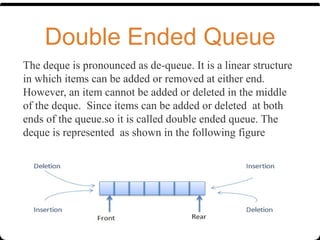
The deque is pronounced as de-queue. It is a linear structure
in which items can be added or removed at either end.
However, an item cannot be added or deleted in the middle
of the deque. Since items can be added or deleted at both
ends of the queue.so it is called double ended queue. The
deque is represented as shown in the following figure
Types of Deque
There are two types of deque depending upon the restriction
to perform insertion or deletion operations at the two ends.
1. Input restricted deque
An input restricted deque is a deque, which allows
insertion at only 1 end, rear end, but allows deletion at
both ends, rear and front end of the lists
2. Output restricted deque
An output-restricted deque is a deque, which
allows deletion at only one end, front end, but allows
insertion at both ends, rear and front ends, of the lists.
The possible operation performed on
deque
1.Add an element at the rear end
2.Add an element at the front end
3. Delete an element from the front end
4. Delete an element from the rear end
Only 1st
, 3rd
and 4th
operations are performed by input-restricted
deque
1st, 2nd
and 3rd
operations are performed by output-restricted
deque.
20
Algorithm For insertion at rear end in Deque
Algorithm-insertiondq
The algorithm is used to inserts an element “item” into queue ‘DQ’ having N
elements. F and R represent the pointers to the front and Rear element of the
queue.
1.[Check Overflow]
IF F=1 and R=N THEN
Print “Overflow”
Return [End of IF Structrue]
2.IF (F=0 and R=0) THEN
F=1
R=1
Else IF R=N THEN
R=1
Else R=R+1 [End of IF Structure]
DQ[R]=X [Insert Element X]
3. Exit
Algorithm For insertion at Front end in Deque
Algorithm-insertiondq
The algorithm is used to inserts an element “item” into queue ‘Q’ having N
elements from front end. F and R represent the pointers to the front and Rear
element of the queue.
1.[Check Overflow]
IF F=1 and R=N THEN
Print “Overflow”
Return [End of IF Structrue]
2.IF (F=0) THEN
F=1
R=1
Else IF (F=1) THEN
F=N
Else F=F-1 [End of IF Structure]
DQ[F]=X [Insert Element X]
3. Exit
Algorithm For deletion from Front end in Deque
Algorithm-deletiondqfront
The algorithm is used to inserts an element “item” into queue ‘DQ’ having N
elements from front end. F and R represent the pointers to the front and Rear
element of the queue.
1.[Check Overflow]
IF F=0 THEN
Print “underflow”
Return [End of IF Structrue]
2. Delete DQ[F]
3. IF (F=R) THEN
F=0
R=0
Else IF (F=N) THEN
F=1
Else F=F+1 [End of IF Structure]
3. Exit
Algorithm For deletion from rear end in Deque
Algorithm-deletiondqrear
The algorithm is used to inserts an element “item” into queue ‘DQ’ having N
elements from front end. F and R represent the pointers to the front and Rear
element of the queue.
1.[Check Overflow]
IF R=0 THEN
Print “underflow”
Return [End of IF Structrue]
2. Delete DQ[R]
3. IF (R=F) THEN
F=0
R=0
Else IF (R=1) THEN
R=N
Else R=R-1 [End of IF Structure]
3. Exit

Queue

  • 1.
  • 2.
    6-2 Introduction Queue: a collectionwhose elements are added at one end (the rear or tail of the queue) and removed from the other end (the front or head of the queue) A queue is a FIFO (first in, first out) data structure
  • 3.
    6-3 Conceptual View ofa Queue Front of queue Adding an element New element is added to the rear of the queue
  • 4.
    6-4 Conceptual View ofa QueueRemoving an element Element is removed from the front of the queue
  • 5.
    Components of Queue •Front is a variable which refers to first position in queue. • Rear is a variable which refers to last position in queue. MaxQueue is variable that describes maximum number of elements in a queue.
  • 6.
    6-6 Uses of Queuesin Computing For any kind of problem involving FIFO data Printer queue Keyboard input buffer
  • 7.
    Queue Operation Two basicoperations are associated with queue: 1.“Insert” operation is used to insert an element into a queue. (From the rear) 2. 2. “Delete” operation is used to delete an element from a queue. (From the Front)
  • 8.
    Steps in Insertionoperation: •Queue can be added when it’s not full •If queue is empty then front and rear is added by 1. For the contrary, rear is added by 1. Insertion Operation
  • 9.
    Insertion front rear Front=0 Rear=0 queueis empty Front=1 Rear=1 value=3 Front=1 Rear=2 Value=2 Queue 0 1 2 3 4 3 2
  • 10.
    Algorithm of Insertion Algorithm-Insertion Writean algorithm to add an “item“ in a queue ‘Q’. 1.IF R=N THEN Print “Overflow” Return Else R=R+1 [End of IF Structure] 2.[Insert Item] Q[R]=“item” IF F=0 THEN F=1 END IF
  • 11.
    Steps in deletionoperation: •Queue of element can be deleted when its elements is not empty. •When the element is deleted from the queue then subtract the rear pointer with 1. Deletion
  • 12.
    Algorithm for deletion Algorithm-Insertion Writean algorithm to add an “item” in a queue. Step 1: If FRONT = 0 then Write “Queue is Underflow”            Step 2: Delete QUEUE [FRONT] Step 3: If FRONT = REAR then FRONT = 0            REAR = 0            Else            FRONT = FRONT + 1            Step 4: Exit
  • 13.
    3 Figure: Circular Queuehaving Rear = 5 and Front = 0 Drawback of Linear Queue •Once the queue is full, even though few elements from the front are deleted and some occupied space is relieved, it is not possible to add anymore new elements, as the rear has already reached the Queue’s rear most position. Circular Queue •This queue is not linear but circular. •Its structure can be like the following figure: •In circular queue, once the Queue is full the "First" element of the Queue becomes the "Rear" most element, if and only if the "Front" has moved forward. otherwise it will again be a "Queue overflow" state.
  • 14.
    Example: Consider thefollowing circular queue with N = 5. 1. Initially, Rear = 0, Front = 0. 3. Insert 50, Rear = 2, Front = 1. Rear 14 Rear 2. Insert 10, Rear = 1, Front = 1. Rear Front Front 4. Insert 20, Rear = 3, Front = 1. Front Rear 5. Insert 70, Rear = 4, Front = 1. Front Rear 6. Delete front, Rear = 4, Front = 2. Front
  • 15.
    7. Insert 100,Rear = 5, Front = 2. 9. Insert 140, Rear = 1, Front = 2. As Front = Rear + 1, so Queue overflow. Front Rear 8. Insert 40, Rear = 1, Front = 2. Rear Front Rear 10. Delete front, Rear = 1, Front = 3. Rear Front Front 11. Delete front, Rear = 1, Front = 4. Rear 15 Front 12. Delete front, Rear = 1, Front = 5. Rear Front
  • 16.
    Algorithm Insertion ForCircular Queue Algorithm-insertioncq The algorithm inserts an element X into queue ‘Q’ having N elements. F and R represent the pointers to the front and Rear element of the queue. 1.[Check Overflow] IF (F=1 and R=N ) or (F=R+1)THEN Print “Overflow” Return [End of IF Structrue] 2.IF (F=0 and R=0) THEN F=1 R=1 Else IF R=N THEN R=1 Else R=R+1 [End of IF Structure] Q[R]=X [Insert Element X] 3. Exit
  • 17.
    Algorithm Deletion ForCircular Queue Algorithm-Deletioncq The algorithm delete an element X into queue ‘Q’ having N elements. F and R represent the pointers to the front and Rear element of the queue. 1.[Check whether or not The Queue is empty] IF F=0 THEN Print “Queue is Empty” Return [End of IF Structrue] 2. [Delete Element] Delete Q[F] 3. IF F=R THEN F=R=0 Else IF F=N THEN F=1 Else F=F+1 [End of IF Structure] 3. Exit
  • 18.
    Double Ended Queue Thedeque is pronounced as de-queue. It is a linear structure in which items can be added or removed at either end. However, an item cannot be added or deleted in the middle of the deque. Since items can be added or deleted at both ends of the queue.so it is called double ended queue. The deque is represented as shown in the following figure
  • 19.
    Types of Deque Thereare two types of deque depending upon the restriction to perform insertion or deletion operations at the two ends. 1. Input restricted deque An input restricted deque is a deque, which allows insertion at only 1 end, rear end, but allows deletion at both ends, rear and front end of the lists 2. Output restricted deque An output-restricted deque is a deque, which allows deletion at only one end, front end, but allows insertion at both ends, rear and front ends, of the lists.
  • 20.
    The possible operationperformed on deque 1.Add an element at the rear end 2.Add an element at the front end 3. Delete an element from the front end 4. Delete an element from the rear end Only 1st , 3rd and 4th operations are performed by input-restricted deque 1st, 2nd and 3rd operations are performed by output-restricted deque. 20
  • 21.
    Algorithm For insertionat rear end in Deque Algorithm-insertiondq The algorithm is used to inserts an element “item” into queue ‘DQ’ having N elements. F and R represent the pointers to the front and Rear element of the queue. 1.[Check Overflow] IF F=1 and R=N THEN Print “Overflow” Return [End of IF Structrue] 2.IF (F=0 and R=0) THEN F=1 R=1 Else IF R=N THEN R=1 Else R=R+1 [End of IF Structure] DQ[R]=X [Insert Element X] 3. Exit
  • 22.
    Algorithm For insertionat Front end in Deque Algorithm-insertiondq The algorithm is used to inserts an element “item” into queue ‘Q’ having N elements from front end. F and R represent the pointers to the front and Rear element of the queue. 1.[Check Overflow] IF F=1 and R=N THEN Print “Overflow” Return [End of IF Structrue] 2.IF (F=0) THEN F=1 R=1 Else IF (F=1) THEN F=N Else F=F-1 [End of IF Structure] DQ[F]=X [Insert Element X] 3. Exit
  • 23.
    Algorithm For deletionfrom Front end in Deque Algorithm-deletiondqfront The algorithm is used to inserts an element “item” into queue ‘DQ’ having N elements from front end. F and R represent the pointers to the front and Rear element of the queue. 1.[Check Overflow] IF F=0 THEN Print “underflow” Return [End of IF Structrue] 2. Delete DQ[F] 3. IF (F=R) THEN F=0 R=0 Else IF (F=N) THEN F=1 Else F=F+1 [End of IF Structure] 3. Exit
  • 24.
    Algorithm For deletionfrom rear end in Deque Algorithm-deletiondqrear The algorithm is used to inserts an element “item” into queue ‘DQ’ having N elements from front end. F and R represent the pointers to the front and Rear element of the queue. 1.[Check Overflow] IF R=0 THEN Print “underflow” Return [End of IF Structrue] 2. Delete DQ[R] 3. IF (R=F) THEN F=0 R=0 Else IF (R=1) THEN R=N Else R=R-1 [End of IF Structure] 3. Exit