Python DB API
Prepared By : Dhara Wagh
Outline
• Definition of Python DB-API
• Python supported databases
• Brief of MySQL
• Prerequisites
• How to connect python with MySQL DB
• Steps to setting up & method to execute MySQL in Python
• Execution of Demo Program
Definition of Python DB-API
• Python Database API (DB-API) is a standardized interface that enables
interactions between Python applications and relational databases.
• It serves as a specification for accessing various database systems in a
uniform manner from Python.
• Python DB-API facilitates essential operations, including connecting to
databases, executing SQL queries, and managing data.
Compatibility with various database
management systems
1. SQLite: A lightweight, self-contained, and serverless database engine.
2.MySQL: A popular open-source relational database management system.
3.PostgreSQL: A powerful, open-source object-relational database system known for its
robust features.
4.Oracle: A widely used enterprise-level relational database management system.
5.Microsoft SQL Server: A comprehensive and feature-rich database system developed
by Microsoft.
6.NoSQL Databases: Certain Python DB-API implementations extend support to
NoSQL databases like MongoDB, enabling interaction with non-tabular data models.
Brief introduction to MySQL
• MySQL is an open-source relational database management system
that is widely used for various applications, ranging from small-
scale to large-scale enterprises. It is known for its speed, reliability,
and ease of use, making it a popular choice for many developers
and organizations.
Prerequisites to work with Python and MySQL
1. Python: Ensure that you have Python installed on your system.
You can download the latest version of Python from the official
website: https://www.python.org/downloads/
2. MySQL Database: You need to have MySQL installed on your
machine or have access to a remote MySQL server. You can
download MySQL from the official website:
https://www.mysql.com/downloads/
Installing the required Python libraries
• To interact with MySQL in Python, you need to install the 'mysql-connector-python' library.
• Use the following command to install it: pip install mysql-connector-python
• Configuring MySQL connection parameters
• You need to specify the host, user, password, and database name to establish a connection
with MySQL.
• For example: Host: "localhost" (if the MySQL server is on the same machine)
User: "yourusername"
Password: "yourpassword"
Database: "yourdatabase"
How to connect python with MySQL DB
• The DB API provides a minimal standard for working with databases using
Python structures and syntax wherever possible. This API includes the
following −
• Importing the API module.
• Acquiring a connection with the database.
• Issuing SQL statements and execute .
• Closing the connection
Setting up MySQL in Python
• Installing and importing the required Python libraries
• Configuring MySQL connection parameters
• Demonstrating how to establish a connection
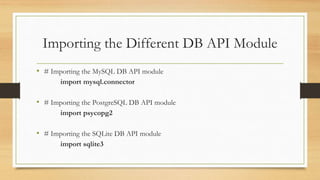
Importing the Different DB API Module
• # Importing the MySQL DB API module
import mysql.connector
• # Importing the PostgreSQL DB API module
import psycopg2
• # Importing the SQLite DB API module
import sqlite3
Connecting in Python DB-API
• Use the connect() method provided by the specific Python DB-API module to
establish a connection to the desired database.
• Define the necessary connection parameters such as the database's address,
username, password, and other relevant details within the connect() method.
• Upon successful execution, the Python program gains the capability to send and
receive data from the connected database, paving the way for data retrieval,
modification, and more.
Create a connection in Python:
import mysql.connector
mydb = mysql.connector.connect( host="localhost",
user="yourusername“,
password="yourpassword",
database="yourdatabase“ )
**Ensure that the values for host, user, password, and database match the
credentials and details of your MySQL server.
Interacting with the Database
• Create Cursor object and executing SQL queries using Python
• Fetching data from MySQL
• Displaying the results in Python
Creating cursor object
• We need to create the object of a class called cursor that allows Python code to
execute database command in a database session
• After establishing the connection, you can execute SQL queries using the cursor
object.
Mysql / PostgreSql
cursorobj = db.cursor( )
• For example : mycursor = mydb.cursor()
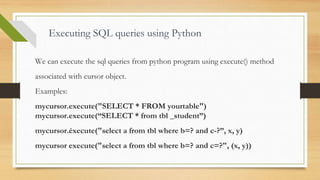
Executing SQL queries using Python
We can execute the sql queries from python program using execute() method
associated with cursor object.
Examples:
mycursor.execute("SELECT * FROM yourtable")
mycursor.execute(“SELECT * from tbl _student”)
mycursor.éxecute("select a from tbl where b=? and c-?”, x, y)
mycursor execute("select a from tbl where b=? and c=?", (х, y))
Execute SOL query
• Executes an SQL. command against all parameter sequences or mappings found in the sequence sq
sql = "INSERT INTO customer (name, address) VALUES (%s, %s)"
val = [
("John Doe", "123 Street, City"),
("Jane Smith", "456 Avenue, Town"),
("Michael Johnson", "789 Road, Village"),
("Sarah Williams", "101 Main Street, Country")
]
mycursor.executemany(sql, val)
Fetch data from MySQL
• MySQL provides multiple ways to retrieve data such as
fetchall() : Fetch all (remaining) rows of a query result, returning them as a
sequence of sequences (eg, a list of tuples).
fetchmany(size) : Fetch the next set of rows of a query result, returning a
sequence of sequences (c.g. a list of tuples) It will return number of rows that
matches to the size argument
fetchone() : Fetch the next row of a query result set, returning a single
sequence, or None when no more data is available
Fetching data from MySQL
• Use the fetchall() method to retrieve the data resulting from the executed
query.
• Assign the fetched data to a variable for further processing.
• For example: result = mycursor.fetchall()
Execute fetch data query
● # Assuming mycursor is the cursor object after executing a query
● mycursor.execute("SELECT * FROM yourtable")
● # Using the fetchall() method to fetch all rows from the result set :
result = mycursor.fetchall()
for row in result:
print(row)
● # Using the fetchone() method to fetch one row at a time from the result set
mycursor.execute("SELECT * FROM yourtable WHERE id = 1")
result = mycursor.fetchone()
print(result)
● # Using the fetchmany() method to fetch a specific number of rows from the result set
mycursor.execute("SELECT * FROM yourtable")
result = mycursor.fetchmany(5)
for row in result:
print(row)
Displaying the results in Python
• Utilize Python's print function to display the fetched data or process it
further according to the requirements.
• For instance:
for x in result:
print(x)
This will print each row retrieved from the MySQL database, based on the
executed query.
Demo Program
import mysql.connector
# Establishing a connection
mydb = mysql.connector.connect( host="localhost",user="root", password="admin“ )
# Creating a cursor object
mycursor = mydb.cursor()
# Creating a database
mycursor.execute("CREATE DATABASE if not exists mydbtest")
print("Database created successfully.")
# Using the created database
mycursor.execute("USE mydbtest")
print("database created successfully.")
Demo Program CONTINUE..
# Creating a table
mycursor.execute("CREATE TABLE if not exists customers (id INT AUTO_INCREMENT
PRIMARY KEY, name VARCHAR(255), address VARCHAR(255))")
# Inserting data into the table
sql = "INSERT INTO customers (name, address) VALUES (%s, %s)"
val = [
("John Doe", "123 Street, City"),
("Jane Smith", "456 Avenue, Town"),
("Michael Johnson", "789 Road, Village"),
("Sarah Williams", "101 Main Street, Country")
]
mycursor.executemany(sql, val)
# Committing the changes
mydb.commit()
print(mycursor.rowcount, "record inserted.")
Demo Program CONTINUE..
#displaying data using select
mycursor.execute("SELECT * FROM customers")
# Fetching the data
result = mycursor.fetchall()
# Displaying the data
for x in result:
print(x)
# Dropping the table
mycursor.execute("DROP TABLE IF EXISTS customers")
print("Table 'customers' deleted successfully.")
# Closing the connection
mydb.close()
print("Connection closed.")
Output :
References
• List of resources for further learning:
1.Python MySQL Database Access - Official Documentation:
https://dev.mysql.com/doc/connector-python/en/
2.W3Schools Python MySQL Tutorial:
https://www.w3schools.com/python/python_mysql_getstarted.asp
3.Real Python - Working with MySQL Databases using Python:
https://realpython.com/python-mysql/
Links to relevant tutorials:
• Python MySQL Connector Documentation:
https://dev.mysql.com/doc/connector-python/en/
• MySQL Documentation: https://dev.mysql.com/doc/
• Python Official Documentation: https://docs.python.org/3/
• MySQL Tutorial on w3schools:
https://www.w3schools.com/python/python_mysql_getstarted.asp
• Real Python's Tutorial on Python MySQL: https://realpython.com/python-mysql/
Any Questions??
Thank You

PythonDatabaseAPI -Presentation for Database

  • 1.
    Python DB API PreparedBy : Dhara Wagh
  • 2.
    Outline • Definition ofPython DB-API • Python supported databases • Brief of MySQL • Prerequisites • How to connect python with MySQL DB • Steps to setting up & method to execute MySQL in Python • Execution of Demo Program
  • 3.
    Definition of PythonDB-API • Python Database API (DB-API) is a standardized interface that enables interactions between Python applications and relational databases. • It serves as a specification for accessing various database systems in a uniform manner from Python. • Python DB-API facilitates essential operations, including connecting to databases, executing SQL queries, and managing data.
  • 4.
    Compatibility with variousdatabase management systems 1. SQLite: A lightweight, self-contained, and serverless database engine. 2.MySQL: A popular open-source relational database management system. 3.PostgreSQL: A powerful, open-source object-relational database system known for its robust features. 4.Oracle: A widely used enterprise-level relational database management system. 5.Microsoft SQL Server: A comprehensive and feature-rich database system developed by Microsoft. 6.NoSQL Databases: Certain Python DB-API implementations extend support to NoSQL databases like MongoDB, enabling interaction with non-tabular data models.
  • 5.
    Brief introduction toMySQL • MySQL is an open-source relational database management system that is widely used for various applications, ranging from small- scale to large-scale enterprises. It is known for its speed, reliability, and ease of use, making it a popular choice for many developers and organizations.
  • 6.
    Prerequisites to workwith Python and MySQL 1. Python: Ensure that you have Python installed on your system. You can download the latest version of Python from the official website: https://www.python.org/downloads/ 2. MySQL Database: You need to have MySQL installed on your machine or have access to a remote MySQL server. You can download MySQL from the official website: https://www.mysql.com/downloads/
  • 7.
    Installing the requiredPython libraries • To interact with MySQL in Python, you need to install the 'mysql-connector-python' library. • Use the following command to install it: pip install mysql-connector-python • Configuring MySQL connection parameters • You need to specify the host, user, password, and database name to establish a connection with MySQL. • For example: Host: "localhost" (if the MySQL server is on the same machine) User: "yourusername" Password: "yourpassword" Database: "yourdatabase"
  • 8.
    How to connectpython with MySQL DB
  • 9.
    • The DBAPI provides a minimal standard for working with databases using Python structures and syntax wherever possible. This API includes the following − • Importing the API module. • Acquiring a connection with the database. • Issuing SQL statements and execute . • Closing the connection
  • 10.
    Setting up MySQLin Python • Installing and importing the required Python libraries • Configuring MySQL connection parameters • Demonstrating how to establish a connection
  • 11.
    Importing the DifferentDB API Module • # Importing the MySQL DB API module import mysql.connector • # Importing the PostgreSQL DB API module import psycopg2 • # Importing the SQLite DB API module import sqlite3
  • 12.
    Connecting in PythonDB-API • Use the connect() method provided by the specific Python DB-API module to establish a connection to the desired database. • Define the necessary connection parameters such as the database's address, username, password, and other relevant details within the connect() method. • Upon successful execution, the Python program gains the capability to send and receive data from the connected database, paving the way for data retrieval, modification, and more.
  • 13.
    Create a connectionin Python: import mysql.connector mydb = mysql.connector.connect( host="localhost", user="yourusername“, password="yourpassword", database="yourdatabase“ ) **Ensure that the values for host, user, password, and database match the credentials and details of your MySQL server.
  • 14.
    Interacting with theDatabase • Create Cursor object and executing SQL queries using Python • Fetching data from MySQL • Displaying the results in Python
  • 15.
    Creating cursor object •We need to create the object of a class called cursor that allows Python code to execute database command in a database session • After establishing the connection, you can execute SQL queries using the cursor object. Mysql / PostgreSql cursorobj = db.cursor( ) • For example : mycursor = mydb.cursor()
  • 16.
    Executing SQL queriesusing Python We can execute the sql queries from python program using execute() method associated with cursor object. Examples: mycursor.execute("SELECT * FROM yourtable") mycursor.execute(“SELECT * from tbl _student”) mycursor.éxecute("select a from tbl where b=? and c-?”, x, y) mycursor execute("select a from tbl where b=? and c=?", (х, y))
  • 17.
    Execute SOL query •Executes an SQL. command against all parameter sequences or mappings found in the sequence sq sql = "INSERT INTO customer (name, address) VALUES (%s, %s)" val = [ ("John Doe", "123 Street, City"), ("Jane Smith", "456 Avenue, Town"), ("Michael Johnson", "789 Road, Village"), ("Sarah Williams", "101 Main Street, Country") ] mycursor.executemany(sql, val)
  • 18.
    Fetch data fromMySQL • MySQL provides multiple ways to retrieve data such as fetchall() : Fetch all (remaining) rows of a query result, returning them as a sequence of sequences (eg, a list of tuples). fetchmany(size) : Fetch the next set of rows of a query result, returning a sequence of sequences (c.g. a list of tuples) It will return number of rows that matches to the size argument fetchone() : Fetch the next row of a query result set, returning a single sequence, or None when no more data is available
  • 19.
    Fetching data fromMySQL • Use the fetchall() method to retrieve the data resulting from the executed query. • Assign the fetched data to a variable for further processing. • For example: result = mycursor.fetchall()
  • 20.
    Execute fetch dataquery ● # Assuming mycursor is the cursor object after executing a query ● mycursor.execute("SELECT * FROM yourtable") ● # Using the fetchall() method to fetch all rows from the result set : result = mycursor.fetchall() for row in result: print(row) ● # Using the fetchone() method to fetch one row at a time from the result set mycursor.execute("SELECT * FROM yourtable WHERE id = 1") result = mycursor.fetchone() print(result) ● # Using the fetchmany() method to fetch a specific number of rows from the result set mycursor.execute("SELECT * FROM yourtable") result = mycursor.fetchmany(5) for row in result: print(row)
  • 21.
    Displaying the resultsin Python • Utilize Python's print function to display the fetched data or process it further according to the requirements. • For instance: for x in result: print(x) This will print each row retrieved from the MySQL database, based on the executed query.
  • 22.
    Demo Program import mysql.connector #Establishing a connection mydb = mysql.connector.connect( host="localhost",user="root", password="admin“ ) # Creating a cursor object mycursor = mydb.cursor() # Creating a database mycursor.execute("CREATE DATABASE if not exists mydbtest") print("Database created successfully.") # Using the created database mycursor.execute("USE mydbtest") print("database created successfully.")
  • 23.
    Demo Program CONTINUE.. #Creating a table mycursor.execute("CREATE TABLE if not exists customers (id INT AUTO_INCREMENT PRIMARY KEY, name VARCHAR(255), address VARCHAR(255))") # Inserting data into the table sql = "INSERT INTO customers (name, address) VALUES (%s, %s)" val = [ ("John Doe", "123 Street, City"), ("Jane Smith", "456 Avenue, Town"), ("Michael Johnson", "789 Road, Village"), ("Sarah Williams", "101 Main Street, Country") ] mycursor.executemany(sql, val) # Committing the changes mydb.commit() print(mycursor.rowcount, "record inserted.")
  • 24.
    Demo Program CONTINUE.. #displayingdata using select mycursor.execute("SELECT * FROM customers") # Fetching the data result = mycursor.fetchall() # Displaying the data for x in result: print(x) # Dropping the table mycursor.execute("DROP TABLE IF EXISTS customers") print("Table 'customers' deleted successfully.") # Closing the connection mydb.close() print("Connection closed.")
  • 25.
  • 26.
    References • List ofresources for further learning: 1.Python MySQL Database Access - Official Documentation: https://dev.mysql.com/doc/connector-python/en/ 2.W3Schools Python MySQL Tutorial: https://www.w3schools.com/python/python_mysql_getstarted.asp 3.Real Python - Working with MySQL Databases using Python: https://realpython.com/python-mysql/
  • 27.
    Links to relevanttutorials: • Python MySQL Connector Documentation: https://dev.mysql.com/doc/connector-python/en/ • MySQL Documentation: https://dev.mysql.com/doc/ • Python Official Documentation: https://docs.python.org/3/ • MySQL Tutorial on w3schools: https://www.w3schools.com/python/python_mysql_getstarted.asp • Real Python's Tutorial on Python MySQL: https://realpython.com/python-mysql/
  • 28.
  • 29.