INTERFACE PYTHON
WITH MYSQL
Connecting Python application with
Introducti
on
 Every application required data to be stored for
future reference to manipulate data. Today every
application stores data in database for this
purpose
 For example, reservation system stores passengers
details for reserving the seats and later on for
sending some messages or for printing tickets etc.
 In school student details are saved for many
reasons like attendance, fee collections, exams,
report card etc.
 Python allows us to connect all types of database
like Oracle, SQL Server, MySQL.
 In our syllabus we have to understand how to
connect Python programs with MySQL
Pre-requisite to connect Python
with MySQL
 Before we connect python program with any
database like MySQL we need to build a bridge
to connect Python and MySQL.
 T
o build this bridge so that data can travel both
ways we need a connector called
“mysql.connector”.
 We can install “mysql.connector” by using
following methods:
🞑 At command prompt (Administrator login)
 Type “pip install mysql.connector” and press enter
 (internet connection in required)
 This connector will work only for MySQL 5.7.3 or later
🞑 Or open
“https://dev.mysql.com/downloads/connector/pyt
hon/”
Connecting to MySQL from
Python
 Once the connector is installed you are
ready to connect your python program
to MySQL.
 The following steps to follow while connecting
your python program with MySQL
🞑 Open python
🞑 Import the package required (import
mysql.connector)
🞑 Open the connection to database
🞑 Create a cursor instance
🞑 Execute the query and store it in resultset
🞑 Extract data from resultset
🞑 Clean up the environment
Importing
mysql.connector
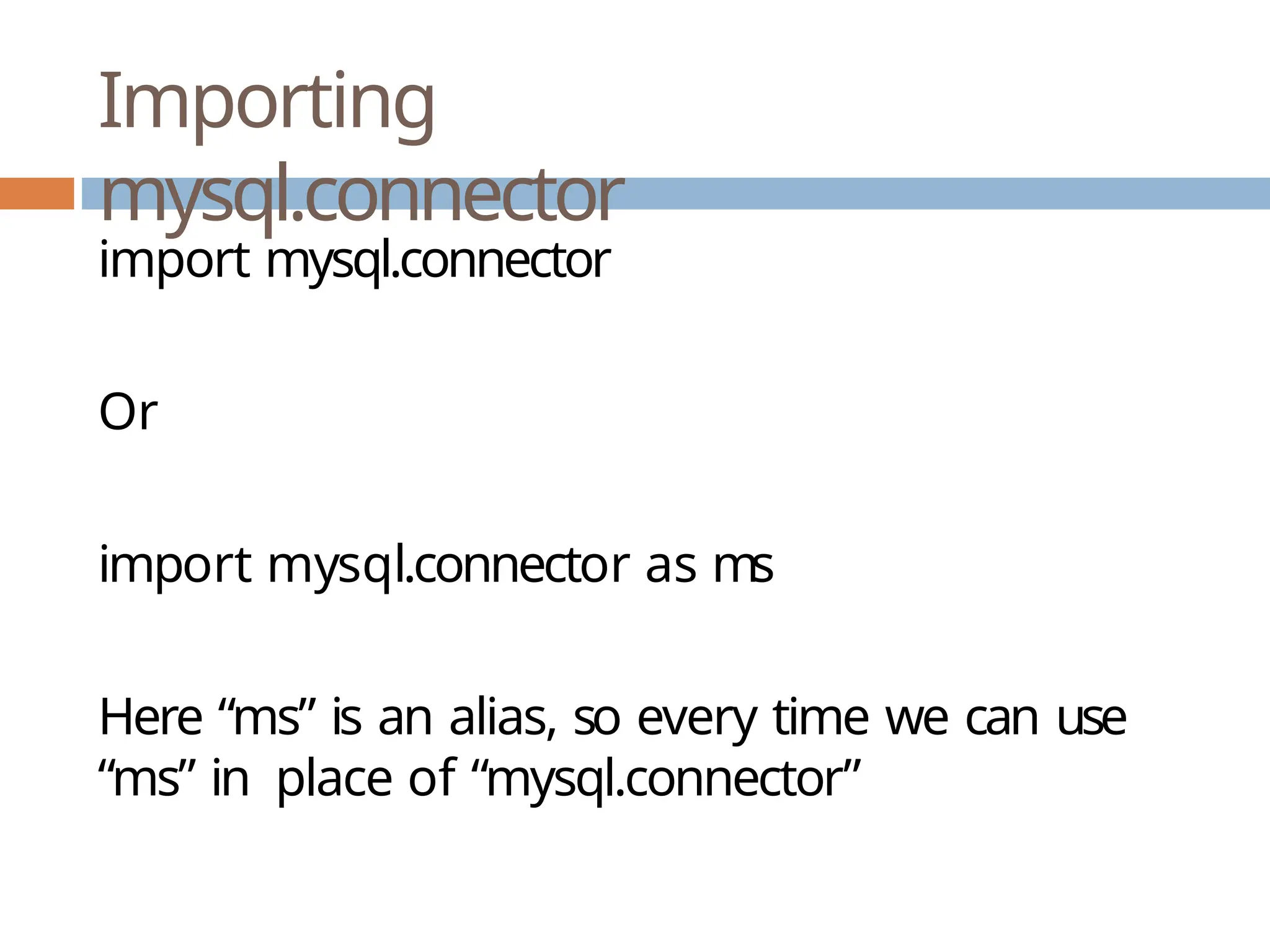
import mysql.connector
Or
import mysql.connector as ms
Here “ms” is an alias, so every time we can use
“ms” in place of “mysql.connector”
Open a connection to MySQL
Database
 T
o create connection, connect() function is used
 Its syntax is:
🞑 connect(host=<server_name>,user=<user_name>,
passwd=<password>[,database=<database>])
 Here server_name means database servername,
generally it is given as “localhost”
 User_name means user by which we connect with
mysql generally it is given as “root”
 Password is the password of user “root”
 Database is the name of database whose
data(table) we want to use
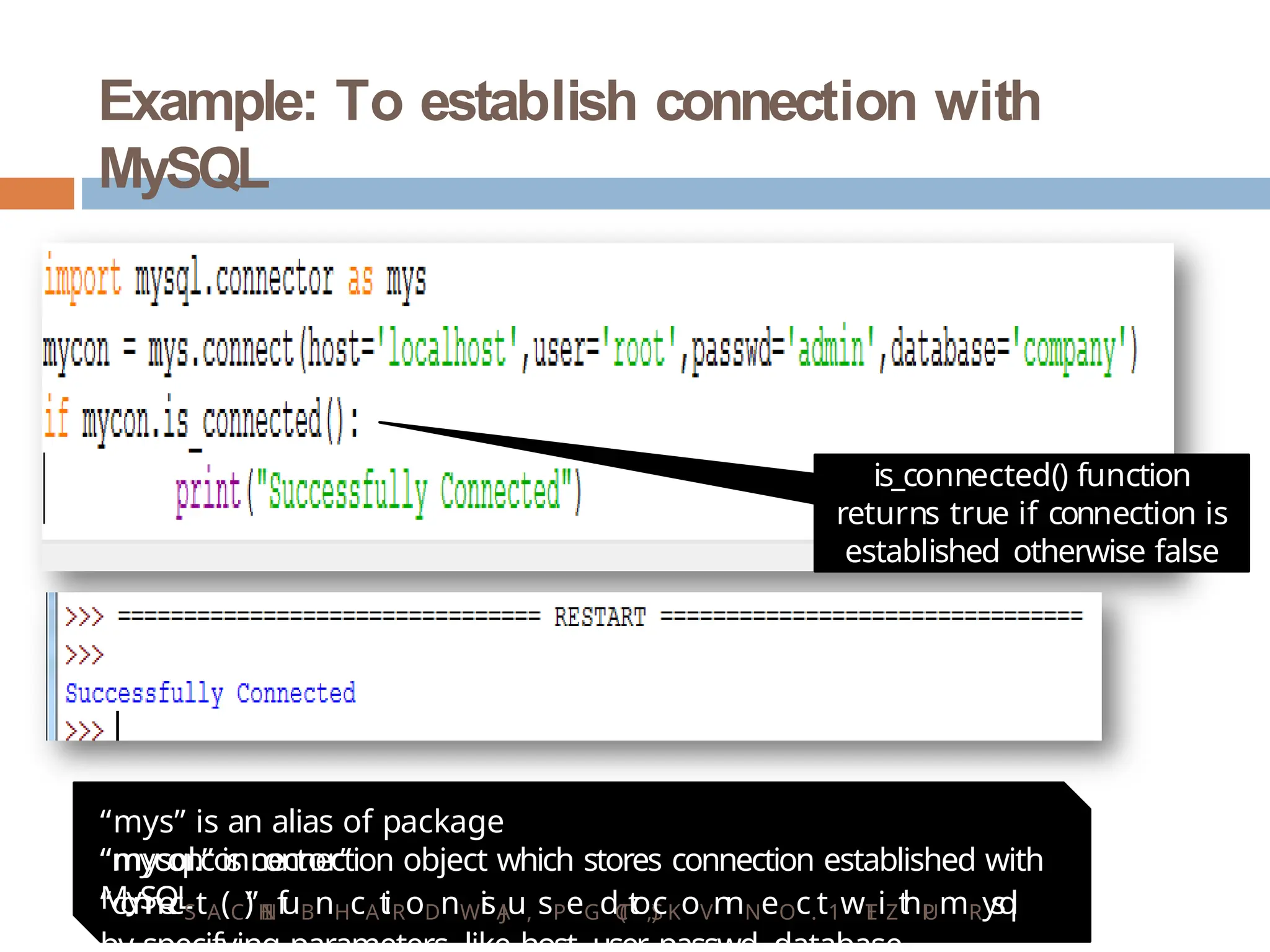
Example: To establish connection with
MySQL
is_connected() function
returns true if connection is
established otherwise false
“mys” is an alias of package
“mysql.connector”
“mycon” is connection object which stores connection established with
MySQL
“c
o
n
n
e
cStA(C)
”H
I
Nf
uBnHcAt
iRoDnWi
sA
Ju, sPeGdT
(
Ct
oS
)
,cKoVn
nNeOc.t1wT
EiZt
hP
UmRy
s
q
l
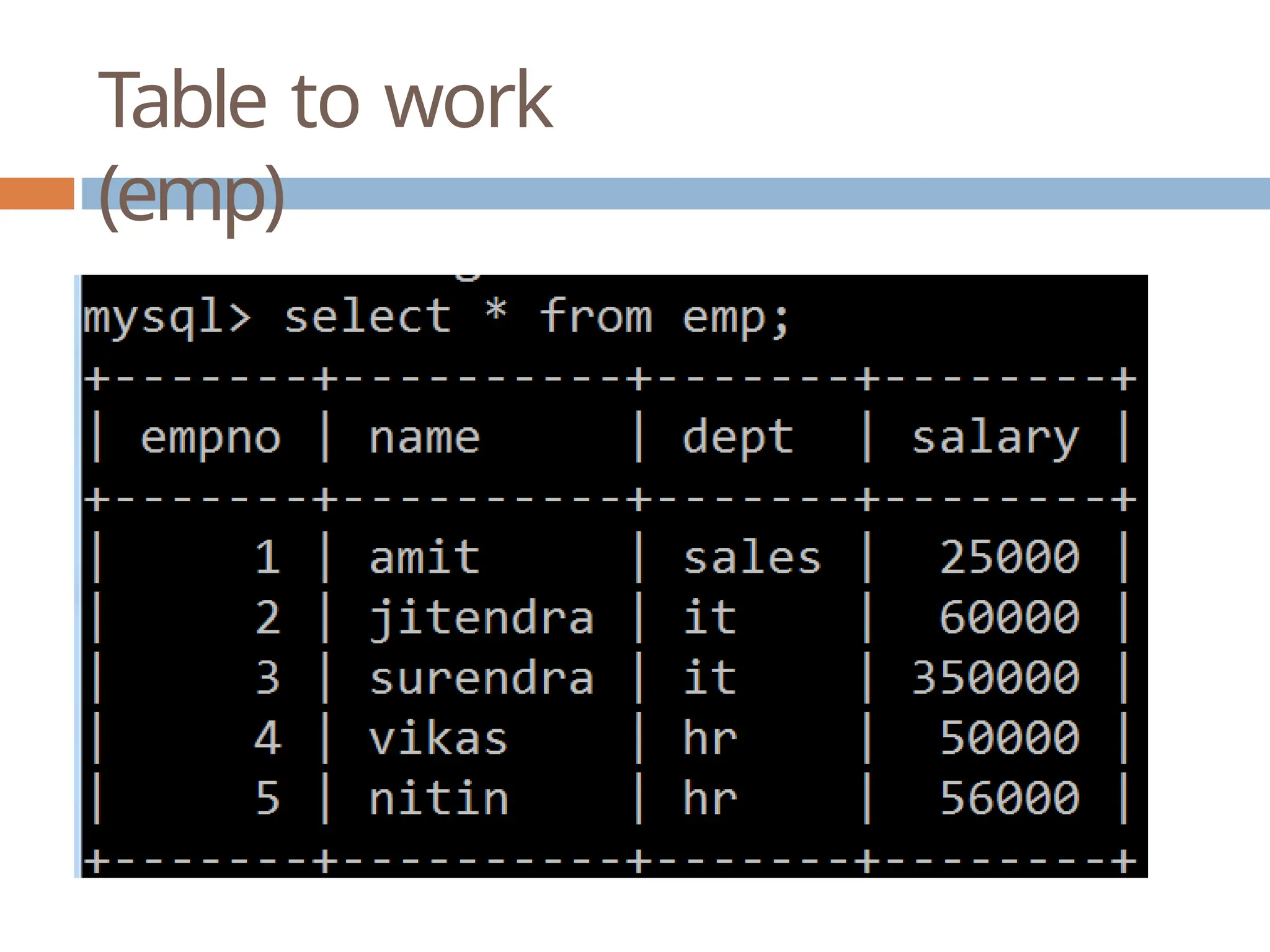
Table to work
(emp)
Creating
Cursor
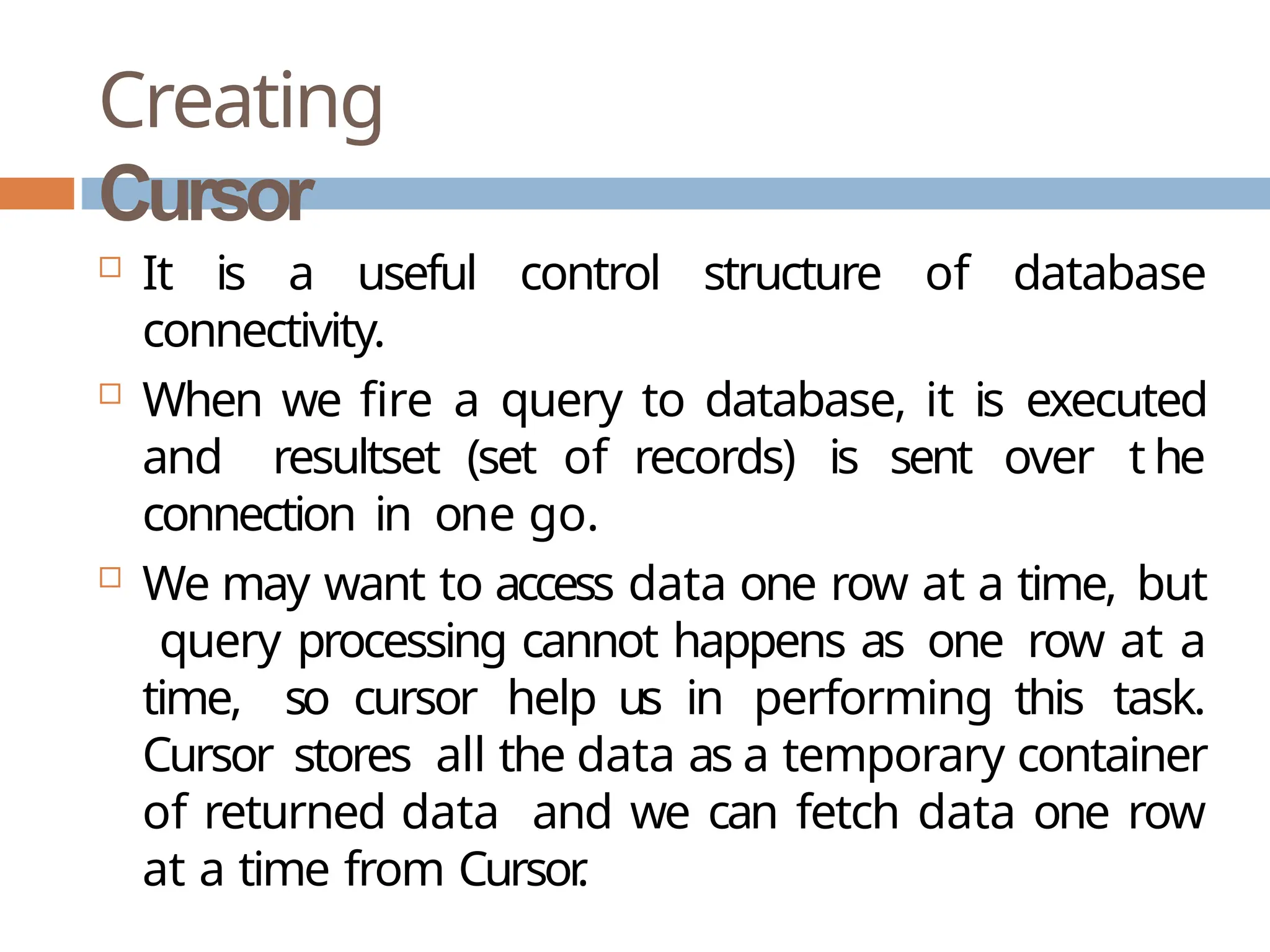
 It is a useful control structure of database
connectivity.
 When we fire a query to database, it is executed
and resultset (set of records) is sent over t he
connection in one go.
 We may want to access data one row at a time, but
query processing cannot happens as one row at a
time, so cursor help us in performing this task.
Cursor stores all the data as a temporary container
of returned data and we can fetch data one row
at a time from Cursor
.
Creating Cursor and Executing
Query
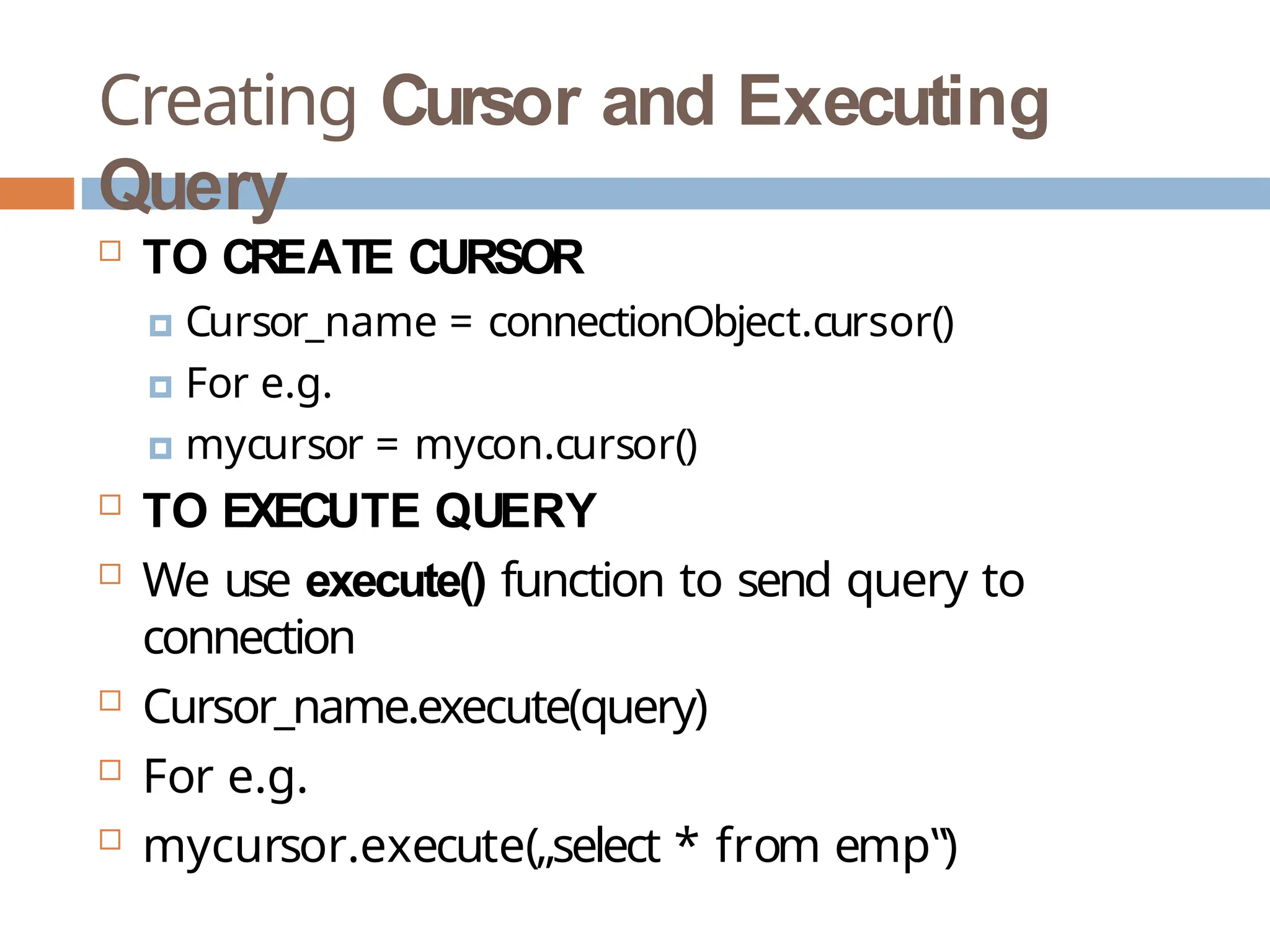
 TO CREATE CURSOR
🞑 Cursor_name = connectionObject.cursor()
🞑 For e.g.
🞑 mycursor = mycon.cursor()
 TO EXECUTE QUERY
 We use execute() function to send query to
connection
 Cursor_name.execute(query)
 For e.g.
 mycursor.execute(„select * from emp‟)
Example -
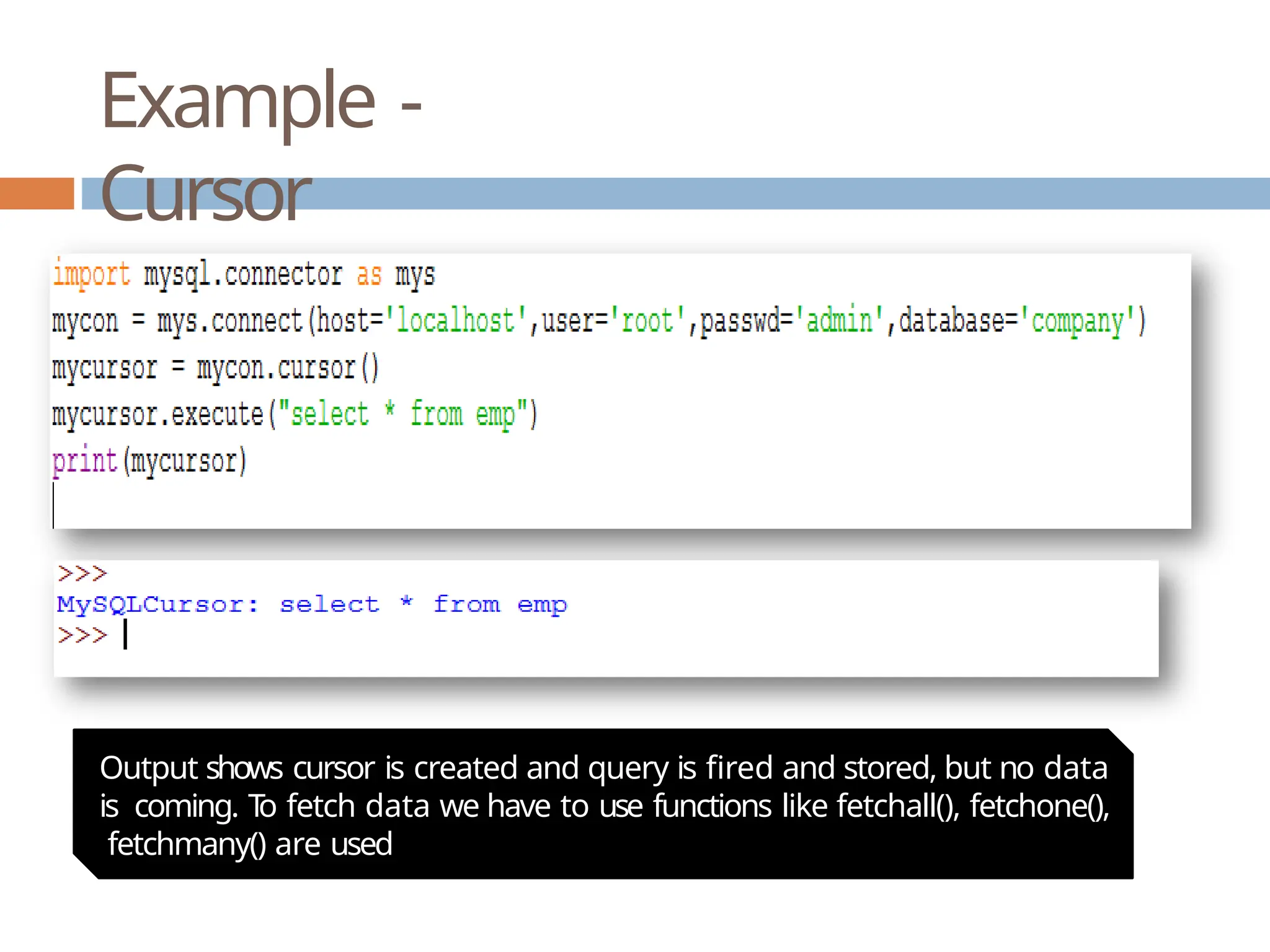
Cursor
Output shows cursor is created and query is fired and stored, but no data
is coming. T
o fetch data we have to use functions like fetchall(), fetchone(),
fetchmany() are used
Fetching(extracting) data from
ResultSet
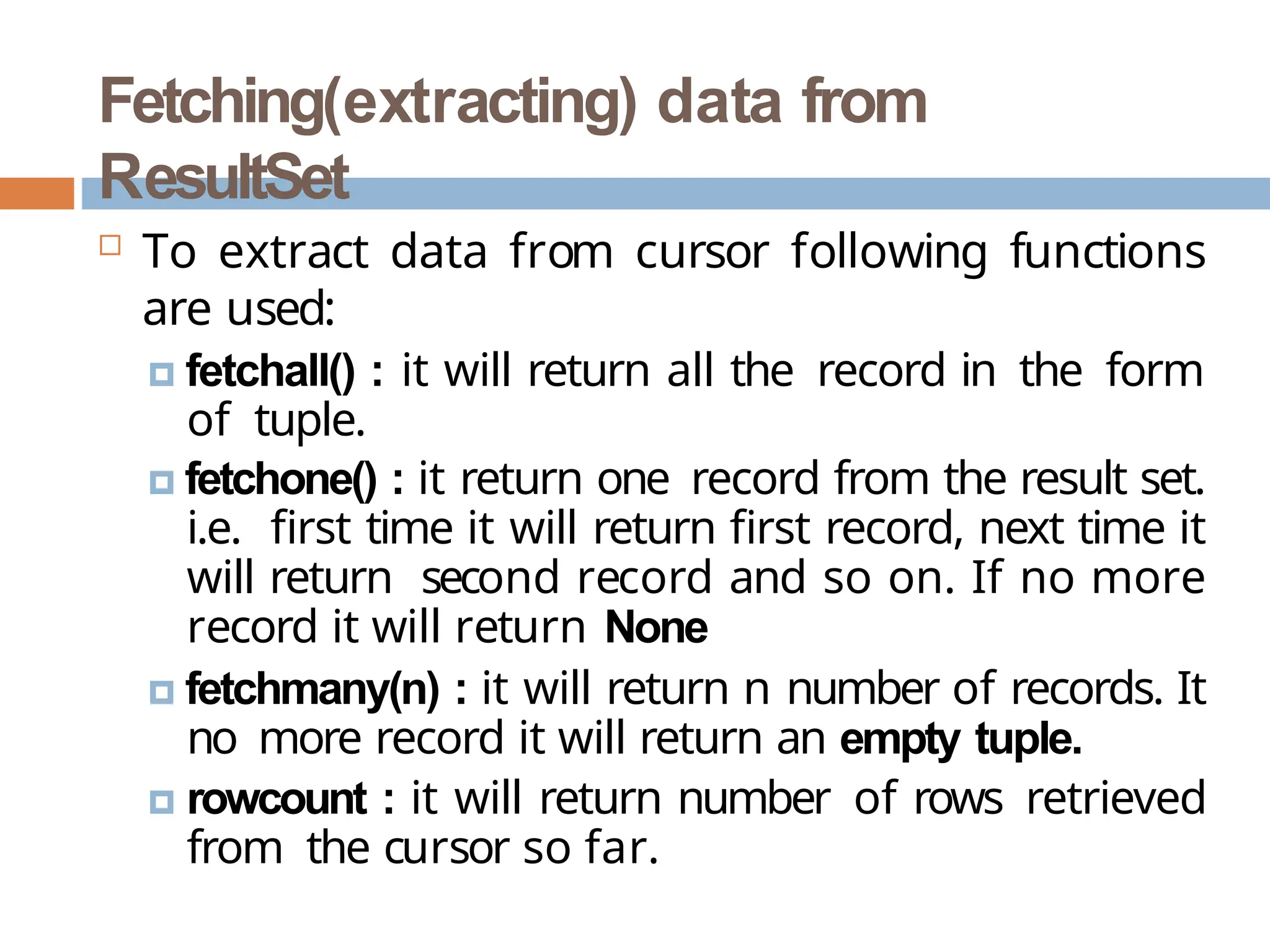
 To extract data from cursor following functions
are used:
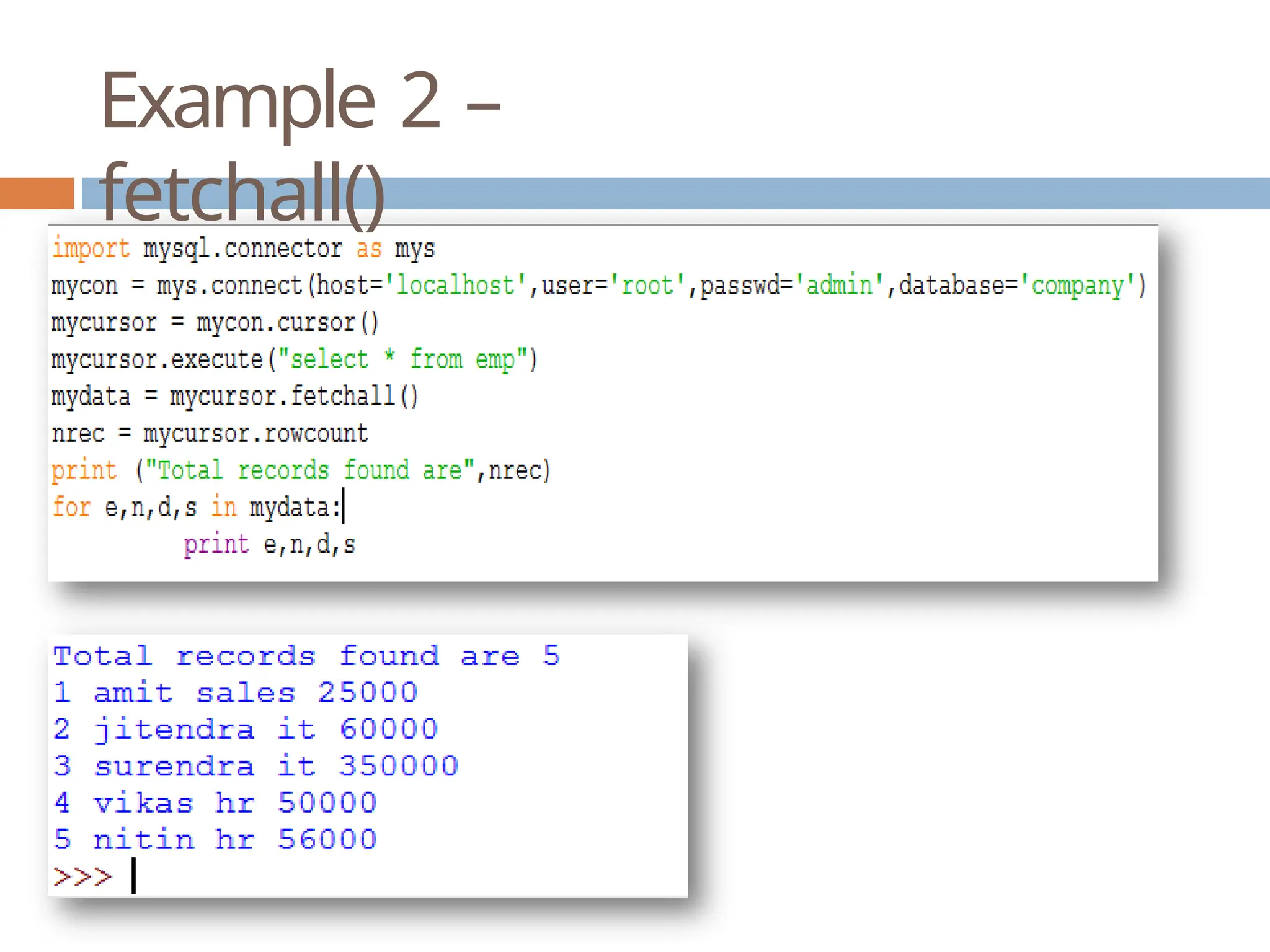
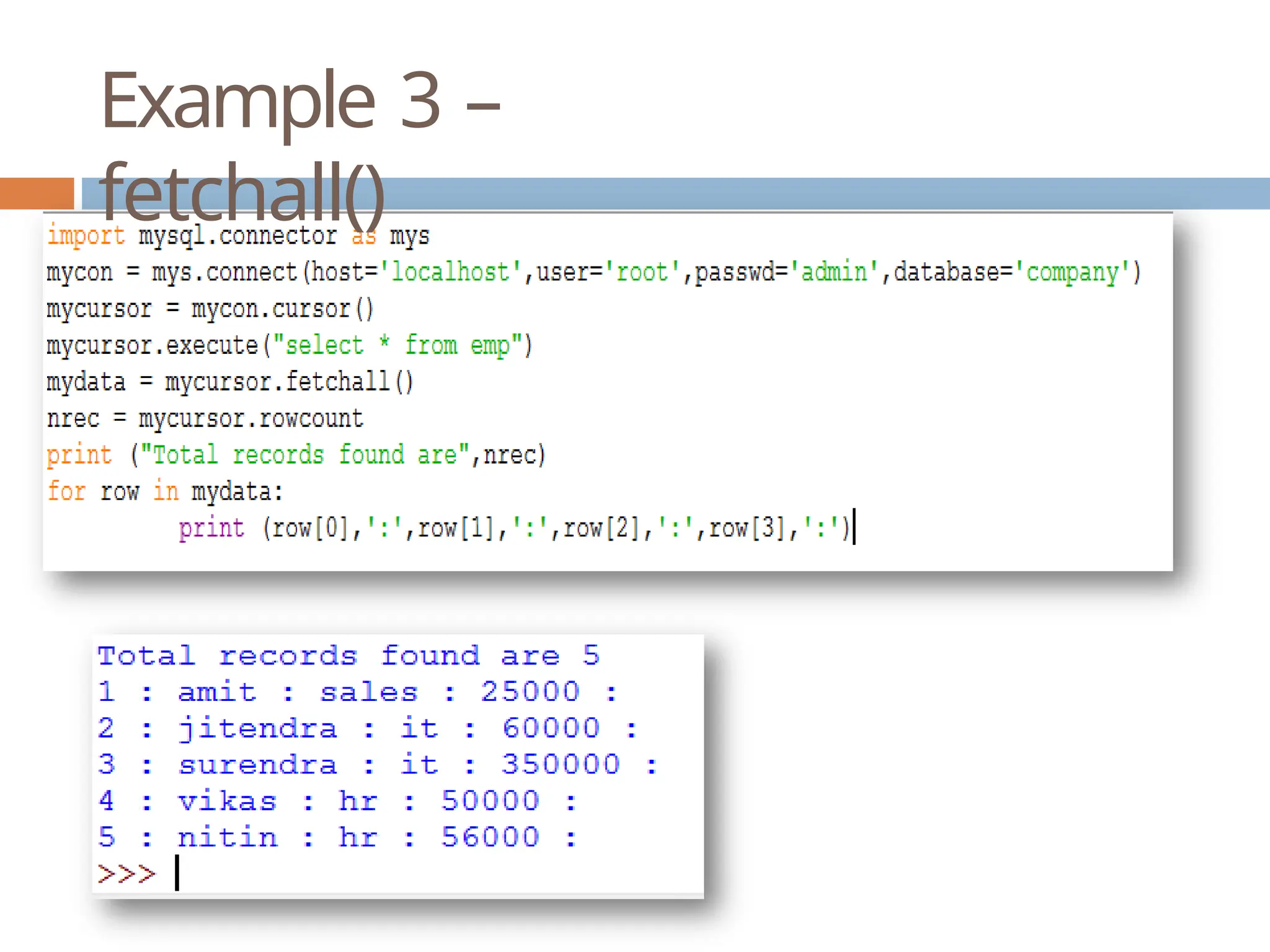
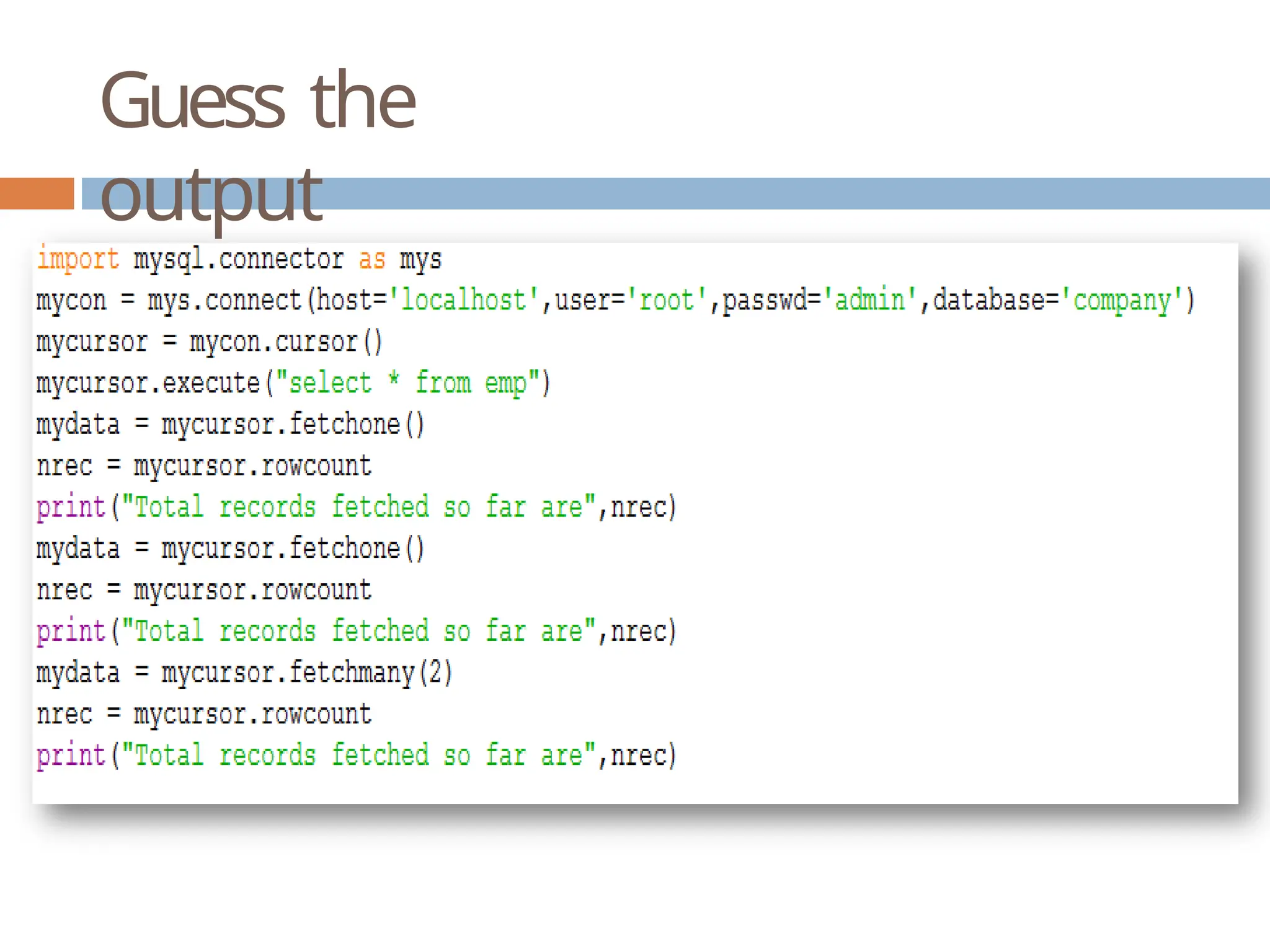
🞑 fetchall() : it will return all the record in the form
of tuple.
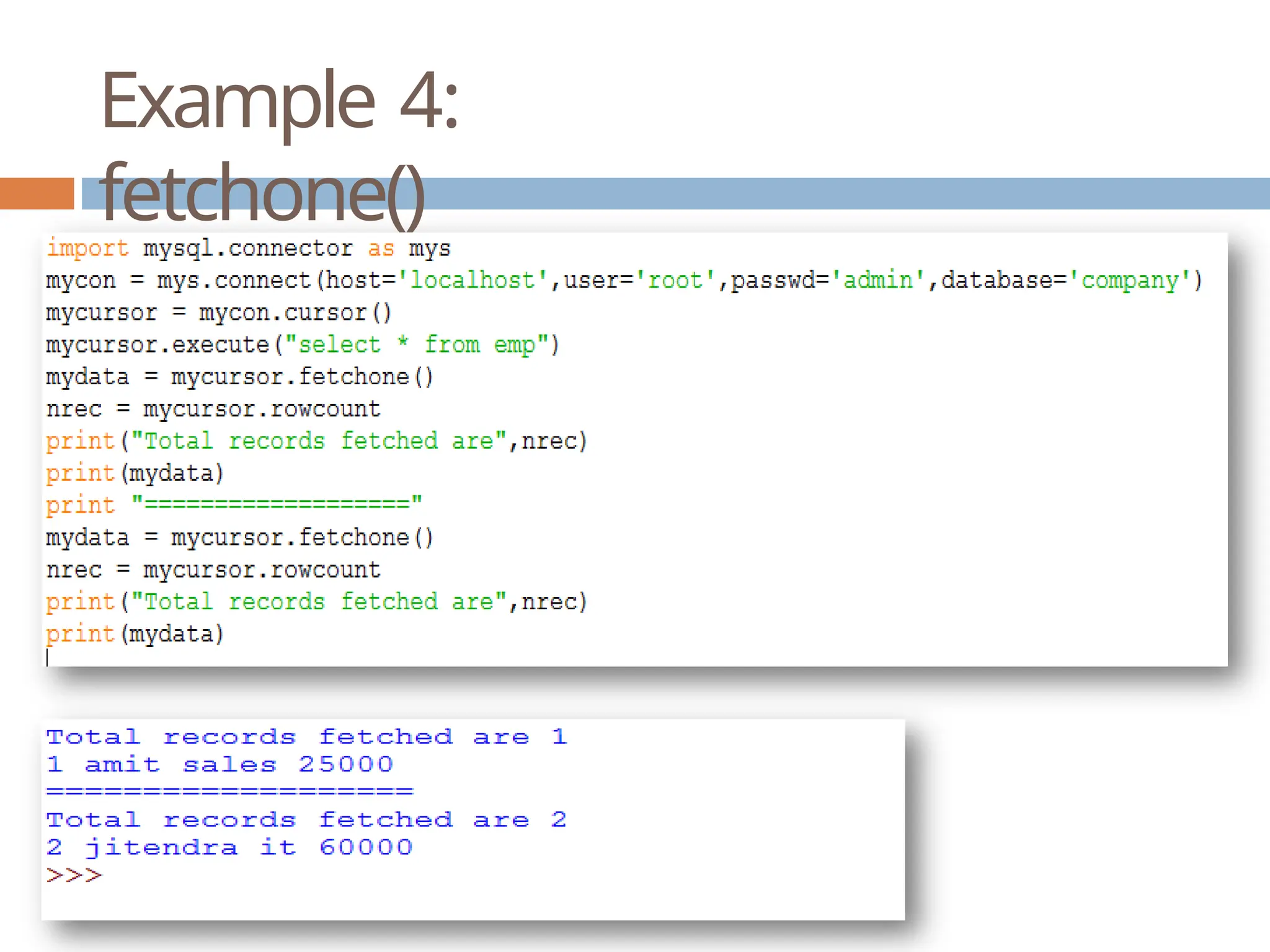
🞑 fetchone() : it return one record from the result set.
i.e. first time it will return first record, next time it
will return second record and so on. If no more
record it will return None
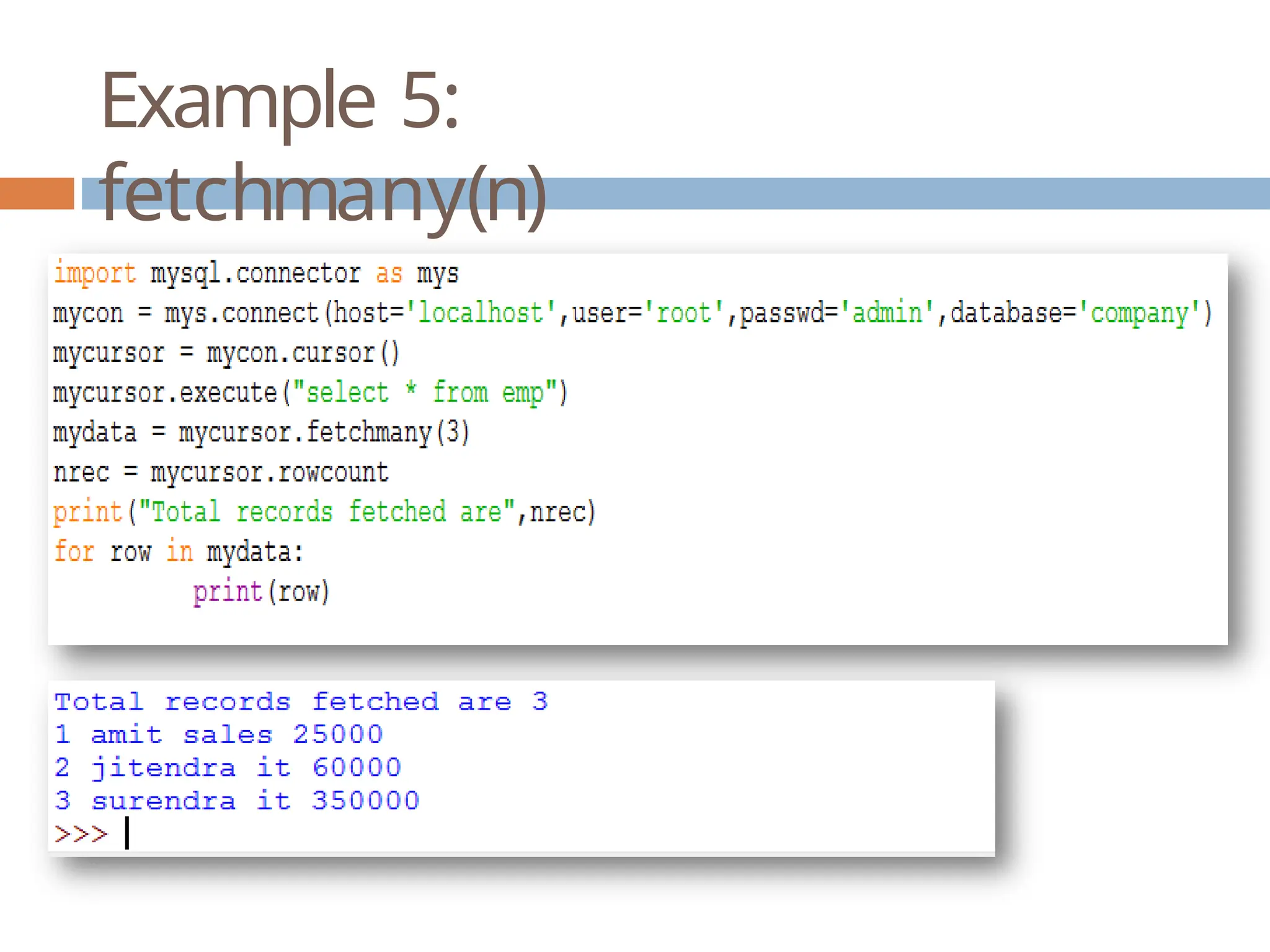
🞑 fetchmany(n) : it will return n number of records. It
no more record it will return an empty tuple.
🞑 rowcount : it will return number of rows retrieved
from the cursor so far.
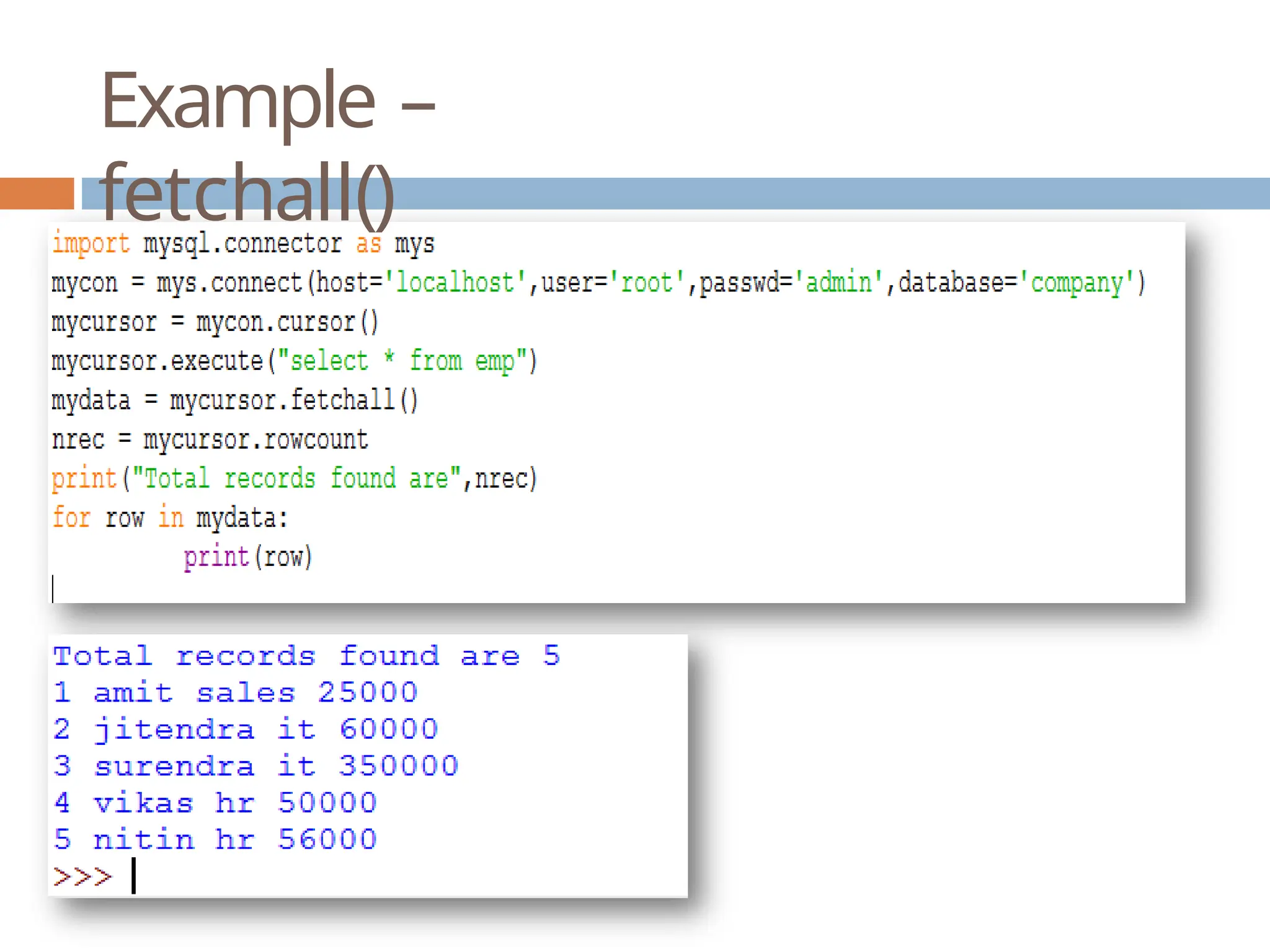
Example –
fetchall()
Example 2 –
fetchall()
Example 3 –
fetchall()
Example 4:
fetchone()
Example 5:
fetchmany(n)
Guess the
output
Parameterized
Query
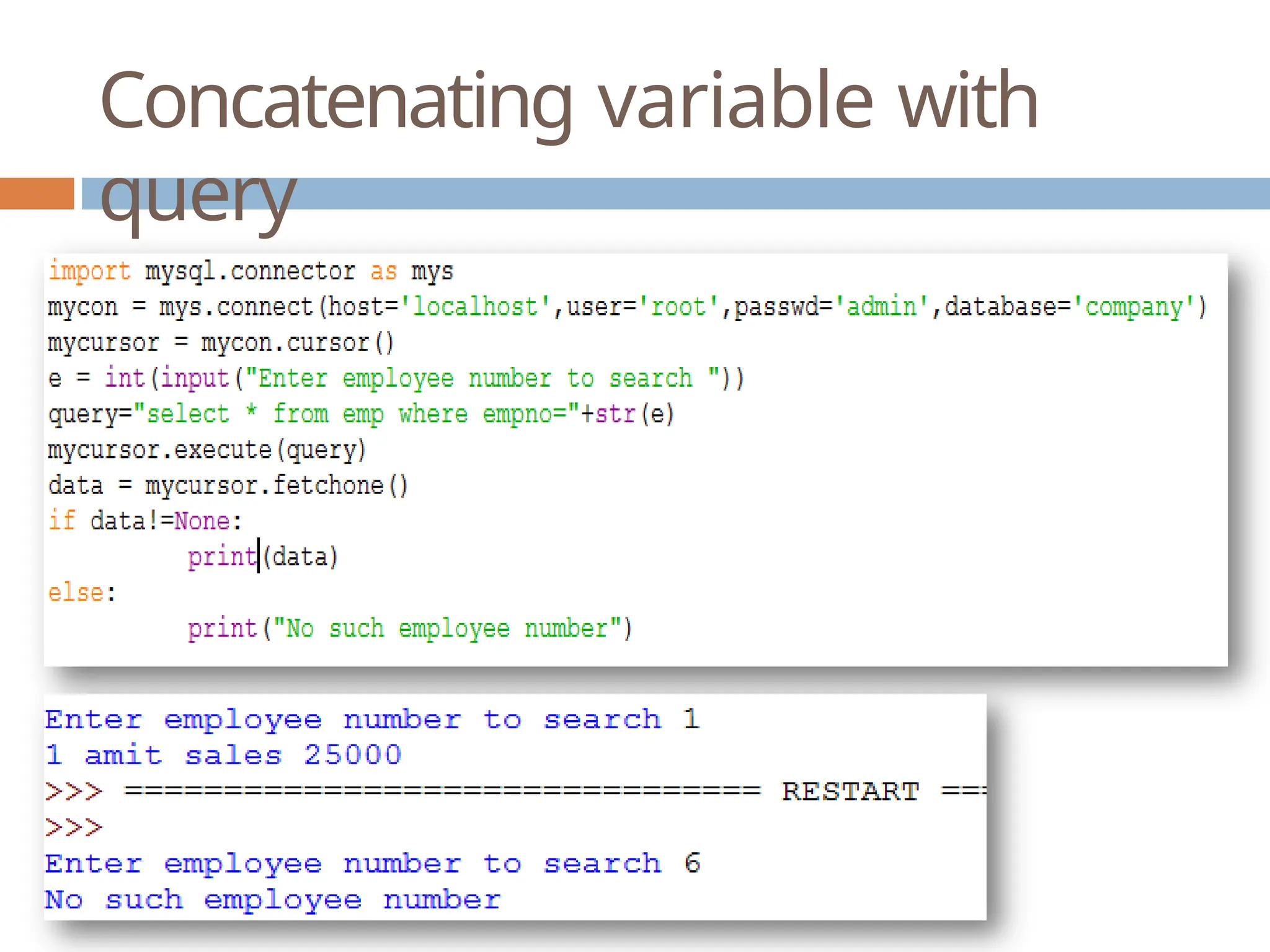
 We can pass values to query to perform
dynamic search like we want to search for any
employee number entered during runtime or
to search any other column values.
 To Create Parameterized query we can use
various methods like:
🞑 Concatenating dynamic variable
to query values are entered.
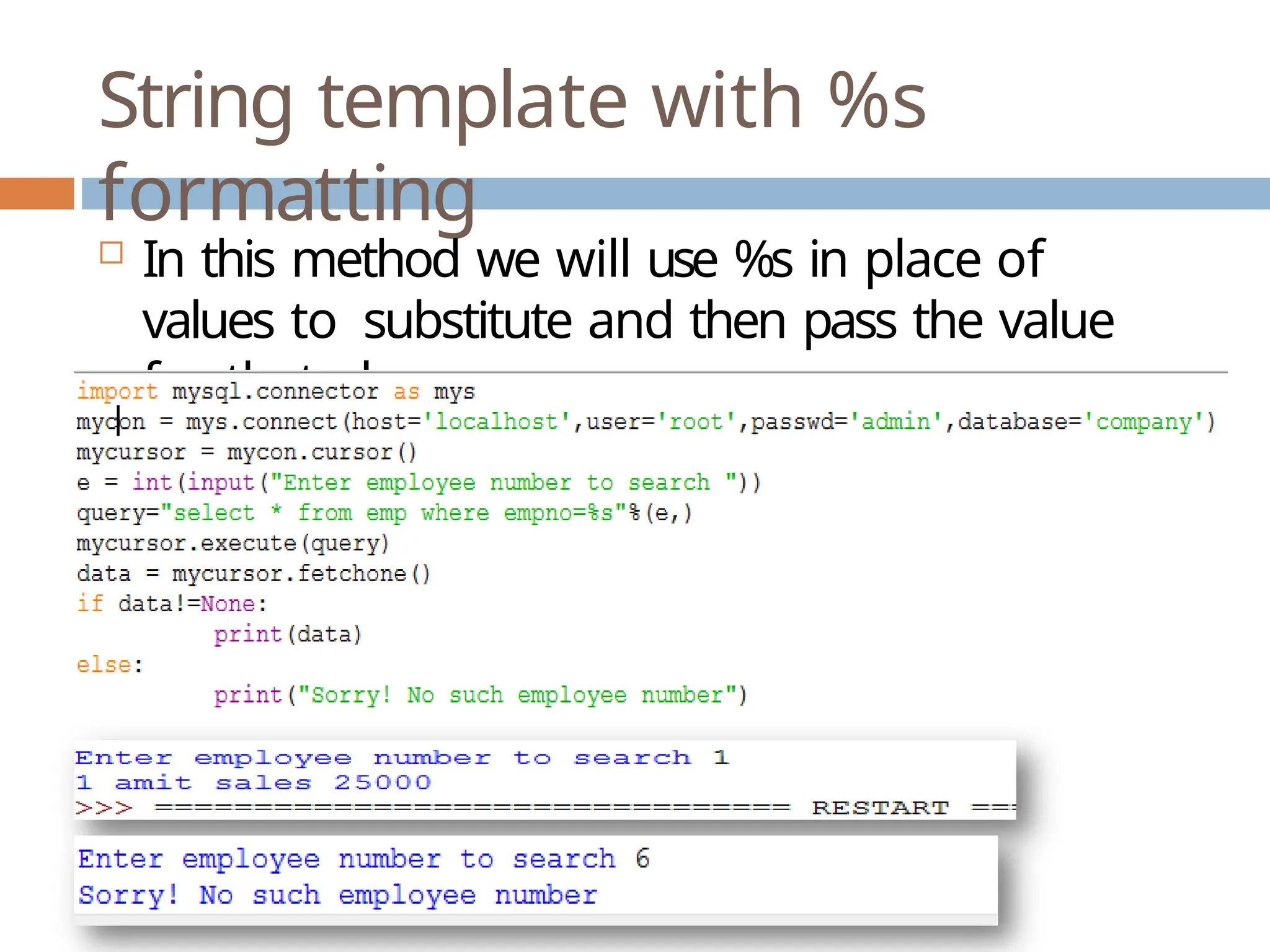
🞑 String template with % formatting
🞑 String template with {} and format
function
in
which
Concatenating variable with
query
String template with %s
formatting
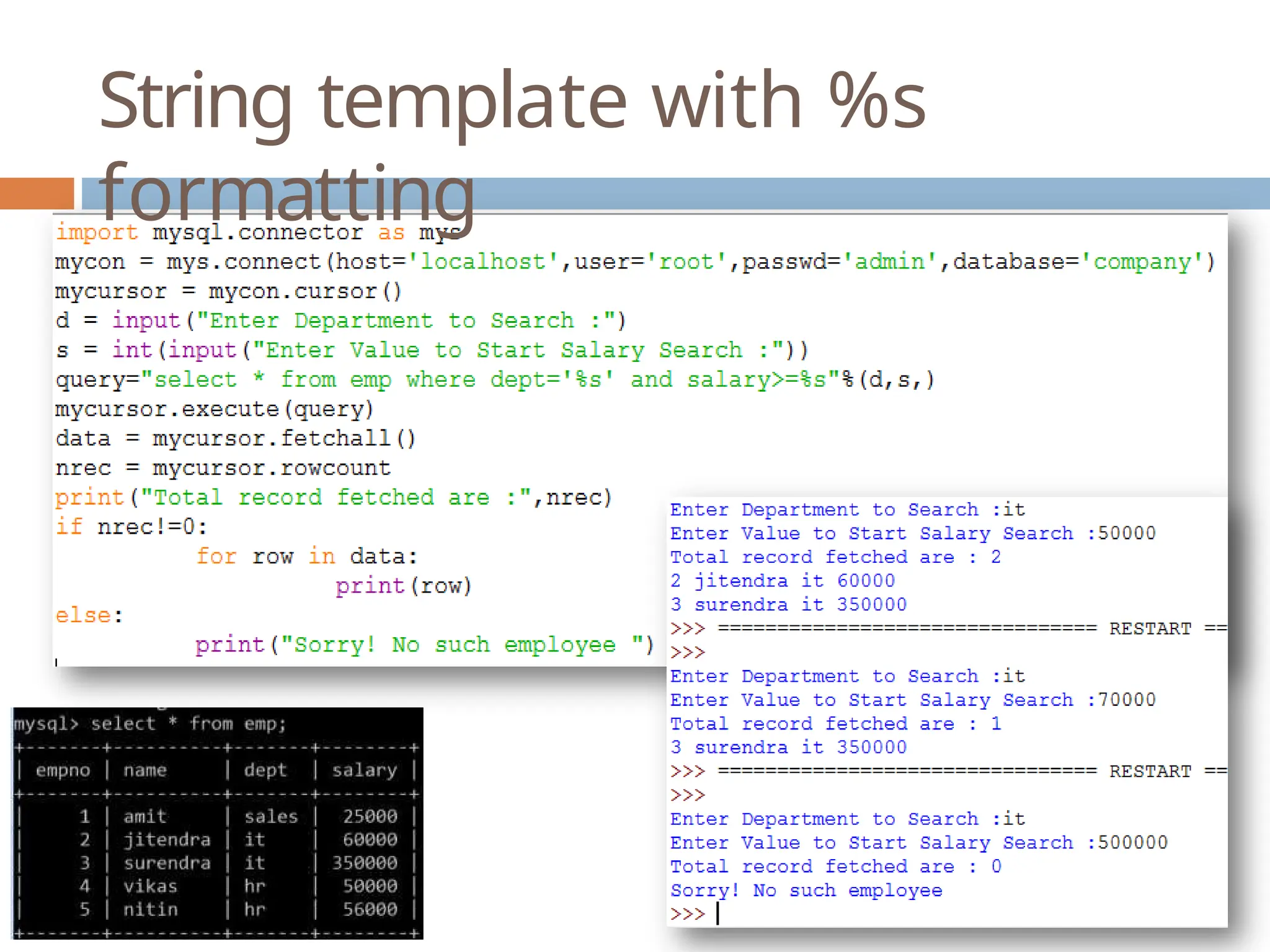
 In this method we will use %s in place of
values to substitute and then pass the value
for that place.
String template with %s
formatting
String template with {} and
format()
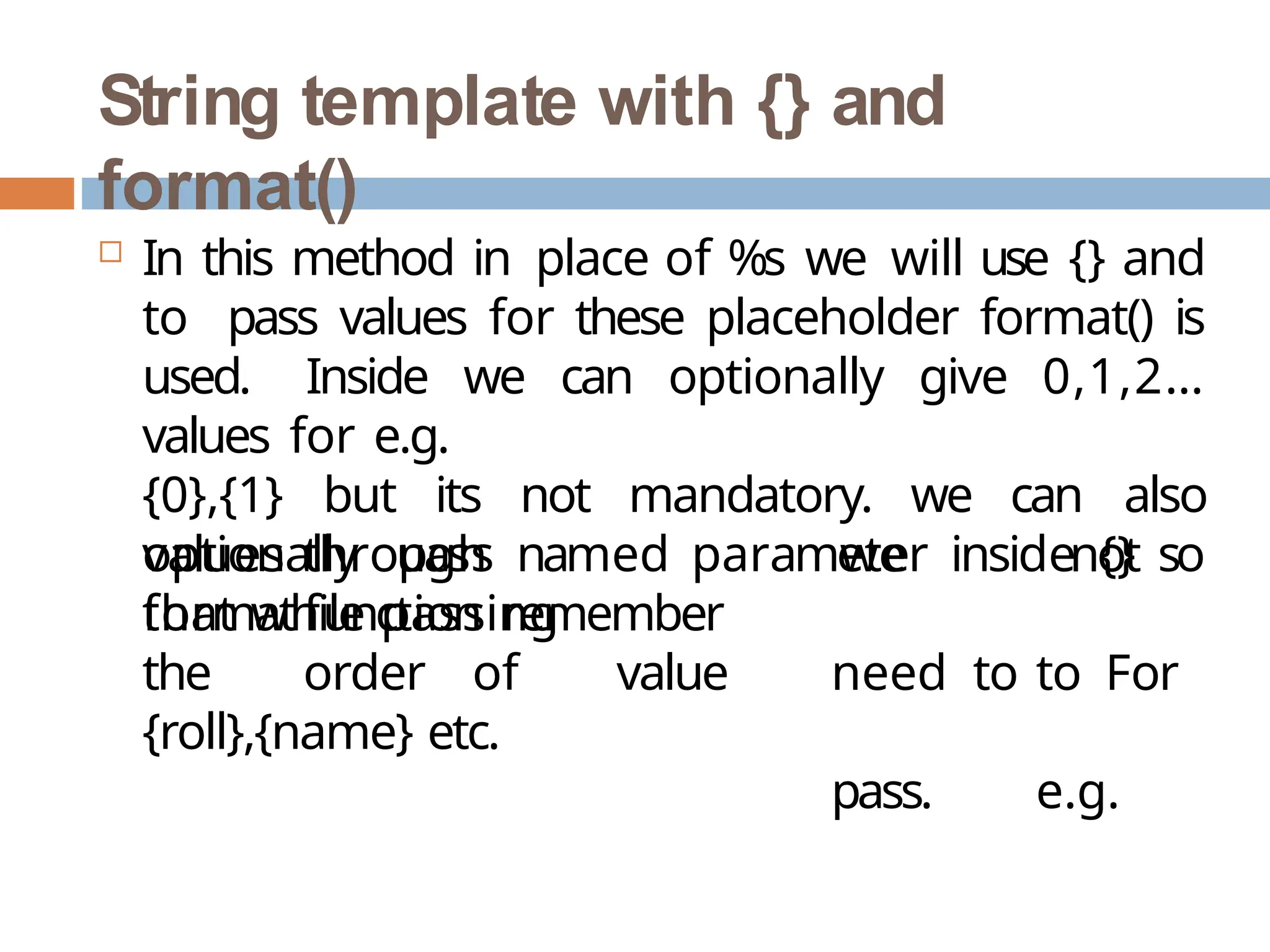
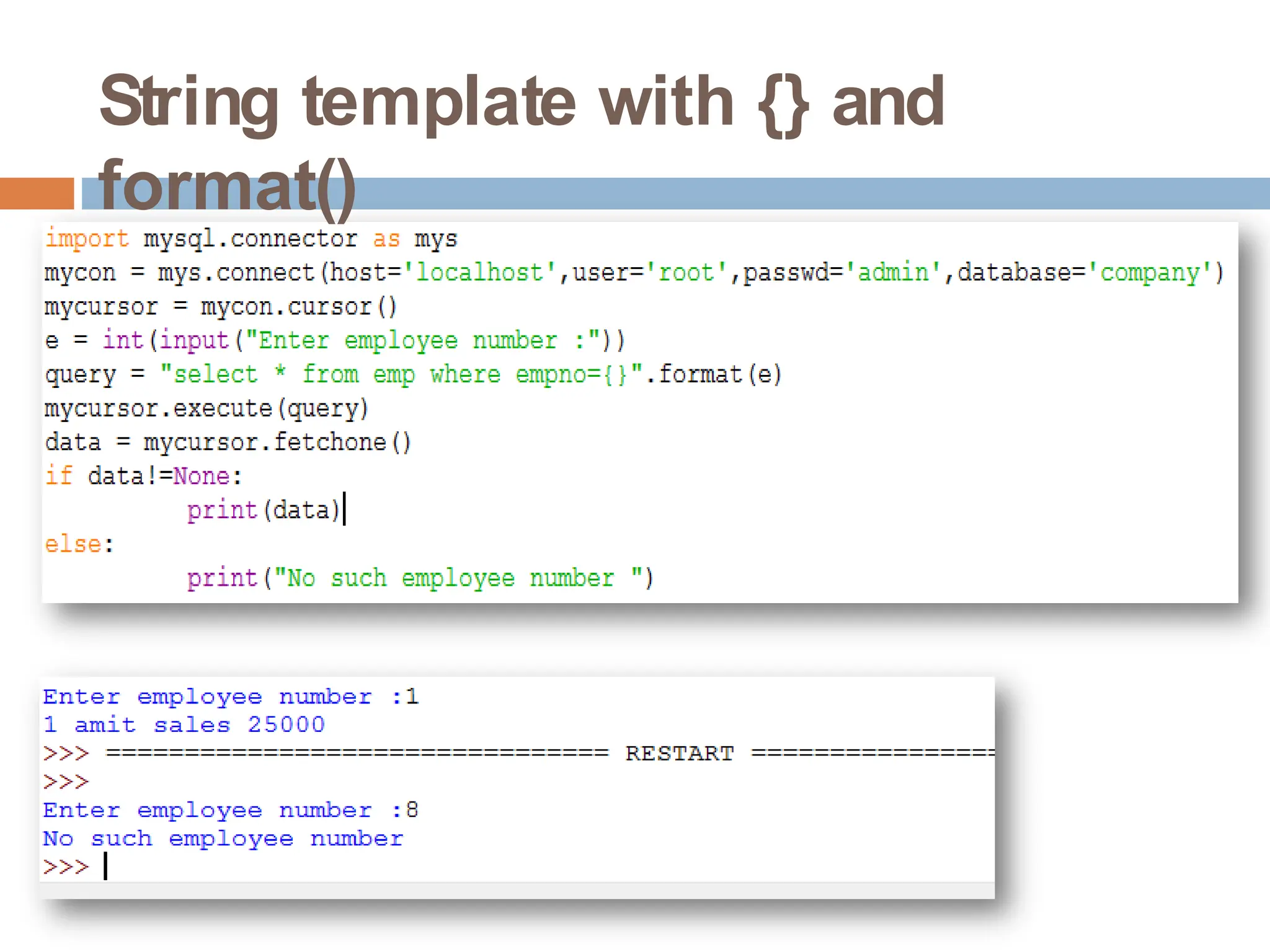
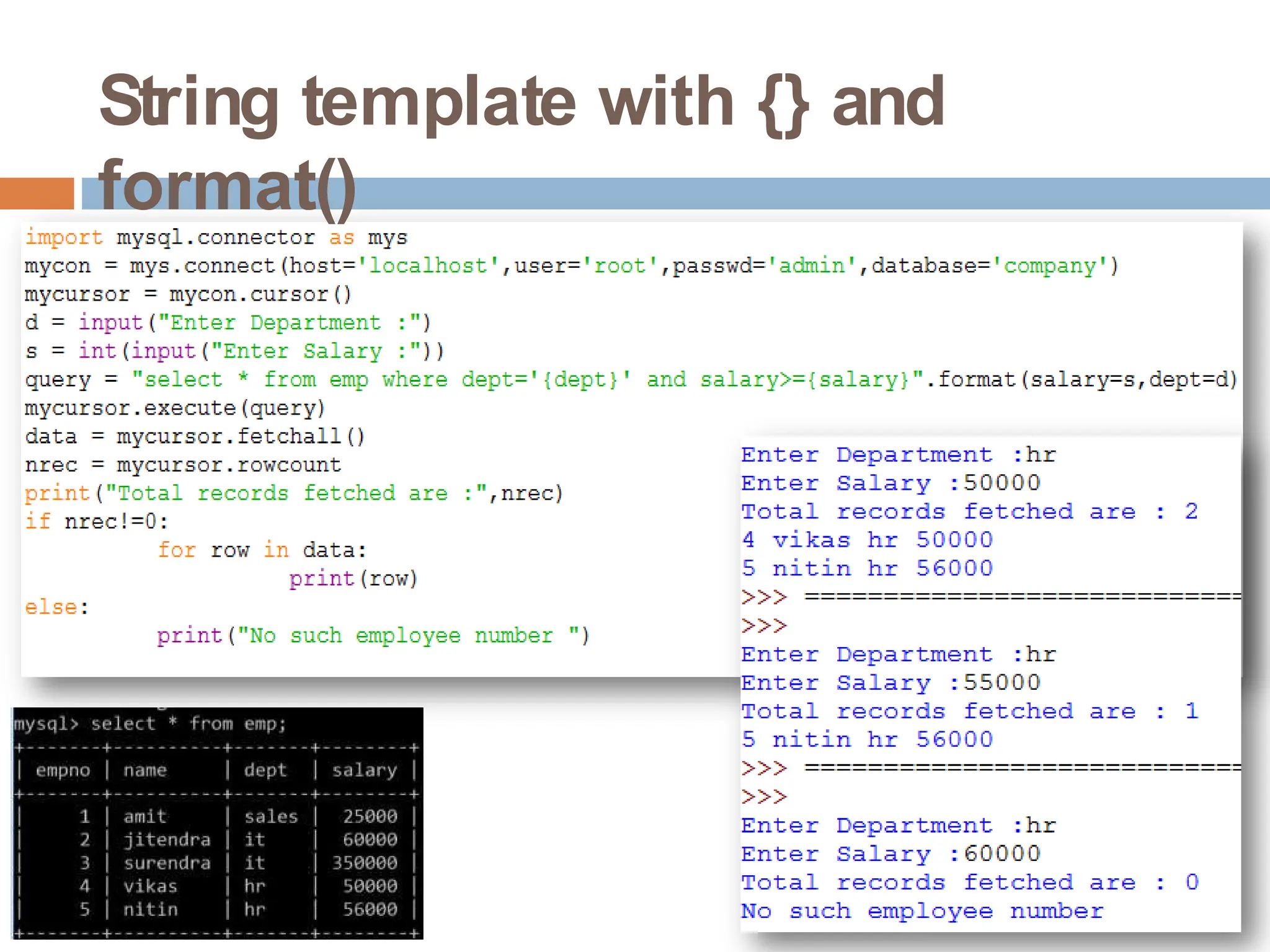
 In this method in place of %s we will use {} and
to pass values for these placeholder format() is
used. Inside we can optionally give 0,1,2…
values for e.g.
{0},{1} but its not mandatory. we can also
optionally pass named parameter inside {} so
that while passing
we
need to
pass.
not
to For
e.g.
values through
formatfunction remember
the order of value
{roll},{name} etc.
String template with {} and
format()
String template with {} and
format()
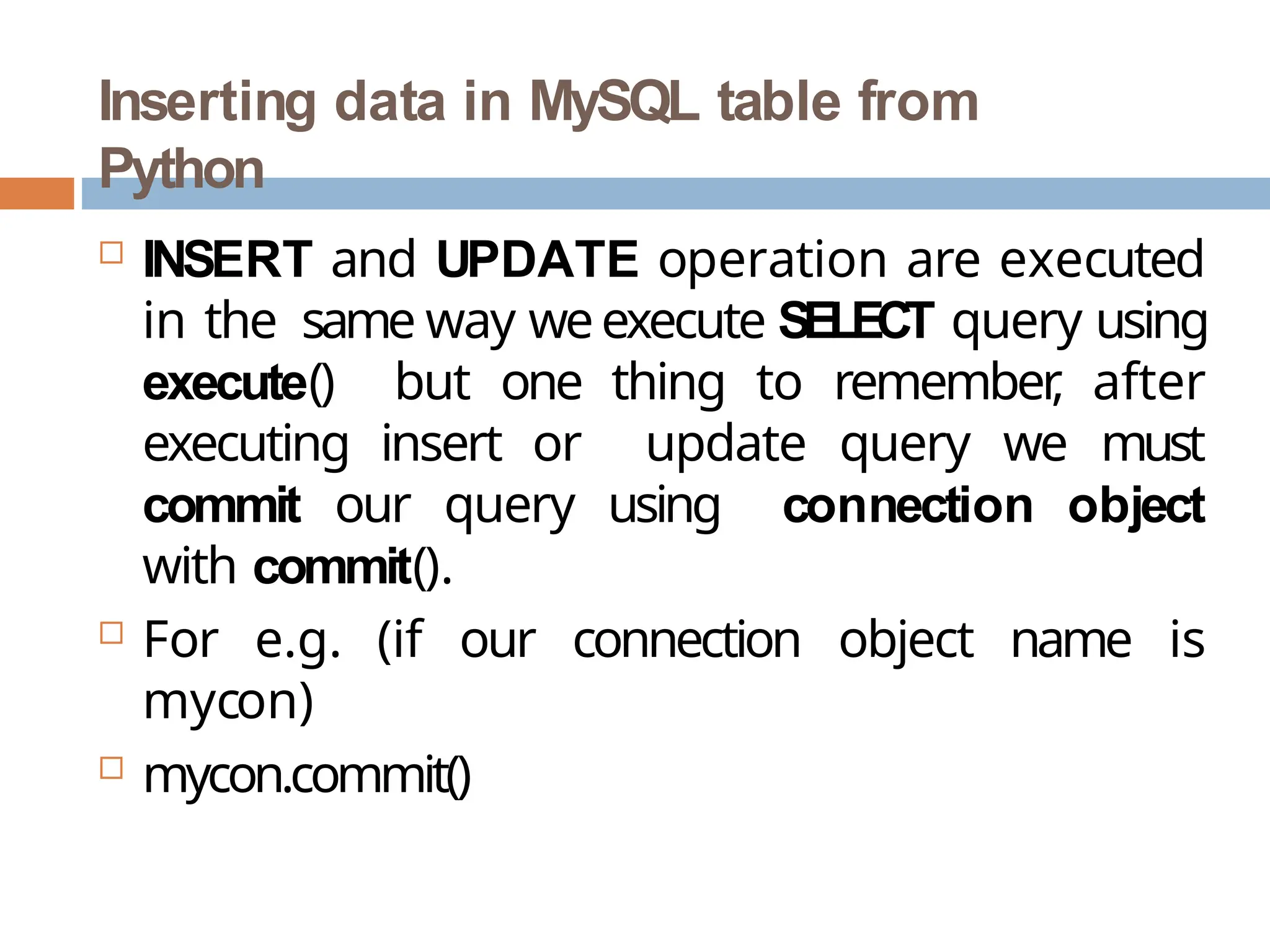
Inserting data in MySQL table from
Python
 INSERT and UPDATE operation are executed
in the same way weexecute SELECT query using
execute() but one thing to remember
, after
executing insert or update query we must
commit our query using connection object
with commit().
 For e.g. (if our connection object name is
mycon)
 mycon.commit()
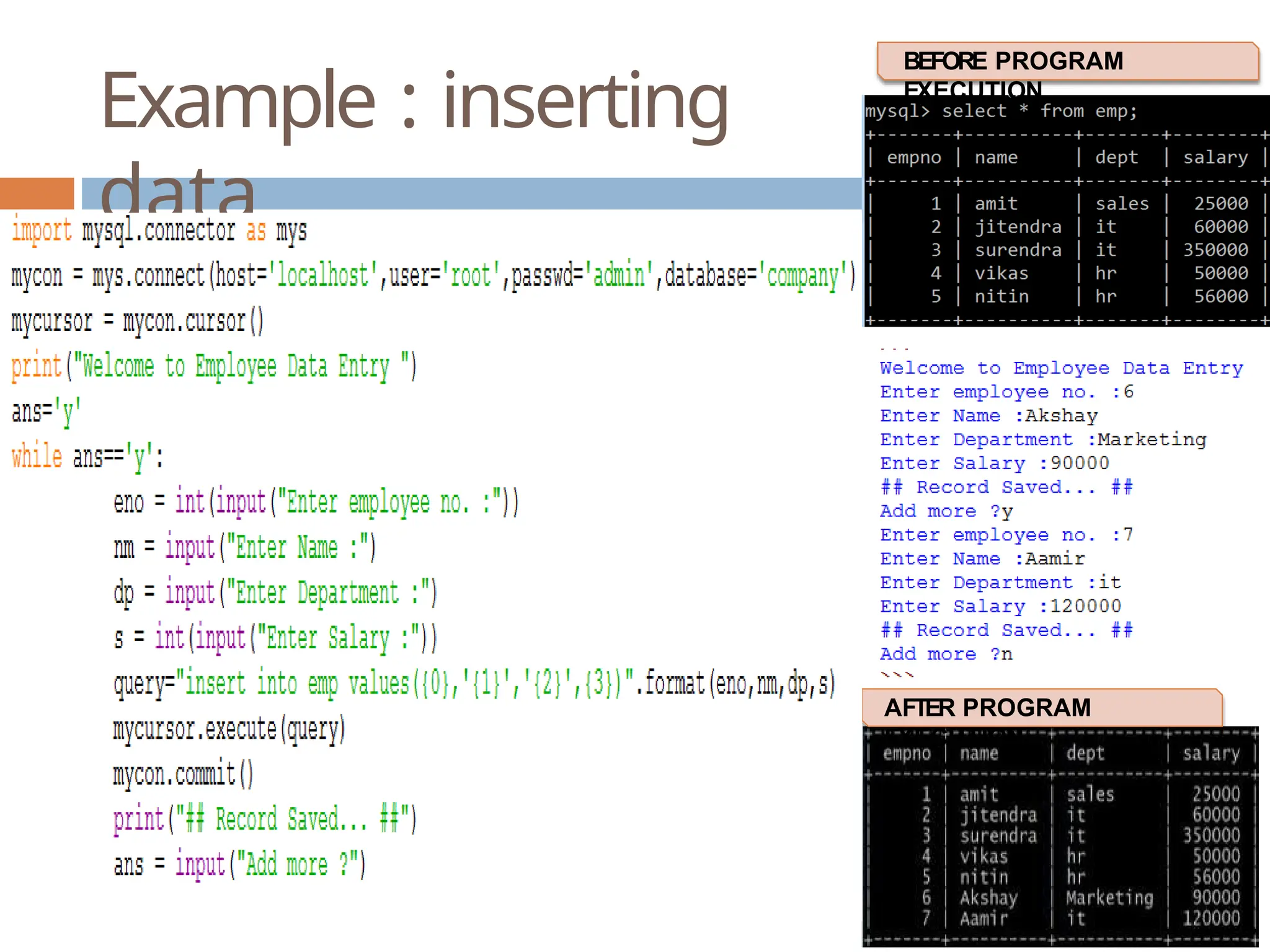
Example : inserting
data
BEFORE PROGRAM
EXECUTION
AFTER PROGRAM
EXECUTION
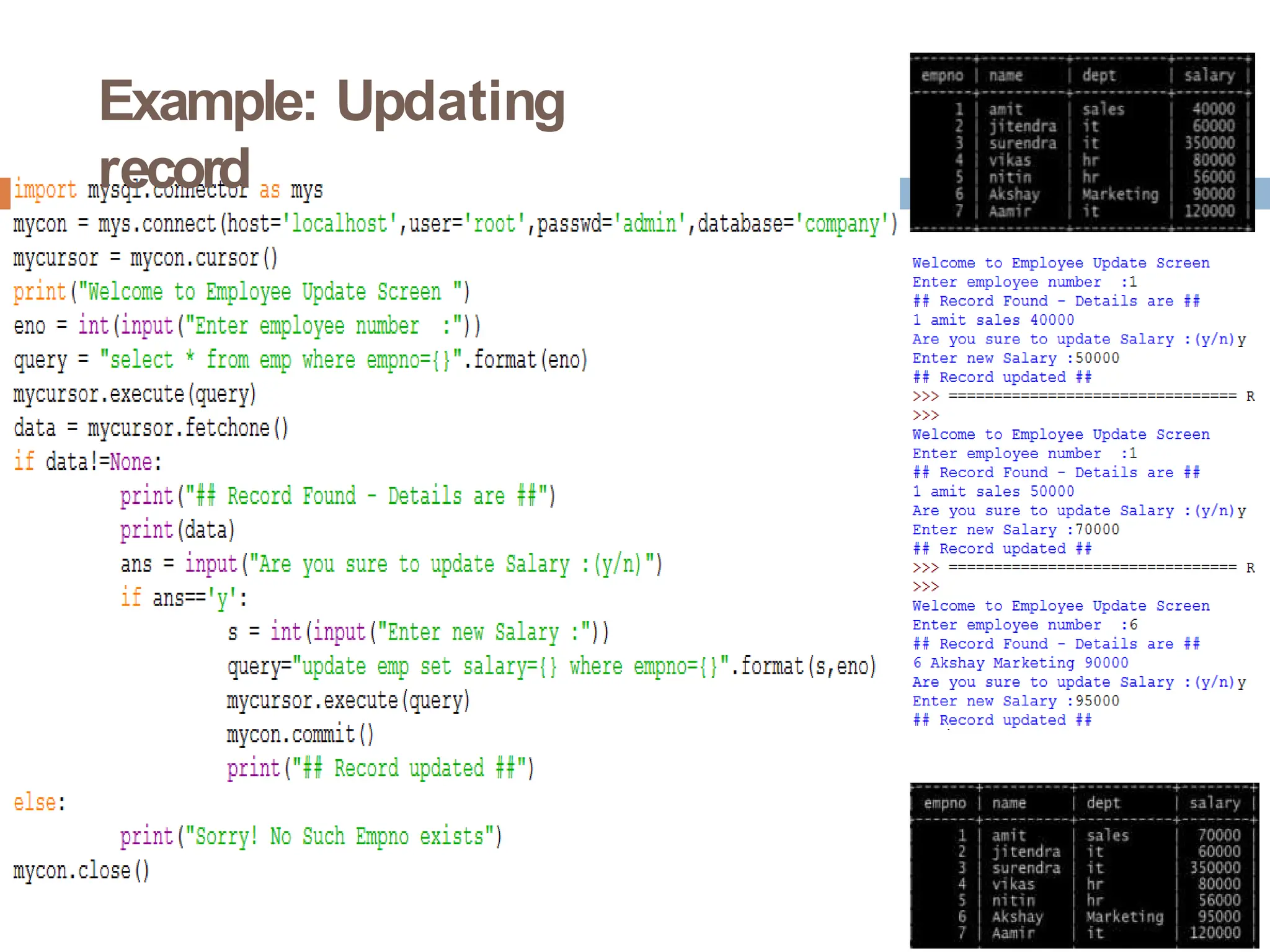
Example: Updating
record

Interface Python with MySQLwedgvwewefwefwe.pptx

  • 1.
  • 2.
    Introducti on  Every applicationrequired data to be stored for future reference to manipulate data. Today every application stores data in database for this purpose  For example, reservation system stores passengers details for reserving the seats and later on for sending some messages or for printing tickets etc.  In school student details are saved for many reasons like attendance, fee collections, exams, report card etc.  Python allows us to connect all types of database like Oracle, SQL Server, MySQL.  In our syllabus we have to understand how to connect Python programs with MySQL
  • 3.
    Pre-requisite to connectPython with MySQL  Before we connect python program with any database like MySQL we need to build a bridge to connect Python and MySQL.  T o build this bridge so that data can travel both ways we need a connector called “mysql.connector”.  We can install “mysql.connector” by using following methods: 🞑 At command prompt (Administrator login)  Type “pip install mysql.connector” and press enter  (internet connection in required)  This connector will work only for MySQL 5.7.3 or later 🞑 Or open “https://dev.mysql.com/downloads/connector/pyt hon/”
  • 4.
    Connecting to MySQLfrom Python  Once the connector is installed you are ready to connect your python program to MySQL.  The following steps to follow while connecting your python program with MySQL 🞑 Open python 🞑 Import the package required (import mysql.connector) 🞑 Open the connection to database 🞑 Create a cursor instance 🞑 Execute the query and store it in resultset 🞑 Extract data from resultset 🞑 Clean up the environment
  • 5.
    Importing mysql.connector import mysql.connector Or import mysql.connectoras ms Here “ms” is an alias, so every time we can use “ms” in place of “mysql.connector”
  • 6.
    Open a connectionto MySQL Database  T o create connection, connect() function is used  Its syntax is: 🞑 connect(host=<server_name>,user=<user_name>, passwd=<password>[,database=<database>])  Here server_name means database servername, generally it is given as “localhost”  User_name means user by which we connect with mysql generally it is given as “root”  Password is the password of user “root”  Database is the name of database whose data(table) we want to use
  • 7.
    Example: To establishconnection with MySQL is_connected() function returns true if connection is established otherwise false “mys” is an alias of package “mysql.connector” “mycon” is connection object which stores connection established with MySQL “c o n n e cStA(C) ”H I Nf uBnHcAt iRoDnWi sA Ju, sPeGdT ( Ct oS ) ,cKoVn nNeOc.t1wT EiZt hP UmRy s q l
  • 8.
  • 9.
    Creating Cursor  It isa useful control structure of database connectivity.  When we fire a query to database, it is executed and resultset (set of records) is sent over t he connection in one go.  We may want to access data one row at a time, but query processing cannot happens as one row at a time, so cursor help us in performing this task. Cursor stores all the data as a temporary container of returned data and we can fetch data one row at a time from Cursor .
  • 10.
    Creating Cursor andExecuting Query  TO CREATE CURSOR 🞑 Cursor_name = connectionObject.cursor() 🞑 For e.g. 🞑 mycursor = mycon.cursor()  TO EXECUTE QUERY  We use execute() function to send query to connection  Cursor_name.execute(query)  For e.g.  mycursor.execute(„select * from emp‟)
  • 11.
    Example - Cursor Output showscursor is created and query is fired and stored, but no data is coming. T o fetch data we have to use functions like fetchall(), fetchone(), fetchmany() are used
  • 12.
    Fetching(extracting) data from ResultSet To extract data from cursor following functions are used: 🞑 fetchall() : it will return all the record in the form of tuple. 🞑 fetchone() : it return one record from the result set. i.e. first time it will return first record, next time it will return second record and so on. If no more record it will return None 🞑 fetchmany(n) : it will return n number of records. It no more record it will return an empty tuple. 🞑 rowcount : it will return number of rows retrieved from the cursor so far.
  • 13.
  • 14.
  • 15.
  • 16.
  • 17.
  • 18.
  • 19.
    Parameterized Query  We canpass values to query to perform dynamic search like we want to search for any employee number entered during runtime or to search any other column values.  To Create Parameterized query we can use various methods like: 🞑 Concatenating dynamic variable to query values are entered. 🞑 String template with % formatting 🞑 String template with {} and format function in which
  • 20.
  • 21.
    String template with%s formatting  In this method we will use %s in place of values to substitute and then pass the value for that place.
  • 22.
    String template with%s formatting
  • 23.
    String template with{} and format()  In this method in place of %s we will use {} and to pass values for these placeholder format() is used. Inside we can optionally give 0,1,2… values for e.g. {0},{1} but its not mandatory. we can also optionally pass named parameter inside {} so that while passing we need to pass. not to For e.g. values through formatfunction remember the order of value {roll},{name} etc.
  • 24.
    String template with{} and format()
  • 25.
    String template with{} and format()
  • 26.
    Inserting data inMySQL table from Python  INSERT and UPDATE operation are executed in the same way weexecute SELECT query using execute() but one thing to remember , after executing insert or update query we must commit our query using connection object with commit().  For e.g. (if our connection object name is mycon)  mycon.commit()
  • 27.
    Example : inserting data BEFOREPROGRAM EXECUTION AFTER PROGRAM EXECUTION
  • 28.