MongoDB and Python Workshop
Joe Drumgoole
Director of Developer Advocacy, EMEA
MongoDB
@jdrumgoole
2
Agenda for Today
• Introduction to NoSQL
• My First MongoDB Application
• Thinking in Documents
• Understanding Replica Sets and Drivers
3
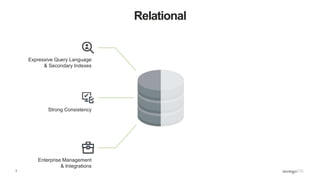
Relational
Expressive Query Language
& Secondary Indexes
Strong Consistency
Enterprise Management
& Integrations
4
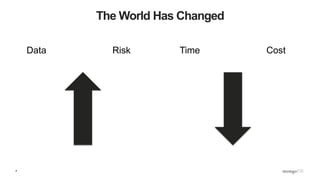
The World Has Changed
Data Risk Time Cost
5
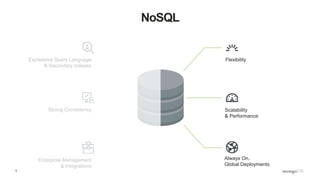
NoSQL
Scalability
& Performance
Always On,
Global Deployments
FlexibilityExpressive Query Language
& Secondary Indexes
Strong Consistency
Enterprise Management
& Integrations
6
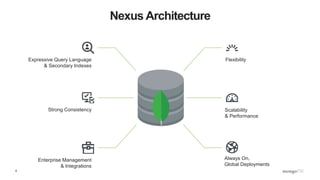
Nexus Architecture
Scalability
& Performance
Always On,
Global Deployments
FlexibilityExpressive Query Language
& Secondary Indexes
Strong Consistency
Enterprise Management
& Integrations
7
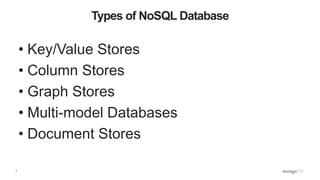
Types of NoSQL Database
• Key/Value Stores
• Column Stores
• Graph Stores
• Multi-model Databases
• Document Stores
8
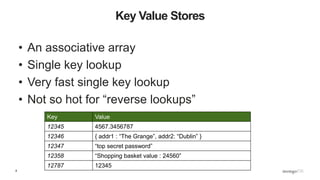
Key Value Stores
• An associative array
• Single key lookup
• Very fast single key lookup
• Not so hot for “reverse lookups”
Key Value
12345 4567.3456787
12346 { addr1 : “The Grange”, addr2: “Dublin” }
12347 “top secret password”
12358 “Shopping basket value : 24560”
12787 12345
9
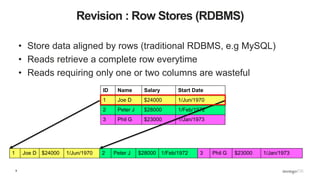
Revision : Row Stores (RDBMS)
• Store data aligned by rows (traditional RDBMS, e.g MySQL)
• Reads retrieve a complete row everytime
• Reads requiring only one or two columns are wasteful
ID Name Salary Start Date
1 Joe D $24000 1/Jun/1970
2 Peter J $28000 1/Feb/1972
3 Phil G $23000 1/Jan/1973
1 Joe D $24000 1/Jun/1970 2 Peter J $28000 1/Feb/1972 3 Phil G $23000 1/Jan/1973
10
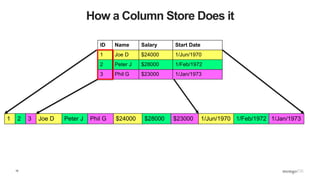
How a Column Store Does it
1 2 3
ID Name Salary Start Date
1 Joe D $24000 1/Jun/1970
2 Peter J $28000 1/Feb/1972
3 Phil G $23000 1/Jan/1973
Joe D Peter J Phil G $24000 $28000 $23000 1/Jun/1970 1/Feb/1972 1/Jan/1973
11
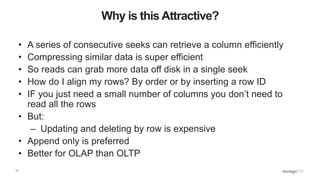
Why is this Attractive?
• A series of consecutive seeks can retrieve a column efficiently
• Compressing similar data is super efficient
• So reads can grab more data off disk in a single seek
• How do I align my rows? By order or by inserting a row ID
• IF you just need a small number of columns you don’t need to
read all the rows
• But:
– Updating and deleting by row is expensive
• Append only is preferred
• Better for OLAP than OLTP
12
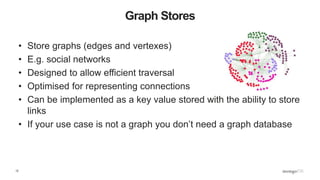
Graph Stores
• Store graphs (edges and vertexes)
• E.g. social networks
• Designed to allow efficient traversal
• Optimised for representing connections
• Can be implemented as a key value stored with the ability to store
links
• If your use case is not a graph you don’t need a graph database
13
Multi-Model Databases
• Combine multiple storage/access models
• Often Graph plus “something else”
• Fixes the “polyglot persistence” issue of keeping multiple
independent databases consistent
• The “new new thing” in NoSQL Land
• Expect to hear more noise about these kinds of databases
14
Document Store
• Not PDFs, Microsoft Word or HTML
• Documents are nested structures created using Javascript Object Notation (JSON)
{
name : “Joe Drumgoole”,
title : “Director of Developer Advocacy”,
Address : {
address1 : “Latin Hall”,
address2 : “Golden Lane”,
eircode : “D09 N623”,
}
expertise: [ “MongoDB”, “Python”, “Javascript” ],
employee_number : 320,
location : [ 53.34, -6.26 ]
}
15
MongoDB Documents are Typed
{
name : “Joe Drumgoole”,
title : “Director of Developer Advocacy”,
Address : {
address1 : “Latin Hall”,
address2 : “Golden Lane”,
eircode : “D09 N623”,
}
expertise: [ “MongoDB”, “Python”, “Javascript” ],
employee_number : 320,
location : [ 53.34, -6.26 ]
}
Strings
Nested Document
Array
Integer
Geo-spatial Coordinates
16
MongoDB Understands JSON Documents
• From the very first version it was a native JSON database
• Understands and can index the sub-structures
• Stores JSON as a binary format called BSON
• Efficient for encoding and decoding for network transmission
• MongoDB can create indexes on any document field
17
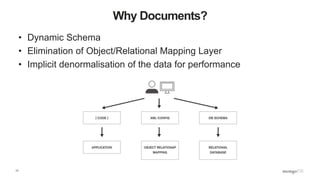
Why Documents?
• Dynamic Schema
• Elimination of Object/Relational Mapping Layer
• Implicit denormalisation of the data for performance
18
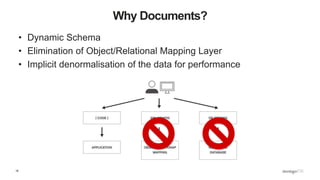
Why Documents?
• Dynamic Schema
• Elimination of Object/Relational Mapping Layer
• Implicit denormalisation of the data for performance
19
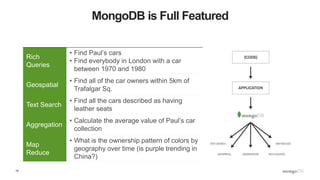
MongoDB is Full Featured
Rich
Queries
• Find Paul’s cars
• Find everybody in London with a car
between 1970 and 1980
Geospatial
• Find all of the car owners within 5km of
Trafalgar Sq.
Text Search
• Find all the cars described as having
leather seats
Aggregation
• Calculate the average value of Paul’s car
collection
Map
Reduce
• What is the ownership pattern of colors by
geography over time (is purple trending in
China?)
20
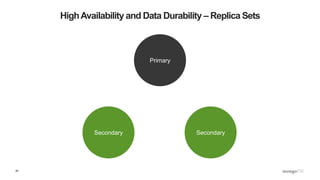
HighAvailability and Data Durability – Replica Sets
SecondarySecondary
Primary
21
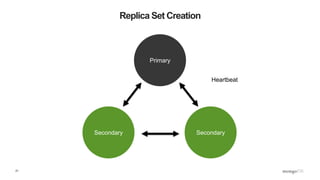
Replica Set Creation
SecondarySecondary
Primary
Heartbeat
22
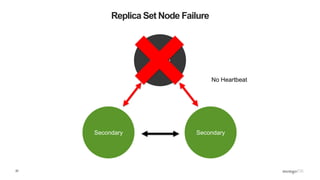
Replica Set Node Failure
SecondarySecondary
Primary
No Heartbeat
23
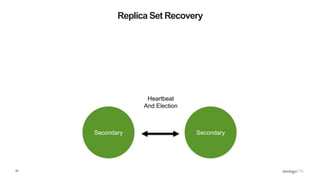
Replica Set Recovery
SecondarySecondary
Heartbeat
And Election
24
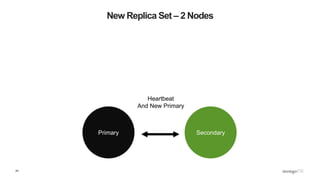
New Replica Set – 2 Nodes
SecondaryPrimary
Heartbeat
And New Primary
25
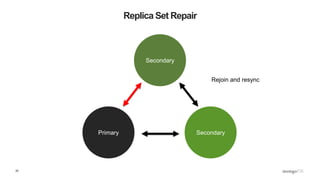
Replica Set Repair
SecondaryPrimary
Secondary
Rejoin and resync
26
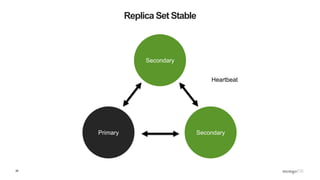
Replica Set Stable
SecondaryPrimary
Secondary
Heartbeat
27
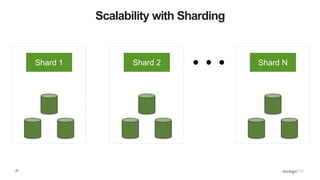
Scalability with Sharding
Shard 1 Shard 2 Shard N
28
Scalability with Sharding
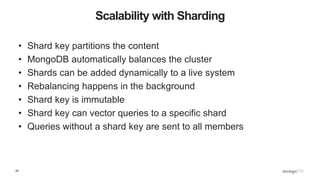
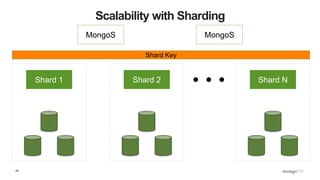
• Shard key partitions the content
• MongoDB automatically balances the cluster
• Shards can be added dynamically to a live system
• Rebalancing happens in the background
• Shard key is immutable
• Shard key can vector queries to a specific shard
• Queries without a shard key are sent to all members
29
Scalability with Sharding
MongoS MongoS
Shard 1 Shard 2 Shard N
Shard Key
Your First MongoDB Application
31
Installing MongoDB
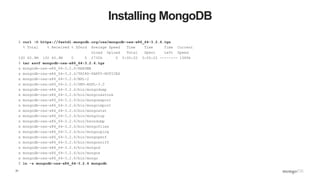
$ curl -O https://fastdl.mongodb.org/osx/mongodb-osx-x86_64-3.2.6.tgz
% Total % Received % Xferd Average Speed Time Time Time Current
Dload Upload Total Spent Left Speed
100 60.9M 100 60.9M 0 0 2730k 0 0:00:22 0:00:22 --:--:-- 1589k
$ tar xzvf mongodb-osx-x86_64-3.2.6.tgz
x mongodb-osx-x86_64-3.2.6/README
x mongodb-osx-x86_64-3.2.6/THIRD-PARTY-NOTICES
x mongodb-osx-x86_64-3.2.6/MPL-2
x mongodb-osx-x86_64-3.2.6/GNU-AGPL-3.0
x mongodb-osx-x86_64-3.2.6/bin/mongodump
x mongodb-osx-x86_64-3.2.6/bin/mongorestore
x mongodb-osx-x86_64-3.2.6/bin/mongoexport
x mongodb-osx-x86_64-3.2.6/bin/mongoimport
x mongodb-osx-x86_64-3.2.6/bin/mongostat
x mongodb-osx-x86_64-3.2.6/bin/mongotop
x mongodb-osx-x86_64-3.2.6/bin/bsondump
x mongodb-osx-x86_64-3.2.6/bin/mongofiles
x mongodb-osx-x86_64-3.2.6/bin/mongooplog
x mongodb-osx-x86_64-3.2.6/bin/mongoperf
x mongodb-osx-x86_64-3.2.6/bin/mongosniff
x mongodb-osx-x86_64-3.2.6/bin/mongod
x mongodb-osx-x86_64-3.2.6/bin/mongos
x mongodb-osx-x86_64-3.2.6/bin/mongo
$ ln -s mongodb-osx-x86_64-3.2.6 mongodb
32
Running Mongod
JD10Gen:mongodb jdrumgoole$ ./bin/mongod --dbpath /data/b2b
2016-05-23T19:21:07.767+0100 I CONTROL [initandlisten] MongoDB starting : pid=49209 port=27017 dbpath=/data/b2b 64-
bit host=JD10Gen.local
2016-05-23T19:21:07.768+0100 I CONTROL [initandlisten] db version v3.2.6
2016-05-23T19:21:07.768+0100 I CONTROL [initandlisten] git version: 05552b562c7a0b3143a729aaa0838e558dc49b25
2016-05-23T19:21:07.768+0100 I CONTROL [initandlisten] allocator: system
2016-05-23T19:21:07.768+0100 I CONTROL [initandlisten] modules: none
2016-05-23T19:21:07.768+0100 I CONTROL [initandlisten] build environment:
2016-05-23T19:21:07.768+0100 I CONTROL [initandlisten] distarch: x86_64
2016-05-23T19:21:07.768+0100 I CONTROL [initandlisten] target_arch: x86_64
2016-05-23T19:21:07.768+0100 I CONTROL [initandlisten] options: { storage: { dbPath: "/data/b2b" } }
2016-05-23T19:21:07.769+0100 I - [initandlisten] Detected data files in /data/b2b created by the 'wiredTiger'
storage engine, so setting the active storage engine to 'wiredTiger'.
2016-05-23T19:21:07.769+0100 I STORAGE [initandlisten] wiredtiger_open config:
create,cache_size=4G,session_max=20000,eviction=(threads_max=4),config_base=false,statistics=(fast),log=(enabled=true
,archive=true,path=journal,compressor=snappy),file_manager=(close_idle_time=100000),checkpoint=(wait=60,log_size=2GB)
,statistics_log=(wait=0),
2016-05-23T19:21:08.837+0100 I CONTROL [initandlisten]
2016-05-23T19:21:08.838+0100 I CONTROL [initandlisten] ** WARNING: soft rlimits too low. Number of files is 256,
should be at least 1000
2016-05-23T19:21:08.840+0100 I NETWORK [HostnameCanonicalizationWorker] Starting hostname canonicalization worker
2016-05-23T19:21:08.840+0100 I FTDC [initandlisten] Initializing full-time diagnostic data capture with directory
'/data/b2b/diagnostic.data'
2016-05-23T19:21:08.841+0100 I NETWORK [initandlisten] waiting for connections on port 27017
2016-05-23T19:21:09.148+0100 I NETWORK [initandlisten] connection accepted from 127.0.0.1:59213 #1 (1 connection now
open)
33
Connecting Via The Shell
$ ./bin/mongo
MongoDB shell version: 3.2.6
connecting to: test
Server has startup warnings:
2016-05-17T11:46:03.516+0100 I CONTROL [initandlisten]
2016-05-17T11:46:03.516+0100 I CONTROL [initandlisten] ** WARNING: soft rlimits too low. Number of
files is 256, should be at least 1000
>
34
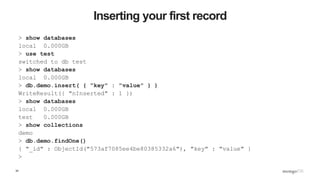
Inserting your first record
> show databases
local 0.000GB
> use test
switched to db test
> show databases
local 0.000GB
> db.demo.insert( { "key" : "value" } )
WriteResult({ "nInserted" : 1 })
> show databases
local 0.000GB
test 0.000GB
> show collections
demo
> db.demo.findOne()
{ "_id" : ObjectId("573af7085ee4be80385332a6"), "key" : "value" }
>
35
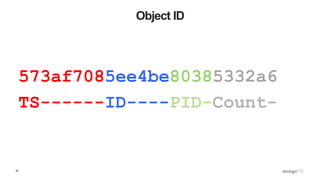
Object ID
573af7085ee4be80385332a6
TS------ID----PID-Count-
36
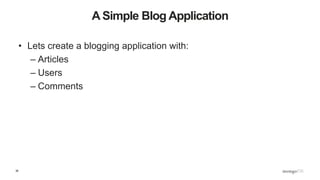
A Simple Blog Application
• Lets create a blogging application with:
– Articles
– Users
– Comments
37
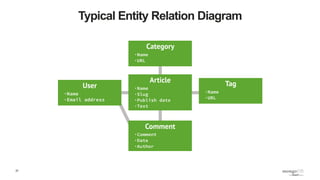
Typical Entity Relation Diagram
38
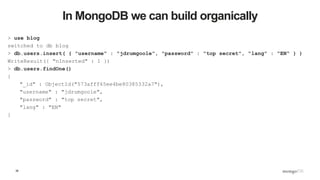
In MongoDB we can build organically
> use blog
switched to db blog
> db.users.insert( { "username" : "jdrumgoole", "password" : "top secret", "lang" : "EN" } )
WriteResult({ "nInserted" : 1 })
> db.users.findOne()
{
"_id" : ObjectId("573afff65ee4be80385332a7"),
"username" : "jdrumgoole",
"password" : "top secret",
"lang" : "EN"
}
39
How do we do this in a program?
'''
Created on 17 May 2016
@author: jdrumgoole
'''
import pymongo
#
# client defaults to localhost and port 27017. eg MongoClient('localhost', 27017)
client = pymongo.MongoClient()
blogDatabase = client[ "blog" ]
usersCollection = blogDatabase[ "users" ]
usersCollection.insert_one( { "username" : "jdrumgoole",
"password" : "top secret",
"lang" : "EN" })
user = usersCollection.find_one()
print( user )
40
Next up Articles
…
articlesCollection = blogDatabase[ "articles" ]
author = "jdrumgoole"
article = { "title" : "This is my first post",
"body" : "The is the longer body text for my blog post. We can add lots of text here.",
"author" : author,
"tags" : [ "joe", "general", "Ireland", "admin" ]
}
#
# Lets check if our author exists
#
if usersCollection.find_one( { "username" : author }) :
articlesCollection.insert_one( article )
else:
raise ValueError( "Author %s does not exist" % author )
41
Create a new type of article
#
# Lets add a new type of article with a posting date and a section
#
author = "jdrumgoole"
title = "This is a post on MongoDB"
newPost = { "title" : title,
"body" : "MongoDB is the worlds most popular NoSQL database. It is a document
database",
"author" : author,
"tags" : [ "joe", "mongodb", "Ireland" ],
"section" : "technology",
"postDate" : datetime.datetime.now(),
}
#
# Lets check if our author exists
#
if usersCollection.find_one( { "username" : author }) :
articlesCollection.insert_one( newPost )
42
Make a lot of articles 1
import pymongo
import string
import datetime
import random
def randomString( size, letters = string.letters ):
return "".join( [random.choice( letters ) for _ in xrange( size )] )
client = pymongo.MongoClient()
def makeArticle( count, author, timestamp ):
return { "_id" : count,
"title" : randomString( 20 ),
"body" : randomString( 80 ),
"author" : author,
"postdate" : timestamp }
def makeUser( username ):
return { "username" : username,
"password" : randomString( 10 ) ,
"karma" : random.randint( 0, 500 ),
"lang" : "EN" }
43
Make a lot of articles 2
blogDatabase = client[ "blog" ]
usersCollection = blogDatabase[ "users" ]
articlesCollection = blogDatabase[ "articles" ]
bulkUsers = usersCollection.initialize_ordered_bulk_op()
bulkArticles = articlesCollection.initialize_ordered_bulk_op()
ts = datetime.datetime.now()
for i in range( 1000000 ) :
#username = randomString( 10, string.ascii_uppercase ) + "_" + str( i )
username = "USER_" + str( i )
bulkUsers.insert( makeUser( username ) )
ts = ts + datetime.timedelta( seconds = 1 )
bulkArticles.insert( makeArticle( i, username, ts ))
if ( i % 500 == 0 ) :
bulkUsers.execute()
bulkArticles.execute()
bulkUsers = usersCollection.initialize_ordered_bulk_op()
bulkArticles = articlesCollection.initialize_ordered_bulk_op()
bulkUsers.execute()
bulkArticles.execute()
44
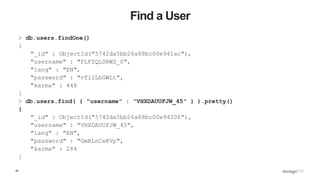
Find a User
> db.users.findOne()
{
"_id" : ObjectId("5742da5bb26a88bc00e941ac"),
"username" : "FLFZQLSRWZ_0",
"lang" : "EN",
"password" : "vTlILbGWLt",
"karma" : 448
}
> db.users.find( { "username" : "VHXDAUUFJW_45" } ).pretty()
{
"_id" : ObjectId("5742da5bb26a88bc00e94206"),
"username" : "VHXDAUUFJW_45",
"lang" : "EN",
"password" : "GmRLnCeKVp",
"karma" : 284
}
45
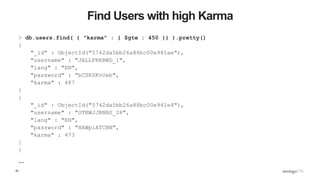
Find Users with high Karma
> db.users.find( { "karma" : { $gte : 450 }} ).pretty()
{
"_id" : ObjectId("5742da5bb26a88bc00e941ae"),
"username" : "JALLFRKBWD_1",
"lang" : "EN",
"password" : "bCSKSKvUeb",
"karma" : 487
}
{
"_id" : ObjectId("5742da5bb26a88bc00e941e4"),
"username" : "OTKWJJBNBU_28",
"lang" : "EN",
"password" : "HAWpiATCBN",
"karma" : 473
}
{
…
46
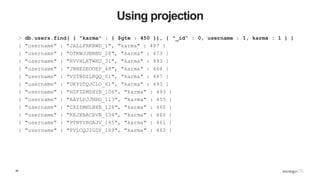
Using projection
> db.users.find( { "karma" : { $gte : 450 }}, { "_id" : 0, username : 1, karma : 1 } )
{ "username" : "JALLFRKBWD_1", "karma" : 487 }
{ "username" : "OTKWJJBNBU_28", "karma" : 473 }
{ "username" : "RVVHLKTWHU_31", "karma" : 493 }
{ "username" : "JBNESEOOEP_48", "karma" : 464 }
{ "username" : "VSTBDZLKQQ_51", "karma" : 487 }
{ "username" : "UKYDTQJCLO_61", "karma" : 493 }
{ "username" : "HZFZZMZHYB_106", "karma" : 493 }
{ "username" : "AAYLPJJNHO_113", "karma" : 455 }
{ "username" : "CXZZMHLBXE_128", "karma" : 460 }
{ "username" : "KKJXBACBVN_134", "karma" : 460 }
{ "username" : "PTNTIBGAJV_165", "karma" : 461 }
{ "username" : "PVLCQJIGDY_169", "karma" : 463 }
47
Update an Article to Add Comments 1
> db.articles.find( { "_id" : 19 } ).pretty()
{
"_id" : 19,
"body" :
"nTzOofOcnHKkJxpjKAyqTTnKZMFzzkWFeXtBRuEKsctuGBgWIrEBrYdvFIVHJWaXLUTVUXblOZZgUq
Wu",
"postdate" : ISODate("2016-05-23T12:02:46.830Z"),
"author" : "ASWTOMMABN_19",
"title" : "CPMaqHtAdRwLXhlUvsej"
}
> db.articles.update( { _id : 18 }, { $set : { comments : [] }} )
WriteResult({ "nMatched" : 1, "nUpserted" : 0, "nModified" : 1 })
48
Update an article to add Comments 2
> db.articles.find( { _id :18 } ).pretty()
{
"_id" : 18,
"body" :
"KmwFSIMQGcIsRNTDBFPuclwcVJkoMcrIPwTiSZDYyatoKzeQiKvJkiVSrndXqrALVIYZxGpaMjucgX
UV",
"postdate" : ISODate("2016-05-23T16:04:39.497Z"),
"author" : "USER_18",
"title" : "wTLreIEyPfovEkBhJZZe",
"comments" : [ ]
}
>
49
Update an Article to Add Comments 3
> db.articles.update( { _id : 18 }, { $push : { comments : { username : "joe",
comment : "hey first post" }}} )
WriteResult({ "nMatched" : 1, "nUpserted" : 0, "nModified" : 1 })
> db.articles.find( { _id :18 } ).pretty()
{
"_id" : 18,
"body" :
"KmwFSIMQGcIsRNTDBFPuclwcVJkoMcrIPwTiSZDYyatoKzeQiKvJkiVSrndXqrALVIYZxGpaMjucgXUV"
,
"postdate" : ISODate("2016-05-23T16:04:39.497Z"),
"author" : "USER_18",
"title" : "wTLreIEyPfovEkBhJZZe",
"comments" : [
{
"username" : "joe",
"comment" : "hey first post"
}
]
}
>
50
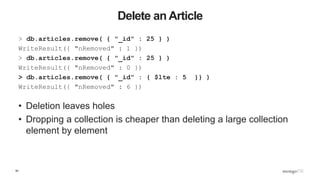
Delete an Article
> db.articles.remove( { "_id" : 25 } )
WriteResult({ "nRemoved" : 1 })
> db.articles.remove( { "_id" : 25 } )
WriteResult({ "nRemoved" : 0 })
> db.articles.remove( { "_id" : { $lte : 5 }} )
WriteResult({ "nRemoved" : 6 })
• Deletion leaves holes
• Dropping a collection is cheaper than deleting a large collection
element by element
51
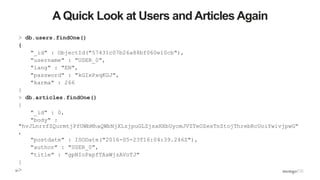
A Quick Look at Users and Articles Again
> db.users.findOne()
{
"_id" : ObjectId("57431c07b26a88bf060e10cb"),
"username" : "USER_0",
"lang" : "EN",
"password" : "kGIxPxqKGJ",
"karma" : 266
}
> db.articles.findOne()
{
"_id" : 0,
"body" :
"hvJLnrrfZQurmtjPfUWbMhaQWbNjXLzjpuGLZjsxHXbUycmJVZTeOZesTnZtojThrebRcUoiYwivjpwG"
,
"postdate" : ISODate("2016-05-23T16:04:39.246Z"),
"author" : "USER_0",
"title" : "gpNIoPxpfTAxWjzAVoTJ"
}
>
52
Find a User
> db.users.find( { "username" : "ABOXHWKBYS_199" } ).explain()
{
"queryPlanner" : {
"plannerVersion" : 1,
"namespace" : "blog.users",
"indexFilterSet" : false,
"parsedQuery" : {
"username" : {
"$eq" : "ABOXHWKBYS_199"
}
},
"winningPlan" : {
"stage" : "COLLSCAN",
"filter" : {
"username" : {
"$eq" : "ABOXHWKBYS_199"
}
},
"direction" : "forward"
},
"rejectedPlans" : [ ]
},
"serverInfo" : {
"host" : "JD10Gen.local",
"port" : 27017,
"version" : "3.2.6",
"gitVersion" : "05552b562c7a0b3143a729aaa0838e558dc49b25"
},
"ok" : 1
}
53
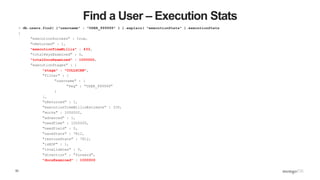
Find a User – Execution Stats
> db.users.find( {"username" : "USER_999999" } ).explain( "executionStats" ).executionStats
{
"executionSuccess" : true,
"nReturned" : 1,
"executionTimeMillis" : 433,
"totalKeysExamined" : 0,
"totalDocsExamined" : 1000000,
"executionStages" : {
"stage" : "COLLSCAN",
"filter" : {
"username" : {
"$eq" : "USER_999999"
}
},
"nReturned" : 1,
"executionTimeMillisEstimate" : 330,
"works" : 1000002,
"advanced" : 1,
"needTime" : 1000000,
"needYield" : 0,
"saveState" : 7812,
"restoreState" : 7812,
"isEOF" : 1,
"invalidates" : 0,
"direction" : "forward",
"docsExamined" : 1000000
54
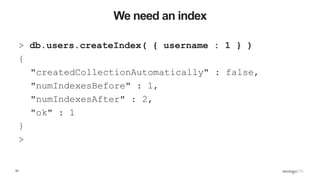
We need an index
> db.users.createIndex( { username : 1 } )
{
"createdCollectionAutomatically" : false,
"numIndexesBefore" : 1,
"numIndexesAfter" : 2,
"ok" : 1
}
>
55
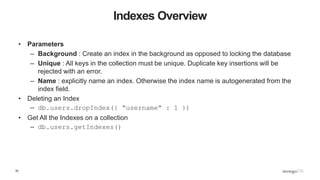
Indexes Overview
• Parameters
– Background : Create an index in the background as opposed to locking the database
– Unique : All keys in the collection must be unique. Duplicate key insertions will be
rejected with an error.
– Name : explicitly name an index. Otherwise the index name is autogenerated from the
index field.
• Deleting an Index
– db.users.dropIndex({ “username” : 1 })
• Get All the Indexes on a collection
– db.users.getIndexes()
56
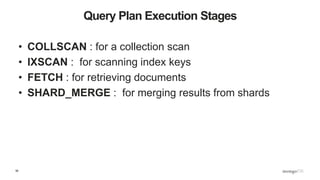
Query Plan Execution Stages
• COLLSCAN : for a collection scan
• IXSCAN : for scanning index keys
• FETCH : for retrieving documents
• SHARD_MERGE : for merging results from shards
57
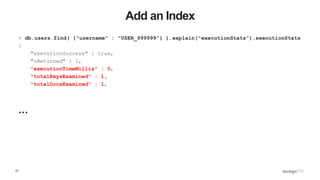
Add an Index
> db.users.find( {"username" : "USER_999999”} ).explain("executionStats”).executionStats
{
"executionSuccess" : true,
"nReturned" : 1,
"executionTimeMillis" : 0,
"totalKeysExamined" : 1,
"totalDocsExamined" : 1,
…
58
Execution Stage
"executionStages" : {
"stage" : "FETCH",
"nReturned" : 1,
"executionTimeMillisEstimate" : 0,
"docsExamined" : 1,,
"inputStage" : {
"stage" : "IXSCAN",
"nReturned" : 1,
"executionTimeMillisEstimate" : 0,
"keyPattern" : {
"username" : 1
},
"indexName" : "username_1",
"isMultiKey" : false,
"isUnique" : false,
"isSparse" : false,
"isPartial" : false,
"indexVersion" : 1,
"direction" : "forward",
"indexBounds" : {
"username" : [
"["USER_999999", "USER_999999"]"
]
},
"keysExamined" : 1,
"seenInvalidated" : 0
}
}
}
Thinking in Documents
60
Example Document
{
first_name: ‘Paul’,
surname: ‘Miller’,
cell: 447557505611,
city: ‘London’,
location: [45.123,47.232],
Profession: [‘banking’, ‘finance’, ‘trader’],
cars: [
{ model: ‘Bentley’,
year: 1973,
value: 100000, … },
{ model: ‘Rolls Royce’,
year: 1965,
value: 330000, … }
]
}
Fields can contain an array
of sub-documents
Fields
Typed field values
Fields can
contain arrays
61
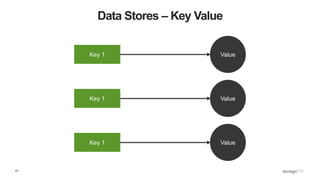
Data Stores – Key Value
Key 1 Value
Key 1 Value
Key 1 Value
62
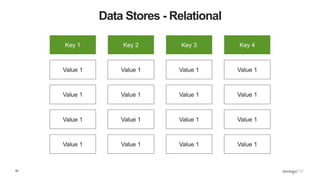
Data Stores - Relational
Key 1
Value 1
Value 1
Value 1
Value 1
Key 2
Value 1
Value 1
Value 1
Value 1
Key 3
Value 1
Value 1
Value 1
Value 1
Key 4
Value 1
Value 1
Value 1
Value 1
63
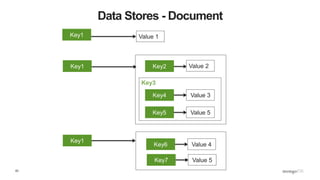
Data Stores - Document
Key3
Key4
Key5
Value 3
Value 5
Value 4Key6
Value 5Key7
Value 2
Value 1Key1
Key1
Key1
Key2
64
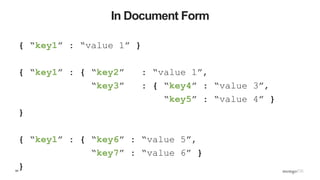
In Document Form
{ “key1” : “value 1” }
{ “key1” : { “key2” : “value 1”,
“key3” : { “key4” : “value 3”,
“key5” : “value 4” }
}
{ “key1” : { “key6” : “value 5”,
“key7” : “value 6” }
}
65
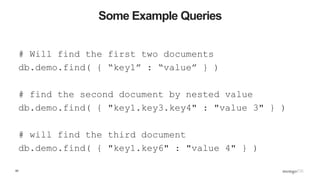
Some Example Queries
# Will find the first two documents
db.demo.find( { “key1” : “value” } )
# find the second document by nested value
db.demo.find( { "key1.key3.key4" : "value 3" } )
# will find the third document
db.demo.find( { "key1.key6" : "value 4" } )
66
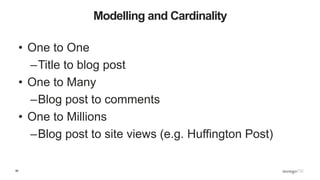
Modelling and Cardinality
• One to One
–Title to blog post
• One to Many
–Blog post to comments
• One to Millions
–Blog post to site views (e.g. Huffington Post)
67
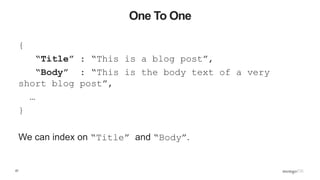
One To One
{
“Title” : “This is a blog post”,
“Body” : “This is the body text of a very
short blog post”,
…
}
We can index on “Title” and “Body”.
68
One to Many
{
“Title” : “This is a blog post”,
“Body” : “This is the body text”,
“Comments” : [ { “name” : “Joe Drumgoole”,
“email” : “Joe.Drumgoole@mongodb.com”,
“comment” : “I love your writing style” },
{ “name” : “John Smith”,
“email” : “John.Smith@example.com”,
“comment” : “I hate your writing style” }]
}
Where we expect a small number of comments we can embed them
in the main document
69
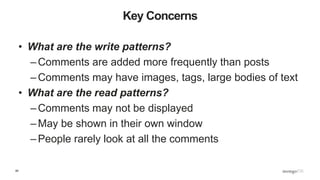
Key Concerns
• What are the write patterns?
–Comments are added more frequently than posts
–Comments may have images, tags, large bodies of text
• What are the read patterns?
–Comments may not be displayed
–May be shown in their own window
–People rarely look at all the comments
70
Approach 2 – Separate Collection
• Keep all comments in a separate comments collection
• Add references to comments as an array of comment IDs
• Requires two queries to display blog post and associated comments
• Requires two writes to create a comments
{
_id : ObjectID( “AAAA” ),
name : “Joe Drumgoole”,
email : “Joe.Drumgoole@mongodb.com”,
comment :“I love your writing style”,
}
{
_id : ObjectID( “AAAB” ),
name : “John Smith”,
email : “Joe.Drumgoole@mongodb.com”,
comment :“I hate your writing style”,
}
{
“_id” : ObjectID( “ZZZZ” ),
“Title” : “A Blog Title”,
“Body” : “A blog post”,
“comments” : [ ObjectID( “AAAA” ),
ObjectID( “AAAB” )]
}
{
“_id” : ObjectID( “AZZZ” ),
“Title” : “A Blog Title”,
“Body” : “A blog post”,
“comments” : []
}
71
Approach 3 – A Hybrid Approach
{
“_id” : ObjectID( “ZZZZ” ),
“Title” : “A Blog Title”,
“Body” : “A blog post”,
“comments” : [{
“_id” : ObjectID( “AAAA” )
“name” : “Joe Drumgoole”,
“email” : “Joe.D@mongodb.com”,
comment :“I love your writing style”,
}
{
_id : ObjectID( “AAAB” ),
name : “John Smith”,
email : “Joe.Drumgoole@mongodb.com”,
comment :“I hate your writing style”,
}]
}
{
“_post_id” : ObjectID( “ZZZZ” ),
“comments” : [{
“_id” : ObjectID( “AAAA” )
“name” : “Joe Drumgoole”,
“email” : “Joe.D@mongodb.com”,
“comment” :“I love your writing
style”,
}
{...},{...},{...},{...},{...},{...}
,{..},{...},{...},{...} ]
72
What About One to A Million
• What is we were tracking mouse position for heat tracking?
– Each user will generate hundreds of data points per visit
– Thousands of data points per post
– Millions of data points per blog site
• Reverse the model
– Store a blog ID per event
{
“post_id” : ObjectID(“ZZZZ”),
“timestamp” : ISODate("2005-01-02T00:00:00Z”),
“location” : [24, 34]
“click” : False,
}
73
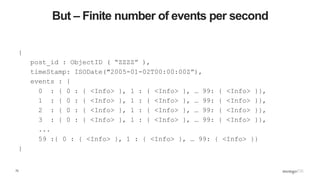
But – Finite number of events per second
{
post_id : ObjectID ( “ZZZZ” ),
timeStamp: ISODate("2005-01-02T00:00:00Z”),
events : {
0 : { 0 : { <Info> }, 1 : { <Info> }, … 99: { <Info> }},
1 : { 0 : { <Info> }, 1 : { <Info> }, … 99: { <Info> }},
2 : { 0 : { <Info> }, 1 : { <Info> }, … 99: { <Info> }},
3 : { 0 : { <Info> }, 1 : { <Info> }, … 99: { <Info> }},
...
59 :{ 0 : { <Info> }, 1 : { <Info> }, … 99: { <Info> }}
}
74
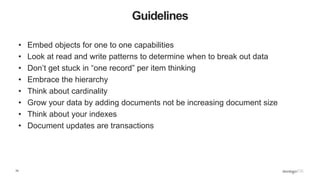
Guidelines
• Embed objects for one to one capabilities
• Look at read and write patterns to determine when to break out data
• Don’t get stuck in “one record” per item thinking
• Embrace the hierarchy
• Think about cardinality
• Grow your data by adding documents not be increasing document size
• Think about your indexes
• Document updates are transactions
Building Real World Applications
76
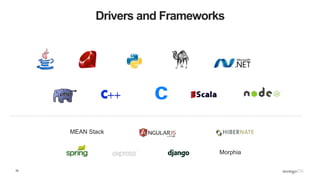
Drivers and Frameworks
Morphia
MEAN Stack
77
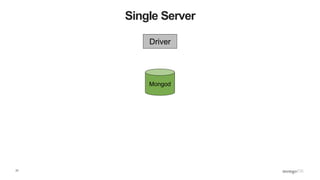
Single Server
Driver
Mongod
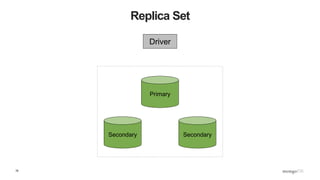
78
Replica Set
Driver
Secondary Secondary
Primary
79
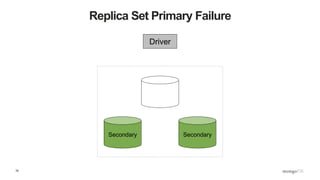
Replica Set Primary Failure
Driver
Secondary Secondary
80
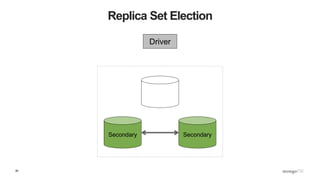
Replica Set Election
Driver
Secondary Secondary
81
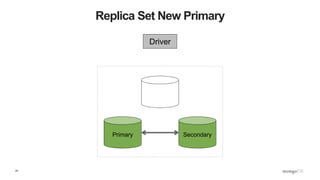
Replica Set New Primary
Driver
Primary Secondary
82
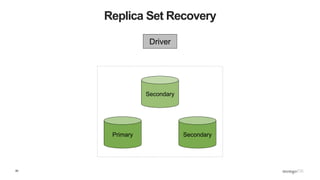
Replica Set Recovery
Driver
Primary Secondary
Secondary
83
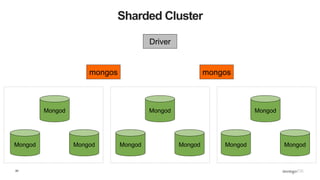
Sharded Cluster
Driver
Mongod Mongod
Mongod
Mongod Mongod
Mongod
Mongod Mongod
Mongod
mongos mongos
84
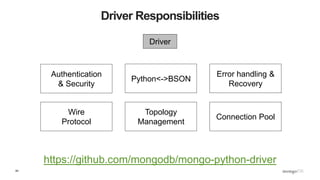
Driver Responsibilities
https://github.com/mongodb/mongo-python-driver
Driver
Authentication
& Security
Python<->BSON
Error handling &
Recovery
Wire
Protocol
Topology
Management
Connection Pool
85
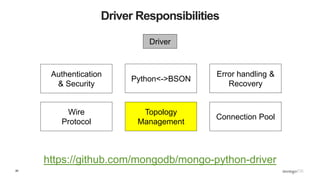
Driver Responsibilities
https://github.com/mongodb/mongo-python-driver
Driver
Authentication
& Security
Python<->BSON
Error handling &
Recovery
Wire
Protocol
Topology
Management
Connection Pool
86
Example API Calls
import pymongo
client = pymongo.MongoClient( host=“localhost”, port=27017)
database = client[ ‘test_database’ ]
collection = database[ ‘test_collection’ ]
collection.insert_one({ "hello" : "world" ,
"goodbye" : "world" } )
collection.find_one( { "hello" : "world" } )
collection.update({ "hello" : "world" },
{ "$set" : { "buenos dias" : "world" }} )
collection.delete_one({ "hello" : "world" } )
87
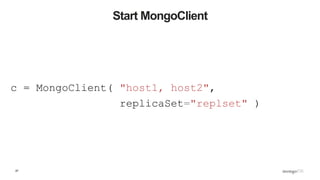
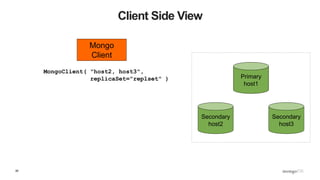
Start MongoClient
c = MongoClient( "host1, host2",
replicaSet="replset" )
88
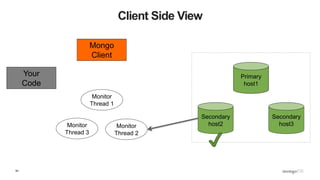
Client Side View
Secondary
host2
Secondary
host3
Primary
host1
Mongo
Client
MongoClient( "host2, host3",
replicaSet="replset" )
89
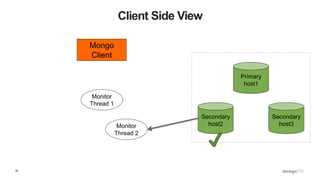
Client Side View
Secondary
host2
Secondary
host3
Primary
host1
Mongo
Client
Monitor
Thread 1
Monitor
Thread 2
{ ismaster : False,
secondary: True,
hosts : [ host1, host2, host3 ] }
90
What Does ismaster show?
>>> pprint.pprint( db.command( "ismaster" ))
{u'hosts': [u'JD10Gen-old.local:27017',
u'JD10Gen-old.local:27018',
u'JD10Gen-old.local:27019'],
u'ismaster' : False,
u'secondary': True,
u'setName' : u'replset',
…}
>>>
91
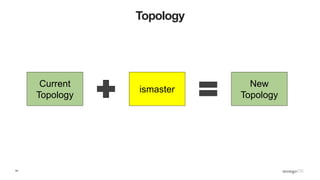
Topology
Current
Topology
ismaster
New
Topology
92
Client Side View
Secondary
host2
Secondary
host3
Primary
host1
Mongo
Client
Monitor
Thread 1
Monitor
Thread 2
93
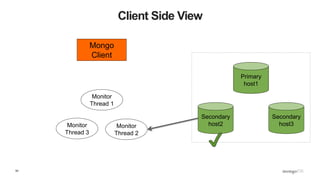
Client Side View
Secondary
host2
Secondary
host3
Primary
host1
Mongo
Client
Monitor
Thread 1
Monitor
Thread 2
Monitor
Thread 3
94
Client Side View
Secondary
host2
Secondary
host3
Primary
host1
Mongo
Client
Monitor
Thread 1
Monitor
Thread 2
Monitor
Thread 3
Your
Code
95
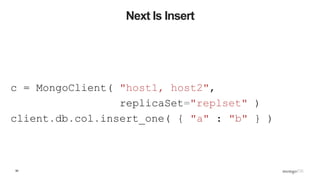
Next Is Insert
c = MongoClient( "host1, host2",
replicaSet="replset" )
client.db.col.insert_one( { "a" : "b" } )
96
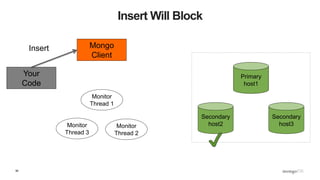
Insert Will Block
Secondary
host2
Secondary
host3
Primary
host1
Mongo
Client
Monitor
Thread 1
Monitor
Thread 2
Monitor
Thread 3
Your
Code
Insert
97
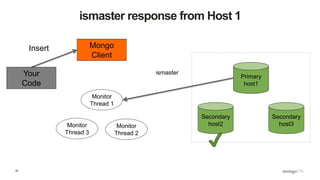
ismaster response from Host 1
Secondary
host2
Secondary
host3
Primary
host1
Mongo
Client
Monitor
Thread 1
Monitor
Thread 2
Monitor
Thread 3
Your
Code
Insert
ismaster
98
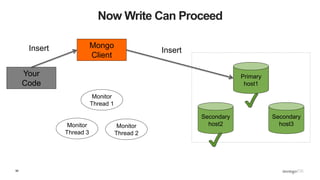
Now Write Can Proceed
Secondary
host2
Secondary
host3
Primary
host1
Mongo
Client
Monitor
Thread 1
Monitor
Thread 2
Monitor
Thread 3
Your
Code
Insert Insert
99
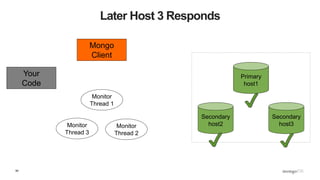
Later Host 3 Responds
Secondary
host2
Secondary
host3
Primary
host1
Mongo
Client
Monitor
Thread 1
Monitor
Thread 2
Monitor
Thread 3
Your
Code
100
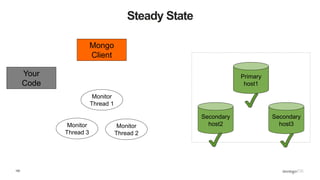
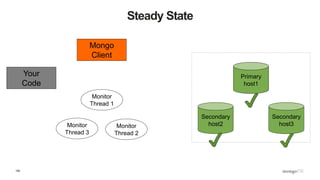
Steady State
Secondary
host2
Secondary
host3
Primary
host1
Mongo
Client
Monitor
Thread 1
Monitor
Thread 2
Monitor
Thread 3
Your
Code
101
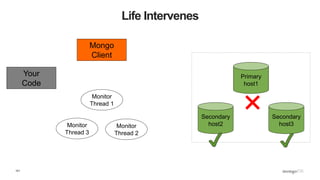
Life Intervenes
Secondary
host2
Secondary
host3
Primary
host1
Mongo
Client
Monitor
Thread 1
Monitor
Thread 2
Monitor
Thread 3
Your
Code
✖
102
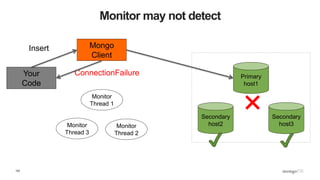
Monitor may not detect
Secondary
host2
Secondary
host3
Primary
host1
Mongo
Client
Monitor
Thread 1
Monitor
Thread 2
Monitor
Thread 3
Your
Code
✖
Insert
ConnectionFailure
103
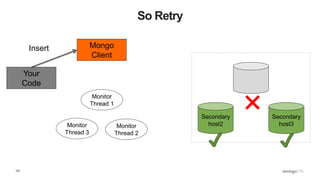
So Retry
Secondary
host2
Secondary
host3
Mongo
Client
Monitor
Thread 1
Monitor
Thread 2
Monitor
Thread 3
Your
Code
✖
Insert
104
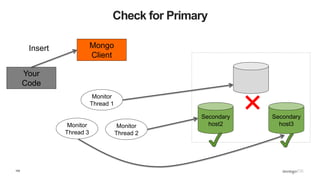
Check for Primary
Secondary
host2
Secondary
host3
Mongo
Client
Monitor
Thread 1
Monitor
Thread 2
Monitor
Thread 3
Your
Code
✖
Insert
105
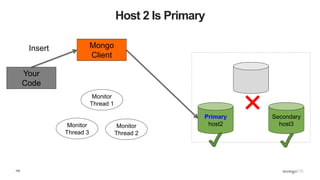
Host 2 Is Primary
Primary
host2
Secondary
host3
Mongo
Client
Monitor
Thread 1
Monitor
Thread 2
Monitor
Thread 3
Your
Code
✖
Insert
106
Steady State
Secondary
host2
Secondary
host3
Primary
host1
Mongo
Client
Monitor
Thread 1
Monitor
Thread 2
Monitor
Thread 3
Your
Code
107
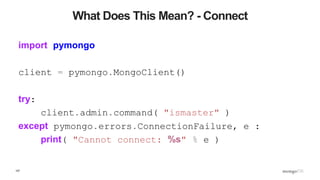
What Does This Mean? - Connect
import pymongo
client = pymongo.MongoClient()
try:
client.admin.command( "ismaster" )
except pymongo.errors.ConnectionFailure, e :
print( "Cannot connect: %s" % e )
108
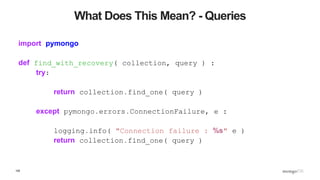
What Does This Mean? - Queries
import pymongo
def find_with_recovery( collection, query ) :
try:
return collection.find_one( query )
except pymongo.errors.ConnectionFailure, e :
logging.info( "Connection failure : %s" e )
return collection.find_one( query )
109
What Does This Mean? - Inserts
def insert_with_recovery( collection, doc ) :
doc[ "_id" ] = ObjectId()
try:
collection.insert_one( doc )
except pymongo.errors.ConnectionFailure, e:
logging.info( "Connection error: %s" % e )
collection.insert_one( doc )
except DuplicateKeyError:
pass
110
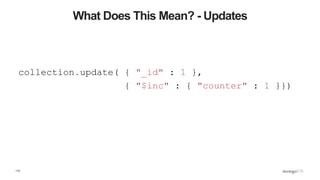
What Does This Mean? - Updates
collection.update( { "_id" : 1 },
{ "$inc" : { "counter" : 1 }})
111
Configuration
connectTimeoutMS : 30s
socketTimeoutMS : None
112
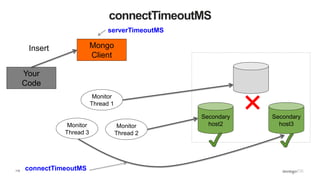
connectTimeoutMS
Secondary
host2
Secondary
host3
Mongo
Client
Monitor
Thread 1
Monitor
Thread 2
Monitor
Thread 3
Your
Code
✖
Insert
connectTimeoutMS
serverTimeoutMS
113
More Reading
• The spec author Jess Jiryu Davis has a collection of links and his better
version of this talk
https://emptysqua.re/blog/server-discovery-and-monitoring-in-mongodb-
drivers/
• The full server discovery and monitoring spec is on GitHub
https://github.com/mongodb/specifications/blob/master/source/server-
discovery-and-monitoring/server-discovery-and-monitoring.rst
Q&A
116
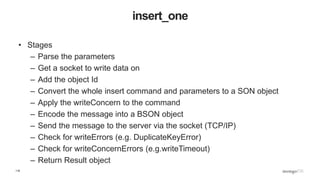
insert_one
• Stages
– Parse the parameters
– Get a socket to write data on
– Add the object Id
– Convert the whole insert command and parameters to a SON object
– Apply the writeConcern to the command
– Encode the message into a BSON object
– Send the message to the server via the socket (TCP/IP)
– Check for writeErrors (e.g. DuplicateKeyError)
– Check for writeConcernErrors (e.g.writeTimeout)
– Return Result object
117
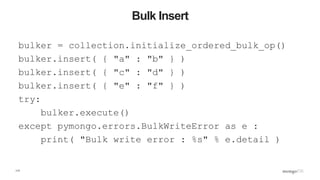
Bulk Insert
bulker = collection.initialize_ordered_bulk_op()
bulker.insert( { "a" : "b" } )
bulker.insert( { "c" : "d" } )
bulker.insert( { "e" : "f" } )
try:
bulker.execute()
except pymongo.errors.BulkWriteError as e :
print( "Bulk write error : %s" % e.detail )
118
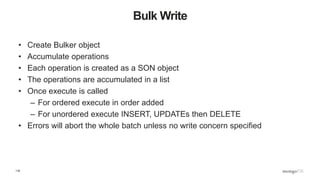
Bulk Write
• Create Bulker object
• Accumulate operations
• Each operation is created as a SON object
• The operations are accumulated in a list
• Once execute is called
– For ordered execute in order added
– For unordered execute INSERT, UPDATEs then DELETE
• Errors will abort the whole batch unless no write concern specified

Python Ireland Conference 2016 - Python and MongoDB Workshop

  • 1.
    MongoDB and PythonWorkshop Joe Drumgoole Director of Developer Advocacy, EMEA MongoDB @jdrumgoole
  • 2.
    2 Agenda for Today •Introduction to NoSQL • My First MongoDB Application • Thinking in Documents • Understanding Replica Sets and Drivers
  • 3.
    3 Relational Expressive Query Language &Secondary Indexes Strong Consistency Enterprise Management & Integrations
  • 4.
    4 The World HasChanged Data Risk Time Cost
  • 5.
    5 NoSQL Scalability & Performance Always On, GlobalDeployments FlexibilityExpressive Query Language & Secondary Indexes Strong Consistency Enterprise Management & Integrations
  • 6.
    6 Nexus Architecture Scalability & Performance AlwaysOn, Global Deployments FlexibilityExpressive Query Language & Secondary Indexes Strong Consistency Enterprise Management & Integrations
  • 7.
    7 Types of NoSQLDatabase • Key/Value Stores • Column Stores • Graph Stores • Multi-model Databases • Document Stores
  • 8.
    8 Key Value Stores •An associative array • Single key lookup • Very fast single key lookup • Not so hot for “reverse lookups” Key Value 12345 4567.3456787 12346 { addr1 : “The Grange”, addr2: “Dublin” } 12347 “top secret password” 12358 “Shopping basket value : 24560” 12787 12345
  • 9.
    9 Revision : RowStores (RDBMS) • Store data aligned by rows (traditional RDBMS, e.g MySQL) • Reads retrieve a complete row everytime • Reads requiring only one or two columns are wasteful ID Name Salary Start Date 1 Joe D $24000 1/Jun/1970 2 Peter J $28000 1/Feb/1972 3 Phil G $23000 1/Jan/1973 1 Joe D $24000 1/Jun/1970 2 Peter J $28000 1/Feb/1972 3 Phil G $23000 1/Jan/1973
  • 10.
    10 How a ColumnStore Does it 1 2 3 ID Name Salary Start Date 1 Joe D $24000 1/Jun/1970 2 Peter J $28000 1/Feb/1972 3 Phil G $23000 1/Jan/1973 Joe D Peter J Phil G $24000 $28000 $23000 1/Jun/1970 1/Feb/1972 1/Jan/1973
  • 11.
    11 Why is thisAttractive? • A series of consecutive seeks can retrieve a column efficiently • Compressing similar data is super efficient • So reads can grab more data off disk in a single seek • How do I align my rows? By order or by inserting a row ID • IF you just need a small number of columns you don’t need to read all the rows • But: – Updating and deleting by row is expensive • Append only is preferred • Better for OLAP than OLTP
  • 12.
    12 Graph Stores • Storegraphs (edges and vertexes) • E.g. social networks • Designed to allow efficient traversal • Optimised for representing connections • Can be implemented as a key value stored with the ability to store links • If your use case is not a graph you don’t need a graph database
  • 13.
    13 Multi-Model Databases • Combinemultiple storage/access models • Often Graph plus “something else” • Fixes the “polyglot persistence” issue of keeping multiple independent databases consistent • The “new new thing” in NoSQL Land • Expect to hear more noise about these kinds of databases
  • 14.
    14 Document Store • NotPDFs, Microsoft Word or HTML • Documents are nested structures created using Javascript Object Notation (JSON) { name : “Joe Drumgoole”, title : “Director of Developer Advocacy”, Address : { address1 : “Latin Hall”, address2 : “Golden Lane”, eircode : “D09 N623”, } expertise: [ “MongoDB”, “Python”, “Javascript” ], employee_number : 320, location : [ 53.34, -6.26 ] }
  • 15.
    15 MongoDB Documents areTyped { name : “Joe Drumgoole”, title : “Director of Developer Advocacy”, Address : { address1 : “Latin Hall”, address2 : “Golden Lane”, eircode : “D09 N623”, } expertise: [ “MongoDB”, “Python”, “Javascript” ], employee_number : 320, location : [ 53.34, -6.26 ] } Strings Nested Document Array Integer Geo-spatial Coordinates
  • 16.
    16 MongoDB Understands JSONDocuments • From the very first version it was a native JSON database • Understands and can index the sub-structures • Stores JSON as a binary format called BSON • Efficient for encoding and decoding for network transmission • MongoDB can create indexes on any document field
  • 17.
    17 Why Documents? • DynamicSchema • Elimination of Object/Relational Mapping Layer • Implicit denormalisation of the data for performance
  • 18.
    18 Why Documents? • DynamicSchema • Elimination of Object/Relational Mapping Layer • Implicit denormalisation of the data for performance
  • 19.
    19 MongoDB is FullFeatured Rich Queries • Find Paul’s cars • Find everybody in London with a car between 1970 and 1980 Geospatial • Find all of the car owners within 5km of Trafalgar Sq. Text Search • Find all the cars described as having leather seats Aggregation • Calculate the average value of Paul’s car collection Map Reduce • What is the ownership pattern of colors by geography over time (is purple trending in China?)
  • 20.
    20 HighAvailability and DataDurability – Replica Sets SecondarySecondary Primary
  • 21.
  • 22.
    22 Replica Set NodeFailure SecondarySecondary Primary No Heartbeat
  • 23.
  • 24.
    24 New Replica Set– 2 Nodes SecondaryPrimary Heartbeat And New Primary
  • 25.
  • 26.
  • 27.
  • 28.
    28 Scalability with Sharding •Shard key partitions the content • MongoDB automatically balances the cluster • Shards can be added dynamically to a live system • Rebalancing happens in the background • Shard key is immutable • Shard key can vector queries to a specific shard • Queries without a shard key are sent to all members
  • 29.
    29 Scalability with Sharding MongoSMongoS Shard 1 Shard 2 Shard N Shard Key
  • 30.
    Your First MongoDBApplication
  • 31.
    31 Installing MongoDB $ curl-O https://fastdl.mongodb.org/osx/mongodb-osx-x86_64-3.2.6.tgz % Total % Received % Xferd Average Speed Time Time Time Current Dload Upload Total Spent Left Speed 100 60.9M 100 60.9M 0 0 2730k 0 0:00:22 0:00:22 --:--:-- 1589k $ tar xzvf mongodb-osx-x86_64-3.2.6.tgz x mongodb-osx-x86_64-3.2.6/README x mongodb-osx-x86_64-3.2.6/THIRD-PARTY-NOTICES x mongodb-osx-x86_64-3.2.6/MPL-2 x mongodb-osx-x86_64-3.2.6/GNU-AGPL-3.0 x mongodb-osx-x86_64-3.2.6/bin/mongodump x mongodb-osx-x86_64-3.2.6/bin/mongorestore x mongodb-osx-x86_64-3.2.6/bin/mongoexport x mongodb-osx-x86_64-3.2.6/bin/mongoimport x mongodb-osx-x86_64-3.2.6/bin/mongostat x mongodb-osx-x86_64-3.2.6/bin/mongotop x mongodb-osx-x86_64-3.2.6/bin/bsondump x mongodb-osx-x86_64-3.2.6/bin/mongofiles x mongodb-osx-x86_64-3.2.6/bin/mongooplog x mongodb-osx-x86_64-3.2.6/bin/mongoperf x mongodb-osx-x86_64-3.2.6/bin/mongosniff x mongodb-osx-x86_64-3.2.6/bin/mongod x mongodb-osx-x86_64-3.2.6/bin/mongos x mongodb-osx-x86_64-3.2.6/bin/mongo $ ln -s mongodb-osx-x86_64-3.2.6 mongodb
  • 32.
    32 Running Mongod JD10Gen:mongodb jdrumgoole$./bin/mongod --dbpath /data/b2b 2016-05-23T19:21:07.767+0100 I CONTROL [initandlisten] MongoDB starting : pid=49209 port=27017 dbpath=/data/b2b 64- bit host=JD10Gen.local 2016-05-23T19:21:07.768+0100 I CONTROL [initandlisten] db version v3.2.6 2016-05-23T19:21:07.768+0100 I CONTROL [initandlisten] git version: 05552b562c7a0b3143a729aaa0838e558dc49b25 2016-05-23T19:21:07.768+0100 I CONTROL [initandlisten] allocator: system 2016-05-23T19:21:07.768+0100 I CONTROL [initandlisten] modules: none 2016-05-23T19:21:07.768+0100 I CONTROL [initandlisten] build environment: 2016-05-23T19:21:07.768+0100 I CONTROL [initandlisten] distarch: x86_64 2016-05-23T19:21:07.768+0100 I CONTROL [initandlisten] target_arch: x86_64 2016-05-23T19:21:07.768+0100 I CONTROL [initandlisten] options: { storage: { dbPath: "/data/b2b" } } 2016-05-23T19:21:07.769+0100 I - [initandlisten] Detected data files in /data/b2b created by the 'wiredTiger' storage engine, so setting the active storage engine to 'wiredTiger'. 2016-05-23T19:21:07.769+0100 I STORAGE [initandlisten] wiredtiger_open config: create,cache_size=4G,session_max=20000,eviction=(threads_max=4),config_base=false,statistics=(fast),log=(enabled=true ,archive=true,path=journal,compressor=snappy),file_manager=(close_idle_time=100000),checkpoint=(wait=60,log_size=2GB) ,statistics_log=(wait=0), 2016-05-23T19:21:08.837+0100 I CONTROL [initandlisten] 2016-05-23T19:21:08.838+0100 I CONTROL [initandlisten] ** WARNING: soft rlimits too low. Number of files is 256, should be at least 1000 2016-05-23T19:21:08.840+0100 I NETWORK [HostnameCanonicalizationWorker] Starting hostname canonicalization worker 2016-05-23T19:21:08.840+0100 I FTDC [initandlisten] Initializing full-time diagnostic data capture with directory '/data/b2b/diagnostic.data' 2016-05-23T19:21:08.841+0100 I NETWORK [initandlisten] waiting for connections on port 27017 2016-05-23T19:21:09.148+0100 I NETWORK [initandlisten] connection accepted from 127.0.0.1:59213 #1 (1 connection now open)
  • 33.
    33 Connecting Via TheShell $ ./bin/mongo MongoDB shell version: 3.2.6 connecting to: test Server has startup warnings: 2016-05-17T11:46:03.516+0100 I CONTROL [initandlisten] 2016-05-17T11:46:03.516+0100 I CONTROL [initandlisten] ** WARNING: soft rlimits too low. Number of files is 256, should be at least 1000 >
  • 34.
    34 Inserting your firstrecord > show databases local 0.000GB > use test switched to db test > show databases local 0.000GB > db.demo.insert( { "key" : "value" } ) WriteResult({ "nInserted" : 1 }) > show databases local 0.000GB test 0.000GB > show collections demo > db.demo.findOne() { "_id" : ObjectId("573af7085ee4be80385332a6"), "key" : "value" } >
  • 35.
  • 36.
    36 A Simple BlogApplication • Lets create a blogging application with: – Articles – Users – Comments
  • 37.
  • 38.
    38 In MongoDB wecan build organically > use blog switched to db blog > db.users.insert( { "username" : "jdrumgoole", "password" : "top secret", "lang" : "EN" } ) WriteResult({ "nInserted" : 1 }) > db.users.findOne() { "_id" : ObjectId("573afff65ee4be80385332a7"), "username" : "jdrumgoole", "password" : "top secret", "lang" : "EN" }
  • 39.
    39 How do wedo this in a program? ''' Created on 17 May 2016 @author: jdrumgoole ''' import pymongo # # client defaults to localhost and port 27017. eg MongoClient('localhost', 27017) client = pymongo.MongoClient() blogDatabase = client[ "blog" ] usersCollection = blogDatabase[ "users" ] usersCollection.insert_one( { "username" : "jdrumgoole", "password" : "top secret", "lang" : "EN" }) user = usersCollection.find_one() print( user )
  • 40.
    40 Next up Articles … articlesCollection= blogDatabase[ "articles" ] author = "jdrumgoole" article = { "title" : "This is my first post", "body" : "The is the longer body text for my blog post. We can add lots of text here.", "author" : author, "tags" : [ "joe", "general", "Ireland", "admin" ] } # # Lets check if our author exists # if usersCollection.find_one( { "username" : author }) : articlesCollection.insert_one( article ) else: raise ValueError( "Author %s does not exist" % author )
  • 41.
    41 Create a newtype of article # # Lets add a new type of article with a posting date and a section # author = "jdrumgoole" title = "This is a post on MongoDB" newPost = { "title" : title, "body" : "MongoDB is the worlds most popular NoSQL database. It is a document database", "author" : author, "tags" : [ "joe", "mongodb", "Ireland" ], "section" : "technology", "postDate" : datetime.datetime.now(), } # # Lets check if our author exists # if usersCollection.find_one( { "username" : author }) : articlesCollection.insert_one( newPost )
  • 42.
    42 Make a lotof articles 1 import pymongo import string import datetime import random def randomString( size, letters = string.letters ): return "".join( [random.choice( letters ) for _ in xrange( size )] ) client = pymongo.MongoClient() def makeArticle( count, author, timestamp ): return { "_id" : count, "title" : randomString( 20 ), "body" : randomString( 80 ), "author" : author, "postdate" : timestamp } def makeUser( username ): return { "username" : username, "password" : randomString( 10 ) , "karma" : random.randint( 0, 500 ), "lang" : "EN" }
  • 43.
    43 Make a lotof articles 2 blogDatabase = client[ "blog" ] usersCollection = blogDatabase[ "users" ] articlesCollection = blogDatabase[ "articles" ] bulkUsers = usersCollection.initialize_ordered_bulk_op() bulkArticles = articlesCollection.initialize_ordered_bulk_op() ts = datetime.datetime.now() for i in range( 1000000 ) : #username = randomString( 10, string.ascii_uppercase ) + "_" + str( i ) username = "USER_" + str( i ) bulkUsers.insert( makeUser( username ) ) ts = ts + datetime.timedelta( seconds = 1 ) bulkArticles.insert( makeArticle( i, username, ts )) if ( i % 500 == 0 ) : bulkUsers.execute() bulkArticles.execute() bulkUsers = usersCollection.initialize_ordered_bulk_op() bulkArticles = articlesCollection.initialize_ordered_bulk_op() bulkUsers.execute() bulkArticles.execute()
  • 44.
    44 Find a User >db.users.findOne() { "_id" : ObjectId("5742da5bb26a88bc00e941ac"), "username" : "FLFZQLSRWZ_0", "lang" : "EN", "password" : "vTlILbGWLt", "karma" : 448 } > db.users.find( { "username" : "VHXDAUUFJW_45" } ).pretty() { "_id" : ObjectId("5742da5bb26a88bc00e94206"), "username" : "VHXDAUUFJW_45", "lang" : "EN", "password" : "GmRLnCeKVp", "karma" : 284 }
  • 45.
    45 Find Users withhigh Karma > db.users.find( { "karma" : { $gte : 450 }} ).pretty() { "_id" : ObjectId("5742da5bb26a88bc00e941ae"), "username" : "JALLFRKBWD_1", "lang" : "EN", "password" : "bCSKSKvUeb", "karma" : 487 } { "_id" : ObjectId("5742da5bb26a88bc00e941e4"), "username" : "OTKWJJBNBU_28", "lang" : "EN", "password" : "HAWpiATCBN", "karma" : 473 } { …
  • 46.
    46 Using projection > db.users.find({ "karma" : { $gte : 450 }}, { "_id" : 0, username : 1, karma : 1 } ) { "username" : "JALLFRKBWD_1", "karma" : 487 } { "username" : "OTKWJJBNBU_28", "karma" : 473 } { "username" : "RVVHLKTWHU_31", "karma" : 493 } { "username" : "JBNESEOOEP_48", "karma" : 464 } { "username" : "VSTBDZLKQQ_51", "karma" : 487 } { "username" : "UKYDTQJCLO_61", "karma" : 493 } { "username" : "HZFZZMZHYB_106", "karma" : 493 } { "username" : "AAYLPJJNHO_113", "karma" : 455 } { "username" : "CXZZMHLBXE_128", "karma" : 460 } { "username" : "KKJXBACBVN_134", "karma" : 460 } { "username" : "PTNTIBGAJV_165", "karma" : 461 } { "username" : "PVLCQJIGDY_169", "karma" : 463 }
  • 47.
    47 Update an Articleto Add Comments 1 > db.articles.find( { "_id" : 19 } ).pretty() { "_id" : 19, "body" : "nTzOofOcnHKkJxpjKAyqTTnKZMFzzkWFeXtBRuEKsctuGBgWIrEBrYdvFIVHJWaXLUTVUXblOZZgUq Wu", "postdate" : ISODate("2016-05-23T12:02:46.830Z"), "author" : "ASWTOMMABN_19", "title" : "CPMaqHtAdRwLXhlUvsej" } > db.articles.update( { _id : 18 }, { $set : { comments : [] }} ) WriteResult({ "nMatched" : 1, "nUpserted" : 0, "nModified" : 1 })
  • 48.
    48 Update an articleto add Comments 2 > db.articles.find( { _id :18 } ).pretty() { "_id" : 18, "body" : "KmwFSIMQGcIsRNTDBFPuclwcVJkoMcrIPwTiSZDYyatoKzeQiKvJkiVSrndXqrALVIYZxGpaMjucgX UV", "postdate" : ISODate("2016-05-23T16:04:39.497Z"), "author" : "USER_18", "title" : "wTLreIEyPfovEkBhJZZe", "comments" : [ ] } >
  • 49.
    49 Update an Articleto Add Comments 3 > db.articles.update( { _id : 18 }, { $push : { comments : { username : "joe", comment : "hey first post" }}} ) WriteResult({ "nMatched" : 1, "nUpserted" : 0, "nModified" : 1 }) > db.articles.find( { _id :18 } ).pretty() { "_id" : 18, "body" : "KmwFSIMQGcIsRNTDBFPuclwcVJkoMcrIPwTiSZDYyatoKzeQiKvJkiVSrndXqrALVIYZxGpaMjucgXUV" , "postdate" : ISODate("2016-05-23T16:04:39.497Z"), "author" : "USER_18", "title" : "wTLreIEyPfovEkBhJZZe", "comments" : [ { "username" : "joe", "comment" : "hey first post" } ] } >
  • 50.
    50 Delete an Article >db.articles.remove( { "_id" : 25 } ) WriteResult({ "nRemoved" : 1 }) > db.articles.remove( { "_id" : 25 } ) WriteResult({ "nRemoved" : 0 }) > db.articles.remove( { "_id" : { $lte : 5 }} ) WriteResult({ "nRemoved" : 6 }) • Deletion leaves holes • Dropping a collection is cheaper than deleting a large collection element by element
  • 51.
    51 A Quick Lookat Users and Articles Again > db.users.findOne() { "_id" : ObjectId("57431c07b26a88bf060e10cb"), "username" : "USER_0", "lang" : "EN", "password" : "kGIxPxqKGJ", "karma" : 266 } > db.articles.findOne() { "_id" : 0, "body" : "hvJLnrrfZQurmtjPfUWbMhaQWbNjXLzjpuGLZjsxHXbUycmJVZTeOZesTnZtojThrebRcUoiYwivjpwG" , "postdate" : ISODate("2016-05-23T16:04:39.246Z"), "author" : "USER_0", "title" : "gpNIoPxpfTAxWjzAVoTJ" } >
  • 52.
    52 Find a User >db.users.find( { "username" : "ABOXHWKBYS_199" } ).explain() { "queryPlanner" : { "plannerVersion" : 1, "namespace" : "blog.users", "indexFilterSet" : false, "parsedQuery" : { "username" : { "$eq" : "ABOXHWKBYS_199" } }, "winningPlan" : { "stage" : "COLLSCAN", "filter" : { "username" : { "$eq" : "ABOXHWKBYS_199" } }, "direction" : "forward" }, "rejectedPlans" : [ ] }, "serverInfo" : { "host" : "JD10Gen.local", "port" : 27017, "version" : "3.2.6", "gitVersion" : "05552b562c7a0b3143a729aaa0838e558dc49b25" }, "ok" : 1 }
  • 53.
    53 Find a User– Execution Stats > db.users.find( {"username" : "USER_999999" } ).explain( "executionStats" ).executionStats { "executionSuccess" : true, "nReturned" : 1, "executionTimeMillis" : 433, "totalKeysExamined" : 0, "totalDocsExamined" : 1000000, "executionStages" : { "stage" : "COLLSCAN", "filter" : { "username" : { "$eq" : "USER_999999" } }, "nReturned" : 1, "executionTimeMillisEstimate" : 330, "works" : 1000002, "advanced" : 1, "needTime" : 1000000, "needYield" : 0, "saveState" : 7812, "restoreState" : 7812, "isEOF" : 1, "invalidates" : 0, "direction" : "forward", "docsExamined" : 1000000
  • 54.
    54 We need anindex > db.users.createIndex( { username : 1 } ) { "createdCollectionAutomatically" : false, "numIndexesBefore" : 1, "numIndexesAfter" : 2, "ok" : 1 } >
  • 55.
    55 Indexes Overview • Parameters –Background : Create an index in the background as opposed to locking the database – Unique : All keys in the collection must be unique. Duplicate key insertions will be rejected with an error. – Name : explicitly name an index. Otherwise the index name is autogenerated from the index field. • Deleting an Index – db.users.dropIndex({ “username” : 1 }) • Get All the Indexes on a collection – db.users.getIndexes()
  • 56.
    56 Query Plan ExecutionStages • COLLSCAN : for a collection scan • IXSCAN : for scanning index keys • FETCH : for retrieving documents • SHARD_MERGE : for merging results from shards
  • 57.
    57 Add an Index >db.users.find( {"username" : "USER_999999”} ).explain("executionStats”).executionStats { "executionSuccess" : true, "nReturned" : 1, "executionTimeMillis" : 0, "totalKeysExamined" : 1, "totalDocsExamined" : 1, …
  • 58.
    58 Execution Stage "executionStages" :{ "stage" : "FETCH", "nReturned" : 1, "executionTimeMillisEstimate" : 0, "docsExamined" : 1,, "inputStage" : { "stage" : "IXSCAN", "nReturned" : 1, "executionTimeMillisEstimate" : 0, "keyPattern" : { "username" : 1 }, "indexName" : "username_1", "isMultiKey" : false, "isUnique" : false, "isSparse" : false, "isPartial" : false, "indexVersion" : 1, "direction" : "forward", "indexBounds" : { "username" : [ "["USER_999999", "USER_999999"]" ] }, "keysExamined" : 1, "seenInvalidated" : 0 } } }
  • 59.
  • 60.
    60 Example Document { first_name: ‘Paul’, surname:‘Miller’, cell: 447557505611, city: ‘London’, location: [45.123,47.232], Profession: [‘banking’, ‘finance’, ‘trader’], cars: [ { model: ‘Bentley’, year: 1973, value: 100000, … }, { model: ‘Rolls Royce’, year: 1965, value: 330000, … } ] } Fields can contain an array of sub-documents Fields Typed field values Fields can contain arrays
  • 61.
    61 Data Stores –Key Value Key 1 Value Key 1 Value Key 1 Value
  • 62.
    62 Data Stores -Relational Key 1 Value 1 Value 1 Value 1 Value 1 Key 2 Value 1 Value 1 Value 1 Value 1 Key 3 Value 1 Value 1 Value 1 Value 1 Key 4 Value 1 Value 1 Value 1 Value 1
  • 63.
    63 Data Stores -Document Key3 Key4 Key5 Value 3 Value 5 Value 4Key6 Value 5Key7 Value 2 Value 1Key1 Key1 Key1 Key2
  • 64.
    64 In Document Form {“key1” : “value 1” } { “key1” : { “key2” : “value 1”, “key3” : { “key4” : “value 3”, “key5” : “value 4” } } { “key1” : { “key6” : “value 5”, “key7” : “value 6” } }
  • 65.
    65 Some Example Queries #Will find the first two documents db.demo.find( { “key1” : “value” } ) # find the second document by nested value db.demo.find( { "key1.key3.key4" : "value 3" } ) # will find the third document db.demo.find( { "key1.key6" : "value 4" } )
  • 66.
    66 Modelling and Cardinality •One to One –Title to blog post • One to Many –Blog post to comments • One to Millions –Blog post to site views (e.g. Huffington Post)
  • 67.
    67 One To One { “Title”: “This is a blog post”, “Body” : “This is the body text of a very short blog post”, … } We can index on “Title” and “Body”.
  • 68.
    68 One to Many { “Title”: “This is a blog post”, “Body” : “This is the body text”, “Comments” : [ { “name” : “Joe Drumgoole”, “email” : “Joe.Drumgoole@mongodb.com”, “comment” : “I love your writing style” }, { “name” : “John Smith”, “email” : “John.Smith@example.com”, “comment” : “I hate your writing style” }] } Where we expect a small number of comments we can embed them in the main document
  • 69.
    69 Key Concerns • Whatare the write patterns? –Comments are added more frequently than posts –Comments may have images, tags, large bodies of text • What are the read patterns? –Comments may not be displayed –May be shown in their own window –People rarely look at all the comments
  • 70.
    70 Approach 2 –Separate Collection • Keep all comments in a separate comments collection • Add references to comments as an array of comment IDs • Requires two queries to display blog post and associated comments • Requires two writes to create a comments { _id : ObjectID( “AAAA” ), name : “Joe Drumgoole”, email : “Joe.Drumgoole@mongodb.com”, comment :“I love your writing style”, } { _id : ObjectID( “AAAB” ), name : “John Smith”, email : “Joe.Drumgoole@mongodb.com”, comment :“I hate your writing style”, } { “_id” : ObjectID( “ZZZZ” ), “Title” : “A Blog Title”, “Body” : “A blog post”, “comments” : [ ObjectID( “AAAA” ), ObjectID( “AAAB” )] } { “_id” : ObjectID( “AZZZ” ), “Title” : “A Blog Title”, “Body” : “A blog post”, “comments” : [] }
  • 71.
    71 Approach 3 –A Hybrid Approach { “_id” : ObjectID( “ZZZZ” ), “Title” : “A Blog Title”, “Body” : “A blog post”, “comments” : [{ “_id” : ObjectID( “AAAA” ) “name” : “Joe Drumgoole”, “email” : “Joe.D@mongodb.com”, comment :“I love your writing style”, } { _id : ObjectID( “AAAB” ), name : “John Smith”, email : “Joe.Drumgoole@mongodb.com”, comment :“I hate your writing style”, }] } { “_post_id” : ObjectID( “ZZZZ” ), “comments” : [{ “_id” : ObjectID( “AAAA” ) “name” : “Joe Drumgoole”, “email” : “Joe.D@mongodb.com”, “comment” :“I love your writing style”, } {...},{...},{...},{...},{...},{...} ,{..},{...},{...},{...} ]
  • 72.
    72 What About Oneto A Million • What is we were tracking mouse position for heat tracking? – Each user will generate hundreds of data points per visit – Thousands of data points per post – Millions of data points per blog site • Reverse the model – Store a blog ID per event { “post_id” : ObjectID(“ZZZZ”), “timestamp” : ISODate("2005-01-02T00:00:00Z”), “location” : [24, 34] “click” : False, }
  • 73.
    73 But – Finitenumber of events per second { post_id : ObjectID ( “ZZZZ” ), timeStamp: ISODate("2005-01-02T00:00:00Z”), events : { 0 : { 0 : { <Info> }, 1 : { <Info> }, … 99: { <Info> }}, 1 : { 0 : { <Info> }, 1 : { <Info> }, … 99: { <Info> }}, 2 : { 0 : { <Info> }, 1 : { <Info> }, … 99: { <Info> }}, 3 : { 0 : { <Info> }, 1 : { <Info> }, … 99: { <Info> }}, ... 59 :{ 0 : { <Info> }, 1 : { <Info> }, … 99: { <Info> }} }
  • 74.
    74 Guidelines • Embed objectsfor one to one capabilities • Look at read and write patterns to determine when to break out data • Don’t get stuck in “one record” per item thinking • Embrace the hierarchy • Think about cardinality • Grow your data by adding documents not be increasing document size • Think about your indexes • Document updates are transactions
  • 75.
    Building Real WorldApplications
  • 76.
  • 77.
  • 78.
  • 79.
    79 Replica Set PrimaryFailure Driver Secondary Secondary
  • 80.
  • 81.
    81 Replica Set NewPrimary Driver Primary Secondary
  • 82.
  • 83.
    83 Sharded Cluster Driver Mongod Mongod Mongod MongodMongod Mongod Mongod Mongod Mongod mongos mongos
  • 84.
  • 85.
  • 86.
    86 Example API Calls importpymongo client = pymongo.MongoClient( host=“localhost”, port=27017) database = client[ ‘test_database’ ] collection = database[ ‘test_collection’ ] collection.insert_one({ "hello" : "world" , "goodbye" : "world" } ) collection.find_one( { "hello" : "world" } ) collection.update({ "hello" : "world" }, { "$set" : { "buenos dias" : "world" }} ) collection.delete_one({ "hello" : "world" } )
  • 87.
    87 Start MongoClient c =MongoClient( "host1, host2", replicaSet="replset" )
  • 88.
  • 89.
    89 Client Side View Secondary host2 Secondary host3 Primary host1 Mongo Client Monitor Thread1 Monitor Thread 2 { ismaster : False, secondary: True, hosts : [ host1, host2, host3 ] }
  • 90.
    90 What Does ismastershow? >>> pprint.pprint( db.command( "ismaster" )) {u'hosts': [u'JD10Gen-old.local:27017', u'JD10Gen-old.local:27018', u'JD10Gen-old.local:27019'], u'ismaster' : False, u'secondary': True, u'setName' : u'replset', …} >>>
  • 91.
  • 92.
  • 93.
  • 94.
  • 95.
    95 Next Is Insert c= MongoClient( "host1, host2", replicaSet="replset" ) client.db.col.insert_one( { "a" : "b" } )
  • 96.
  • 97.
    97 ismaster response fromHost 1 Secondary host2 Secondary host3 Primary host1 Mongo Client Monitor Thread 1 Monitor Thread 2 Monitor Thread 3 Your Code Insert ismaster
  • 98.
    98 Now Write CanProceed Secondary host2 Secondary host3 Primary host1 Mongo Client Monitor Thread 1 Monitor Thread 2 Monitor Thread 3 Your Code Insert Insert
  • 99.
    99 Later Host 3Responds Secondary host2 Secondary host3 Primary host1 Mongo Client Monitor Thread 1 Monitor Thread 2 Monitor Thread 3 Your Code
  • 100.
  • 101.
  • 102.
    102 Monitor may notdetect Secondary host2 Secondary host3 Primary host1 Mongo Client Monitor Thread 1 Monitor Thread 2 Monitor Thread 3 Your Code ✖ Insert ConnectionFailure
  • 103.
  • 104.
    104 Check for Primary Secondary host2 Secondary host3 Mongo Client Monitor Thread1 Monitor Thread 2 Monitor Thread 3 Your Code ✖ Insert
  • 105.
    105 Host 2 IsPrimary Primary host2 Secondary host3 Mongo Client Monitor Thread 1 Monitor Thread 2 Monitor Thread 3 Your Code ✖ Insert
  • 106.
  • 107.
    107 What Does ThisMean? - Connect import pymongo client = pymongo.MongoClient() try: client.admin.command( "ismaster" ) except pymongo.errors.ConnectionFailure, e : print( "Cannot connect: %s" % e )
  • 108.
    108 What Does ThisMean? - Queries import pymongo def find_with_recovery( collection, query ) : try: return collection.find_one( query ) except pymongo.errors.ConnectionFailure, e : logging.info( "Connection failure : %s" e ) return collection.find_one( query )
  • 109.
    109 What Does ThisMean? - Inserts def insert_with_recovery( collection, doc ) : doc[ "_id" ] = ObjectId() try: collection.insert_one( doc ) except pymongo.errors.ConnectionFailure, e: logging.info( "Connection error: %s" % e ) collection.insert_one( doc ) except DuplicateKeyError: pass
  • 110.
    110 What Does ThisMean? - Updates collection.update( { "_id" : 1 }, { "$inc" : { "counter" : 1 }})
  • 111.
  • 112.
  • 113.
    113 More Reading • Thespec author Jess Jiryu Davis has a collection of links and his better version of this talk https://emptysqua.re/blog/server-discovery-and-monitoring-in-mongodb- drivers/ • The full server discovery and monitoring spec is on GitHub https://github.com/mongodb/specifications/blob/master/source/server- discovery-and-monitoring/server-discovery-and-monitoring.rst
  • 114.
  • 116.
    116 insert_one • Stages – Parsethe parameters – Get a socket to write data on – Add the object Id – Convert the whole insert command and parameters to a SON object – Apply the writeConcern to the command – Encode the message into a BSON object – Send the message to the server via the socket (TCP/IP) – Check for writeErrors (e.g. DuplicateKeyError) – Check for writeConcernErrors (e.g.writeTimeout) – Return Result object
  • 117.
    117 Bulk Insert bulker =collection.initialize_ordered_bulk_op() bulker.insert( { "a" : "b" } ) bulker.insert( { "c" : "d" } ) bulker.insert( { "e" : "f" } ) try: bulker.execute() except pymongo.errors.BulkWriteError as e : print( "Bulk write error : %s" % e.detail )
  • 118.
    118 Bulk Write • CreateBulker object • Accumulate operations • Each operation is created as a SON object • The operations are accumulated in a list • Once execute is called – For ordered execute in order added – For unordered execute INSERT, UPDATEs then DELETE • Errors will abort the whole batch unless no write concern specified

Editor's Notes

  • #2 Who I am, how long have I been at MongoDB.
  • #4 A lot of people expect us to come in and bash relational database or say we don’t think they’re good. And that’s simply not true. Relational databases has laid the foundation for what you’d want out of a database, and we absolutely think there are capabilities that remain critical today Expressive query language & secondary Indexes. Users should be able to access and manipulate their data in sophisticated ways – and you need a query language that let’s you do all that out of the box. Indexes are a critical part of providing efficient access to data. We believe these are table stakes for a database. Strong consistency. Strong consistency has become second nature for how we think about building applications, and for good reason. The database should always provide access to the most up-to-date copy of the data. Strong consistency is the right way to design a database. Enterprise Management and Integrations. Finally, databases are just one piece of the puzzle, and they need to fit into the enterprise IT stack. Organizations need a database that can be secured, monitored, automated, and integrated with their existing IT infrastructure and staff, such as operations teams, DBAs, and data analysts.
  • #5 But of course the world has changed a lot since the 1980s when the relational database first came about. First of all, data and risk are significantly up. In terms of data 90% data created in last 2 years - think about that for a moment, of all the data ever created, 90% of it was in the last 2 years 80% of enterprise data is unstructured - this is data that doesn’t fit into the neat tables of a relational database Unstructured data is growing 2X rate of structured data At the same time, risks of running a database are higher than ever before. You are now faced with: More users - Apps have shifted from small internal departmental system with thousands of users to large external audiences with millions of users No downtime - It’s no longer the case that apps only need to be available during standard business hours. They must be up 24/7. All across the globe - your users are everywhere, and they are always connected On the other hand, time and costs are way down. There’s less time to build apps than ever before. You’re being asked to: Ship apps in a few months not years - Development methods have shifted from a waterfall process to an iterative process that ships new functionality in weeks and in some cases multiple times per day at companies like Facebook and Amazon. And costs are way down too.  Companies want to: Pay for value over time - Companies have shifted to open-source business and SaaS models that allow them to pay for value over time Use cloud and commodity resources - to reduce the time to provision their infrastructure, and to lower their total cost of ownership
  • #6 Because the relational database was not designed for modern applications, starting about 10 years ago a number of companies began to build their own databases that are fundamentally different. The market calls these NoSQL. NoSQL databases were designed for this new world… Flexibility. All of them have some kind of flexible data model to allow for faster iteration and to accommodate the data we see dominating modern applications. While they all have different approaches, what they have in common is they want to be more flexible. Scalability + Performance. Similarly, they were all built with a focus on scalability, so they all include some form of sharding or partitioning. And they're all designed to deliver great performance. Some are better at reads, some are better at writes, but more or less they all strive to have better performance than a relational database. Always-On Global Deployments. Lastly, NoSQL databases are designed for highly available systems that provide a consistent, high quality experience for users all over the world. They are designed to run on many computers, and they include replication to automatically synchronize the data across servers, racks, and data centers. However, when you take a closer look at these NoSQL systems, it turns out they have thrown out the baby with the bathwater. They have sacrificed the core database capabilities you’ve come to expect and rely on in order to build fully functional apps, like rich querying and secondary indexes, strong consistency, and enterprise management.
  • #7 MongoDB was built to address the way the world has changed while preserving the core database capabilities required to build modern applications. Our vision is to leverage the work that Oracle and others have done over the last 40 years to make relational databases what they are today, and to take the reins from here. We pick up where they left off, incorporating the work that internet pioneers like Google and Amazon did to address the requirements of modern applications. MongoDB is the only database that harnesses the innovations of NoSQL and maintains the foundation of relational databases – and we call this our Nexus Architecture.
  • #9 Think redis, memcached or Couchbase.
  • #12 Column stores you know and love, HP Vertica, Cassandra.
  • #20 Rich queries, text search, geospatial, aggregation, mapreduce are types of things you can build based on the richness of the query model.
  • #35 This is javascript. Lazy evaluation. Databases and collections spring to life as needed.
  • #36 12 byte value.
  • #62 Single index. N to M is 1 to 1.
  • #65 Candidate keys
  • #72 Keep the first number of comments in the primary, keep the rest in a secondary collection
  • #79 Primary secondary, secondary
  • #80 Primary secondary, secondary
  • #81 Primary secondary, secondary
  • #82 Primary secondary, secondary
  • #83 Primary secondary, secondary
  • #85 Present a native language interface - converts python types to BSON objects Convert the JSON query language into commands for the database Convert JSON data into BSON data and vice-versa Handles interfacing to different MongoDB topologies Helps recover from server side outages/network errors Manages the client side connection pool The pymongo driver code is on Github (Apache License)
  • #86 Present a native language interface - converts python types to BSON objects Convert the JSON query language into commands for the database Convert JSON data into BSON data and vice-versa Handles interfacing to different MongoDB topologies Helps recover from server side outages/network errors Manages the client side connection pool The pymongo driver code is on Github (Apache License)
  • #89 Calls i
  • #90 Calls i
  • #92 State machine, full set of states defined in spec.
  • #93 Calls i
  • #94 Calls i
  • #95 Still waiting. No primary.
  • #97 Needs a primary to complete a write.
  • #98 Needs a primary to complete a write.
  • #99 Needs a primary to complete a write.
  • #100 Needs a primary to complete a write.
  • #101 Each thread wakes every 10 seconds. Runs ismaster, sleeps. We use ismaster to check latency. Keep topology description up to date.
  • #102 Each thread wakes every 10 seconds. Runs ismaster, sleeps. We use ismaster to check latency. Keep topology description up to date.
  • #103 Each thread wakes every 10 seconds. Runs ismaster, sleeps. We use ismaster to check latency. Keep topology description up to date.
  • #104 Primary is marked as unknown Wakes up all monitor threads to check for a primary.
  • #105 Primary is marked as unknown Wakes up all monitor threads to check for a primary every half second.
  • #106 Primary is marked as unknown Wakes up all monitor threads to check for a primary every half second.
  • #107 Each thread wakes every 10 seconds. Runs ismaster, sleeps. We use ismaster to check latency. Keep topology description up to date.
  • #109 Try once. This will accomdate elections. Other errore should be propagated.
  • #110 Try once. This will accomdate elections. Other errore should be propagated.
  • #111 Can you afford to over or under count. Operations need to be idempotent. Turn an update into a write of a document, cf EventSourcing. Then aggregate on the server.
  • #113 How long should a connection wait before timing out and sleeping for 10 seconds.