DATA FOLKZ
NUMPY
1
What is
NumPy?
• Python is a fabulous language
– Easy to extend
– Great syntax which
encourages easy to write
and maintain code
– Incredibly large standard-
library and third-party tools
• No built-in multi-dimensional
array (but it supports the
needed syntax for extracting
elements from one)
• NumPy provides a fast built-in
object (ndarray) which is a
multi-dimensional array of a
homogeneous data-type.
Overview of NumPy
N-D ARRAY (NDARRAY)
• N-dimensional array of rectangular data
• Element of the array can be C-structureor simple data-type.
• Fast algorithms on machine data-types(int, float, etc.)
• Arrays are used to store multiple values in one single variable.Python
does not have built-in support for Arrays, but Python lists can be used
instead.
3
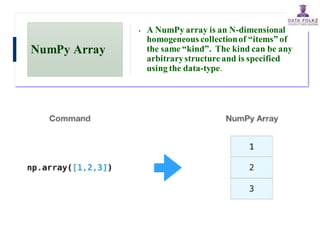
NumPy Array
• A NumPy array is an N-dimensional
homogeneous collectionof “items” of
the same “kind”. The kind can be any
arbitrarystructureand is specified
using the data-type.
5
Dimensions in Arrays
• 0-D Arrays : 0-D arrays, or Scalars, are the elements in an
array. Each value in an array is a 0-D array.
Input : arr = np.array(42)
Output : 42
• 1-D Arrays : An array that has 0-D arrays as its elements
is called uni-dimensional or 1-D array.
Input : arr = np.array([1, 2, 3, 4, 5])
Output: [1 2 3 4 5]
6
Dimensions in Arrays
• 2-D Arrays : An array that has 1-D arrays as its elements is
called a 2-D array. These are often used to represent matrix or
2nd order tensors.
Input : arr = np.array([[1, 2, 3], [4, 5, 6]])
Output : [[1 2 3]
[4 5 6]]
• 3-D arrays : An array that has 2-D arrays (matrices) as its
elements is called 3-D array.These are often used to represent a
3rd order tensor.
Input : arr = np.array([[[1, 2, 3], [4, 5, 6]], [[1, 2, 3], [4, 5, 6]]])
Output :[[[1 2 3]
[4 5 6]]
[[1 2 3]
[4 5 6]]]
7
8
Multi-Dimensional Arrays
Input : a = array([[ 0, 1, 2, 3],
[10,11,12,13]])
Output : array([[ 0, 1, 2, 3],
[10,11,12,13]])
MULTI-DIMENSIONAL ARRAYS
Input : a.shape
Output : (2, 4)
(ROWS,COLUMNS)
NUMBER OF DIMENSIONS
Input : a.ndims
Output :2
An array can have any number of dimensions.
When the array is created, you can define the number of
dimensions by using the ndmin argument.
Matrix In Python
• A Python matrix is a specialized two-dimensional rectangular array of
data stored in rows and columns. The data in a matrix can be
numbers, strings, expressions, symbols, etc. Matrix is one of the
important data structures that can be used in mathematical and
scientific calculations.
• A = [[1, 4, 5],
• [-5, 8, 9]]
• Output :
9
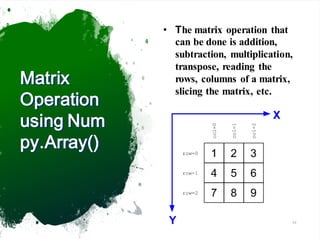
Matrix
Operation
using Num
py.Array()
• The matrix operation that
can be done is addition,
subtraction, multiplication,
transpose, reading the
rows, columns of a matrix,
slicing the matrix, etc.
10
11
Array Slicing
Input : a[0,3:5]
Output : array([3, 4])
Input : a[:,2]
Output :
array([2,12,22,32,42,52])
50 51 52 53 54 55
40 41 42 43 44 45
30 31 32 33 34 35
20 21 22 23 24 25
10 11 12 13 14 15
0 1 2 3 4 5
SLICING WORKS MUCH LIKE STANDARD PYTHON SLICING :-
Slicing in python means taking elements from one given index
to another given index. We pass slice instead of index like this:
[start:end]
NumPy
dtypes
Basic
Type
Available NumPy types Comments
Boolean bool Elements are 1 byte in
size
Integer int8, int16, int32,
int64, int128, int
int defaults to the size
of int in C for the
platform
Unsigned
Integer
uint8, uint16, uint32,
uint64, uint128, uint
uint defaults to the size
of unsigned int in C for
the platform
Float float32, float64,
float, longfloat,
Float is always a double
precision floating point
value (64 bits).
longfloat represents
large precision floats.
Its size is platform
dependent.
Complex complex64, complex128,
complex
The real and complex
elements of a complex64
are each represented by a
single precision (32 bit)
value for a total size of
64 bits.
Strings str, unicode Unicode is always UTF32
(UCS4)
Object object Represent items in array
as Python objects.
Records void Used for arbitrary data
structures in record
arrays.
Click to add text
13
Statistics Array Methods
Gives mean valueof each column
a = array([[1,2,3],
[4,5,6]], float)
Input : mean(a, axis=0)
Output : array([ 2.5,3.5,4.5])
MEAN
StandardDeviation
Input : a.std(axis=0)
Output : array([ 1.5, 1.5, 1.5])
Variance:
Input :a.var(axis=0)
Output : array([2.25,2.25, 2.25])
STANDARD DEV./VARIANCE
14
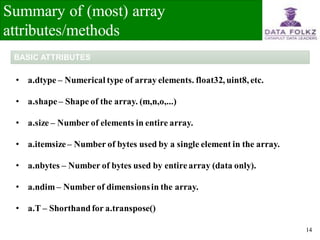
Summary of (most) array
attributes/methods
• a.dtype – Numerical type of array elements. float32, uint8, etc.
• a.shape– Shape of the array. (m,n,o,...)
• a.size – Number of elements in entire array.
• a.itemsize – Number of bytes used by a single element in the array.
• a.nbytes – Number of bytes used by entirearray (data only).
• a.ndim – Number of dimensionsin the array.
• a.T – Shorthandfor a.transpose()
BASIC ATTRIBUTES
15
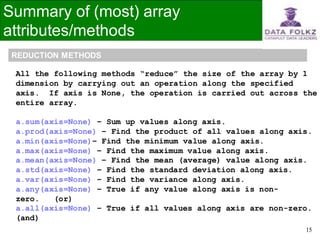
Summary of (most) array
attributes/methods
All the following methods “reduce” the size of the array by 1
dimension by carrying out an operation along the specified
axis. If axis is None, the operation is carried out across the
entire array.
a.sum(axis=None) – Sum up values along axis.
a.prod(axis=None) – Find the product of all values along axis.
a.min(axis=None)– Find the minimum value along axis.
a.max(axis=None) – Find the maximum value along axis.
a.mean(axis=None) – Find the mean (average) value along axis.
a.std(axis=None) – Find the standard deviation along axis.
a.var(axis=None) – Find the variance along axis.
a.any(axis=None) – True if any value along axis is non-
zero. (or)
a.all(axis=None) – True if all values along axis are non-zero.
(and)
REDUCTION METHODS

Numpy.pdf

  • 1.
  • 2.
    What is NumPy? • Pythonis a fabulous language – Easy to extend – Great syntax which encourages easy to write and maintain code – Incredibly large standard- library and third-party tools • No built-in multi-dimensional array (but it supports the needed syntax for extracting elements from one) • NumPy provides a fast built-in object (ndarray) which is a multi-dimensional array of a homogeneous data-type.
  • 3.
    Overview of NumPy N-DARRAY (NDARRAY) • N-dimensional array of rectangular data • Element of the array can be C-structureor simple data-type. • Fast algorithms on machine data-types(int, float, etc.) • Arrays are used to store multiple values in one single variable.Python does not have built-in support for Arrays, but Python lists can be used instead. 3
  • 4.
    NumPy Array • ANumPy array is an N-dimensional homogeneous collectionof “items” of the same “kind”. The kind can be any arbitrarystructureand is specified using the data-type.
  • 5.
  • 6.
    Dimensions in Arrays •0-D Arrays : 0-D arrays, or Scalars, are the elements in an array. Each value in an array is a 0-D array. Input : arr = np.array(42) Output : 42 • 1-D Arrays : An array that has 0-D arrays as its elements is called uni-dimensional or 1-D array. Input : arr = np.array([1, 2, 3, 4, 5]) Output: [1 2 3 4 5] 6
  • 7.
    Dimensions in Arrays •2-D Arrays : An array that has 1-D arrays as its elements is called a 2-D array. These are often used to represent matrix or 2nd order tensors. Input : arr = np.array([[1, 2, 3], [4, 5, 6]]) Output : [[1 2 3] [4 5 6]] • 3-D arrays : An array that has 2-D arrays (matrices) as its elements is called 3-D array.These are often used to represent a 3rd order tensor. Input : arr = np.array([[[1, 2, 3], [4, 5, 6]], [[1, 2, 3], [4, 5, 6]]]) Output :[[[1 2 3] [4 5 6]] [[1 2 3] [4 5 6]]] 7
  • 8.
    8 Multi-Dimensional Arrays Input :a = array([[ 0, 1, 2, 3], [10,11,12,13]]) Output : array([[ 0, 1, 2, 3], [10,11,12,13]]) MULTI-DIMENSIONAL ARRAYS Input : a.shape Output : (2, 4) (ROWS,COLUMNS) NUMBER OF DIMENSIONS Input : a.ndims Output :2 An array can have any number of dimensions. When the array is created, you can define the number of dimensions by using the ndmin argument.
  • 9.
    Matrix In Python •A Python matrix is a specialized two-dimensional rectangular array of data stored in rows and columns. The data in a matrix can be numbers, strings, expressions, symbols, etc. Matrix is one of the important data structures that can be used in mathematical and scientific calculations. • A = [[1, 4, 5], • [-5, 8, 9]] • Output : 9
  • 10.
    Matrix Operation using Num py.Array() • Thematrix operation that can be done is addition, subtraction, multiplication, transpose, reading the rows, columns of a matrix, slicing the matrix, etc. 10
  • 11.
    11 Array Slicing Input :a[0,3:5] Output : array([3, 4]) Input : a[:,2] Output : array([2,12,22,32,42,52]) 50 51 52 53 54 55 40 41 42 43 44 45 30 31 32 33 34 35 20 21 22 23 24 25 10 11 12 13 14 15 0 1 2 3 4 5 SLICING WORKS MUCH LIKE STANDARD PYTHON SLICING :- Slicing in python means taking elements from one given index to another given index. We pass slice instead of index like this: [start:end]
  • 12.
    NumPy dtypes Basic Type Available NumPy typesComments Boolean bool Elements are 1 byte in size Integer int8, int16, int32, int64, int128, int int defaults to the size of int in C for the platform Unsigned Integer uint8, uint16, uint32, uint64, uint128, uint uint defaults to the size of unsigned int in C for the platform Float float32, float64, float, longfloat, Float is always a double precision floating point value (64 bits). longfloat represents large precision floats. Its size is platform dependent. Complex complex64, complex128, complex The real and complex elements of a complex64 are each represented by a single precision (32 bit) value for a total size of 64 bits. Strings str, unicode Unicode is always UTF32 (UCS4) Object object Represent items in array as Python objects. Records void Used for arbitrary data structures in record arrays. Click to add text
  • 13.
    13 Statistics Array Methods Givesmean valueof each column a = array([[1,2,3], [4,5,6]], float) Input : mean(a, axis=0) Output : array([ 2.5,3.5,4.5]) MEAN StandardDeviation Input : a.std(axis=0) Output : array([ 1.5, 1.5, 1.5]) Variance: Input :a.var(axis=0) Output : array([2.25,2.25, 2.25]) STANDARD DEV./VARIANCE
  • 14.
    14 Summary of (most)array attributes/methods • a.dtype – Numerical type of array elements. float32, uint8, etc. • a.shape– Shape of the array. (m,n,o,...) • a.size – Number of elements in entire array. • a.itemsize – Number of bytes used by a single element in the array. • a.nbytes – Number of bytes used by entirearray (data only). • a.ndim – Number of dimensionsin the array. • a.T – Shorthandfor a.transpose() BASIC ATTRIBUTES
  • 15.
    15 Summary of (most)array attributes/methods All the following methods “reduce” the size of the array by 1 dimension by carrying out an operation along the specified axis. If axis is None, the operation is carried out across the entire array. a.sum(axis=None) – Sum up values along axis. a.prod(axis=None) – Find the product of all values along axis. a.min(axis=None)– Find the minimum value along axis. a.max(axis=None) – Find the maximum value along axis. a.mean(axis=None) – Find the mean (average) value along axis. a.std(axis=None) – Find the standard deviation along axis. a.var(axis=None) – Find the variance along axis. a.any(axis=None) – True if any value along axis is non- zero. (or) a.all(axis=None) – True if all values along axis are non-zero. (and) REDUCTION METHODS