Python
Introduction
CREATED BY RIDA ZAMAN 1
Python
• High Level Programming Language for general
purpose programming
( general-purpose programming language is a
programming language designed to be used for
writing software in a wide variety of application
domains)
• Created by Guido Van Rossum
• Release in 1991
• Interpreted not Compiled
• Open Source
CREATED BY RIDA ZAMAN 2
Why Python?
CREATED BY RIDA ZAMAN 3
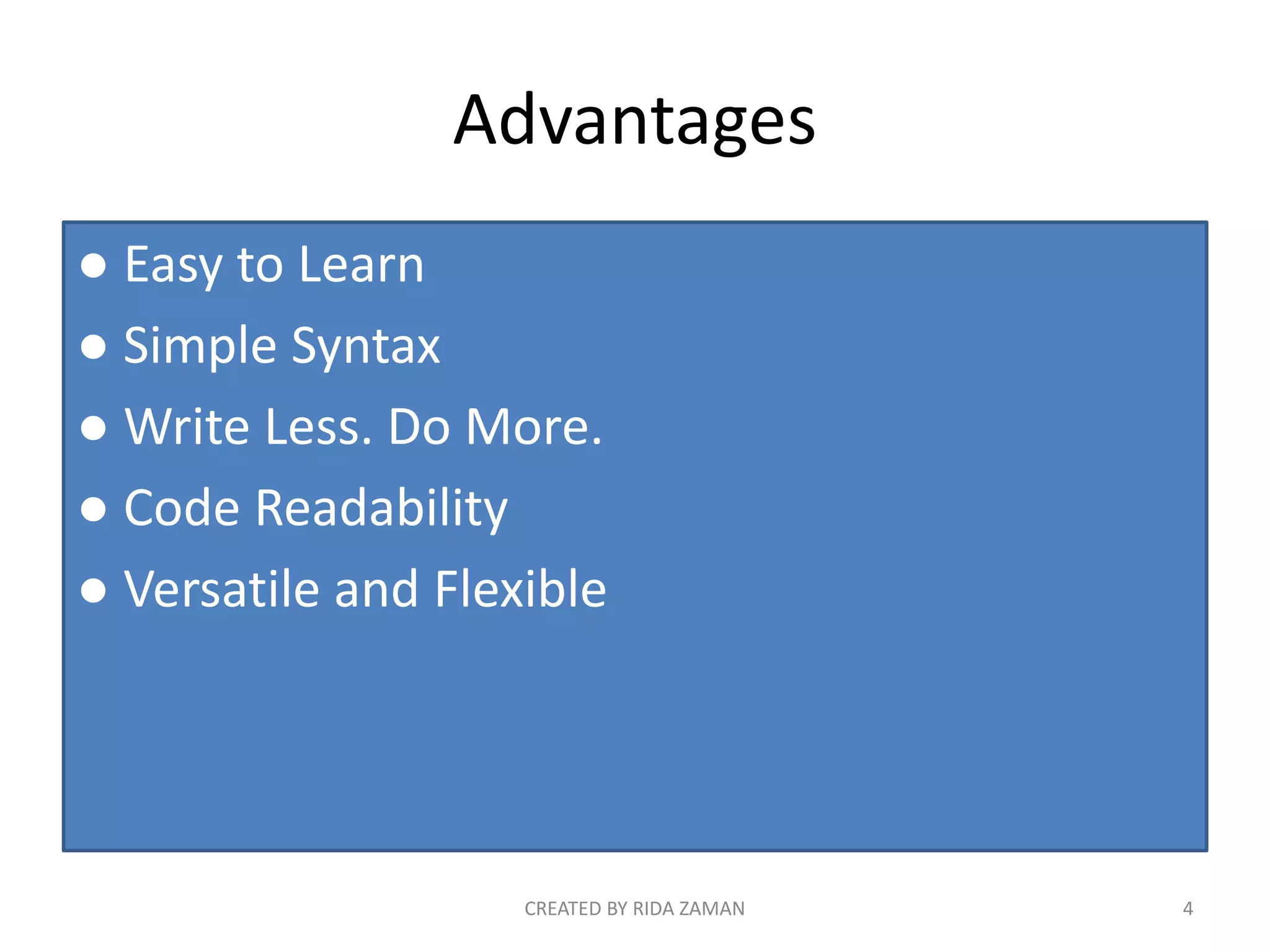
Advantages
● Easy to Learn
● Simple Syntax
● Write Less. Do More.
● Code Readability
● Versatile and Flexible
CREATED BY RIDA ZAMAN 4
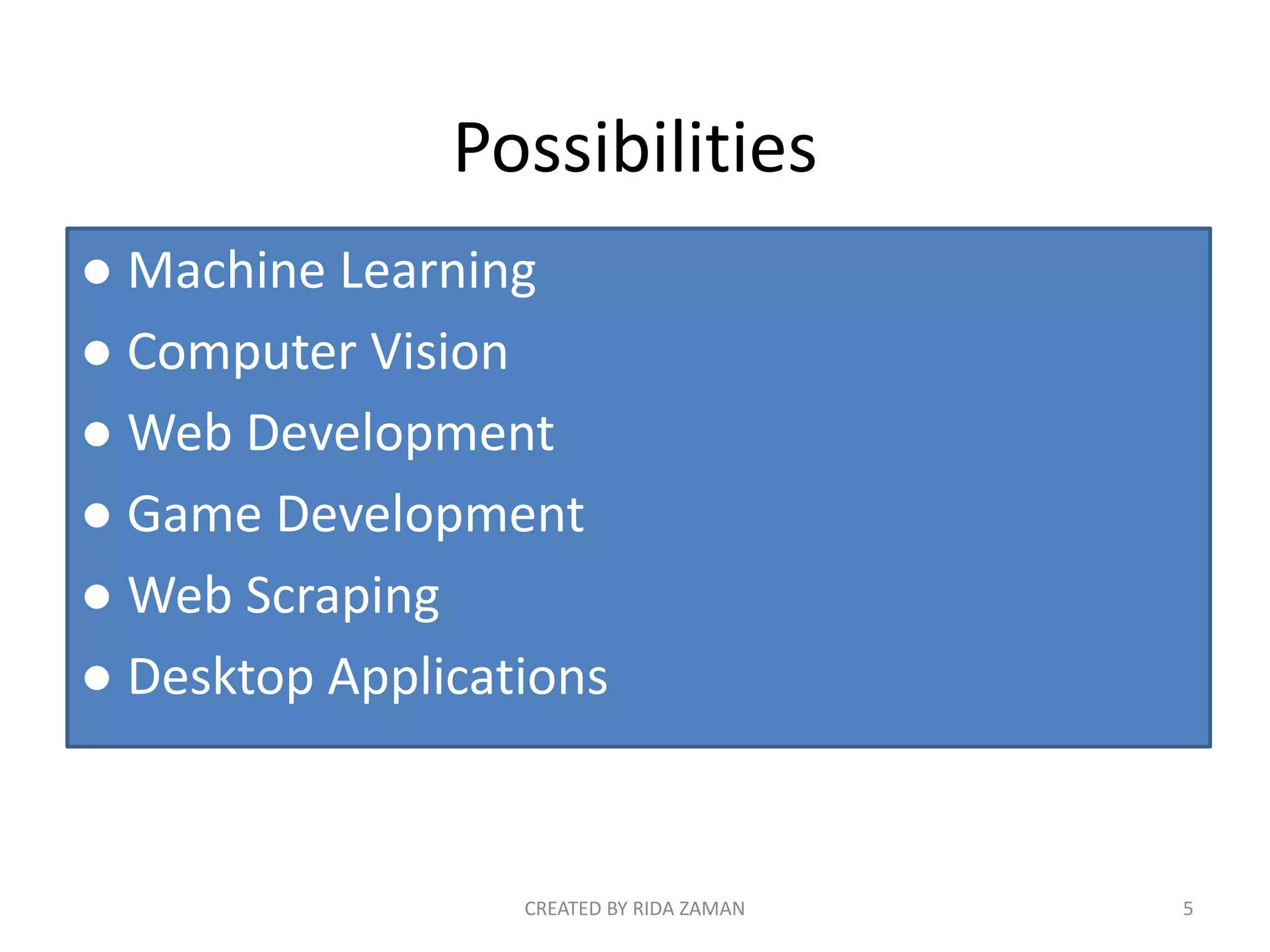
Possibilities
● Machine Learning
● Computer Vision
● Web Development
● Game Development
● Web Scraping
● Desktop Applications
CREATED BY RIDA ZAMAN 5
Machine Learning
● Chat bots
● Speech Recognition
● Anti Virus
● Cancer Detection
CREATED BY RIDA ZAMAN 6
Computer Vision
● Self Driving Cars
● Image Recognition
● Gesture Recognition
● Robots
● Image Enhancement
CREATED BY RIDA ZAMAN 7
Web Development
● Instagram
● Youtube
● Pinterest
CREATED BY RIDA ZAMAN 8
Game Development
CREATED BY RIDA ZAMAN 9
Web Scraping
● News Scraping
● Price Comparison
● Reviews
● Monitoring
CREATED BY RIDA ZAMAN 10
To grab or capture the textual information
In a particular file format through a third
party software without opening the web
Page in a web browser
Desktop Application
CREATED BY RIDA ZAMAN 11
CREATED BY RIDA ZAMAN 12
SCOPE
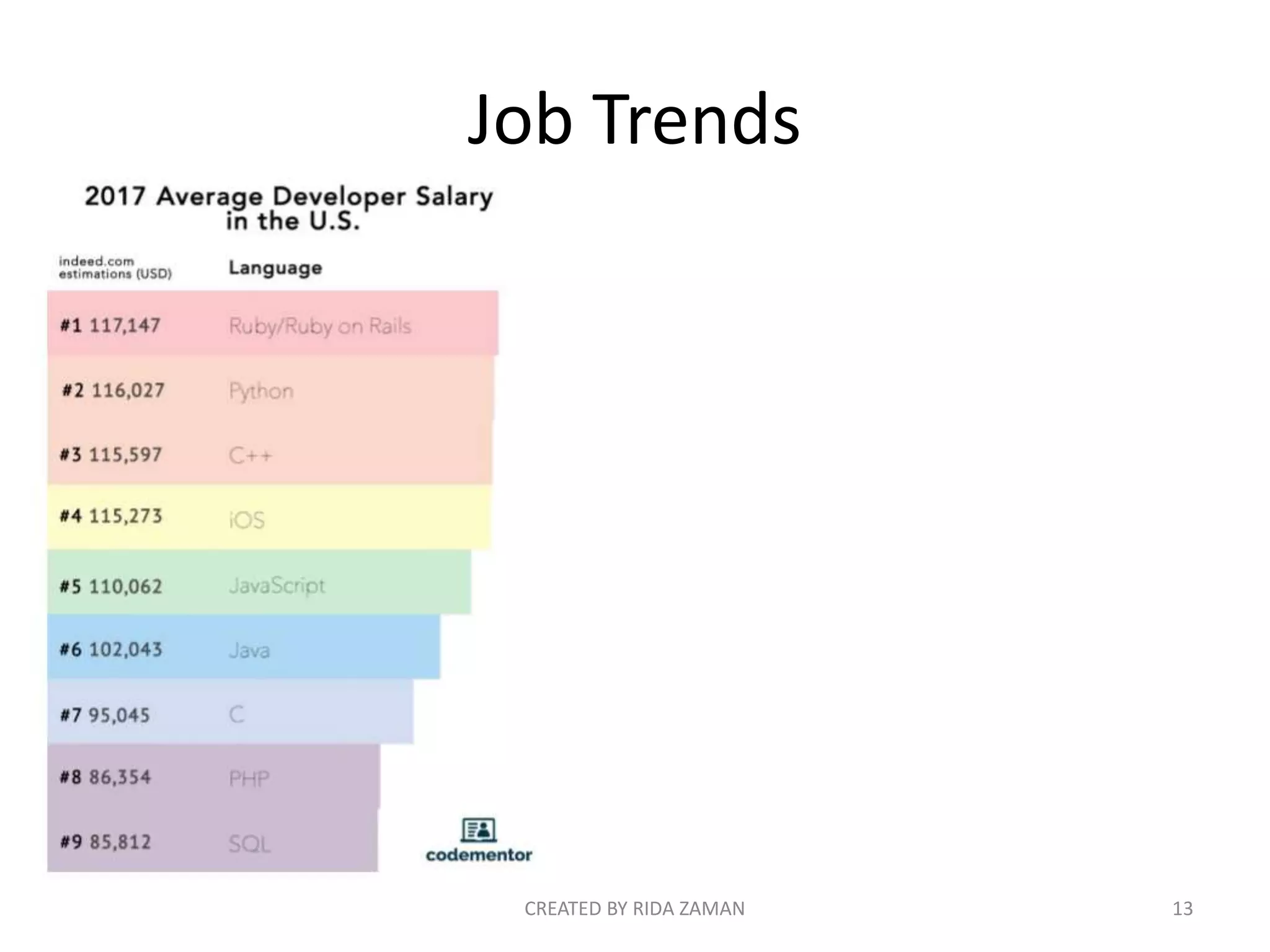
Job Trends
CREATED BY RIDA ZAMAN 13
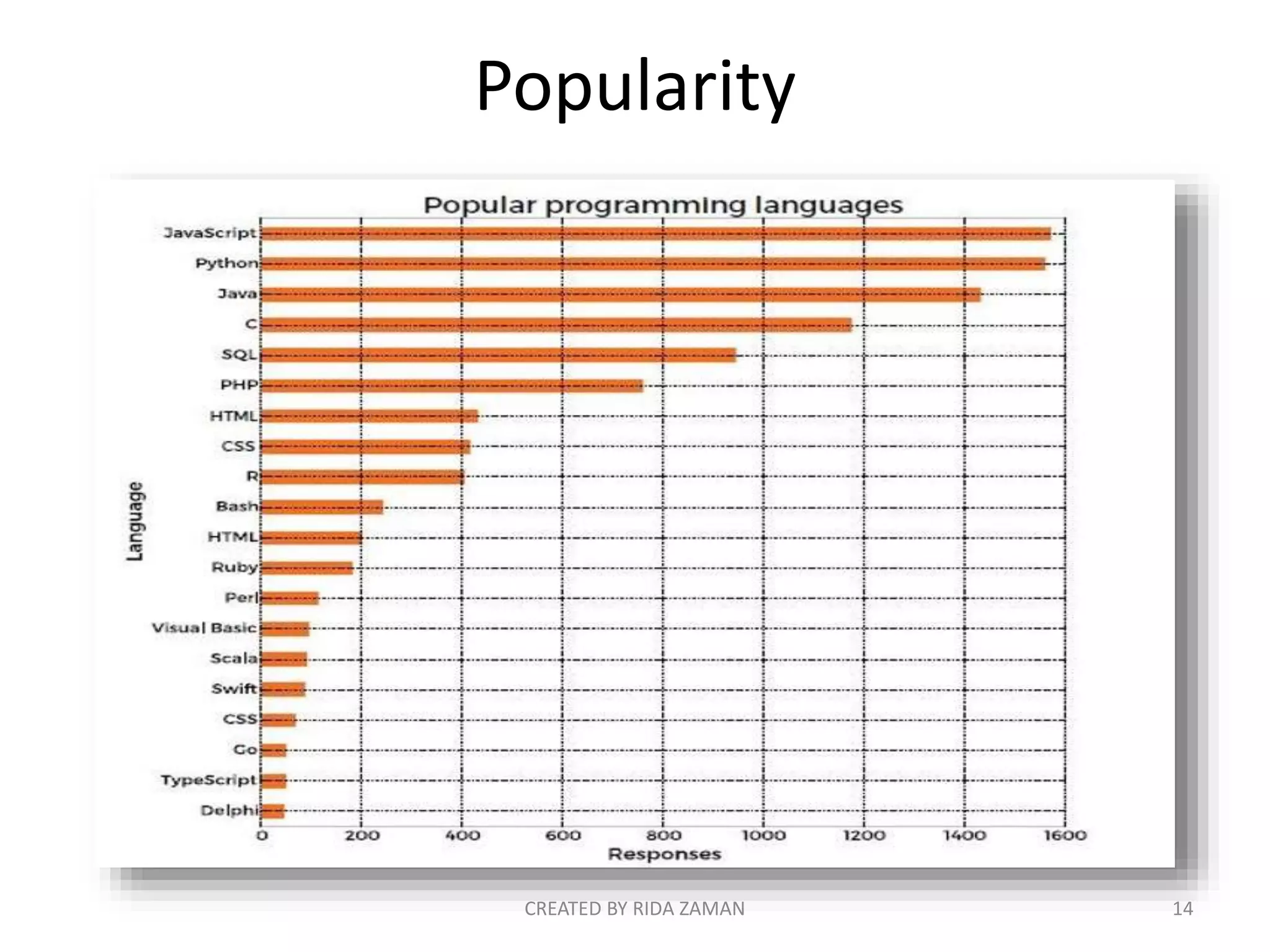
Popularity
CREATED BY RIDA ZAMAN 14
INSTALLATION
CREATED BY RIDA ZAMAN 15
Installation
www.python.org
CREATED BY RIDA ZAMAN 16
IDE’s for Python
• Idle
• Atom
• Editra
• PyCharm
• Gedit
• PythonWin
• Spyder
CREATED BY RIDA ZAMAN 17
CODING
(SIMPLE PROGRAMS)
CREATED BY RIDA ZAMAN 18
Basic syntax of a python program is
too simple than other languages:
Python:
>>> print(“Hello World
!”)
Java:
public class HelloWorld
{
public static void
main(String[] args)
{
System.out.println("Hell
o, World");
}
}
C :
#include<stdio.h>
void main()
{
printf(“Hello World !”);
}
CREATED BY RIDA ZAMAN 19
Read User Input from Keyboard in
Python:
>>> # Python Basic Syntax - Example Program
>>> strn = input("Enter your name: ")
>>> print("Your name is ", strn);
CREATED BY RIDA ZAMAN 20
Comments:
• Single line comment
• All characters after hash (#) sign referred as
comment (single line comment), up to the
physical line end.
• Example:
# Python Basic Syntax - Example Program
# We are comments
print("Hello World, I am Python");
CREATED BY RIDA ZAMAN 21
Multiline Comments:
• multiline comments are used inside triple
quotes.Multiline starting commenting code is
''' and ending with same, that is ''‘.
• Example:
''' this
Is
Multiline comment ''‘
Print(“ Hello Python, n This is multiline comment”)
CREATED BY RIDA ZAMAN 22
Delete keyword:
• To delete the variable in python, use the keyword
del.
• Example:
num1 = 10
num2 = 20
print("num1 = ", num1, " and num2 = ", num2);
del num1, num2
print("num1 = ", num1, " and num2 = ", num2);
CREATED BY RIDA ZAMAN 23
Strings:
• Strings are contiguous set of characters in
between quotation marks. You are free to use
either pairs of single or double quotes to use
the strings in your python program.
• Example:
str1 = 'Hello Python‘
str2 = "This is Python Strings Example"
CREATED BY RIDA ZAMAN 24
Concept and use of string in python:
# Python String - Example
str = 'Hello Python’
1- print (str) # this will print the complete string
2- print (str[0]) # this will print the first character of
the string
3- print (str[2:8]) # this will print the characters starting
from 3rd to 8th
4- print (str[3:]) # this will print the string starting from
the 4th character
5- print (str * 3) # this will print the string three times
6- print (str + "String") # this will print the concatenated
string
7- Print (len(str)) # this will print the length of string
CREATED BY RIDA ZAMAN 25
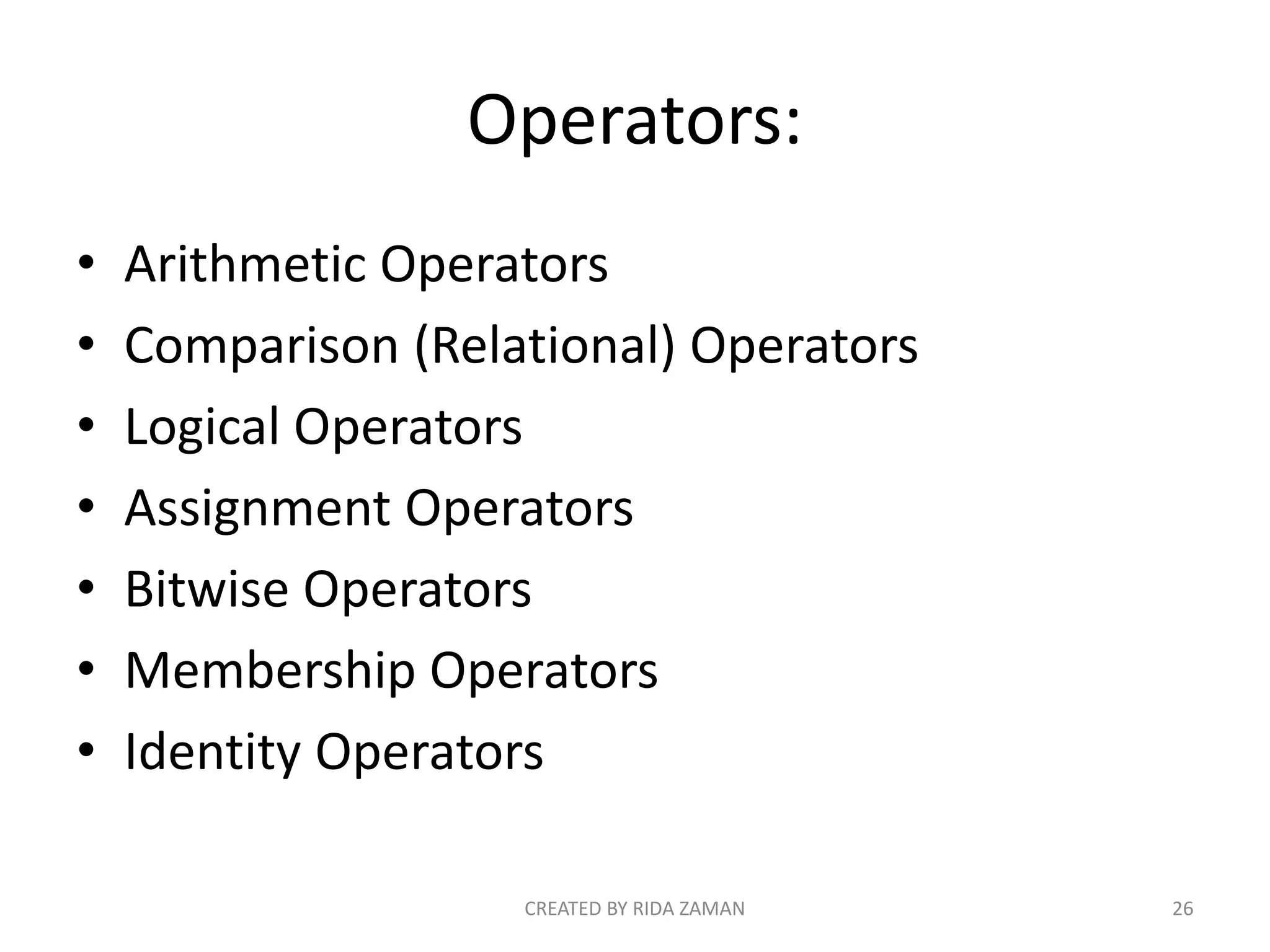
Operators:
• Arithmetic Operators
• Comparison (Relational) Operators
• Logical Operators
• Assignment Operators
• Bitwise Operators
• Membership Operators
• Identity Operators
CREATED BY RIDA ZAMAN 26
Operator Name Meaning
+ Addition Operator Add two values
- Subtraction Operator Used for subtraction
* Multiplication Operator Used for multiplication
/ Division Operator Used for division
% Modulus Operator
Returns remainder after
dividing
// Floor Division Operator
Returns the quotient
without any digits after
decimal
** Exponent Operator
Used to perform
exponential calculation
on operators
CREATED BY RIDA ZAMAN 27
Python Arithmetic Operators
Here the following table lists the arithmetic operators (7) available in
python with their name and meaning:
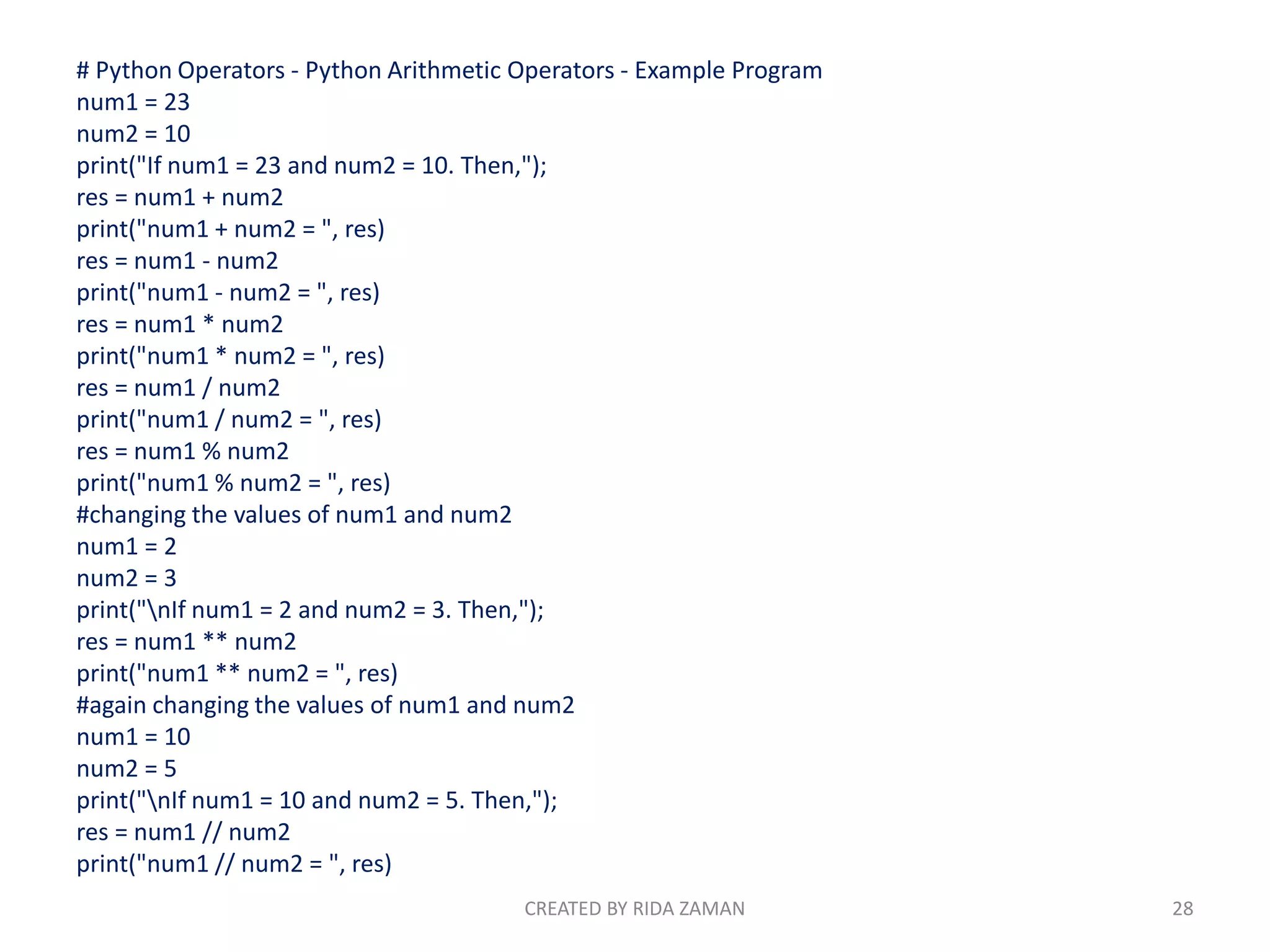
# Python Operators - Python Arithmetic Operators - Example Program
num1 = 23
num2 = 10
print("If num1 = 23 and num2 = 10. Then,");
res = num1 + num2
print("num1 + num2 = ", res)
res = num1 - num2
print("num1 - num2 = ", res)
res = num1 * num2
print("num1 * num2 = ", res)
res = num1 / num2
print("num1 / num2 = ", res)
res = num1 % num2
print("num1 % num2 = ", res)
#changing the values of num1 and num2
num1 = 2
num2 = 3
print("nIf num1 = 2 and num2 = 3. Then,");
res = num1 ** num2
print("num1 ** num2 = ", res)
#again changing the values of num1 and num2
num1 = 10
num2 = 5
print("nIf num1 = 10 and num2 = 5. Then,");
res = num1 // num2
print("num1 // num2 = ", res)
CREATED BY RIDA ZAMAN 28
Python Comparison Operators:
Operator Meaning
==
Returns true if values of the two operands are equal,
otherwise returns false if not equal
!=
Returns true if value of the two operands are not
equal, otherwise returns false if equal
>
Returns true if value of the left operand is greater
than right one, otherwise false if value of the right
operand is greater than left one
<
Returns true if value of the left operand is less than
right one, otherwise false if value of the right operand
is less than left one
>=
Returns true if value of the left operand is greater
than or equal to the value of the right one, otherwise
false if value of the right operand is greater than left
one
<=
Returns true if value of the left operand is
less than or equal to right one, otherwise
false if value of the right operand is less
than or equal to left one
CREATED BY RIDA ZAMAN 29
Here the following lists the comparison operators (6) available in Python:
# Python Operators - Comparison Operators -
Example Program
num1 = 23
num2 = 10
print("If num1 = 23 and num2 = 10. Then,");
if(num1 == num2):
print("num1 is equal to num2");
elif(num1 != num2):
print("num1 is not equal to num2");
elif(num1 < num2):
print("num1 is less than num2");
elif(num1 > num2):
print("num1 is greater than num2");
elif(num1 <= num2):
print("num1 is either less than or equal to num2");
elif(num1 >= num2):
print("num1 is either greater than or equal to
num2");
# changing the values of num1 and num2
num1 = 40
num2 = 40
print("n If num1 = 40 and num2 = 40. Then,");
if(num1 <= num2):
print("num1 is either less than or equal to num2");
else:
print("num1 is neither less than or equal to
num2");
if(num1 >= num2):
print("num1 is either greater than or equal to
num2");
else:
print("num1 is neither greater than or equal to
num2"); CREATED BY RIDA ZAMAN 30
Python Assignment Operators:
Assume variable a holds 30 and variable b
holds 18, and c is a variable.
CREATED BY RIDA ZAMAN 31
CON’T:
CREATED BY RIDA ZAMAN 32
EXAMPLE CODE:
a,b=30,18
print('a=',a)
print('b=',b) c=a+b
print('c=a+b=',c)
c+=a #c=c+a c=48+30=78 now c is 78
print('c=c+a=',c)
c-=a #c=c-a c=78-30=48 now c is 48
print('c=c-a=',c)
c*=a #c=c*a c=48*30=1440 now c is 1440
print('c=c*a=',c)
c/=a #c=c/a c=1440/30=48 now c is 48
CREATED BY RIDA ZAMAN 33
CON’T:
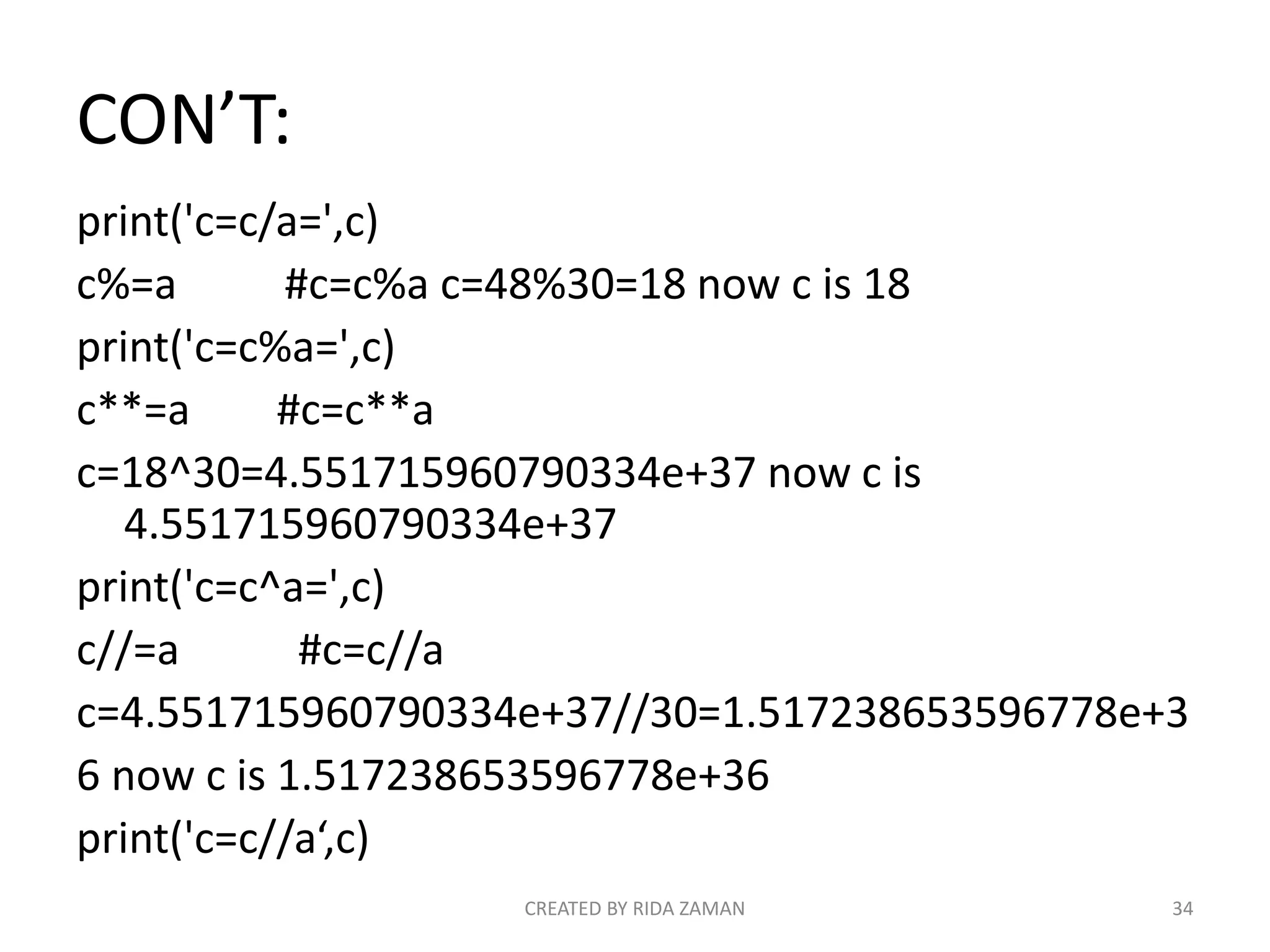
print('c=c/a=',c)
c%=a #c=c%a c=48%30=18 now c is 18
print('c=c%a=',c)
c**=a #c=c**a
c=18^30=4.551715960790334e+37 now c is
4.551715960790334e+37
print('c=c^a=',c)
c//=a #c=c//a
c=4.551715960790334e+37//30=1.517238653596778e+3
6 now c is 1.517238653596778e+36
print('c=c//a‘,c)
CREATED BY RIDA ZAMAN 34
RESULT:
a= 30
b= 18
c=a+b= 48
c=c+a= 78
c=c-a= 48
c=c*a= 1440
c=c/a= 48.0
c=c%a= 18.0
c=c^a= 4.551715960790334e+37
c=c//a 1.517238653596778e+36
CREATED BY RIDA ZAMAN 35
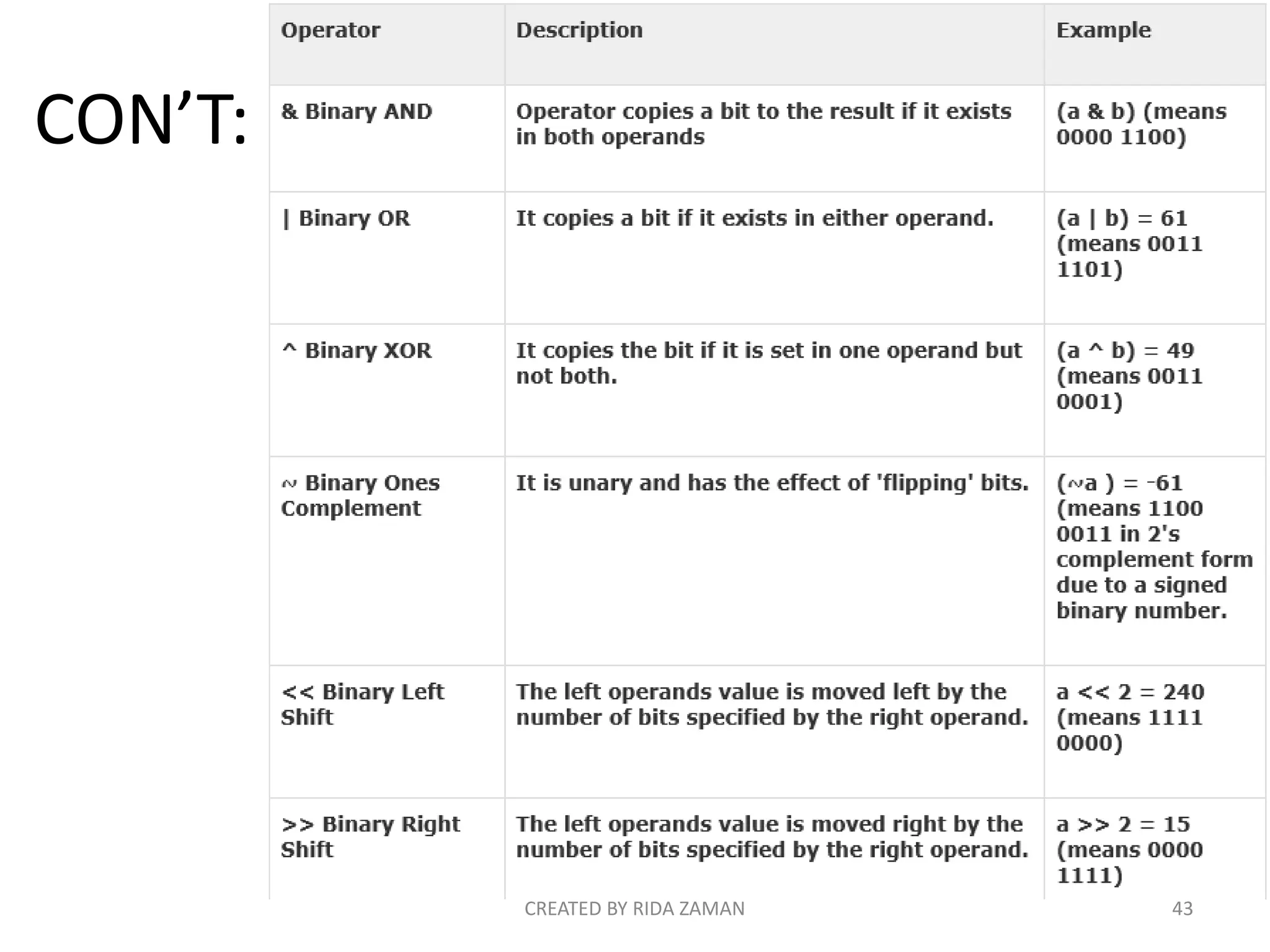
Python Bitwise Operators :
Bitwise operator works on bits and performs bit
by bit operation.
CREATED BY RIDA ZAMAN 36
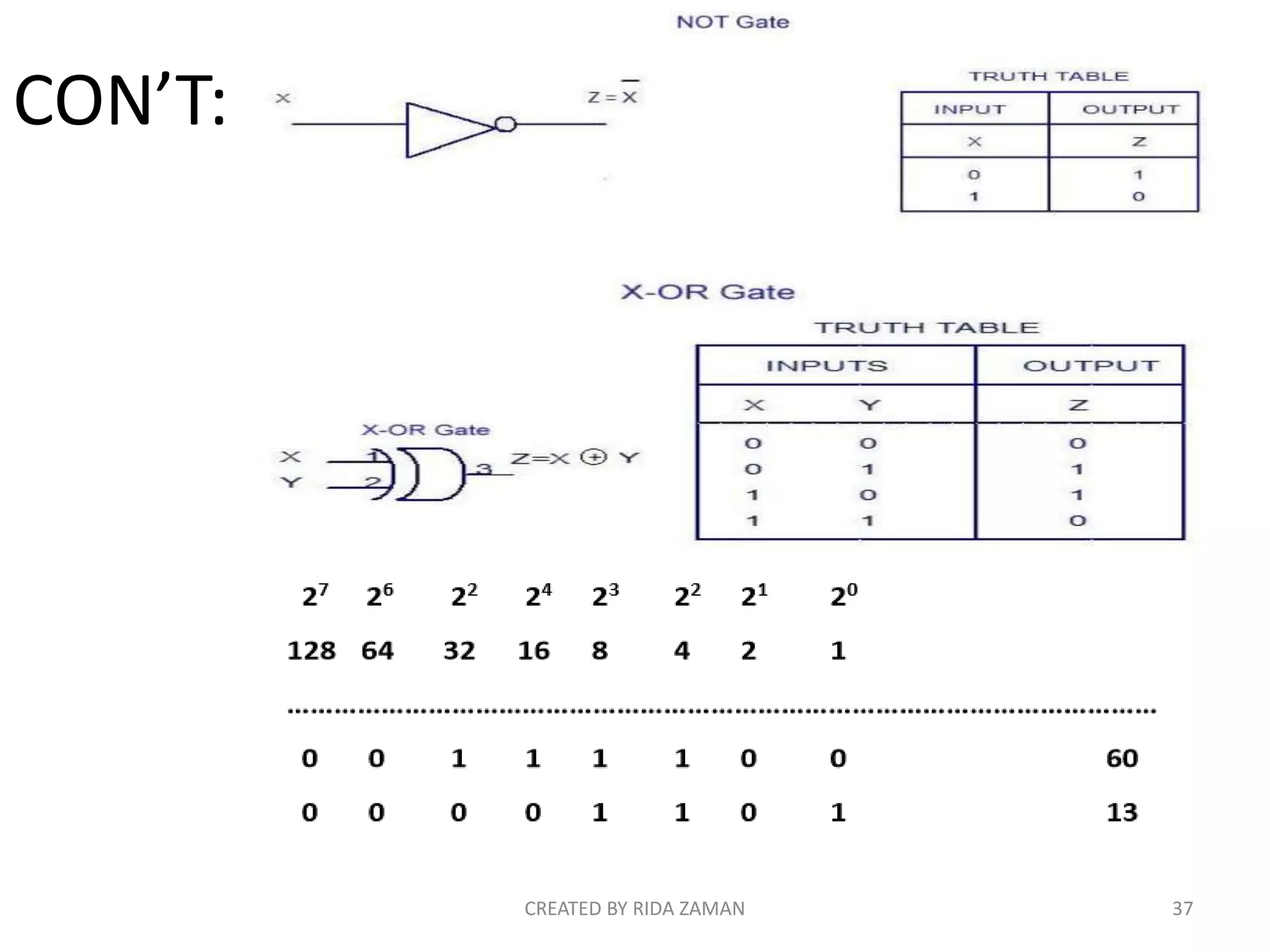
CON’T:
CREATED BY RIDA ZAMAN 37
CON’T:
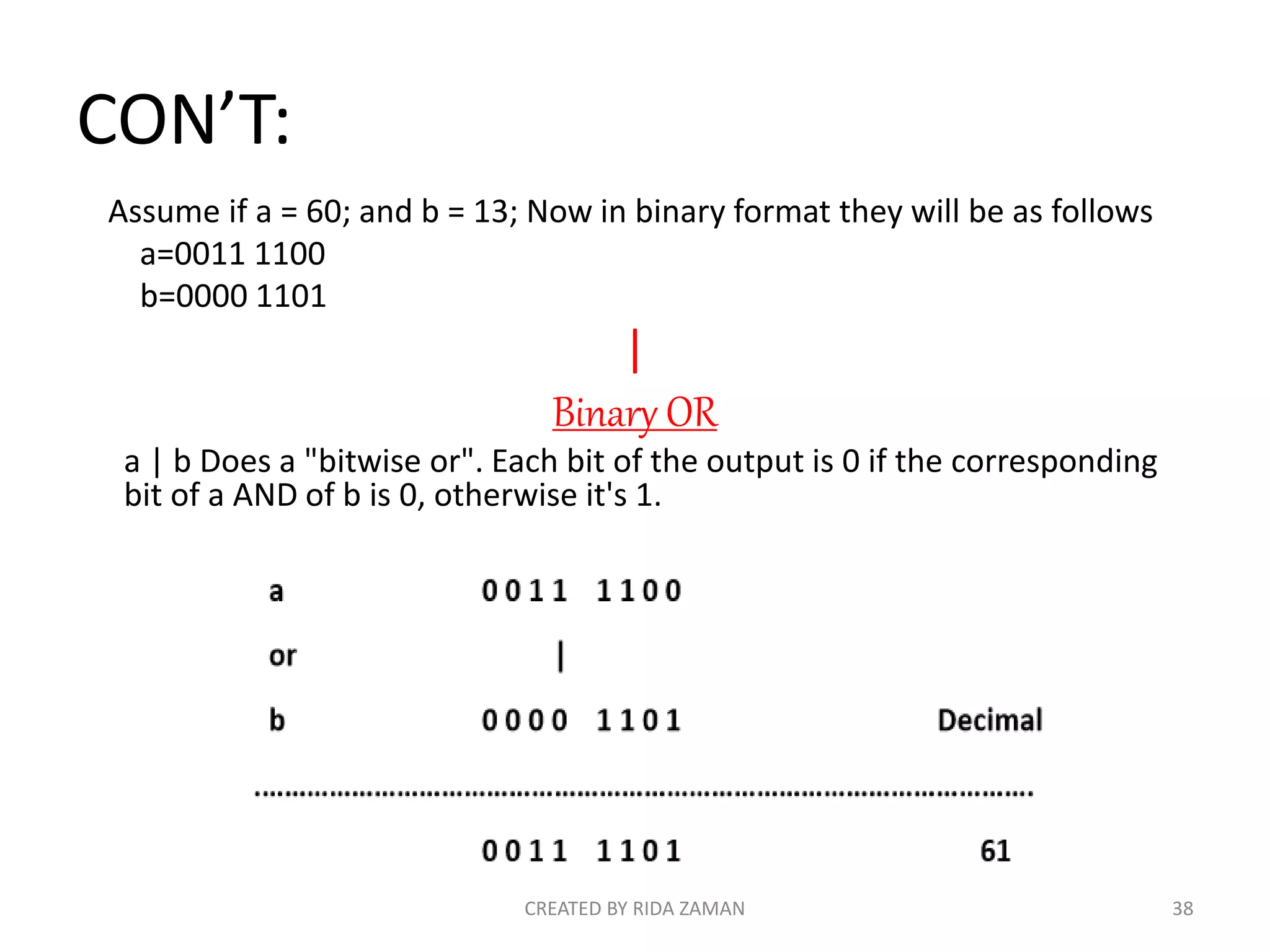
Assume if a = 60; and b = 13; Now in binary format they will be as follows
a=0011 1100
b=0000 1101
|
Binary OR
a | b Does a "bitwise or". Each bit of the output is 0 if the corresponding
bit of a AND of b is 0, otherwise it's 1.
CREATED BY RIDA ZAMAN 38
CON’T:
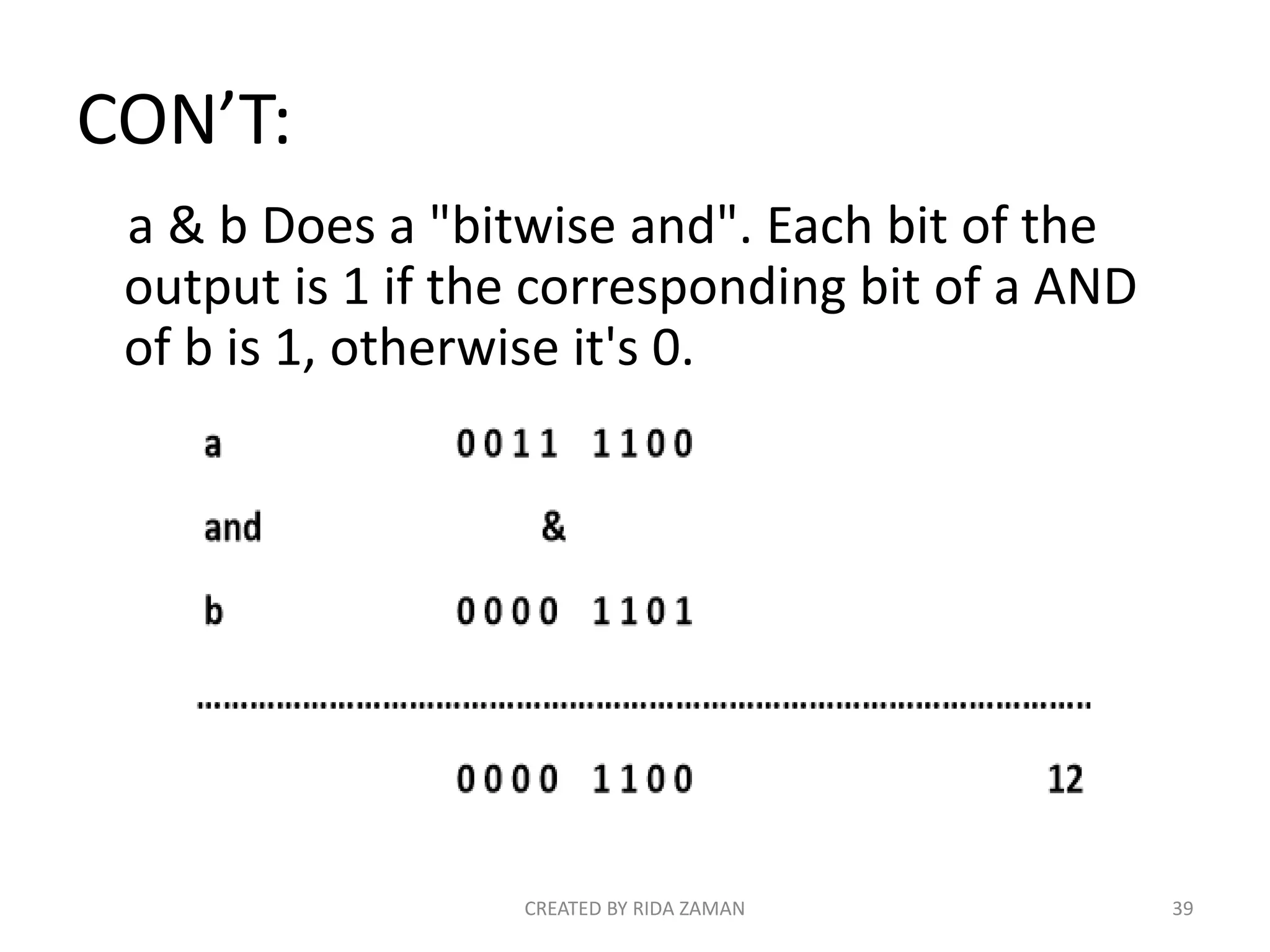
a & b Does a "bitwise and". Each bit of the
output is 1 if the corresponding bit of a AND
of b is 1, otherwise it's 0.
CREATED BY RIDA ZAMAN 39
CON’T:
^
Binary XOR
x ^ y Does a "bitwise exclusive or". Each bit of the output
is the same as the corresponding bit in x if that bit in y
is 0, and it's the complement of the bit in x if that bit in
y is 1.
CREATED BY RIDA ZAMAN 40
CON’T:
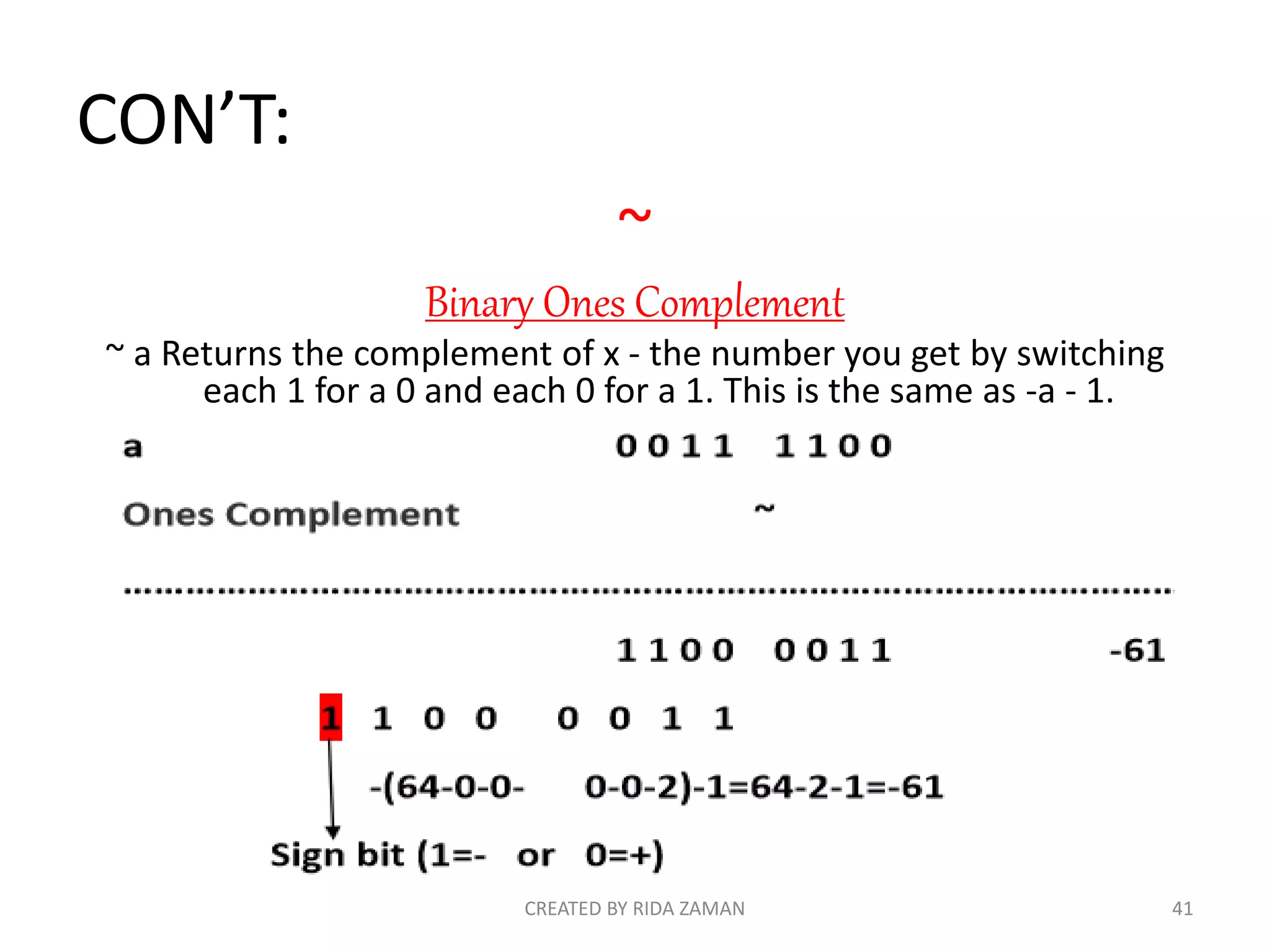
~
Binary Ones Complement
~ a Returns the complement of x - the number you get by switching
each 1 for a 0 and each 0 for a 1. This is the same as -a - 1.
CREATED BY RIDA ZAMAN 41
CON’T:
<<
Binary Left Shift
a << 2 Returns a with the bits shifted to the left by 2
places (and new bits on the right-handside are zeros).
a<<2 0 0 1 1 1 1 0 0<<2 1 1 1 1 0 0 0 0 240
>>
Binary Right Shift
a >> 2 Returns a with the bits shifted to the right by 2
places (and new bits on the left-hand side are zeros).
a>>2 0 0 1 1 1 1 0 0>> 0 0 0 0 1 1 1 1 15
CREATED BY RIDA ZAMAN 42
CON’T:
CREATED BY RIDA ZAMAN 43
EXAMPLE CODE
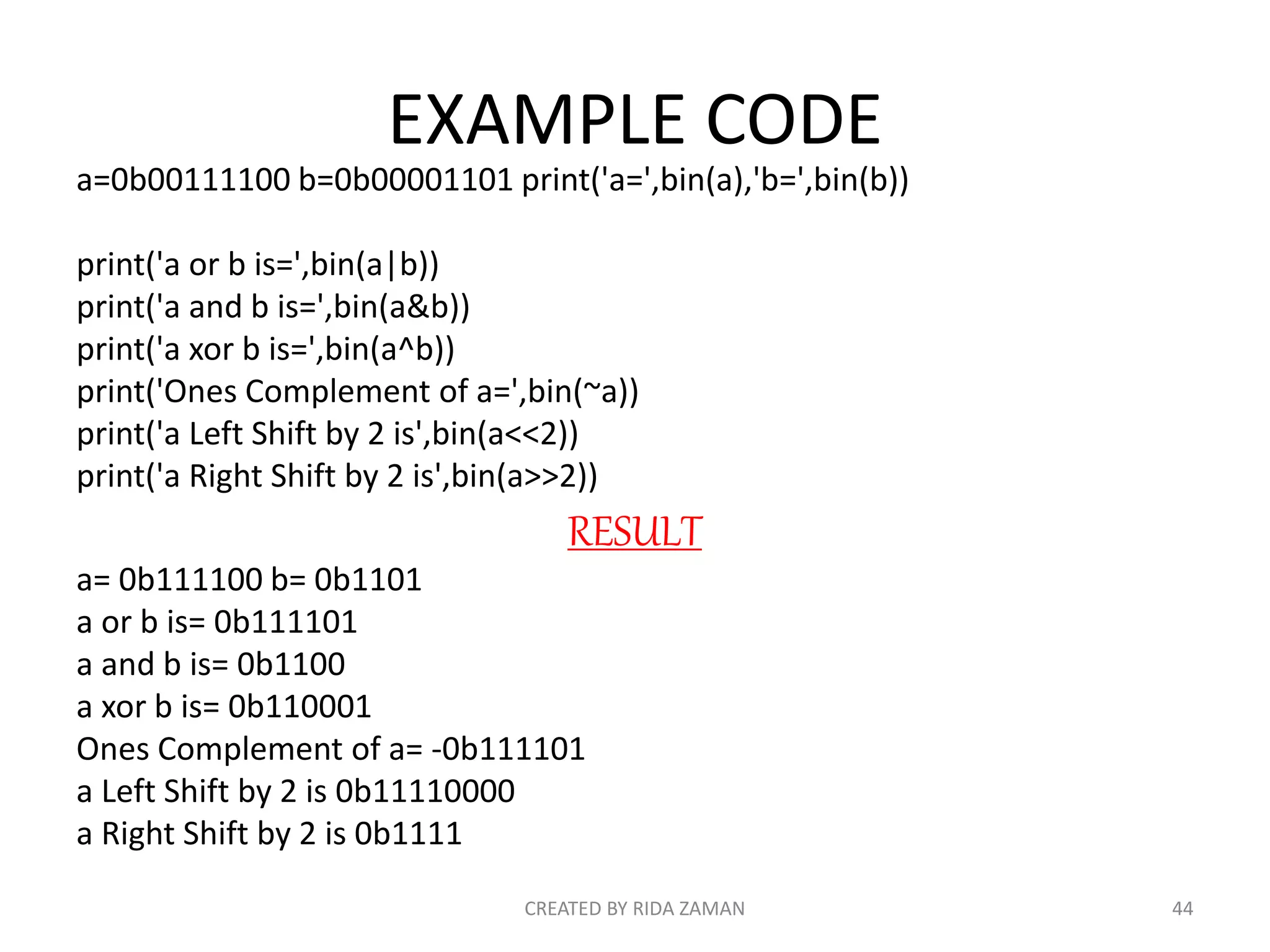
a=0b00111100 b=0b00001101 print('a=',bin(a),'b=',bin(b))
print('a or b is=',bin(a|b))
print('a and b is=',bin(a&b))
print('a xor b is=',bin(a^b))
print('Ones Complement of a=',bin(~a))
print('a Left Shift by 2 is',bin(a<<2))
print('a Right Shift by 2 is',bin(a>>2))
RESULT
a= 0b111100 b= 0b1101
a or b is= 0b111101
a and b is= 0b1100
a xor b is= 0b110001
Ones Complement of a= -0b111101
a Left Shift by 2 is 0b11110000
a Right Shift by 2 is 0b1111
CREATED BY RIDA ZAMAN 44
Python Logical Operators
here are following logical operators supported
by Python language. Assume variable a holds
10 and variable b holds 20 then
CREATED BY RIDA ZAMAN 45
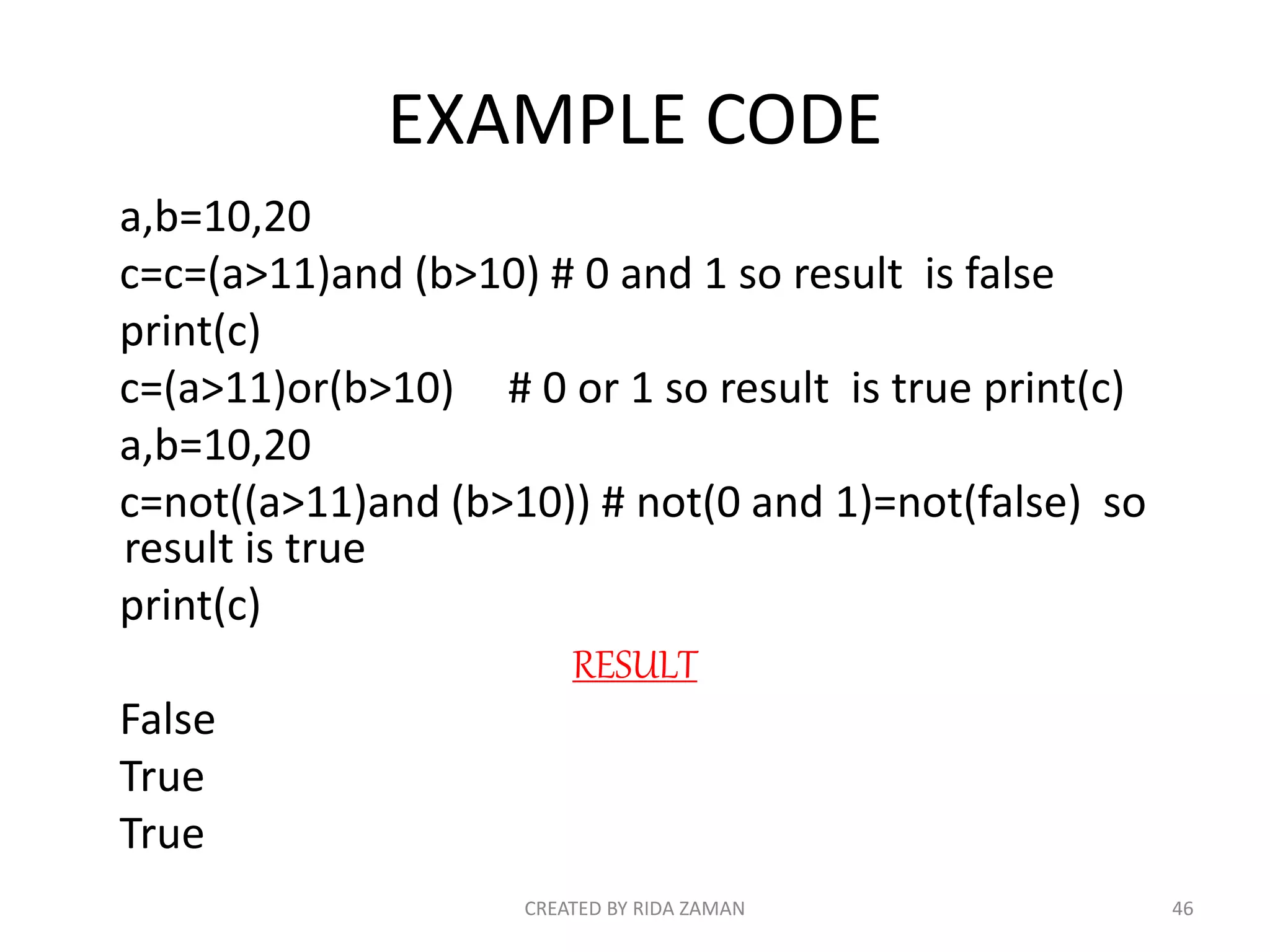
EXAMPLE CODE
a,b=10,20
c=c=(a>11)and (b>10) # 0 and 1 so result is false
print(c)
c=(a>11)or(b>10) # 0 or 1 so result is true print(c)
a,b=10,20
c=not((a>11)and (b>10)) # not(0 and 1)=not(false) so
result is true
print(c)
RESULT
False
True
True
CREATED BY RIDA ZAMAN 46
Python Membership Operators
Python’s membership operators test for
membership in a sequence, such as strings, lists,
or tuples. There are two membership operators
as explained below.
CREATED BY RIDA ZAMAN 47
Python Logical Operators
here are following logical operators supported
by Python language. Assume variable a holds
10 and variable b holds 20 then
CREATED BY RIDA ZAMAN 48
EXAMPLE CODE
a=[1,2,3,4,5,6,7,8,9,10] # a is a list
print(3 in a) # 3 in list a so result is true
print(20 in a) # 20 not in list a so result is false
print(3 not in a) # 3 not in list a ,(but 3 in list a) so result is false
print(20 not in a) # 20 not in list a ,(but 20 not in list a ) so result is
true
RESULT
True
False
False
True
CREATED BY RIDA ZAMAN 49
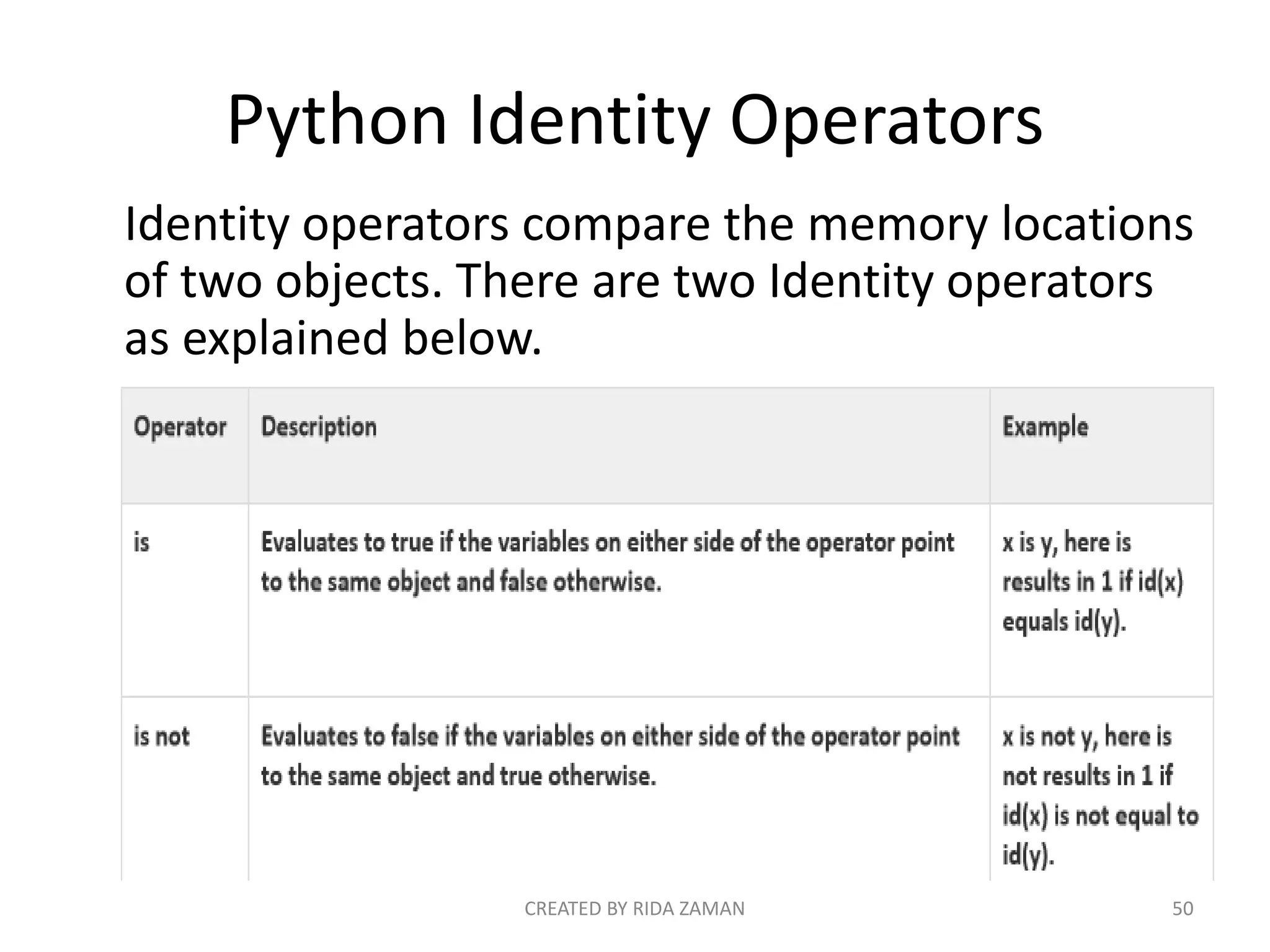
Python Identity Operators
Identity operators compare the memory locations
of two objects. There are two Identity operators
as explained below.
CREATED BY RIDA ZAMAN 50
EXAMPLE CODE
a,b=10,100
print(a is b)
print(a is not b)
RESULT
False
True
CREATED BY RIDA ZAMAN 51
Variables :
Python is dynamically typed. You do not need to
declare variables!
The declaration happens automatically when you
assign a value to a variable.
CREATED BY RIDA ZAMAN 52
Variables can change type, simply by assigning
them a new value of a different type.
CON’T:
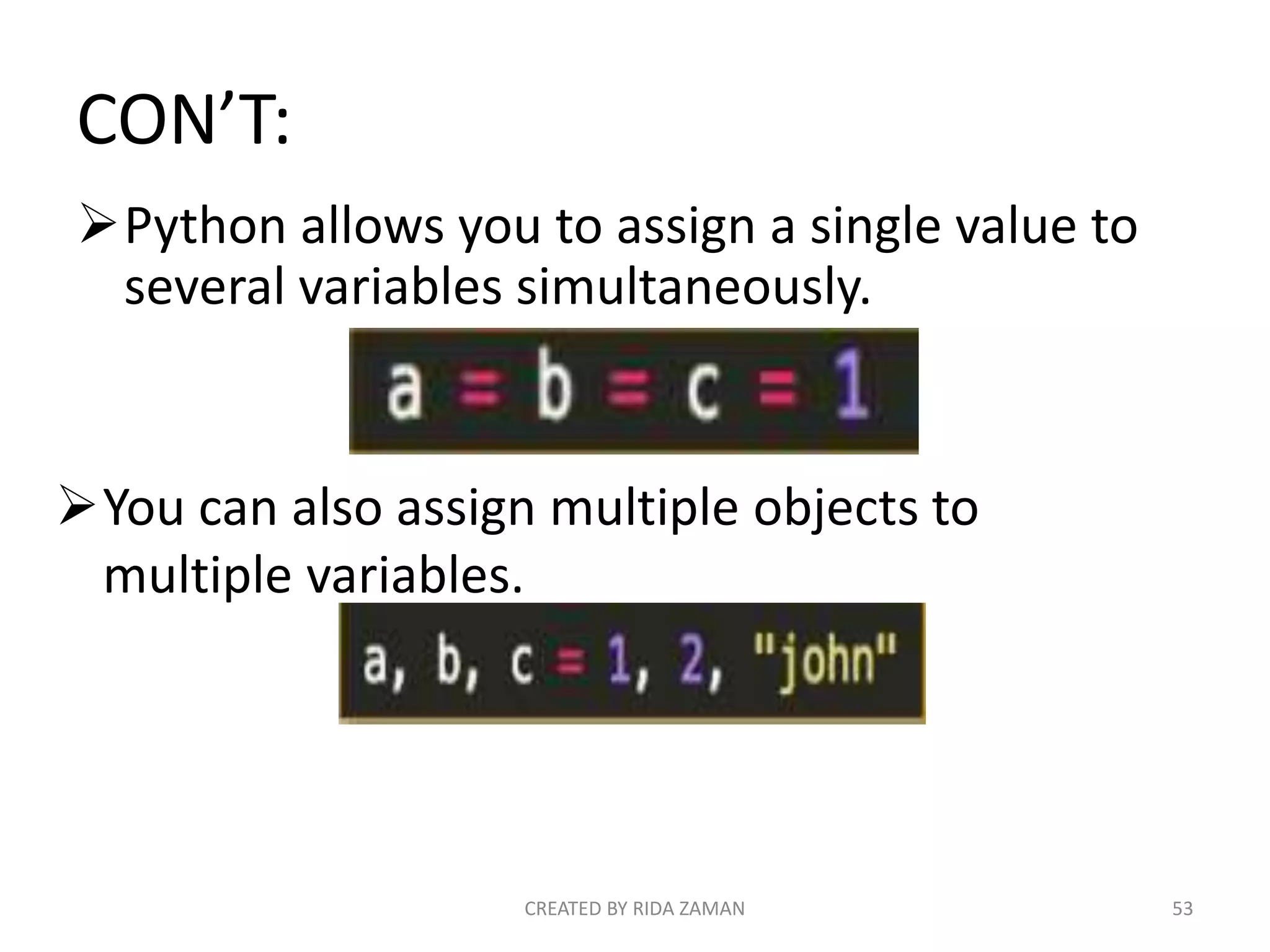
Python allows you to assign a single value to
several variables simultaneously.
CREATED BY RIDA ZAMAN 53
You can also assign multiple objects to
multiple variables.
THE END
SUBMITTED BY:
RIDA ZAMAN
RIDA FATIMA
SADAF REASHEED
CREATED BY RIDA ZAMAN 54

PYTHON

  • 1.
  • 2.
    Python • High LevelProgramming Language for general purpose programming ( general-purpose programming language is a programming language designed to be used for writing software in a wide variety of application domains) • Created by Guido Van Rossum • Release in 1991 • Interpreted not Compiled • Open Source CREATED BY RIDA ZAMAN 2
  • 3.
  • 4.
    Advantages ● Easy toLearn ● Simple Syntax ● Write Less. Do More. ● Code Readability ● Versatile and Flexible CREATED BY RIDA ZAMAN 4
  • 5.
    Possibilities ● Machine Learning ●Computer Vision ● Web Development ● Game Development ● Web Scraping ● Desktop Applications CREATED BY RIDA ZAMAN 5
  • 6.
    Machine Learning ● Chatbots ● Speech Recognition ● Anti Virus ● Cancer Detection CREATED BY RIDA ZAMAN 6
  • 7.
    Computer Vision ● SelfDriving Cars ● Image Recognition ● Gesture Recognition ● Robots ● Image Enhancement CREATED BY RIDA ZAMAN 7
  • 8.
    Web Development ● Instagram ●Youtube ● Pinterest CREATED BY RIDA ZAMAN 8
  • 9.
  • 10.
    Web Scraping ● NewsScraping ● Price Comparison ● Reviews ● Monitoring CREATED BY RIDA ZAMAN 10 To grab or capture the textual information In a particular file format through a third party software without opening the web Page in a web browser
  • 11.
  • 12.
    CREATED BY RIDAZAMAN 12 SCOPE
  • 13.
    Job Trends CREATED BYRIDA ZAMAN 13
  • 14.
  • 15.
  • 16.
  • 17.
    IDE’s for Python •Idle • Atom • Editra • PyCharm • Gedit • PythonWin • Spyder CREATED BY RIDA ZAMAN 17
  • 18.
  • 19.
    Basic syntax ofa python program is too simple than other languages: Python: >>> print(“Hello World !”) Java: public class HelloWorld { public static void main(String[] args) { System.out.println("Hell o, World"); } } C : #include<stdio.h> void main() { printf(“Hello World !”); } CREATED BY RIDA ZAMAN 19
  • 20.
    Read User Inputfrom Keyboard in Python: >>> # Python Basic Syntax - Example Program >>> strn = input("Enter your name: ") >>> print("Your name is ", strn); CREATED BY RIDA ZAMAN 20
  • 21.
    Comments: • Single linecomment • All characters after hash (#) sign referred as comment (single line comment), up to the physical line end. • Example: # Python Basic Syntax - Example Program # We are comments print("Hello World, I am Python"); CREATED BY RIDA ZAMAN 21
  • 22.
    Multiline Comments: • multilinecomments are used inside triple quotes.Multiline starting commenting code is ''' and ending with same, that is ''‘. • Example: ''' this Is Multiline comment ''‘ Print(“ Hello Python, n This is multiline comment”) CREATED BY RIDA ZAMAN 22
  • 23.
    Delete keyword: • Todelete the variable in python, use the keyword del. • Example: num1 = 10 num2 = 20 print("num1 = ", num1, " and num2 = ", num2); del num1, num2 print("num1 = ", num1, " and num2 = ", num2); CREATED BY RIDA ZAMAN 23
  • 24.
    Strings: • Strings arecontiguous set of characters in between quotation marks. You are free to use either pairs of single or double quotes to use the strings in your python program. • Example: str1 = 'Hello Python‘ str2 = "This is Python Strings Example" CREATED BY RIDA ZAMAN 24
  • 25.
    Concept and useof string in python: # Python String - Example str = 'Hello Python’ 1- print (str) # this will print the complete string 2- print (str[0]) # this will print the first character of the string 3- print (str[2:8]) # this will print the characters starting from 3rd to 8th 4- print (str[3:]) # this will print the string starting from the 4th character 5- print (str * 3) # this will print the string three times 6- print (str + "String") # this will print the concatenated string 7- Print (len(str)) # this will print the length of string CREATED BY RIDA ZAMAN 25
  • 26.
    Operators: • Arithmetic Operators •Comparison (Relational) Operators • Logical Operators • Assignment Operators • Bitwise Operators • Membership Operators • Identity Operators CREATED BY RIDA ZAMAN 26
  • 27.
    Operator Name Meaning +Addition Operator Add two values - Subtraction Operator Used for subtraction * Multiplication Operator Used for multiplication / Division Operator Used for division % Modulus Operator Returns remainder after dividing // Floor Division Operator Returns the quotient without any digits after decimal ** Exponent Operator Used to perform exponential calculation on operators CREATED BY RIDA ZAMAN 27 Python Arithmetic Operators Here the following table lists the arithmetic operators (7) available in python with their name and meaning:
  • 28.
    # Python Operators- Python Arithmetic Operators - Example Program num1 = 23 num2 = 10 print("If num1 = 23 and num2 = 10. Then,"); res = num1 + num2 print("num1 + num2 = ", res) res = num1 - num2 print("num1 - num2 = ", res) res = num1 * num2 print("num1 * num2 = ", res) res = num1 / num2 print("num1 / num2 = ", res) res = num1 % num2 print("num1 % num2 = ", res) #changing the values of num1 and num2 num1 = 2 num2 = 3 print("nIf num1 = 2 and num2 = 3. Then,"); res = num1 ** num2 print("num1 ** num2 = ", res) #again changing the values of num1 and num2 num1 = 10 num2 = 5 print("nIf num1 = 10 and num2 = 5. Then,"); res = num1 // num2 print("num1 // num2 = ", res) CREATED BY RIDA ZAMAN 28
  • 29.
    Python Comparison Operators: OperatorMeaning == Returns true if values of the two operands are equal, otherwise returns false if not equal != Returns true if value of the two operands are not equal, otherwise returns false if equal > Returns true if value of the left operand is greater than right one, otherwise false if value of the right operand is greater than left one < Returns true if value of the left operand is less than right one, otherwise false if value of the right operand is less than left one >= Returns true if value of the left operand is greater than or equal to the value of the right one, otherwise false if value of the right operand is greater than left one <= Returns true if value of the left operand is less than or equal to right one, otherwise false if value of the right operand is less than or equal to left one CREATED BY RIDA ZAMAN 29 Here the following lists the comparison operators (6) available in Python:
  • 30.
    # Python Operators- Comparison Operators - Example Program num1 = 23 num2 = 10 print("If num1 = 23 and num2 = 10. Then,"); if(num1 == num2): print("num1 is equal to num2"); elif(num1 != num2): print("num1 is not equal to num2"); elif(num1 < num2): print("num1 is less than num2"); elif(num1 > num2): print("num1 is greater than num2"); elif(num1 <= num2): print("num1 is either less than or equal to num2"); elif(num1 >= num2): print("num1 is either greater than or equal to num2"); # changing the values of num1 and num2 num1 = 40 num2 = 40 print("n If num1 = 40 and num2 = 40. Then,"); if(num1 <= num2): print("num1 is either less than or equal to num2"); else: print("num1 is neither less than or equal to num2"); if(num1 >= num2): print("num1 is either greater than or equal to num2"); else: print("num1 is neither greater than or equal to num2"); CREATED BY RIDA ZAMAN 30
  • 31.
    Python Assignment Operators: Assumevariable a holds 30 and variable b holds 18, and c is a variable. CREATED BY RIDA ZAMAN 31
  • 32.
  • 33.
    EXAMPLE CODE: a,b=30,18 print('a=',a) print('b=',b) c=a+b print('c=a+b=',c) c+=a#c=c+a c=48+30=78 now c is 78 print('c=c+a=',c) c-=a #c=c-a c=78-30=48 now c is 48 print('c=c-a=',c) c*=a #c=c*a c=48*30=1440 now c is 1440 print('c=c*a=',c) c/=a #c=c/a c=1440/30=48 now c is 48 CREATED BY RIDA ZAMAN 33
  • 34.
    CON’T: print('c=c/a=',c) c%=a #c=c%a c=48%30=18now c is 18 print('c=c%a=',c) c**=a #c=c**a c=18^30=4.551715960790334e+37 now c is 4.551715960790334e+37 print('c=c^a=',c) c//=a #c=c//a c=4.551715960790334e+37//30=1.517238653596778e+3 6 now c is 1.517238653596778e+36 print('c=c//a‘,c) CREATED BY RIDA ZAMAN 34
  • 35.
    RESULT: a= 30 b= 18 c=a+b=48 c=c+a= 78 c=c-a= 48 c=c*a= 1440 c=c/a= 48.0 c=c%a= 18.0 c=c^a= 4.551715960790334e+37 c=c//a 1.517238653596778e+36 CREATED BY RIDA ZAMAN 35
  • 36.
    Python Bitwise Operators: Bitwise operator works on bits and performs bit by bit operation. CREATED BY RIDA ZAMAN 36
  • 37.
  • 38.
    CON’T: Assume if a= 60; and b = 13; Now in binary format they will be as follows a=0011 1100 b=0000 1101 | Binary OR a | b Does a "bitwise or". Each bit of the output is 0 if the corresponding bit of a AND of b is 0, otherwise it's 1. CREATED BY RIDA ZAMAN 38
  • 39.
    CON’T: a & bDoes a "bitwise and". Each bit of the output is 1 if the corresponding bit of a AND of b is 1, otherwise it's 0. CREATED BY RIDA ZAMAN 39
  • 40.
    CON’T: ^ Binary XOR x ^y Does a "bitwise exclusive or". Each bit of the output is the same as the corresponding bit in x if that bit in y is 0, and it's the complement of the bit in x if that bit in y is 1. CREATED BY RIDA ZAMAN 40
  • 41.
    CON’T: ~ Binary Ones Complement ~a Returns the complement of x - the number you get by switching each 1 for a 0 and each 0 for a 1. This is the same as -a - 1. CREATED BY RIDA ZAMAN 41
  • 42.
    CON’T: << Binary Left Shift a<< 2 Returns a with the bits shifted to the left by 2 places (and new bits on the right-handside are zeros). a<<2 0 0 1 1 1 1 0 0<<2 1 1 1 1 0 0 0 0 240 >> Binary Right Shift a >> 2 Returns a with the bits shifted to the right by 2 places (and new bits on the left-hand side are zeros). a>>2 0 0 1 1 1 1 0 0>> 0 0 0 0 1 1 1 1 15 CREATED BY RIDA ZAMAN 42
  • 43.
  • 44.
    EXAMPLE CODE a=0b00111100 b=0b00001101print('a=',bin(a),'b=',bin(b)) print('a or b is=',bin(a|b)) print('a and b is=',bin(a&b)) print('a xor b is=',bin(a^b)) print('Ones Complement of a=',bin(~a)) print('a Left Shift by 2 is',bin(a<<2)) print('a Right Shift by 2 is',bin(a>>2)) RESULT a= 0b111100 b= 0b1101 a or b is= 0b111101 a and b is= 0b1100 a xor b is= 0b110001 Ones Complement of a= -0b111101 a Left Shift by 2 is 0b11110000 a Right Shift by 2 is 0b1111 CREATED BY RIDA ZAMAN 44
  • 45.
    Python Logical Operators hereare following logical operators supported by Python language. Assume variable a holds 10 and variable b holds 20 then CREATED BY RIDA ZAMAN 45
  • 46.
    EXAMPLE CODE a,b=10,20 c=c=(a>11)and (b>10)# 0 and 1 so result is false print(c) c=(a>11)or(b>10) # 0 or 1 so result is true print(c) a,b=10,20 c=not((a>11)and (b>10)) # not(0 and 1)=not(false) so result is true print(c) RESULT False True True CREATED BY RIDA ZAMAN 46
  • 47.
    Python Membership Operators Python’smembership operators test for membership in a sequence, such as strings, lists, or tuples. There are two membership operators as explained below. CREATED BY RIDA ZAMAN 47
  • 48.
    Python Logical Operators hereare following logical operators supported by Python language. Assume variable a holds 10 and variable b holds 20 then CREATED BY RIDA ZAMAN 48
  • 49.
    EXAMPLE CODE a=[1,2,3,4,5,6,7,8,9,10] #a is a list print(3 in a) # 3 in list a so result is true print(20 in a) # 20 not in list a so result is false print(3 not in a) # 3 not in list a ,(but 3 in list a) so result is false print(20 not in a) # 20 not in list a ,(but 20 not in list a ) so result is true RESULT True False False True CREATED BY RIDA ZAMAN 49
  • 50.
    Python Identity Operators Identityoperators compare the memory locations of two objects. There are two Identity operators as explained below. CREATED BY RIDA ZAMAN 50
  • 51.
    EXAMPLE CODE a,b=10,100 print(a isb) print(a is not b) RESULT False True CREATED BY RIDA ZAMAN 51
  • 52.
    Variables : Python isdynamically typed. You do not need to declare variables! The declaration happens automatically when you assign a value to a variable. CREATED BY RIDA ZAMAN 52 Variables can change type, simply by assigning them a new value of a different type.
  • 53.
    CON’T: Python allows youto assign a single value to several variables simultaneously. CREATED BY RIDA ZAMAN 53 You can also assign multiple objects to multiple variables.
  • 54.
    THE END SUBMITTED BY: RIDAZAMAN RIDA FATIMA SADAF REASHEED CREATED BY RIDA ZAMAN 54