Data Types andMathematical
Expressions in Python
Presented by: [Your Name]
Date: [Presentation Date]
2.
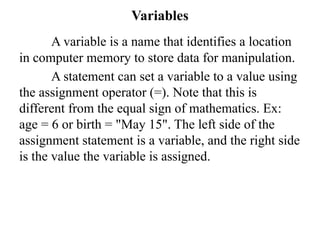
Variables
A variable isa name that identifies a location
in computer memory to store data for manipulation.
A statement can set a variable to a value using
the assignment operator (=). Note that this is
different from the equal sign of mathematics. Ex:
age = 6 or birth = "May 15". The left side of the
assignment statement is a variable, and the right side
is the value the variable is assigned.
3.
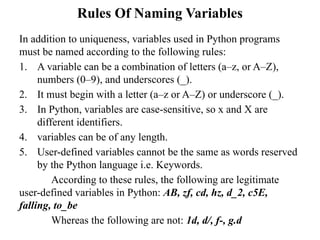
Rules Of NamingVariables
In addition to uniqueness, variables used in Python programs
must be named according to the following rules:
1. A variable can be a combination of letters (a–z, or A–Z),
numbers (0–9), and underscores (_).
2. It must begin with a letter (a–z or A–Z) or underscore (_).
3. In Python, variables are case-sensitive, so x and X are
different identifiers.
4. variables can be of any length.
5. User-defined variables cannot be the same as words reserved
by the Python language i.e. Keywords.
According to these rules, the following are legitimate
user-defined variables in Python: AB, zf, cd, hz, d_2, c5E,
falling, to_be
Whereas the following are not: 1d, d/, f-, g.d
4.
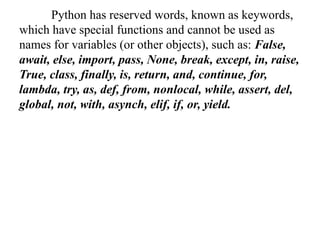
Python has reservedwords, known as keywords,
which have special functions and cannot be used as
names for variables (or other objects), such as: False,
await, else, import, pass, None, break, except, in, raise,
True, class, finally, is, return, and, continue, for,
lambda, try, as, def, from, nonlocal, while, assert, del,
global, not, with, asynch, elif, if, or, yield.
5.
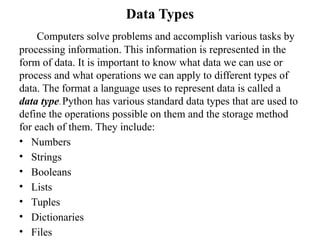
Data Types
Computers solveproblems and accomplish various tasks by
processing information. This information is represented in the
form of data. It is important to know what data we can use or
process and what operations we can apply to different types of
data. The format a language uses to represent data is called a
data type. Python has various standard data types that are used to
define the operations possible on them and the storage method
for each of them. They include:
• Numbers
• Strings
• Booleans
• Lists
• Tuples
• Dictionaries
• Files
6.
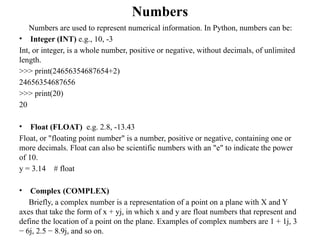
Numbers
Numbers are usedto represent numerical information. In Python, numbers can be:
• Integer (INT) e.g., 10, -3
Int, or integer, is a whole number, positive or negative, without decimals, of unlimited
length.
>>> print(24656354687654+2)
24656354687656
>>> print(20)
20
• Float (FLOAT) e.g. 2.8, -13.43
Float, or "floating point number" is a number, positive or negative, containing one or
more decimals. Float can also be scientific numbers with an "e" to indicate the power
of 10.
y = 3.14 # float
• Complex (COMPLEX)
Briefly, a complex number is a representation of a point on a plane with X and Y
axes that take the form of x + yj, in which x and y are float numbers that represent and
define the location of a point on the plane. Examples of complex numbers are 1 + 1j, 3
− 6j, 2.5 − 8.9j, and so on.
7.
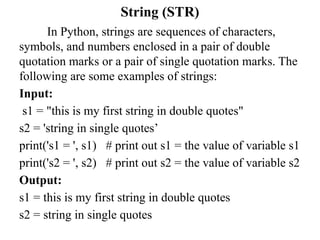
String (STR)
In Python,strings are sequences of characters,
symbols, and numbers enclosed in a pair of double
quotation marks or a pair of single quotation marks. The
following are some examples of strings:
Input:
s1 = "this is my first string in double quotes"
s2 = 'string in single quotes’
print('s1 = ', s1) # print out s1 = the value of variable s1
print('s2 = ', s2) # print out s2 = the value of variable s2
Output:
s1 = this is my first string in double quotes
s2 = string in single quotes
8.
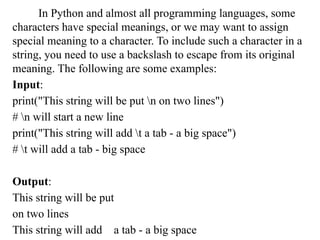
In Python andalmost all programming languages, some
characters have special meanings, or we may want to assign
special meaning to a character. To include such a character in a
string, you need to use a backslash to escape from its original
meaning. The following are some examples:
Input:
print("This string will be put n on two lines")
# n will start a new line
print("This string will add t a tab - a big space")
# t will add a tab - big space
Output:
This string will be put
on two lines
This string will add a tab -a big space
9.
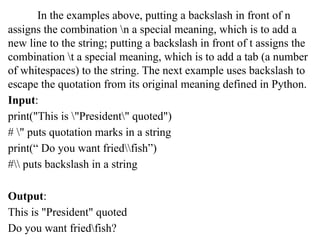
In the examplesabove, putting a backslash in front of n
assigns the combination n a special meaning, which is to add a
new line to the string; putting a backslash in front of t assigns the
combination t a special meaning, which is to add a tab (a number
of whitespaces) to the string. The next example uses backslash to
escape the quotation from its original meaning defined in Python.
Input:
print("This is "President" quoted")
# " puts quotation marks in a string
print(“ Do you want friedfish”)
# puts backslash in a string
Output:
This is "President" quoted
Do you want friedfish?
10.
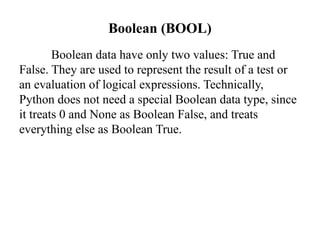
Boolean (BOOL)
Boolean datahave only two values: True and
False. They are used to represent the result of a test or
an evaluation of logical expressions. Technically,
Python does not need a special Boolean data type, since
it treats 0 and None as Boolean False, and treats
everything else as Boolean True.
11.
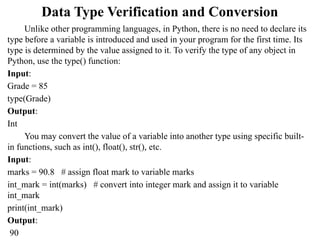
Data Type Verificationand Conversion
Unlike other programming languages, in Python, there is no need to declare its
type before a variable is introduced and used in your program for the first time. Its
type is determined by the value assigned to it. To verify the type of any object in
Python, use the type() function:
Input:
Grade = 85
type(Grade)
Output:
Int
You may convert the value of a variable into another type using specific built-
in functions, such as int(), float(), str(), etc.
Input:
marks = 90.8 # assign float mark to variable marks
int_mark = int(marks) # convert into integer mark and assign it to variable
int_mark
print(int_mark)
Output:
90
12.
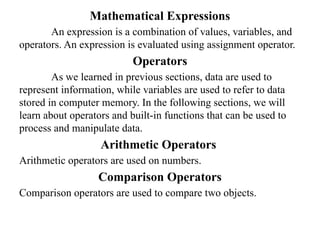
Mathematical Expressions
An expressionis a combination of values, variables, and
operators. An expression is evaluated using assignment operator.
Operators
As we learned in previous sections, data are used to
represent information, while variables are used to refer to data
stored in computer memory. In the following sections, we will
learn about operators and built-in functions that can be used to
process and manipulate data.
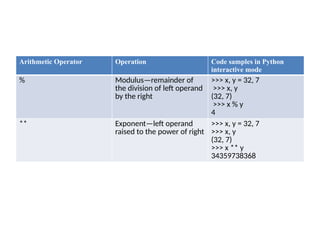
Arithmetic Operators
Arithmetic operators are used on numbers.
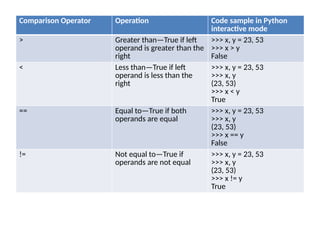
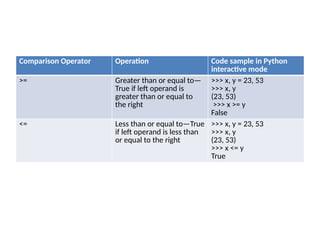
Comparison Operators
Comparison operators are used to compare two objects.
13.
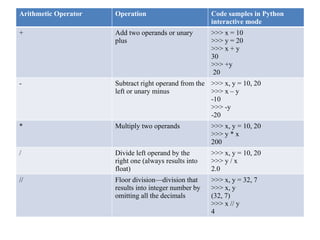
Arithmetic Operator OperationCode samples in Python
interactive mode
+ Add two operands or unary
plus
>>> x = 10
>>> y = 20
>>> x + y
30
>>> +y
20
- Subtract right operand from the
left or unary minus
>>> x, y = 10, 20
>>> x – y
-10
>>> -y
-20
* Multiply two operands >>> x, y = 10, 20
>>> y * x
200
/ Divide left operand by the
right one (always results into
float)
>>> x, y = 10, 20
>>> y / x
2.0
// Floor division—division that
results into integer number by
omitting all the decimals
>>> x, y = 32, 7
>>> x, y
(32, 7)
>>> x // y
4
14.
Arithmetic Operator OperationCode samples in Python
interactive mode
% Modulus—remainder of
the division of left operand
by the right
>>> x, y = 32, 7
>>> x, y
(32, 7)
>>> x % y
4
** Exponent—left operand
raised to the power of right
>>> x, y = 32, 7
>>> x, y
(32, 7)
>>> x ** y
34359738368
15.
Comparison Operator OperationCode sample in Python
interactive mode
> Greater than—True if left
operand is greater than the
right
>>> x, y = 23, 53
>>> x > y
False
< Less than—True if left
operand is less than the
right
>>> x, y = 23, 53
>>> x, y
(23, 53)
>>> x < y
True
== Equal to—True if both
operands are equal
>>> x, y = 23, 53
>>> x, y
(23, 53)
>>> x == y
False
!= Not equal to—True if
operands are not equal
>>> x, y = 23, 53
>>> x, y
(23, 53)
>>> x != y
True
16.
Comparison Operator OperationCode sample in Python
interactive mode
>= Greater than or equal to—
True if left operand is
greater than or equal to
the right
>>> x, y = 23, 53
>>> x, y
(23, 53)
>>> x >= y
False
<= Less than or equal to—True
if left operand is less than
or equal to the right
>>> x, y = 23, 53
>>> x, y
(23, 53)
>>> x <= y
True
17.
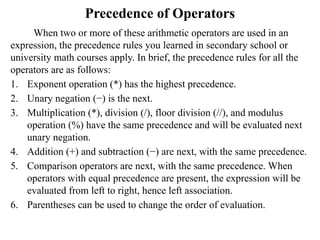
Precedence of Operators
Whentwo or more of these arithmetic operators are used in an
expression, the precedence rules you learned in secondary school or
university math courses apply. In brief, the precedence rules for all the
operators are as follows:
1. Exponent operation (*) has the highest precedence.
2. Unary negation (−) is the next.
3. Multiplication (*), division (/), floor division (//), and modulus
operation (%) have the same precedence and will be evaluated next
unary negation.
4. Addition (+) and subtraction (−) are next, with the same precedence.
5. Comparison operators are next, with the same precedence. When
operators with equal precedence are present, the expression will be
evaluated from left to right, hence left association.
6. Parentheses can be used to change the order of evaluation.
![Data Types and Mathematical
Expressions in Python
Presented by: [Your Name]
Date: [Presentation Date]](https://image.slidesharecdn.com/datatypesandmathexpressionspython-250922110728-b1f5aa50/85/Data_Types_and_Math_Expressions_Python-pptx-1-320.jpg)
![Data Types and Mathematical
Expressions in Python
Presented by: [Your Name]
Date: [Presentation Date]](https://image.slidesharecdn.com/datatypesandmathexpressionspython-250922110728-b1f5aa50/75/Data_Types_and_Math_Expressions_Python-pptx-1-2048.jpg)