Data types and datatype conversions of python programming.pptx
1.
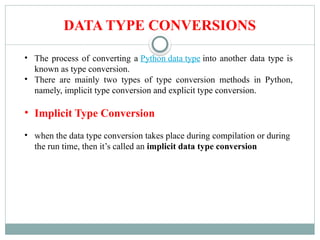
DATA TYPE CONVERSIONS
•The process of converting a Python data type into another data type is
known as type conversion.
• There are mainly two types of type conversion methods in Python,
namely, implicit type conversion and explicit type conversion.
• Implicit Type Conversion
• when the data type conversion takes place during compilation or during
the run time, then it’s called an implicit data type conversion
2.
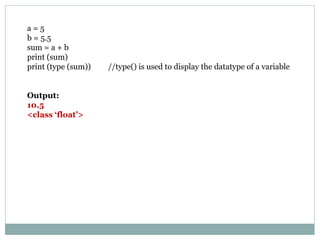
a = 5
b= 5.5
sum = a + b
print (sum)
print (type (sum)) //type() is used to display the datatype of a variable
Output:
10.5
<class ‘float’>
3.
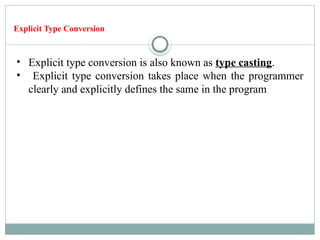
Explicit Type Conversion
•Explicit type conversion is also known as type casting.
• Explicit type conversion takes place when the programmer
clearly and explicitly defines the same in the program
6.
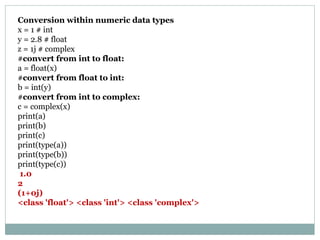
Conversion within numericdata types
x = 1 # int
y = 2.8 # float
z = 1j # complex
#convert from int to float:
a = float(x)
#convert from float to int:
b = int(y)
#convert from int to complex:
c = complex(x)
print(a)
print(b)
print(c)
print(type(a))
print(type(b))
print(type(c))
1.0
2
(1+0j)
<class 'float'> <class 'int'> <class 'complex'>
7.
Function Description
int(y [base])It converts y to an integer, and Base specifies the number base. For
example, if you want to convert the string in decimal number then you’ll
use 10 as base.
float(y) It converts y to a floating-point number.
complex(real [imag]) It creates a complex number.
str(y) It converts y to a string.
tuple(y) It converts y to a tuple.
list(y) It converts y to a list.
set(y) It converts y to a set.
dict(y) It creates a dictionary and y should be a sequence of (key,value) tuples.
ord(y) It converts a character into an integer.
hex(y) It converts an integer to a hexadecimal string.
oct(y) It converts an integer to an octal string
8.
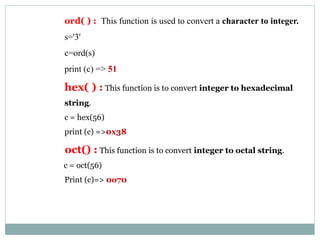
ord( ) :This function is used to convert a character to integer.
s='3'
c=ord(s)
print (c) => 51
hex( ) : This function is to convert integer to hexadecimal
string.
c = hex(56)
print (c) =>0x38
oct() : This function is to convert integer to octal string.
c = oct(56)
Print (c)=> 0o70
9.
tuple( ) :This function is used to convert to a tuple.
s = 'greeks’
c = tuple(s)
Print (c) => ('g', 'r', 'e', 'e', 'k', 's')
set( ) : This function returns the type after converting to set
c=set(s)
print(c) = >{'e', 'k', 'r', 's', 'g'}
list( ) : This function is used to convert any data type to a list
type
c=list(s)
print(c) = > ['g', 'r', 'e', 'e', 'k', 's']
10.
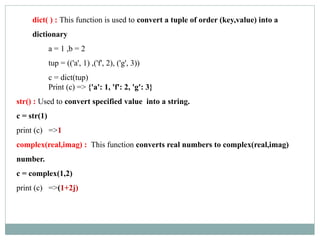
dict( ) :This function is used to convert a tuple of order (key,value) into a
dictionary
a = 1 ,b = 2
tup = (('a', 1) ,('f', 2), ('g', 3))
c = dict(tup)
Print (c) => {'a': 1, 'f': 2, 'g': 3}
str() : Used to convert specified value into a string.
c = str(1)
print (c) =>1
complex(real,imag) : This function converts real numbers to complex(real,imag)
number.
c = complex(1,2)
print (c) =>(1+2j)
11.
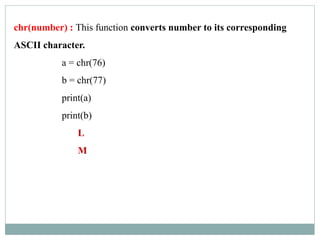
chr(number) : Thisfunction converts number to its corresponding
ASCII character.
a = chr(76)
b = chr(77)
print(a)
print(b)
L
M
12.
Converting String into List
string='python is very simple programming language'
print(string)
python is very simple programming language
type(string)
<type 'str'>
list=string.split()
print(list)
['python', 'is', 'very', 'simple', 'programming', 'language']
type(list)
<type 'list'>
13.
Converting list intostring:
list=['python', 'is', 'very', 'simple', 'programming', 'language']
type(list)
<type 'list'>
string1=" ".join(list)
print(string1)
python is very simple programming language
type(string1)
<type 'str'>
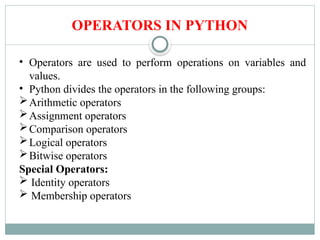
OPERATORS IN PYTHON
•Operators are used to perform operations on variables and
values.
• Python divides the operators in the following groups:
Arithmetic operators
Assignment operators
Comparison operators
Logical operators
Bitwise operators
Special Operators:
Identity operators
Membership operators
18.
Arithmetic Operators :
Arithmeticoperators are used to perform mathematical operations like
addition, subtraction, multiplication, etc.
Operator Name Example
+ Addition
x + y x = 5 , y = 3 , print(x + y) => 8
- Subtraction x – y x = 5 , y = 3 , print(x - y) => 2
* Multiplication x * y x = 5 , y = 3 , print(x * y) => 15
/ Division x / y x = 12, y = 3 , print(x /y) => 4
% Modulus
(remainder of the division of
left operand by the right)
x % y x = 5 , y = 2 , print(x % y) => 1
** Exponentiation
(left operand raised to the
power of right)
x ** y
x = 2 , y = 5
print(x ** y) #same as 2*2*2*2*2 =>32
// Floor division
(division that results into
whole number adjusted to the
left in the number line)
x // y
x = 15 , y = 2
print(x // y) => 7
#the floor division // rounds the result down to the
19.
Assignment Operators
Operator ExampleSame As Implement
= x = 5 x = 5 x = 5
print(x)=>5
+= x += 3 x = x + 3 x = 5 x += 3 print(x)=> 8
-= x -= 3 x = x - 3 x = 5 x -= 3 print(x)=> 2
*= x *= 3 x = x * 3 x = 5 x *= 3 print(x)=> 15
/= x /= 3 x = x / 3 x = 5 x *= 3
print(x)=>
1.6666666666666667
%= x %= 3 x = x % 3 x = 5 x%=3 print(x)=>2
//= x //= 3 x = x // 3 x = 5 x//=3 print(x)=> 1
**= x **= 3 x = x ** 3 x = 5 x **= 3 print(x)=>125
&= x &= 3 x = x & 3 x = 5 x &= 3 print(x)=> 1
|= x |= 3 x = x | 3 x = 5 x |= 3 print(x)=>7
^= x ^= 3 x = x ^ 3 x = 5 x ^= 3 print(x)=>6
>>= x >>= 3 x = x >> 3 x = 5 x >>= 3 print(x)=>0
<<= x <<= 3 x = x << 3 x = 5 x <<= 3 print(x)=>40
20.
Comparision Operators
Operat
or
Name Exampl
e
==Equal x == y x = 5 , y = 3
print(x == y)# returns False because 5 is
not equal to 3
!= Not equal x != y x = 5 , y = 3
print(x != y)# returns True because 5 is
not equal to 3
> Greater than x > y x = 5 , y = 3
print(x > y)# returns True because 5 is
greater than 3
< Less than x < y x = 5 , y = 3
print(x < y)# returns False because 5 is
not less than 3
>= Greater than or
equal to
x >= y x = 5 , y = 3
print(x >= y)
# returns True because five is greater, or
equal, to 3
21.
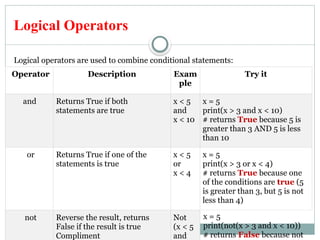
Logical Operators
Logical operatorsare used to combine conditional statements:
Operator Description Exam
ple
Try it
and Returns True if both
statements are true
x < 5
and
x < 10
x = 5
print(x > 3 and x < 10)
# returns True because 5 is
greater than 3 AND 5 is less
than 10
or Returns True if one of the
statements is true
x < 5
or
x < 4
x = 5
print(x > 3 or x < 4)
# returns True because one
of the conditions are true (5
is greater than 3, but 5 is not
less than 4)
not Reverse the result, returns
False if the result is true
Compliment
Not
(x < 5
and
x = 5
print(not(x > 3 and x < 10))
# returns False because not
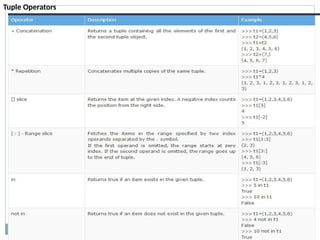
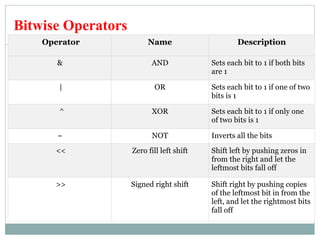
22.
Bitwise Operators
Operator NameDescription
& AND Sets each bit to 1 if both bits
are 1
| OR Sets each bit to 1 if one of two
bits is 1
^ XOR Sets each bit to 1 if only one
of two bits is 1
~ NOT Inverts all the bits
<< Zero fill left shift Shift left by pushing zeros in
from the right and let the
leftmost bits fall off
>> Signed right shift Shift right by pushing copies
of the leftmost bit in from the
left, and let the rightmost bits
fall off
23.
Operato
r
Meaning Example
& BitwiseAND x & y = 0 (0000 0000)
| Bitwise OR x | y = 14 (0000 1110)
~ Bitwise NOT ~x = -11 (1111 0101)
^ Bitwise XOR x ^ y = 14 (0000 1110)
>>
Bitwise right
shift
x >> 2 = 2 (0000 0010)
<<
Bitwise left
shift
x << 2 = 40 (0010 1000)
2 is 10 in binary and 7 is 111.
In the table below: Let x = 10 (0000 1010 in binary) and y = 4
(0000 0100 in binary)
24.
Identity Operators
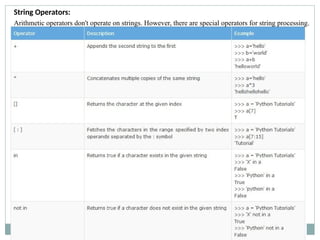
Identity operatorsare used to compare the objects, not if they are equal, but if they
are actually the same object, with the same memory location:
Operat
or
Description Exampl
e
Implementation
is Returns True if
both variables
are the same
object
x is y x = ["apple", "banana"]
y = ["apple", "banana"] z = x print(x is z)
# returns True because z is the same object as x
print(x is y)
# returns False because x is not the same object
as y, even if they have the same content
is not Returns True if
both variables
are not the
same object
x is not
y
x = ["apple", "banana"]
y = ["apple", "banana"] z = x
print(x is not z)
# returns False because z is the same object as x
print(x is not y)
# returns True because x is not the same object
as y, even if they have the same content
25.
Membership Operators
Membership operatorsare used to test if a sequence is presented in an object:
Operator Description Example Implementation
in Returns True
if a sequence
with the
specified
value is
present in
the object
x in y x = ["apple", "banana"]
print("banana" in x)
# returns True because a sequence with
the value "banana" is in the list
not in Returns True
if a sequence
with the
specified
value is not
present in
the object
x not in y x = ["apple", "banana"]
print("pineapple" not in x)
# returns True because a sequence with
the value "pineapple" is not in the list
26.
Inbuilt Functions
Function DescriptionImplementation
abs() Returns the
absolute value of a
number
x = abs(-7.25)
print(x)
=>7.25
all() Returns True if all
items in an iterable
object are true
mylist = [0, 1, 1]
x = all(mylist)
print(x)
# Returns False because 0 is the same as False
any() Returns True if any
item in an iterable
object is true
mytuple = (0, 1, False)
x = any(mytuple)
print(x)
# Returns True because the second item is True
ascii() Returns a readable
version of an
object. Replaces
none-ascii
characters with
escape character
x = ascii("My name is Ståle")
print(x)
'My name is Ste5le'
27.
Function Description Implementation
bin()Returns the binary
version of a
number
x = bin(36)
print(x)=>0b100100
# The result will always have the prefix 0b
bool() Returns the
boolean value of
the specified object
x = bool(1)
print(x)=True
bytearray() Returns an array of
bytes
x = bytearray(4)
print(x)
bytearray(b'x00x00x00x00')
callable() Returns True if the
specified object is
callable, otherwise
False
def x():
a = 5
print(callable(x))=>True
bytes() Returns a bytes
object
x = bytes(4)
print(x)
b'x00x00x00x00'
28.
Functio
n
Description Implementation
filter() Usea filter function to
exclude items in an
iterable object
ages = [5, 12, 17, 18, 24, 32]
def myFunc(x):
if x < 18: return False
else: return True
adults = filter(myFunc, ages)
for x in adults:
print(x)=> 18 24 32
divmod() Returns the quotient and
the remainder when
argument1 is divided by
argument2
x = divmod(5, 2)
print(x)=> (2, 1)
enumera
te()
Takes a collection (e.g. a
tuple) and returns it as an
enumerate object
x = ('apple', 'banana', 'cherry')
y = enumerate(x)
print(list(y))=>[(0, 'apple'), (1,
'banana'), (2, 'cherry')]
eval() Evaluates and executes
an expression
x = 'print(55)'
eval(x)=>55
exec() Executes the specified
code (or object)
x = 'name = "John"nprint(name)'
exec(x)=> John
29.
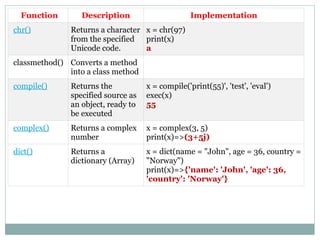
Function Description Implementation
chr()Returns a character
from the specified
Unicode code.
x = chr(97)
print(x)
a
classmethod() Converts a method
into a class method
compile() Returns the
specified source as
an object, ready to
be executed
x = compile('print(55)', 'test', 'eval')
exec(x)
55
complex() Returns a complex
number
x = complex(3, 5)
print(x)=>(3+5j)
dict() Returns a
dictionary (Array)
x = dict(name = "John", age = 36, country =
"Norway")
print(x)=>{'name': 'John', 'age': 36,
'country': 'Norway'}
30.
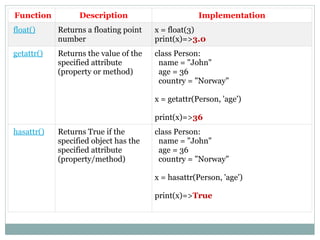
Function Description Implementation
float()Returns a floating point
number
x = float(3)
print(x)=>3.0
getattr() Returns the value of the
specified attribute
(property or method)
class Person:
name = "John"
age = 36
country = "Norway"
x = getattr(Person, 'age')
print(x)=>36
hasattr() Returns True if the
specified object has the
specified attribute
(property/method)
class Person:
name = "John"
age = 36
country = "Norway"
x = hasattr(Person, 'age')
print(x)=>True
31.
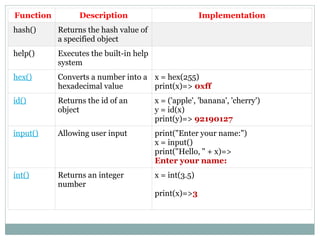
Function Description Implementation
hash()Returns the hash value of
a specified object
help() Executes the built-in help
system
hex() Converts a number into a
hexadecimal value
x = hex(255)
print(x)=> 0xff
id() Returns the id of an
object
x = ('apple', 'banana', 'cherry')
y = id(x)
print(y)=> 92190127
input() Allowing user input print("Enter your name:")
x = input()
print("Hello, " + x)=>
Enter your name:
int() Returns an integer
number
x = int(3.5)
print(x)=>3
32.
Function Description Implementation
iter()Returns an iterator object x = iter(["apple", "banana", "cherry"])
print(next(x))
print(next(x))
print(next(x))
apple
banana
cherry
len() Returns the length of an
object
mylist = ["apple", "orange", "cherry"]
x = len(mylist)
print(x)=>3
map() Returns the specified
iterator with the specified
function applied to each
item
def myfunc(a):
return len(a)
x = map(myfunc, ('apple', 'banana',
'cherry'))
print(x)
#convert the map into a list, for readability:
print(list(x))
<map object at 0x056D44F0>
['5', '6', '6']
33.
Function Description Implementation
max()Returns the largest item
in an iterable
x = max(5, 10)
print(x)=>10
min() Returns the smallest item
in an iterable
x = min(5, 10)
print(x)=>5
next() Returns the next item in
an iterable
mylist = iter(["apple", "banana", "cherry"])
x = next(mylist)
print(x)
x = next(mylist)
print(x)
x = next(mylist)
print(x)
apple
banana
cherry
oct() Converts a number into
an octal
x = oct(12)
print(x)=>0o14
pow() Returns the value of x to
the power of y
x = pow(4, 3)
print(x)=>64
34.
Function Description Implementation
print()Prints to the standard
output device
print("Hello World")=>Hello World
range() Returns a sequence of
numbers, starting from 0
and increments by 1 (by
default)
x = range(6)
for n in x:
print(n)=>
0
1
2
3
4
5
reversed() Returns a reversed
iterator
alph = ["a", "b", "c", "d"]
ralph = reversed(alph)
for x in ralph:
print(x)
d
c
b
a
35.
Function Description Implementation
round()Rounds a numbers x = round(5.76543, 2)
print(x)=> 5.77
slice() Returns a slice object a = ("a", "b", "c", "d", "e", "f", "g", "h")
x = slice(2)
print(a[x])=>('a', 'b')
sorted() Returns a sorted list a = ("b", "g", "a", "d", "f", "c", "h", "e")
x = sorted(a)
print(x)=>
['a', 'b', 'c', 'd', 'e', 'f', 'g', 'h']
sum() Sums the items of an
iterator
a = (1, 2, 3, 4, 5)
x = sum(a)
print(x)=>15
tuple() Returns a tuple x = tuple(("apple", "banana", "cherry"))
print(x)=>('banana', 'cherry', 'apple')
36.
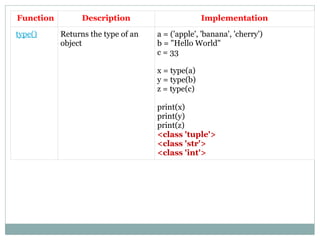
Function Description Implementation
type()Returns the type of an
object
a = ('apple', 'banana', 'cherry')
b = "Hello World"
c = 33
x = type(a)
y = type(b)
z = type(c)
print(x)
print(y)
print(z)
<class 'tuple'>
<class 'str'>
<class 'int'>
![Function Description
int(y [base]) It converts y to an integer, and Base specifies the number base. For
example, if you want to convert the string in decimal number then you’ll
use 10 as base.
float(y) It converts y to a floating-point number.
complex(real [imag]) It creates a complex number.
str(y) It converts y to a string.
tuple(y) It converts y to a tuple.
list(y) It converts y to a list.
set(y) It converts y to a set.
dict(y) It creates a dictionary and y should be a sequence of (key,value) tuples.
ord(y) It converts a character into an integer.
hex(y) It converts an integer to a hexadecimal string.
oct(y) It converts an integer to an octal string](https://image.slidesharecdn.com/ppt-251018133503-df10f6f3/85/Data-types-and-datatype-conversions-of-python-programming-pptx-7-320.jpg)
![tuple( ) : This function is used to convert to a tuple.
s = 'greeks’
c = tuple(s)
Print (c) => ('g', 'r', 'e', 'e', 'k', 's')
set( ) : This function returns the type after converting to set
c=set(s)
print(c) = >{'e', 'k', 'r', 's', 'g'}
list( ) : This function is used to convert any data type to a list
type
c=list(s)
print(c) = > ['g', 'r', 'e', 'e', 'k', 's']](https://image.slidesharecdn.com/ppt-251018133503-df10f6f3/85/Data-types-and-datatype-conversions-of-python-programming-pptx-9-320.jpg)
![Converting String in to List
string='python is very simple programming language'
print(string)
python is very simple programming language
type(string)
<type 'str'>
list=string.split()
print(list)
['python', 'is', 'very', 'simple', 'programming', 'language']
type(list)
<type 'list'>](https://image.slidesharecdn.com/ppt-251018133503-df10f6f3/85/Data-types-and-datatype-conversions-of-python-programming-pptx-12-320.jpg)
![Converting list into string:
list=['python', 'is', 'very', 'simple', 'programming', 'language']
type(list)
<type 'list'>
string1=" ".join(list)
print(string1)
python is very simple programming language
type(string1)
<type 'str'>](https://image.slidesharecdn.com/ppt-251018133503-df10f6f3/85/Data-types-and-datatype-conversions-of-python-programming-pptx-13-320.jpg)



![Identity Operators
Identity operators are used to compare the objects, not if they are equal, but if they
are actually the same object, with the same memory location:
Operat
or
Description Exampl
e
Implementation
is Returns True if
both variables
are the same
object
x is y x = ["apple", "banana"]
y = ["apple", "banana"] z = x print(x is z)
# returns True because z is the same object as x
print(x is y)
# returns False because x is not the same object
as y, even if they have the same content
is not Returns True if
both variables
are not the
same object
x is not
y
x = ["apple", "banana"]
y = ["apple", "banana"] z = x
print(x is not z)
# returns False because z is the same object as x
print(x is not y)
# returns True because x is not the same object
as y, even if they have the same content](https://image.slidesharecdn.com/ppt-251018133503-df10f6f3/85/Data-types-and-datatype-conversions-of-python-programming-pptx-24-320.jpg)
![Membership Operators
Membership operators are used to test if a sequence is presented in an object:
Operator Description Example Implementation
in Returns True
if a sequence
with the
specified
value is
present in
the object
x in y x = ["apple", "banana"]
print("banana" in x)
# returns True because a sequence with
the value "banana" is in the list
not in Returns True
if a sequence
with the
specified
value is not
present in
the object
x not in y x = ["apple", "banana"]
print("pineapple" not in x)
# returns True because a sequence with
the value "pineapple" is not in the list](https://image.slidesharecdn.com/ppt-251018133503-df10f6f3/85/Data-types-and-datatype-conversions-of-python-programming-pptx-25-320.jpg)
![Inbuilt Functions
Function Description Implementation
abs() Returns the
absolute value of a
number
x = abs(-7.25)
print(x)
=>7.25
all() Returns True if all
items in an iterable
object are true
mylist = [0, 1, 1]
x = all(mylist)
print(x)
# Returns False because 0 is the same as False
any() Returns True if any
item in an iterable
object is true
mytuple = (0, 1, False)
x = any(mytuple)
print(x)
# Returns True because the second item is True
ascii() Returns a readable
version of an
object. Replaces
none-ascii
characters with
escape character
x = ascii("My name is Ståle")
print(x)
'My name is Ste5le'](https://image.slidesharecdn.com/ppt-251018133503-df10f6f3/85/Data-types-and-datatype-conversions-of-python-programming-pptx-26-320.jpg)

![Functio
n
Description Implementation
filter() Use a filter function to
exclude items in an
iterable object
ages = [5, 12, 17, 18, 24, 32]
def myFunc(x):
if x < 18: return False
else: return True
adults = filter(myFunc, ages)
for x in adults:
print(x)=> 18 24 32
divmod() Returns the quotient and
the remainder when
argument1 is divided by
argument2
x = divmod(5, 2)
print(x)=> (2, 1)
enumera
te()
Takes a collection (e.g. a
tuple) and returns it as an
enumerate object
x = ('apple', 'banana', 'cherry')
y = enumerate(x)
print(list(y))=>[(0, 'apple'), (1,
'banana'), (2, 'cherry')]
eval() Evaluates and executes
an expression
x = 'print(55)'
eval(x)=>55
exec() Executes the specified
code (or object)
x = 'name = "John"nprint(name)'
exec(x)=> John](https://image.slidesharecdn.com/ppt-251018133503-df10f6f3/85/Data-types-and-datatype-conversions-of-python-programming-pptx-28-320.jpg)
![Function Description Implementation
iter() Returns an iterator object x = iter(["apple", "banana", "cherry"])
print(next(x))
print(next(x))
print(next(x))
apple
banana
cherry
len() Returns the length of an
object
mylist = ["apple", "orange", "cherry"]
x = len(mylist)
print(x)=>3
map() Returns the specified
iterator with the specified
function applied to each
item
def myfunc(a):
return len(a)
x = map(myfunc, ('apple', 'banana',
'cherry'))
print(x)
#convert the map into a list, for readability:
print(list(x))
<map object at 0x056D44F0>
['5', '6', '6']](https://image.slidesharecdn.com/ppt-251018133503-df10f6f3/85/Data-types-and-datatype-conversions-of-python-programming-pptx-32-320.jpg)
![Function Description Implementation
max() Returns the largest item
in an iterable
x = max(5, 10)
print(x)=>10
min() Returns the smallest item
in an iterable
x = min(5, 10)
print(x)=>5
next() Returns the next item in
an iterable
mylist = iter(["apple", "banana", "cherry"])
x = next(mylist)
print(x)
x = next(mylist)
print(x)
x = next(mylist)
print(x)
apple
banana
cherry
oct() Converts a number into
an octal
x = oct(12)
print(x)=>0o14
pow() Returns the value of x to
the power of y
x = pow(4, 3)
print(x)=>64](https://image.slidesharecdn.com/ppt-251018133503-df10f6f3/85/Data-types-and-datatype-conversions-of-python-programming-pptx-33-320.jpg)
![Function Description Implementation
print() Prints to the standard
output device
print("Hello World")=>Hello World
range() Returns a sequence of
numbers, starting from 0
and increments by 1 (by
default)
x = range(6)
for n in x:
print(n)=>
0
1
2
3
4
5
reversed() Returns a reversed
iterator
alph = ["a", "b", "c", "d"]
ralph = reversed(alph)
for x in ralph:
print(x)
d
c
b
a](https://image.slidesharecdn.com/ppt-251018133503-df10f6f3/85/Data-types-and-datatype-conversions-of-python-programming-pptx-34-320.jpg)
![Function Description Implementation
round() Rounds a numbers x = round(5.76543, 2)
print(x)=> 5.77
slice() Returns a slice object a = ("a", "b", "c", "d", "e", "f", "g", "h")
x = slice(2)
print(a[x])=>('a', 'b')
sorted() Returns a sorted list a = ("b", "g", "a", "d", "f", "c", "h", "e")
x = sorted(a)
print(x)=>
['a', 'b', 'c', 'd', 'e', 'f', 'g', 'h']
sum() Sums the items of an
iterator
a = (1, 2, 3, 4, 5)
x = sum(a)
print(x)=>15
tuple() Returns a tuple x = tuple(("apple", "banana", "cherry"))
print(x)=>('banana', 'cherry', 'apple')](https://image.slidesharecdn.com/ppt-251018133503-df10f6f3/85/Data-types-and-datatype-conversions-of-python-programming-pptx-35-320.jpg)