A conceptual framework for data-interactivity
PykQuery.js
Ritvvij Parrikh,
Founder, pykih.com | pykcharts.com
Genesis
Pykih is a data design company. We make
data human i.e. we use algorithms and
design to help humans consume data.
Genesis
Built for FirstPost.com - As seen on History Channel Documentary - Vital Stats of India
Genesis
GapMinder style design for 500 startups (VC) to analyse their portfolio
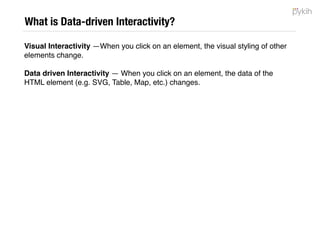
Genesis
Real-time social media dashboard for Microsoft World Partner Conference
Genesis
Nature of our business:
• Data can be streaming live or static
• Data could be big or small
• User can be on mobile or laptop
• Traffic can be in millions (media) or few hundreds (ERP)
• Good Design and interactivity is a must
2, 10, 30, 50 projects later… we realised the need for PykQuery
Warning
What it is NOT
• NOT an Angular / React alternative 

• Does NOT help with data binding

• NOT a monolithic framework

• NOT an isomorphic framework (e.g. Meteor) 

• NOT a non-isomorphic framework 

• Does NOT choose the database for you (e.g. Meteor is built for MongoDB)
What
PykQuery is a conceptual framework that help
organise complexity around data-driven
interactive single page apps.
What
PykQuery is a conceptual framework that help
organise complexity around data-driven
interactive single page apps.
Even MVC sites
have 1 or 2 very
powerful single
page apps inside
them
Searching,
Filtering,
Analytics,
Visualisation,
Dashboards, etc.
You can use our
code or use the
concepts to write
your own code.
Why (Developer)
PykQuery is a conceptual framework that help
organise complexity around data-driven
interactive single page apps.
• Maintainable Code
• Black box out data-related code
• Black box out interactivity related code
Why (Business)
PykQuery is a conceptual framework that help
organise complexity around data-driven
interactive single page apps.
• Invest maximum time on design
Types of Interactivity
Interactive visual and data driven analytics provides different ways to extract
knowledge from very large data sets:
Visual Interactivity —Visual interactivity allows user to change the styling/
visual appearance of elements by clicking on other elements.
Data driven Interactivity — Data driven interactivity extends this to the
capability of changing the data itself, allowing user to discover more things about
data, on their own.
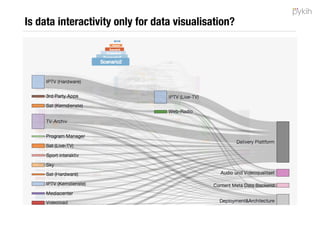
Is data interactivity only for data visualisation?
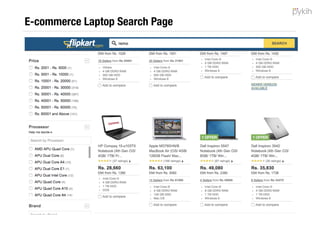
E-commerce Laptop Search Page
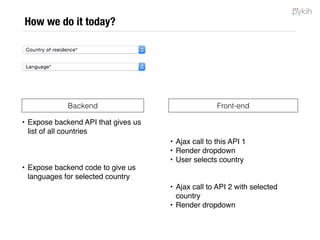
How we do it today?
• Expose backend API that gives us
list of all countries
• Expose backend code to give us
languages for selected country
Backend Front-end
• Ajax call to this API 1
• Render dropdown
• User selects country
• Ajax call to API 2 with selected
country
• Render dropdown
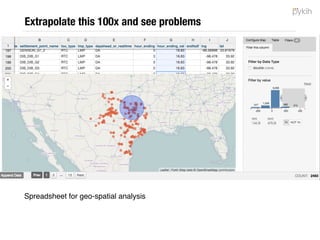
Extrapolate this 100x and see problems
Spreadsheet for geo-spatial analysis
Problems with data interactivity
#1 - Messy Backend Code
• Front-end team dependent on backend team to write APIs
• 5 min. to write drop down code; 15 min. to expose 1 API and deploy to prod.
• Prod. code ends up with multiple APIs
• Front-end can stop using the APIs without telling backend (dead code in prod.)
Step #1 - Run a backend server
Download a piece of backend code - http://github.com/pykih/PykQuery.rb 

Connect to your database

Switch on server
Step #2 - Write a query in JSON in browser
{
"dataformat":"json”,
"scope":"local”,
"impacts":[],
"impactedby":["connector1”],
"div_id":"map_local”,
"alias":{},
"rumiparams":"pykih/icici-ha/untitled-grid-13-csv/“,
"metrics":{},
"filters”:[
{
"column_name":"city”,
"condition_type":"values”,
"next":"AND”,
"in":["mumbai”],
"not_in":[]
}
],
"limit":2000,
"sort":[{"price_for_sorting":"desc"}],
“dimensions”:["price_for_sorting","name","map_coordinate_lat",
"map_coordinate_lon","city","address","computed_rating","slug”],
"offset":0,
"mode":”aggregation"
}
Step #3 - Call the .call method
c.call();
Step #4 - Render the DOM for the data received
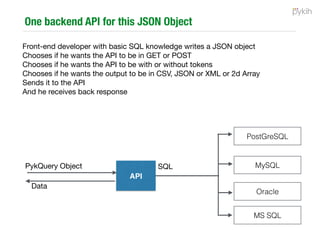
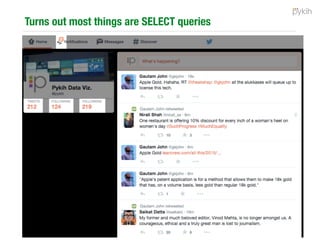
Turns out most UI elements are SELECT queries
1 scalable backend API for 70% of your front-end data needs
Front-end developer with basic SQL knowledge writes a JSON object

Chooses if he wants the API to be in GET or POST

Chooses if he wants the API to be with or without tokens

Chooses if he wants the output to be in CSV, JSON or XML or 2d Array

Sends it to the API

And he receives back response
PostGreSQL
MySQL
Oracle
MS SQL
PykQuery Object
 SQL

API
Data
Problems with data interactivity
#1 - Messy Backend Code
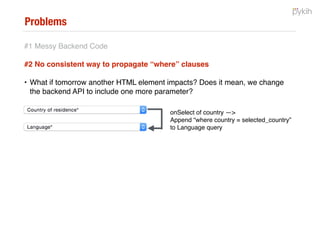
#2 - No consistent way to propagate WHERE clauses
onSelect of country —>
Append “where country = selected_country”
to Language query
Interactivity Management
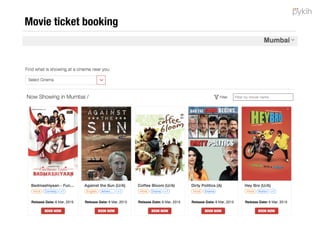
Disclaimer: This is a screenshot of BookMyShow and Pykih has no relation with BookMyShow.
Let’s abstract
#cities
#movies
#cinemas
#shows
How it works?
#cities
#movies
#cinemas
#shows
Theoretically speaking
#cities
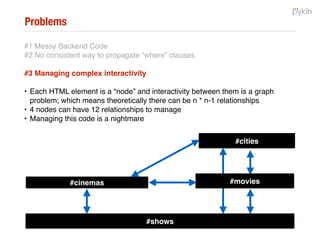
Interactivity is a graph problem and hence theoretically there can be n*n-1
relationships for every n nodes.
#movies
#shows
#cinemas
Problems with data interactivity
#1 - Messy Backend Code
#2 - No consistent way to propagate WHERE clauses
#3 - Managing complex interactivity
Conceptual Abstraction - Connector Object
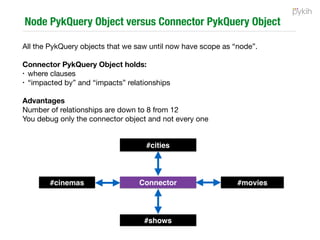
Each PykQuery object has a scope: NODE or CONNECTOR

Connector PykQuery Object holds:

• where clauses 

• “impacted by” and “impacts” relationships

Advantages

• Number of relationships are down to 8 from 12

• You debug only the connector object and not every one
#cities
#shows
#cinemas #moviesConnector
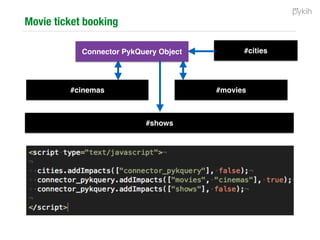
Step #5 - Define the interactivity
#cities
#shows
#movies#cinemas
Connector PykQuery Object
Problems with data interactivity
#1 - Messy Backend Code
#2 - No consistent way to propagate WHERE clauses
#3 - Managing complex interactivity
#4 - UI for the big data age is the browser (<5MB)
• The problem is further aggravated for Mobile WEB where not only is the
browser’s RAM less but the bandwidth is also poor.
Step #6 - Lazy load DB data. Query in-browser to render
Pull slices from DB and query them in-browser

Inspiration: Paging data between Cache, RAM and HDD

DB
Browser
Memory /
IndexedDB
Rendered
DOM
API
PykQuery
In-browser
Querying
PykQuery
DB
Querying
Example use case
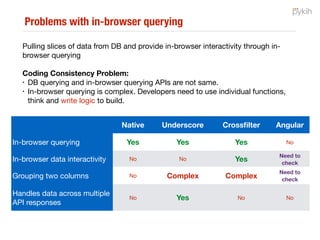
Problems with in-browser querying
No good way of doing it
• DB querying and in-browser querying APIs are not same.

• In-browser querying is complex. Developers need to use individual functions,
think and write logic to build.
Native Underscore Crossfilter Angular
In-browser querying Yes Yes Yes No
In-browser data interactivity No No Yes No
Grouping two columns No Complex Complex No
Handles data across multiple
API responses
No Yes No No
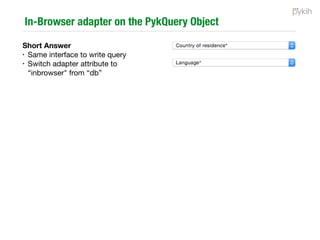
In-Browser adapter on the PykQuery Object
• Same interface to write query

• Switch adapter attribute to “inbrowser" from “db”
Problems with data interactivity
#1 - Messy Backend Code
#2 - No consistent way to propagate WHERE clauses
#3 - Managing complex interactivity
#4 - UI for the big data age is the browser (<5MB)
#5 - Can we save interactivity states?
• You have a doctor or hospital discovery front-end. My friend’s father needs
urgent surgery and I’m helping him out to find the right hospital. I filter on your
UI to find the right hospitals. Next, I want to take the results found and share it
with my friend. How are we doing this today?
Today
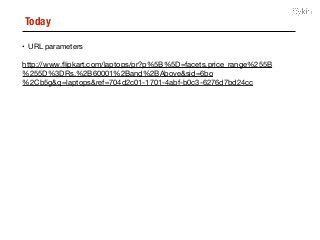
• URL parameters

http://www.flipkart.com/laptops/pr?p%5B%5D=facets.price_range%255B
%255D%3DRs.%2B60001%2Band%2BAbove&sid=6bo
%2Cb5g&q=laptops&ref=704d2c01-1701-4abf-b0c3-6276d7bd24cc
Step #7 - Save the PykQuery Object!
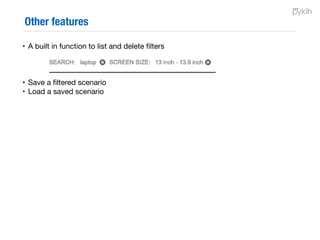
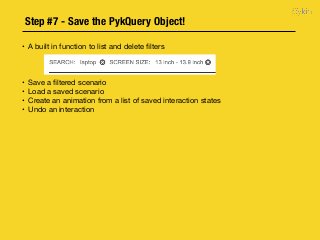
• A built in function to list and delete filters

• Save a filtered scenario

• Load a saved scenario

• Create an animation from a list of saved interaction states

• Undo an interaction
Step #8 - Focus on design
With data in your browser, data interactivity
defined and taken care of, now your design team
can focus maximum time on building the right UX.
Philosophical Construct
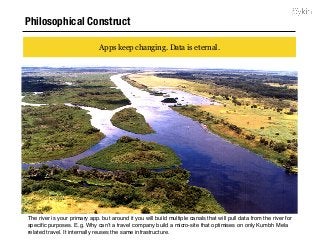
Apps keep changing. Data is eternal.
The river is your primary app. but around it you will build multiple canals that will pull data from the river for
specific purposes. E.g. Why can’t a travel company build a micro-site that optimises on only Kumbh Mela
related travel. It internally reuses the same infrastructure.
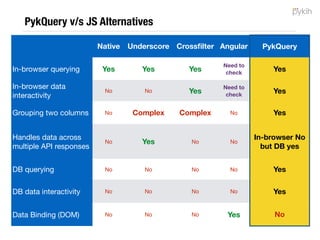
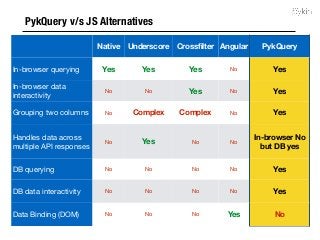
PykQuery v/s JS Alternatives
Native Underscore Crossfilter Angular PykQuery
In-browser querying Yes Yes Yes No Yes
In-browser data
interactivity
No No Yes No Yes
Grouping two columns No Complex Complex No Yes
Handles data across
multiple API responses
No Yes No No
In-browser No
but DB yes
DB querying No No No No Yes
DB data interactivity No No No No Yes
Data Binding (DOM) No No No Yes No
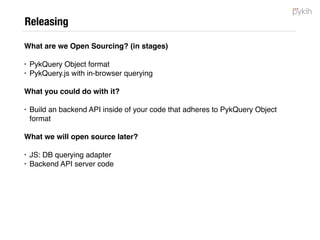
Releasing
https://github.com/pykih/PykQuery.js — JS Library
https://github.com/pykih/PykQuery.rb — Backend code in Ruby for PostGreSQL
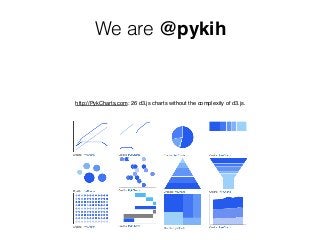
We are @pykih
http://PykCharts.com: 26 d3.js charts without the complexity of d3.js.
Countries Drop down Code
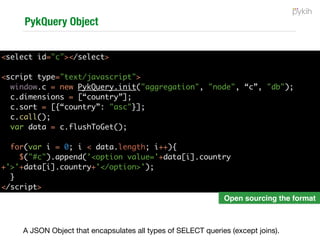
A JSON Object that encapsulates all types of SELECT queries (except joins).

<select id="c"></select>
<script type="text/javascript">
window.c = new PykQuery.init("aggregation", "node", “c”, "db");
c.dimensions = [“country”];
c.sort = [{“country”: "asc"}];
c.call();
var data = c.flushToGet();
for(var i = 0; i < data.length; i++){
$("#c").append('<option value='+data[i].country
+'>'+data[i].country+'</option>');
}
</script>
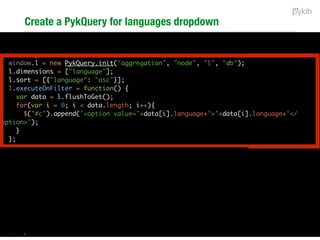
Languages Dropdown code
<select id="c"></select>
<select id="l"></select>
<script type="text/javascript">
window.l = new PykQuery.init("aggregation", "node", "l", "db");
l.dimensions = ["language"];
l.sort = [{"language": "asc"}];
l.executeOnFilter = function() {
var data = l.flushToGet();
for(var i = 0; i < data.length; i++){
$("#c").append('<option value='+data[i].language+'>'+data[i].language+'</
option>');
}
};
l.call();
c.addImpacts(["l"], false);
$("#c").change(function() {
c.addFilter([[{"column_name": "country",
"condition_type": "values",
"in": ["India"]}]], false, true);
});
</script>
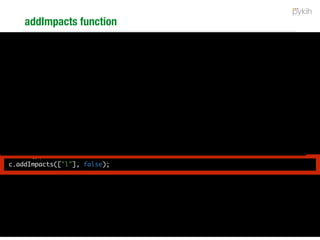
addImpacts function
<select id="c"></select>
<select id="l"></select>
<script type="text/javascript">
window.l = new PykQuery.init("aggregation", "node", "l", "db");
l.dimensions = ["language"];
l.sort = [{"language": "asc"}];
l.executeOnFilter = function() {
var data = l.flushToGet();
for(var i = 0; i < data.length; i++){
$("#c").append('<option value='+data[i].language+'>'+data[i].language+'</
option>');
}
};
l.call();
c.addImpacts(["l"], false);
$("#c").change(function() {
c.addFilter([[{"column_name": "country",
"condition_type": "values",
"in": ["India"]}]], false, true);
});
</script>
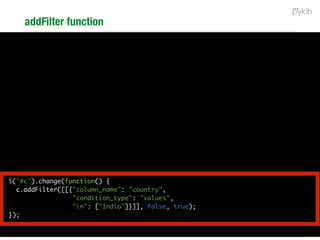
addFilter function
<select id="c"></select>
<select id="l"></select>
<script type="text/javascript">
window.l = new PykQuery.init("aggregation", "node", "l", "db");
l.dimensions = ["language"];
l.sort = [{"language": "asc"}];
l.executeOnFilter = function() {
var data = l.flushToGet();
for(var i = 0; i < data.length; i++){
$("#c").append('<option value='+data[i].language+'>'+data[i].language+'</
option>');
}
};
l.call();
c.addImpacts(["l"], false);
$("#c").change(function() {
c.addFilter([[{"column_name": "country",
"condition_type": "values",
"in": ["India"]}]], false, true);
});
</script>
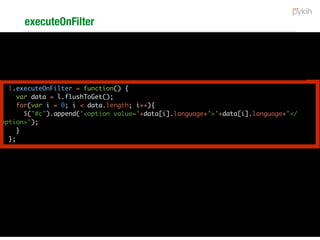
executeOnFilter
<select id="c"></select>
<select id="l"></select>
<script type="text/javascript">
window.l = new PykQuery.init("aggregation", "node", "l", "db");
l.dimensions = ["language"];
l.sort = [{"language": "asc"}];
l.executeOnFilter = function() {
var data = l.flushToGet();
for(var i = 0; i < data.length; i++){
$("#c").append('<option value='+data[i].language+'>'+data[i].language+'</
option>');
}
};
l.call();
c.addImpacts(["l"], false);
$("#c").change(function() {
c.addFilter([[{"column_name": "country",
"condition_type": "values",
"in": ["India"]}]], false, true);
});
</script>
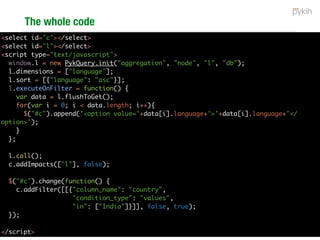
The whole code
<select id="c"></select>
<select id="l"></select>
<script type="text/javascript">
window.l = new PykQuery.init("aggregation", "node", "l", "db");
l.dimensions = ["language"];
l.sort = [{"language": "asc"}];
l.executeOnFilter = function() {
var data = l.flushToGet();
for(var i = 0; i < data.length; i++){
$("#c").append('<option value='+data[i].language+'>'+data[i].language+'</
option>');
}
};
l.call();
c.addImpacts(["l"], false);
$("#c").change(function() {
c.addFilter([[{"column_name": "country",
"condition_type": "values",
"in": ["India"]}]], false, true);
});
</script>
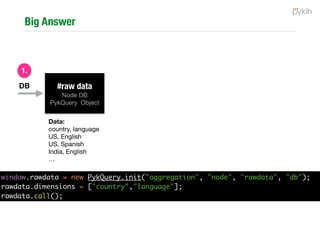
In-browser querying
DB #raw data
Node DB

PykQuery Object
1.
Data:
country, language

US, English

US, Spanish

India, English

…
window.rawdata = new PykQuery.init("aggregation", "node", "rawdata", "db");
rawdata.dimensions = ["country","language"];
rawdata.call();
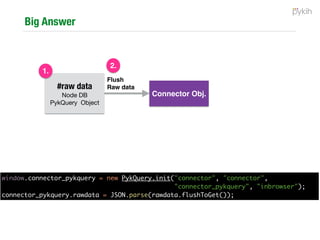
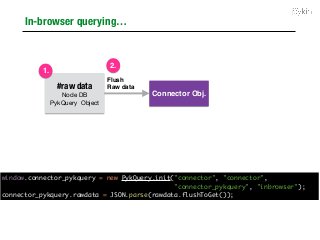
In-browser querying…
Connector Obj.
Flush
Raw data#raw data
Node DB

PykQuery Object
1.
2.
window.connector_pykquery = new PykQuery.init("connector", "connector",
"connector_pykquery", "inbrowser");
connector_pykquery.rawdata = JSON.parse(rawdata.flushToGet());
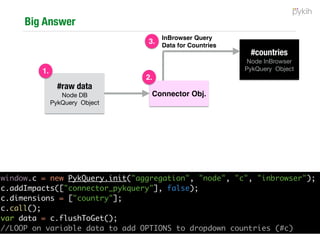
In-browser querying…
#countries
Node InBrowser

PykQuery Object
Connector Obj.
InBrowser Query
Data for Countries
2.
3.
#raw data
Node DB

PykQuery Object
1.
window.c = new PykQuery.init("aggregation", "node", "c", "inbrowser");
c.addImpacts(["connector_pykquery"], false);
c.dimensions = ["country"];
c.call();
var data = c.flushToGet();
//LOOP on variable data to add OPTIONS to dropdown countries (#c)
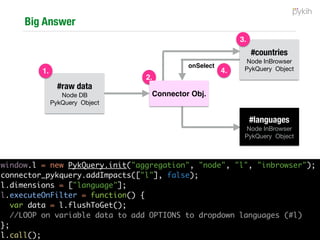
In-browser querying…
#countries
Node InBrowser

PykQuery Object
#languages
Node InBrowser

PykQuery Object
onSelect
3.
4.
#raw data
Node DB

PykQuery Object
1.
2.
Connector Obj.
window.l = new PykQuery.init("aggregation", "node", "l", "inbrowser");
connector_pykquery.addImpacts(["l"], false);
l.dimensions = ["language"];
l.executeOnFilter = function() {
var data = l.flushToGet();
//LOOP on variable data to add OPTIONS to dropdown languages (#l)
};
l.call();
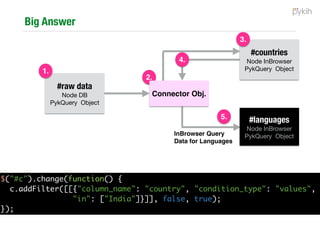
In-browser querying…
#languages
Node InBrowser

PykQuery ObjectInBrowser Query
Data for Languages
4.
5.
#raw data
Node DB

PykQuery Object
1.
2.
Connector Obj.
#countries
Node InBrowser

PykQuery Object
3.
$("#c").change(function() {
c.addFilter([[{"column_name": "country", "condition_type": "values",
"in": ["India"]}]], false, true);
});

PykQuery.js

  • 1.
    A conceptual frameworkfor data-interactivity PykQuery.js Ritvvij Parrikh, Founder, pykih.com | pykcharts.com
  • 2.
    Genesis Pykih is adata design company. We make data human i.e. we use algorithms and design to help humans consume data.
  • 3.
    Genesis Built for FirstPost.com- As seen on History Channel Documentary - Vital Stats of India
  • 4.
    Genesis GapMinder style designfor 500 startups (VC) to analyse their portfolio
  • 5.
    Genesis Real-time social mediadashboard for Microsoft World Partner Conference
  • 6.
    Genesis Nature of ourbusiness: • Data can be streaming live or static • Data could be big or small • User can be on mobile or laptop • Traffic can be in millions (media) or few hundreds (ERP) • Good Design and interactivity is a must 2, 10, 30, 50 projects later… we realised the need for PykQuery
  • 7.
    Warning What it isNOT • NOT an Angular / React alternative • Does NOT help with data binding • NOT a monolithic framework • NOT an isomorphic framework (e.g. Meteor) • NOT a non-isomorphic framework • Does NOT choose the database for you (e.g. Meteor is built for MongoDB)
  • 8.
    What PykQuery is aconceptual framework that help organise complexity around data-driven interactive single page apps.
  • 9.
    What PykQuery is aconceptual framework that help organise complexity around data-driven interactive single page apps. Even MVC sites have 1 or 2 very powerful single page apps inside them Searching, Filtering, Analytics, Visualisation, Dashboards, etc. You can use our code or use the concepts to write your own code.
  • 10.
    Why (Developer) PykQuery isa conceptual framework that help organise complexity around data-driven interactive single page apps. • Maintainable Code • Black box out data-related code • Black box out interactivity related code
  • 11.
    Why (Business) PykQuery isa conceptual framework that help organise complexity around data-driven interactive single page apps. • Invest maximum time on design
  • 12.
    Types of Interactivity Interactivevisual and data driven analytics provides different ways to extract knowledge from very large data sets: Visual Interactivity —Visual interactivity allows user to change the styling/ visual appearance of elements by clicking on other elements. Data driven Interactivity — Data driven interactivity extends this to the capability of changing the data itself, allowing user to discover more things about data, on their own.
  • 13.
    Is data interactivityonly for data visualisation?
  • 14.
  • 15.
    How we doit today? • Expose backend API that gives us list of all countries • Expose backend code to give us languages for selected country Backend Front-end • Ajax call to this API 1 • Render dropdown • User selects country • Ajax call to API 2 with selected country • Render dropdown
  • 16.
    Extrapolate this 100xand see problems Spreadsheet for geo-spatial analysis
  • 17.
    Problems with datainteractivity #1 - Messy Backend Code • Front-end team dependent on backend team to write APIs • 5 min. to write drop down code; 15 min. to expose 1 API and deploy to prod. • Prod. code ends up with multiple APIs • Front-end can stop using the APIs without telling backend (dead code in prod.)
  • 18.
    Step #1 -Run a backend server Download a piece of backend code - http://github.com/pykih/PykQuery.rb Connect to your database Switch on server
  • 19.
    Step #2 -Write a query in JSON in browser { "dataformat":"json”, "scope":"local”, "impacts":[], "impactedby":["connector1”], "div_id":"map_local”, "alias":{}, "rumiparams":"pykih/icici-ha/untitled-grid-13-csv/“, "metrics":{}, "filters”:[ { "column_name":"city”, "condition_type":"values”, "next":"AND”, "in":["mumbai”], "not_in":[] } ], "limit":2000, "sort":[{"price_for_sorting":"desc"}], “dimensions”:["price_for_sorting","name","map_coordinate_lat", "map_coordinate_lon","city","address","computed_rating","slug”], "offset":0, "mode":”aggregation" }
  • 20.
    Step #3 -Call the .call method c.call();
  • 21.
    Step #4 -Render the DOM for the data received
  • 22.
    Turns out mostUI elements are SELECT queries
  • 23.
    1 scalable backendAPI for 70% of your front-end data needs Front-end developer with basic SQL knowledge writes a JSON object Chooses if he wants the API to be in GET or POST Chooses if he wants the API to be with or without tokens Chooses if he wants the output to be in CSV, JSON or XML or 2d Array Sends it to the API And he receives back response PostGreSQL MySQL Oracle MS SQL PykQuery Object SQL API Data
  • 24.
    Problems with datainteractivity #1 - Messy Backend Code #2 - No consistent way to propagate WHERE clauses onSelect of country —> Append “where country = selected_country” to Language query
  • 25.
    Interactivity Management Disclaimer: Thisis a screenshot of BookMyShow and Pykih has no relation with BookMyShow.
  • 26.
  • 27.
  • 28.
    Theoretically speaking #cities Interactivity isa graph problem and hence theoretically there can be n*n-1 relationships for every n nodes. #movies #shows #cinemas
  • 29.
    Problems with datainteractivity #1 - Messy Backend Code #2 - No consistent way to propagate WHERE clauses #3 - Managing complex interactivity
  • 30.
    Conceptual Abstraction -Connector Object Each PykQuery object has a scope: NODE or CONNECTOR Connector PykQuery Object holds: • where clauses • “impacted by” and “impacts” relationships Advantages • Number of relationships are down to 8 from 12 • You debug only the connector object and not every one #cities #shows #cinemas #moviesConnector
  • 31.
    Step #5 -Define the interactivity #cities #shows #movies#cinemas Connector PykQuery Object
  • 32.
    Problems with datainteractivity #1 - Messy Backend Code #2 - No consistent way to propagate WHERE clauses #3 - Managing complex interactivity #4 - UI for the big data age is the browser (<5MB) • The problem is further aggravated for Mobile WEB where not only is the browser’s RAM less but the bandwidth is also poor.
  • 33.
    Step #6 -Lazy load DB data. Query in-browser to render Pull slices from DB and query them in-browser Inspiration: Paging data between Cache, RAM and HDD DB Browser Memory / IndexedDB Rendered DOM API PykQuery In-browser Querying PykQuery DB Querying
  • 34.
  • 35.
    Problems with in-browserquerying No good way of doing it • DB querying and in-browser querying APIs are not same. • In-browser querying is complex. Developers need to use individual functions, think and write logic to build. Native Underscore Crossfilter Angular In-browser querying Yes Yes Yes No In-browser data interactivity No No Yes No Grouping two columns No Complex Complex No Handles data across multiple API responses No Yes No No
  • 36.
    In-Browser adapter onthe PykQuery Object • Same interface to write query • Switch adapter attribute to “inbrowser" from “db”
  • 37.
    Problems with datainteractivity #1 - Messy Backend Code #2 - No consistent way to propagate WHERE clauses #3 - Managing complex interactivity #4 - UI for the big data age is the browser (<5MB) #5 - Can we save interactivity states? • You have a doctor or hospital discovery front-end. My friend’s father needs urgent surgery and I’m helping him out to find the right hospital. I filter on your UI to find the right hospitals. Next, I want to take the results found and share it with my friend. How are we doing this today?
  • 38.
  • 39.
    Step #7 -Save the PykQuery Object! • A built in function to list and delete filters • Save a filtered scenario • Load a saved scenario • Create an animation from a list of saved interaction states • Undo an interaction
  • 40.
    Step #8 -Focus on design With data in your browser, data interactivity defined and taken care of, now your design team can focus maximum time on building the right UX.
  • 41.
    Philosophical Construct Apps keepchanging. Data is eternal. The river is your primary app. but around it you will build multiple canals that will pull data from the river for specific purposes. E.g. Why can’t a travel company build a micro-site that optimises on only Kumbh Mela related travel. It internally reuses the same infrastructure.
  • 42.
    PykQuery v/s JSAlternatives Native Underscore Crossfilter Angular PykQuery In-browser querying Yes Yes Yes No Yes In-browser data interactivity No No Yes No Yes Grouping two columns No Complex Complex No Yes Handles data across multiple API responses No Yes No No In-browser No but DB yes DB querying No No No No Yes DB data interactivity No No No No Yes Data Binding (DOM) No No No Yes No
  • 43.
    Releasing https://github.com/pykih/PykQuery.js — JSLibrary https://github.com/pykih/PykQuery.rb — Backend code in Ruby for PostGreSQL
  • 44.
    We are @pykih http://PykCharts.com:26 d3.js charts without the complexity of d3.js.
  • 45.
    Countries Drop downCode A JSON Object that encapsulates all types of SELECT queries (except joins). <select id="c"></select> <script type="text/javascript"> window.c = new PykQuery.init("aggregation", "node", “c”, "db"); c.dimensions = [“country”]; c.sort = [{“country”: "asc"}]; c.call(); var data = c.flushToGet(); for(var i = 0; i < data.length; i++){ $("#c").append('<option value='+data[i].country +'>'+data[i].country+'</option>'); } </script>
  • 46.
    Languages Dropdown code <selectid="c"></select> <select id="l"></select> <script type="text/javascript"> window.l = new PykQuery.init("aggregation", "node", "l", "db"); l.dimensions = ["language"]; l.sort = [{"language": "asc"}]; l.executeOnFilter = function() { var data = l.flushToGet(); for(var i = 0; i < data.length; i++){ $("#c").append('<option value='+data[i].language+'>'+data[i].language+'</ option>'); } }; l.call(); c.addImpacts(["l"], false); $("#c").change(function() { c.addFilter([[{"column_name": "country", "condition_type": "values", "in": ["India"]}]], false, true); }); </script>
  • 47.
    addImpacts function <select id="c"></select> <selectid="l"></select> <script type="text/javascript"> window.l = new PykQuery.init("aggregation", "node", "l", "db"); l.dimensions = ["language"]; l.sort = [{"language": "asc"}]; l.executeOnFilter = function() { var data = l.flushToGet(); for(var i = 0; i < data.length; i++){ $("#c").append('<option value='+data[i].language+'>'+data[i].language+'</ option>'); } }; l.call(); c.addImpacts(["l"], false); $("#c").change(function() { c.addFilter([[{"column_name": "country", "condition_type": "values", "in": ["India"]}]], false, true); }); </script>
  • 48.
    addFilter function <select id="c"></select> <selectid="l"></select> <script type="text/javascript"> window.l = new PykQuery.init("aggregation", "node", "l", "db"); l.dimensions = ["language"]; l.sort = [{"language": "asc"}]; l.executeOnFilter = function() { var data = l.flushToGet(); for(var i = 0; i < data.length; i++){ $("#c").append('<option value='+data[i].language+'>'+data[i].language+'</ option>'); } }; l.call(); c.addImpacts(["l"], false); $("#c").change(function() { c.addFilter([[{"column_name": "country", "condition_type": "values", "in": ["India"]}]], false, true); }); </script>
  • 49.
    executeOnFilter <select id="c"></select> <select id="l"></select> <scripttype="text/javascript"> window.l = new PykQuery.init("aggregation", "node", "l", "db"); l.dimensions = ["language"]; l.sort = [{"language": "asc"}]; l.executeOnFilter = function() { var data = l.flushToGet(); for(var i = 0; i < data.length; i++){ $("#c").append('<option value='+data[i].language+'>'+data[i].language+'</ option>'); } }; l.call(); c.addImpacts(["l"], false); $("#c").change(function() { c.addFilter([[{"column_name": "country", "condition_type": "values", "in": ["India"]}]], false, true); }); </script>
  • 50.
    The whole code <selectid="c"></select> <select id="l"></select> <script type="text/javascript"> window.l = new PykQuery.init("aggregation", "node", "l", "db"); l.dimensions = ["language"]; l.sort = [{"language": "asc"}]; l.executeOnFilter = function() { var data = l.flushToGet(); for(var i = 0; i < data.length; i++){ $("#c").append('<option value='+data[i].language+'>'+data[i].language+'</ option>'); } }; l.call(); c.addImpacts(["l"], false); $("#c").change(function() { c.addFilter([[{"column_name": "country", "condition_type": "values", "in": ["India"]}]], false, true); }); </script>
  • 51.
    In-browser querying DB #rawdata Node DB PykQuery Object 1. Data: country, language US, English US, Spanish India, English … window.rawdata = new PykQuery.init("aggregation", "node", "rawdata", "db"); rawdata.dimensions = ["country","language"]; rawdata.call();
  • 52.
    In-browser querying… Connector Obj. Flush Rawdata#raw data Node DB PykQuery Object 1. 2. window.connector_pykquery = new PykQuery.init("connector", "connector", "connector_pykquery", "inbrowser"); connector_pykquery.rawdata = JSON.parse(rawdata.flushToGet());
  • 53.
    In-browser querying… #countries Node InBrowser PykQueryObject Connector Obj. InBrowser Query Data for Countries 2. 3. #raw data Node DB PykQuery Object 1. window.c = new PykQuery.init("aggregation", "node", "c", "inbrowser"); c.addImpacts(["connector_pykquery"], false); c.dimensions = ["country"]; c.call(); var data = c.flushToGet(); //LOOP on variable data to add OPTIONS to dropdown countries (#c)
  • 54.
    In-browser querying… #countries Node InBrowser PykQueryObject #languages Node InBrowser PykQuery Object onSelect 3. 4. #raw data Node DB PykQuery Object 1. 2. Connector Obj. window.l = new PykQuery.init("aggregation", "node", "l", "inbrowser"); connector_pykquery.addImpacts(["l"], false); l.dimensions = ["language"]; l.executeOnFilter = function() { var data = l.flushToGet(); //LOOP on variable data to add OPTIONS to dropdown languages (#l) }; l.call();
  • 55.
    In-browser querying… #languages Node InBrowser PykQueryObjectInBrowser Query Data for Languages 4. 5. #raw data Node DB PykQuery Object 1. 2. Connector Obj. #countries Node InBrowser PykQuery Object 3. $("#c").change(function() { c.addFilter([[{"column_name": "country", "condition_type": "values", "in": ["India"]}]], false, true); });