>>> print(me)
Chinab Chugh
chinab@jublia.com
We’re hiring!
Our current investment status is…
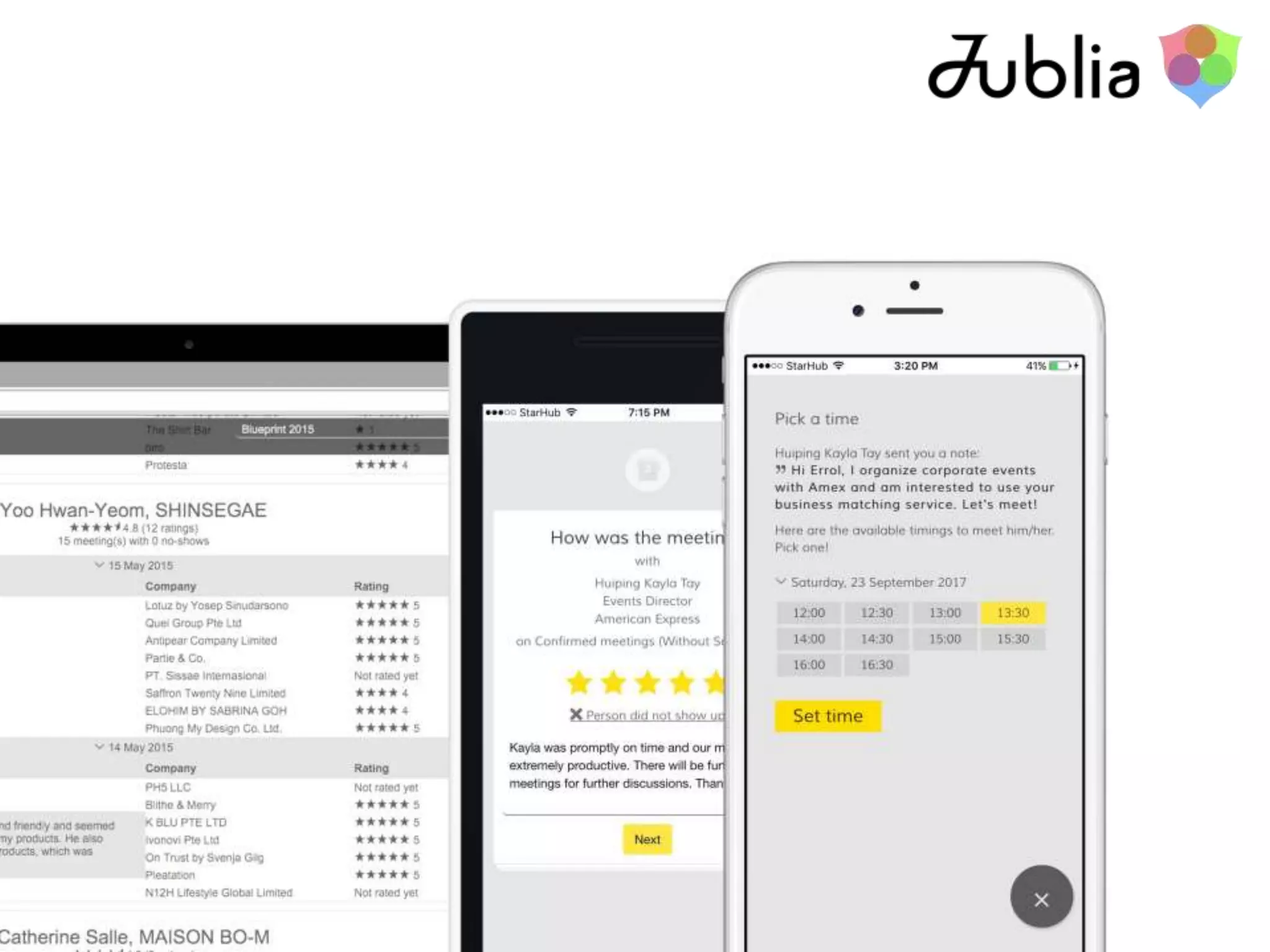
Our annual revenue is… Our product range comprises of…
Our countries of operation are…
What now?
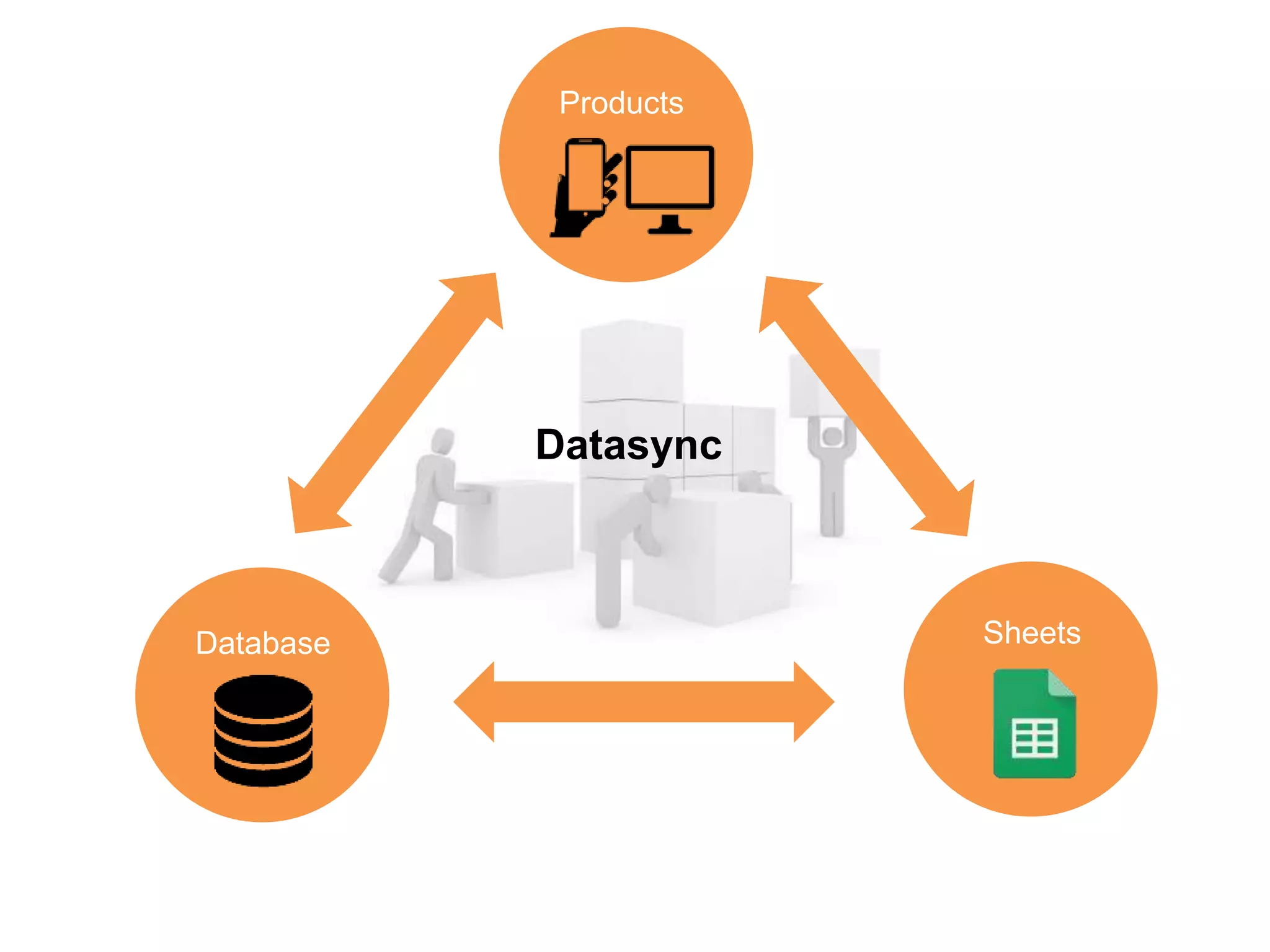
Datasync
Database Sheets
Products
>>> print(agenda)
2-way sync
Datasync in-action
Building blocks of Datasync
Building blocks of Datasync2-way sync Datasync in-action
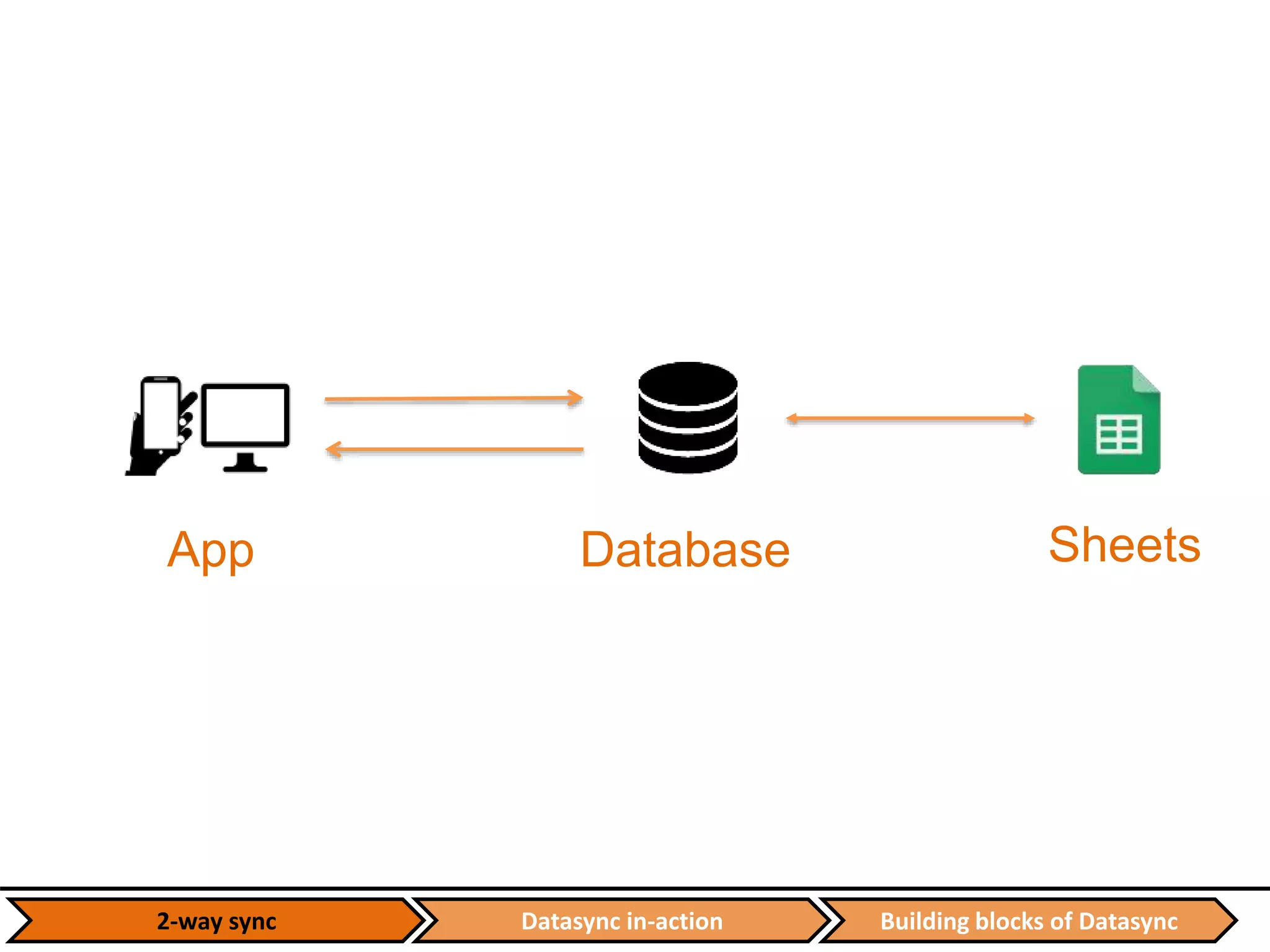
App Database Sheets
Building blocks of DatasyncDatasync in-action2-way sync
App Database
Sheets
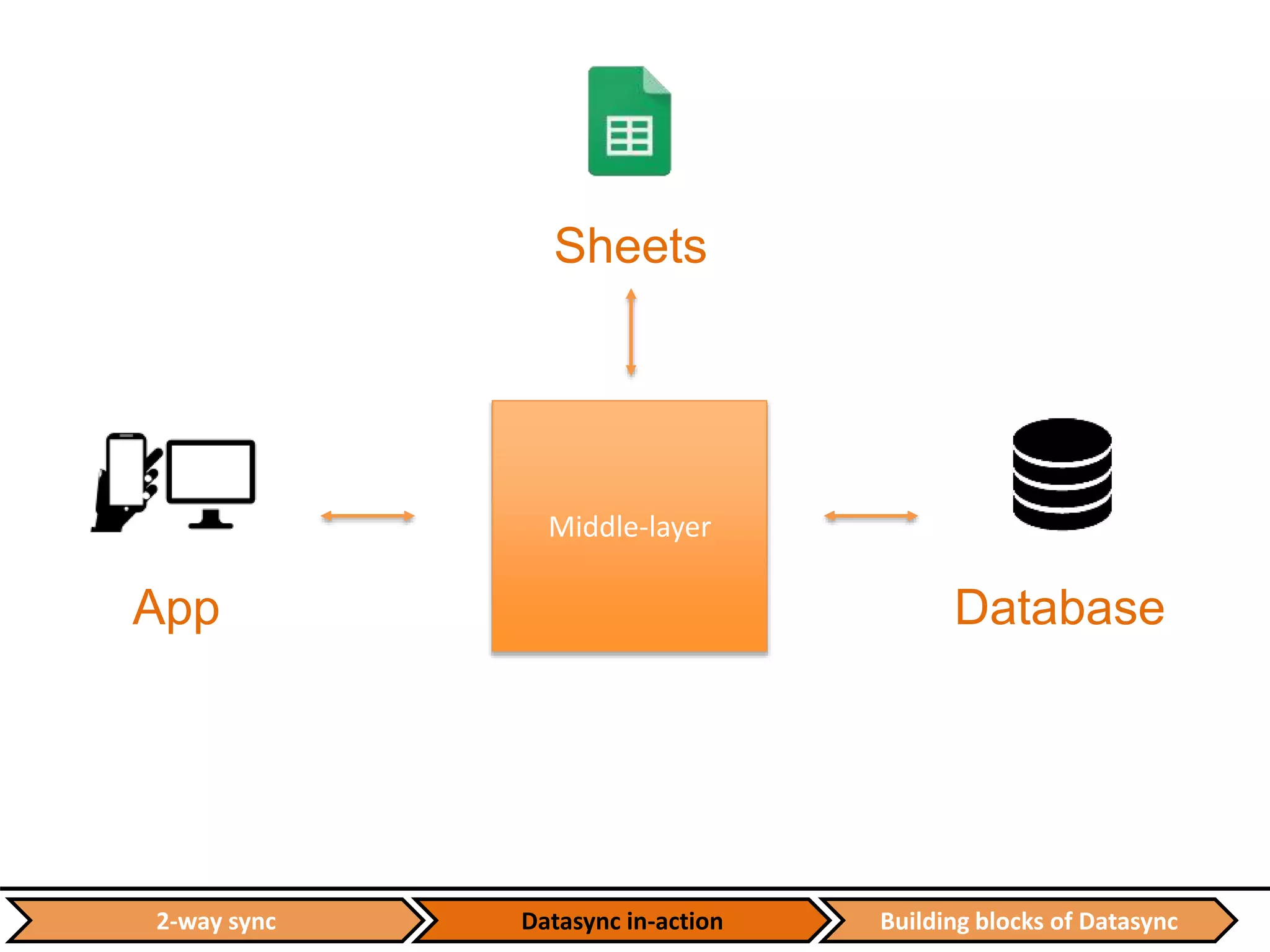
Middle-layer
Datasync in-action Building blocks of Datasync2-way sync
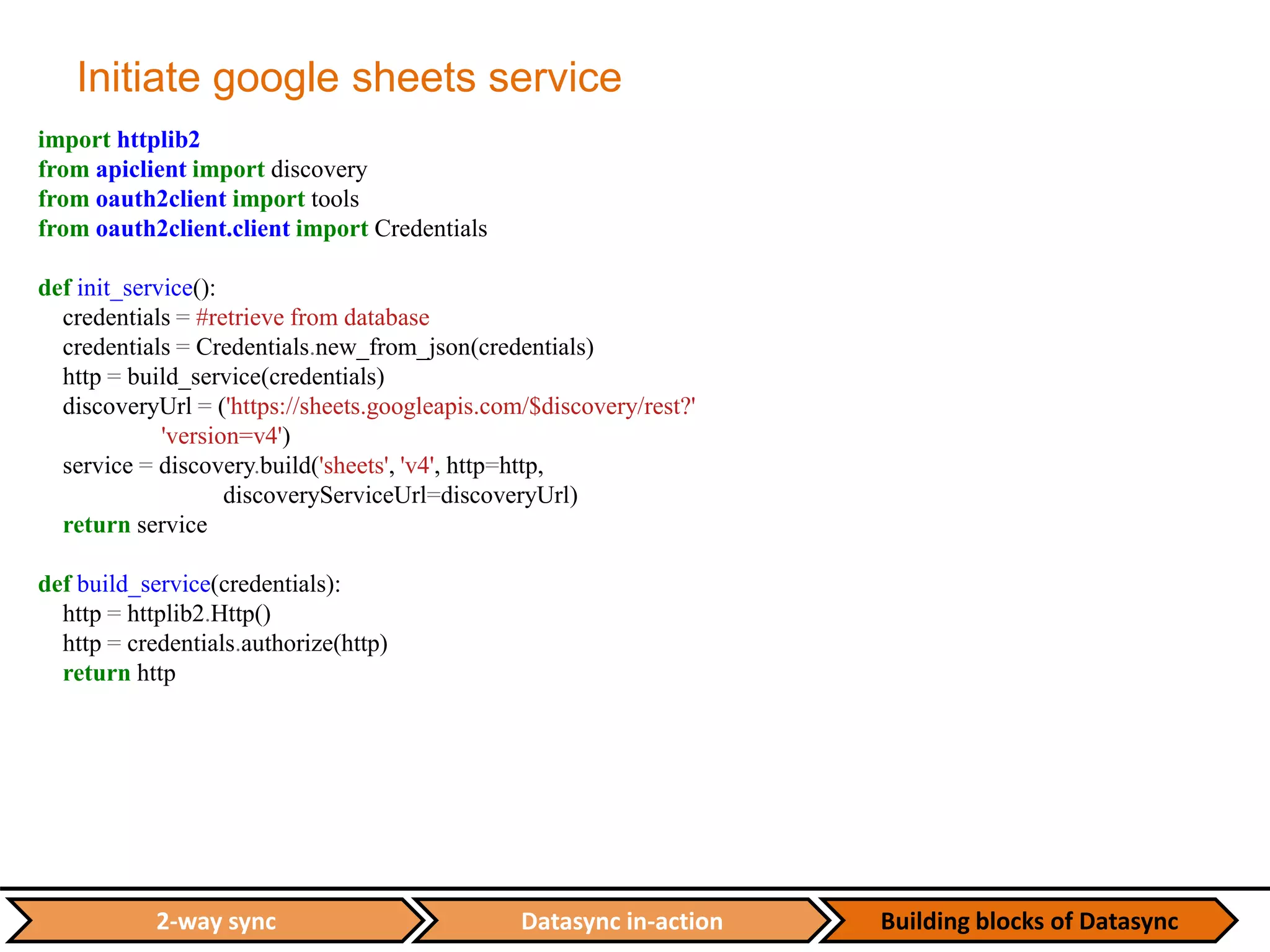
Initiate google sheets service
import httplib2
from apiclient import discovery
from oauth2client import tools
from oauth2client.client import Credentials
def init_service():
credentials = #retrieve from database
credentials = Credentials.new_from_json(credentials)
http = build_service(credentials)
discoveryUrl = ('https://sheets.googleapis.com/$discovery/rest?'
'version=v4')
service = discovery.build('sheets', 'v4', http=http,
discoveryServiceUrl=discoveryUrl)
return service
def build_service(credentials):
http = httplib2.Http()
http = credentials.authorize(http)
return http
Datasync in-action Building blocks of Datasync2-way sync
Create a sheet
def create_worksheet(event_id, service):
#get event details, participant group types and event attributes from the database
attributes_group = ["attribute_%s" % x.attribute for x in event_attribute_group]
column_headers = ["ID", "Login Passcode", "Status", "Delete Reason", "Email", "Full Name", "Company”…]
column_headers.extend(attributes_group)
cell_list = [{"userEnteredValue": {"stringValue": header}} for header in column_headers]
grid_data = {"startRow": 0,
"startColumn": 0,
"rowData": [{"values": cell_list}]}
spreadsheet_properties = {"title": event_fullname}
sheet_list = []
for group in event_participant_group:
group_name = group.group_name
sheet_property = {"title": group_name,
"sheetId": group.id_participant_group}
sheet = {"properties": sheet_property,
"data": grid_data}
sheet_list.append(sheet)
spreadsheet = {"properties": spreadsheet_properties,
"sheets": sheet_list}
result = service.spreadsheets().create(body=spreadsheet).execute()
gdocs_key = result['spreadsheetId']
return gdocs_key
Datasync in-action Building blocks of Datasync2-way sync
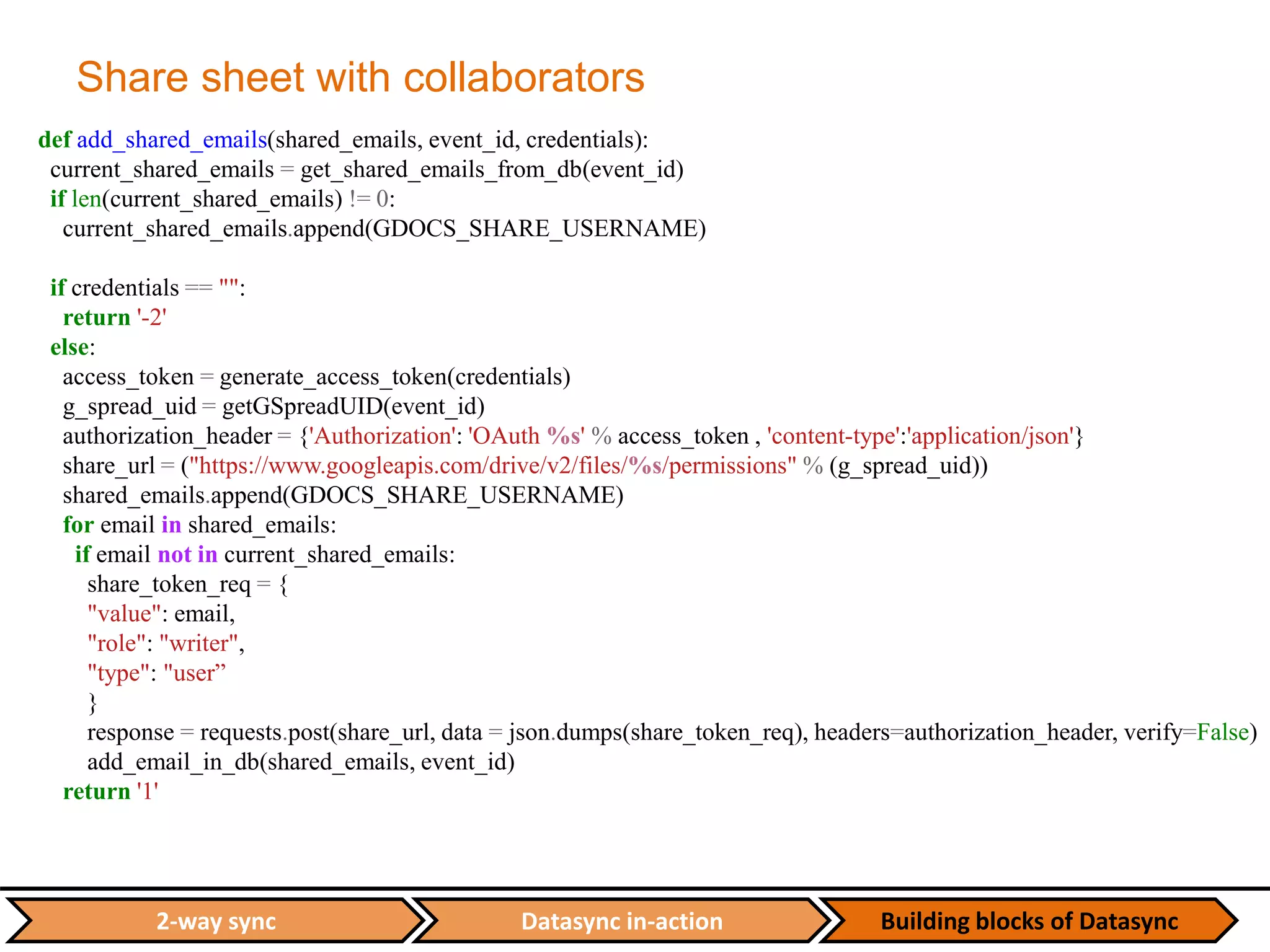
Share sheet with collaborators
def add_shared_emails(shared_emails, event_id, credentials):
current_shared_emails = get_shared_emails_from_db(event_id)
if len(current_shared_emails) != 0:
current_shared_emails.append(GDOCS_SHARE_USERNAME)
if credentials == "":
return '-2'
else:
access_token = generate_access_token(credentials)
g_spread_uid = getGSpreadUID(event_id)
authorization_header = {'Authorization': 'OAuth %s' % access_token , 'content-type':'application/json'}
share_url = ("https://www.googleapis.com/drive/v2/files/%s/permissions" % (g_spread_uid))
shared_emails.append(GDOCS_SHARE_USERNAME)
for email in shared_emails:
if email not in current_shared_emails:
share_token_req = {
"value": email,
"role": "writer",
"type": "user”
}
response = requests.post(share_url, data = json.dumps(share_token_req), headers=authorization_header, verify=False)
add_email_in_db(shared_emails, event_id)
return '1'
Datasync in-action Building blocks of Datasync2-way sync
Wrappers for read/write to sheets
def get_sheets_properties(service, spreadsheet_id):
response = service.spreadsheets().get(
spreadsheetId=spreadsheet_id).execute()
return response
def batch_get_cells(service, spreadsheet_id, cell_ranges, dimension=None):
response = service.spreadsheets().values().batchGet(
spreadsheetId=spreadsheet_id, ranges=cell_ranges, majorDimension=dimension).execute()
values = response.get('valueRanges')
return values
def batch_update_cells(service, spreadsheet_id, cell_range, values, dimension=None, option="USER_ENTERED"):
request = {
"valueInputOption": option,
"data" : [{
"range": cell_range,
"majorDimension": dimension,
"values": values,
}]
}
try:
service.spreadsheets().values().batchUpdate(
spreadsheetId=spreadsheet_id, body=request).execute()
except:
print 'ERROR: Failed to update cells!'
Datasync in-action Building blocks of Datasync2-way sync
Sync endpoint and main class
api.add_resource(DataSync, '/sync/<int:event_id>/<int:start_row>/<int:end_row>/<int:id_participant_group>')
class DataSync(restful.Resource):
def get(self, event_id, start_row, end_row, id_participant_group):
nosql_table = Table('process_status', connection=dynamoconn)
while True:
try:
file_statistic = datasync.sync_spreadsheet(event_id, start_row, end_row, id_participant_group)
except (CannotSendRequest, ResponseNotReady) as e:
if not nosql_table.has_item(EVENT_ID=str(event_id)):
start_row = 0
else:
item = nosql_table.get_item(EVENT_ID=str(event_id))
datasync_json = json.loads(item["DATASYNC_JSON"])
print datasync_json
start_row = int(datasync_json["start_row"])
except Exception, e:
report_dictionary = {'status': 'error',
'data': 'data:{"error", "reason": "sync spreadsheet"}nn'}
create_or_update_ds(event_id, nosql_table, report_dictionary)
return
else:
break
Datasync in-action Building blocks of Datasync2-way sync
Sync main function
def sync_speednetworking(event_id, percentage, start_row, end_row, participant_group_id):
extra_attribute = db.session.query(Attribute_Group).filter(Attribute_Group.id_event == event_id).all()
extra_headers = ["attribute_%s" % (x.attribute) for x in extra_attribute if x.attribute != "Position"]
header = ["ID", "Login Passcode", "Status", "Delete Reason", "Email", "Full Name", "Company", "Position",
"Company URL", "Company Description", "Sponsor (1 or 0)", "Contact No", "Intend to Meet", "Meeting
Location"]
header.extend(extra_headers)
# Initiate service for Google Sheets API v4
service = init_service()
# Retrieve relevant sheet properties – spreadsheet_id, sheet_properties, sheet_title, row_count…
# check whether user input params are correct…
block_size = 10
last_chunk_size = (max_row) % block_size
last_chunk_count = int(ceil(max_row / float(block_size)))
start_range = start_row
if (end_row - start_row) > (block_size - 1):
end_range = start_row + (block_size - 1)
else:
end_range = end_row
Datasync in-action Building blocks of Datasync2-way sync
Sync main function - 2
for loop_count in xrange(1, last_chunk_count+1):
end_col = build_a1_end_range(header_len, end_range)
cell_range = 'A%s:%s' % (start_range, end_col)
cell_range = sheet_title + '!' + cell_range
response = batch_get_cells(service, spreadsheet_id, cell_range)
if 'values' in response[0].keys():
values = response[0]['values']
attendee_row = start_range
data_struct = {}
data_struct['event_id'] = event_id
data_struct['cell_range'] = cell_range
data_struct['spreadsheet_id'] = spreadsheet_id
data_struct['participant_group_id'] = participant_group_id
data_struct['values'] = []
for value in values:
row = []
row.append(attendee_row)
while len(value) != len(header):
value.append("")
row.extend(value)
data_struct['values'].append(row)
attendee_row += 1
data_struct = ujson.dumps(data_struct)
process_data(data_struct, 1, service)
Datasync in-action Building blocks of Datasync2-way sync
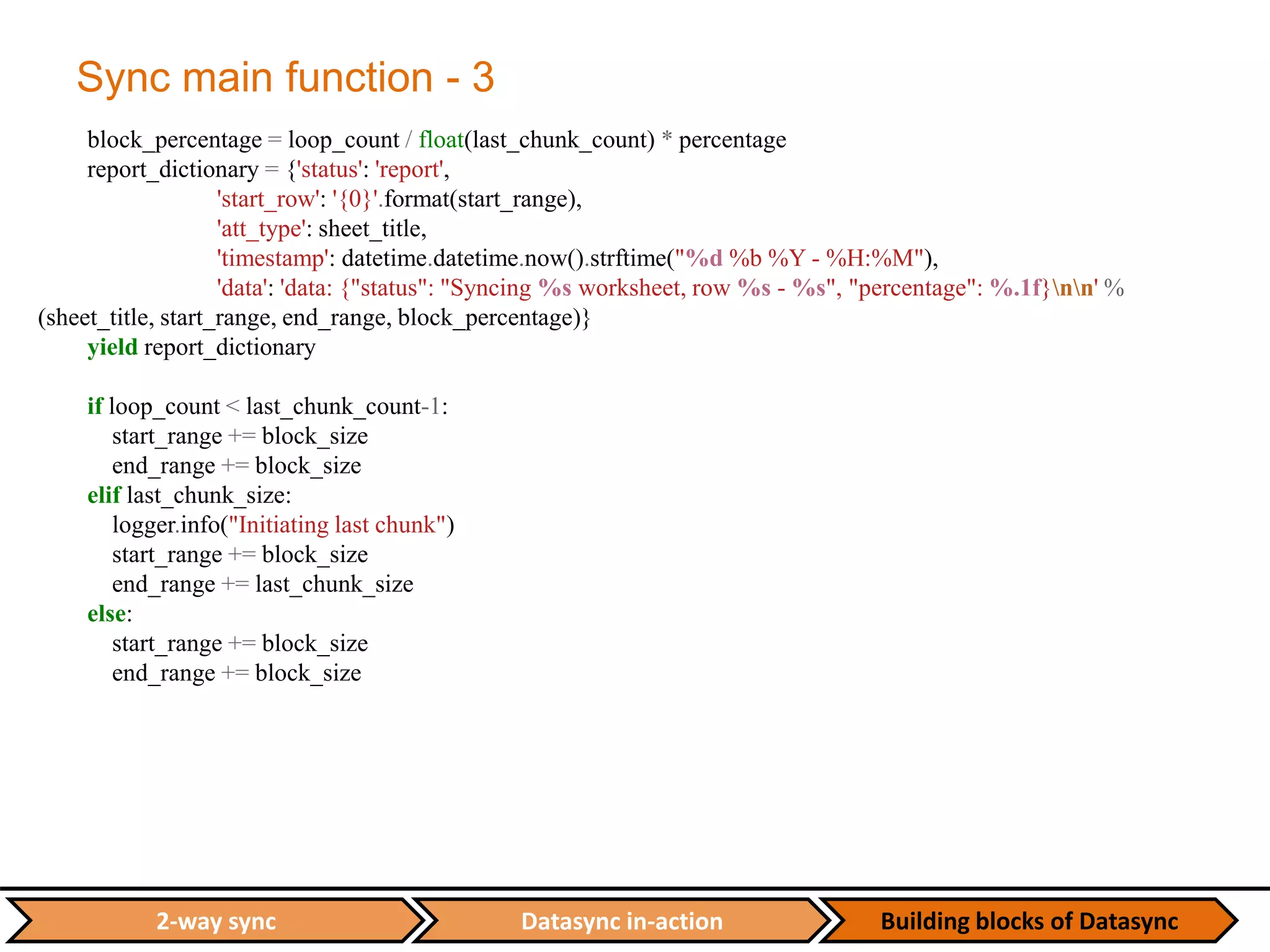
Sync main function - 3
block_percentage = loop_count / float(last_chunk_count) * percentage
report_dictionary = {'status': 'report',
'start_row': '{0}'.format(start_range),
'att_type': sheet_title,
'timestamp': datetime.datetime.now().strftime("%d %b %Y - %H:%M"),
'data': 'data: {"status": "Syncing %s worksheet, row %s - %s", "percentage": %.1f}nn' %
(sheet_title, start_range, end_range, block_percentage)}
yield report_dictionary
if loop_count < last_chunk_count-1:
start_range += block_size
end_range += block_size
elif last_chunk_size:
logger.info("Initiating last chunk")
start_range += block_size
end_range += last_chunk_size
else:
start_range += block_size
end_range += block_size
Datasync in-action Building blocks of Datasync2-way sync
Middle layer
def process_data(data_struct, sync_type, service=None):
data_struct = json.loads(data_struct)
# Misc info – get event_id, cell_range, spreadsheet_id, participant_group_id from data_struct…
update_row_list = []
run_batch_update = False # Run batch update only when there is new attendee
if sync_type == 1:
for data_row in data_struct['values']:
if not data_row[1]:
run_batch_update = True
update_row = add_new_attendee(event_id, data_row, participant_group_id)
update_row_list.append(update_row)
elif data_row[3]:
if data_row[3].lower() == 'delete':
attendee_id = data_row[1]
delete_profile_sn(attendee_id)
update_row_list.append(data_row[1:])
else:
update_attendee(data_row, participant_group_id)
update_row_list.append(data_row[1:])
else:
update_attendee(data_row, participant_group_id)
update_row_list.append(data_row[1:])
if run_batch_update:
batch_update_cells(service, spreadsheet_id, cell_range, update_row_list)
return 1
Datasync in-action Building blocks of Datasync2-way sync
SSE with DynamoDB
def create_or_update_ds(event_id, table, report_dictionary):
event_id = str(event_id)
dumped_json = ujson.dumps(report_dictionary)
if table.has_item(EVENT_ID=event_id):
item = table.get_item(EVENT_ID=event_id)
item["DATASYNC_JSON"] = dumped_json
item.save(overwrite=True)
else:
table.put_item({"EVENT_ID":str(event_id), "DATASYNC_JSON": dumped_json,
"EMAILSENDER_JSON":"", "CRM_JSON":""})
Dynamo
DATASYNC
BACKEND
SENSE
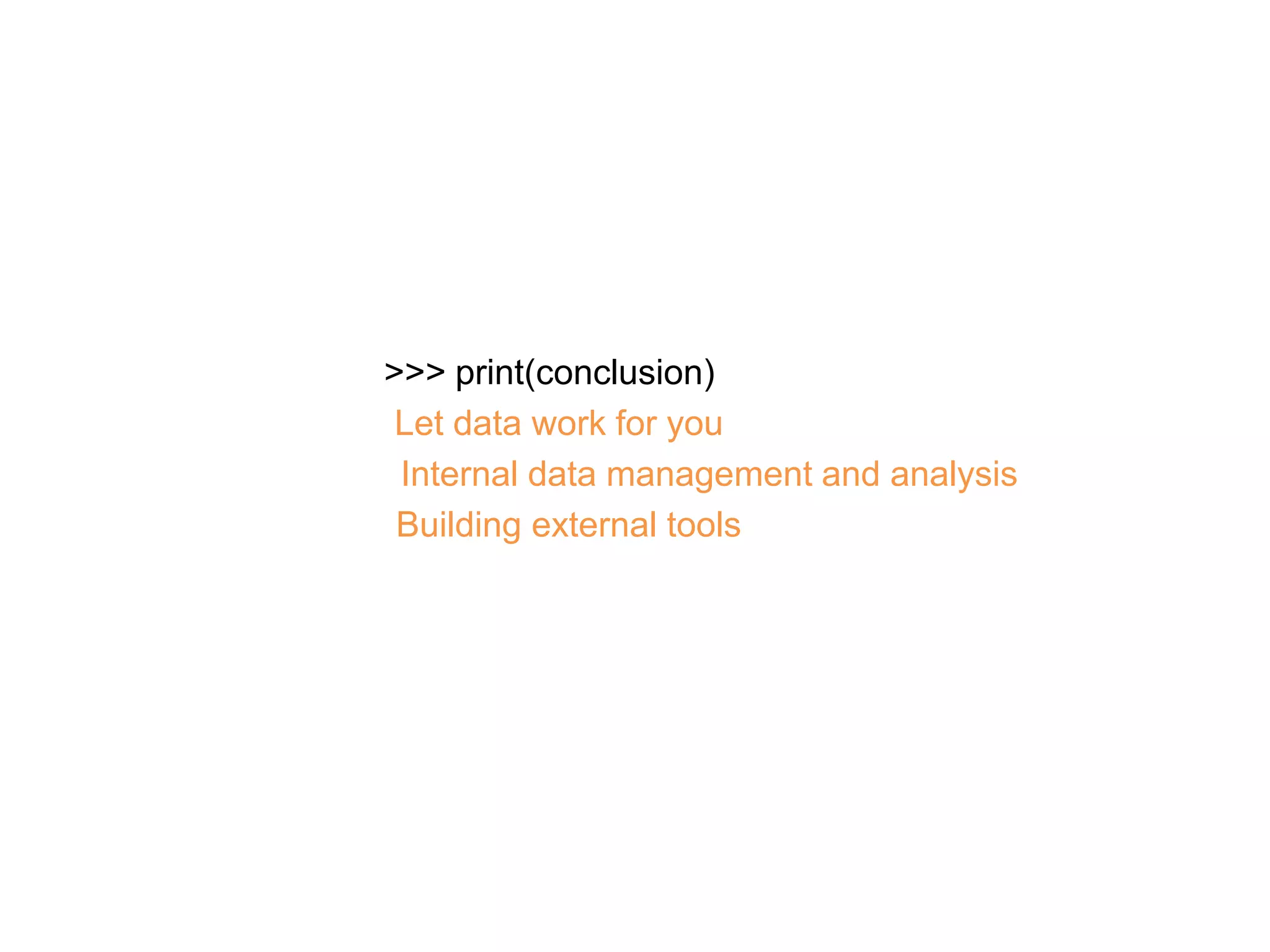
>>> print(conclusion)
Let data work for you
Internal data management and analysis
Building external tools
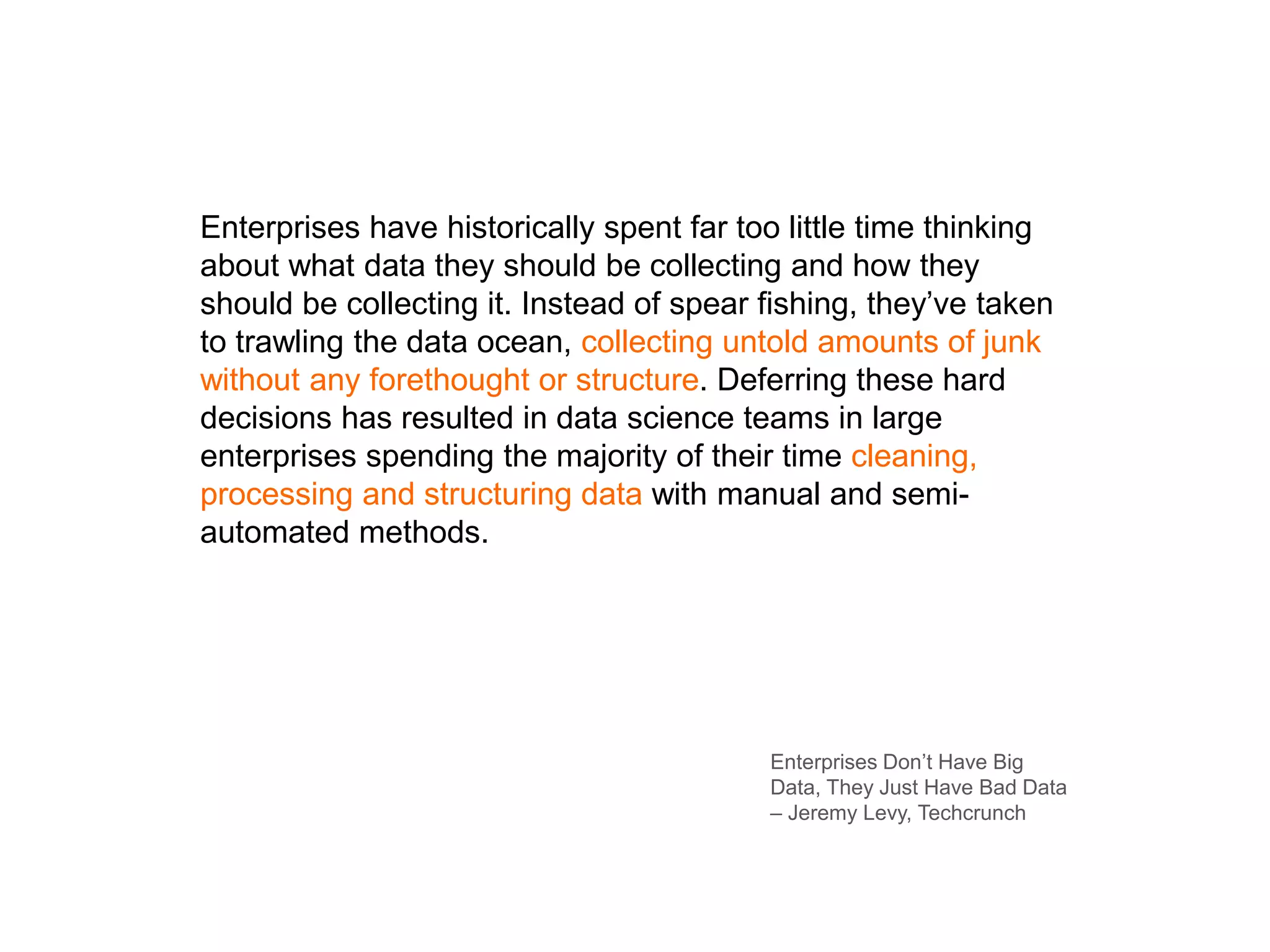
Enterprises have historically spent far too little time thinking
about what data they should be collecting and how they
should be collecting it. Instead of spear fishing, they’ve taken
to trawling the data ocean, collecting untold amounts of junk
without any forethought or structure. Deferring these hard
decisions has resulted in data science teams in large
enterprises spending the majority of their time cleaning,
processing and structuring data with manual and semi-
automated methods.
Enterprises Don’t Have Big
Data, They Just Have Bad Data
– Jeremy Levy, Techcrunch
Questions

PyCon SG x Jublia - Building a simple-to-use Database Management tool

  • 1.
  • 6.
    Our current investmentstatus is… Our annual revenue is… Our product range comprises of… Our countries of operation are…
  • 7.
  • 8.
  • 9.
    >>> print(agenda) 2-way sync Datasyncin-action Building blocks of Datasync
  • 10.
    Building blocks ofDatasync2-way sync Datasync in-action App Database Sheets
  • 11.
    Building blocks ofDatasyncDatasync in-action2-way sync App Database Sheets Middle-layer
  • 12.
    Datasync in-action Buildingblocks of Datasync2-way sync Initiate google sheets service import httplib2 from apiclient import discovery from oauth2client import tools from oauth2client.client import Credentials def init_service(): credentials = #retrieve from database credentials = Credentials.new_from_json(credentials) http = build_service(credentials) discoveryUrl = ('https://sheets.googleapis.com/$discovery/rest?' 'version=v4') service = discovery.build('sheets', 'v4', http=http, discoveryServiceUrl=discoveryUrl) return service def build_service(credentials): http = httplib2.Http() http = credentials.authorize(http) return http
  • 13.
    Datasync in-action Buildingblocks of Datasync2-way sync Create a sheet def create_worksheet(event_id, service): #get event details, participant group types and event attributes from the database attributes_group = ["attribute_%s" % x.attribute for x in event_attribute_group] column_headers = ["ID", "Login Passcode", "Status", "Delete Reason", "Email", "Full Name", "Company”…] column_headers.extend(attributes_group) cell_list = [{"userEnteredValue": {"stringValue": header}} for header in column_headers] grid_data = {"startRow": 0, "startColumn": 0, "rowData": [{"values": cell_list}]} spreadsheet_properties = {"title": event_fullname} sheet_list = [] for group in event_participant_group: group_name = group.group_name sheet_property = {"title": group_name, "sheetId": group.id_participant_group} sheet = {"properties": sheet_property, "data": grid_data} sheet_list.append(sheet) spreadsheet = {"properties": spreadsheet_properties, "sheets": sheet_list} result = service.spreadsheets().create(body=spreadsheet).execute() gdocs_key = result['spreadsheetId'] return gdocs_key
  • 14.
    Datasync in-action Buildingblocks of Datasync2-way sync Share sheet with collaborators def add_shared_emails(shared_emails, event_id, credentials): current_shared_emails = get_shared_emails_from_db(event_id) if len(current_shared_emails) != 0: current_shared_emails.append(GDOCS_SHARE_USERNAME) if credentials == "": return '-2' else: access_token = generate_access_token(credentials) g_spread_uid = getGSpreadUID(event_id) authorization_header = {'Authorization': 'OAuth %s' % access_token , 'content-type':'application/json'} share_url = ("https://www.googleapis.com/drive/v2/files/%s/permissions" % (g_spread_uid)) shared_emails.append(GDOCS_SHARE_USERNAME) for email in shared_emails: if email not in current_shared_emails: share_token_req = { "value": email, "role": "writer", "type": "user” } response = requests.post(share_url, data = json.dumps(share_token_req), headers=authorization_header, verify=False) add_email_in_db(shared_emails, event_id) return '1'
  • 15.
    Datasync in-action Buildingblocks of Datasync2-way sync Wrappers for read/write to sheets def get_sheets_properties(service, spreadsheet_id): response = service.spreadsheets().get( spreadsheetId=spreadsheet_id).execute() return response def batch_get_cells(service, spreadsheet_id, cell_ranges, dimension=None): response = service.spreadsheets().values().batchGet( spreadsheetId=spreadsheet_id, ranges=cell_ranges, majorDimension=dimension).execute() values = response.get('valueRanges') return values def batch_update_cells(service, spreadsheet_id, cell_range, values, dimension=None, option="USER_ENTERED"): request = { "valueInputOption": option, "data" : [{ "range": cell_range, "majorDimension": dimension, "values": values, }] } try: service.spreadsheets().values().batchUpdate( spreadsheetId=spreadsheet_id, body=request).execute() except: print 'ERROR: Failed to update cells!'
  • 16.
    Datasync in-action Buildingblocks of Datasync2-way sync Sync endpoint and main class api.add_resource(DataSync, '/sync/<int:event_id>/<int:start_row>/<int:end_row>/<int:id_participant_group>') class DataSync(restful.Resource): def get(self, event_id, start_row, end_row, id_participant_group): nosql_table = Table('process_status', connection=dynamoconn) while True: try: file_statistic = datasync.sync_spreadsheet(event_id, start_row, end_row, id_participant_group) except (CannotSendRequest, ResponseNotReady) as e: if not nosql_table.has_item(EVENT_ID=str(event_id)): start_row = 0 else: item = nosql_table.get_item(EVENT_ID=str(event_id)) datasync_json = json.loads(item["DATASYNC_JSON"]) print datasync_json start_row = int(datasync_json["start_row"]) except Exception, e: report_dictionary = {'status': 'error', 'data': 'data:{"error", "reason": "sync spreadsheet"}nn'} create_or_update_ds(event_id, nosql_table, report_dictionary) return else: break
  • 17.
    Datasync in-action Buildingblocks of Datasync2-way sync Sync main function def sync_speednetworking(event_id, percentage, start_row, end_row, participant_group_id): extra_attribute = db.session.query(Attribute_Group).filter(Attribute_Group.id_event == event_id).all() extra_headers = ["attribute_%s" % (x.attribute) for x in extra_attribute if x.attribute != "Position"] header = ["ID", "Login Passcode", "Status", "Delete Reason", "Email", "Full Name", "Company", "Position", "Company URL", "Company Description", "Sponsor (1 or 0)", "Contact No", "Intend to Meet", "Meeting Location"] header.extend(extra_headers) # Initiate service for Google Sheets API v4 service = init_service() # Retrieve relevant sheet properties – spreadsheet_id, sheet_properties, sheet_title, row_count… # check whether user input params are correct… block_size = 10 last_chunk_size = (max_row) % block_size last_chunk_count = int(ceil(max_row / float(block_size))) start_range = start_row if (end_row - start_row) > (block_size - 1): end_range = start_row + (block_size - 1) else: end_range = end_row
  • 18.
    Datasync in-action Buildingblocks of Datasync2-way sync Sync main function - 2 for loop_count in xrange(1, last_chunk_count+1): end_col = build_a1_end_range(header_len, end_range) cell_range = 'A%s:%s' % (start_range, end_col) cell_range = sheet_title + '!' + cell_range response = batch_get_cells(service, spreadsheet_id, cell_range) if 'values' in response[0].keys(): values = response[0]['values'] attendee_row = start_range data_struct = {} data_struct['event_id'] = event_id data_struct['cell_range'] = cell_range data_struct['spreadsheet_id'] = spreadsheet_id data_struct['participant_group_id'] = participant_group_id data_struct['values'] = [] for value in values: row = [] row.append(attendee_row) while len(value) != len(header): value.append("") row.extend(value) data_struct['values'].append(row) attendee_row += 1 data_struct = ujson.dumps(data_struct) process_data(data_struct, 1, service)
  • 19.
    Datasync in-action Buildingblocks of Datasync2-way sync Sync main function - 3 block_percentage = loop_count / float(last_chunk_count) * percentage report_dictionary = {'status': 'report', 'start_row': '{0}'.format(start_range), 'att_type': sheet_title, 'timestamp': datetime.datetime.now().strftime("%d %b %Y - %H:%M"), 'data': 'data: {"status": "Syncing %s worksheet, row %s - %s", "percentage": %.1f}nn' % (sheet_title, start_range, end_range, block_percentage)} yield report_dictionary if loop_count < last_chunk_count-1: start_range += block_size end_range += block_size elif last_chunk_size: logger.info("Initiating last chunk") start_range += block_size end_range += last_chunk_size else: start_range += block_size end_range += block_size
  • 20.
    Datasync in-action Buildingblocks of Datasync2-way sync Middle layer def process_data(data_struct, sync_type, service=None): data_struct = json.loads(data_struct) # Misc info – get event_id, cell_range, spreadsheet_id, participant_group_id from data_struct… update_row_list = [] run_batch_update = False # Run batch update only when there is new attendee if sync_type == 1: for data_row in data_struct['values']: if not data_row[1]: run_batch_update = True update_row = add_new_attendee(event_id, data_row, participant_group_id) update_row_list.append(update_row) elif data_row[3]: if data_row[3].lower() == 'delete': attendee_id = data_row[1] delete_profile_sn(attendee_id) update_row_list.append(data_row[1:]) else: update_attendee(data_row, participant_group_id) update_row_list.append(data_row[1:]) else: update_attendee(data_row, participant_group_id) update_row_list.append(data_row[1:]) if run_batch_update: batch_update_cells(service, spreadsheet_id, cell_range, update_row_list) return 1
  • 21.
    Datasync in-action Buildingblocks of Datasync2-way sync SSE with DynamoDB def create_or_update_ds(event_id, table, report_dictionary): event_id = str(event_id) dumped_json = ujson.dumps(report_dictionary) if table.has_item(EVENT_ID=event_id): item = table.get_item(EVENT_ID=event_id) item["DATASYNC_JSON"] = dumped_json item.save(overwrite=True) else: table.put_item({"EVENT_ID":str(event_id), "DATASYNC_JSON": dumped_json, "EMAILSENDER_JSON":"", "CRM_JSON":""}) Dynamo DATASYNC BACKEND SENSE
  • 22.
    >>> print(conclusion) Let datawork for you Internal data management and analysis Building external tools
  • 23.
    Enterprises have historicallyspent far too little time thinking about what data they should be collecting and how they should be collecting it. Instead of spear fishing, they’ve taken to trawling the data ocean, collecting untold amounts of junk without any forethought or structure. Deferring these hard decisions has resulted in data science teams in large enterprises spending the majority of their time cleaning, processing and structuring data with manual and semi- automated methods. Enterprises Don’t Have Big Data, They Just Have Bad Data – Jeremy Levy, Techcrunch
  • 24.

Editor's Notes

  • #2 I was at a tech conference 2 months back. It was the biggest one I have seen in Singapore with about 2-3000 techies. It was so huge that they had the main stage, and 2 screens on both sides of the stage - the ones you see at movie theatres. But there was something surprising. There was hardly anyone I could see with their laptops out. Now that’s not a common sight, especially when you go a tech event. Pycon feels great with familiar faces and more people staring at laptops than the speakers. I am not sure that is a good thing but it feels more like home. Let me start by introducing myself. I am Chinab, the CTO and Co-founder of Jublia, a 3 year old startup into the business of making meaningful hellos at events.
  • #3 We make attending conferences and B2B exhibitions worth your time by helping you easily arrange relevant 1-to-1 meetings with other participants. That is facilitated by our web application, Jublia Match, which is launched 3-4 weeks before the event. Not only that, we have Jublia Sense, an analytics dashboard for the event organiser to improve and learn insights from the networking segment of their event. We have provided our service to over 300 B2B events worldwide, ranging from different sizes and over 30 industries. And our ecosystem of products is developed and maintained by our small but mighty tech team of 3. So what brings me here?
  • #4 We are one of the sponsors of the event and we want to give back to the community because Python is the core of our data analytics dashboard providing us with high-performance, easy-to-use data structures and open source libraries for commonly used functions. And I am going to share with you one of the most important tools we have built in our company called Datasync.
  • #5 As we scale up our business, we need to continuously build and improve our internal tools which scale up the processes we have for our clients. And that is a big component of a SaaS business like ours. One of such issues was data management. The event organisers pass us data of all the registered people, which usually comes from registration forms.
  • #6 But different events collect different types of data. You have different stakeholders and different event sizes too.
  • #7 A startup conference would bring together Startups and VCs and we would get information like their current investment round and annual revenue whereas a medical tradeshow would have exhibitors or sellers of medical equipment and buyers who could be clinics or retailers distributing these goods and they would give us information about their product range, country of operation. How do we handle these different data sets?
  • #8 And to make it more difficult, organisers pass us data in batches - twice a week. With information on new entries, updates to existing, and who drops out from the event. Keeping this in mind and handling 30 events on average a month, we needed to build a tool which our team and our clients can use to manage the event database. We decided to leverage on Google sheets, a perfect mirror image to a SQL database and a scalable solution to our problem.
  • #9 Introducing datasync, an easy-to-use data management tool on Google Sheets built to manage different dynamic datasets of event goers. In addition to keeping our database always in sync with google sheets, we need to cater for our products writing to our database, which in turn needs to be reflected on the sheets as well. In essence, building a 2-way sync cycle between the database and google sheets. The purpose of this talk is not to show you how to use the Google API but to educate you on how we built datasync, so you can too let your non-techies manage and get insights from your data without you needing to worry about ‘what if they they do something to my database’.
  • #10 We will start off by building a 2-way sync between a SQL database and the google sheets. Following that, I will show you a sneak peak of Jublia’s own datasync. That would leave us with the best for last which is code snippets to our datasync itself.
  • #11 Let’s get started with some hands-on coding to show how easy it is to use the API. For this example, I am a fruit seller with a good online presence. What you see here is how I designed my application. Its a mobile app where my users order fruits and it interacts with the database. But since I am the only techie in the fruit shop, all my team members keeps coming to me asking what fruits are available, what is their stock and so on. I am fed up. And decide to leverage on the power of google sheets to build a 2-way sync between sheets and the database. I will be using this for internal data management - my staff can insert new fruits and update existing quantities, when we get a new shipment. And the app will auto-update the sheets and database when a new order is purchased. This allows my team to manage our database via Sheets YOU ARE PRETTY MUCH DONE. WITH MINIMAL CHANGES TO YOUR BACKEND CODE. I HAVE ESTABLISHED A WAY FOR MY STAFF AT THE FRUIT SHOP TO KNOW WHICH FRUITS AND HOW MANY ARE IN STOCK. NOW WE ALL CAN MONITOR THIS CHART TO TRACK IT AND IT WILL GET UPDATED WHEN SOMEONE ORDERS FRUIT VIA THE APP OR WHEN SOMEONE INSERTS UPDATED DATA ON THE SHEETS. That was the initial design of datasync.
  • #12 We have since added a component called the Middle Layer which is a central piece of code handling all read and write operations to Sheets. There are 2 reasons for this:   1. This keeps it centralised and easier for scaling up because there is only one point of failure. 2. We have implemented a priority scheme when the app tries to write to it. The priority is such that it will write to sheets, and only upon success, will it write to the database. This will ensure consistent data. Which is actually the most important part of using this in a live product - the db and sheets always need to be in sync.   Let’s keep these 2 in mind as I show you a working prototype of Jubia’s datasync. Say we are providing our application to facilitate networking at Pycon 2017. JUST A QUICK RECAP ON WHAT WE HAVE SEEN IN THIS DEMO. WE SAW HOW WE WERE ABLE TO MANAGE THE ATTENDEE DATABASE OF PYCON ON THE GOOGLE SHEETS AND SELECTIVELY SYNC THOSE ROWS INTO OUR DATABASE.   //WE ALSO MANAGED TO CAPTURE APP TRIGGERS, WHICH WAS THE CHANGING OF THE PROFILE, TO BOTH SHEETS AND DATABASE (INTERNALLY, THERE IS A PRIORITY GOING ON THERE). Now that you have an idea of how datasync operates, let’s jump into the code. And while I describe this, I will leave you guys with 3 useful things I have learnt
  • #13 Initiate google sheets service - FUNCTION. web server applications can store a refresh token for long term application. You will use service for all calls made to Google Sheets API
  • #14 2. Create a sheet - We need to cater for 2 cases - create a fresh worksheet and updating an existing one. Previously only possible in Google Drive API
  • #15 3. Share sheet with collaborators - FUNCTION. Google drive API. The owner of the sheet is whose credentials you are using. And credentials are handled differently for sheets and drive - so you will notice there is no service object here.
  • #16 4. Wrappers for read/write to sheets - All APIs within sheets are divided into 3 collections - spreadsheets, spreadsheets.sheets and spreadsheets.values   cell_ranges (list): List of cell ranges in a1 notation e.g ['Delegates!A1:B1', 'Delegates!A2:B2']   values (list of list): List of row values list retrieved   1.5s regardless of block size
  • #17 5. Sync endpoint and main class FUNCTION Catching errors Scraping, 100% scripts – generate search terms
  • #18 6. Sync main function - This function is a generator and constitutes the main logic on datasync for syncing The actual sync is not done here itself but pushed to the middle layer to be performed we sync 10 rows at a time
  • #19 7. Sync main function 2
  • #20 8. Sync main function 3 - Yields back the percentage
  • #21 9. Middle layer - This function handles the CRUD to google sheets and our database for every chunk which needs to be synced - data struct comprises of spreadsheet and event properties, and the list of values to be synced - I have removed the code for syncing of profile but it comes here - priority scheme done here too
  • #22 10. SSE with DynamoDB - server sent events is a HTML 5 technology for one way messaging. e.g. news feed. we use it for our status bar database centric architecture - public and private subnet
  • #23 To conclude, today we saw how we can use Google sheets as an alternative mode of data representation. It allows everyone in the team, be it programmers or non-techies to manage the database themselves. The idea is to let data work for you, and not the other way around   We can use Google sheets for internal data management. Since we all have large datasets, we need to talk with other teams and analyse what would be useful to display on Sheets. The data you choose should be dynamic in nature. You can explore 2 way sync capabilitites by adding those attributes which users can change and it should accordingly be reflected on your database   Some applications would allow their clients to use Google sheets, allowing us to build client-facing or external tools. You then have to cater for error display and recovery, optimising code using chunk syncing and so on China
  • #24 I want to leave you with this quote by Jeremy Levy who is the founder of a data analytics company. Make sure you are not caught in the trap of capturing unused data because you will take large amounts of time cleaning, processing and structuring data. A tool like google sheets would be useful in being a solution to your data problem.