Pushover Analysis
Section 1 Create a pushover analysis directory and a collapse input file
Step 1 Create the directory for pushover analysis
Under “Training Project”, create “Pushover” subdirectory; copy the model file sacinp.dat,
seastate input file seainp.dat, and psi input file psiinp.dat to the directory, and make this directory
current.
Step 2 Modify the model input file and seastate input file for collapse analysis
Modify the model file: the only modification for the model file is to delete HYDRO and
HYDRO2
lines.
Modify the seastate input file:
• Delete AMOD lines;by• Modify LCSEL line to include load conditions GRAV, S000, S045, and S090;• Input CMB into column 65-67 in LDOPT line.• Delete AMOD lines; • Modify operating storm load cases and extreme storm load case
P000~P090 and S000~S090 by deleting DEAD lines and INCWGT line; • Add DEAD load
condition with selected weight groups for ANOD and WKWY; • Delete all existing combined
load conditions; • Add a new combined load condition GRAV to include structural dead load and
applied equipment loads, miscellaneous loads and live loads; • Modify LCSEL line to include
load conditions GRAV, S000, S045, and S090; • Input CMB into column 65-67 in LDOPT line.
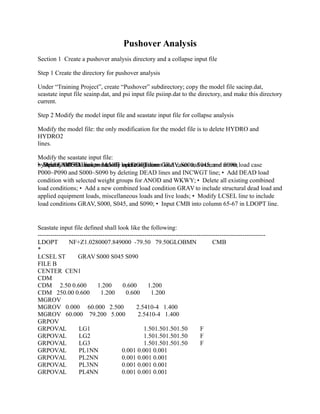
Seastate input file defined shall look like the following:
-------------------------------------------------------------------------------------------------------------
LDOPT NF+Z1.0280007.849000 -79.50 79.50GLOBMN CMB
*
LCSEL ST GRAV S000 S045 S090
FILE B
CENTER CEN1
CDM
CDM 2.50 0.600 1.200 0.600 1.200
CDM 250.00 0.600 1.200 0.600 1.200
MGROV
MGROV 0.000 60.000 2.500 2.5410-4 1.400
MGROV 60.000 79.200 5.000 2.5410-4 1.400
GRPOV
GRPOVAL LG1 1.501.501.501.50 F
GRPOVAL LG2 1.501.501.501.50 F
GRPOVAL LG3 1.501.501.501.50 F
GRPOVAL PL1NN 0.001 0.001 0.001
GRPOVAL PL2NN 0.001 0.001 0.001
GRPOVAL PL3NN 0.001 0.001 0.001
GRPOVAL PL4NN 0.001 0.001 0.001
GRPOV W.BNF 0.001 0.001 0.001 0.001 0.001
LOAD
LOADCNDEAD
DEAD
DEAD -Z 81.000 M BML
INCWGT ANODWKWY
LOADCNAREA
INCWGT AREA
ACCEL 1.00000 N CEN1
LOADCNEQPT
INCWGT EQPT
ACCEL 1.00000 N CEN1
LOADCNLIVE
INCWGT LIVE
ACCEL 1.00000 N CEN1
LOADCNMISC
INCWGT MISC
ACCEL 1.00000 N CEN1
LOADCNS000
WAVE
WAVE1.00STRE 12.19 81.00 15.00 0.00 D 20.00 18MS10 1
WIND
WIND D 45.170 0.00 AP08
CURR
CURR 0.000 0.514 0.000 -5.000BC LN
CURR 81.000 1.801
LOADCNS045
WAVE
WAVE1.00STRE 12.19 81.00 15.00 45.00 D 20.00 18MS10 1
WIND
WIND D 45.170 45.00 AP08
CURR
CURR 0.000 0.514 45.000 -5.000BC LN
CURR 81.000 1.801 45.000
LOADCNS090
WAVE
WAVE1.00STRE 12.19 81.00 15.00 90.00 D 20.00 18MS10 1
WIND
WIND D 45.170 90.00 AP08
CURR
CURR 0.000 0.514 90.000 -5.000BC LN
CURR 81.000 1.801 90.000
LCOMB
LCOMB GRAV DEAD1.0000AREA1.0000EQPT1.0000LIVE0.7500MISC1.0000
END
-------------------------------------------------------------------------------------------------------------
Step 3 Create the collapse input file CLPINP.000
Pushover analysis should be performed for each wave direction since the structural behaviors
could be different when environmental loads are applied on the structure from different
directions.
In one collapse pushover analysis clients can define more than one load sequence in one collapse
analysis input file to include environmental loads from different directions. However only the
results from the last load sequence defined in the input file is saved in clprst file for collapse
view program. In this demo pushover analysis it only includes extreme storm loads from one
direction, 0 degree.
The unit of the collapse input file:
There is no place to define the unit for the collapse input file. The program will use the same unit
as whatever defined in the structural model file.
Collapse options:
• Member segments 8 is chosen along with 80 iterations allowed for both load increment and• Member local buckling check with API Bulletin LRFD method is included;• Member segments 8 is chosen along with 80 iterations allowed for both load increment and
member iterations; • Member local buckling check with API Bulletin LRFD method is included;
• Joint flexibility with JF option and joint strength check with API LRFD option is included; •
Pile plasticity is selected in the analysis; • The maximum deflection = 500 cm is used as the
collapse criterion. • Strain hardening ratio of .005 is selected. Collapse analysis report
selections: • Joint deflections will be printed out in the listing file for each load increment by
selecting P1 • Joint strengths will be printed out for each load increment by selecting J1; •
Member stresses will be printed out for each load increment by selecting M1; • Collapse and
member summary report will be included in the output listing file by selecting SM and MS.
Define load sequence: • One Load sequence AAAA is defined to apply vertical loads first, and
then apply ship impact loads by increments; • Combined load case GRAV will be applied on the
structure in 1 load increment; • Load case S000 will be applied on the structure 1) in 2 load steps
from load factors of 0 to 1.00; 2) in 50 steps for load factors from 1.02 to 2.02.
In this demo pushover analysis the jacket structure and piles behaviors are to be investigated for
environmental loads exceed the design extreme storm loads, deck members are to be defined as
Elastic members during the analysis. Elastic member groups can be defined using GRPELA line
for member groups W01, W02, DL6, DL7, DUM, and W.B.
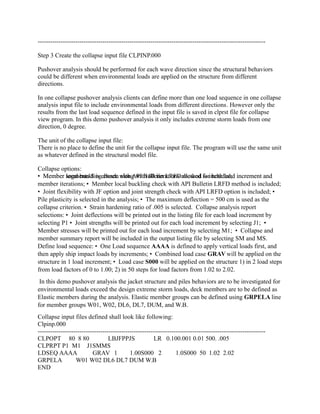
Collapse input files defined shall look like following:
Clpinp.000
-------------------------------------------------------------------------------------------------------------
CLPOPT 80 8 80 LBJFPPJS LR 0.100.001 0.01 500. .005
CLPRPT P1 M1 J1SMMS
LDSEQ AAAA GRAV 1 1.00S000 2 1.0S000 50 1.02 2.02
GRPELA W01 W02 DL6 DL7 DUM W.B
END
-------------------------------------------------------------------------------------------------------------
Section 2 Create the collapse analysis run file
Step 1 Select analysis type and sub-type
Click “Analysis Generator” from Executive window and select “Statics” for Type and “Full
Plastic
Collapse/Pushove” for Subtype. The file Id of 000 is chosen in the first analysis.
Step 2 Select Analysis Options
Check options for Environmental Loading, Solve, Foundation, and Non-Linear / Plastic.
Step 3 Select input files
SACS model input file is SACINP.DAT;
SeaState input file is SEAINP.DAT;
Foundation input file is PSIINP.DAT;
Collapse input file is CLPINP.000
See below picture for the selected options:
Section 3 Run the analysis and review the results
Check the results from collapse view:
After a collapse analysis is finished, a collapse view file clprst.000 will be created. Double click
the file name, collapse view program will open the file and many results can be checked on the
screen. Several reports, such as analysis history report, joint report, member report, and pile
capacity report can be generated.
The part of pile capacity report generated from collapse view is shown below.
-------------------------------------------------------------------------------------------------------------
Pile Capacity Used Report (KN )
Load Load Load Pilehead Axial Total Capacity
Step Cond Factor Joint Load Capacity Used (%)
1 GRAV 1.00 101P -3774.2 -57792.1 6.5 Compression
1 GRAV 1.00 102P -2322.5 -57772.9 4.0 Compression
1 GRAV 1.00 103P -3624.1 -57792.1 6.3 Compression
1 GRAV 1.00 104P -2467.7 -57772.9 4.3 Compression
1 GRAV 1.00 105C -403.3 -21849.2 1.8 Compression
1 GRAV 1.00 106C -403.3 -21849.2 1.8 Compression
1 GRAV 1.00 107C -403.3 -21849.2 1.8 Compression
1 GRAV 1.00 108C -403.3 -21849.2 1.8 Compression
2 S000 0.50 101P -1353.8 -57792.1 2.3 Compression
2 S000 0.50 102P -4740.8 -57772.9 8.2 Compression
2 S000 0.50 103P -1204.2 -57792.1 2.1 Compression
2 S000 0.50 104P -4885.2 -57772.9 8.5 Compression
…
13 S000 1.20 103P 2272.2 58144.3 3.9 Tension
13 S000 1.20 104P -8379.5 -57772.9 14.5 Compression
13 S000 1.20 105C -403.3 -21849.2 1.8 Compression
13 S000 1.20 106C -403.3 -21849.2 1.8 Compression
13 S000 1.20 107C -403.3 -21849.2 1.8 Compression
13 S000 1.20 108C -403.3 -21849.2 1.8 Compression
14 S000 1.22 101P 2234.1 58144.3 3.8 Tension
14 S000 1.22 102P -8347.2 -57772.9 14.4 Compression
14 S000 1.22 103P 2373.9 58144.3 4.1 Tension
14 S000 1.22 104P -8483.9 -57772.9 14.7 Compression
14 S000 1.22 105C -403.3 -21849.2 1.8 Compression
14 S000 1.22 106C -403.3 -21849.2 1.8 Compression
14 S000 1.22 107C -403.3 -21849.2 1.8 Compression
14 S000 1.22 108C -403.3 -21849.2 1.8 Compression
…
44 S000 1.82 101P 5296.4 58144.3 9.1 Tension
44 S000 1.82 102P -11419.9 -57772.9 19.8 Compression
44 S000 1.82 103P 5418.5 58144.3 9.3 Tension
44 S000 1.82 104P -11539.5 -57772.9 20.0 Compression
44 S000 1.82 105C -403.5 -21849.2 1.8 Compression
44 S000 1.82 106C -403.5 -21849.2 1.8 Compression
44 S000 1.82 107C -403.5 -21849.2 1.8 Compression
44 S000 1.82 108C -403.5 -21849.2 1.8 Compression
45 S000 1.84 101P 5409.1 58144.3 9.3 Tension
45 S000 1.84 102P -11520.7 -57772.9 19.9 Compression
45 S000 1.84 103P 5522.3 58144.3 9.5 Tension
47 S000 1.88 101P 5651.7 58144.3 9.7 Tension
47 S000 1.88 102P -11722.8 -57772.9 20.3 Compression
47 S000 1.88 103P 5740.8 58144.3 9.9 Tension
47 S000 1.88 104P -11809.2 -57772.9 20.4 Compression
47 S000 1.88 105C -402.0 -21849.2 1.8 Compression
47 S000 1.88 106C -402.0 -21849.2 1.8 Compression
47 S000 1.88 107C -402.0 -21849.2 1.8 Compression
47 S000 1.88 108C -402.0 -21849.2 1.8 Compression
48 S000 1.90 101P 5769.9 58144.3 9.9 Tension
48 S000 1.90 102P -11851.0 -57772.9 20.5 Compression
48 S000 1.90 103P 5844.4 58144.3 10.1 Tension
48 S000 1.90 104P -11924.4 -57772.9 20.6 Compression
48 S000 1.90 105C -402.5 -21849.2 1.8 Compression
48 S000 1.90 106C -402.5 -21849.2 1.8 Compression
48 S000 1.90 107C -402.5 -21849.2 1.8 Compression
48 S000 1.90 108C -402.5 -21849.2 1.8 Compression
-------------------------------------------------------------------------------------------------------------
Collapse view also can show the structural damage graphically, see the following pictures.
The parts of results also can be viewed by graphic curves.
Select the Total Joint Displacement as the output parameter for X axis and 100 cm as the
maximum value, the Load Factor as the output parameter for Y axis, and omit the final load
increment from the graph, see the followings
The curve is shown as below.
Check collapse output listing file:
The listing file reports the selected outputs, such as joint deflections and member stresses. It also
includes the total ship impact energy, and the energy absorbed by structure at each load
increment. Listing file also indicates the structure damages.
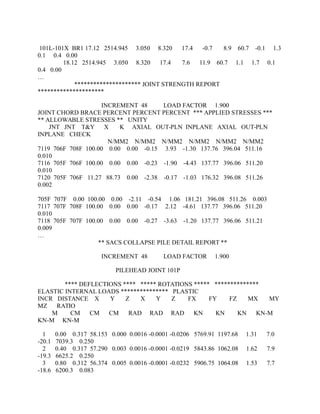
The following are parts of the listing file.
---------------------------------------------------------------------------------------------------------------------
--
**** INCREMENT NO. 48 DEFLECTIONS AND ROTATIONS FOR LOAD CASE
S000 ****
LOAD FACTOR 1.900
****** DEFLECTIONS ****** ******* ROTATIONS *******
JOINT X Y Z X Y Z
CM CM CM RAD RAD RAD
101L 58.166 0.227 3.391 0.00004 0.00366 -0.00115
101P 58.153 -0.143 -0.304 -0.00006 0.02031 -0.00361
101X 63.360 -0.026 0.541 0.00000 0.00260 -0.00001
102L 58.117 -0.066 -2.822 0.00021 0.00387 -0.00101
102P 57.472 0.574 3.573 -0.00022 0.03041 -0.00335
102X 63.696 0.206 0.530 -0.00001 0.00261 -0.00030
103L 58.548 0.269 3.381 -0.00005 0.00366 0.00084
103P 58.535 0.632 -0.256 -0.00011 0.02036 0.00347
103X 66.304 0.260 3.261 -0.00001 0.00267 -0.00013
104L 58.500 -0.139 -2.837 -0.00022 0.00386 0.00071
104P 57.855 -0.779 3.555 0.00031 0.03099 0.00330
…
** SACS COLLAPSE MEMBER FORCES AND MOMENTS **
INCREMENT 48 LOAD FACTOR 1.900
****** INTERNAL FORCES ****** ***** INTERNAL MOMENTS *****
************** STRESSES **************
MEMBER GRUP LOC. X Y Z X Y Z AXIAL BEND-Y
BEND-Z SHEAR-Y SHEAR-Z PLAST.
M KN KN KN KN-M KN-M KN-M N/MM2 N/MM2
N/MM2 N/MM2 N/MM2 RATIO
101L-101X BR1 0.00 2520.658 3.538 -2.387 17.4 -34.2 -42.3 60.9 -4.9
-6.1 0.2 -0.1 0.00
2.14 2520.658 3.538 -2.387 17.4 -39.3 -34.7 60.9 -5.6 -5.0 0.2
-0.1 0.00
4.28 2519.592 3.291 -1.477 17.4 -42.5 -27.7 60.8 -6.1 -4.0 0.2
-0.1 0.00
6.42 2518.750 3.080 -0.413 17.4 -43.3 -21.1 60.8 -6.2 -3.0 0.1
0.0 0.00
8.56 2518.725 2.836 1.252 17.4 -40.7 -15.0 60.8 -5.8 -2.2 0.1
0.1 0.00
10.70 2517.659 2.785 2.276 17.4 -35.8 -9.1 60.8 -5.1 -1.3 0.1
0.1 0.00
12.84 2517.042 2.747 3.726 17.4 -27.8 -3.2 60.8 -4.0 -0.5 0.1
0.2 0.00
14.98 2516.793 2.734 5.585 17.4 -15.9 2.7 60.8 -2.3 0.4 0.1
0.3 0.00
17.12 2515.727 2.891 7.080 17.4 -0.7 8.9 60.7 -0.1 1.3 0.1
0.3 0.00
101L-101X BR1 17.12 2514.945 3.050 8.320 17.4 -0.7 8.9 60.7 -0.1 1.3
0.1 0.4 0.00
18.12 2514.945 3.050 8.320 17.4 7.6 11.9 60.7 1.1 1.7 0.1
0.4 0.00
…
********************* JOINT STRENGTH REPORT
*********************
INCREMENT 48 LOAD FACTOR 1.900
JOINT CHORD BRACE PERCENT PERCENT PERCENT *** APPLIED STRESSES ***
** ALLOWABLE STRESSES ** UNITY
JNT JNT T&Y X K AXIAL OUT-PLN INPLANE AXIAL OUT-PLN
INPLANE CHECK
N/MM2 N/MM2 N/MM2 N/MM2 N/MM2 N/MM2
7119 706F 708F 100.00 0.00 0.00 -0.15 3.93 -1.30 137.76 396.04 511.16
0.010
7116 705F 706F 100.00 0.00 0.00 -0.23 -1.90 -4.43 137.77 396.06 511.20
0.010
7120 705F 706F 11.27 88.73 0.00 -2.38 -0.17 -1.03 176.32 396.08 511.26
0.002
705F 707F 0.00 100.00 0.00 -2.11 -0.54 1.06 181.21 396.08 511.26 0.003
7117 707F 708F 100.00 0.00 0.00 -0.17 2.12 -4.61 137.77 396.06 511.20
0.010
7118 705F 707F 100.00 0.00 0.00 -0.27 -3.63 -1.20 137.77 396.06 511.21
0.009
…
** SACS COLLAPSE PILE DETAIL REPORT **
INCREMENT 48 LOAD FACTOR 1.900
PILEHEAD JOINT 101P
**** DEFLECTIONS **** ***** ROTATIONS ***** **************
ELASTIC INTERNAL LOADS *************** PLASTIC
INCR DISTANCE X Y Z X Y Z FX FY FZ MX MY
MZ RATIO
M CM CM CM RAD RAD RAD KN KN KN KN-M
KN-M KN-M
1 0.00 0.317 58.153 0.000 0.0016 -0.0001 -0.0206 5769.91 1197.68 1.31 7.0
-20.1 7039.3 0.250
2 0.40 0.317 57.290 0.003 0.0016 -0.0001 -0.0219 5843.86 1062.08 1.62 7.9
-19.3 6625.2 0.250
3 0.80 0.312 56.374 0.005 0.0016 -0.0001 -0.0232 5906.75 1064.08 1.53 7.7
-18.6 6200.3 0.083
4 1.20 0.303 55.413 0.007 0.0016 -0.0001 -0.0243 5981.88 1050.95 1.49 7.6
-18.0 5774.7 0.000
5 1.60 0.293 54.410 0.009 0.0016 -0.0001 -0.0253 6067.73 1028.61 1.46 7.5
-17.4 5354.3 0.000
6 2.00 0.281 53.368 0.011 0.0016 -0.0001 -0.0262 6162.92 1004.85 1.44 7.4
-16.8 4942.9 0.000
7 2.40 0.267 52.291 0.012 0.0016 -0.0001 -0.0270 6265.64 979.70 1.41 7.3
-16.2 4540.9 0.000
8 2.80 0.251 51.182 0.014 0.0016 -0.0001 -0.0278 6373.92 953.22 1.38 7.2
-15.6 4149.0 0.000
9 3.20 0.234 50.043 0.015 0.0016 -0.0001 -0.0285 6485.63 925.47 1.36 7.2
-15.1 3767.8 0.000
10 3.60 0.216 48.878 0.016 0.0016 -0.0001 -0.0292 6598.53 896.51 1.33 7.1
-14.5 3397.6 0.000
11 4.00 0.197 47.688 0.017 0.0016 -0.0001 -0.0298 6710.24 866.43 1.30 7.0
-14.0 3039.0 0.000
…
-----------------------------------------------------

Pushover analysis-sacs

  • 1.
    Pushover Analysis Section 1Create a pushover analysis directory and a collapse input file Step 1 Create the directory for pushover analysis Under “Training Project”, create “Pushover” subdirectory; copy the model file sacinp.dat, seastate input file seainp.dat, and psi input file psiinp.dat to the directory, and make this directory current. Step 2 Modify the model input file and seastate input file for collapse analysis Modify the model file: the only modification for the model file is to delete HYDRO and HYDRO2 lines. Modify the seastate input file: • Delete AMOD lines;by• Modify LCSEL line to include load conditions GRAV, S000, S045, and S090;• Input CMB into column 65-67 in LDOPT line.• Delete AMOD lines; • Modify operating storm load cases and extreme storm load case P000~P090 and S000~S090 by deleting DEAD lines and INCWGT line; • Add DEAD load condition with selected weight groups for ANOD and WKWY; • Delete all existing combined load conditions; • Add a new combined load condition GRAV to include structural dead load and applied equipment loads, miscellaneous loads and live loads; • Modify LCSEL line to include load conditions GRAV, S000, S045, and S090; • Input CMB into column 65-67 in LDOPT line. Seastate input file defined shall look like the following: ------------------------------------------------------------------------------------------------------------- LDOPT NF+Z1.0280007.849000 -79.50 79.50GLOBMN CMB * LCSEL ST GRAV S000 S045 S090 FILE B CENTER CEN1 CDM CDM 2.50 0.600 1.200 0.600 1.200 CDM 250.00 0.600 1.200 0.600 1.200 MGROV MGROV 0.000 60.000 2.500 2.5410-4 1.400 MGROV 60.000 79.200 5.000 2.5410-4 1.400 GRPOV GRPOVAL LG1 1.501.501.501.50 F GRPOVAL LG2 1.501.501.501.50 F GRPOVAL LG3 1.501.501.501.50 F GRPOVAL PL1NN 0.001 0.001 0.001 GRPOVAL PL2NN 0.001 0.001 0.001 GRPOVAL PL3NN 0.001 0.001 0.001 GRPOVAL PL4NN 0.001 0.001 0.001
  • 2.
    GRPOV W.BNF 0.0010.001 0.001 0.001 0.001 LOAD LOADCNDEAD DEAD DEAD -Z 81.000 M BML INCWGT ANODWKWY LOADCNAREA INCWGT AREA ACCEL 1.00000 N CEN1 LOADCNEQPT INCWGT EQPT ACCEL 1.00000 N CEN1 LOADCNLIVE INCWGT LIVE ACCEL 1.00000 N CEN1 LOADCNMISC INCWGT MISC ACCEL 1.00000 N CEN1 LOADCNS000 WAVE WAVE1.00STRE 12.19 81.00 15.00 0.00 D 20.00 18MS10 1 WIND WIND D 45.170 0.00 AP08 CURR CURR 0.000 0.514 0.000 -5.000BC LN CURR 81.000 1.801 LOADCNS045 WAVE WAVE1.00STRE 12.19 81.00 15.00 45.00 D 20.00 18MS10 1 WIND WIND D 45.170 45.00 AP08 CURR CURR 0.000 0.514 45.000 -5.000BC LN CURR 81.000 1.801 45.000 LOADCNS090 WAVE WAVE1.00STRE 12.19 81.00 15.00 90.00 D 20.00 18MS10 1 WIND WIND D 45.170 90.00 AP08 CURR CURR 0.000 0.514 90.000 -5.000BC LN CURR 81.000 1.801 90.000 LCOMB LCOMB GRAV DEAD1.0000AREA1.0000EQPT1.0000LIVE0.7500MISC1.0000 END
  • 3.
    ------------------------------------------------------------------------------------------------------------- Step 3 Createthe collapse input file CLPINP.000 Pushover analysis should be performed for each wave direction since the structural behaviors could be different when environmental loads are applied on the structure from different directions. In one collapse pushover analysis clients can define more than one load sequence in one collapse analysis input file to include environmental loads from different directions. However only the results from the last load sequence defined in the input file is saved in clprst file for collapse view program. In this demo pushover analysis it only includes extreme storm loads from one direction, 0 degree. The unit of the collapse input file: There is no place to define the unit for the collapse input file. The program will use the same unit as whatever defined in the structural model file. Collapse options: • Member segments 8 is chosen along with 80 iterations allowed for both load increment and• Member local buckling check with API Bulletin LRFD method is included;• Member segments 8 is chosen along with 80 iterations allowed for both load increment and member iterations; • Member local buckling check with API Bulletin LRFD method is included; • Joint flexibility with JF option and joint strength check with API LRFD option is included; • Pile plasticity is selected in the analysis; • The maximum deflection = 500 cm is used as the collapse criterion. • Strain hardening ratio of .005 is selected. Collapse analysis report selections: • Joint deflections will be printed out in the listing file for each load increment by selecting P1 • Joint strengths will be printed out for each load increment by selecting J1; • Member stresses will be printed out for each load increment by selecting M1; • Collapse and member summary report will be included in the output listing file by selecting SM and MS. Define load sequence: • One Load sequence AAAA is defined to apply vertical loads first, and then apply ship impact loads by increments; • Combined load case GRAV will be applied on the structure in 1 load increment; • Load case S000 will be applied on the structure 1) in 2 load steps from load factors of 0 to 1.00; 2) in 50 steps for load factors from 1.02 to 2.02. In this demo pushover analysis the jacket structure and piles behaviors are to be investigated for environmental loads exceed the design extreme storm loads, deck members are to be defined as Elastic members during the analysis. Elastic member groups can be defined using GRPELA line for member groups W01, W02, DL6, DL7, DUM, and W.B. Collapse input files defined shall look like following: Clpinp.000 ------------------------------------------------------------------------------------------------------------- CLPOPT 80 8 80 LBJFPPJS LR 0.100.001 0.01 500. .005 CLPRPT P1 M1 J1SMMS LDSEQ AAAA GRAV 1 1.00S000 2 1.0S000 50 1.02 2.02 GRPELA W01 W02 DL6 DL7 DUM W.B END
  • 4.
    ------------------------------------------------------------------------------------------------------------- Section 2 Createthe collapse analysis run file Step 1 Select analysis type and sub-type Click “Analysis Generator” from Executive window and select “Statics” for Type and “Full Plastic Collapse/Pushove” for Subtype. The file Id of 000 is chosen in the first analysis. Step 2 Select Analysis Options Check options for Environmental Loading, Solve, Foundation, and Non-Linear / Plastic. Step 3 Select input files SACS model input file is SACINP.DAT; SeaState input file is SEAINP.DAT; Foundation input file is PSIINP.DAT; Collapse input file is CLPINP.000 See below picture for the selected options:
  • 5.
    Section 3 Runthe analysis and review the results Check the results from collapse view: After a collapse analysis is finished, a collapse view file clprst.000 will be created. Double click the file name, collapse view program will open the file and many results can be checked on the screen. Several reports, such as analysis history report, joint report, member report, and pile capacity report can be generated. The part of pile capacity report generated from collapse view is shown below. ------------------------------------------------------------------------------------------------------------- Pile Capacity Used Report (KN ) Load Load Load Pilehead Axial Total Capacity Step Cond Factor Joint Load Capacity Used (%)
  • 6.
    1 GRAV 1.00101P -3774.2 -57792.1 6.5 Compression 1 GRAV 1.00 102P -2322.5 -57772.9 4.0 Compression 1 GRAV 1.00 103P -3624.1 -57792.1 6.3 Compression 1 GRAV 1.00 104P -2467.7 -57772.9 4.3 Compression 1 GRAV 1.00 105C -403.3 -21849.2 1.8 Compression 1 GRAV 1.00 106C -403.3 -21849.2 1.8 Compression 1 GRAV 1.00 107C -403.3 -21849.2 1.8 Compression 1 GRAV 1.00 108C -403.3 -21849.2 1.8 Compression 2 S000 0.50 101P -1353.8 -57792.1 2.3 Compression 2 S000 0.50 102P -4740.8 -57772.9 8.2 Compression 2 S000 0.50 103P -1204.2 -57792.1 2.1 Compression 2 S000 0.50 104P -4885.2 -57772.9 8.5 Compression … 13 S000 1.20 103P 2272.2 58144.3 3.9 Tension 13 S000 1.20 104P -8379.5 -57772.9 14.5 Compression 13 S000 1.20 105C -403.3 -21849.2 1.8 Compression 13 S000 1.20 106C -403.3 -21849.2 1.8 Compression 13 S000 1.20 107C -403.3 -21849.2 1.8 Compression 13 S000 1.20 108C -403.3 -21849.2 1.8 Compression 14 S000 1.22 101P 2234.1 58144.3 3.8 Tension 14 S000 1.22 102P -8347.2 -57772.9 14.4 Compression 14 S000 1.22 103P 2373.9 58144.3 4.1 Tension 14 S000 1.22 104P -8483.9 -57772.9 14.7 Compression 14 S000 1.22 105C -403.3 -21849.2 1.8 Compression 14 S000 1.22 106C -403.3 -21849.2 1.8 Compression 14 S000 1.22 107C -403.3 -21849.2 1.8 Compression 14 S000 1.22 108C -403.3 -21849.2 1.8 Compression … 44 S000 1.82 101P 5296.4 58144.3 9.1 Tension 44 S000 1.82 102P -11419.9 -57772.9 19.8 Compression 44 S000 1.82 103P 5418.5 58144.3 9.3 Tension 44 S000 1.82 104P -11539.5 -57772.9 20.0 Compression 44 S000 1.82 105C -403.5 -21849.2 1.8 Compression 44 S000 1.82 106C -403.5 -21849.2 1.8 Compression 44 S000 1.82 107C -403.5 -21849.2 1.8 Compression 44 S000 1.82 108C -403.5 -21849.2 1.8 Compression 45 S000 1.84 101P 5409.1 58144.3 9.3 Tension 45 S000 1.84 102P -11520.7 -57772.9 19.9 Compression 45 S000 1.84 103P 5522.3 58144.3 9.5 Tension 47 S000 1.88 101P 5651.7 58144.3 9.7 Tension 47 S000 1.88 102P -11722.8 -57772.9 20.3 Compression 47 S000 1.88 103P 5740.8 58144.3 9.9 Tension 47 S000 1.88 104P -11809.2 -57772.9 20.4 Compression 47 S000 1.88 105C -402.0 -21849.2 1.8 Compression 47 S000 1.88 106C -402.0 -21849.2 1.8 Compression 47 S000 1.88 107C -402.0 -21849.2 1.8 Compression
  • 7.
    47 S000 1.88108C -402.0 -21849.2 1.8 Compression 48 S000 1.90 101P 5769.9 58144.3 9.9 Tension 48 S000 1.90 102P -11851.0 -57772.9 20.5 Compression 48 S000 1.90 103P 5844.4 58144.3 10.1 Tension 48 S000 1.90 104P -11924.4 -57772.9 20.6 Compression 48 S000 1.90 105C -402.5 -21849.2 1.8 Compression 48 S000 1.90 106C -402.5 -21849.2 1.8 Compression 48 S000 1.90 107C -402.5 -21849.2 1.8 Compression 48 S000 1.90 108C -402.5 -21849.2 1.8 Compression ------------------------------------------------------------------------------------------------------------- Collapse view also can show the structural damage graphically, see the following pictures. The parts of results also can be viewed by graphic curves.
  • 8.
    Select the TotalJoint Displacement as the output parameter for X axis and 100 cm as the maximum value, the Load Factor as the output parameter for Y axis, and omit the final load increment from the graph, see the followings
  • 9.
    The curve isshown as below. Check collapse output listing file: The listing file reports the selected outputs, such as joint deflections and member stresses. It also includes the total ship impact energy, and the energy absorbed by structure at each load increment. Listing file also indicates the structure damages. The following are parts of the listing file. --------------------------------------------------------------------------------------------------------------------- -- **** INCREMENT NO. 48 DEFLECTIONS AND ROTATIONS FOR LOAD CASE S000 ****
  • 10.
    LOAD FACTOR 1.900 ******DEFLECTIONS ****** ******* ROTATIONS ******* JOINT X Y Z X Y Z CM CM CM RAD RAD RAD 101L 58.166 0.227 3.391 0.00004 0.00366 -0.00115 101P 58.153 -0.143 -0.304 -0.00006 0.02031 -0.00361 101X 63.360 -0.026 0.541 0.00000 0.00260 -0.00001 102L 58.117 -0.066 -2.822 0.00021 0.00387 -0.00101 102P 57.472 0.574 3.573 -0.00022 0.03041 -0.00335 102X 63.696 0.206 0.530 -0.00001 0.00261 -0.00030 103L 58.548 0.269 3.381 -0.00005 0.00366 0.00084 103P 58.535 0.632 -0.256 -0.00011 0.02036 0.00347 103X 66.304 0.260 3.261 -0.00001 0.00267 -0.00013 104L 58.500 -0.139 -2.837 -0.00022 0.00386 0.00071 104P 57.855 -0.779 3.555 0.00031 0.03099 0.00330 … ** SACS COLLAPSE MEMBER FORCES AND MOMENTS ** INCREMENT 48 LOAD FACTOR 1.900 ****** INTERNAL FORCES ****** ***** INTERNAL MOMENTS ***** ************** STRESSES ************** MEMBER GRUP LOC. X Y Z X Y Z AXIAL BEND-Y BEND-Z SHEAR-Y SHEAR-Z PLAST. M KN KN KN KN-M KN-M KN-M N/MM2 N/MM2 N/MM2 N/MM2 N/MM2 RATIO 101L-101X BR1 0.00 2520.658 3.538 -2.387 17.4 -34.2 -42.3 60.9 -4.9 -6.1 0.2 -0.1 0.00 2.14 2520.658 3.538 -2.387 17.4 -39.3 -34.7 60.9 -5.6 -5.0 0.2 -0.1 0.00 4.28 2519.592 3.291 -1.477 17.4 -42.5 -27.7 60.8 -6.1 -4.0 0.2 -0.1 0.00 6.42 2518.750 3.080 -0.413 17.4 -43.3 -21.1 60.8 -6.2 -3.0 0.1 0.0 0.00 8.56 2518.725 2.836 1.252 17.4 -40.7 -15.0 60.8 -5.8 -2.2 0.1 0.1 0.00 10.70 2517.659 2.785 2.276 17.4 -35.8 -9.1 60.8 -5.1 -1.3 0.1 0.1 0.00 12.84 2517.042 2.747 3.726 17.4 -27.8 -3.2 60.8 -4.0 -0.5 0.1 0.2 0.00 14.98 2516.793 2.734 5.585 17.4 -15.9 2.7 60.8 -2.3 0.4 0.1 0.3 0.00 17.12 2515.727 2.891 7.080 17.4 -0.7 8.9 60.7 -0.1 1.3 0.1 0.3 0.00
  • 11.
    101L-101X BR1 17.122514.945 3.050 8.320 17.4 -0.7 8.9 60.7 -0.1 1.3 0.1 0.4 0.00 18.12 2514.945 3.050 8.320 17.4 7.6 11.9 60.7 1.1 1.7 0.1 0.4 0.00 … ********************* JOINT STRENGTH REPORT ********************* INCREMENT 48 LOAD FACTOR 1.900 JOINT CHORD BRACE PERCENT PERCENT PERCENT *** APPLIED STRESSES *** ** ALLOWABLE STRESSES ** UNITY JNT JNT T&Y X K AXIAL OUT-PLN INPLANE AXIAL OUT-PLN INPLANE CHECK N/MM2 N/MM2 N/MM2 N/MM2 N/MM2 N/MM2 7119 706F 708F 100.00 0.00 0.00 -0.15 3.93 -1.30 137.76 396.04 511.16 0.010 7116 705F 706F 100.00 0.00 0.00 -0.23 -1.90 -4.43 137.77 396.06 511.20 0.010 7120 705F 706F 11.27 88.73 0.00 -2.38 -0.17 -1.03 176.32 396.08 511.26 0.002 705F 707F 0.00 100.00 0.00 -2.11 -0.54 1.06 181.21 396.08 511.26 0.003 7117 707F 708F 100.00 0.00 0.00 -0.17 2.12 -4.61 137.77 396.06 511.20 0.010 7118 705F 707F 100.00 0.00 0.00 -0.27 -3.63 -1.20 137.77 396.06 511.21 0.009 … ** SACS COLLAPSE PILE DETAIL REPORT ** INCREMENT 48 LOAD FACTOR 1.900 PILEHEAD JOINT 101P **** DEFLECTIONS **** ***** ROTATIONS ***** ************** ELASTIC INTERNAL LOADS *************** PLASTIC INCR DISTANCE X Y Z X Y Z FX FY FZ MX MY MZ RATIO M CM CM CM RAD RAD RAD KN KN KN KN-M KN-M KN-M 1 0.00 0.317 58.153 0.000 0.0016 -0.0001 -0.0206 5769.91 1197.68 1.31 7.0 -20.1 7039.3 0.250 2 0.40 0.317 57.290 0.003 0.0016 -0.0001 -0.0219 5843.86 1062.08 1.62 7.9 -19.3 6625.2 0.250 3 0.80 0.312 56.374 0.005 0.0016 -0.0001 -0.0232 5906.75 1064.08 1.53 7.7 -18.6 6200.3 0.083
  • 12.
    4 1.20 0.30355.413 0.007 0.0016 -0.0001 -0.0243 5981.88 1050.95 1.49 7.6 -18.0 5774.7 0.000 5 1.60 0.293 54.410 0.009 0.0016 -0.0001 -0.0253 6067.73 1028.61 1.46 7.5 -17.4 5354.3 0.000 6 2.00 0.281 53.368 0.011 0.0016 -0.0001 -0.0262 6162.92 1004.85 1.44 7.4 -16.8 4942.9 0.000 7 2.40 0.267 52.291 0.012 0.0016 -0.0001 -0.0270 6265.64 979.70 1.41 7.3 -16.2 4540.9 0.000 8 2.80 0.251 51.182 0.014 0.0016 -0.0001 -0.0278 6373.92 953.22 1.38 7.2 -15.6 4149.0 0.000 9 3.20 0.234 50.043 0.015 0.0016 -0.0001 -0.0285 6485.63 925.47 1.36 7.2 -15.1 3767.8 0.000 10 3.60 0.216 48.878 0.016 0.0016 -0.0001 -0.0292 6598.53 896.51 1.33 7.1 -14.5 3397.6 0.000 11 4.00 0.197 47.688 0.017 0.0016 -0.0001 -0.0298 6710.24 866.43 1.30 7.0 -14.0 3039.0 0.000 … -----------------------------------------------------