Protocol Buffers
Protocol Buffers
Ceyhan Kasap | Software Infrastructure
Data Serialization
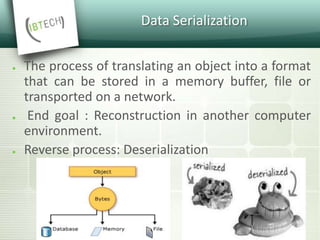
● The process of translating an object into a format
that can be stored in a memory buffer, file or
transported on a network.
● End goal : Reconstruction in another computer
environment.
● Reverse process: Deserialization
Binary Serialization
● Many languages provides built in language
support
● Language specific (Interop issues)
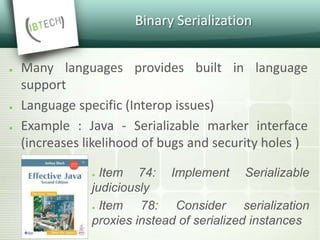
● Example : Java - Serializable marker interface
(increases likelihood of bugs and security holes )
● Item 74: Implement Serializable
judiciously
● Item 78: Consider serialization
proxies instead of serialized instances
Binary Serialization
● Advantages
● Memory efficient
● Fast to emit and parse
● Disadvantages
● Not human readable
● Platform dependent
CROSS PLATFORM SOLUTIONS - XML
(Extensible Markup Language)
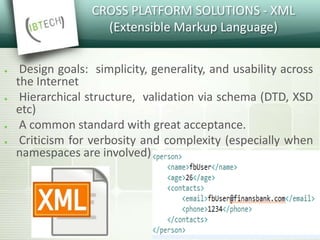
● Design goals: simplicity, generality, and usability across
the Internet
● Hierarchical structure, validation via schema (DTD, XSD
etc)
● A common standard with great acceptance.
● Criticism for verbosity and complexity (especially when
namespaces are involved)
CROSS PLATFORM SOLUTIONS - JSON
(Javascript object notation)
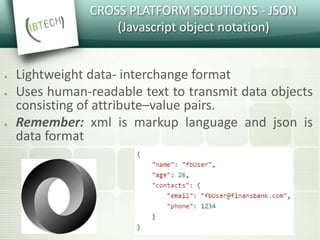
● Lightweight data- interchange format
● Uses human-readable text to transmit data objects
consisting of attribute–value pairs.
● Remember: xml is markup language and json is
data format
Google Data Encoding Solution
Options
«At Google, our mission is organizing all of the
world's information.
We use literally thousands of different data formats
and most of these formats are structured, not flat»
https://opensource.googleblog.com/2008/07/protocol-buffers-googles-data.html
Google Data Encoding Solution
Options
« Not efficient enough for this scale.
Writing code to work with the DOM tree can
sometimes become unwieldy.»
Option 1 : Use XML
https://opensource.googleblog.com/2008/07/protocol-buffers-googles-data.html
Google Data Encoding Solution
Options
«When we roll out a new version of a server, it
almost always has to start out talking to older
servers.
Also, we use many languages, so we need a portable
solution.»
Option 2 : write the raw bytes of in-memory data
structures to the wire
https://opensource.googleblog.com/2008/07/protocol-buffers-googles-data.html
Google Data Encoding Solution
Options
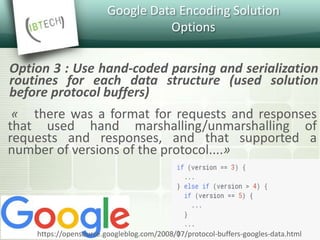
« there was a format for requests and responses
that used hand marshalling/unmarshalling of
requests and responses, and that supported a
number of versions of the protocol....»
Option 3 : Use hand-coded parsing and serialization
routines for each data structure (used solution
before protocol buffers)
https://opensource.googleblog.com/2008/07/protocol-buffers-googles-data.html
What are protocol buffers?
 A language-neutral, platform-neutral, extensible
way of serializing structured data for use in
communications protocols, data storage, and
more.
 Initially developed at Google to deal with an index
server request/response protocol.
 Designed and used since 2001 in Google.
 Open-sourced since 2008.
How do they work?
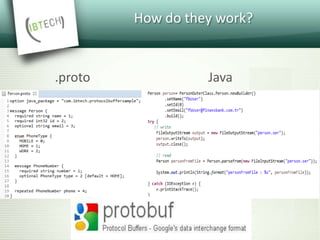
 You define your structured data format in a
descriptor file (.proto file)
 You run the protocol buffer compiler for your
application's language on your .proto file to
generate data access classes.
 You can even update your data structure without
breaking deployed programs that are compiled
against the "old" format.
How do they work?
.proto Java
Message Definition
 Messages defined in .proto files
 Syntax:
Message [MessageName] { ... }
 Can be nested
 Will be converted to e.g. a Java class
Message Contents
 Each message may have
 Messages
 Enums:
enum <name> {
valuename = value;
}
 Fields
 Each field is defined as
<rule> <type> <name> = <id> {[<options>]};
 Rules : required, optional, repeated
Generated Code
MESSAGES
• Immutable (Person.java)
BUILDERS
• (Person.Builder.java)
ENUMS & NESTED CLASSES
• Person.PhoneType.MOBILE
• Person. PhoneNumber
PARSING & SERIALIZATION
• writeTo(final OutputStream output)
• parseFrom(byte[] data), parseFrom(java.io.InputStream input)
Backward / Forward Compatibility
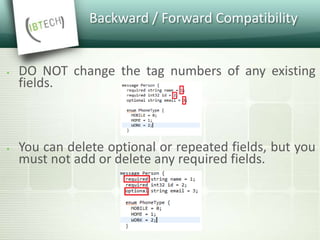
 DO NOT change the tag numbers of any existing
fields.
 You can delete optional or repeated fields, but you
must not add or delete any required fields.
Backward / Forward Compatibility
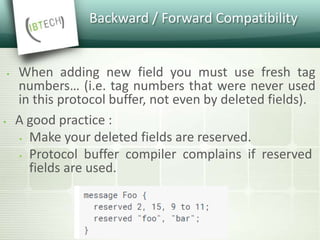
 When adding new field you must use fresh tag
numbers… (i.e. tag numbers that were never used
in this protocol buffer, not even by deleted fields).
 A good practice :
 Make your deleted fields are reserved.
 Protocol buffer compiler complains if reserved
fields are used.
Backward / Forward Compatibility
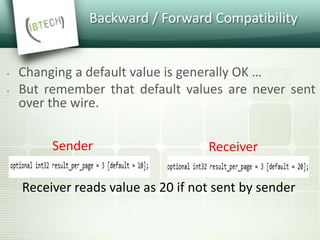
 Changing a default value is generally OK …
 But remember that default values are never sent
over the wire.
Sender Receiver
Receiver reads value as 20 if not sent by sender
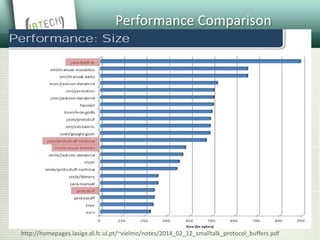
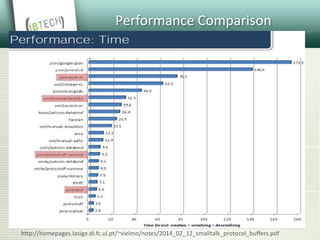
Performance Comparison
http://homepages.lasige.di.fc.ul.pt/~vielmo/notes/2014_02_12_smalltalk_protocol_buffers.pdf
Performance Comparison
http://homepages.lasige.di.fc.ul.pt/~vielmo/notes/2014_02_12_smalltalk_protocol_buffers.pdf
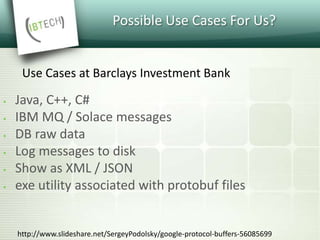
Possible Use Cases For Us?
 Java, C++, C#
 IBM MQ / Solace messages
 DB raw data
 Log messages to disk
 Show as XML / JSON
 exe utility associated with protobuf files
Use Cases at Barclays Investment Bank
http://www.slideshare.net/SergeyPodolsky/google-protocol-buffers-56085699
QUESTIONS?

Protocol Buffers

  • 1.
    Protocol Buffers Protocol Buffers CeyhanKasap | Software Infrastructure
  • 2.
    Data Serialization ● Theprocess of translating an object into a format that can be stored in a memory buffer, file or transported on a network. ● End goal : Reconstruction in another computer environment. ● Reverse process: Deserialization
  • 3.
    Binary Serialization ● Manylanguages provides built in language support ● Language specific (Interop issues) ● Example : Java - Serializable marker interface (increases likelihood of bugs and security holes ) ● Item 74: Implement Serializable judiciously ● Item 78: Consider serialization proxies instead of serialized instances
  • 4.
    Binary Serialization ● Advantages ●Memory efficient ● Fast to emit and parse ● Disadvantages ● Not human readable ● Platform dependent
  • 5.
    CROSS PLATFORM SOLUTIONS- XML (Extensible Markup Language) ● Design goals: simplicity, generality, and usability across the Internet ● Hierarchical structure, validation via schema (DTD, XSD etc) ● A common standard with great acceptance. ● Criticism for verbosity and complexity (especially when namespaces are involved)
  • 6.
    CROSS PLATFORM SOLUTIONS- JSON (Javascript object notation) ● Lightweight data- interchange format ● Uses human-readable text to transmit data objects consisting of attribute–value pairs. ● Remember: xml is markup language and json is data format
  • 7.
    Google Data EncodingSolution Options «At Google, our mission is organizing all of the world's information. We use literally thousands of different data formats and most of these formats are structured, not flat» https://opensource.googleblog.com/2008/07/protocol-buffers-googles-data.html
  • 8.
    Google Data EncodingSolution Options « Not efficient enough for this scale. Writing code to work with the DOM tree can sometimes become unwieldy.» Option 1 : Use XML https://opensource.googleblog.com/2008/07/protocol-buffers-googles-data.html
  • 9.
    Google Data EncodingSolution Options «When we roll out a new version of a server, it almost always has to start out talking to older servers. Also, we use many languages, so we need a portable solution.» Option 2 : write the raw bytes of in-memory data structures to the wire https://opensource.googleblog.com/2008/07/protocol-buffers-googles-data.html
  • 10.
    Google Data EncodingSolution Options « there was a format for requests and responses that used hand marshalling/unmarshalling of requests and responses, and that supported a number of versions of the protocol....» Option 3 : Use hand-coded parsing and serialization routines for each data structure (used solution before protocol buffers) https://opensource.googleblog.com/2008/07/protocol-buffers-googles-data.html
  • 11.
    What are protocolbuffers?  A language-neutral, platform-neutral, extensible way of serializing structured data for use in communications protocols, data storage, and more.  Initially developed at Google to deal with an index server request/response protocol.  Designed and used since 2001 in Google.  Open-sourced since 2008.
  • 12.
    How do theywork?  You define your structured data format in a descriptor file (.proto file)  You run the protocol buffer compiler for your application's language on your .proto file to generate data access classes.  You can even update your data structure without breaking deployed programs that are compiled against the "old" format.
  • 13.
    How do theywork? .proto Java
  • 14.
    Message Definition  Messagesdefined in .proto files  Syntax: Message [MessageName] { ... }  Can be nested  Will be converted to e.g. a Java class
  • 15.
    Message Contents  Eachmessage may have  Messages  Enums: enum <name> { valuename = value; }  Fields  Each field is defined as <rule> <type> <name> = <id> {[<options>]};  Rules : required, optional, repeated
  • 16.
    Generated Code MESSAGES • Immutable(Person.java) BUILDERS • (Person.Builder.java) ENUMS & NESTED CLASSES • Person.PhoneType.MOBILE • Person. PhoneNumber PARSING & SERIALIZATION • writeTo(final OutputStream output) • parseFrom(byte[] data), parseFrom(java.io.InputStream input)
  • 17.
    Backward / ForwardCompatibility  DO NOT change the tag numbers of any existing fields.  You can delete optional or repeated fields, but you must not add or delete any required fields.
  • 18.
    Backward / ForwardCompatibility  When adding new field you must use fresh tag numbers… (i.e. tag numbers that were never used in this protocol buffer, not even by deleted fields).  A good practice :  Make your deleted fields are reserved.  Protocol buffer compiler complains if reserved fields are used.
  • 19.
    Backward / ForwardCompatibility  Changing a default value is generally OK …  But remember that default values are never sent over the wire. Sender Receiver Receiver reads value as 20 if not sent by sender
  • 20.
  • 21.
  • 22.
    Possible Use CasesFor Us?  Java, C++, C#  IBM MQ / Solace messages  DB raw data  Log messages to disk  Show as XML / JSON  exe utility associated with protobuf files Use Cases at Barclays Investment Bank http://www.slideshare.net/SergeyPodolsky/google-protocol-buffers-56085699
  • 23.

Editor's Notes

  • #4 binary not human readable but: platform dependend (Little Endian vs. Big Endian?) + memory efficient fast to parse
  • #5 binary not human readable but: platform dependend (Little Endian vs. Big Endian?) + memory efficient fast to parse
  • #6 Cross platform solutions are text based + human readable (okay, xml...) + platform independend (but: still encoding problems!) + format can evolve (e.g. additional fields in xml ) waste more memory slow to parse
  • #7 From http://www.yegor256.com/2015/11/16/json-vs-xml.html  I believe there are four features XML has that seriously set it apart from JSON or any other simple data format, like YAML for example. XPath. To get data like the year of publication from the document above, I just send an XPath query: /book/published/year/text(). However, there has to be an XPath processor that understands my request and returns 2004. The beauty of this is that XPath 2.0 is a very powerful query engine with its own functions, predicates, axes, etc. You can literally put any logic into your XPath request without writing any traversing logic in Java, for example. You may ask "How many books were published by David West in 2004?" and get an answer, just via XPath. JSON is not even close to this. Attributes and Namespaces. You can attach metadata to your data, just like it's done above with the id attribute. The data stays inside elements, just like the name of the book author, for example, while metadata (data about data) can and should be placed into attributes. This significantly helps in organizing and structuring information. On top of that, both elements and attributes can be marked as belonging to certain namespaces. This is a very useful technique during times when a few applications are working with the same XML document. XML Schema. When you create an XML document in one place, modify it a few times somewhere else, and then transfer it to yet another place, you want to make sure its structure is not broken by any of these actions. One of them may use <year> to store the publication date while another uses <date> with ISO-8601. To avoid that mess in structure, create a supplementary document, which is called XML Schema, and ship it together with the main document. Everyone who wants to work with the main document will first validate its correctness using the schema supplied. This is a sort of integration testing in production. RelaxNG is a similar but simpler mechanism; give it a try if you find XML Schema too complex. XSL. You can make modifications to your XML document without any Java/Ruby/etc. code at all. Just create an XSL transformation document and "apply" it to your original XML. As an output, you will get a new XML. The XSL language (it is purely functional, by the way) is designed for hierarchical data manipulations. It is much more suitable for this task than Java or any other OOP/procedural approach. You can transform an XML document into anything, including plain text andHTML. Some complain about XSL's complexity, but please give it a try. You won't need all of it, while its core functionality is pretty straight-forward. From http://apigee.com/about/blog/technology/why-xml-wont-die-xml-vs-json-your-api JSON is especially good at representing programming-language objects. If you have a JavaScript or Java object, or even a C struct, the structure of the object and all its fields can be easily and quickly converted to JSON, sent over a network, and retrieved on the other end without too much difficulty and (usually) comes out the same on both ends. But not everything in the world is a programming-language object. Sometimes to describe a complex real-world object we have to combine different descriptions and languages from different places, mash them up, and use them to describe even more complex things. The descriptions of these complex things need to be validated, they need to be commented on, they need to be shared and sometimes annotated with additional data that doesn't affect the original structure. When the world gets complicated and open-ended like that, what's needed is not a programming-language-format object, but a open-ended, extensible -- umm -- markup language. That's what we have today with XML.
  • #8 https://opensource.googleblog.com/2008/07/protocol-buffers-googles-data.html
  • #9 https://opensource.googleblog.com/2008/07/protocol-buffers-googles-data.html
  • #10 https://opensource.googleblog.com/2008/07/protocol-buffers-googles-data.html
  • #11 https://opensource.googleblog.com/2008/07/protocol-buffers-googles-data.html
  • #12 https://opensource.googleblog.com/2008/07/protocol-buffers-googles-data.html
  • #13 https://opensource.googleblog.com/2008/07/protocol-buffers-googles-data.html
  • #17 Kodu goster
  • #18 Kodu goster
  • #23 http://www.slideshare.net/SergeyPodolsky/google-protocol-buffers-56085699