PROGRAMMING IN ADVANCE JAVA
(J2EE)
Created By : Vikas Goyal
Basic Concepts Of Advance Java
 JVM : Java Virtual Machine
 Assertion
 JDBC : Java Database Connectivity
 Java Servlet
 JSP : Java Server Pages
Created By : Vikas Goyal
JVM : Java Virtual Machine
 Java application are typically compiled to byte code
(class file) that can run on any java virtual machine
(JVM) regardless of computer architecture.
 Before understanding what is JVM let us first know
what virtual machine is.
 A Virtual Machine is a layer of abstraction that gives
a program one simplified interface for interacting
with a variety of physical computers and their
operation system.
Created By : Vikas Goyal
JVM : Java Virtual Machine
 As the name indicates, JVM is not a real hardware
machine but a software layer which resembles an
hardware platform.
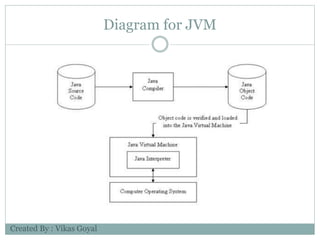
 JVM converts java byte code into machine language
and execute it.
 The byte code can be executed on any platform
where there exists JVM
Created By : Vikas Goyal
Diagram for JVM
Created By : Vikas Goyal
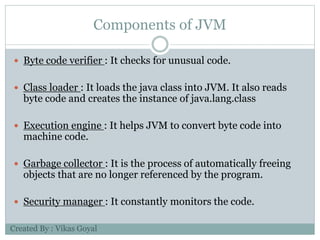
Components of JVM
 Byte code verifier : It checks for unusual code.
 Class loader : It loads the java class into JVM. It also reads
byte code and creates the instance of java.lang.class
 Execution engine : It helps JVM to convert byte code into
machine code.
 Garbage collector : It is the process of automatically freeing
objects that are no longer referenced by the program.
 Security manager : It constantly monitors the code.
Created By : Vikas Goyal
Assertion
 An assertion is a statement in Java that enables you to
test your assumptions about your program.
 Each assertion contains a boolean expression that you
believe will be true when the assertion executes.
 By verifying that the boolean expression is indeed true,
the assertion confirms your assumptions about the
behavior of your program, increasing your confidence
that the program is free of errors.
Created By : Vikas Goyal
Why use assertions?
 Programming by contract
 Pre-conditions
 Assert precondition as requirement of client
 Post-conditions
 Assert post-condition as effect of client method
Created By : Vikas Goyal
Syntax of using Assertion :
 There are two ways to use assertion.
 First way is : assert expression;
 Second way is : assert expression1 : expression2;
Created By : Vikas Goyal
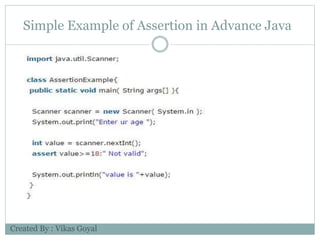
Simple Example of Assertion in Advance Java
Created By : Vikas Goyal
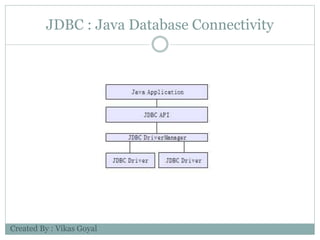
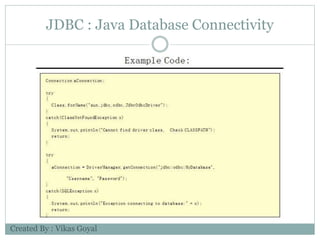
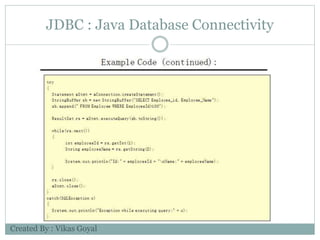
JDBC : Java Database Connectivity
 JDBC provides Java applications with access to most
database systems via SQL.
 Before APIs like JDBC and ODBC, database
connectivity was tedious
With JDBC, the application programmer uses the
JDBC API
The developer never uses any proprietary APIs
• Any proprietary APIs are implemented by a JDBC
driver
• There are 4 types of JDBC Drivers
Created By : Vikas Goyal
JDBC : Java Database Connectivity
Type 1 - JDBC-ODBC Bridge
Type 2 - JDBC-Native Bridge
Type 3 - JDBC-Net Bridge
Type 4 - Direct JDBC Driver
Type 1 only runs on platforms where ODBC is available
ODBC must be configured separately
Type 2 Drivers map between a proprietary Database API and
the JDBC API
Type 3 Drivers are used with middleware products
Type 4 Drivers are written in Java
In most cases, type 4 drivers are preferred
Created By : Vikas Goyal
JDBC : Java Database Connectivity
Created By : Vikas Goyal
JDBC : Java Database Connectivity
Created By : Vikas Goyal
JDBC : Java Database Connectivity
Created By : Vikas Goyal
Java Servlet
16
 Servlets are the Java technology for serving HTTP
requests.
 They are particularly used for serving HTTP requests, but
they can be used as a basis for serving other requests,
too.
 Basic servlet functionalities implemented by the basic
HTTP servlet classes have the features for accessing
HTTP request data and managing cookies and sessions.
 Typically some other technology is used for user interface
or representation part.
 Basic servlets are not that handy for representation matters.
Created By : Vikas Goyal
Important To Know
17
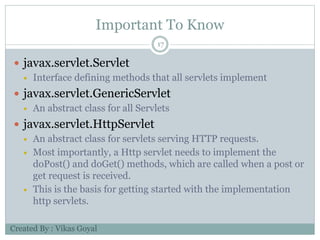
 javax.servlet.Servlet
 Interface defining methods that all servlets implement
 javax.servlet.GenericServlet
 An abstract class for all Servlets
 javax.servlet.HttpServlet
 An abstract class for servlets serving HTTP requests.
 Most importantly, a Http servlet needs to implement the
doPost() and doGet() methods, which are called when a post or
get request is received.
 This is the basis for getting started with the implementation
http servlets.
Created By : Vikas Goyal
Java Servlet Web Application
18
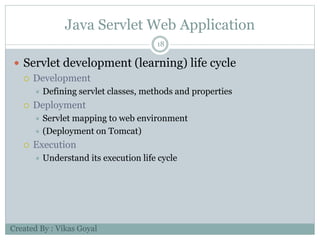
 Servlet development (learning) life cycle
 Development
 Defining servlet classes, methods and properties
 Deployment
 Servlet mapping to web environment
 (Deployment on Tomcat)
 Execution
 Understand its execution life cycle
Created By : Vikas Goyal
“web.xml” Configuration
19
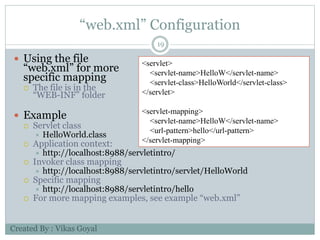
 Using the file
“web.xml” for more
specific mapping
 The file is in the
“WEB-INF” folder
 Example
 Servlet class
 HelloWorld.class
 Application context:
 http://localhost:8988/servletintro/
 Invoker class mapping
 http://localhost:8988/servletintro/servlet/HelloWorld
 Specific mapping
 http://localhost:8988/servletintro/hello
 For more mapping examples, see example “web.xml”
<servlet>
<servlet-name>HelloW</servlet-name>
<servlet-class>HelloWorld</servlet-class>
</servlet>
<servlet-mapping>
<servlet-name>HelloW</servlet-name>
<url-pattern>hello</url-pattern>
</servlet-mapping>
Created By : Vikas Goyal
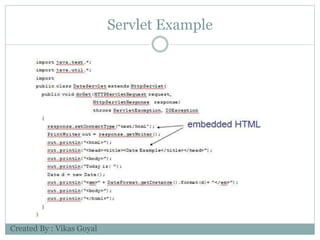
Servlet Example
Created By : Vikas Goyal
JSP : Java Server Pages
 Four different elements are used in constructing JSPs
 Scripting Elements
 Implicit Objects
 Directives
 Actions
 JSPs run in two phases
 Translation Phase
 Execution Phase
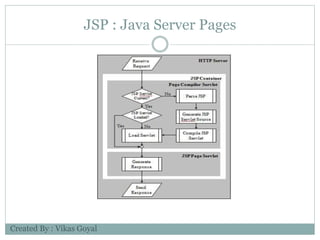
 In translation phase JSP page is compiled into a servlet
 called JSP Page Implementation class
 In execution phase the compiled JSP is processed
Created By : Vikas Goyal
JSP : Java Server Pages
Created By : Vikas Goyal
JSP : Java Server Pages
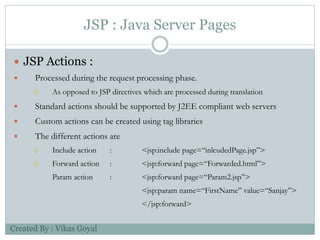
 JSP Actions :
 Processed during the request processing phase.
 As opposed to JSP directives which are processed during translation
 Standard actions should be supported by J2EE compliant web servers
 Custom actions can be created using tag libraries
 The different actions are
 Include action : <jsp:include page=“inlcudedPage.jsp”>
 Forward action : <jsp:forward page=“Forwarded.html”>
Param action : <jsp:forward page=“Param2.jsp”>
<jsp:param name=“FirstName” value=“Sanjay”>
</jsp:forward>
Created By : Vikas Goyal
JSP : Java Server Pages
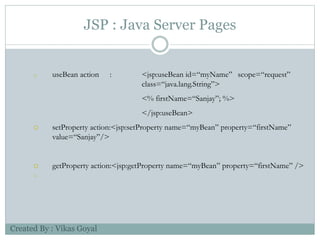
o useBean action : <jsp:useBean id=“myName” scope=“request”
class=“java.lang.String”>
<% firstName=“Sanjay”; %>
</jsp:useBean>
 setProperty action:<jsp:setProperty name=“myBean” property=“firstName”
value=“Sanjay”/>
 getProperty action:<jsp:getProperty name=“myBean” property=“firstName” />

Created By : Vikas Goyal
JSP : Java Server Pages
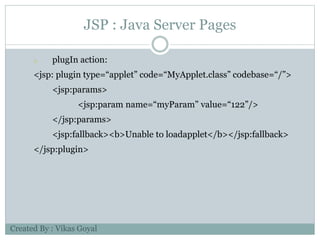
o plugIn action:
<jsp: plugin type=“applet” code=“MyApplet.class” codebase=“/”>
<jsp:params>
<jsp:param name=“myParam” value=“122”/>
</jsp:params>
<jsp:fallback><b>Unable to loadapplet</b></jsp:fallback>
</jsp:plugin>
Created By : Vikas Goyal

Project Presentation on Advance Java

  • 1.
    PROGRAMMING IN ADVANCEJAVA (J2EE) Created By : Vikas Goyal
  • 2.
    Basic Concepts OfAdvance Java  JVM : Java Virtual Machine  Assertion  JDBC : Java Database Connectivity  Java Servlet  JSP : Java Server Pages Created By : Vikas Goyal
  • 3.
    JVM : JavaVirtual Machine  Java application are typically compiled to byte code (class file) that can run on any java virtual machine (JVM) regardless of computer architecture.  Before understanding what is JVM let us first know what virtual machine is.  A Virtual Machine is a layer of abstraction that gives a program one simplified interface for interacting with a variety of physical computers and their operation system. Created By : Vikas Goyal
  • 4.
    JVM : JavaVirtual Machine  As the name indicates, JVM is not a real hardware machine but a software layer which resembles an hardware platform.  JVM converts java byte code into machine language and execute it.  The byte code can be executed on any platform where there exists JVM Created By : Vikas Goyal
  • 5.
    Diagram for JVM CreatedBy : Vikas Goyal
  • 6.
    Components of JVM Byte code verifier : It checks for unusual code.  Class loader : It loads the java class into JVM. It also reads byte code and creates the instance of java.lang.class  Execution engine : It helps JVM to convert byte code into machine code.  Garbage collector : It is the process of automatically freeing objects that are no longer referenced by the program.  Security manager : It constantly monitors the code. Created By : Vikas Goyal
  • 7.
    Assertion  An assertionis a statement in Java that enables you to test your assumptions about your program.  Each assertion contains a boolean expression that you believe will be true when the assertion executes.  By verifying that the boolean expression is indeed true, the assertion confirms your assumptions about the behavior of your program, increasing your confidence that the program is free of errors. Created By : Vikas Goyal
  • 8.
    Why use assertions? Programming by contract  Pre-conditions  Assert precondition as requirement of client  Post-conditions  Assert post-condition as effect of client method Created By : Vikas Goyal
  • 9.
    Syntax of usingAssertion :  There are two ways to use assertion.  First way is : assert expression;  Second way is : assert expression1 : expression2; Created By : Vikas Goyal
  • 10.
    Simple Example ofAssertion in Advance Java Created By : Vikas Goyal
  • 11.
    JDBC : JavaDatabase Connectivity  JDBC provides Java applications with access to most database systems via SQL.  Before APIs like JDBC and ODBC, database connectivity was tedious With JDBC, the application programmer uses the JDBC API The developer never uses any proprietary APIs • Any proprietary APIs are implemented by a JDBC driver • There are 4 types of JDBC Drivers Created By : Vikas Goyal
  • 12.
    JDBC : JavaDatabase Connectivity Type 1 - JDBC-ODBC Bridge Type 2 - JDBC-Native Bridge Type 3 - JDBC-Net Bridge Type 4 - Direct JDBC Driver Type 1 only runs on platforms where ODBC is available ODBC must be configured separately Type 2 Drivers map between a proprietary Database API and the JDBC API Type 3 Drivers are used with middleware products Type 4 Drivers are written in Java In most cases, type 4 drivers are preferred Created By : Vikas Goyal
  • 13.
    JDBC : JavaDatabase Connectivity Created By : Vikas Goyal
  • 14.
    JDBC : JavaDatabase Connectivity Created By : Vikas Goyal
  • 15.
    JDBC : JavaDatabase Connectivity Created By : Vikas Goyal
  • 16.
    Java Servlet 16  Servletsare the Java technology for serving HTTP requests.  They are particularly used for serving HTTP requests, but they can be used as a basis for serving other requests, too.  Basic servlet functionalities implemented by the basic HTTP servlet classes have the features for accessing HTTP request data and managing cookies and sessions.  Typically some other technology is used for user interface or representation part.  Basic servlets are not that handy for representation matters. Created By : Vikas Goyal
  • 17.
    Important To Know 17 javax.servlet.Servlet  Interface defining methods that all servlets implement  javax.servlet.GenericServlet  An abstract class for all Servlets  javax.servlet.HttpServlet  An abstract class for servlets serving HTTP requests.  Most importantly, a Http servlet needs to implement the doPost() and doGet() methods, which are called when a post or get request is received.  This is the basis for getting started with the implementation http servlets. Created By : Vikas Goyal
  • 18.
    Java Servlet WebApplication 18  Servlet development (learning) life cycle  Development  Defining servlet classes, methods and properties  Deployment  Servlet mapping to web environment  (Deployment on Tomcat)  Execution  Understand its execution life cycle Created By : Vikas Goyal
  • 19.
    “web.xml” Configuration 19  Usingthe file “web.xml” for more specific mapping  The file is in the “WEB-INF” folder  Example  Servlet class  HelloWorld.class  Application context:  http://localhost:8988/servletintro/  Invoker class mapping  http://localhost:8988/servletintro/servlet/HelloWorld  Specific mapping  http://localhost:8988/servletintro/hello  For more mapping examples, see example “web.xml” <servlet> <servlet-name>HelloW</servlet-name> <servlet-class>HelloWorld</servlet-class> </servlet> <servlet-mapping> <servlet-name>HelloW</servlet-name> <url-pattern>hello</url-pattern> </servlet-mapping> Created By : Vikas Goyal
  • 20.
  • 21.
    JSP : JavaServer Pages  Four different elements are used in constructing JSPs  Scripting Elements  Implicit Objects  Directives  Actions  JSPs run in two phases  Translation Phase  Execution Phase  In translation phase JSP page is compiled into a servlet  called JSP Page Implementation class  In execution phase the compiled JSP is processed Created By : Vikas Goyal
  • 22.
    JSP : JavaServer Pages Created By : Vikas Goyal
  • 23.
    JSP : JavaServer Pages  JSP Actions :  Processed during the request processing phase.  As opposed to JSP directives which are processed during translation  Standard actions should be supported by J2EE compliant web servers  Custom actions can be created using tag libraries  The different actions are  Include action : <jsp:include page=“inlcudedPage.jsp”>  Forward action : <jsp:forward page=“Forwarded.html”> Param action : <jsp:forward page=“Param2.jsp”> <jsp:param name=“FirstName” value=“Sanjay”> </jsp:forward> Created By : Vikas Goyal
  • 24.
    JSP : JavaServer Pages o useBean action : <jsp:useBean id=“myName” scope=“request” class=“java.lang.String”> <% firstName=“Sanjay”; %> </jsp:useBean>  setProperty action:<jsp:setProperty name=“myBean” property=“firstName” value=“Sanjay”/>  getProperty action:<jsp:getProperty name=“myBean” property=“firstName” />  Created By : Vikas Goyal
  • 25.
    JSP : JavaServer Pages o plugIn action: <jsp: plugin type=“applet” code=“MyApplet.class” codebase=“/”> <jsp:params> <jsp:param name=“myParam” value=“122”/> </jsp:params> <jsp:fallback><b>Unable to loadapplet</b></jsp:fallback> </jsp:plugin> Created By : Vikas Goyal