JDBC
Topics to be covered
 JDBC
 Architecture
 Components
 Demo program
 SERVLETS
 Lifecycle
 Servlet deployment
 Session
What is JDBC?
Java database
connectivity (JDBC) is
the Java Soft
specification of a
standard application
programming interface
(API) that allows Java
programs to access
database management
systems. The JDBC API
consists of a set of
interfaces and classes
written in the Java
programming language.
JDBC Architecture
JDBC API: This provides the
application-to-JDBC Manager
connection.
JDBC Driver API: This supports the
JDBC Manager-to-Driver
Connection.
The JDBC API uses a driver manager
and database-specific drivers to
provide transparent connectivity to
heterogeneous databases.
The JDBC driver manager ensures
that the correct driver is used to
access each data source. The driver
manager is capable of supporting
multiple concurrent drivers
connected to multiple heterogeneous
databases
JDBC Components
 The JDBC API provides the following interfaces and classes −
 Driver Manager: This class manages a list of database drivers. Matches connection requests from the java
application with the proper database driver using communication sub protocol. The first driver that
recognizes a certain subprotocol under JDBC will be used to establish a database Connection.
 Driver: This interface handles the communications with the database server. You will interact directly with
Driver objects very rarely. Instead, you use Driver Manager objects, which manages objects of this type. It
also abstracts the details associated with working with Driver objects.
 Connection: This interface with all methods for contacting a database. The connection object
object represents communication context, i.e., all communication with database is through
connection object only.
 Statement: You use objects created from this interface to submit the SQL statements to the
database. Some derived interfaces accept parameters in addition to executing stored
procedures.
 Result Set: These objects hold data retrieved from a database after you execute an SQL query
query using Statement objects. It acts as an iterator to allow you to move through its data.
 SQL Exception: This class handles any errors that occur in a database application.
JDBC Program
 package DAY1;
 public class JdbcDemo1 {
 public static void main(String[] args) {
 JdbccDao jdbcDao = new JdbccDao();
 jdbcDao.getConnection();
 }
 }
JDBC Program
 import java.sql.Connection;
 import java.sql.DriverManager;
 import java.sql.SQLException;
 import com.mysql.cj.xdevapi.Statement;
 public class JdbccDao {
 public void getConnection() {
 String URL = "jdbc:mysql://localhost:3306/CSE_b";
 Connection con = null;
 try {
 Class.forName("com.mysql.cj.jdbc.Driver");
 con = DriverManager.getConnection(URL,"root","tiger");
 Statement st = (Statement) con.createStatement();
 ((java.sql.Statement) st).executeUpdate("insert into employee
(empName,salary,loginId
,password)value
('bindhu',520.520,'bindhu520','password')");
 } catch (ClassNotFoundException e) {
 e.printStackTrace();
 } catch (SQLException e) {
 e.printStackTrace();
 }finally{
 try {
 con.close();
 } catch (SQLException e) {
 e.printStackTrace();
 }}
 }private Object Update(String string) {
 return null;}}
SERVLETS
 Servlets are Java classes which service HTTP requests and implement the
javax.servlet.Servlet interface. Web application developers typically write
servlets that extend javax.servlet.http.HttpServlet, an abstract class that
implements the Servlet interface and is specially designed to handle HTTP
requests.
 Steps to run servlets:
 First create a new web application.
 Add new servlet to the web application.
 Run the servlet
 The servlet in action.
War File
 A war (web archive) File contains files of a web project. It may have servlet, xml, jsp, image, html, css, js etc.
files.
 Here, we will discuss what is war file, how to create war file, how to deploy war file and how to extract war
file.
 To create war file, you need to use jar tool of JDK. You need to use -c switch of jar, to create the war file.
 Go inside the project directory of your project (outside the WEB-INF), then write the following command:
jar -cvf projectname.war *
 Here, -c is used to create file, -v to generate the verbose output and -f to specify the archive file name.
The * (asterisk) symbol signifies that all the files of this directory (including sub directory).
 o extract the war file, you need to use -x switch of jar tool of JDK. Let's see the command to extract the war
file.
jar -xvf projectname.war
Servlets example
// Import required java libraries
import java.io.*;
import javax.servlet.*;
import javax.servlet.http.*;
// Extend HttpServlet class
public class HelloWorld extends HttpServlet {
private String message;
public void init() throws ServletException {
// Do required initialization
message = "Hello World";
} public void doGet(HttpServletRequest request, HttpServletResponse response)
throws ServletException, IOException {
// Set response content type
response.setContentType("text/html");
// Actual logic goes here.
PrintWriter out = response.getWriter();
out.println("<h1>" + message + "</h1>");
} public void destroy() {
// do nothing.
} }
Compiling a Servlet
Let us create a file with name HelloWorld.java with the code shown above. Place this file at C:ServletDevel (in Windows) or at
/usr/ServletDevel (in Unix). This path location must be added to CLASSPATH before proceeding further.
Assuming your environment is setup properly, go in ServletDevel directory and compile HelloWorld.java as follows −
$ javac HelloWorld.java
If the servlet depends on any other libraries, you have to include those JAR files on your CLASSPATH as
well. I have included only servlet-api.jar JAR file because I'm not using any other library in Hello World
program.
This command line uses the built-in javac compiler that comes with the Sun Microsystems Java Software
Development Kit (JDK). For this command to work properly, you have to include the location of the Java
SDK that you are using in the PATH environment variable. If everything goes fine, above compilation would
produce HelloWorld.class file in the same directory. Next section would explain how a compiled servlet
would be deployed in production.
Servlet Deployment
A servlet application is located at the path <Tomcat-installationdirectory>/webapps/ROOT
and the class file would reside in <Tomcat-installationdirectory>/webapps/ROOT/WEB-
INF/classes.
If you have a fully qualified class name of com.myorg.MyServlet, then this servlet class
must be located in WEB-INF/classes/com/myorg/MyServlet.class.
For now, let us copy HelloWorld.class into <Tomcat-
installationdirectory>/webapps/ROOT/WEB-INF/classes and create following entries in
web.xml file located in <Tomcat-installation-directory>/webapps/ROOT/WEB-INF/
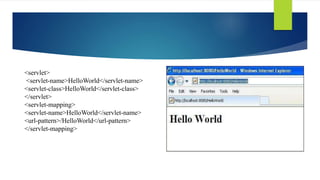
<servlet>
<servlet-name>HelloWorld</servlet-name>
<servlet-class>HelloWorld</servlet-class>
</servlet>
<servlet-mapping>
<servlet-name>HelloWorld</servlet-name>
<url-pattern>/HelloWorld</url-pattern>
</servlet-mapping>
Servlet lifecycle
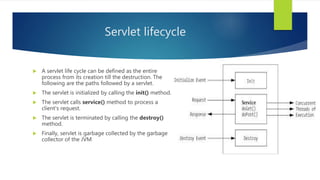
 A servlet life cycle can be defined as the entire
process from its creation till the destruction. The
following are the paths followed by a servlet.
 The servlet is initialized by calling the init() method.
 The servlet calls service() method to process a
client's request.
 The servlet is terminated by calling the destroy()
method.
 Finally, servlet is garbage collected by the garbage
collector of the JVM
Creating the form in eclipse IDE
 Creating new Html form
 Create new servlet.
 Hello servlet in action
 Hello servlet – HTTP request.
Servlet Session:
Session simply means a particular interval of time.
Session Tracking is a way to maintain state (data) of
an user. It is also known as session management in
servlet.
Http protocol is a stateless so we need to maintain state
using session tracking techniques. Each time user
requests to the server, server treats the request as the
new request. So we need to maintain the state of an
user to recognize to particular user.
HTTP is stateless that means each request is
considered as the new request. It is shown in the figure
given :
Session Tracking Techniques
There are four techniques used in Session tracking:
 Cookies
 Login & logout
 Hidden Form Field
 URL Rewriting
 HttpSession
Servlet Login and Logout Example using Cookies
 A cookie is a kind of information that is stored at client side.
 In the previous page, we learned a lot about cookie e.g. how to create cookie, how to delete cookie, how to get cookie etc.
 Here, we are going to create a login and logout example using servlet cookies.
 In this example, we are creating 3 links: login, logout and profile. User can't go to profile page until he/she is logged in. If user is
logged out, he need to login again to visit profile.
 In this application, we have created following files.
o index.html
o link.html
o login.html
o LoginServlet.java
o LogoutServlet.java
o ProfileServlet.java
o web.xml
Index.html
 <!DOCTYPE html>
 <html>
 <head>
 <meta charset="ISO-8859-1">
 <title>Servlet Login Example</title>
 </head>
 <body>
 <h1>Welcome to Login App by Cookie</h1>
 <a href="login.html">Login</a>|
 <a href="LogoutServlet">Logout</a>|
 <a href="ProfileServlet">Profile</a>
 </body>
 </html>
Link.html
 <a href="login.html">Login</a> |
 <a href="LogoutServlet">Logout</a>
 <a href="ProfileServlet">Profile</a>
 <hr>
login.html
1. <form action="LoginServlet" method="post">
2. Name:<input type="text" name="name"><br>
3. Password:<input type="password" name="password"><br>
4. <input type="submit" value="login">
5. </form>
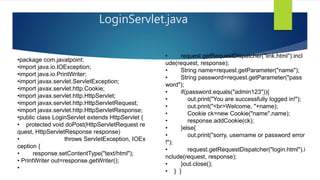
LoginServlet.java
•package com.javatpoint;
•import java.io.IOException;
•import java.io.PrintWriter;
•import javax.servlet.ServletException;
•import javax.servlet.http.Cookie;
•import javax.servlet.http.HttpServlet;
•import javax.servlet.http.HttpServletRequest;
•import javax.servlet.http.HttpServletResponse;
•public class LoginServlet extends HttpServlet {
• protected void doPost(HttpServletRequest re
quest, HttpServletResponse response)
• throws ServletException, IOEx
ception {
• response.setContentType("text/html");
• PrintWriter out=response.getWriter();
•
• request.getRequestDispatcher("link.html").incl
ude(request, response);
• String name=request.getParameter("name");
• String password=request.getParameter("pass
word");
• if(password.equals("admin123")){
• out.print("You are successfully logged in!");
• out.print("<br>Welcome, "+name);
• Cookie ck=new Cookie("name",name);
• response.addCookie(ck);
• }else{
• out.print("sorry, username or password error
!");
• request.getRequestDispatcher("login.html").i
nclude(request, response);
• }out.close();
• } }
web.xml
 <?xml version="1.0" encoding="UTF-8"?>
 <web-app xmlns:xsi="http://www.w3.org/2001/XMLSchema-
instance"
 xmlns="http://java.sun.com/xml/ns/javaee" xsi:schemaLocation="http://
java.sun.com/xml/ns/javaee
 http://java.sun.com/xml/ns/javaee/web-
app_2_5.xsd" id="WebApp_ID" version="2.5">
 <servlet>
 <description></description>
 <display-name>LoginServlet</display-name>
 <servlet-name>LoginServlet</servlet-name>
 <servlet-class>com.javatpoint.LoginServlet</servlet-class>
 </servlet>
 <servlet-mapping>
 <servlet-name>LoginServlet</servlet-name>
 <url-pattern>/LoginServlet</url-pattern>
 </servlet-mapping>
 <servlet>
 <description></description>
 <display-name>ProfileServlet</display-name>
 <servlet-name>ProfileServlet</servlet-name>
 <servlet-class>com.javatpoint.ProfileServlet</servlet-class>
 </servlet> <servlet-mapping>
 <servlet-name>ProfileServlet</servlet-name>
 <url-pattern>/ProfileServlet</url-pattern>
 </servlet-mapping> <servlet>
 <description></description>
 <display-name>LogoutServlet</display-name>
 <servlet-name>LogoutServlet</servlet-name>
 <servlet-class>com.javatpoint.LogoutServlet</servlet-class>
 </servlet> <servlet-mapping>
 <servlet-name>LogoutServlet</servlet-name>
 <url-pattern>/LogoutServlet</url-pattern>
 </servlet-mapping>
 </web-app>
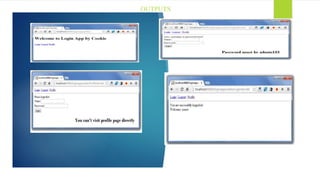
OUTPUTS
THANK YOU

Jdbc

  • 1.
  • 2.
    Topics to becovered  JDBC  Architecture  Components  Demo program  SERVLETS  Lifecycle  Servlet deployment  Session
  • 3.
    What is JDBC? Javadatabase connectivity (JDBC) is the Java Soft specification of a standard application programming interface (API) that allows Java programs to access database management systems. The JDBC API consists of a set of interfaces and classes written in the Java programming language.
  • 4.
    JDBC Architecture JDBC API:This provides the application-to-JDBC Manager connection. JDBC Driver API: This supports the JDBC Manager-to-Driver Connection. The JDBC API uses a driver manager and database-specific drivers to provide transparent connectivity to heterogeneous databases. The JDBC driver manager ensures that the correct driver is used to access each data source. The driver manager is capable of supporting multiple concurrent drivers connected to multiple heterogeneous databases
  • 5.
    JDBC Components  TheJDBC API provides the following interfaces and classes −  Driver Manager: This class manages a list of database drivers. Matches connection requests from the java application with the proper database driver using communication sub protocol. The first driver that recognizes a certain subprotocol under JDBC will be used to establish a database Connection.  Driver: This interface handles the communications with the database server. You will interact directly with Driver objects very rarely. Instead, you use Driver Manager objects, which manages objects of this type. It also abstracts the details associated with working with Driver objects.
  • 6.
     Connection: Thisinterface with all methods for contacting a database. The connection object object represents communication context, i.e., all communication with database is through connection object only.  Statement: You use objects created from this interface to submit the SQL statements to the database. Some derived interfaces accept parameters in addition to executing stored procedures.  Result Set: These objects hold data retrieved from a database after you execute an SQL query query using Statement objects. It acts as an iterator to allow you to move through its data.  SQL Exception: This class handles any errors that occur in a database application.
  • 7.
    JDBC Program  packageDAY1;  public class JdbcDemo1 {  public static void main(String[] args) {  JdbccDao jdbcDao = new JdbccDao();  jdbcDao.getConnection();  }  }
  • 8.
    JDBC Program  importjava.sql.Connection;  import java.sql.DriverManager;  import java.sql.SQLException;  import com.mysql.cj.xdevapi.Statement;  public class JdbccDao {  public void getConnection() {  String URL = "jdbc:mysql://localhost:3306/CSE_b";  Connection con = null;  try {  Class.forName("com.mysql.cj.jdbc.Driver");  con = DriverManager.getConnection(URL,"root","tiger");  Statement st = (Statement) con.createStatement();  ((java.sql.Statement) st).executeUpdate("insert into employee (empName,salary,loginId ,password)value ('bindhu',520.520,'bindhu520','password')");  } catch (ClassNotFoundException e) {  e.printStackTrace();  } catch (SQLException e) {  e.printStackTrace();  }finally{  try {  con.close();  } catch (SQLException e) {  e.printStackTrace();  }}  }private Object Update(String string) {  return null;}}
  • 9.
    SERVLETS  Servlets areJava classes which service HTTP requests and implement the javax.servlet.Servlet interface. Web application developers typically write servlets that extend javax.servlet.http.HttpServlet, an abstract class that implements the Servlet interface and is specially designed to handle HTTP requests.  Steps to run servlets:  First create a new web application.  Add new servlet to the web application.  Run the servlet  The servlet in action.
  • 10.
    War File  Awar (web archive) File contains files of a web project. It may have servlet, xml, jsp, image, html, css, js etc. files.  Here, we will discuss what is war file, how to create war file, how to deploy war file and how to extract war file.  To create war file, you need to use jar tool of JDK. You need to use -c switch of jar, to create the war file.
  • 11.
     Go insidethe project directory of your project (outside the WEB-INF), then write the following command: jar -cvf projectname.war *  Here, -c is used to create file, -v to generate the verbose output and -f to specify the archive file name. The * (asterisk) symbol signifies that all the files of this directory (including sub directory).  o extract the war file, you need to use -x switch of jar tool of JDK. Let's see the command to extract the war file. jar -xvf projectname.war
  • 12.
    Servlets example // Importrequired java libraries import java.io.*; import javax.servlet.*; import javax.servlet.http.*; // Extend HttpServlet class public class HelloWorld extends HttpServlet { private String message; public void init() throws ServletException { // Do required initialization message = "Hello World"; } public void doGet(HttpServletRequest request, HttpServletResponse response) throws ServletException, IOException { // Set response content type response.setContentType("text/html"); // Actual logic goes here. PrintWriter out = response.getWriter(); out.println("<h1>" + message + "</h1>"); } public void destroy() { // do nothing. } }
  • 13.
    Compiling a Servlet Letus create a file with name HelloWorld.java with the code shown above. Place this file at C:ServletDevel (in Windows) or at /usr/ServletDevel (in Unix). This path location must be added to CLASSPATH before proceeding further. Assuming your environment is setup properly, go in ServletDevel directory and compile HelloWorld.java as follows − $ javac HelloWorld.java
  • 14.
    If the servletdepends on any other libraries, you have to include those JAR files on your CLASSPATH as well. I have included only servlet-api.jar JAR file because I'm not using any other library in Hello World program. This command line uses the built-in javac compiler that comes with the Sun Microsystems Java Software Development Kit (JDK). For this command to work properly, you have to include the location of the Java SDK that you are using in the PATH environment variable. If everything goes fine, above compilation would produce HelloWorld.class file in the same directory. Next section would explain how a compiled servlet would be deployed in production.
  • 15.
    Servlet Deployment A servletapplication is located at the path <Tomcat-installationdirectory>/webapps/ROOT and the class file would reside in <Tomcat-installationdirectory>/webapps/ROOT/WEB- INF/classes. If you have a fully qualified class name of com.myorg.MyServlet, then this servlet class must be located in WEB-INF/classes/com/myorg/MyServlet.class. For now, let us copy HelloWorld.class into <Tomcat- installationdirectory>/webapps/ROOT/WEB-INF/classes and create following entries in web.xml file located in <Tomcat-installation-directory>/webapps/ROOT/WEB-INF/
  • 16.
  • 17.
    Servlet lifecycle  Aservlet life cycle can be defined as the entire process from its creation till the destruction. The following are the paths followed by a servlet.  The servlet is initialized by calling the init() method.  The servlet calls service() method to process a client's request.  The servlet is terminated by calling the destroy() method.  Finally, servlet is garbage collected by the garbage collector of the JVM
  • 18.
    Creating the formin eclipse IDE  Creating new Html form  Create new servlet.  Hello servlet in action  Hello servlet – HTTP request.
  • 19.
    Servlet Session: Session simplymeans a particular interval of time. Session Tracking is a way to maintain state (data) of an user. It is also known as session management in servlet. Http protocol is a stateless so we need to maintain state using session tracking techniques. Each time user requests to the server, server treats the request as the new request. So we need to maintain the state of an user to recognize to particular user. HTTP is stateless that means each request is considered as the new request. It is shown in the figure given :
  • 20.
    Session Tracking Techniques Thereare four techniques used in Session tracking:  Cookies  Login & logout  Hidden Form Field  URL Rewriting  HttpSession
  • 21.
    Servlet Login andLogout Example using Cookies  A cookie is a kind of information that is stored at client side.  In the previous page, we learned a lot about cookie e.g. how to create cookie, how to delete cookie, how to get cookie etc.  Here, we are going to create a login and logout example using servlet cookies.  In this example, we are creating 3 links: login, logout and profile. User can't go to profile page until he/she is logged in. If user is logged out, he need to login again to visit profile.
  • 22.
     In thisapplication, we have created following files. o index.html o link.html o login.html o LoginServlet.java o LogoutServlet.java o ProfileServlet.java o web.xml
  • 23.
    Index.html  <!DOCTYPE html> <html>  <head>  <meta charset="ISO-8859-1">  <title>Servlet Login Example</title>  </head>  <body>  <h1>Welcome to Login App by Cookie</h1>  <a href="login.html">Login</a>|  <a href="LogoutServlet">Logout</a>|  <a href="ProfileServlet">Profile</a>  </body>  </html> Link.html  <a href="login.html">Login</a> |  <a href="LogoutServlet">Logout</a>  <a href="ProfileServlet">Profile</a>  <hr>
  • 24.
    login.html 1. <form action="LoginServlet"method="post"> 2. Name:<input type="text" name="name"><br> 3. Password:<input type="password" name="password"><br> 4. <input type="submit" value="login"> 5. </form>
  • 25.
    LoginServlet.java •package com.javatpoint; •import java.io.IOException; •importjava.io.PrintWriter; •import javax.servlet.ServletException; •import javax.servlet.http.Cookie; •import javax.servlet.http.HttpServlet; •import javax.servlet.http.HttpServletRequest; •import javax.servlet.http.HttpServletResponse; •public class LoginServlet extends HttpServlet { • protected void doPost(HttpServletRequest re quest, HttpServletResponse response) • throws ServletException, IOEx ception { • response.setContentType("text/html"); • PrintWriter out=response.getWriter(); • • request.getRequestDispatcher("link.html").incl ude(request, response); • String name=request.getParameter("name"); • String password=request.getParameter("pass word"); • if(password.equals("admin123")){ • out.print("You are successfully logged in!"); • out.print("<br>Welcome, "+name); • Cookie ck=new Cookie("name",name); • response.addCookie(ck); • }else{ • out.print("sorry, username or password error !"); • request.getRequestDispatcher("login.html").i nclude(request, response); • }out.close(); • } }
  • 26.
    web.xml  <?xml version="1.0"encoding="UTF-8"?>  <web-app xmlns:xsi="http://www.w3.org/2001/XMLSchema- instance"  xmlns="http://java.sun.com/xml/ns/javaee" xsi:schemaLocation="http:// java.sun.com/xml/ns/javaee  http://java.sun.com/xml/ns/javaee/web- app_2_5.xsd" id="WebApp_ID" version="2.5">  <servlet>  <description></description>  <display-name>LoginServlet</display-name>  <servlet-name>LoginServlet</servlet-name>  <servlet-class>com.javatpoint.LoginServlet</servlet-class>  </servlet>  <servlet-mapping>  <servlet-name>LoginServlet</servlet-name>  <url-pattern>/LoginServlet</url-pattern>  </servlet-mapping>  <servlet>  <description></description>  <display-name>ProfileServlet</display-name>  <servlet-name>ProfileServlet</servlet-name>  <servlet-class>com.javatpoint.ProfileServlet</servlet-class>  </servlet> <servlet-mapping>  <servlet-name>ProfileServlet</servlet-name>  <url-pattern>/ProfileServlet</url-pattern>  </servlet-mapping> <servlet>  <description></description>  <display-name>LogoutServlet</display-name>  <servlet-name>LogoutServlet</servlet-name>  <servlet-class>com.javatpoint.LogoutServlet</servlet-class>  </servlet> <servlet-mapping>  <servlet-name>LogoutServlet</servlet-name>  <url-pattern>/LogoutServlet</url-pattern>  </servlet-mapping>  </web-app>
  • 27.
  • 28.