Docker in a nutshell
A short introduction
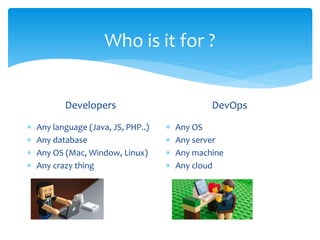
Who is it for ?
Developers
 Any language (Java, JS, PHP..)
 Any database
 Any OS (Mac, Window, Linux)
 Any crazy thing
DevOps
 Any OS
 Any server
 Any machine
 Any cloud
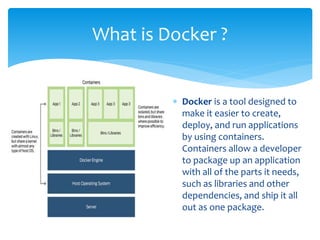
What is Docker ?
 Docker is a tool designed to
make it easier to create,
deploy, and run applications
by using containers.
Containers allow a developer
to package up an application
with all of the parts it needs,
such as libraries and other
dependencies, and ship it all
out as one package.
Docker Components & Elements
Why use Docker ?
Why use containers ?
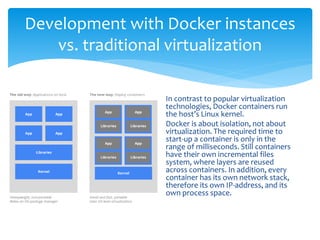
Development with Docker instances
vs. traditional virtualization
In contrast to popular virtualization
technologies, Docker containers run
the host’s Linux kernel.
Docker is about isolation, not about
virtualization. The required time to
start-up a container is only in the
range of milliseconds. Still containers
have their own incremental files
system, where layers are reused
across containers. In addition, every
container has its own network stack,
therefore its own IP-address, and its
own process space.
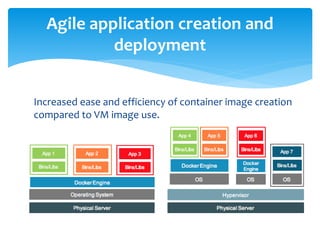
Increased ease and efficiency of container image creation
compared to VM image use.
Agile application creation and
deployment
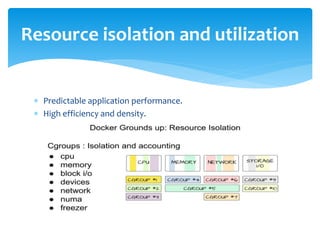
 Predictable application performance.
 High efficiency and density.
Resource isolation and utilization
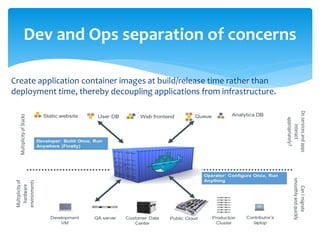
Create application container images at build/release time rather than
deployment time, thereby decoupling applications from infrastructure.
Dev and Ops separation of concerns
Loosely coupled, distributed, elastic,
liberated micro-service/micro-app
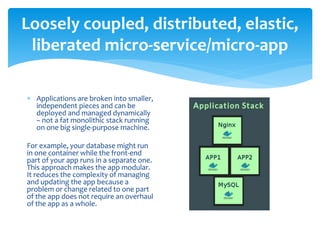
 Applications are broken into smaller,
independent pieces and can be
deployed and managed dynamically
– not a fat monolithic stack running
on one big single-purpose machine.
For example, your database might run
in one container while the front-end
part of your app runs in a separate one.
This approach makes the app modular.
It reduces the complexity of managing
and updating the app because a
problem or change related to one part
of the app does not require an overhaul
of the app as a whole.
Runs the same on a laptop as it does in the cloud:
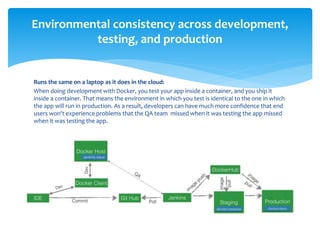
When doing development with Docker, you test your app inside a container, and you ship it
inside a container. That means the environment in which you test is identical to the one in which
the app will run in production. As a result, developers can have much more confidence that end
users won't experience problems that the QA team missed when it was testing the app missed
when it was testing the app.
Environmental consistency across development,
testing, and production
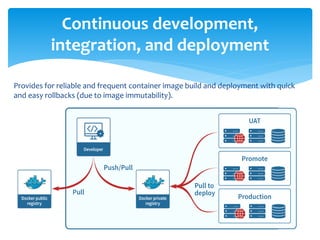
Provides for reliable and frequent container image build and deployment with quick
and easy rollbacks (due to image immutability).
Continuous development,
integration, and deployment
 Raises the level of abstraction from running an OS on virtual
hardware to run an application on an OS using logical resources.
 Because a Docker app runs inside a container, and the container can
run on any system with Docker installed, there is no need to build
the app and configure it for multiple types of hardware platforms or
operating systems where it will run.
You only have to build it once for Docker.
Application-centric management
 https://docs.docker.com
 https://kubernetes.io/docs/concepts/overview/what-is-
kubernetes/
References/ Useful resources

Docker containers intro

  • 1.
    Docker in anutshell A short introduction
  • 2.
    Who is itfor ? Developers  Any language (Java, JS, PHP..)  Any database  Any OS (Mac, Window, Linux)  Any crazy thing DevOps  Any OS  Any server  Any machine  Any cloud
  • 3.
    What is Docker?  Docker is a tool designed to make it easier to create, deploy, and run applications by using containers. Containers allow a developer to package up an application with all of the parts it needs, such as libraries and other dependencies, and ship it all out as one package.
  • 4.
  • 5.
    Why use Docker? Why use containers ?
  • 6.
    Development with Dockerinstances vs. traditional virtualization In contrast to popular virtualization technologies, Docker containers run the host’s Linux kernel. Docker is about isolation, not about virtualization. The required time to start-up a container is only in the range of milliseconds. Still containers have their own incremental files system, where layers are reused across containers. In addition, every container has its own network stack, therefore its own IP-address, and its own process space.
  • 7.
    Increased ease andefficiency of container image creation compared to VM image use. Agile application creation and deployment
  • 8.
     Predictable applicationperformance.  High efficiency and density. Resource isolation and utilization
  • 9.
    Create application containerimages at build/release time rather than deployment time, thereby decoupling applications from infrastructure. Dev and Ops separation of concerns
  • 10.
    Loosely coupled, distributed,elastic, liberated micro-service/micro-app  Applications are broken into smaller, independent pieces and can be deployed and managed dynamically – not a fat monolithic stack running on one big single-purpose machine. For example, your database might run in one container while the front-end part of your app runs in a separate one. This approach makes the app modular. It reduces the complexity of managing and updating the app because a problem or change related to one part of the app does not require an overhaul of the app as a whole.
  • 11.
    Runs the sameon a laptop as it does in the cloud: When doing development with Docker, you test your app inside a container, and you ship it inside a container. That means the environment in which you test is identical to the one in which the app will run in production. As a result, developers can have much more confidence that end users won't experience problems that the QA team missed when it was testing the app missed when it was testing the app. Environmental consistency across development, testing, and production
  • 12.
    Provides for reliableand frequent container image build and deployment with quick and easy rollbacks (due to image immutability). Continuous development, integration, and deployment
  • 13.
     Raises thelevel of abstraction from running an OS on virtual hardware to run an application on an OS using logical resources.  Because a Docker app runs inside a container, and the container can run on any system with Docker installed, there is no need to build the app and configure it for multiple types of hardware platforms or operating systems where it will run. You only have to build it once for Docker. Application-centric management
  • 14.