TO
ENTERPRISE JAVA
INTRODUCTION
JAVA
Programming
Language
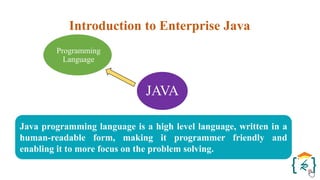
Java programming language is a high level language, written in a
human-readable form, making it programmer friendly and
enabling it to more focus on the problem solving.
Introduction to Enterprise Java
JAVA
Platform
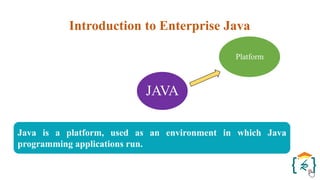
Java is a platform, used as an environment in which Java
programming applications run.
Introduction to Enterprise Java
JAVA
Programming
Language Platform
Introduction to Enterprise Java
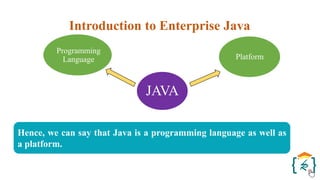
Hence, we can say that Java is a programming language as well as
a platform.
JVM and API
JVM and API
JVM and API
JVM and API
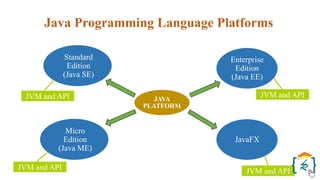
JAVA
PLATFORM
Standard
Edition
(Java SE)
Enterprise
Edition
(Java EE)
Java Programming Language Platforms
Micro
Edition
(Java ME)
JavaFX
JVM and API
JVM and API
JVM and API
JVM and API
JAVA
PLATFORM
Standard
Edition
(Java SE)
Enterprise
Edition
(Java EE)
Micro
Edition
(Java ME)
JavaFX
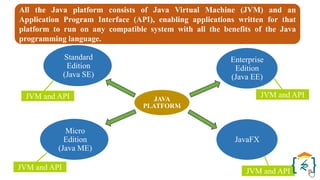
All the Java platform consists of Java Virtual Machine (JVM) and an
Application Program Interface (API), enabling applications written for that
platform to run on any compatible system with all the benefits of the Java
programming language.
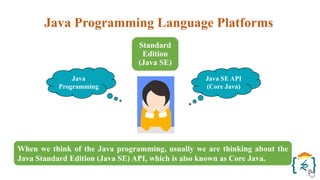
When we think of the Java programming, usually we are thinking about the
Java Standard Edition (Java SE) API, which is also known as Core Java.
Java Programming Language Platforms
Standard
Edition
(Java SE)
Java
Programming
Java SE API
(Core Java)
Java Programming Language Platforms
Standard
Edition
(Java SE)
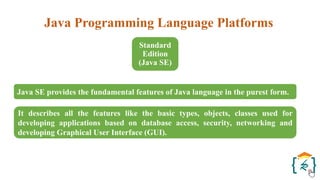
Java SE provides the fundamental features of Java language in the purest form.
It describes all the features like the basic types, objects, classes used for
developing applications based on database access, security, networking and
developing Graphical User Interface (GUI).
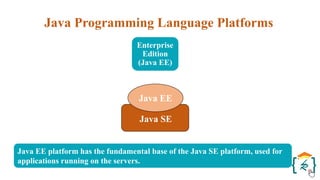
Java EE platform has the fundamental base of the Java SE platform, used for
applications running on the servers.
Java Programming Language Platforms
Enterprise
Edition
(Java EE)
Java SE
Java EE
Java Programming Language Platforms
Enterprise
Edition
(Java EE)
It serves an Application Programming Interface (API) and runtime
environment for creating, developing and executing extensive, scalable, reliable
and multi-tiered business applications.
Virtual
Machine
Mobile
API
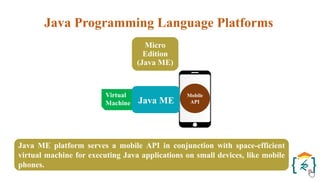
Java ME platform serves a mobile API in conjunction with space-efficient
virtual machine for executing Java applications on small devices, like mobile
phones.
Java Programming Language Platforms
Micro
Edition
(Java ME)
Java ME
Java Programming Language Platforms
Micro
Edition
(Java ME)
The API is a subset of the Java SE API having exceptional class libraries
beneficial for developing small device applications.
JavaFX Script
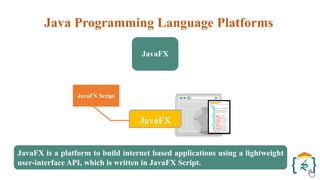
JavaFX is a platform to build internet based applications using a lightweight
user-interface API, which is written in JavaFX Script.
Java Programming Language Platforms
JavaFX
JavaFX
Java Programming Language Platforms
JavaFX
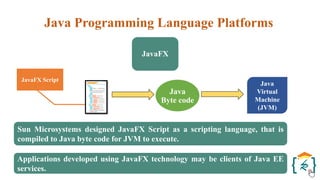
Sun Microsystems designed JavaFX Script as a scripting language, that is
compiled to Java byte code for JVM to execute.
Applications developed using JavaFX technology may be clients of Java EE
services.
JavaFX Script
Java
Virtual
Machine
(JVM)
Java
Byte code
What is Enterprise Application?
Enterprise
Edition
(Java EE)
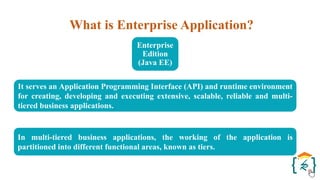
It serves an Application Programming Interface (API) and runtime environment
for creating, developing and executing extensive, scalable, reliable and multi-
tiered business applications.
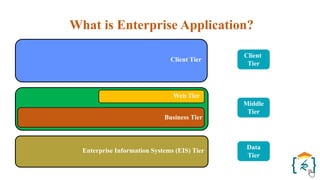
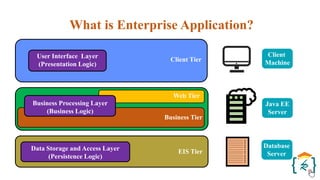
In multi-tiered business applications, the working of the application is
partitioned into different functional areas, known as tiers.
What is Enterprise Application?
Client Tier
Web Tier
Business Tier
Enterprise Information Systems (EIS) Tier
Client
Tier
Middle
Tier
Data
Tier
What is Enterprise Application?
Client Tier
Web Tier
Business Tier
EIS Tier
Java EE
Server
Client
Machine
Database
Server
User Interface Layer
(Presentation Logic)
Business Processing Layer
(Business Logic)
Data Storage and Access Layer
(Persistence Logic)
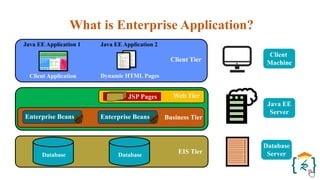
What is Enterprise Application?
Java EE Application 1 Java EE Application 2
Client Tier
Client Application Dynamic HTML Pages
Web Tier
Business Tier
EIS Tier
JSP Pages
Enterprise Beans Enterprise Beans
Database Database
Java EE
Server
Client
Machine
Database
Server
Java Servlet Technology
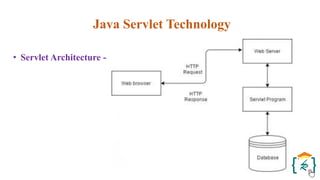
• Servlets are the Java programs that runs on the Java-enabled web
server or application server.
• They are used to handle the request obtained from the web server,
process the request, produce the response, then send response back to
the web server.
• Properties of Servlets :
- Servlets work on the server-side.
- Servlets are capable of handling complex requests obtained from
web server.
Java Servlet Technology
• Execution of Servlets involves six basic steps:
1) The clients send the request to the web server.
2) The web server receives the request.
3) The web server passes the request to the corresponding servlet.
4) The servlet processes the request and generates the response in
the form of output.
5) The servlet sends the response back to the web server.
6) The web server sends the response back to the client and the
client browser displays it on the screen.
Java Servlet Technology
• Servlet Architecture -
Java Servlet Technology
Need For Server-Side Extensions (Need for Dynamic Content)
• The server-side extensions are nothing but the technologies that are
used to create dynamic Web pages.
• Actually, to provide the facility of dynamic Web pages, Web pages need
a container or Web server.
• To meet this requirement, independent Web server providers offer
some proprietary solutions in the form of APIs(Application
Programming Interface).
Java Servlet Technology
Need For Server-Side Extensions (Need for Dynamic Content)
• These APIs allow us to build programs that can run with a Web server.
• In this case, Java Servlet is also one of the component APIs of Java
Platform Enterprise Edition which sets standards for creating dynamic
Web applications in Java.
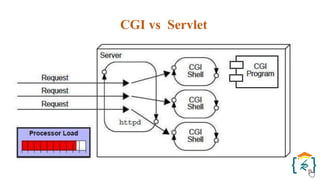
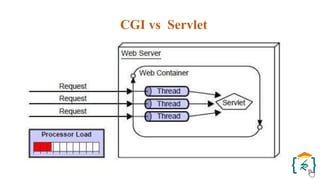
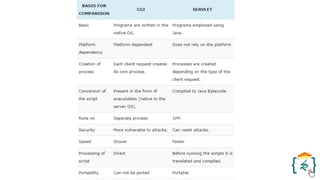
CGI vs Servlet
CGI (Common Gateway Interface)
• CGI technology enables the web server to call an external program and
pass HTTP request information to the external program to process the
request. For each request, it starts a new process.
• There are many problems in CGI technology:
- If the number of clients increases, it takes more time for sending the
response.
- For each request, it starts a process, and the web server is limited to
start processes.
- It uses platform dependent language e.g. C, C++, perl.
CGI vs Servlet
CGI vs Servlet
Servlet
• There are many advantages of Servlet over CGI. The web container
creates threads for handling the multiple requests to the Servlet.
• Threads have many benefits over the Processes such as they share a
common memory area, lightweight, cost of communication between the
threads are low.
CGI vs Servlet
Servlet
• The advantages of Servlet are as follows:
- Better performance: because it creates a thread for each request,
not process.
- Portability: because it uses Java language.
- Robust: JVM manages Servlets, so we don't need to worry about
the memory leak, garbage collection, etc.
- Secure: because it uses java language.
CGI vs Servlet
Servlet Lifecycle
• A servlet life cycle can be defined as the entire process from its creation
till the destruction.
• The following are the paths followed by a servlet -
- The servlet is initialized by calling the init() method.
- The servlet calls service() method to process a client's request.
- The servlet is terminated by calling the destroy() method.
- Finally, servlet is garbage collected by the garbage collector of the
JVM.
Servlet Lifecycle
• The init() Method - It is called only once. It is called only when the
servlet is created, and not called for any user requests afterwards. So, it
is used for one-time initializations, just as with the init method of
applets.
• The service() Method - The service() method is the main method to
perform the actual task. The servlet container (i.e. web server) calls the
service() method to handle requests coming from the client (browsers)
and to write the formatted response back to the client.
Servlet Lifecycle
• The doGet() Method - A GET request results from a normal request for
a URL or from an HTML form that has no METHOD specified and it
should be handled by doGet() method.
• The doPost() Method - A POST request results from an HTML form
that specifically lists POST as the METHOD and it should be handled
by doPost() method.
Servlet Lifecycle
• The destroy() Method - The destroy() method is called only once at the
end of the life cycle of a servlet. This method gives your servlet a chance
to close database connections, halt background threads, write cookie
lists or hit counts to disk, and perform other such cleanup activities.
Servlet Lifecycle
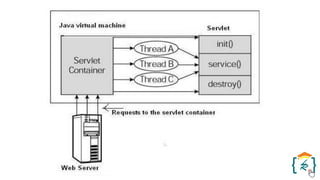
• The following figure depicts a typical servlet life-cycle scenario -
- First the HTTP requests coming to the server are delegated to the
servlet container.
- The servlet container loads the servlet before invoking the service()
method.
- Then the servlet container handles multiple requests by spawning
multiple threads, each thread executing the service() method of a
single instance of the servlet.
JDBC
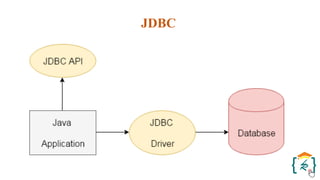
• JDBC stands for Java Database Connectivity. JDBC is a Java API to
connect and execute the query with the database.
• It is a part of JavaSE (Java Standard Edition).
• JDBC API uses JDBC drivers to connect with the database.
• There are four types of JDBC drivers:
- JDBC-ODBC Bridge Driver,
- Native Driver,
- Network Protocol Driver, and
- Thin Driver servlet.
JDBC
JDBC
• Before JDBC, ODBC API was the database API to connect and execute
the query with the database.
• But, ODBC API uses ODBC (Open Database Connectivity) driver
which is written in C language (i.e. platform dependent and unsecured).
• That is why Java has defined its own API (JDBC API) that uses JDBC
drivers (written in Java language).
• We can use JDBC API to handle database using Java program and can
perform the following activities:
- Connect to the database.
- Execute queries and update statements to the database.
- Retrieve the result received from the database.
JDBC
• JDBC includes four components:
1)The JDBC API
2)JDBC Driver Manager
3)JDBC Test Suite
4)JDBC-ODBC Bridge
JDBC
• JDBC includes four components:
1) The JDBC API –
- The JDBC API provides programmatic access to relational data
from the Java programming language.
- Using the JDBC API, applications can execute SQL statements,
retrieve results, and propagate changes back to an underlying data
source.
- The JDBC API can also interact with multiple data sources in a
distributed, heterogeneous environment.
JDBC
• JDBC includes four components:
2) JDBC Driver Manager -
- The JDBC DriverManager class defines objects which can connect
Java applications to a JDBC driver.
- DriverManager has traditionally been the backbone of the JDBC
architecture. It is quite small and simple.
- The Standard Extension packages javax.naming and javax.sql let
you use a DataSource object registered with a Java Naming and
Directory Interface (JNDI) naming service to establish a connection
with a data source.
JDBC
• JDBC includes four components:
3) JDBC Test Suite -
- The JDBC driver test suite helps you to determine that JDBC
drivers will run your program.
- These tests are not comprehensive or exhaustive, but they do
exercise many of the important features in the JDBC API.
JDBC
• JDBC includes four components:
4) JDBC-ODBC Bridge -
- The Java Software bridge provides JDBC access via ODBC drivers.
- You need to load ODBC binary code onto each client machine that
uses this driver.
- As a result, the ODBC driver is most appropriate on a corporate
network where client installations are not a major problem, or for
application server code written in Java in a three-tier architecture.
JDBC
• The following are the steps for connectivity between Java program and
database (Accessing Database) :
1)Loading the Driver
2)Create the connections
3)Create a statement
4)Execute the query
JDBC
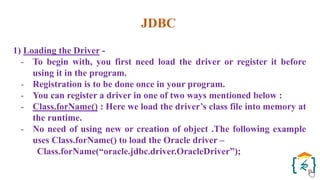
1) Loading the Driver -
- To begin with, you first need load the driver or register it before
using it in the program.
- Registration is to be done once in your program.
- You can register a driver in one of two ways mentioned below :
- Class.forName() : Here we load the driver’s class file into memory at
the runtime.
- No need of using new or creation of object .The following example
uses Class.forName() to load the Oracle driver –
Class.forName(“oracle.jdbc.driver.OracleDriver”);
JDBC
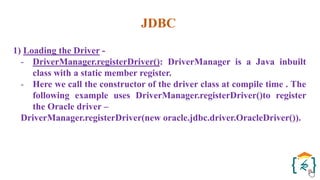
1) Loading the Driver -
- DriverManager.registerDriver(): DriverManager is a Java inbuilt
class with a static member register.
- Here we call the constructor of the driver class at compile time . The
following example uses DriverManager.registerDriver()to register
the Oracle driver –
DriverManager.registerDriver(new oracle.jdbc.driver.OracleDriver()).
JDBC
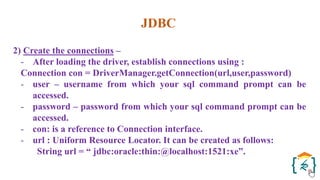
2) Create the connections –
- After loading the driver, establish connections using :
Connection con = DriverManager.getConnection(url,user,password)
- user – username from which your sql command prompt can be
accessed.
- password – password from which your sql command prompt can be
accessed.
- con: is a reference to Connection interface.
- url : Uniform Resource Locator. It can be created as follows:
String url = “ jdbc:oracle:thin:@localhost:1521:xe”.
JDBC
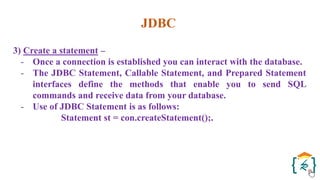
3) Create a statement –
- Once a connection is established you can interact with the database.
- The JDBC Statement, Callable Statement, and Prepared Statement
interfaces define the methods that enable you to send SQL
commands and receive data from your database.
- Use of JDBC Statement is as follows:
Statement st = con.createStatement();.
JDBC
4) Execute the query –
- Now comes the most important part i.e executing the query. Query
here is an SQL Query . Now we know we can have multiple types of
queries. Some of them are as follows:
- Query for updating / inserting table in a database.
- Query for retrieving data.
- The executeQuery() method of Statement interface is used to execute
queries of retrieving values from the database. This method returns
the object of ResultSet that can be used to get all the records of a
table. The executeUpdate(sql query) method ofStatement interface is
used to execute queries of updating/inserting.
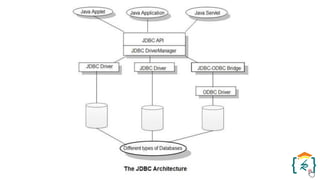
JDBC Architecture
- The JDBC API supports both two-tier and three-tier processing models
for database access but in general, JDBC Architecture consists of two
layers −
1) JDBC API: This provides the application-to-JDBC Manager
connection.
2)JDBC Driver API: This supports the JDBC Manager-to-
Driver Connection.
- The JDBC API uses a driver manager and database-specific drivers to
provide transparent connectivity to heterogeneous databases.
JDBC Architecture
- The JDBC driver manager ensures that the correct driver is used to
access each data source. The driver manager is capable of supporting
multiple concurrent drivers connected to multiple heterogeneous
databases.
JDBC Architecture
- JDBC supports two types of processing models for accessing database
i.e. two-tier and three-tier.
1. Two-tier Architecture:
- This architecture helps java program or application to directly
communicate with the database.
- It needs a JDBC driver to communicate with a specific database.
- Query or request is sent by the user to the database and results are
received back by the user.
- The database may be present on the same machine or any remote
machine connected via a network.
- This approach is called client-server architecture or configuration.
JDBC Architecture
2. Three-tier Architecture:
- In this, there is no direct communication. Requests are sent to the
middle tier i.e. HTML browser sends a request to java application
which is then further sent to the database.
- Database processes the request and sends the result back to the middle
tier which then communicates with the user.
- It increases the performance and simplifies the application
deployment.
JDBC Architecture
Components of JDBC Architecture
• Driver Manager: It is a class that contains a list of all drivers. When a
connection request is received, it matches the request with the
appropriate database driver using a protocol called communication
sub-protocol. The driver that matches is used to establish a connection.
• Driver: It is an interface which controls the communication with the
database server. DriverManager objects are used to perform
communication.
• Connection: It is an interface which contains methods to contact a
database.
JDBC Architecture
Components of JDBC Architecture
• Statement: This interface creates an object to submit SQL queries or
statements to the database.
• ResultSet: This contains the results retrieved after the execution of the
SQL statements or queries.
• SQLException: Any errors that occur in database application are
handled by this class.
JDBC Architecture
Interfaces
The java.sql package consists of many interfaces. Some popular
interfaces are mentioned below:
• Driver Interface: This interface allows for multiple database drivers.
DriverManager objects are created to communicate with the database.
These objects are created by DriverManager.registerDriver();
• Connection Interface: Connection interface establishes the connection
i.e. session between java program and the database. It has many
methods like rollback(), close() etc.
JDBC Architecture
Interfaces
• Statement Interface: This interface provides methods for the execution
of the SQL queries. It provides factory methods to get a ResultSet
object. Some methods of statement interface are executeQuery(),
executeUpdate() etc.
• PreparedStatement Interface: This interface helps when the SQL
queries need to implement many times. It accepts input parameters
during runtime.
JDBC Architecture
Interfaces
• CallableStatement Interface: This interface is used when stored
procedures are to be accessed. It also accepts parameters during run
time.
• ResultSet Interface: This interface helps to store the result returned
after the execution of the SQL queries.
RequestDispatcher in Servlet
• The RequestDispatcher interface provides the facility of dispatching
the request to another resource it may be html, servlet or jsp.
• This interface can also be used to include the content of another
resource also.
• It is one of the way of servlet collaboration.
• There are two methods defined in the RequestDispatcher interface.
RequestDispatcher in Servlet
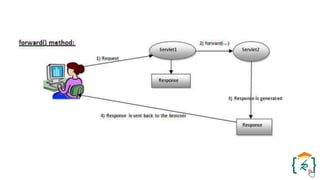
1) public void forward(ServletRequest request,ServletResponse
response)throws ServletException,java.io.IOException:Forwards a
request from a servlet to another resource (servlet, JSP file, or HTML
file) on the server.
RequestDispatcher in Servlet
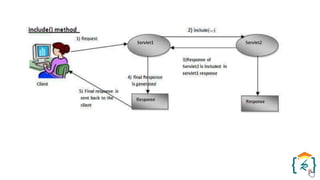
2) public void include(ServletRequest request,ServletResponse
response)throws ServletException,java.io.IOException:Includes the
content of a resource (servlet, JSP page, or HTML file) in the response.
Cookies and Sessions
Cookies
• A cookie is a small piece of information that is persisted between the
multiple client requests.
• A cookie has a name, a single value, and optional attributes such as a
comment, path and domain qualifiers, a maximum age, and a version
number.
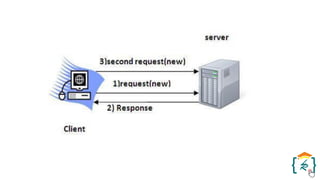
• Working of Cookies is by default, each request is considered as a new
request.
• In cookies technique, we add cookie with response from the servlet.
Cookies and Sessions
Cookies
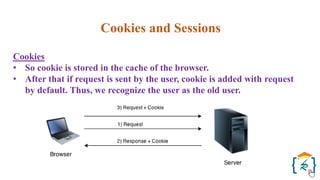
• So cookie is stored in the cache of the browser.
• After that if request is sent by the user, cookie is added with request
by default. Thus, we recognize the user as the old user.
Cookies and Sessions
Types of Cookies
1) Non-persistent cookie - It is valid for single session only. It is removed
each time when user closes the browser.
2) Persistent cookie - It is valid for multiple session . It is not removed
each time when user closes the browser. It is removed only if user logout
or signout.
Cookies and Sessions
Sessions
• Session simply means a particular interval of time.
• Session Tracking is a way to maintain state (data) of an user.
• It is also known as session management in servlet.
• Http protocol is a stateless so we need to maintain state using session
tracking techniques.
• Each time user requests to the server, server treats the request as the
new request.
• So we need to maintain the state of an user to recognize to particular
user.
Java Server Pages (JSP)
Introduction
• Java Server Pages (JSP) is a server-side programming technology that
enables the creation of dynamic, platform-independent method for
building Web-based applications.
• JSP have access to the entire family of Java APIs, including the JDBC
API to access enterprise databases.
Java Server Pages (JSP)
Why JSP?
• Performance is significantly better because JSP allows embedding
Dynamic Elements in HTML Pages itself instead of having separate
CGI files.
• JSP are always compiled before they are processed by the server
unlike CGI/Perl which requires the server to load an interpreter and
the target script each time the page is requested.
Java Server Pages (JSP)
Why JSP?
• JavaServer Pages are built on top of the Java Servlets API, so like
Servlets, JSP also has access to all the powerful Enterprise Java APIs,
including JDBC, JNDI, EJB, JAXP, etc.
• JSP pages can be used in combination with servlets that handle the
business logic, the model supported by Java servlet template engines.
Java Server Pages (JSP)
Why JSP?
• Finally, JSP is an integral part of Java EE, a complete platform for
enterprise class applications.
• This means that JSP can play a part in the simplest applications to the
most complex and demanding.
Java Server Pages (JSP)
Applications of JSP
1) JSP vs. Active Server Pages (ASP)
• The advantages of JSP are twofold. First, the dynamic part is written
in Java, not Visual Basic or other MS specific language, so it is more
powerful and easier to use. Second, it is portable to other operating
systems and non-Microsoft Web servers.
2) JSP vs. Pure Servlets
• It is more convenient to write (and to modify!) regular HTML than to
have plenty of println statements that generate the HTML.
Java Server Pages (JSP)
Applications of JSP
3) JSP vs. Server-Side Includes (SSI)
• SSI is really only intended for simple inclusions, not for "real"
programs that use form data, make database connections, and the
like.
4) JSP vs. JavaScript
• JavaScript can generate HTML dynamically on the client but can
hardly interact with the web server to perform complex tasks like
database access and image processing etc.
5) JSP vs. Static HTML
• Regular HTML, of course, cannot contain dynamic information.
Java Server Pages (JSP)
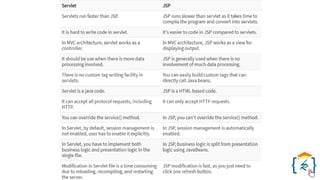
Servlet vs JSP
• Following is the distinguish between Servlet and JSP
Java Server Pages (JSP)
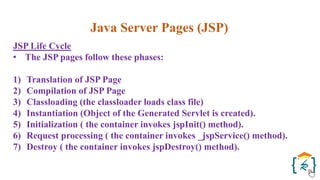
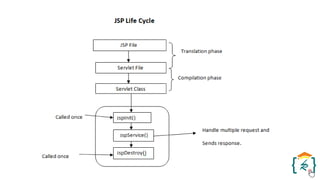
JSP Life Cycle
• The JSP pages follow these phases:
1) Translation of JSP Page
2) Compilation of JSP Page
3) Classloading (the classloader loads class file)
4) Instantiation (Object of the Generated Servlet is created).
5) Initialization ( the container invokes jspInit() method).
6) Request processing ( the container invokes _jspService() method).
7) Destroy ( the container invokes jspDestroy() method).
Java Server Pages (JSP)
JSP Comments
• JSP comment marks to text or statements that the JSP container
should ignore.
• A JSP comment is useful when you want to hide or "comment out", a
part of your JSP page.
• Following is the syntax of the JSP comments −
<%-- This is JSP comment --%>
Java Server Pages (JSP)
JSP Documents
• According to the JSP specification, a JSP page can be written in 2
formats:
1) JSP Page Format - A JSP page written in an HTML format with JSP
elements expressed as <% ... %> tags as described in the previous
section.
2) JSP Document Format - A JSP page written in an XML format with
JSP elements expressed as XML elements.
Java Server Pages (JSP)
JSP Elements - JSP Declaration
• A declaration tag is a piece of Java code for declaring variables,
methods and classes.
• If we declare a variable or method inside declaration tag it means that
the declaration is made inside the servlet class but outside the service
method.
• We can declare a static member, an instance variable (can declare a
number or string) and methods inside the declaration tag.
• Syntax of declaration tag :
<%! Dec var %>
• Here Dec var is the method or a variable inside the declaration tag.
Java Server Pages (JSP)
JSP Elements - JSP Scriptlet
• Scriptlet tag allows to write Java code into JSP file.
• JSP container moves statements in _jspservice() method while
generating servlet from jsp.
• For each request of the client, service method of the JSP gets invoked
hence the code inside the Scriptlet executes for every request.
• A Scriptlet contains java code that is executed every time JSP is
invoked.
• Syntax of Scriptlet tag:
<% java code %>
• Here <%%> tags are scriplets tag and within it, we can place java
code.
Java Server Pages (JSP)
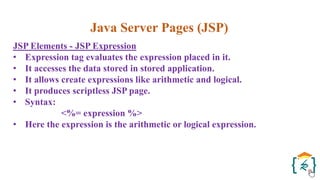
JSP Elements - JSP Expression
• Expression tag evaluates the expression placed in it.
• It accesses the data stored in stored application.
• It allows create expressions like arithmetic and logical.
• It produces scriptless JSP page.
• Syntax:
<%= expression %>
• Here the expression is the arithmetic or logical expression.
Java Server Pages (JSP)
JSP Elements - JSP Expression
• Expression tag evaluates the expression placed in it.
• It accesses the data stored in stored application.
• It allows create expressions like arithmetic and logical.
• It produces scriptless JSP page.
• Syntax:
<%= expression %>
• Here the expression is the arithmetic or logical expression.
Any Questions… ???
Enterprise Java, Servlet, JDBC and JSP.pdf

Enterprise Java, Servlet, JDBC and JSP.pdf

  • 2.
  • 3.
    JAVA Programming Language Java programming languageis a high level language, written in a human-readable form, making it programmer friendly and enabling it to more focus on the problem solving. Introduction to Enterprise Java
  • 4.
    JAVA Platform Java is aplatform, used as an environment in which Java programming applications run. Introduction to Enterprise Java
  • 5.
    JAVA Programming Language Platform Introduction toEnterprise Java Hence, we can say that Java is a programming language as well as a platform.
  • 6.
    JVM and API JVMand API JVM and API JVM and API JAVA PLATFORM Standard Edition (Java SE) Enterprise Edition (Java EE) Java Programming Language Platforms Micro Edition (Java ME) JavaFX
  • 7.
    JVM and API JVMand API JVM and API JVM and API JAVA PLATFORM Standard Edition (Java SE) Enterprise Edition (Java EE) Micro Edition (Java ME) JavaFX All the Java platform consists of Java Virtual Machine (JVM) and an Application Program Interface (API), enabling applications written for that platform to run on any compatible system with all the benefits of the Java programming language.
  • 8.
    When we thinkof the Java programming, usually we are thinking about the Java Standard Edition (Java SE) API, which is also known as Core Java. Java Programming Language Platforms Standard Edition (Java SE) Java Programming Java SE API (Core Java)
  • 9.
    Java Programming LanguagePlatforms Standard Edition (Java SE) Java SE provides the fundamental features of Java language in the purest form. It describes all the features like the basic types, objects, classes used for developing applications based on database access, security, networking and developing Graphical User Interface (GUI).
  • 10.
    Java EE platformhas the fundamental base of the Java SE platform, used for applications running on the servers. Java Programming Language Platforms Enterprise Edition (Java EE) Java SE Java EE
  • 11.
    Java Programming LanguagePlatforms Enterprise Edition (Java EE) It serves an Application Programming Interface (API) and runtime environment for creating, developing and executing extensive, scalable, reliable and multi-tiered business applications.
  • 12.
    Virtual Machine Mobile API Java ME platformserves a mobile API in conjunction with space-efficient virtual machine for executing Java applications on small devices, like mobile phones. Java Programming Language Platforms Micro Edition (Java ME) Java ME
  • 13.
    Java Programming LanguagePlatforms Micro Edition (Java ME) The API is a subset of the Java SE API having exceptional class libraries beneficial for developing small device applications.
  • 14.
    JavaFX Script JavaFX isa platform to build internet based applications using a lightweight user-interface API, which is written in JavaFX Script. Java Programming Language Platforms JavaFX JavaFX
  • 15.
    Java Programming LanguagePlatforms JavaFX Sun Microsystems designed JavaFX Script as a scripting language, that is compiled to Java byte code for JVM to execute. Applications developed using JavaFX technology may be clients of Java EE services. JavaFX Script Java Virtual Machine (JVM) Java Byte code
  • 16.
    What is EnterpriseApplication? Enterprise Edition (Java EE) It serves an Application Programming Interface (API) and runtime environment for creating, developing and executing extensive, scalable, reliable and multi- tiered business applications. In multi-tiered business applications, the working of the application is partitioned into different functional areas, known as tiers.
  • 17.
    What is EnterpriseApplication? Client Tier Web Tier Business Tier Enterprise Information Systems (EIS) Tier Client Tier Middle Tier Data Tier
  • 18.
    What is EnterpriseApplication? Client Tier Web Tier Business Tier EIS Tier Java EE Server Client Machine Database Server User Interface Layer (Presentation Logic) Business Processing Layer (Business Logic) Data Storage and Access Layer (Persistence Logic)
  • 19.
    What is EnterpriseApplication? Java EE Application 1 Java EE Application 2 Client Tier Client Application Dynamic HTML Pages Web Tier Business Tier EIS Tier JSP Pages Enterprise Beans Enterprise Beans Database Database Java EE Server Client Machine Database Server
  • 20.
    Java Servlet Technology •Servlets are the Java programs that runs on the Java-enabled web server or application server. • They are used to handle the request obtained from the web server, process the request, produce the response, then send response back to the web server. • Properties of Servlets : - Servlets work on the server-side. - Servlets are capable of handling complex requests obtained from web server.
  • 21.
    Java Servlet Technology •Execution of Servlets involves six basic steps: 1) The clients send the request to the web server. 2) The web server receives the request. 3) The web server passes the request to the corresponding servlet. 4) The servlet processes the request and generates the response in the form of output. 5) The servlet sends the response back to the web server. 6) The web server sends the response back to the client and the client browser displays it on the screen.
  • 22.
    Java Servlet Technology •Servlet Architecture -
  • 23.
    Java Servlet Technology NeedFor Server-Side Extensions (Need for Dynamic Content) • The server-side extensions are nothing but the technologies that are used to create dynamic Web pages. • Actually, to provide the facility of dynamic Web pages, Web pages need a container or Web server. • To meet this requirement, independent Web server providers offer some proprietary solutions in the form of APIs(Application Programming Interface).
  • 24.
    Java Servlet Technology NeedFor Server-Side Extensions (Need for Dynamic Content) • These APIs allow us to build programs that can run with a Web server. • In this case, Java Servlet is also one of the component APIs of Java Platform Enterprise Edition which sets standards for creating dynamic Web applications in Java.
  • 25.
    CGI vs Servlet CGI(Common Gateway Interface) • CGI technology enables the web server to call an external program and pass HTTP request information to the external program to process the request. For each request, it starts a new process. • There are many problems in CGI technology: - If the number of clients increases, it takes more time for sending the response. - For each request, it starts a process, and the web server is limited to start processes. - It uses platform dependent language e.g. C, C++, perl.
  • 26.
  • 27.
    CGI vs Servlet Servlet •There are many advantages of Servlet over CGI. The web container creates threads for handling the multiple requests to the Servlet. • Threads have many benefits over the Processes such as they share a common memory area, lightweight, cost of communication between the threads are low.
  • 28.
    CGI vs Servlet Servlet •The advantages of Servlet are as follows: - Better performance: because it creates a thread for each request, not process. - Portability: because it uses Java language. - Robust: JVM manages Servlets, so we don't need to worry about the memory leak, garbage collection, etc. - Secure: because it uses java language.
  • 29.
  • 31.
    Servlet Lifecycle • Aservlet life cycle can be defined as the entire process from its creation till the destruction. • The following are the paths followed by a servlet - - The servlet is initialized by calling the init() method. - The servlet calls service() method to process a client's request. - The servlet is terminated by calling the destroy() method. - Finally, servlet is garbage collected by the garbage collector of the JVM.
  • 32.
    Servlet Lifecycle • Theinit() Method - It is called only once. It is called only when the servlet is created, and not called for any user requests afterwards. So, it is used for one-time initializations, just as with the init method of applets. • The service() Method - The service() method is the main method to perform the actual task. The servlet container (i.e. web server) calls the service() method to handle requests coming from the client (browsers) and to write the formatted response back to the client.
  • 33.
    Servlet Lifecycle • ThedoGet() Method - A GET request results from a normal request for a URL or from an HTML form that has no METHOD specified and it should be handled by doGet() method. • The doPost() Method - A POST request results from an HTML form that specifically lists POST as the METHOD and it should be handled by doPost() method.
  • 34.
    Servlet Lifecycle • Thedestroy() Method - The destroy() method is called only once at the end of the life cycle of a servlet. This method gives your servlet a chance to close database connections, halt background threads, write cookie lists or hit counts to disk, and perform other such cleanup activities.
  • 35.
    Servlet Lifecycle • Thefollowing figure depicts a typical servlet life-cycle scenario - - First the HTTP requests coming to the server are delegated to the servlet container. - The servlet container loads the servlet before invoking the service() method. - Then the servlet container handles multiple requests by spawning multiple threads, each thread executing the service() method of a single instance of the servlet.
  • 37.
    JDBC • JDBC standsfor Java Database Connectivity. JDBC is a Java API to connect and execute the query with the database. • It is a part of JavaSE (Java Standard Edition). • JDBC API uses JDBC drivers to connect with the database. • There are four types of JDBC drivers: - JDBC-ODBC Bridge Driver, - Native Driver, - Network Protocol Driver, and - Thin Driver servlet.
  • 38.
  • 39.
    JDBC • Before JDBC,ODBC API was the database API to connect and execute the query with the database. • But, ODBC API uses ODBC (Open Database Connectivity) driver which is written in C language (i.e. platform dependent and unsecured). • That is why Java has defined its own API (JDBC API) that uses JDBC drivers (written in Java language). • We can use JDBC API to handle database using Java program and can perform the following activities: - Connect to the database. - Execute queries and update statements to the database. - Retrieve the result received from the database.
  • 40.
    JDBC • JDBC includesfour components: 1)The JDBC API 2)JDBC Driver Manager 3)JDBC Test Suite 4)JDBC-ODBC Bridge
  • 41.
    JDBC • JDBC includesfour components: 1) The JDBC API – - The JDBC API provides programmatic access to relational data from the Java programming language. - Using the JDBC API, applications can execute SQL statements, retrieve results, and propagate changes back to an underlying data source. - The JDBC API can also interact with multiple data sources in a distributed, heterogeneous environment.
  • 42.
    JDBC • JDBC includesfour components: 2) JDBC Driver Manager - - The JDBC DriverManager class defines objects which can connect Java applications to a JDBC driver. - DriverManager has traditionally been the backbone of the JDBC architecture. It is quite small and simple. - The Standard Extension packages javax.naming and javax.sql let you use a DataSource object registered with a Java Naming and Directory Interface (JNDI) naming service to establish a connection with a data source.
  • 43.
    JDBC • JDBC includesfour components: 3) JDBC Test Suite - - The JDBC driver test suite helps you to determine that JDBC drivers will run your program. - These tests are not comprehensive or exhaustive, but they do exercise many of the important features in the JDBC API.
  • 44.
    JDBC • JDBC includesfour components: 4) JDBC-ODBC Bridge - - The Java Software bridge provides JDBC access via ODBC drivers. - You need to load ODBC binary code onto each client machine that uses this driver. - As a result, the ODBC driver is most appropriate on a corporate network where client installations are not a major problem, or for application server code written in Java in a three-tier architecture.
  • 45.
    JDBC • The followingare the steps for connectivity between Java program and database (Accessing Database) : 1)Loading the Driver 2)Create the connections 3)Create a statement 4)Execute the query
  • 46.
    JDBC 1) Loading theDriver - - To begin with, you first need load the driver or register it before using it in the program. - Registration is to be done once in your program. - You can register a driver in one of two ways mentioned below : - Class.forName() : Here we load the driver’s class file into memory at the runtime. - No need of using new or creation of object .The following example uses Class.forName() to load the Oracle driver – Class.forName(“oracle.jdbc.driver.OracleDriver”);
  • 47.
    JDBC 1) Loading theDriver - - DriverManager.registerDriver(): DriverManager is a Java inbuilt class with a static member register. - Here we call the constructor of the driver class at compile time . The following example uses DriverManager.registerDriver()to register the Oracle driver – DriverManager.registerDriver(new oracle.jdbc.driver.OracleDriver()).
  • 48.
    JDBC 2) Create theconnections – - After loading the driver, establish connections using : Connection con = DriverManager.getConnection(url,user,password) - user – username from which your sql command prompt can be accessed. - password – password from which your sql command prompt can be accessed. - con: is a reference to Connection interface. - url : Uniform Resource Locator. It can be created as follows: String url = “ jdbc:oracle:thin:@localhost:1521:xe”.
  • 49.
    JDBC 3) Create astatement – - Once a connection is established you can interact with the database. - The JDBC Statement, Callable Statement, and Prepared Statement interfaces define the methods that enable you to send SQL commands and receive data from your database. - Use of JDBC Statement is as follows: Statement st = con.createStatement();.
  • 50.
    JDBC 4) Execute thequery – - Now comes the most important part i.e executing the query. Query here is an SQL Query . Now we know we can have multiple types of queries. Some of them are as follows: - Query for updating / inserting table in a database. - Query for retrieving data. - The executeQuery() method of Statement interface is used to execute queries of retrieving values from the database. This method returns the object of ResultSet that can be used to get all the records of a table. The executeUpdate(sql query) method ofStatement interface is used to execute queries of updating/inserting.
  • 51.
    JDBC Architecture - TheJDBC API supports both two-tier and three-tier processing models for database access but in general, JDBC Architecture consists of two layers − 1) JDBC API: This provides the application-to-JDBC Manager connection. 2)JDBC Driver API: This supports the JDBC Manager-to- Driver Connection. - The JDBC API uses a driver manager and database-specific drivers to provide transparent connectivity to heterogeneous databases.
  • 52.
    JDBC Architecture - TheJDBC driver manager ensures that the correct driver is used to access each data source. The driver manager is capable of supporting multiple concurrent drivers connected to multiple heterogeneous databases.
  • 54.
    JDBC Architecture - JDBCsupports two types of processing models for accessing database i.e. two-tier and three-tier. 1. Two-tier Architecture: - This architecture helps java program or application to directly communicate with the database. - It needs a JDBC driver to communicate with a specific database. - Query or request is sent by the user to the database and results are received back by the user. - The database may be present on the same machine or any remote machine connected via a network. - This approach is called client-server architecture or configuration.
  • 55.
    JDBC Architecture 2. Three-tierArchitecture: - In this, there is no direct communication. Requests are sent to the middle tier i.e. HTML browser sends a request to java application which is then further sent to the database. - Database processes the request and sends the result back to the middle tier which then communicates with the user. - It increases the performance and simplifies the application deployment.
  • 56.
    JDBC Architecture Components ofJDBC Architecture • Driver Manager: It is a class that contains a list of all drivers. When a connection request is received, it matches the request with the appropriate database driver using a protocol called communication sub-protocol. The driver that matches is used to establish a connection. • Driver: It is an interface which controls the communication with the database server. DriverManager objects are used to perform communication. • Connection: It is an interface which contains methods to contact a database.
  • 57.
    JDBC Architecture Components ofJDBC Architecture • Statement: This interface creates an object to submit SQL queries or statements to the database. • ResultSet: This contains the results retrieved after the execution of the SQL statements or queries. • SQLException: Any errors that occur in database application are handled by this class.
  • 58.
    JDBC Architecture Interfaces The java.sqlpackage consists of many interfaces. Some popular interfaces are mentioned below: • Driver Interface: This interface allows for multiple database drivers. DriverManager objects are created to communicate with the database. These objects are created by DriverManager.registerDriver(); • Connection Interface: Connection interface establishes the connection i.e. session between java program and the database. It has many methods like rollback(), close() etc.
  • 59.
    JDBC Architecture Interfaces • StatementInterface: This interface provides methods for the execution of the SQL queries. It provides factory methods to get a ResultSet object. Some methods of statement interface are executeQuery(), executeUpdate() etc. • PreparedStatement Interface: This interface helps when the SQL queries need to implement many times. It accepts input parameters during runtime.
  • 60.
    JDBC Architecture Interfaces • CallableStatementInterface: This interface is used when stored procedures are to be accessed. It also accepts parameters during run time. • ResultSet Interface: This interface helps to store the result returned after the execution of the SQL queries.
  • 61.
    RequestDispatcher in Servlet •The RequestDispatcher interface provides the facility of dispatching the request to another resource it may be html, servlet or jsp. • This interface can also be used to include the content of another resource also. • It is one of the way of servlet collaboration. • There are two methods defined in the RequestDispatcher interface.
  • 62.
    RequestDispatcher in Servlet 1)public void forward(ServletRequest request,ServletResponse response)throws ServletException,java.io.IOException:Forwards a request from a servlet to another resource (servlet, JSP file, or HTML file) on the server.
  • 64.
    RequestDispatcher in Servlet 2)public void include(ServletRequest request,ServletResponse response)throws ServletException,java.io.IOException:Includes the content of a resource (servlet, JSP page, or HTML file) in the response.
  • 66.
    Cookies and Sessions Cookies •A cookie is a small piece of information that is persisted between the multiple client requests. • A cookie has a name, a single value, and optional attributes such as a comment, path and domain qualifiers, a maximum age, and a version number. • Working of Cookies is by default, each request is considered as a new request. • In cookies technique, we add cookie with response from the servlet.
  • 67.
    Cookies and Sessions Cookies •So cookie is stored in the cache of the browser. • After that if request is sent by the user, cookie is added with request by default. Thus, we recognize the user as the old user.
  • 68.
    Cookies and Sessions Typesof Cookies 1) Non-persistent cookie - It is valid for single session only. It is removed each time when user closes the browser. 2) Persistent cookie - It is valid for multiple session . It is not removed each time when user closes the browser. It is removed only if user logout or signout.
  • 69.
    Cookies and Sessions Sessions •Session simply means a particular interval of time. • Session Tracking is a way to maintain state (data) of an user. • It is also known as session management in servlet. • Http protocol is a stateless so we need to maintain state using session tracking techniques. • Each time user requests to the server, server treats the request as the new request. • So we need to maintain the state of an user to recognize to particular user.
  • 71.
    Java Server Pages(JSP) Introduction • Java Server Pages (JSP) is a server-side programming technology that enables the creation of dynamic, platform-independent method for building Web-based applications. • JSP have access to the entire family of Java APIs, including the JDBC API to access enterprise databases.
  • 72.
    Java Server Pages(JSP) Why JSP? • Performance is significantly better because JSP allows embedding Dynamic Elements in HTML Pages itself instead of having separate CGI files. • JSP are always compiled before they are processed by the server unlike CGI/Perl which requires the server to load an interpreter and the target script each time the page is requested.
  • 73.
    Java Server Pages(JSP) Why JSP? • JavaServer Pages are built on top of the Java Servlets API, so like Servlets, JSP also has access to all the powerful Enterprise Java APIs, including JDBC, JNDI, EJB, JAXP, etc. • JSP pages can be used in combination with servlets that handle the business logic, the model supported by Java servlet template engines.
  • 74.
    Java Server Pages(JSP) Why JSP? • Finally, JSP is an integral part of Java EE, a complete platform for enterprise class applications. • This means that JSP can play a part in the simplest applications to the most complex and demanding.
  • 75.
    Java Server Pages(JSP) Applications of JSP 1) JSP vs. Active Server Pages (ASP) • The advantages of JSP are twofold. First, the dynamic part is written in Java, not Visual Basic or other MS specific language, so it is more powerful and easier to use. Second, it is portable to other operating systems and non-Microsoft Web servers. 2) JSP vs. Pure Servlets • It is more convenient to write (and to modify!) regular HTML than to have plenty of println statements that generate the HTML.
  • 76.
    Java Server Pages(JSP) Applications of JSP 3) JSP vs. Server-Side Includes (SSI) • SSI is really only intended for simple inclusions, not for "real" programs that use form data, make database connections, and the like. 4) JSP vs. JavaScript • JavaScript can generate HTML dynamically on the client but can hardly interact with the web server to perform complex tasks like database access and image processing etc. 5) JSP vs. Static HTML • Regular HTML, of course, cannot contain dynamic information.
  • 77.
    Java Server Pages(JSP) Servlet vs JSP • Following is the distinguish between Servlet and JSP
  • 79.
    Java Server Pages(JSP) JSP Life Cycle • The JSP pages follow these phases: 1) Translation of JSP Page 2) Compilation of JSP Page 3) Classloading (the classloader loads class file) 4) Instantiation (Object of the Generated Servlet is created). 5) Initialization ( the container invokes jspInit() method). 6) Request processing ( the container invokes _jspService() method). 7) Destroy ( the container invokes jspDestroy() method).
  • 81.
    Java Server Pages(JSP) JSP Comments • JSP comment marks to text or statements that the JSP container should ignore. • A JSP comment is useful when you want to hide or "comment out", a part of your JSP page. • Following is the syntax of the JSP comments − <%-- This is JSP comment --%>
  • 82.
    Java Server Pages(JSP) JSP Documents • According to the JSP specification, a JSP page can be written in 2 formats: 1) JSP Page Format - A JSP page written in an HTML format with JSP elements expressed as <% ... %> tags as described in the previous section. 2) JSP Document Format - A JSP page written in an XML format with JSP elements expressed as XML elements.
  • 83.
    Java Server Pages(JSP) JSP Elements - JSP Declaration • A declaration tag is a piece of Java code for declaring variables, methods and classes. • If we declare a variable or method inside declaration tag it means that the declaration is made inside the servlet class but outside the service method. • We can declare a static member, an instance variable (can declare a number or string) and methods inside the declaration tag. • Syntax of declaration tag : <%! Dec var %> • Here Dec var is the method or a variable inside the declaration tag.
  • 84.
    Java Server Pages(JSP) JSP Elements - JSP Scriptlet • Scriptlet tag allows to write Java code into JSP file. • JSP container moves statements in _jspservice() method while generating servlet from jsp. • For each request of the client, service method of the JSP gets invoked hence the code inside the Scriptlet executes for every request. • A Scriptlet contains java code that is executed every time JSP is invoked. • Syntax of Scriptlet tag: <% java code %> • Here <%%> tags are scriplets tag and within it, we can place java code.
  • 85.
    Java Server Pages(JSP) JSP Elements - JSP Expression • Expression tag evaluates the expression placed in it. • It accesses the data stored in stored application. • It allows create expressions like arithmetic and logical. • It produces scriptless JSP page. • Syntax: <%= expression %> • Here the expression is the arithmetic or logical expression.
  • 86.
    Java Server Pages(JSP) JSP Elements - JSP Expression • Expression tag evaluates the expression placed in it. • It accesses the data stored in stored application. • It allows create expressions like arithmetic and logical. • It produces scriptless JSP page. • Syntax: <%= expression %> • Here the expression is the arithmetic or logical expression.
  • 94.