Project-Based Learning & Arduino
Miguela Fernandes (miguela@sapo.pt), Agrupamento de Escolas da Batalha, eTwinning
Ambassador, Portugal
Teresa Lacerda (teresalacerda@hotmail.com), Agrupamento de Escolas de Póvoa de Lanhoso,
eTwinning Ambassador, Portugal
23.June.2017
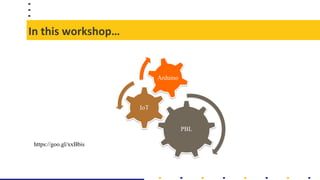
In this workshop…
PBL
IoT
Arduino
https://goo.gl/xxBbis
Project-based learning [PBL]
Video in https://www.youtube.com/watch?v=LMCZvGesRz8
Project-based learning [PBL]
PBL…
• …is a new approach to teaching and
learning and helps students to acquire
the XXI Century skills.
• …engage students in investigation of
real-world problems and challenges.
For this, students need…
• …explore the real-world
• …collaborate with peers
• …develop a critical thinking
• …purpose solutions and make
products.
• The technology, web 2.0 and
eTwinning can support students and
teachers when they work on PBL.
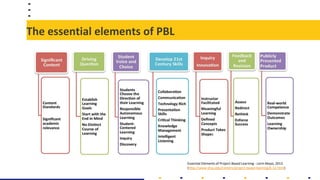
The essential elements of PBL
Essential Elements of Project-Based Learning - Lorin Mayo, 2013
(http://www.shsu.edu/centers/project-based-learning/k-12.html)
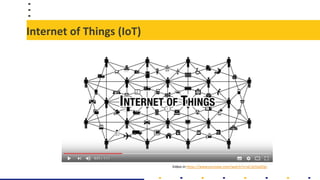
Internet of Things (IoT)
Video in https://www.youtube.com/watch?v=aCJjtJ5pGQo
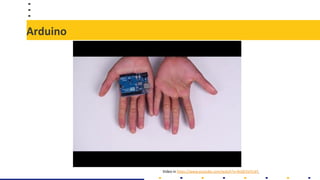
Arduino
Video in https://www.youtube.com/watch?v=9vQY2oTrLkY
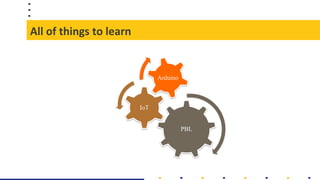
All of things to learn
PBL
IoT
Arduino
Now…
Images found in Google with labelled for reuse with modification
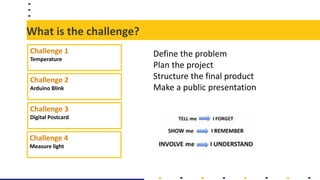
What is the challenge?
Challenge 1
Temperature
Challenge 3
Digital Postcard
Challenge 2
Arduino Blink
Challenge 4
Measure light
Define the problem
Plan the project
Structure the final product
Make a public presentation
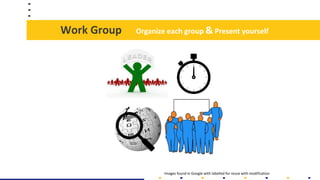
Work Group
Images found in Google with labelled for reuse with modification
Organize each group & Present yourself
Work Group
Step 2 – Plan the project
[Sustained inquiry - The project involves an active, in-depth process over time, in which
students generate questions, find and use resources, ask further questions, and develop their
own answers.]
Step 1 - Define the problem
[Challenging problem - The project is based on a meaningful problem to solve or a question to
answer, at the appropriate level of challenge for students, which is operationalized by an open-
ended, engaging driving question.]
Step 4 – Reflection / Critique & Revision
[The project provides opportunities for students to reflect on what and how they are learning,
and on the project’s design and implementation. // The project includes processes for students
to give and receive feedback on their work, in order to revise their ideas and products or
conduct further inquiry.]
Step 3 – Work in process
[The project allows students to make some choices about the products they create, how they
work, and how they use their time.]
Public presentation
Images found in Google with labelled for reuse with modification
Conclusions
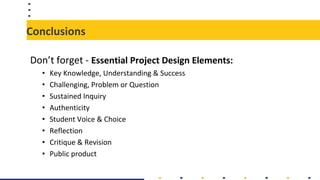
Don’t forget - Essential Project Design Elements:
• Key Knowledge, Understanding & Success
• Challenging, Problem or Question
• Sustained Inquiry
• Authenticity
• Student Voice & Choice
• Reflection
• Critique & Revision
• Public product
Conclusions
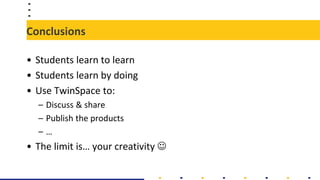
• Students learn to learn
• Students learn by doing
• Use TwinSpace to:
– Discuss & share
– Publish the products
– …
• The limit is… your creativity 
The end!
Miguela Fernandes (miguela@sapo.pt)
Teresa Lacerda (teresalacerda@hotmail.com)
Image found in Google with labelled for reuse with modification
Workshop evaluation

Project-Based Learning & Arduino

  • 1.
    Project-Based Learning &Arduino Miguela Fernandes (miguela@sapo.pt), Agrupamento de Escolas da Batalha, eTwinning Ambassador, Portugal Teresa Lacerda (teresalacerda@hotmail.com), Agrupamento de Escolas de Póvoa de Lanhoso, eTwinning Ambassador, Portugal 23.June.2017
  • 2.
  • 3.
    Project-based learning [PBL] Videoin https://www.youtube.com/watch?v=LMCZvGesRz8
  • 4.
    Project-based learning [PBL] PBL… •…is a new approach to teaching and learning and helps students to acquire the XXI Century skills. • …engage students in investigation of real-world problems and challenges. For this, students need… • …explore the real-world • …collaborate with peers • …develop a critical thinking • …purpose solutions and make products. • The technology, web 2.0 and eTwinning can support students and teachers when they work on PBL.
  • 5.
    The essential elementsof PBL Essential Elements of Project-Based Learning - Lorin Mayo, 2013 (http://www.shsu.edu/centers/project-based-learning/k-12.html)
  • 6.
    Internet of Things(IoT) Video in https://www.youtube.com/watch?v=aCJjtJ5pGQo
  • 7.
  • 8.
    All of thingsto learn PBL IoT Arduino
  • 9.
    Now… Images found inGoogle with labelled for reuse with modification
  • 10.
    What is thechallenge? Challenge 1 Temperature Challenge 3 Digital Postcard Challenge 2 Arduino Blink Challenge 4 Measure light Define the problem Plan the project Structure the final product Make a public presentation
  • 11.
    Work Group Images foundin Google with labelled for reuse with modification Organize each group & Present yourself
  • 12.
    Work Group Step 2– Plan the project [Sustained inquiry - The project involves an active, in-depth process over time, in which students generate questions, find and use resources, ask further questions, and develop their own answers.] Step 1 - Define the problem [Challenging problem - The project is based on a meaningful problem to solve or a question to answer, at the appropriate level of challenge for students, which is operationalized by an open- ended, engaging driving question.] Step 4 – Reflection / Critique & Revision [The project provides opportunities for students to reflect on what and how they are learning, and on the project’s design and implementation. // The project includes processes for students to give and receive feedback on their work, in order to revise their ideas and products or conduct further inquiry.] Step 3 – Work in process [The project allows students to make some choices about the products they create, how they work, and how they use their time.]
  • 13.
    Public presentation Images foundin Google with labelled for reuse with modification
  • 14.
    Conclusions Don’t forget -Essential Project Design Elements: • Key Knowledge, Understanding & Success • Challenging, Problem or Question • Sustained Inquiry • Authenticity • Student Voice & Choice • Reflection • Critique & Revision • Public product
  • 15.
    Conclusions • Students learnto learn • Students learn by doing • Use TwinSpace to: – Discuss & share – Publish the products – … • The limit is… your creativity 
  • 16.
    The end! Miguela Fernandes(miguela@sapo.pt) Teresa Lacerda (teresalacerda@hotmail.com) Image found in Google with labelled for reuse with modification Workshop evaluation