www.tacticalprojectmanagement.com
Project Status Reporting with
Andrew Makar
www.tacticalprojectmanagement.com
Agenda
1. Introduction
2. Status Reporting Challenges
3. Demonstration
4. Confluence vs. JIRA
5. Status Report Tutorial
6. Questions
2
www.tacticalprojectmanagement.com
Introduction
● Atlassian user since 2015
● 21+ years in Information Technology
● Musings on practical project management
techniques (including this tutorial)
○ http://www.tacticalprojectmanagement.com
● andy@tacticalprojectmanagement.com
● www.linkedin.com/in/amakar
3
www.tacticalprojectmanagement.com
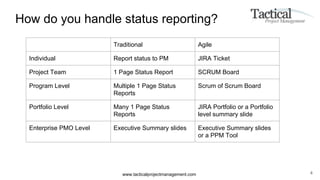
How do you handle status reporting?
4
Traditional Agile
Individual Report status to PM JIRA Ticket
Project Team 1 Page Status Report SCRUM Board
Program Level Multiple 1 Page Status
Reports
Scrum of Scrum Board
Portfolio Level Many 1 Page Status
Reports
JIRA Portfolio or a Portfolio
level summary slide
Enterprise PMO Level Executive Summary slides Executive Summary slides
or a PPM Tool
www.tacticalprojectmanagement.com
The challenge with status reporting
● Necessary evil that no one likes to do
● Fill out a document and email it to the project manager or submit to the PMO
● 1 page status reports in Excel or Powerpoint need reformatting
● “Just one more change” yet you already pressed Print
● Most organizations lack a central PPM tool for project status reporting
5
www.tacticalprojectmanagement.com
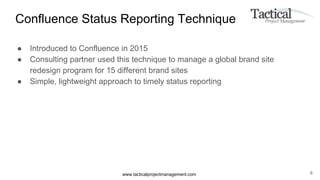
Confluence Status Reporting Technique
● Introduced to Confluence in 2015
● Consulting partner used this technique to manage a global brand site
redesign program for 15 different brand sites
● Simple, lightweight approach to timely status reporting
6
www.tacticalprojectmanagement.com 7
https://www.tacticalprojectmanagement.com/confluence-tutorial-project-portfolio-dashboard/
www.tacticalprojectmanagement.com
Demonstration
8
www.tacticalprojectmanagement.com
Confluence Vs JIRA
● Why not use JIRA to track individual workstream status?
● Definitely possible but requires more coordination and configuration of the
JIRA ticket type
● Goal : Simple and light with no additional administration
9
www.tacticalprojectmanagement.com
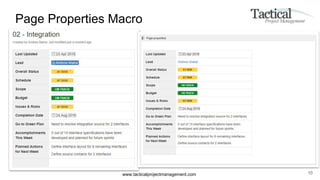
Page Properties Macro
10
www.tacticalprojectmanagement.com
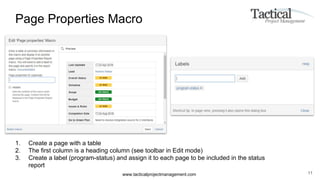
Page Properties Macro
11
1. Create a page with a table
2. The first column is a heading column (see toolbar in Edit mode)
3. Create a label (program-status) and assign it to each page to be included in the status
report
www.tacticalprojectmanagement.com
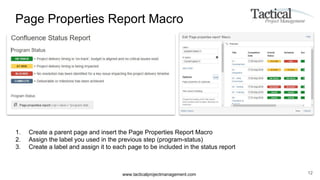
Page Properties Report Macro
12
1. Create a parent page and insert the Page Properties Report Macro
2. Assign the label you used in the previous step (program-status)
3. Create a label and assign it to each page to be included in the status report
www.tacticalprojectmanagement.com
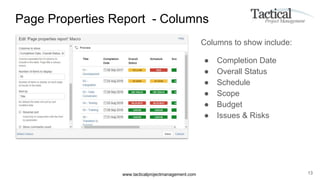
Page Properties Report - Columns
Columns to show include:
● Completion Date
● Overall Status
● Schedule
● Scope
● Budget
● Issues & Risks
13
www.tacticalprojectmanagement.com
Benefits
● Each week individual team members or workstream leads update individual
project status table
● Centralized status
● Automatic updates
● Obtain visibility to project issues using a formal status reporting structure
powered by collaboration
● Expand from 1 to 100+ projects for a program or portfolio view
● Requires no central administration or Atlassian Admin configuration
14
www.tacticalprojectmanagement.com 15
https://www.tacticalprojectmanagement.com/atlassian-confluence-tutorial-track-action-items/
www.tacticalprojectmanagement.com
The Problem with Action Items
16
● Usually part of meeting minutes that no one reads
○ Meeting minutes are sent via email
○ People are already overwhelmed with email
○ Bit of a challenge search through email for the last set of action items
● Action items are rarely followed up unless put into a plan or task list
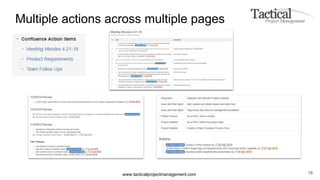
● Even if collaborating in Confluence, action items can exist on multiple pages
in multiple spaces
www.tacticalprojectmanagement.com
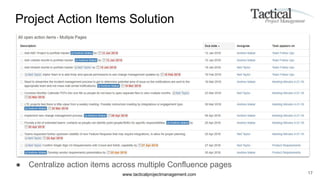
Project Action Items Solution
● Centralize action items across multiple Confluence pages
17
www.tacticalprojectmanagement.com
Multiple actions across multiple pages
18
www.tacticalprojectmanagement.com
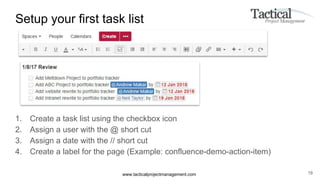
Setup your first task list
1. Create a task list using the checkbox icon
2. Assign a user with the @ short cut
3. Assign a date with the // short cut
4. Create a label for the page (Example: confluence-demo-action-item)
19
www.tacticalprojectmanagement.com
Task Report Macro
1. Create a Summary page and insert the Task Report macro
20
www.tacticalprojectmanagement.com
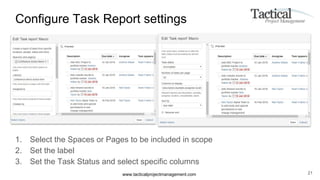
Configure Task Report settings
1. Select the Spaces or Pages to be included in scope
2. Set the label
3. Set the Task Status and select specific columns
21
www.tacticalprojectmanagement.com
Real-World Application
● During program status meetings, specific actions were documented during the
meeting
● Team members assigned action items and target due date
● Some of these actions became tasks in a project schedule
● Other actions were quick follow ups
● Still needed to remind team members to “check the box” to close out their
action items
● Facilitated the review of open actions at the following status meeting
22
www.tacticalprojectmanagement.com
Confluence Vs JIRA
● Why not use JIRA to track individual action items?
○ Create a JIRA project and write a filter for open / closed actions and embed in Confluence
● Preference is to keep meeting notes, discussion items in a Word processing
tool (i.e. Confluence) vs. opening another tool to track an additional task
23
www.tacticalprojectmanagement.com
Delivery with Atlassian tools continues to grow
● Project status reports and action items are two use cases
● Requirements management (Confluence and JIRA)
● Production support / Operations Run books (Confluence)
● Custom Dashboards for Application Management (JIRA)
● Simple project portfolio management (JIRA)
Years ago I scoffed at hearing how project teams deliver projects using a “wiki”
Now I can’t see any other way of successfully delivering a project
24
www.tacticalprojectmanagement.com
Questions?
25

Project status reporting with Confluence