Project Plan
by
Muhammad Nabeel Arif
Purpose
To understand and list the Processes and tools to
establish and organization. In this section we will go
through currently established processes and tools we
suggest for a startup.
2
Outline
JIRA
JIRA Confluence
Basecamp
Git
Project Wiki
Documentation
JIRA
JIRA provides issue tracking and project tracking for
software development teams to improve code quality and
the speed of development.
Combining a clean, fast interface for capturing and
organising issues with customisable workflows,
OpenSocial dashboards and a pluggable integration
framework, JIRA is the perfect fit at the centre of your
development team.
https://www.atlassian.com/software/jira
https://www.atlassian.com/software/jira/agile/?section=scr
um
Price 10 user-20$/month
(bit.ly/19a4cDd)
Why JIRA
Issues
Process
Planning
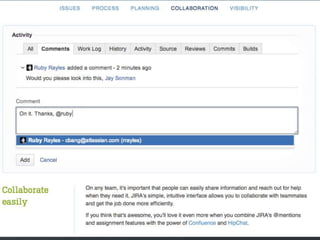
Collaboration
Visibility
JIRA Demonstration Video (bit.ly/IKReAZ )
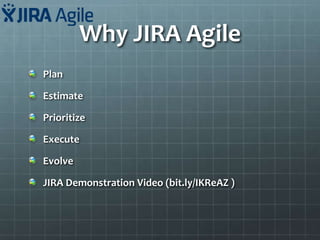
Why JIRA Agile
Plan
Estimate
Prioritize
Execute
Evolve
JIRA Demonstration Video (bit.ly/IKReAZ )
Why JIRA Agile(Plan)
Check Scrum. JIRA Agile brings all the power of JIRA to agile. JIRA Agile's rich
feature set enables you to flexibly plan and adopt the best agile practices for
your organization.
Why JIRA Agile(Estimate)
Add estimates and bugs to user stories while in a planning meeting, or
capture estimates on each story as you play planning poker. Tracking your
estimates on each story helps your team become more accurate.
Use story points, ideal hours, t-shirt sizes, or your own estimation technique
– JIRA Agile supports them all.
Why JIRA Agile(Prioritize)
Order the user stories and bugs in the product backlog by dragging and
dropping issues. Put the stories that deliver the most customer value at the
top of the backlog.
If you have a large backlog, instantly filter with JIRA Agile's flexible search to
find a particular user story or bug.
Why JIRA Agile (Execute)
Team members can update the status of stories by drag-and-drop, or edit story
details directly in the integrated detail view.
JIRA Agile brings a new level of transparency as everyone shares the same view,
whether they're in the office or working remotely.
Why JIRA Agile (Evolve)
Agile is all about scale. Extend JIRA's issue types, fields, and workflows to
quickly adapt as your team evolves. And as JIRA scales, JIRA Agile does, too.
They support managing issues from multiple projects in a single board, and
multi-select ranking for grooming huge backlogs.
JIRA Scrum
Adopt
Schedule
Launch
Deliver
Grow
JIRA Scrum (Adopt)
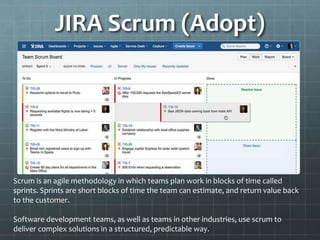
Scrum is an agile methodology in which teams plan work in blocks of time called
sprints. Sprints are short blocks of time the team can estimate, and return value back
to the customer.
Software development teams, as well as teams in other industries, use scrum to
deliver complex solutions in a structured, predictable way.
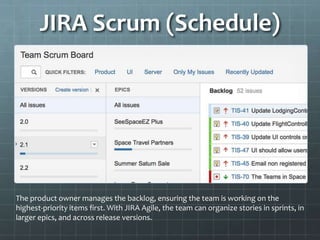
JIRA Scrum (Schedule)
The product owner manages the backlog, ensuring the team is working on the
highest-priority items first. With JIRA Agile, the team can organize stories in sprints, in
larger epics, and across release versions.
JIRA Scrum (Launch)
The team will take a subset from the top of the backlog and bring it into the sprint
with the sprint marker. With JIRA Agile, the team has visibility into the work ahead
of them so everyone is aligned.
All stories above the sprint marker get discussed in the sprint planning session. The
issues above the marker become the ones the team is committing to for that sprint.
JIRA Scrum (Deliver)
JIRA Agile's flexible agile boards help every team stay on top of the work in
progress. Swim lanes let the team see progress on individual stories, while quick
filters highlight specific areas that need attention.
JIRA Agile is deeply customizeable. Team members can create personal quick filters
that make it easy to report in for standup.
JIRA Scrum (Grow)
Retrospectives are sprint reviews which help the agile team evolve. JIRA Agile's
extensive reports give the team critical insight into their agile process and results.
The team can follow their progress towards the sprint commitment using the
burndown chart; If the scope of the sprint has changed, JIRA Agile highlights the
additional work.
Want to track larger items? The epic and version reports go across sprints to show
delivery of feature level work.
JIRA Confluence
JIRA Confluence is a solution for team to interact with each
other.
Share your ideas within the team and with the client.
Share your files by easily attaching them with discussion
threads.
Provides a user friendly editor to deliver what you think
Integrate with JIRA and JIRA Agile
Price (bit.ly/ILt9de)
Why JIRA Confluence
Converts work into teamwork
Turns ideas into products
Organize your work
Add Clarity to JIRA
Customize and extend
https://www.atlassian.com/software/confluence
Converts work into
Teamwork
Give your team one place to
share, find, and collaborate
on information they need to
get work done.
Give your team Confluence.
No email. No meetings. No
problem
Turn ideas into products
Discuss ideas, define
requirements, report on
projects, run
retrospectives, publish
docs, and so much
more.
Organize your work
Give every team,
project, or department
its own space with its
own permissions and
theme. Keep
information organized
and accessible with a
flexible page
hierarchy.
Add clarity to JIRA
Give everyone
transparency between
the issues tracked in
JIRA and related
content in Confluence –
requirements
documents, project
reports, roadmaps, and
more.
Customize and extend
Choose from hundreds
of add-ons on the
Atlassian Marketplace
to extend Confluence to
fit your needs. From
custom themes and
diagramming tools, to
workflow management
the possibilities are
endless.
Basecamp
Basecamp is an excellent online software package that
makes project management and collaboration easy.
Created by 37signals, the entire Basecamp system is
accessed and managed online, so none of the software
or data is actually stored on your computer. You can
share the project management with your entire
company.
https://basecamp.com/
Price: Manage up to 10 projects at once Includes 3 GB of
file storage $20/month (bit.ly/18h9ZrQ)
Price: $20/month
(bit.ly/18h9ZrQ)
With an entire project on one
page, nothing gets lost and your
team always knows where
things are.
All your projects stored
safely in one place
Your team, Clients, Contractors
and Venders together, at last.
People are every where but
discussions happen here.
Basecamp discussions are
the best place to stay on
topic, hash out details and
make decisions.
Add your words. Attach
documents. You can even
reply via email without
even sigining in. Basecamp
will keep everything
together.
Keep your files on basecamp so
everyone knows where to find them.
Share any file with your team
and client by just dragging it
from your desktop to
browser. That’s all there is to
it.
When you keep your files on
basecamp everyone knows
where they will find the
latest version.
New in Basecamp
Share your Google Docs
Document Previews
Full size images in discussions
A brand new design for files and images
Text Document 2.0, edit and save different versions of
text documents, preview them. Compatible with
mobiles
https://basecamp.com/announcements
Git
GIT is a very popular and efficient open source
Version Control System. It tracks content such as files
and directories.
1: Commit code on daily basis
2: Branches: master, staging, development
3: Create a tag after every build deployment
Price: Bronze- 25$/month
(bit.ly/1aM835k)
Project Wiki
Every project will have a wiki to briefly desribe everything
about projet. Wiki should include following components:
Introduction
Team Structure
Deployment Instructions (Development, staging,
production)
Coding conventions
Web-Services
Documentation
Requirement Specification Document
Technical Design Document
Estimation Document
Web-Service Documentation
Build Release Checklist
Discussion about requirement will be exchanged via basecamp
Feature and corresponding use cases will be documented via JIRA

Project plan

  • 1.
  • 2.
    Purpose To understand andlist the Processes and tools to establish and organization. In this section we will go through currently established processes and tools we suggest for a startup. 2
  • 3.
  • 4.
    JIRA JIRA provides issuetracking and project tracking for software development teams to improve code quality and the speed of development. Combining a clean, fast interface for capturing and organising issues with customisable workflows, OpenSocial dashboards and a pluggable integration framework, JIRA is the perfect fit at the centre of your development team. https://www.atlassian.com/software/jira https://www.atlassian.com/software/jira/agile/?section=scr um
  • 5.
  • 6.
  • 12.
  • 13.
    Why JIRA Agile(Plan) CheckScrum. JIRA Agile brings all the power of JIRA to agile. JIRA Agile's rich feature set enables you to flexibly plan and adopt the best agile practices for your organization.
  • 14.
    Why JIRA Agile(Estimate) Addestimates and bugs to user stories while in a planning meeting, or capture estimates on each story as you play planning poker. Tracking your estimates on each story helps your team become more accurate. Use story points, ideal hours, t-shirt sizes, or your own estimation technique – JIRA Agile supports them all.
  • 15.
    Why JIRA Agile(Prioritize) Orderthe user stories and bugs in the product backlog by dragging and dropping issues. Put the stories that deliver the most customer value at the top of the backlog. If you have a large backlog, instantly filter with JIRA Agile's flexible search to find a particular user story or bug.
  • 16.
    Why JIRA Agile(Execute) Team members can update the status of stories by drag-and-drop, or edit story details directly in the integrated detail view. JIRA Agile brings a new level of transparency as everyone shares the same view, whether they're in the office or working remotely.
  • 17.
    Why JIRA Agile(Evolve) Agile is all about scale. Extend JIRA's issue types, fields, and workflows to quickly adapt as your team evolves. And as JIRA scales, JIRA Agile does, too. They support managing issues from multiple projects in a single board, and multi-select ranking for grooming huge backlogs.
  • 18.
  • 19.
    JIRA Scrum (Adopt) Scrumis an agile methodology in which teams plan work in blocks of time called sprints. Sprints are short blocks of time the team can estimate, and return value back to the customer. Software development teams, as well as teams in other industries, use scrum to deliver complex solutions in a structured, predictable way.
  • 20.
    JIRA Scrum (Schedule) Theproduct owner manages the backlog, ensuring the team is working on the highest-priority items first. With JIRA Agile, the team can organize stories in sprints, in larger epics, and across release versions.
  • 21.
    JIRA Scrum (Launch) Theteam will take a subset from the top of the backlog and bring it into the sprint with the sprint marker. With JIRA Agile, the team has visibility into the work ahead of them so everyone is aligned. All stories above the sprint marker get discussed in the sprint planning session. The issues above the marker become the ones the team is committing to for that sprint.
  • 22.
    JIRA Scrum (Deliver) JIRAAgile's flexible agile boards help every team stay on top of the work in progress. Swim lanes let the team see progress on individual stories, while quick filters highlight specific areas that need attention. JIRA Agile is deeply customizeable. Team members can create personal quick filters that make it easy to report in for standup.
  • 23.
    JIRA Scrum (Grow) Retrospectivesare sprint reviews which help the agile team evolve. JIRA Agile's extensive reports give the team critical insight into their agile process and results. The team can follow their progress towards the sprint commitment using the burndown chart; If the scope of the sprint has changed, JIRA Agile highlights the additional work. Want to track larger items? The epic and version reports go across sprints to show delivery of feature level work.
  • 24.
    JIRA Confluence JIRA Confluenceis a solution for team to interact with each other. Share your ideas within the team and with the client. Share your files by easily attaching them with discussion threads. Provides a user friendly editor to deliver what you think Integrate with JIRA and JIRA Agile
  • 25.
  • 26.
    Why JIRA Confluence Convertswork into teamwork Turns ideas into products Organize your work Add Clarity to JIRA Customize and extend https://www.atlassian.com/software/confluence
  • 27.
    Converts work into Teamwork Giveyour team one place to share, find, and collaborate on information they need to get work done. Give your team Confluence. No email. No meetings. No problem
  • 28.
    Turn ideas intoproducts Discuss ideas, define requirements, report on projects, run retrospectives, publish docs, and so much more.
  • 29.
    Organize your work Giveevery team, project, or department its own space with its own permissions and theme. Keep information organized and accessible with a flexible page hierarchy.
  • 30.
    Add clarity toJIRA Give everyone transparency between the issues tracked in JIRA and related content in Confluence – requirements documents, project reports, roadmaps, and more.
  • 31.
    Customize and extend Choosefrom hundreds of add-ons on the Atlassian Marketplace to extend Confluence to fit your needs. From custom themes and diagramming tools, to workflow management the possibilities are endless.
  • 32.
    Basecamp Basecamp is anexcellent online software package that makes project management and collaboration easy. Created by 37signals, the entire Basecamp system is accessed and managed online, so none of the software or data is actually stored on your computer. You can share the project management with your entire company. https://basecamp.com/ Price: Manage up to 10 projects at once Includes 3 GB of file storage $20/month (bit.ly/18h9ZrQ)
  • 33.
  • 34.
    With an entireproject on one page, nothing gets lost and your team always knows where things are.
  • 35.
    All your projectsstored safely in one place
  • 36.
    Your team, Clients,Contractors and Venders together, at last.
  • 37.
    People are everywhere but discussions happen here. Basecamp discussions are the best place to stay on topic, hash out details and make decisions. Add your words. Attach documents. You can even reply via email without even sigining in. Basecamp will keep everything together.
  • 38.
    Keep your fileson basecamp so everyone knows where to find them. Share any file with your team and client by just dragging it from your desktop to browser. That’s all there is to it. When you keep your files on basecamp everyone knows where they will find the latest version.
  • 39.
    New in Basecamp Shareyour Google Docs Document Previews Full size images in discussions A brand new design for files and images Text Document 2.0, edit and save different versions of text documents, preview them. Compatible with mobiles https://basecamp.com/announcements
  • 40.
    Git GIT is avery popular and efficient open source Version Control System. It tracks content such as files and directories. 1: Commit code on daily basis 2: Branches: master, staging, development 3: Create a tag after every build deployment
  • 41.
  • 42.
    Project Wiki Every projectwill have a wiki to briefly desribe everything about projet. Wiki should include following components: Introduction Team Structure Deployment Instructions (Development, staging, production) Coding conventions Web-Services
  • 43.
    Documentation Requirement Specification Document TechnicalDesign Document Estimation Document Web-Service Documentation Build Release Checklist Discussion about requirement will be exchanged via basecamp Feature and corresponding use cases will be documented via JIRA