10 Key Features of
Microsoft Project Plan
(MPP)
By: Sridhar SK, PMP
Purpose of Project Planning
 The objective of a project plan is to define the major tasks, estimate timelines and
resources, identify associated risks, negotiate commitments with stake holders,
and provide framework for review and control with a goal to deliver the project on
time & within budget
Project plan answers basic questions about the project:
 Why? - What is the problem or value proposition addressed by the project?
 What? - What is the work that will be performed for the project? What are the
deliverables ?
 Who? - Who will be involved and what will be their responsibilities within the
project? How will they be organized?
 When? - What is the project timeline and when will the milestones deliverable be
complete?
 By: Sridhar SK, PMP
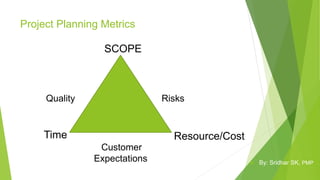
Project Planning Metrics
SCOPE
Time Resource/Cost
Quality Risks
Customer
Expectations  By: Sridhar SK, PMP
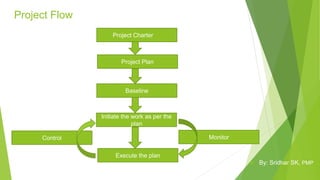
Project Flow
Project Plan
Baseline
Initiate the work as per the
plan
Execute the plan
Project Charter
MonitorControl
 By: Sridhar SK, PMP
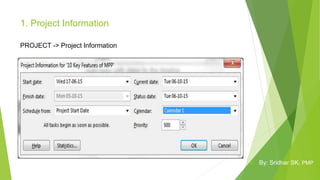
1. Project Information
PROJECT -> Project Information
 By: Sridhar SK, PMP
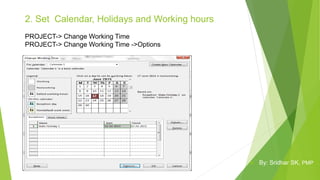
2. Set Calendar, Holidays and Working hours
PROJECT-> Change Working Time
PROJECT-> Change Working Time ->Options
 By: Sridhar SK, PMP
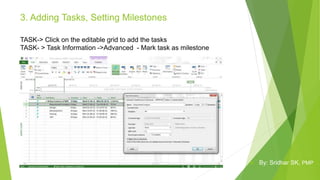
3. Adding Tasks, Setting Milestones
TASK-> Click on the editable grid to add the tasks
TASK- > Task Information ->Advanced - Mark task as milestone
 By: Sridhar SK, PMP
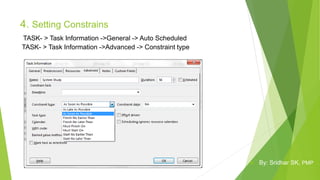
4. Setting Constrains
TASK- > Task Information ->General -> Auto Scheduled
TASK- > Task Information ->Advanced -> Constraint type
 By: Sridhar SK, PMP
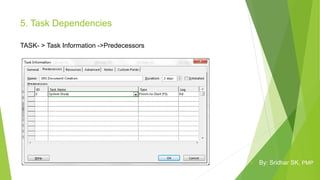
5. Task Dependencies
TASK- > Task Information ->Predecessors
 By: Sridhar SK, PMP
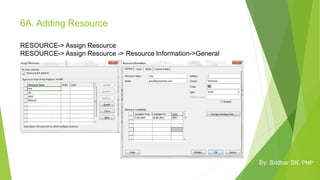
6A. Adding Resource
RESOURCE-> Assign Resource
RESOURCE-> Assign Resource -> Resource Information->General
 By: Sridhar SK, PMP
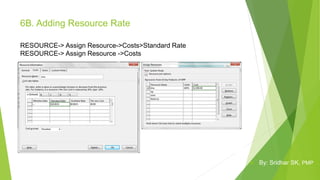
6B. Adding Resource Rate
RESOURCE-> Assign Resource->Costs>Standard Rate
RESOURCE-> Assign Resource ->Costs
 By: Sridhar SK, PMP
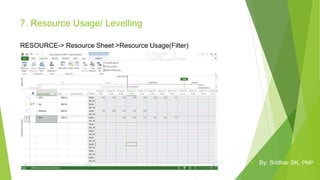
7. Resource Usage/ Levelling
RESOURCE-> Resource Sheet >Resource Usage(Filter)
 By: Sridhar SK, PMP
8. Baseline
PROJECT->Set Baseline
 By: Sridhar SK, PMP
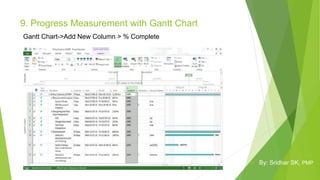
9. Progress Measurement with Gantt Chart
Gantt Chart->Add New Column > % Complete
 By: Sridhar SK, PMP
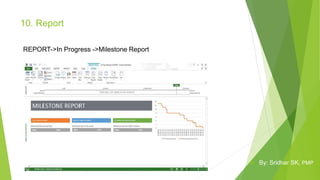
10. Report
REPORT->In Progress ->Milestone Report
 By: Sridhar SK, PMP
Thank You

10 key features of microsoft project plan (mpp)

  • 1.
    10 Key Featuresof Microsoft Project Plan (MPP) By: Sridhar SK, PMP
  • 2.
    Purpose of ProjectPlanning  The objective of a project plan is to define the major tasks, estimate timelines and resources, identify associated risks, negotiate commitments with stake holders, and provide framework for review and control with a goal to deliver the project on time & within budget Project plan answers basic questions about the project:  Why? - What is the problem or value proposition addressed by the project?  What? - What is the work that will be performed for the project? What are the deliverables ?  Who? - Who will be involved and what will be their responsibilities within the project? How will they be organized?  When? - What is the project timeline and when will the milestones deliverable be complete?  By: Sridhar SK, PMP
  • 3.
    Project Planning Metrics SCOPE TimeResource/Cost Quality Risks Customer Expectations  By: Sridhar SK, PMP
  • 4.
    Project Flow Project Plan Baseline Initiatethe work as per the plan Execute the plan Project Charter MonitorControl  By: Sridhar SK, PMP
  • 5.
    1. Project Information PROJECT-> Project Information  By: Sridhar SK, PMP
  • 6.
    2. Set Calendar,Holidays and Working hours PROJECT-> Change Working Time PROJECT-> Change Working Time ->Options  By: Sridhar SK, PMP
  • 7.
    3. Adding Tasks,Setting Milestones TASK-> Click on the editable grid to add the tasks TASK- > Task Information ->Advanced - Mark task as milestone  By: Sridhar SK, PMP
  • 8.
    4. Setting Constrains TASK-> Task Information ->General -> Auto Scheduled TASK- > Task Information ->Advanced -> Constraint type  By: Sridhar SK, PMP
  • 9.
    5. Task Dependencies TASK-> Task Information ->Predecessors  By: Sridhar SK, PMP
  • 10.
    6A. Adding Resource RESOURCE->Assign Resource RESOURCE-> Assign Resource -> Resource Information->General  By: Sridhar SK, PMP
  • 11.
    6B. Adding ResourceRate RESOURCE-> Assign Resource->Costs>Standard Rate RESOURCE-> Assign Resource ->Costs  By: Sridhar SK, PMP
  • 12.
    7. Resource Usage/Levelling RESOURCE-> Resource Sheet >Resource Usage(Filter)  By: Sridhar SK, PMP
  • 13.
  • 14.
    9. Progress Measurementwith Gantt Chart Gantt Chart->Add New Column > % Complete  By: Sridhar SK, PMP
  • 15.
    10. Report REPORT->In Progress->Milestone Report  By: Sridhar SK, PMP
  • 16.