1	
  
COMP3500:	
  Project	
  2	
  Modify	
  the	
  Kernel	
  	
  
Xiao	
  Qin	
  @	
  Auburn	
  University	
  
Note:	
  I	
  rebuilt	
  the	
  kernel	
  by	
  adding	
  "hello	
  world!"	
  into	
  the	
  boot	
  message.	
  In	
  what	
  follows,	
  I	
  
summarize	
  my	
  process	
  of	
  rebuilding	
  the	
  OS161	
  kernel.	
  You	
  may	
  also	
  found	
  the	
  three	
  common	
  
mistakes	
  at	
  the	
  end	
  of	
  this	
  document.	
  
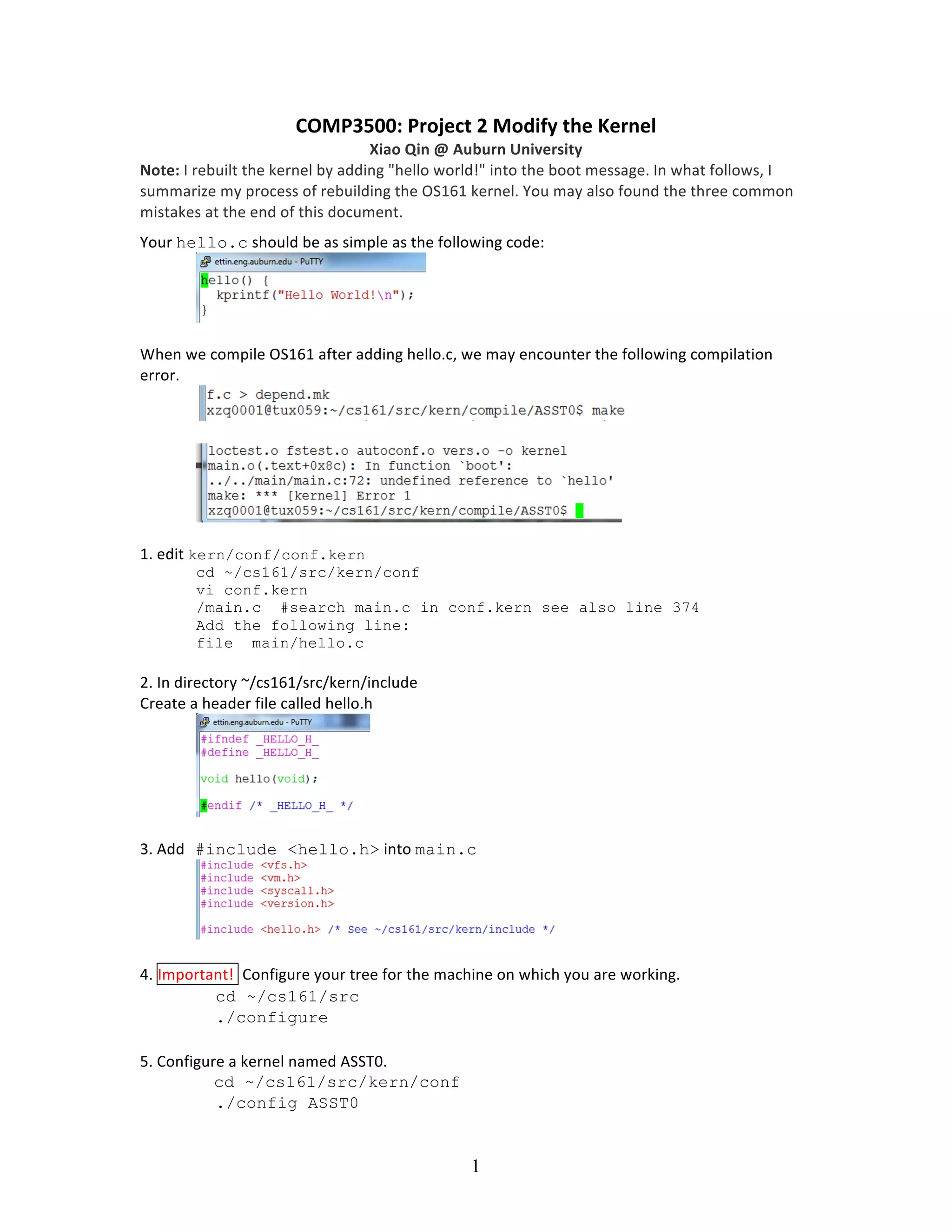
Your	
  hello.c	
  should	
  be	
  as	
  simple	
  as	
  the	
  following	
  code:	


When	
  we	
  compile	
  OS161	
  after	
  adding	
  hello.c,	
  we	
  may	
  encounter	
  the	
  following	
  compilation	
  
error.	


1.	
  edit	
  kern/conf/conf.kern
cd ~/cs161/src/kern/conf
vi conf.kern
/main.c #search main.c in conf.kern see also line 374
Add the following line:
file main/hello.c
2.	
  In	
  directory	
  ~/cs161/src/kern/include	
  
Create	
  a	
  header	
  file	
  called	
  hello.h	


3.	
  Add #include <hello.h>	
  into	
  main.c


4.	
  Important!	
  	
  Configure	
  your	
  tree	
  for	
  the	
  machine	
  on	
  which	
  you	
  are	
  working.	
  	
  
cd ~/cs161/src
./configure
5.	
  Configure	
  a	
  kernel	
  named	
  ASST0.	
  
cd ~/cs161/src/kern/conf
./config ASST0
2	
  
6.	
  Build	
  the	
  ASST0	
  kernel.	
  (cs161/src/compile).	
  Use	
  ‘echo $PATH’	
  to	
  check	
  your	
  $PATH.	
  
cd ../compile/ASST0
make depend
make
make install Important!
7.	
  Now	
  also	
  build	
  the	
  user	
  level	
  utilties.	
  
cd ~/cs161/src
make
8.	
  Run	
  OS161:	
  Change	
  into	
  your	
  root	
  directory.	
  
%cd ~/cs161/root
Run	
  the	
  machine	
  simulator	
  on	
  your	
  operating	
  system.	
  
%./sys161 kernel
	
  
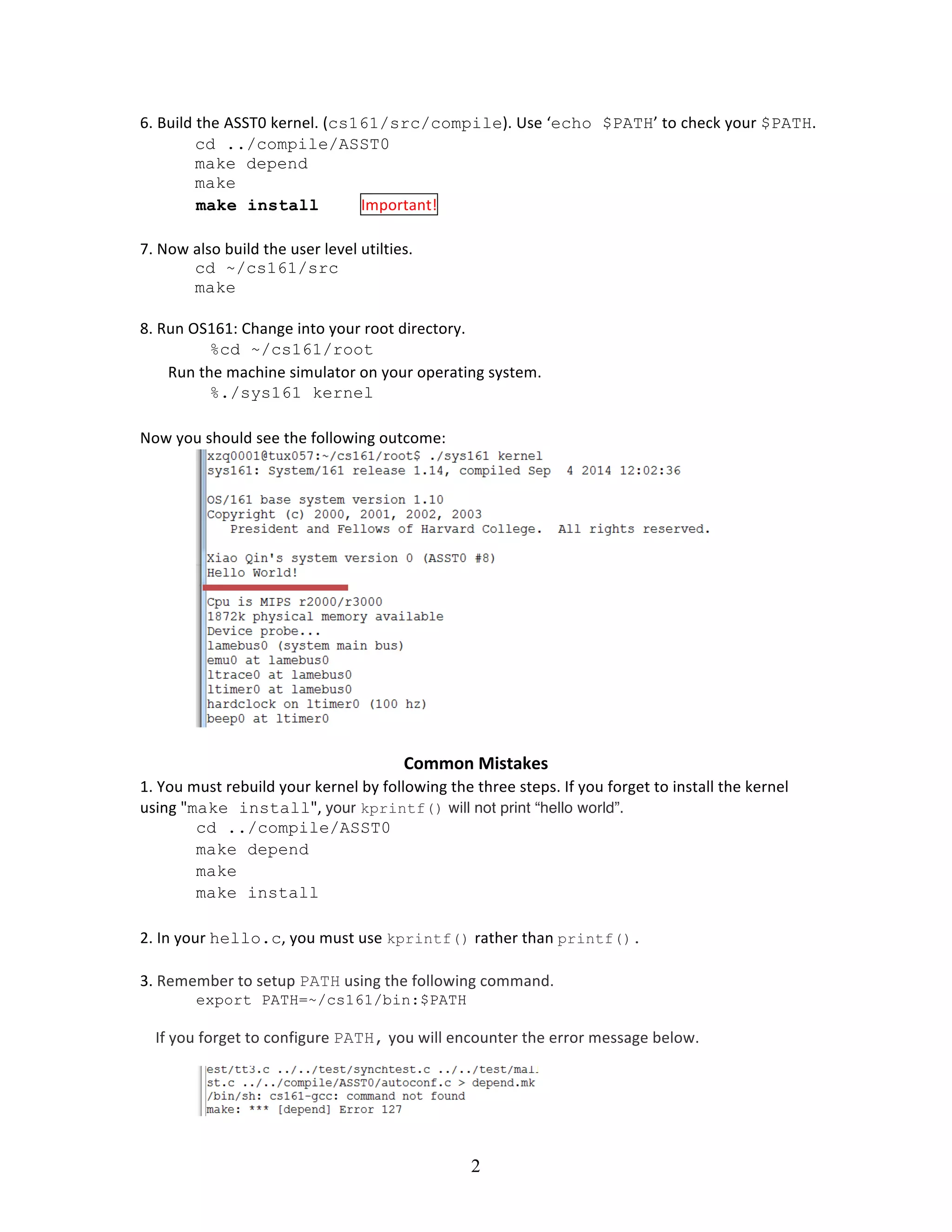
Now	
  you	
  should	
  see	
  the	
  following	
  outcome:	


Common	
  Mistakes	
  
1.	
  You	
  must	
  rebuild	
  your	
  kernel	
  by	
  following	
  the	
  three	
  steps.	
  If	
  you	
  forget	
  to	
  install	
  the	
  kernel	
  
using	
  "make install",	
  your kprintf() will not print “hello world”.	
  
cd ../compile/ASST0
make depend
make
make install
2.	
  In	
  your	
  hello.c,	
  you	
  must	
  use	
  kprintf() rather	
  than	
  printf().
3.	
  Remember	
  to	
  setup	
  PATH	
  using	
  the	
  following	
  command.	
  	
  
export PATH=~/cs161/bin:$PATH


  If	
  you	
  forget	
  to	
  configure	
  PATH,	
  you	
  will	
  encounter	
  the	
  error	
  message	
  below.	
  

Project 2 How to modify os161: A Manual

  • 1.
    1   COMP3500:  Project  2  Modify  the  Kernel     Xiao  Qin  @  Auburn  University   Note:  I  rebuilt  the  kernel  by  adding  "hello  world!"  into  the  boot  message.  In  what  follows,  I   summarize  my  process  of  rebuilding  the  OS161  kernel.  You  may  also  found  the  three  common   mistakes  at  the  end  of  this  document.   Your  hello.c  should  be  as  simple  as  the  following  code:       When  we  compile  OS161  after  adding  hello.c,  we  may  encounter  the  following  compilation   error.             1.  edit  kern/conf/conf.kern cd ~/cs161/src/kern/conf vi conf.kern /main.c #search main.c in conf.kern see also line 374 Add the following line: file main/hello.c 2.  In  directory  ~/cs161/src/kern/include   Create  a  header  file  called  hello.h       3.  Add #include <hello.h>  into  main.c     4.  Important!    Configure  your  tree  for  the  machine  on  which  you  are  working.     cd ~/cs161/src ./configure 5.  Configure  a  kernel  named  ASST0.   cd ~/cs161/src/kern/conf ./config ASST0
  • 2.
    2   6.  Build  the  ASST0  kernel.  (cs161/src/compile).  Use  ‘echo $PATH’  to  check  your  $PATH.   cd ../compile/ASST0 make depend make make install Important! 7.  Now  also  build  the  user  level  utilties.   cd ~/cs161/src make 8.  Run  OS161:  Change  into  your  root  directory.   %cd ~/cs161/root Run  the  machine  simulator  on  your  operating  system.   %./sys161 kernel   Now  you  should  see  the  following  outcome:       Common  Mistakes   1.  You  must  rebuild  your  kernel  by  following  the  three  steps.  If  you  forget  to  install  the  kernel   using  "make install",  your kprintf() will not print “hello world”.   cd ../compile/ASST0 make depend make make install 2.  In  your  hello.c,  you  must  use  kprintf() rather  than  printf(). 3.  Remember  to  setup  PATH  using  the  following  command.     export PATH=~/cs161/bin:$PATH        If  you  forget  to  configure  PATH,  you  will  encounter  the  error  message  below.