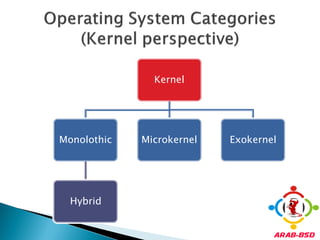

Kernel


Monolothic   Microkernel   Exokernel


  Hybrid
   When a computer is powered on, there is
    nothing running on the CPU. For a program to
    be set running, the binary image of the
    program must first be loaded into memory
    from a storage device.
   Bootstrapping: cold start to the point at
    which user-mode programs can be run.
   In FreeBSD, the binary image is in /vmunix or
    /boot/kernel/kernel
Kernel

Static Modules                 KLDs


Compiled in the kernel   Loaded during run time
   Some modules should be compiled in the
    kernel and can’t be loaded during run time.
     Those modules are ones that used before control
     turned to the user.
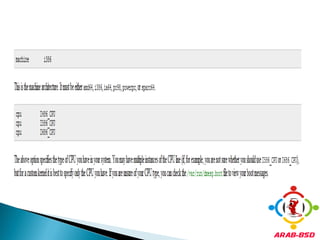
   Kernel Location
      /usr/src/sys/machine_type
   Kernel Configuration File
     /usr/src/sys/machine_type/conf
   By default, Kernel Configuration file is called
    GENERIC.
   Kernel Configuration file consists of set of
    modules.
   These modules consists of machine
    architecture, devices and set of options.
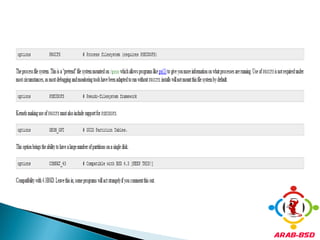
   Options are modes of compilation,
    communication restrictions, ports
    infrastructure, debugging options, .. etc
   It’s very important to compile the kernel with
    the modules which are needed at boot time
    since there is no control to the user to load
    them manually.
   Default Options are stored in DEFAULTS file.
   All the available options are located in the
    NOTES file in the same directory.
1.   One method is using the dmesg(8) utility
     and the man(1) commands. Most device
     drivers on FreeBSD have a manual page,
     listing supported hardware, and during the
     boot probe, found hardware will be listed.
2. Another method of finding hardware is by
   using the pciconf(8) utility which provides
   more verbose output.


   Using man ath will return the ath(4) manual
    page
   An include directive is available for use in
    configuration files. This allows another
    configuration file to be logically included in
    the current one, making it easy to maintain
    small changes relative to an existing file.
   Note: To build a file which contains all
    available options, as normally done for
    testing purposes, run the following command
    as root:

# cd /usr/src/sys/i386/conf && make LINT
   Compile Kernel
   Install Kernel
   New kernel will be installed in /boot/kernel
   For backup issues, old kernel stored in
    /boot/kernel.old
   You can load the old kernel by using single
    user mode at the FreeBSD booting page.
Unlike the older approach, this
make buildkernel      uses the new compiler residing
                                in /usr/obj.
                         This first compiles the new
                      compiler and a few related tools,
make buildworld        then uses the new compiler to
                     compile the rest of the new world.
                       The result ends up in /usr/obj.
                     Place the new kernel and kernel
                     modules onto the disk, making it
make installkernel
                     possible to boot with the newly
                             updated kernel.
                      Copies the world from /usr/obj.
make installworld     You now have a new kernel and
                            new world on disk.
1. Move to the directory of i386 kernel config files
   # cd /usr/src/sys/i386/conf
2. Create a copy of your kernel config file.
   # cp GENERIC MYKERNEL
3. Modify MYKERNEL configuration file.
   # ee MYKERNEL
4. Change to the /usr/src directory:
   # cd /usr/src
5. Compile the kernel:
   # make buildkernel KERNCONF=MYKERNEL
6. Install the new kernel:
   # make installkernel KERNCONF=MYKERNEL
   Kernel Loadable Modules result large
    flexibility in the kernel size since only needed
    KLD’s are loaded.
     We can use Binary file for total KLD’s indexing and
     make it easier for the user to determine what KLD’s
     can be loaded at boot time without the need for
     loading each one separately.
   Use kldstat to view them.
   All the kld’s are found in /boot/kernel
    directory.
   Use kldload to load kld’s.


   After loading
   Use kldunload to unload kld.
1. The bsd.kmod.mk makefile resides
 in /usr/src/share/mk/bsd.kmod.mk and
 takes all of the pain out of building and
 linking kernel modules properly.
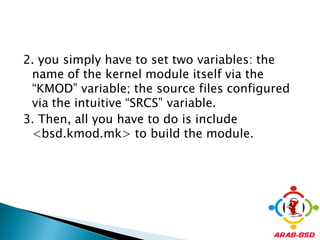
2. you simply have to set two variables: the
 name of the kernel module itself via the
 “KMOD” variable; the source files configured
 via the intuitive “SRCS” variable.
3. Then, all you have to do is include
 <bsd.kmod.mk> to build the module.
 The Makefile for our introductory kernel
  module looks like this:
# Declare Name of kernel module
KMOD = hello_fsm
# Enumerate Source files for kernel module
SRCS = hello_fsm.c
# Include kernel module makefile
.include <bsd.kmod.mk>
   Create a new directory called kernel, under
    your home directory. Copy and paste the text
    in the last presentation into a file
    called Makefile. This will be your working
    base going forward.
   A kernel module allows dynamic functionality
    to be added to a running kernel. When a
    kernel module is inserted, the “load” event is
    fired. When a kernel module is removed, the
    “unload” event is fired. The kernel module is
    responsible for implementing an event
    handler that handles these cases.
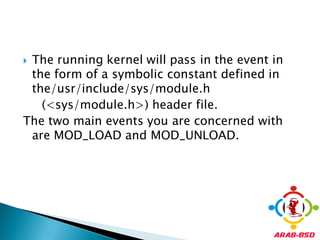
The running kernel will pass in the event in
 the form of a symbolic constant defined in
 the/usr/include/sys/module.h
   (<sys/module.h>) header file.
The two main events you are concerned with
 are MOD_LOAD and MOD_UNLOAD.
   The module is responsible for configuring
    that call-back as well by using the
    DECLARE_MODULE macro.
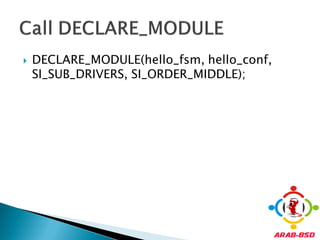
   The DECLARE_MODULE macro is defined in
    the <sys/module.h> header
  DECLARE_MODULE takes four parameters in the
  following order:
1. name: Defines the name.
2. data: Specifies the name of
  the moduledata_t structure, which I’ve
  named hello_conf in my implementation.
  The moduledata_t type is defined at
  <sys/module.h>
3. sub: Sets the subsystem interface, which defines
  the module type.
4. order: Defines the modules initialization order
  within the defined subsystem
   The moduledata structure contains the name
    defined as a char variable and the event
    handler routine defined as
    a modeventhand_t structure which is defined
    at line 50 of <sys/module.h>. Finally,
    themoduledata structure has void pointer for
    any extra data, which you won’t be using.
   #include <sys/param.h>
   #include <sys/module.h>
   #include <sys/kernel.h>
   #include <sys/systm.h>
   /* The function called at load/unload. */
    static int event_handler(struct module *module, int event, void *arg)
{
 int e = 0;    /* Error, 0 for normal return status */
switch (event) {
case MOD_LOAD:
uprintf("Hello Free Software Magazine Readers! n");
break;
case MOD_UNLOAD:
uprintf("Bye Bye FSM reader, be sure to check http://www.google.com !n");
break;
default:
e = EOPNOTSUPP; /* Error, Operation Not Supported */
break;
}
return(e);
}
  This is where you set the name of the module
   and expose the event_handler routine to be
   called when loaded and unloaded from the
   kernel.
 /* The second argument of
   DECLARE_MODULE. */
  static moduledata_t hello_conf = {
    "hello_fsm", /* module name */
     event_handler, /* event handler */
     NULL /* extra data */
};
   DECLARE_MODULE(hello_fsm, hello_conf,
    SI_SUB_DRIVERS, SI_ORDER_MIDDLE);
   make
Thank you

Lecture 5 Kernel Development

  • 2.
    Kernel Monolothic Microkernel Exokernel Hybrid
  • 3.
    When a computer is powered on, there is nothing running on the CPU. For a program to be set running, the binary image of the program must first be loaded into memory from a storage device.  Bootstrapping: cold start to the point at which user-mode programs can be run.  In FreeBSD, the binary image is in /vmunix or /boot/kernel/kernel
  • 4.
    Kernel Static Modules KLDs Compiled in the kernel Loaded during run time
  • 5.
    Some modules should be compiled in the kernel and can’t be loaded during run time.  Those modules are ones that used before control turned to the user.
  • 6.
    Kernel Location /usr/src/sys/machine_type  Kernel Configuration File /usr/src/sys/machine_type/conf  By default, Kernel Configuration file is called GENERIC.
  • 7.
    Kernel Configuration file consists of set of modules.  These modules consists of machine architecture, devices and set of options.  Options are modes of compilation, communication restrictions, ports infrastructure, debugging options, .. etc
  • 8.
    It’s very important to compile the kernel with the modules which are needed at boot time since there is no control to the user to load them manually.  Default Options are stored in DEFAULTS file.  All the available options are located in the NOTES file in the same directory.
  • 9.
    1. One method is using the dmesg(8) utility and the man(1) commands. Most device drivers on FreeBSD have a manual page, listing supported hardware, and during the boot probe, found hardware will be listed.
  • 10.
    2. Another methodof finding hardware is by using the pciconf(8) utility which provides more verbose output.  Using man ath will return the ath(4) manual page
  • 11.
    An include directive is available for use in configuration files. This allows another configuration file to be logically included in the current one, making it easy to maintain small changes relative to an existing file.
  • 13.
    Note: To build a file which contains all available options, as normally done for testing purposes, run the following command as root: # cd /usr/src/sys/i386/conf && make LINT
  • 22.
    Compile Kernel  Install Kernel
  • 23.
    New kernel will be installed in /boot/kernel  For backup issues, old kernel stored in /boot/kernel.old  You can load the old kernel by using single user mode at the FreeBSD booting page.
  • 24.
    Unlike the olderapproach, this make buildkernel uses the new compiler residing in /usr/obj. This first compiles the new compiler and a few related tools, make buildworld then uses the new compiler to compile the rest of the new world. The result ends up in /usr/obj. Place the new kernel and kernel modules onto the disk, making it make installkernel possible to boot with the newly updated kernel. Copies the world from /usr/obj. make installworld You now have a new kernel and new world on disk.
  • 25.
    1. Move tothe directory of i386 kernel config files # cd /usr/src/sys/i386/conf 2. Create a copy of your kernel config file. # cp GENERIC MYKERNEL 3. Modify MYKERNEL configuration file. # ee MYKERNEL
  • 26.
    4. Change tothe /usr/src directory: # cd /usr/src 5. Compile the kernel: # make buildkernel KERNCONF=MYKERNEL 6. Install the new kernel: # make installkernel KERNCONF=MYKERNEL
  • 27.
    Kernel Loadable Modules result large flexibility in the kernel size since only needed KLD’s are loaded.  We can use Binary file for total KLD’s indexing and make it easier for the user to determine what KLD’s can be loaded at boot time without the need for loading each one separately.
  • 28.
    Use kldstat to view them.
  • 29.
    All the kld’s are found in /boot/kernel directory.
  • 30.
    Use kldload to load kld’s.  After loading
  • 31.
    Use kldunload to unload kld.
  • 32.
    1. The bsd.kmod.mkmakefile resides in /usr/src/share/mk/bsd.kmod.mk and takes all of the pain out of building and linking kernel modules properly.
  • 33.
    2. you simplyhave to set two variables: the name of the kernel module itself via the “KMOD” variable; the source files configured via the intuitive “SRCS” variable. 3. Then, all you have to do is include <bsd.kmod.mk> to build the module.
  • 34.
     The Makefilefor our introductory kernel module looks like this: # Declare Name of kernel module KMOD = hello_fsm # Enumerate Source files for kernel module SRCS = hello_fsm.c # Include kernel module makefile .include <bsd.kmod.mk>
  • 35.
    Create a new directory called kernel, under your home directory. Copy and paste the text in the last presentation into a file called Makefile. This will be your working base going forward.
  • 36.
    A kernel module allows dynamic functionality to be added to a running kernel. When a kernel module is inserted, the “load” event is fired. When a kernel module is removed, the “unload” event is fired. The kernel module is responsible for implementing an event handler that handles these cases.
  • 37.
    The running kernelwill pass in the event in the form of a symbolic constant defined in the/usr/include/sys/module.h (<sys/module.h>) header file. The two main events you are concerned with are MOD_LOAD and MOD_UNLOAD.
  • 38.
    The module is responsible for configuring that call-back as well by using the DECLARE_MODULE macro.  The DECLARE_MODULE macro is defined in the <sys/module.h> header
  • 39.
     DECLARE_MODULEtakes four parameters in the following order: 1. name: Defines the name. 2. data: Specifies the name of the moduledata_t structure, which I’ve named hello_conf in my implementation. The moduledata_t type is defined at <sys/module.h> 3. sub: Sets the subsystem interface, which defines the module type. 4. order: Defines the modules initialization order within the defined subsystem
  • 40.
    The moduledata structure contains the name defined as a char variable and the event handler routine defined as a modeventhand_t structure which is defined at line 50 of <sys/module.h>. Finally, themoduledata structure has void pointer for any extra data, which you won’t be using.
  • 41.
    #include <sys/param.h>  #include <sys/module.h>  #include <sys/kernel.h>  #include <sys/systm.h>
  • 42.
    /* The function called at load/unload. */ static int event_handler(struct module *module, int event, void *arg) { int e = 0; /* Error, 0 for normal return status */ switch (event) { case MOD_LOAD: uprintf("Hello Free Software Magazine Readers! n"); break; case MOD_UNLOAD: uprintf("Bye Bye FSM reader, be sure to check http://www.google.com !n"); break; default: e = EOPNOTSUPP; /* Error, Operation Not Supported */ break; } return(e); }
  • 43.
     Thisis where you set the name of the module and expose the event_handler routine to be called when loaded and unloaded from the kernel.  /* The second argument of DECLARE_MODULE. */ static moduledata_t hello_conf = { "hello_fsm", /* module name */ event_handler, /* event handler */ NULL /* extra data */ };
  • 44.
    DECLARE_MODULE(hello_fsm, hello_conf, SI_SUB_DRIVERS, SI_ORDER_MIDDLE);
  • 45.
    make
  • 47.