Production of Website
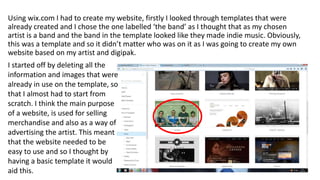
Using wix.com I had to create my website, firstly I looked through templates that were
already created and I chose the one labelled ‘the band’ as I thought that as my chosen
artist is a band and the band in the template looked like they made indie music. Obviously,
this was a template and so it didn’t matter who was on it as I was going to create my own
website based on my artist and digipak.
I started off by deleting all the
information and images that were
already in use on the template, so
that I almost had to start from
scratch. I think the main purpose
of a website, is used for selling
merchandise and also as a way of
advertising the artist. This meant
that the website needed to be
easy to use and so I thought by
having a basic template it would
aid this.
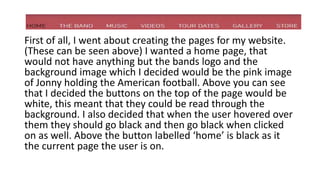
First of all, I went about creating the pages for my website.
(These can be seen above) I wanted a home page, that
would not have anything but the bands logo and the
background image which I decided would be the pink image
of Jonny holding the American football. Above you can see
that I decided the buttons on the top of the page would be
white, this meant that they could be read through the
background. I also decided that when the user hovered over
them they should go black and then go black when clicked
on as well. Above the button labelled ‘home’ is black as it
the current page the user is on.
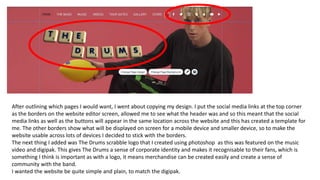
After outlining which pages I would want, I went about copying my design. I put the social media links at the top corner
as the borders on the website editor screen, allowed me to see what the header was and so this meant that the social
media links as well as the buttons will appear in the same location across the website and this has created a template for
me. The other borders show what will be displayed on screen for a mobile device and smaller device, so to make the
website usable across lots of devices I decided to stick with the borders.
The next thing I added was The Drums scrabble logo that I created using photoshop as this was featured on the music
video and digipak. This gives The Drums a sense of corporate identity and makes it recognisable to their fans, which is
something I think is important as with a logo, it means merchandise can be created easily and create a sense of
community with the band.
I wanted the website be quite simple and plain, to match the digipak.
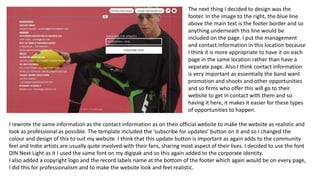
The next thing I decided to design was the
footer. In the image to the right, the blue line
above the main text is the footer border and so
anything underneath this line would be
included on the page. I put the management
and contact information in this location because
I think it is more appropriate to have it on each
page in the same location rather than have a
separate page. Also I think contact information
is very important as essentially the band want
promotion and shoots and other opportunities
and so firms who offer this will go to their
website to get in contact with them and so
having it here, it makes it easier for these types
of opportunities to happen.
I rewrote the same information as the contact information as on their official website to make the website as realistic and
look as professional as possible. The template included the ‘subscribe for updates’ button on it and so I changed the
colour and design of this to suit my website. I think that this update button is important as again adds to the community
feel and Indie artists are usually quite involved with their fans, sharing most aspect of their lives. I decided to use the font
DIN Next Light as it I used the same font on my digipak and so this again added to the corporate identity.
I also added a copyright logo and the record labels name at the bottom of the footer which again would be on every page,
I did this for professionalism and to make the website look and feel realistic.
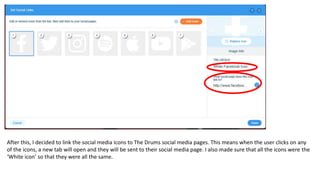
After this, I decided to link the social media icons to The Drums social media pages. This means when the user clicks on any
of the icons, a new tab will open and they will be sent to their social media page. I also made sure that all the icons were the
‘White icon’ so that they were all the same.
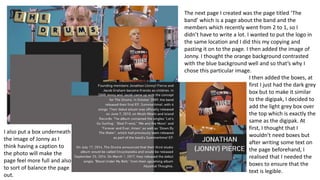
The next page I created was the page titled ‘The
band’ which is a page about the band and the
members which recently went from 2 to 1, so I
didn’t have to write a lot. I wanted to put the logo in
the same location and I did this my copying and
pasting it on to the page. I then added the image of
Jonny. I thought the orange background contrasted
with the blue background well and so that’s why I
chose this particular image.
I also put a box underneath
the image of Jonny as I
think having a caption to
the photo will make the
page feel more full and also
to sort of balance the page
out.
I then added the boxes, at
first I just had the dark grey
box but to make it similar
to the digipak, I decided to
add the light grey box over
the top which is exactly the
same as the digipak. At
first, I thought that I
wouldn’t need boxes but
after writing some text on
the page beforehand, I
realised that I needed the
boxes to ensure that the
text is legible.
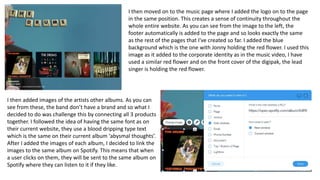
I then moved on to the music page where I added the logo on to the page
in the same position. This creates a sense of continuity throughout the
whole entire website. As you can see from the image to the left, the
footer automatically is added to the page and so looks exactly the same
as the rest of the pages that I've created so far. I added the blue
background which is the one with Jonny holding the red flower. I used this
image as it added to the corporate identity as in the music video, I have
used a similar red flower and on the front cover of the digipak, the lead
singer is holding the red flower.
I then added images of the artists other albums. As you can
see from these, the band don’t have a brand and so what I
decided to do was challenge this by connecting all 3 products
together. I followed the idea of having the same font as on
their current website, they use a blood dripping type text
which is the same on their current album ‘abysmal thoughts’.
After I added the images of each album, I decided to link the
images to the same album on Spotify. This means that when
a user clicks on them, they will be sent to the same album on
Spotify where they can listen to it if they like.
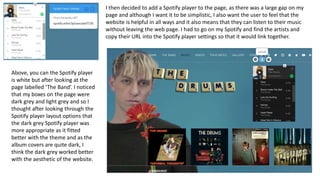
I then decided to add a Spotify player to the page, as there was a large gap on my
page and although I want it to be simplistic, I also want the user to feel that the
website is helpful in all ways and it also means that they can listen to their music
without leaving the web page. I had to go on my Spotify and find the artists and
copy their URL into the Spotify player settings so that it would link together.
Above, you can the Spotify player
is white but after looking at the
page labelled ‘The Band’. I noticed
that my boxes on the page were
dark grey and light grey and so I
thought after looking through the
Spotify player layout options that
the dark grey Spotify player was
more appropriate as it fitted
better with the theme and as the
album covers are quite dark, I
think the dark grey worked better
with the aesthetic of the website.
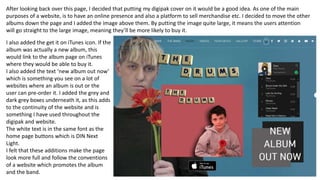
After looking back over this page, I decided that putting my digipak cover on it would be a good idea. As one of the main
purposes of a website, is to have an online presence and also a platform to sell merchandise etc. I decided to move the other
albums down the page and I added the image above them. By putting the image quite large, it means the users attention
will go straight to the large image, meaning they’ll be more likely to buy it.
I also added the get it on iTunes icon. If the
album was actually a new album, this
would link to the album page on iTunes
where they would be able to buy it.
I also added the text ‘new album out now’
which is something you see on a lot of
websites where an album is out or the
user can pre-order it. I added the grey and
dark grey boxes underneath it, as this adds
to the continuity of the website and is
something I have used throughout the
digipak and website.
The white text is in the same font as the
home page buttons which is DIN Next
Light.
I felt that these additions make the page
look more full and follow the conventions
of a website which promotes the album
and the band.
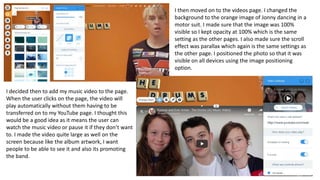
I then moved on to the videos page. I changed the
background to the orange image of Jonny dancing in a
motor suit. I made sure that the image was 100%
visible so I kept opacity at 100% which is the same
setting as the other pages. I also made sure the scroll
effect was parallax which again is the same settings as
the other page. I positioned the photo so that it was
visible on all devices using the image positioning
option.
I decided then to add my music video to the page.
When the user clicks on the page, the video will
play automatically without them having to be
transferred on to my YouTube page. I thought this
would be a good idea as it means the user can
watch the music video or pause it if they don’t want
to. I made the video quite large as well on the
screen because like the album artwork, I want
people to be able to see it and also its promoting
the band.
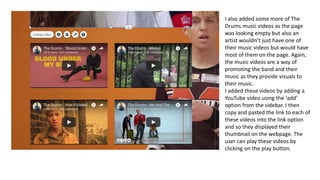
I also added some more of The
Drums music videos as the page
was looking empty but also an
artist wouldn’t just have one of
their music videos but would have
most of them on the page. Again,
the music videos are a way of
promoting the band and their
music as they provide visuals to
their music.
I added these videos by adding a
YouTube video using the ‘add’
option from the sidebar. I then
copy and pasted the link to each of
these videos into the link option
and so they displayed their
thumbnail on the webpage. The
user can play these videos by
clicking on the play button.
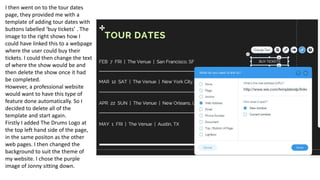
I then went on to the tour dates
page, they provided me with a
template of adding tour dates with
buttons labelled ‘buy tickets’ . The
image to the right shows how I
could have linked this to a webpage
where the user could buy their
tickets. I could then change the text
of where the show would be and
then delete the show once it had
be completed.
However, a professional website
would want to have this type of
feature done automatically. So I
decided to delete all of the
template and start again.
Firstly I added The Drums Logo at
the top left hand side of the page,
in the same positon as the other
web pages. I then changed the
background to suit the theme of
my website. I chose the purple
image of Jonny sitting down.
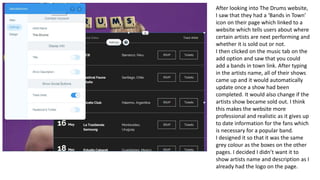
After looking into The Drums website,
I saw that they had a ‘Bands in Town’
icon on their page which linked to a
website which tells users about where
certain artists are next performing and
whether it is sold out or not.
I then clicked on the music tab on the
add option and saw that you could
add a bands in town link. After typing
in the artists name, all of their shows
came up and it would automatically
update once a show had been
completed. It would also change if the
artists show became sold out. I think
this makes the website more
professional and realistic as it gives up
to date information for the fans which
is necessary for a popular band.
I designed it so that it was the same
grey colour as the boxes on the other
pages. I decided I didn’t want it to
show artists name and description as I
already had the logo on the page.
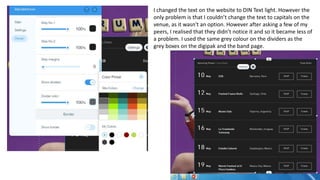
I changed the text on the website to DIN Text light. However the
only problem is that I couldn’t change the text to capitals on the
venue, as it wasn't an option. However after asking a few of my
peers, I realised that they didn’t notice it and so it became less of
a problem. I used the same grey colour on the dividers as the
grey boxes on the digipak and the band page.
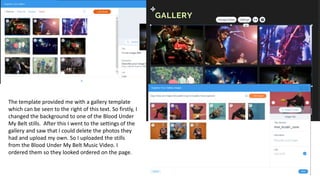
The template provided me with a gallery template
which can be seen to the right of this text. So firstly, I
changed the background to one of the Blood Under
My Belt stills. After this I went to the settings of the
gallery and saw that I could delete the photos they
had and upload my own. So I uploaded the stills
from the Blood Under My Belt Music Video. I
ordered them so they looked ordered on the page.
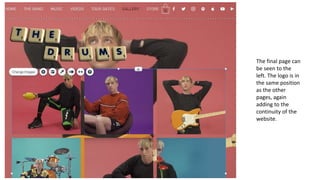
The final page can
be seen to the
left. The logo is in
the same position
as the other
pages, again
adding to the
continuity of the
website.
When creating the store I realised that using one of the
wix.com options, you could create a shop on your
website. This meant you could connect a PayPal account
to the website and people can actually buy stock and
then the website would automatically update the stock
level until the item is sold out.
So firstly, I went about creating the merchandise for the
website. As I was creating the merchandise, I did some
simple designs on the typical colours of t –shirts fans
usually buy.
If I were to do the website again, I would have spent
more time creating the colours of the t-shirts to fit with
the theme and made them the pink, purple, blue and
orange of the digipak with the logo. As this would add to
the corporate identity of the band.
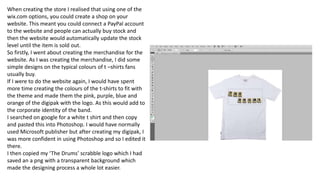
I searched on google for a white t shirt and then copy
and pasted this into Photoshop. I would have normally
used Microsoft publisher but after creating my digipak, I
was more confident in using Photoshop and so I edited it
there.
I then copied my ‘The Drums’ scrabble logo which I had
saved an a png with a transparent background which
made the designing process a whole lot easier.
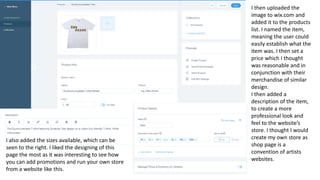
I then uploaded the
image to wix.com and
added it to the products
list. I named the item,
meaning the user could
easily establish what the
item was. I then set a
price which I thought
was reasonable and in
conjunction with their
merchandise of similar
design.
I then added a
description of the item,
to create a more
professional look and
feel to the website’s
store. I thought I would
create my own store as
shop page is a
convention of artists
websites.
I also added the sizes available, which can be
seen to the right. I liked the designing of this
page the most as it was interesting to see how
you can add promotions and run your own store
from a website like this.
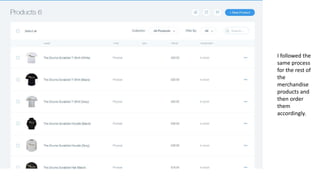
I followed the
same process
for the rest of
the
merchandise
products and
then order
them
accordingly.
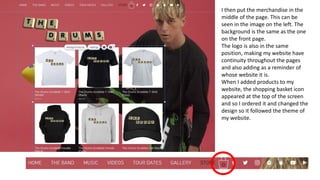
I then put the merchandise in the
middle of the page. This can be
seen in the image on the left. The
background is the same as the one
on the front page.
The logo is also in the same
position, making my website have
continuity throughout the pages
and also adding as a reminder of
whose website it is.
When I added products to my
website, the shopping basket icon
appeared at the top of the screen
and so I ordered it and changed the
design so it followed the theme of
my website.

Production of Website

  • 1.
  • 2.
    Using wix.com Ihad to create my website, firstly I looked through templates that were already created and I chose the one labelled ‘the band’ as I thought that as my chosen artist is a band and the band in the template looked like they made indie music. Obviously, this was a template and so it didn’t matter who was on it as I was going to create my own website based on my artist and digipak. I started off by deleting all the information and images that were already in use on the template, so that I almost had to start from scratch. I think the main purpose of a website, is used for selling merchandise and also as a way of advertising the artist. This meant that the website needed to be easy to use and so I thought by having a basic template it would aid this.
  • 3.
    First of all,I went about creating the pages for my website. (These can be seen above) I wanted a home page, that would not have anything but the bands logo and the background image which I decided would be the pink image of Jonny holding the American football. Above you can see that I decided the buttons on the top of the page would be white, this meant that they could be read through the background. I also decided that when the user hovered over them they should go black and then go black when clicked on as well. Above the button labelled ‘home’ is black as it the current page the user is on.
  • 4.
    After outlining whichpages I would want, I went about copying my design. I put the social media links at the top corner as the borders on the website editor screen, allowed me to see what the header was and so this meant that the social media links as well as the buttons will appear in the same location across the website and this has created a template for me. The other borders show what will be displayed on screen for a mobile device and smaller device, so to make the website usable across lots of devices I decided to stick with the borders. The next thing I added was The Drums scrabble logo that I created using photoshop as this was featured on the music video and digipak. This gives The Drums a sense of corporate identity and makes it recognisable to their fans, which is something I think is important as with a logo, it means merchandise can be created easily and create a sense of community with the band. I wanted the website be quite simple and plain, to match the digipak.
  • 5.
    The next thingI decided to design was the footer. In the image to the right, the blue line above the main text is the footer border and so anything underneath this line would be included on the page. I put the management and contact information in this location because I think it is more appropriate to have it on each page in the same location rather than have a separate page. Also I think contact information is very important as essentially the band want promotion and shoots and other opportunities and so firms who offer this will go to their website to get in contact with them and so having it here, it makes it easier for these types of opportunities to happen. I rewrote the same information as the contact information as on their official website to make the website as realistic and look as professional as possible. The template included the ‘subscribe for updates’ button on it and so I changed the colour and design of this to suit my website. I think that this update button is important as again adds to the community feel and Indie artists are usually quite involved with their fans, sharing most aspect of their lives. I decided to use the font DIN Next Light as it I used the same font on my digipak and so this again added to the corporate identity. I also added a copyright logo and the record labels name at the bottom of the footer which again would be on every page, I did this for professionalism and to make the website look and feel realistic.
  • 6.
    After this, Idecided to link the social media icons to The Drums social media pages. This means when the user clicks on any of the icons, a new tab will open and they will be sent to their social media page. I also made sure that all the icons were the ‘White icon’ so that they were all the same.
  • 7.
    The next pageI created was the page titled ‘The band’ which is a page about the band and the members which recently went from 2 to 1, so I didn’t have to write a lot. I wanted to put the logo in the same location and I did this my copying and pasting it on to the page. I then added the image of Jonny. I thought the orange background contrasted with the blue background well and so that’s why I chose this particular image. I also put a box underneath the image of Jonny as I think having a caption to the photo will make the page feel more full and also to sort of balance the page out. I then added the boxes, at first I just had the dark grey box but to make it similar to the digipak, I decided to add the light grey box over the top which is exactly the same as the digipak. At first, I thought that I wouldn’t need boxes but after writing some text on the page beforehand, I realised that I needed the boxes to ensure that the text is legible.
  • 8.
    I then movedon to the music page where I added the logo on to the page in the same position. This creates a sense of continuity throughout the whole entire website. As you can see from the image to the left, the footer automatically is added to the page and so looks exactly the same as the rest of the pages that I've created so far. I added the blue background which is the one with Jonny holding the red flower. I used this image as it added to the corporate identity as in the music video, I have used a similar red flower and on the front cover of the digipak, the lead singer is holding the red flower. I then added images of the artists other albums. As you can see from these, the band don’t have a brand and so what I decided to do was challenge this by connecting all 3 products together. I followed the idea of having the same font as on their current website, they use a blood dripping type text which is the same on their current album ‘abysmal thoughts’. After I added the images of each album, I decided to link the images to the same album on Spotify. This means that when a user clicks on them, they will be sent to the same album on Spotify where they can listen to it if they like.
  • 9.
    I then decidedto add a Spotify player to the page, as there was a large gap on my page and although I want it to be simplistic, I also want the user to feel that the website is helpful in all ways and it also means that they can listen to their music without leaving the web page. I had to go on my Spotify and find the artists and copy their URL into the Spotify player settings so that it would link together. Above, you can the Spotify player is white but after looking at the page labelled ‘The Band’. I noticed that my boxes on the page were dark grey and light grey and so I thought after looking through the Spotify player layout options that the dark grey Spotify player was more appropriate as it fitted better with the theme and as the album covers are quite dark, I think the dark grey worked better with the aesthetic of the website.
  • 10.
    After looking backover this page, I decided that putting my digipak cover on it would be a good idea. As one of the main purposes of a website, is to have an online presence and also a platform to sell merchandise etc. I decided to move the other albums down the page and I added the image above them. By putting the image quite large, it means the users attention will go straight to the large image, meaning they’ll be more likely to buy it. I also added the get it on iTunes icon. If the album was actually a new album, this would link to the album page on iTunes where they would be able to buy it. I also added the text ‘new album out now’ which is something you see on a lot of websites where an album is out or the user can pre-order it. I added the grey and dark grey boxes underneath it, as this adds to the continuity of the website and is something I have used throughout the digipak and website. The white text is in the same font as the home page buttons which is DIN Next Light. I felt that these additions make the page look more full and follow the conventions of a website which promotes the album and the band.
  • 11.
    I then movedon to the videos page. I changed the background to the orange image of Jonny dancing in a motor suit. I made sure that the image was 100% visible so I kept opacity at 100% which is the same setting as the other pages. I also made sure the scroll effect was parallax which again is the same settings as the other page. I positioned the photo so that it was visible on all devices using the image positioning option. I decided then to add my music video to the page. When the user clicks on the page, the video will play automatically without them having to be transferred on to my YouTube page. I thought this would be a good idea as it means the user can watch the music video or pause it if they don’t want to. I made the video quite large as well on the screen because like the album artwork, I want people to be able to see it and also its promoting the band.
  • 12.
    I also addedsome more of The Drums music videos as the page was looking empty but also an artist wouldn’t just have one of their music videos but would have most of them on the page. Again, the music videos are a way of promoting the band and their music as they provide visuals to their music. I added these videos by adding a YouTube video using the ‘add’ option from the sidebar. I then copy and pasted the link to each of these videos into the link option and so they displayed their thumbnail on the webpage. The user can play these videos by clicking on the play button.
  • 13.
    I then wenton to the tour dates page, they provided me with a template of adding tour dates with buttons labelled ‘buy tickets’ . The image to the right shows how I could have linked this to a webpage where the user could buy their tickets. I could then change the text of where the show would be and then delete the show once it had be completed. However, a professional website would want to have this type of feature done automatically. So I decided to delete all of the template and start again. Firstly I added The Drums Logo at the top left hand side of the page, in the same positon as the other web pages. I then changed the background to suit the theme of my website. I chose the purple image of Jonny sitting down.
  • 14.
    After looking intoThe Drums website, I saw that they had a ‘Bands in Town’ icon on their page which linked to a website which tells users about where certain artists are next performing and whether it is sold out or not. I then clicked on the music tab on the add option and saw that you could add a bands in town link. After typing in the artists name, all of their shows came up and it would automatically update once a show had been completed. It would also change if the artists show became sold out. I think this makes the website more professional and realistic as it gives up to date information for the fans which is necessary for a popular band. I designed it so that it was the same grey colour as the boxes on the other pages. I decided I didn’t want it to show artists name and description as I already had the logo on the page.
  • 15.
    I changed thetext on the website to DIN Text light. However the only problem is that I couldn’t change the text to capitals on the venue, as it wasn't an option. However after asking a few of my peers, I realised that they didn’t notice it and so it became less of a problem. I used the same grey colour on the dividers as the grey boxes on the digipak and the band page.
  • 16.
    The template providedme with a gallery template which can be seen to the right of this text. So firstly, I changed the background to one of the Blood Under My Belt stills. After this I went to the settings of the gallery and saw that I could delete the photos they had and upload my own. So I uploaded the stills from the Blood Under My Belt Music Video. I ordered them so they looked ordered on the page.
  • 17.
    The final pagecan be seen to the left. The logo is in the same position as the other pages, again adding to the continuity of the website.
  • 18.
    When creating thestore I realised that using one of the wix.com options, you could create a shop on your website. This meant you could connect a PayPal account to the website and people can actually buy stock and then the website would automatically update the stock level until the item is sold out. So firstly, I went about creating the merchandise for the website. As I was creating the merchandise, I did some simple designs on the typical colours of t –shirts fans usually buy. If I were to do the website again, I would have spent more time creating the colours of the t-shirts to fit with the theme and made them the pink, purple, blue and orange of the digipak with the logo. As this would add to the corporate identity of the band. I searched on google for a white t shirt and then copy and pasted this into Photoshop. I would have normally used Microsoft publisher but after creating my digipak, I was more confident in using Photoshop and so I edited it there. I then copied my ‘The Drums’ scrabble logo which I had saved an a png with a transparent background which made the designing process a whole lot easier.
  • 19.
    I then uploadedthe image to wix.com and added it to the products list. I named the item, meaning the user could easily establish what the item was. I then set a price which I thought was reasonable and in conjunction with their merchandise of similar design. I then added a description of the item, to create a more professional look and feel to the website’s store. I thought I would create my own store as shop page is a convention of artists websites. I also added the sizes available, which can be seen to the right. I liked the designing of this page the most as it was interesting to see how you can add promotions and run your own store from a website like this.
  • 20.
    I followed the sameprocess for the rest of the merchandise products and then order them accordingly.
  • 21.
    I then putthe merchandise in the middle of the page. This can be seen in the image on the left. The background is the same as the one on the front page. The logo is also in the same position, making my website have continuity throughout the pages and also adding as a reminder of whose website it is. When I added products to my website, the shopping basket icon appeared at the top of the screen and so I ordered it and changed the design so it followed the theme of my website.