Basic Amazon
Product
Research
"Finding Products are like finding Gems in the seashore"
Amazon
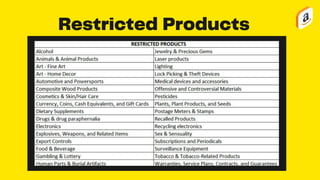
Restricted
Categories
Restricted Products
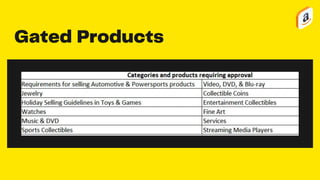
Gated Products
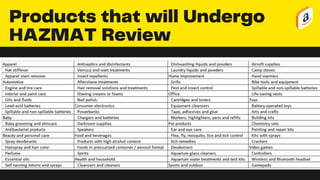
Products that will Undergo
HAZMAT Review
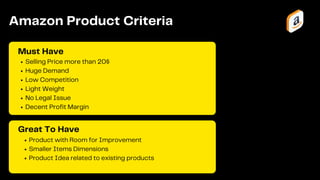
Product with Room for Improvement
Smaller Items Dimensions
Product Idea related to existing products
Selling Price more than 20$
Huge Demand
Low Competition
Light Weight
No Legal Issue
Decent Profit Margin
Must Have
Amazon Product Criteria
Great To Have
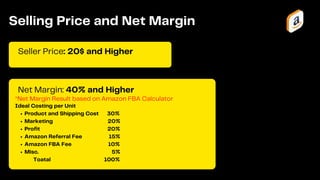
*Net Margin Result based on Amazon FBA Calculator
Seller Price: 20$ and Higher
Selling Price and Net Margin
Net Margin: 40% and Higher
Product and Shipping Cost 30%
Marketing 20%
Profit 20%
Amazon Referral Fee 15%
Amazon FBA Fee 10%
Misc. 5%
Ideal Costing per Unit
Toatal 100%
1 2 3 4 5 6 7 8 9 10
100
75
50
25
0
Demands
Units Sold per Month:
500 Units or More
Helium 10 X-Ray Chrome Extension
Unicorn Smasher
Jungle Scout
There are tools that you can use to
validate Demand like:
1 2 3 4 5 6 7 8 9 10
100
75
50
25
0
Reviews
Reviews are good indicator how competitive
products are. This can tell you the ease of entry
and competition.
1 to 100 Reviews: Low Competition
101 to 500 Reviews: Moderate Competition
501 to 1000 Reviews: High Competition
1001 or higher Reviews: Ultra High Competition
Target: All sellers should have 500
reviews and below
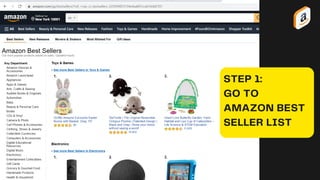
STEP 1:
GO TO
AMAZON BEST
SELLER LIST
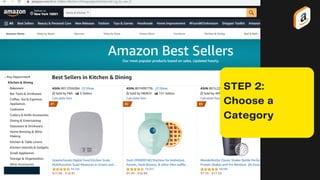
STEP 2:
Choose a
Category
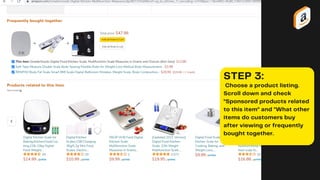
STEP 3:
Choose a product listing.
Scroll down and check
"Sponsored products related
to this item" and "What other
items do customers buy
after viewing or frequently
bought together.
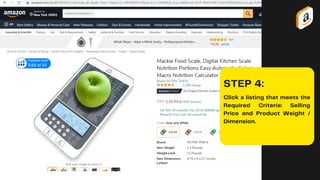
STEP 4:
Click a listing that meets the
Required Criteria: Selling
Price and Product Weight /
Dimension.
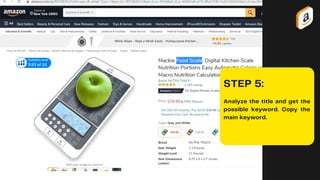
STEP 5:
Analyze the title and get the
possible keyword. Copy the
main keyword.
STEP 6:
Go to Amazon.com and
paste the Main Keyword on
the search bar.
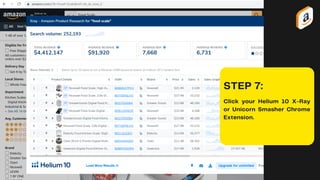
STEP 7:
Click your Helium 10 X-Ray
or Unicorn Smasher Chrome
Extension.
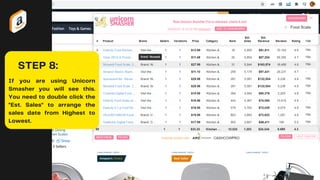
STEP 8:
If you are using Unicorn
Smasher you will see this.
You need to double click the
"Est. Sales" to arrange the
sales date from Highest to
Lowest.
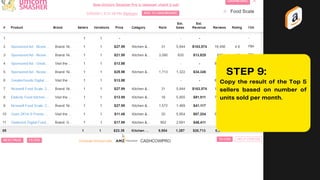
STEP 9:
Copy the result of the Top 5
sellers based on number of
units sold per month.
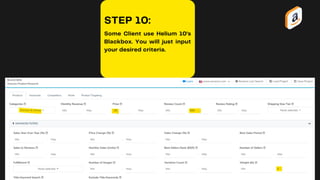
STEP 10:
Some Client use Helium 10's
Blackbox. You will just input
your desired criteria.
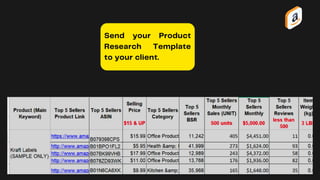
Send your Product
Research Template
to your client.
What makes
a Good
Product
Researcher?
Resourchful
Always Curious
Critical Thinker
Data Driven
Thank You
Hoping we collaborate each other soon..

Product Research Presentation

  • 1.
    Basic Amazon Product Research "Finding Productsare like finding Gems in the seashore"
  • 2.
  • 3.
  • 4.
  • 5.
    Products that willUndergo HAZMAT Review
  • 6.
    Product with Roomfor Improvement Smaller Items Dimensions Product Idea related to existing products Selling Price more than 20$ Huge Demand Low Competition Light Weight No Legal Issue Decent Profit Margin Must Have Amazon Product Criteria Great To Have
  • 7.
    *Net Margin Resultbased on Amazon FBA Calculator Seller Price: 20$ and Higher Selling Price and Net Margin Net Margin: 40% and Higher Product and Shipping Cost 30% Marketing 20% Profit 20% Amazon Referral Fee 15% Amazon FBA Fee 10% Misc. 5% Ideal Costing per Unit Toatal 100%
  • 8.
    1 2 34 5 6 7 8 9 10 100 75 50 25 0 Demands Units Sold per Month: 500 Units or More Helium 10 X-Ray Chrome Extension Unicorn Smasher Jungle Scout There are tools that you can use to validate Demand like:
  • 9.
    1 2 34 5 6 7 8 9 10 100 75 50 25 0 Reviews Reviews are good indicator how competitive products are. This can tell you the ease of entry and competition. 1 to 100 Reviews: Low Competition 101 to 500 Reviews: Moderate Competition 501 to 1000 Reviews: High Competition 1001 or higher Reviews: Ultra High Competition Target: All sellers should have 500 reviews and below
  • 10.
    STEP 1: GO TO AMAZONBEST SELLER LIST
  • 11.
  • 12.
    STEP 3: Choose aproduct listing. Scroll down and check "Sponsored products related to this item" and "What other items do customers buy after viewing or frequently bought together.
  • 13.
    STEP 4: Click alisting that meets the Required Criteria: Selling Price and Product Weight / Dimension.
  • 14.
    STEP 5: Analyze thetitle and get the possible keyword. Copy the main keyword.
  • 15.
    STEP 6: Go toAmazon.com and paste the Main Keyword on the search bar.
  • 16.
    STEP 7: Click yourHelium 10 X-Ray or Unicorn Smasher Chrome Extension.
  • 17.
    STEP 8: If youare using Unicorn Smasher you will see this. You need to double click the "Est. Sales" to arrange the sales date from Highest to Lowest.
  • 18.
    STEP 9: Copy theresult of the Top 5 sellers based on number of units sold per month.
  • 19.
    STEP 10: Some Clientuse Helium 10's Blackbox. You will just input your desired criteria.
  • 20.
    Send your Product ResearchTemplate to your client.
  • 21.
  • 22.
    Thank You Hoping wecollaborate each other soon..