Procedure writing: As easy as 1, 2, 3? Optional, conditional, and branching steps  ©  Marcia (Riefer Poulsen) Johnston  2009 [email_address]
To view in PowerPoint, press the F5 key (or in the menu bar go to  Slide Show  >  View Show ),  and click through the slides.
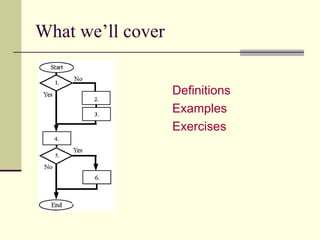
What we’ll cover Definitions Examples Exercises
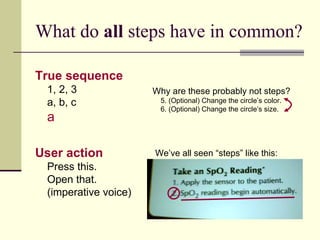
What do  all  steps have in common? True sequence 1, 2, 3 a, b, c        User action Press this. Open that. (imperative voice) We’ve all seen “steps” like this: Why are these probably not steps?   5. (Optional) Change the circle’s color. 6. (Optional) Change the circle’s size.
Definitions Optional step A step that you can skip. Conditional step A step that you take  if and only if… .  In that case, you can’t skip it. Branching step A step that gives you choices.
This is a basic (required) step. 5. Press the power button.
What kind of step is this? 4. If you are not registered on the LAN,  register your computer as a client. Conditional step This step must be done if and only if this  condition applies.
What kind of step is this?   Trick question 8. If desired, adjust the screen brightness. Optional step  This step can be skipped. Clearer form:  8. (Optional) Adjust the screen brightness.
What kind of step is this? 5. Format the diskette. If you have a UFS system, type  fdformat . If you have an MS-DOS system, type  fdformat -d . Branching step   Tip: If the same branches recur, consider separate procedures (UFS system, MS-DOS system).
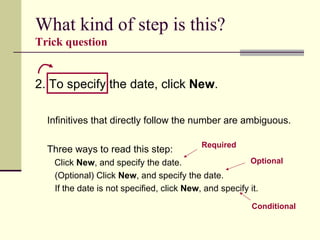
What kind of step is this?   Trick question 2. To specify the date, click  New . Infinitives that directly follow the number are ambiguous. Three ways to read this step:   Click  New , and specify the date. (Optional) Click  New , and specify the date. If the date is not specified, click  New , and specify it. Required Optional Conditional
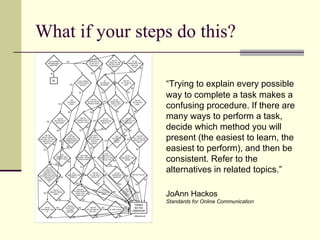
What if your steps do this? “ Trying to explain every possible way to complete a task makes a confusing procedure. If there are many ways to perform a task, decide which method you will present (the easiest to learn, the easiest to perform), and then be consistent. Refer to the alternatives in related topics.” JoAnn Hackos Standards for Online Communication
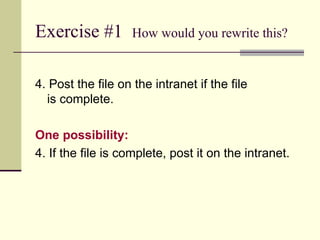
Exercise #1  How would you rewrite this? 4. Post the file on the intranet if the file  is complete. One possibility: 4. If the file is complete, post it on the intranet.
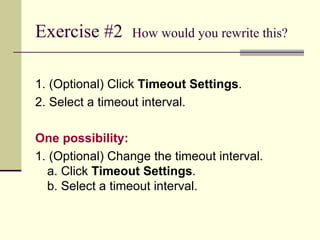
Exercise #2  How would you rewrite this? 1. (Optional) Click  Timeout Settings . 2. Select a timeout interval. One possibility: 1. (Optional) Change the timeout interval. a. Click  Timeout Settings . b. Select a timeout interval.
Exercise #3  How would you rewrite this? 6. Determine whether to make this printer the default printer. If no, go to Step 7. If yes, select  Default . One possibility: 6. (Optional) Select  Default .
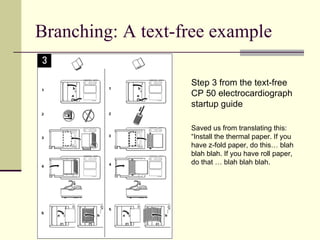
Branching: A text-free example Step 3 from the text-free CP 50 electrocardiograph startup guide  Saved us from translating this: “Install the thermal paper. If you have z-fold paper, do this… blah blah blah. If you have roll paper, do that … blah blah blah.
Books that I pilfered from Read Me First!   Sun, 2nd edition, 2003, pp 127-132 Developing Quality Technical Information   IBM, 2nd edition, 2004, pp 41-44 Single Sourcing: Building Modular Documentation   Kurt Ament, 2003, pp 123 Standards for Online Communication JoAnn Hackos & Dawn Stevens, 1997, pp 271-272

Procedure Writing

  • 1.
    Procedure writing: Aseasy as 1, 2, 3? Optional, conditional, and branching steps © Marcia (Riefer Poulsen) Johnston 2009 [email_address]
  • 2.
    To view inPowerPoint, press the F5 key (or in the menu bar go to Slide Show > View Show ), and click through the slides.
  • 3.
    What we’ll coverDefinitions Examples Exercises
  • 4.
    What do all steps have in common? True sequence 1, 2, 3 a, b, c    User action Press this. Open that. (imperative voice) We’ve all seen “steps” like this: Why are these probably not steps? 5. (Optional) Change the circle’s color. 6. (Optional) Change the circle’s size.
  • 5.
    Definitions Optional stepA step that you can skip. Conditional step A step that you take if and only if… . In that case, you can’t skip it. Branching step A step that gives you choices.
  • 6.
    This is abasic (required) step. 5. Press the power button.
  • 7.
    What kind ofstep is this? 4. If you are not registered on the LAN, register your computer as a client. Conditional step This step must be done if and only if this condition applies.
  • 8.
    What kind ofstep is this? Trick question 8. If desired, adjust the screen brightness. Optional step This step can be skipped. Clearer form: 8. (Optional) Adjust the screen brightness.
  • 9.
    What kind ofstep is this? 5. Format the diskette. If you have a UFS system, type fdformat . If you have an MS-DOS system, type fdformat -d . Branching step Tip: If the same branches recur, consider separate procedures (UFS system, MS-DOS system).
  • 10.
    What kind ofstep is this? Trick question 2. To specify the date, click New . Infinitives that directly follow the number are ambiguous. Three ways to read this step: Click New , and specify the date. (Optional) Click New , and specify the date. If the date is not specified, click New , and specify it. Required Optional Conditional
  • 11.
    What if yoursteps do this? “ Trying to explain every possible way to complete a task makes a confusing procedure. If there are many ways to perform a task, decide which method you will present (the easiest to learn, the easiest to perform), and then be consistent. Refer to the alternatives in related topics.” JoAnn Hackos Standards for Online Communication
  • 12.
    Exercise #1 How would you rewrite this? 4. Post the file on the intranet if the file is complete. One possibility: 4. If the file is complete, post it on the intranet.
  • 13.
    Exercise #2 How would you rewrite this? 1. (Optional) Click Timeout Settings . 2. Select a timeout interval. One possibility: 1. (Optional) Change the timeout interval. a. Click Timeout Settings . b. Select a timeout interval.
  • 14.
    Exercise #3 How would you rewrite this? 6. Determine whether to make this printer the default printer. If no, go to Step 7. If yes, select Default . One possibility: 6. (Optional) Select Default .
  • 15.
    Branching: A text-freeexample Step 3 from the text-free CP 50 electrocardiograph startup guide Saved us from translating this: “Install the thermal paper. If you have z-fold paper, do this… blah blah blah. If you have roll paper, do that … blah blah blah.
  • 16.
    Books that Ipilfered from Read Me First! Sun, 2nd edition, 2003, pp 127-132 Developing Quality Technical Information IBM, 2nd edition, 2004, pp 41-44 Single Sourcing: Building Modular Documentation Kurt Ament, 2003, pp 123 Standards for Online Communication JoAnn Hackos & Dawn Stevens, 1997, pp 271-272