Setting up an in-house
     Private Cloud


                 Chintana Wilamuna
                chintana@wso2.com
Cloud Computing
• Buy computing power, storage or
  services on demand
• Service Delivery Model
 • What is given “as a Service”
   •   Pay per use
   •   Self service provisioning
   •   Virtually unlimited resources
   •   Resource sharing
• Cloud Deployment Model
 • Where is the cloud deployed
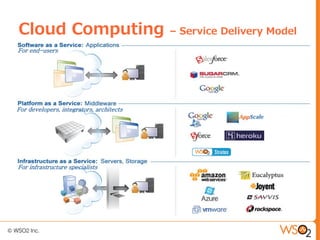
Cloud Computing                           – Service Delivery Model
For end-users


For developers, integrators, architects


For infrastructure specialists
Cloud Computing                  – Deployment Model


●   Public
    –   IaaS, PaaS, SaaS available on the Internet
    –   Use one of the cloud service providers
    –   Information stored and managed by provider - SLA
●   Private
    –   Have a cloud, in-house
    –   IaaS provides by hardware on your data centers
    –   PaaS running on your IaaS
    –   SaaS executing on your PaaS
●   Hybrid
●   Community
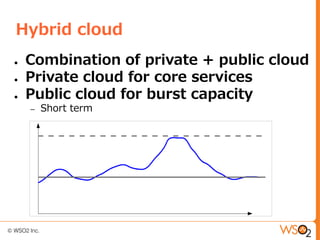
Hybrid cloud
●   Combination of private + public cloud
●   Private cloud for core services
●   Public cloud for burst capacity
    –   Short term
Bridging private & public clouds


1.   Use WSO2 Cloud Services Gateway
     (CSG)

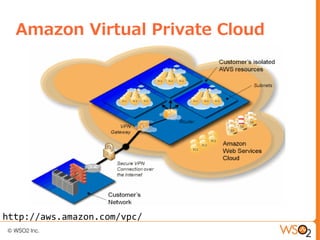
2.   Use Amazon Virtual Private Cloud
     (VPC)
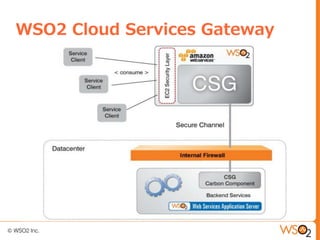
WSO2 Cloud Services Gateway
Amazon Virtual Private Cloud


http://aws.amazon.com/vpc/
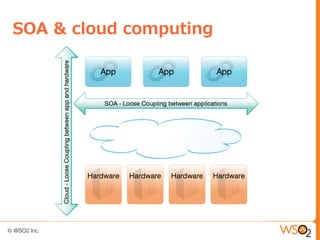
SOA & cloud computing
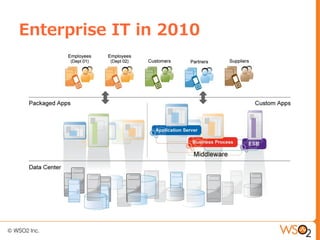
Enterprise IT in 2010
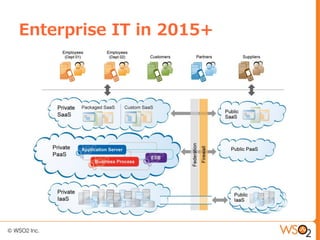
Enterprise IT in 2015+
Why public cloud?
●   No need to buy machines

●   No need to setup

●   No need to spend anything, if we are
    not using

●   No need to wait, if you need more
    computing power

●   It is just out there, ready to be used
Why not public cloud?
●    Data is wealth, key to competitive
     advantage
     –   Not supposed to move it out of premises

●   Security reasons
     –   Take no chance on sensitive elements in IT

●   Mainframe -> cloud
     –   Legacy apps are better off the way they are

●   Quality of service - Availability, SLA
●   Regulations
     –   Government and industry regulations
Prerequisites for private cloud
●   Hardware
    –   CPUs supporting virtualization
    –   Large storage
    –   High speed network
●   Cloud ready OS
    –   Ubuntu Server LTS
●   Cloud infrastructure
    –   Eucalyptus
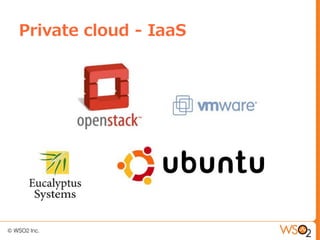
Private cloud - IaaS
Private cloud - UEC
●   EC2 compatible API
     –   Stratos Autoscaling code on EC2

●   Open source & wide availability

●   Ubuntu LTS
     –   Support for 5 years
UEC configuration tips
●   Choose the right topology
     –   # physical systems
     –   Where CLC/Walrus/CC/NC is installed
     –   https://help.ubuntu.com/community/UEC/Topologies

●   Network configuration
     –   https://help.ubuntu.com/community/UEC/Tips


●   Monitor instance memory usage
Beyond private IaaS
●   Define your purpose
     –   Why do I want a private IaaS?
     –   How to utilize it
     –   Possible usage patterns

●   Too low level?
     –   Deal with machines/instances
     –   A minimal OS

●   IaaS = cloud?!
A complete platform
●   PaaS
     –   Running on top of your IaaS
     –   More high-level
     –   Easier to develop

●   Concentrate on your apps

●   A cloud native PaaS
     –   Take advantage of “cloud features”
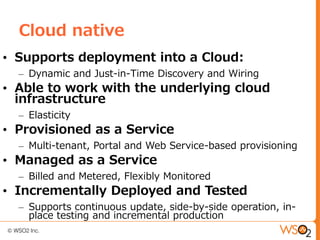
Cloud native
• Supports deployment into a Cloud:
  – Dynamic and Just-in-Time Discovery and Wiring
• Able to work with the underlying cloud
  infrastructure
  – Elasticity
• Provisioned as a Service
  – Multi-tenant, Portal and Web Service-based provisioning
• Managed as a Service
  – Billed and Metered, Flexibly Monitored
• Incrementally Deployed and Tested
  – Supports continuous update, side-by-side operation, in-
    place testing and incremental production
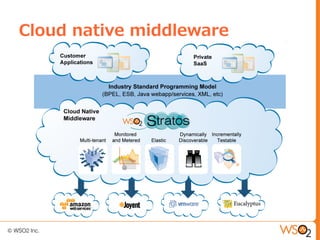
Cloud native middleware
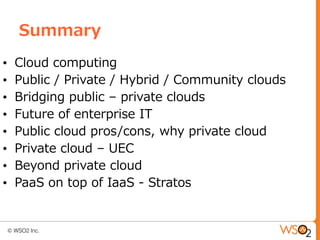
Summary
•   Cloud computing
•   Public / Private / Hybrid / Community clouds
•   Bridging public – private clouds
•   Future of enterprise IT
•   Public cloud pros/cons, why private cloud
•   Private cloud – UEC
•   Beyond private cloud
•   PaaS on top of IaaS - Stratos
Thank you!
Questions?

Private cloud-webinar

  • 1.
    Setting up anin-house Private Cloud Chintana Wilamuna chintana@wso2.com
  • 2.
    Cloud Computing • Buycomputing power, storage or services on demand • Service Delivery Model • What is given “as a Service” • Pay per use • Self service provisioning • Virtually unlimited resources • Resource sharing • Cloud Deployment Model • Where is the cloud deployed
  • 3.
    Cloud Computing – Service Delivery Model For end-users For developers, integrators, architects For infrastructure specialists
  • 4.
    Cloud Computing – Deployment Model ● Public – IaaS, PaaS, SaaS available on the Internet – Use one of the cloud service providers – Information stored and managed by provider - SLA ● Private – Have a cloud, in-house – IaaS provides by hardware on your data centers – PaaS running on your IaaS – SaaS executing on your PaaS ● Hybrid ● Community
  • 5.
    Hybrid cloud ● Combination of private + public cloud ● Private cloud for core services ● Public cloud for burst capacity – Short term
  • 6.
    Bridging private &public clouds 1. Use WSO2 Cloud Services Gateway (CSG) 2. Use Amazon Virtual Private Cloud (VPC)
  • 7.
  • 8.
    Amazon Virtual PrivateCloud http://aws.amazon.com/vpc/
  • 9.
    SOA & cloudcomputing
  • 10.
  • 11.
  • 12.
    Why public cloud? ● No need to buy machines ● No need to setup ● No need to spend anything, if we are not using ● No need to wait, if you need more computing power ● It is just out there, ready to be used
  • 13.
    Why not publiccloud? ● Data is wealth, key to competitive advantage – Not supposed to move it out of premises ● Security reasons – Take no chance on sensitive elements in IT ● Mainframe -> cloud – Legacy apps are better off the way they are ● Quality of service - Availability, SLA ● Regulations – Government and industry regulations
  • 14.
    Prerequisites for privatecloud ● Hardware – CPUs supporting virtualization – Large storage – High speed network ● Cloud ready OS – Ubuntu Server LTS ● Cloud infrastructure – Eucalyptus
  • 15.
  • 16.
    Private cloud -UEC ● EC2 compatible API – Stratos Autoscaling code on EC2 ● Open source & wide availability ● Ubuntu LTS – Support for 5 years
  • 17.
    UEC configuration tips ● Choose the right topology – # physical systems – Where CLC/Walrus/CC/NC is installed – https://help.ubuntu.com/community/UEC/Topologies ● Network configuration – https://help.ubuntu.com/community/UEC/Tips ● Monitor instance memory usage
  • 18.
    Beyond private IaaS ● Define your purpose – Why do I want a private IaaS? – How to utilize it – Possible usage patterns ● Too low level? – Deal with machines/instances – A minimal OS ● IaaS = cloud?!
  • 19.
    A complete platform ● PaaS – Running on top of your IaaS – More high-level – Easier to develop ● Concentrate on your apps ● A cloud native PaaS – Take advantage of “cloud features”
  • 20.
    Cloud native • Supportsdeployment into a Cloud: – Dynamic and Just-in-Time Discovery and Wiring • Able to work with the underlying cloud infrastructure – Elasticity • Provisioned as a Service – Multi-tenant, Portal and Web Service-based provisioning • Managed as a Service – Billed and Metered, Flexibly Monitored • Incrementally Deployed and Tested – Supports continuous update, side-by-side operation, in- place testing and incremental production
  • 21.
  • 22.
    Summary • Cloud computing • Public / Private / Hybrid / Community clouds • Bridging public – private clouds • Future of enterprise IT • Public cloud pros/cons, why private cloud • Private cloud – UEC • Beyond private cloud • PaaS on top of IaaS - Stratos
  • 23.
  • 24.