Infrastructure as a Service (IaaS) provides essential computing resources such as servers, networking, and storage over the cloud, enabling scalability, reliability, and cost-efficiency for organizations. It allows clients to dynamically manage resources and emphasizes characteristics like availability, performance optimization, and ease of access. Various deployment models, including private, public, and hybrid clouds, cater to different organizational needs and regulatory considerations.
Introduction to Infrastructure as a Service (IaaS) and its basic definitions, including the delivery of computing resources, storage, and managed services.
Discussion on the necessity of IaaS for organizations facing volatile demand, limited capital, and specific business needs.
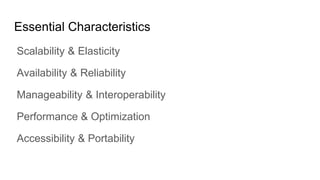
Overview of essential characteristics of IaaS: Scalability, Availability, Manageability, Performance, and Accessibility.
Focus on scalability and elasticity in IaaS; dynamic resource allocation for computation, storage, and communication.
Strategies for ensuring availability and reliability in IaaS, including monitoring, data replication, and redundancy.
Approaches to achieving manageability and interoperability in IaaS through automation, monitoring, and control.
Techniques for optimizing performance in IaaS, focusing on load balancing and resource migration.
Accessibility and portability strategies in IaaS, focusing on web-based management and ease of resource allocation.
Different deployment models for IaaS: Private, Community, Public, and Hybrid clouds, including their characteristics.
Conditions under which IaaS may not be ideal, such as regulatory compliance and performance requirements.
List of resources and references used for IaaS content and context.
What is Infrastructureas a Service?
“Infrastructure as a Service, sometimes abbreviated as IaaS,
contains the basic building blocks for cloud IT and typically
provide access to networking features, computers (virtual or
on dedicated hardware), and data storage space.” - Amazon
(https://aws.amazon.com/types-of-cloud-computing/)
3.
What is Infrastructureas a Service?
Delivery of a compute foundation,
Servers,
networking technology,
storage, and
data center space
as a service.
Includes the delivery of
operating systems and
virtualization technology
to manage the resources.
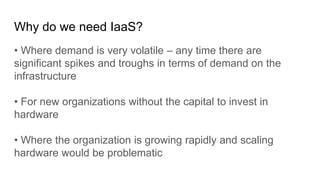
Why do weneed IaaS?
• Where demand is very volatile – any time there are
significant spikes and troughs in terms of demand on the
infrastructure
• For new organizations without the capital to invest in
hardware
• Where the organization is growing rapidly and scaling
hardware would be problematic
7.
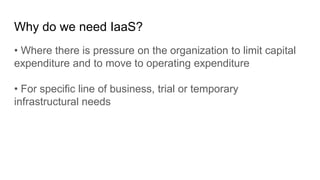
Why do weneed IaaS?
• Where there is pressure on the organization to limit capital
expenditure and to move to operating expenditure
• For specific line of business, trial or temporary
infrastructural needs
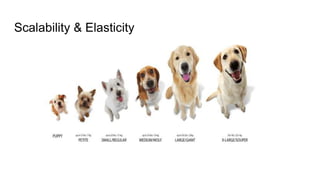
Scalability & Elasticity
Clientsshould be able to dynamically increase or decrease
the amount of infrastructure resources in need.
Large amount of resources provisioning and deployment
should be done in a short period of time, such as several
hours or days.
System behavior should remain identical in small scale or
large one.
11.
How to approachscalability and elasticity in IaaS ?
For computation resources :
Dynamically create or terminate virtual machines for clients
on demand.
Integrate hypervisors among all physical machines to
collaboratively control and manage all virtual machines.
12.
How to approachscalability and elasticity in IaaS ?
For storage resources :
Dynamically allocate or de-allocate virtual storage space for
clients.
Integrate all physical storage resources in the entire IaaS
system
Offer initial storage resources by thin provisioning technique.
13.
How to approachscalability and elasticity in IaaS ?
For communication resources :
Dynamically connect or disconnect the linking state of virtual
networks for clients on demand.
Dynamically divide the network request flow to different
physical routers to maintain access bandwidth.
14.
Availability & Reliability
Clientsshould be able to access computation resources
without considering the possibility of hardware failure.
Data stored in IaaS cloud should be able to be retrieved
when needed without considering any natural disaster
damage.
Communication capability and capacity should be maintained
without considering any physical equipment shortage.
15.
How to approachavailability and reliability in IaaS ?
For computation resources :
Monitor each physical and virtual machine for any possible
failure.
Regularly backup virtual machine system state for disaster
recovery.
Migrate virtual machine among physical machines for
potential failure prevention.
16.
How to approachavailability and reliability in IaaS ?
For storage resources :
Maintain data pieces replication among different physical
storage devices.
Regularly backup virtual storage data to geographically
remote locations for disaster prevention.
For communication resources :
Built redundant connection system to improve robustness.
17.
Manageability & Interoperability
Clientsshould be able to fully control the virtualized infrastructure
resources which allocated to them.
Virtualized resources can be allocated by means of system control
automation process with pre-configured policy.
States of all virtualized resource should be fully under monitoring.
Usage of infrastructure resources will be recorded and then billing
system will convert these information to user payment.
18.
How to approachmanageability and interoperability
in IaaS ?
For computation resources :
Provide basic virtual machine operations, such as creation,
termination, suspension, resumption and system snapshot.
Monitor and record CPU and memory loading for each virtual
machine.
19.
How to approachmanageability and interoperability
in IaaS ?
For storage resources :
Monitor and record storage space usage and read/write data
access from user for each virtual storage resource.
Automatic allocate/de-allocate physical storage according to
space utilization.
20.
How to approachmanageability and interoperability
in IaaS ?
For communication resources :
Monitor and record the network bandwidth consumption for each
virtual link.
Automatically reroute the data path when computation and storage
are duplicated.
21.
Performance & Optimization
Physicalresources should be highly utilized among different
clients.
Physical resources should form a large resource pool which
provide high computing power through parallel processing.
Virtual infrastructure resources will be dynamically configured to
an optimized deployment among physical resources.
22.
How to approachperformance and optimization in
IaaS ?
For computation resources :
Deploy virtual machine with load balancing consideration.
Live migrate virtual machines among physical ones to balance the
system loading.
For storage resources :
Deploy virtual storage with hot spot access consideration.
Live migrate virtual storage among physical ones with different
performance level.
23.
How to approachperformance and optimization in
IaaS ?
For communication resources :
Consider network bandwidth loading when deploying virtual
machines and storage.
Dynamically migrate virtual machines or storage to balance
network flow.
24.
Accessibility & Portability
Clientsshould be able to control, manage and access
infrastructure resources in an easy way, such as the web-
browser, without additional local software or hardware
installation.
Provided infrastructure resources should be able to be reallocated
or duplicated easily.
25.
How to approachaccessibility and portability in IaaS
?
For computation resources :
Cloud provider integrates virtual machine management and
access through web-based portal.
Comply the virtual machine standard for portability.
For storage resources :
Cloud provider integrates virtual storage management and access
through web-based portal.
26.
How to approachaccessibility and portability in IaaS
?
For communication resources :
Cloud provider integrates virtual network management and access
through web-based portal.
27.
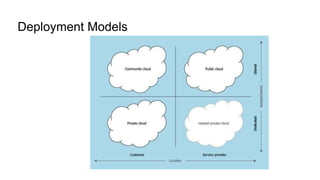
Deployment Models
Private cloud.The cloud infrastructure is operated solely for an
organization. It may be managed by the organization or a third-
party and may exist on premises or off premises.
Community cloud. The cloud infrastructure is shared by several
organizations and supports a specific community that has
shared concerns (for example, mission, security requirements,
policy, and compliance considerations). It may be managed by
the organizations or a third-party and may exist on premises or
off premises.
28.
Deployment Models
Public cloud.The cloud infrastructure is made available to the
general public or a large industry group and is owned by an
organization selling cloud services.
Hybrid cloud. The cloud infrastructure is a composition of two or
more clouds (private, community, or public) that remain unique
entities but are bound together by standardized or proprietary
technology that enables data and application portability (for
example, cloud bursting for load balancing between clouds).
29.
Deployment Models
Two dimensionsare used to classify the various deployment
models for cloud computing:
Where the service is running: On customer premises or in a
service provider's data center.
Level of access: Shared or dedicated.
Where IaaS MayNot be the Best Option
• Where regulatory compliance makes the offshoring or
outsourcing of data storage and processing difficult
• Where the highest levels of performance are required, and
on-premise or dedicated hosted infrastructure has the
capacity to meet the organization’s needs
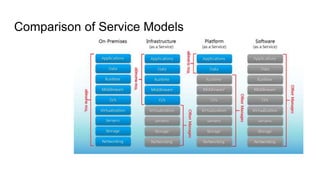
#3 Infrastructure as a Service provides you with the highest level of flexibility and management control over your IT resources and is most similar to existing IT resources that many IT departments and developers are familiar with today. (https://aws.amazon.com/types-of-cloud-computing/)
#13 Thin provisioning involves using virtualization technology to give the appearance of having more physical resources than are actually available
#23 Hot spot - part of the disk system that has significantly high activity and is usually characterized by long wait times for I/O requests and long waits for the data from those requests
#28 National Institute of Standards and Technology
#32 While IaaS provides massive advantages for situations where scalability and quick provisioning are beneficial, there are situations where its limitations may be problematic. Examples of situations where we would advise caution with regards IaaS include;