


The Privilege of Android™ Privacy
How PRIV™
Safeguards Your Data
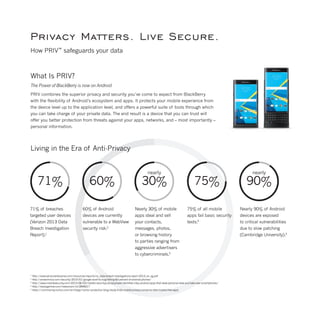
71%
71% of breaches
targeted user devices
(Verizon 2013 Data
Breach Investigation
Report).1
60%
60% of Android
devices are currently
vulnerable to a WebView
security risk.2
30%
nearly
Nearly 30% of mobile
apps steal and sell
your contacts,
messages, photos,
or browsing history
to parties ranging from
aggressive advertisers
to cybercriminals.3
75%
75% of all mobile
apps fail basic security
tests.4
90%
nearly
Nearly 90% of Android
devices are exposed
to critical vulnerabilities
due to slow patching
(Cambridge University).5
Privacy Matters. Live Secure.
How PRIV™
safeguards your data
What Is PRIV?
The Power of BlackBerry is now on Android
PRIV combines the superior privacy and security you’ve come to expect from BlackBerry
with the flexibility of Android’s ecosystem and apps. It protects your mobile experience from
the device level up to the application level, and offers a powerful suite of tools through which
you can take charge of your private data. The end result is a device that you can trust will
offer you better protection from threats against your apps, networks, and – most importantly –
personal information.
Living in the Era of Anti-Privacy
1
http://www.verizonenterprise.com/resources/reports/rp_data-breach-investigations-report-2013_en_xg.pdf
2
http://arstechnica.com/security/2015/01/google-wont-fix-bug-hitting-60-percent-of-android-phones/
3
http://www.marblesecurity.com/2015/06/03/marble-securitys-privacyhawk-identifies-risky-android-apps-that-steal-personal-data-and-take-over-smartphones/
4
http://www.gartner.com/newsroom/id/2846017
5
https://community.norton.com/en/blogs/norton-protection-blog/study-finds-mobile-privacy-concerns-often-traded-free-apps
Bringing BlackBerry to Android
BlackBerry and Android together have a long and storied history. The BlackBerry®
10 OS runs an Android app player and features an
Android app store, while BES®
and BlackBerry®
security apps support a wide range of Android endpoints. PRIV is the natural next step
in the relationship between the two platforms, expanding on the most comprehensive security solution available for privacy-minded
consumers and enterprises alike.
This solution focuses on four key areas:
•	 Empowering the user with advanced privacy controls
•	 Protecting applications and data at every level, starting with the hardware
•	 Enhancing device security with a productivity-first approach
•	 Augmenting the native Android experience with BlackBerry’s security expertise
No matter what you use it for, PRIV is designed to keep you safe and secure.
What Makes PRIV More Secure?
Designed With Security at its Core
PRIV smartphone layered approach to security leverages BlackBerry’s mobile security chops and combines them with Google’s
Android security improvements. In addition to the standard measures found in Android for Work, we’ve hardened the platform
at every level. Our improvements also bring with them our long-standing focus on the user experience: a seamless division
between personal and work data, effortless management of conversations and notifications, and a strong focus on privacy visibility
and control.
Manufacturing Process/Root of Trust
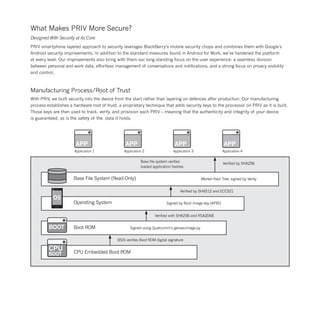
With PRIV, we built security into the device from the start rather than layering on defences after production. Our manufacturing
process establishes a hardware root of trust, a proprietary technique that adds security keys to the processor on PRIV as it is built.
Those keys are then used to track, verify, and provision each PRIV – meaning that the authenticity and integrity of your device
is guaranteed, as is the safety of the data it holds.
APP APP APP APP
Application 1 Application 2 Application 3 Application 4
Base file system verifies
loaded application hashes
Verified by SHA256
Base File System (Read-Only)
Operating System
Boot ROM
CPU Embedded Boot ROM
BSIS verifies Boot ROM digital signature
Verified with SHA256 and RSA2048
Verified by SHA512 and ECC521
Merkel Hast Tree, signed by Verity
Signed by Boot Image key (APBI)
Signed using Qualcomm’s gensecimage.py
CPU
BOOT
BOOT
OS
A Better Bootloader
When you boot up your device, it’s important that you’re
able to trust that only a BlackBerry signed OS can be loaded
and it hasn’t been tampered with since the last restart.
That’s where PRIV secure boot process comes in. Starting
with the hardware Root of Trust, each stage of the secure
boot chain must first verify that the next component is fully
intact before proceeding.
OS-Level Protection
Increasing the integrity of the Android OS is a cornerstone
of PRIV. To that end, the device incorporates a number
of improvements to Android’s base security, locking down
or blocking many unnecessary Android features that could
give an attacker the opportunity to compromise your device.
These improvements include preventing older versions
of the OS from being loaded after a device upgrade and
locking down Android’s core memory.
PRIV runs Android Lollipop (version 5.1.1 or later),
which includes several security enhancements of its own:
•	 Smart lock: Allows you to unlock your device
	 by displaying your face or placing it near another
	 trusted device.
•	 Multi-user, restricted profile, and guest modes.
•	 Containerization through Android for Work.
•	 Address Space Layout Randomization: This Android
	 feature, which makes it more difficult for attackers
	 to target a device by scrambling application/system
	 memory, is enhanced on PRIV.
Device Security
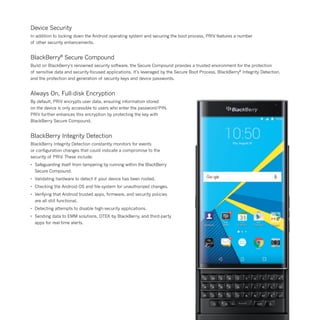
In addition to locking down the Android operating system and securing the boot process, PRIV features a number
of other security enhancements.
BlackBerry®
Secure Compound
Build on BlackBerry’s renowned security software, the Secure Compound provides a trusted environment for the protection
of sensitive data and security-focused applications. It’s leveraged by the Secure Boot Process, BlackBerry®
Integrity Detection,
and the protection and generation of security keys and device passwords.
Always On, Full-disk Encryption
By default, PRIV encrypts user data, ensuring information stored
on the device is only accessible to users who enter the password/PIN.
PRIV further enhances this encryption by protecting the key with
BlackBerry Secure Compound.
BlackBerry Integrity Detection
BlackBerry Integrity Detection constantly monitors for events
or configuration changes that could indicate a compromise to the
security of PRIV. These include:
•	 Safeguarding itself from tampering by running within the BlackBerry
	 Secure Compound.
•	 Validating hardware to detect if your device has been rooted.
•	 Checking the Android OS and file-system for unauthorized changes.
•	 Verifying that Android trusted apps, firmware, and security policies
	 are all still functional.
•	 Detecting attempts to disable high-security applications.
•	 Sending data to EMM solutions, DTEK by BlackBerry, and third-party
	 apps for real-time alerts.
How Can I Take Control of my Privacy with PRIV?
Keep your data private and share with confidence
Every component of PRIV works together to protect the privacy, integrity, and confidentiality of your apps and data – all without
impeding you. PRIV smartphone security measures protect your device against outside threats, while its privacy tools empower
you to directly manage how and where your data is used. With PRIV, whether you’re working with financial reports or sending selfies,
you are the one that’s in control.
DTEK™
by BlackBerry
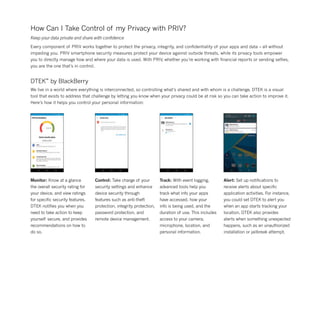
We live in a world where everything is interconnected, so controlling what’s shared and with whom is a challenge. DTEK is a visual
tool that exists to address that challenge by letting you know when your privacy could be at risk so you can take action to improve it.
Here’s how it helps you control your personal information:
Monitor: Know at a glance
the overall security rating for
your device, and view ratings
for specific security features.
DTEK notifies you when you
need to take action to keep
yourself secure, and provides
recommendations on how to
do so.
Control: Take charge of your
security settings and enhance
device security through
features such as anti-theft
protection, integrity protection,
password protection, and
remote device management.
Track: With event logging,
advanced tools help you
track what info your apps
have accessed, how your
info is being used, and the
duration of use. This includes
access to your camera,
microphone, location, and
personal information.
Alert: Set up notifications to
receive alerts about specific
application activities. For instance,
you could set DTEK to alert you
when an app starts tracking your
location. DTEK also provides
alerts when something unexpected
happens, such as an unauthorized
installation or jailbreak attempt.
BlackBerry®
Password Keeper™
BlackBerry Password Keeper lets you store passwords, usernames, notes, and security questions in a single location. Using the app
is incredibly simple:
1.	 Create a master password.
	 Generate secure, random
	 passwords containing letters,
	 numbers, and symbols.
3.	 Import credentials from other
	 applications into BlackBerry
	 Password Keeper. Create backups
	 of records in encrypted or text
	format.
2.	 Measure password strength
	 through a meter based
	 on a proprietary algorithm.
GO
4.	 Locate passwords by
	 username, website, app,
	 or notes with in-app search.
5.	 After ten failed sign-in
	 attempts, BlackBerry
	 Password Keeper clears
	 its data. This protects
	 against both brute-force
	 attacks and attempts
	 by a thief to guess your
	 master password.
6.	 Import credentials from other
	 applications into BlackBerry 	
	 Password Keeper.
Picture Passwords
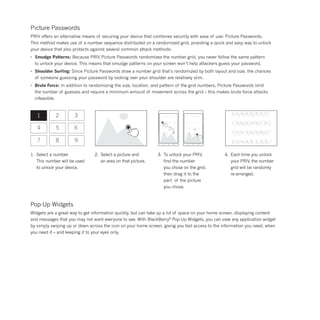
PRIV offers an alternative means of securing your device that combines security with ease of use: Picture Passwords.
This method makes use of a number sequence distributed on a randomized grid, providing a quick and easy way to unlock
your device that also protects against several common attack methods:
•	 Smudge Patterns: Because PRIV Picture Passwords randomizes the number grid, you never follow the same pattern
	 to unlock your device. This means that smudge patterns on your screen won’t help attackers guess your password.
•	 Shoulder Surfing: Since Picture Passwords draw a number grid that’s randomized by both layout and size, the chances
	 of someone guessing your password by looking over your shoulder are relatively slim.
•	 Brute Force: In addition to randomizing the size, location, and pattern of the grid numbers, Picture Passwords limit
	 the number of guesses and require a minimum amount of movement across the grid – this makes brute force attacks
	infeasible.
1
4
7
2
5
8
3
6
9
2.	 Select a picture and
	 an area on that picture.
1.	 Select a number.
	 This number will be used
	 to unlock your device.
3.	 To unlock your PRIV,
	 find the number
	 you chose on the grid,
	 then drag it to the
	 part of the picture
	 you chose.
4.	 Each time you unlock
	 your PRIV, the number
	 grid will be randomly
	re-arranged.
Pop-Up Widgets
Widgets are a great way to get information quickly, but can take up a lot of space on your home screen, displaying content
and messages that you may not want everyone to see. With BlackBerry®
Pop-Up Widgets, you can view any application widget
by simply swiping up or down across the icon on your home screen, giving you fast access to the information you need, when
you need it – and keeping it to your eyes only.
BBM®
BBM allows you to securely chat and share files with others
in real time. It affords an unprecedented amount of control
over how messages and documents are sent and received,
and features like such as BBM®
Voice, BBM®
Groups, and
BBM®
Channels transform it into a powerful collaborative
tool. All BBM users are fully-authenticated; all messages
are encrypted to prevent tampering or interception. It also
offers the following features:
•	 Timed Messages: Set how long
	 contacts have access to messages
	 and pictures shared in a chat before
	 it disappears from the screen.
•	 Message Retraction: Retract a message
	 to remove it from your BBM chat.
•	 BBM uses PINs instead of phone
	 numbers or email addresses so that
	 it’s more private, and spam-free.
	 With 2-way opt-in, you always control
	 who can contact you.
Media Card Protection
Managed properly, PRIV can protect your personal data
by controlling who can access your media card, and where
your photos and other personal files are stored. Using
Android for Work software, only the primary user profile –
your profile – can modify media card files. This prevents
private data from being altered by work or guest profiles
on your device.
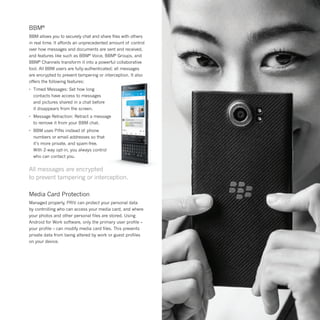
All messages are encrypted
to prevent tampering or interception.
Remote Device Management
There are few feelings worse than knowing you’ve misplaced your smartphone – especially given how much personal information
is now stored on mobile devices. That’s why PRIV is configured to work seamlessly with a wide range of remote device management
apps such as Android Device Manager. Using these apps, you (and/or an administrator, if your device is managed by an EMM solution)
can safeguard your data if your phone is lost or stolen.
To locate a lost or stolen device:
•	 View the device’s location on a map
•	 Make the device ring
•	 Display contact information on-screen.
To protect the data on a stolen device:
•	 Remotely lock it
•	 Change the password
•	 Perform a factory reset on the device, deleting all data and device settings.
Data In Transit Protection
Most people work outside the office on a regular basis, yourself included. It isn’t enough to simply secure the data you’ve stored
on your device. There also needs to be a means of protecting information – both personal and corporate – while it’s in transit.
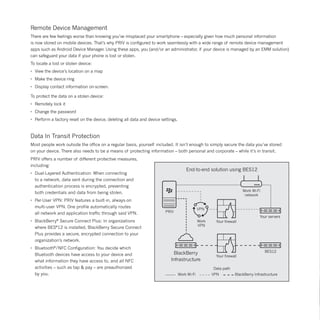
PRIV offers a number of different protective measures,
including:
•	 Dual-Layered Authentication: When connecting
	 to a network, data sent during the connection and
	 authentication process is encrypted, preventing
	 both credentials and data from being stolen.
•	 Per-User VPN: PRIV features a built-in, always-on
	 multi-user VPN. One profile automatically routes
	 all network and application traffic through said VPN.
•	 BlackBerry®
Secure Connect Plus: In organizations
	 where BES®
12 is installed, BlackBerry Secure Connect
	 Plus provides a secure, encrypted connection to your
	 organization’s network.
•	 Bluetooth®
/NFC Configuration: You decide which
	 Bluetooth devices have access to your device and
	 what information they have access to, and all NFC
	 activities – such as tap & pay – are preauthorized
	 by you.
PRIV
VPN
Work Wi-Fi
network
Your servers
BES12
Your firewall
Your firewall
Work
VPN
BlackBerry
Infrastructure
Data path
Work Wi-Fi VPN BlackBerry Infrastructure
End-to-end solution using BES12
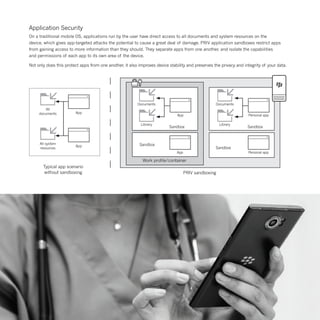
Documents
Library
App
Sandbox
Documents
Library
Personal app
Sandbox
Personal appApp
Sandbox
Sandbox
App
App
All
documents
All system
resources
Work profile/container
PRIV sandboxing
Typical app scenario
without sandboxing
Application Security
On a traditional mobile OS, applications run by the user have direct access to all documents and system resources on the
device, which gives app-targeted attacks the potential to cause a great deal of damage. PRIV application sandboxes restrict apps
from gaining access to more information than they should. They separate apps from one another, and isolate the capabilities
and permissions of each app to its own area of the device.
Not only does this protect apps from one another, it also improves device stability and preserves the privacy and integrity of your data.
Rapid Patching and Support from a World-Class Security Partner
With PRIV, BlackBerry has introduced a new 30-day patching protocol, designed to quickly address Android vulnerabilities, which
functions alongside Android’s 30-day vulnerability disclosure schedule. In addition, we can deliver hotfixes for critical issues outside
of that cycle.
The most impactful threats deserve a far better resolution commitment than can be provided by a time-based approach alone –
your personal data depends on it.
Where Can I Learn More about PRIV?
Interested in finding out more about BlackBerry’s newest smartphone? Check out our full PRIV Security Guide which takes
a comprehensive look at many of the features described in this brochure. You should also swing by the Inside BlackBerry Blog,
where we provide regular news updates about the PRIV (and all of BlackBerry’s other products, as well), as well as visit
blackberry.com/priv for the latest info. Finally, take a look at our online store to purchase a PRIV.
BlackBerry Plugins
PRIV opens the door to a suite of powerful BlackBerry applications which further enhance productivity and security:
•	 WatchDox®
by BlackBerry: A secure, intuitive file-sharing solution with granular document and permission control.
•	 Enterprise Identity by BlackBerry: A streamlined identity-management platform that automatically authenticates a user
	 for access to products and services, particularly on the cloud.
•	 VPN Authentication by BlackBerry: A VPN solution that uses the PRIV as a secondary factor for authentication rather
	 than requiring physical tokens, shared secrets, or passcodes.
•	 SecuSUITE®
for Enterprise: A background anti-eavesdropping solution that provides a high level of security for voice and
	 instant messaging communications.
•	 BBM®
Protected: A hardened version of BBM which strengthens encryption on messages, allowing the app to be used
	 for collaboration in regulated industries.
blackberry.com/priv
Screen images simulated. Data plan required. Please check with your service provider for availability, costs and restrictions.
© 2015 BlackBerry. Trademarks, including but not limited to BlackBerry, EMBLEM & PRIV Design, BBM and BES are the trademarks or registered trademarks of BlackBerry Limited, the exclusive rights to which
are expressly reserved. Trademarks, included but not limited to SECUSUITE and WATCHDOX are the trademarks or registered trademarks of BlackBerry Limited, its subsidiaries and/or affiliates, used under license,
the exclusive rights to which are expressly reserved. Google and Android are trademarks of Google Inc. Bluetooth is a trademark of Bluetooth SIG. All other trademarks are the property of their respective owners.

PRIV Security: How BlackBerry PRIV Safeguards Your Data

  • 1.
    The Privilege ofAndroid™ Privacy How PRIV™ Safeguards Your Data
  • 3.
    71% 71% of breaches targeteduser devices (Verizon 2013 Data Breach Investigation Report).1 60% 60% of Android devices are currently vulnerable to a WebView security risk.2 30% nearly Nearly 30% of mobile apps steal and sell your contacts, messages, photos, or browsing history to parties ranging from aggressive advertisers to cybercriminals.3 75% 75% of all mobile apps fail basic security tests.4 90% nearly Nearly 90% of Android devices are exposed to critical vulnerabilities due to slow patching (Cambridge University).5 Privacy Matters. Live Secure. How PRIV™ safeguards your data What Is PRIV? The Power of BlackBerry is now on Android PRIV combines the superior privacy and security you’ve come to expect from BlackBerry with the flexibility of Android’s ecosystem and apps. It protects your mobile experience from the device level up to the application level, and offers a powerful suite of tools through which you can take charge of your private data. The end result is a device that you can trust will offer you better protection from threats against your apps, networks, and – most importantly – personal information. Living in the Era of Anti-Privacy 1 http://www.verizonenterprise.com/resources/reports/rp_data-breach-investigations-report-2013_en_xg.pdf 2 http://arstechnica.com/security/2015/01/google-wont-fix-bug-hitting-60-percent-of-android-phones/ 3 http://www.marblesecurity.com/2015/06/03/marble-securitys-privacyhawk-identifies-risky-android-apps-that-steal-personal-data-and-take-over-smartphones/ 4 http://www.gartner.com/newsroom/id/2846017 5 https://community.norton.com/en/blogs/norton-protection-blog/study-finds-mobile-privacy-concerns-often-traded-free-apps
  • 4.
    Bringing BlackBerry toAndroid BlackBerry and Android together have a long and storied history. The BlackBerry® 10 OS runs an Android app player and features an Android app store, while BES® and BlackBerry® security apps support a wide range of Android endpoints. PRIV is the natural next step in the relationship between the two platforms, expanding on the most comprehensive security solution available for privacy-minded consumers and enterprises alike. This solution focuses on four key areas: • Empowering the user with advanced privacy controls • Protecting applications and data at every level, starting with the hardware • Enhancing device security with a productivity-first approach • Augmenting the native Android experience with BlackBerry’s security expertise No matter what you use it for, PRIV is designed to keep you safe and secure.
  • 5.
    What Makes PRIVMore Secure? Designed With Security at its Core PRIV smartphone layered approach to security leverages BlackBerry’s mobile security chops and combines them with Google’s Android security improvements. In addition to the standard measures found in Android for Work, we’ve hardened the platform at every level. Our improvements also bring with them our long-standing focus on the user experience: a seamless division between personal and work data, effortless management of conversations and notifications, and a strong focus on privacy visibility and control. Manufacturing Process/Root of Trust With PRIV, we built security into the device from the start rather than layering on defences after production. Our manufacturing process establishes a hardware root of trust, a proprietary technique that adds security keys to the processor on PRIV as it is built. Those keys are then used to track, verify, and provision each PRIV – meaning that the authenticity and integrity of your device is guaranteed, as is the safety of the data it holds. APP APP APP APP Application 1 Application 2 Application 3 Application 4 Base file system verifies loaded application hashes Verified by SHA256 Base File System (Read-Only) Operating System Boot ROM CPU Embedded Boot ROM BSIS verifies Boot ROM digital signature Verified with SHA256 and RSA2048 Verified by SHA512 and ECC521 Merkel Hast Tree, signed by Verity Signed by Boot Image key (APBI) Signed using Qualcomm’s gensecimage.py CPU BOOT BOOT OS
  • 6.
    A Better Bootloader Whenyou boot up your device, it’s important that you’re able to trust that only a BlackBerry signed OS can be loaded and it hasn’t been tampered with since the last restart. That’s where PRIV secure boot process comes in. Starting with the hardware Root of Trust, each stage of the secure boot chain must first verify that the next component is fully intact before proceeding. OS-Level Protection Increasing the integrity of the Android OS is a cornerstone of PRIV. To that end, the device incorporates a number of improvements to Android’s base security, locking down or blocking many unnecessary Android features that could give an attacker the opportunity to compromise your device. These improvements include preventing older versions of the OS from being loaded after a device upgrade and locking down Android’s core memory. PRIV runs Android Lollipop (version 5.1.1 or later), which includes several security enhancements of its own: • Smart lock: Allows you to unlock your device by displaying your face or placing it near another trusted device. • Multi-user, restricted profile, and guest modes. • Containerization through Android for Work. • Address Space Layout Randomization: This Android feature, which makes it more difficult for attackers to target a device by scrambling application/system memory, is enhanced on PRIV.
  • 7.
    Device Security In additionto locking down the Android operating system and securing the boot process, PRIV features a number of other security enhancements. BlackBerry® Secure Compound Build on BlackBerry’s renowned security software, the Secure Compound provides a trusted environment for the protection of sensitive data and security-focused applications. It’s leveraged by the Secure Boot Process, BlackBerry® Integrity Detection, and the protection and generation of security keys and device passwords. Always On, Full-disk Encryption By default, PRIV encrypts user data, ensuring information stored on the device is only accessible to users who enter the password/PIN. PRIV further enhances this encryption by protecting the key with BlackBerry Secure Compound. BlackBerry Integrity Detection BlackBerry Integrity Detection constantly monitors for events or configuration changes that could indicate a compromise to the security of PRIV. These include: • Safeguarding itself from tampering by running within the BlackBerry Secure Compound. • Validating hardware to detect if your device has been rooted. • Checking the Android OS and file-system for unauthorized changes. • Verifying that Android trusted apps, firmware, and security policies are all still functional. • Detecting attempts to disable high-security applications. • Sending data to EMM solutions, DTEK by BlackBerry, and third-party apps for real-time alerts.
  • 8.
    How Can ITake Control of my Privacy with PRIV? Keep your data private and share with confidence Every component of PRIV works together to protect the privacy, integrity, and confidentiality of your apps and data – all without impeding you. PRIV smartphone security measures protect your device against outside threats, while its privacy tools empower you to directly manage how and where your data is used. With PRIV, whether you’re working with financial reports or sending selfies, you are the one that’s in control. DTEK™ by BlackBerry We live in a world where everything is interconnected, so controlling what’s shared and with whom is a challenge. DTEK is a visual tool that exists to address that challenge by letting you know when your privacy could be at risk so you can take action to improve it. Here’s how it helps you control your personal information: Monitor: Know at a glance the overall security rating for your device, and view ratings for specific security features. DTEK notifies you when you need to take action to keep yourself secure, and provides recommendations on how to do so. Control: Take charge of your security settings and enhance device security through features such as anti-theft protection, integrity protection, password protection, and remote device management. Track: With event logging, advanced tools help you track what info your apps have accessed, how your info is being used, and the duration of use. This includes access to your camera, microphone, location, and personal information. Alert: Set up notifications to receive alerts about specific application activities. For instance, you could set DTEK to alert you when an app starts tracking your location. DTEK also provides alerts when something unexpected happens, such as an unauthorized installation or jailbreak attempt.
  • 9.
    BlackBerry® Password Keeper™ BlackBerry PasswordKeeper lets you store passwords, usernames, notes, and security questions in a single location. Using the app is incredibly simple: 1. Create a master password. Generate secure, random passwords containing letters, numbers, and symbols. 3. Import credentials from other applications into BlackBerry Password Keeper. Create backups of records in encrypted or text format. 2. Measure password strength through a meter based on a proprietary algorithm. GO 4. Locate passwords by username, website, app, or notes with in-app search. 5. After ten failed sign-in attempts, BlackBerry Password Keeper clears its data. This protects against both brute-force attacks and attempts by a thief to guess your master password. 6. Import credentials from other applications into BlackBerry Password Keeper.
  • 10.
    Picture Passwords PRIV offersan alternative means of securing your device that combines security with ease of use: Picture Passwords. This method makes use of a number sequence distributed on a randomized grid, providing a quick and easy way to unlock your device that also protects against several common attack methods: • Smudge Patterns: Because PRIV Picture Passwords randomizes the number grid, you never follow the same pattern to unlock your device. This means that smudge patterns on your screen won’t help attackers guess your password. • Shoulder Surfing: Since Picture Passwords draw a number grid that’s randomized by both layout and size, the chances of someone guessing your password by looking over your shoulder are relatively slim. • Brute Force: In addition to randomizing the size, location, and pattern of the grid numbers, Picture Passwords limit the number of guesses and require a minimum amount of movement across the grid – this makes brute force attacks infeasible. 1 4 7 2 5 8 3 6 9 2. Select a picture and an area on that picture. 1. Select a number. This number will be used to unlock your device. 3. To unlock your PRIV, find the number you chose on the grid, then drag it to the part of the picture you chose. 4. Each time you unlock your PRIV, the number grid will be randomly re-arranged. Pop-Up Widgets Widgets are a great way to get information quickly, but can take up a lot of space on your home screen, displaying content and messages that you may not want everyone to see. With BlackBerry® Pop-Up Widgets, you can view any application widget by simply swiping up or down across the icon on your home screen, giving you fast access to the information you need, when you need it – and keeping it to your eyes only.
  • 11.
    BBM® BBM allows youto securely chat and share files with others in real time. It affords an unprecedented amount of control over how messages and documents are sent and received, and features like such as BBM® Voice, BBM® Groups, and BBM® Channels transform it into a powerful collaborative tool. All BBM users are fully-authenticated; all messages are encrypted to prevent tampering or interception. It also offers the following features: • Timed Messages: Set how long contacts have access to messages and pictures shared in a chat before it disappears from the screen. • Message Retraction: Retract a message to remove it from your BBM chat. • BBM uses PINs instead of phone numbers or email addresses so that it’s more private, and spam-free. With 2-way opt-in, you always control who can contact you. Media Card Protection Managed properly, PRIV can protect your personal data by controlling who can access your media card, and where your photos and other personal files are stored. Using Android for Work software, only the primary user profile – your profile – can modify media card files. This prevents private data from being altered by work or guest profiles on your device. All messages are encrypted to prevent tampering or interception.
  • 12.
    Remote Device Management Thereare few feelings worse than knowing you’ve misplaced your smartphone – especially given how much personal information is now stored on mobile devices. That’s why PRIV is configured to work seamlessly with a wide range of remote device management apps such as Android Device Manager. Using these apps, you (and/or an administrator, if your device is managed by an EMM solution) can safeguard your data if your phone is lost or stolen. To locate a lost or stolen device: • View the device’s location on a map • Make the device ring • Display contact information on-screen. To protect the data on a stolen device: • Remotely lock it • Change the password • Perform a factory reset on the device, deleting all data and device settings. Data In Transit Protection Most people work outside the office on a regular basis, yourself included. It isn’t enough to simply secure the data you’ve stored on your device. There also needs to be a means of protecting information – both personal and corporate – while it’s in transit. PRIV offers a number of different protective measures, including: • Dual-Layered Authentication: When connecting to a network, data sent during the connection and authentication process is encrypted, preventing both credentials and data from being stolen. • Per-User VPN: PRIV features a built-in, always-on multi-user VPN. One profile automatically routes all network and application traffic through said VPN. • BlackBerry® Secure Connect Plus: In organizations where BES® 12 is installed, BlackBerry Secure Connect Plus provides a secure, encrypted connection to your organization’s network. • Bluetooth® /NFC Configuration: You decide which Bluetooth devices have access to your device and what information they have access to, and all NFC activities – such as tap & pay – are preauthorized by you. PRIV VPN Work Wi-Fi network Your servers BES12 Your firewall Your firewall Work VPN BlackBerry Infrastructure Data path Work Wi-Fi VPN BlackBerry Infrastructure End-to-end solution using BES12
  • 13.
    Documents Library App Sandbox Documents Library Personal app Sandbox Personal appApp Sandbox Sandbox App App All documents Allsystem resources Work profile/container PRIV sandboxing Typical app scenario without sandboxing Application Security On a traditional mobile OS, applications run by the user have direct access to all documents and system resources on the device, which gives app-targeted attacks the potential to cause a great deal of damage. PRIV application sandboxes restrict apps from gaining access to more information than they should. They separate apps from one another, and isolate the capabilities and permissions of each app to its own area of the device. Not only does this protect apps from one another, it also improves device stability and preserves the privacy and integrity of your data.
  • 14.
    Rapid Patching andSupport from a World-Class Security Partner With PRIV, BlackBerry has introduced a new 30-day patching protocol, designed to quickly address Android vulnerabilities, which functions alongside Android’s 30-day vulnerability disclosure schedule. In addition, we can deliver hotfixes for critical issues outside of that cycle. The most impactful threats deserve a far better resolution commitment than can be provided by a time-based approach alone – your personal data depends on it. Where Can I Learn More about PRIV? Interested in finding out more about BlackBerry’s newest smartphone? Check out our full PRIV Security Guide which takes a comprehensive look at many of the features described in this brochure. You should also swing by the Inside BlackBerry Blog, where we provide regular news updates about the PRIV (and all of BlackBerry’s other products, as well), as well as visit blackberry.com/priv for the latest info. Finally, take a look at our online store to purchase a PRIV. BlackBerry Plugins PRIV opens the door to a suite of powerful BlackBerry applications which further enhance productivity and security: • WatchDox® by BlackBerry: A secure, intuitive file-sharing solution with granular document and permission control. • Enterprise Identity by BlackBerry: A streamlined identity-management platform that automatically authenticates a user for access to products and services, particularly on the cloud. • VPN Authentication by BlackBerry: A VPN solution that uses the PRIV as a secondary factor for authentication rather than requiring physical tokens, shared secrets, or passcodes. • SecuSUITE® for Enterprise: A background anti-eavesdropping solution that provides a high level of security for voice and instant messaging communications. • BBM® Protected: A hardened version of BBM which strengthens encryption on messages, allowing the app to be used for collaboration in regulated industries.
  • 16.
    blackberry.com/priv Screen images simulated.Data plan required. Please check with your service provider for availability, costs and restrictions. © 2015 BlackBerry. Trademarks, including but not limited to BlackBerry, EMBLEM & PRIV Design, BBM and BES are the trademarks or registered trademarks of BlackBerry Limited, the exclusive rights to which are expressly reserved. Trademarks, included but not limited to SECUSUITE and WATCHDOX are the trademarks or registered trademarks of BlackBerry Limited, its subsidiaries and/or affiliates, used under license, the exclusive rights to which are expressly reserved. Google and Android are trademarks of Google Inc. Bluetooth is a trademark of Bluetooth SIG. All other trademarks are the property of their respective owners.