Printing in .Net Framework
Design
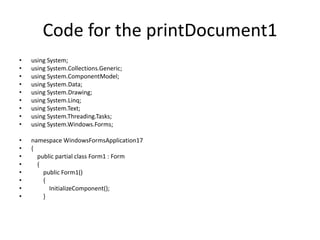
Code for the printDocument1
• using System;
• using System.Collections.Generic;
• using System.ComponentModel;
• using System.Data;
• using System.Drawing;
• using System.Linq;
• using System.Text;
• using System.Threading.Tasks;
• using System.Windows.Forms;
• namespace WindowsFormsApplication17
• {
• public partial class Form1 : Form
• {
• public Form1()
• {
• InitializeComponent();
• }
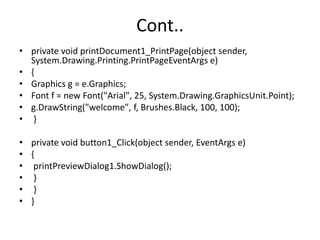
Cont..
• private void printDocument1_PrintPage(object sender,
System.Drawing.Printing.PrintPageEventArgs e)
• {
• Graphics g = e.Graphics;
• Font f = new Font("Arial", 25, System.Drawing.GraphicsUnit.Point);
• g.DrawString("welcome", f, Brushes.Black, 100, 100);
• }
• private void button1_Click(object sender, EventArgs e)
• {
• printPreviewDialog1.ShowDialog();
• }
• }
• }
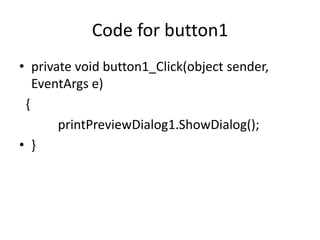
Code for button1
• private void button1_Click(object sender,
EventArgs e)
{
printPreviewDialog1.ShowDialog();
• }
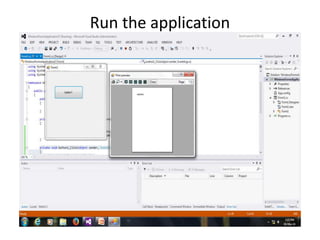
Run the application
Graphics in VB.net
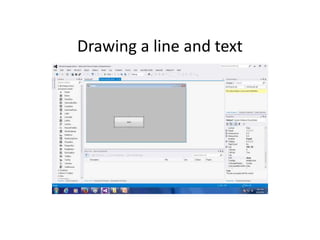
Drawing a line and text
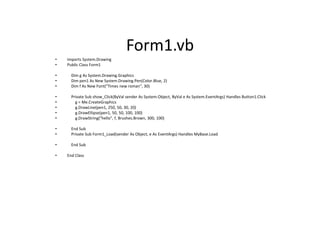
Form1.vb
• Imports System.Drawing
• Public Class Form1
• Dim g As System.Drawing.Graphics
• Dim pen1 As New System.Drawing.Pen(Color.Blue, 2)
• Dim f As New Font("Times new roman", 30)
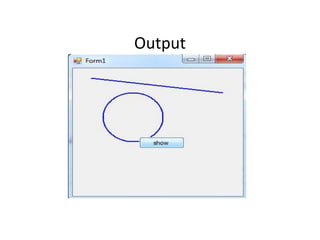
• Private Sub show_Click(ByVal sender As System.Object, ByVal e As System.EventArgs) Handles Button1.Click
• g = Me.CreateGraphics
• g.DrawLine(pen1, 250, 50, 30, 20)
• g.DrawEllipse(pen1, 50, 50, 100, 100)
• g.DrawString("hello", f, Brushes.Brown, 300, 100)
• End Sub
• Private Sub Form1_Load(sender As Object, e As EventArgs) Handles MyBase.Load
• End Sub
• End Class
Output

Printing and graphics (asp.net)

  • 1.
  • 2.
  • 3.
    Code for theprintDocument1 • using System; • using System.Collections.Generic; • using System.ComponentModel; • using System.Data; • using System.Drawing; • using System.Linq; • using System.Text; • using System.Threading.Tasks; • using System.Windows.Forms; • namespace WindowsFormsApplication17 • { • public partial class Form1 : Form • { • public Form1() • { • InitializeComponent(); • }
  • 4.
    Cont.. • private voidprintDocument1_PrintPage(object sender, System.Drawing.Printing.PrintPageEventArgs e) • { • Graphics g = e.Graphics; • Font f = new Font("Arial", 25, System.Drawing.GraphicsUnit.Point); • g.DrawString("welcome", f, Brushes.Black, 100, 100); • } • private void button1_Click(object sender, EventArgs e) • { • printPreviewDialog1.ShowDialog(); • } • } • }
  • 5.
    Code for button1 •private void button1_Click(object sender, EventArgs e) { printPreviewDialog1.ShowDialog(); • }
  • 6.
  • 7.
  • 8.
  • 9.
    Form1.vb • Imports System.Drawing •Public Class Form1 • Dim g As System.Drawing.Graphics • Dim pen1 As New System.Drawing.Pen(Color.Blue, 2) • Dim f As New Font("Times new roman", 30) • Private Sub show_Click(ByVal sender As System.Object, ByVal e As System.EventArgs) Handles Button1.Click • g = Me.CreateGraphics • g.DrawLine(pen1, 250, 50, 30, 20) • g.DrawEllipse(pen1, 50, 50, 100, 100) • g.DrawString("hello", f, Brushes.Brown, 300, 100) • End Sub • Private Sub Form1_Load(sender As Object, e As EventArgs) Handles MyBase.Load • End Sub • End Class
  • 10.