Hello friends
C# Tutorial
Part 44:
Windows app
www.siri-kt.blogspot.com
• Windows Application:
• we can create the user interface purpose using windows
applications. windows applications supports
GUI(graphical user interface) microsoft given no of
predefined controls
• 1.common controls
• 2.container controls
• 3.Reporting Controls
• 4.Menu controls
• 5.Data Bounded controls
• 6.dialog controls
www.siri-kt.blogspot.com7/11/2017
• vs-IDE supports no of windows
• 1.ToolBox
• 2.solution Explorer
• 3.Properties window
• 1.ToolBox:
• in the toolbox window no of predefined controls. in this
events are executed
• 1.mouse drag & drop
• 2.mouse double click
www.siri-kt.blogspot.com7/11/2017
• 2.solution explorer:
• in the solution explorer maintains the all classes,forms and
Resource files ect.
• 3.properties windows:
• in this windows we can change the intialize component method
method.
• partial class:
• using partial keyword we can implement any no of classes with same
name. as per .net technologies all container are classes.
• all forms(form1,form2,form3.....)containers having default base
• class is form
• form1:form
• form2:form
• form 3:form
www.siri-kt.blogspot.com7/11/2017
• In the common controls no of predefined controls.
• TextBox:
• this control is input control. this control having
different properties
• 1.text
• 2.Name
• 3.Location
• 4.backcolor
• 5.forecolor
• 6.Dock
• 7.MultiLine
www.siri-kt.blogspot.com7/11/2017
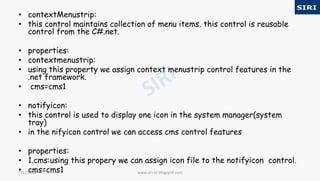
• contextMenustrip:
• this control maintains collection of menu items. this control is reusable
control from the C#.net.
• properties:
• contextmenustrip:
• using this property we assign context menustrip control features in the
.net framework.
• cms=cms1
• notifyicon:
• this control is used to display one icon in the system manager(system
tray)
• in the nifyicon control we can access cms control features
• properties:
• 1.cms:using this propery we can assign icon file to the notifyicon control.
• cms=cms1 www.siri-kt.blogspot.com7/11/2017
• 2.icon:
• using this propery we can assign icon file to the notifyicon control.
• icon=*.ico
• example contextmenustrip&notifyicon:
• 1.take the form
• 2.add contextmenustrip control
• 3.add notifyicon control
• 1.in the contextmenustrip add items
• Red
• Green
• Yellow
• Blue
• Exit
• 2.goto form1-Right click-properties-
• windowstate=maximized
• cms=cms1
www.siri-kt.blogspot.com7/11/2017
• 3.Notifyicon-rightclick-properties-
• cms=cms1
• icon=*.ico
• source code:
• private void redToolStripMenuItem_Click(object sender, EventArgs e)
• { this.BackColor = Color.Red;
• }
• private void greenToolStripMenuItem_Click(object sender,
EventArgs e)
• { this.BackColor = Color.Green; }
• private void yellowToolStripMenuItem_Click(object sender,
EventArgs e)
• { this.BackColor = Color.Yellow; }
• private void blueToolStripMenuItem_Click(object sender, EventArgs
e)
• { this.BackColor = Color.Blue; }
• private void exitToolStripMenuItem_Click(object sender, EventArgs
e)
www.siri-kt.blogspot.com7/11/2017
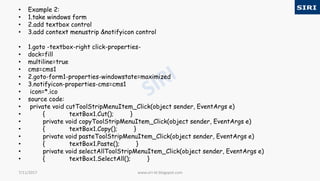
• Example 2:
• 1.take windows form
• 2.add textbox control
• 3.add context menustrip &notifyicon control
• 1.goto -textbox-right click-properties-
• dock=fill
• multiline=true
• cms=cms1
• 2.goto-form1-properties-windowstate=maximized
• 3.notifyicon-properties-cms=cms1
• icon=*.ico
• source code:
• private void cutToolStripMenuItem_Click(object sender, EventArgs e)
• { textBox1.Cut(); }
• private void copyToolStripMenuItem_Click(object sender, EventArgs e)
• { textBox1.Copy(); }
• private void pasteToolStripMenuItem_Click(object sender, EventArgs e)
• { textBox1.Paste(); }
• private void selectAllToolStripMenuItem_Click(object sender, EventArgs e)
• { textBox1.SelectAll(); }
www.siri-kt.blogspot.com7/11/2017
For more visit our website www.siri-kt.blogspot.com
Thanks for
Watching
More Angular JS TutorialsMore C sharp (c#) tutorials
www.siri-kt.blogspot.com7/11/2017

44c

  • 1.
    Hello friends C# Tutorial Part44: Windows app www.siri-kt.blogspot.com www.siri-kt.blogspot.com
  • 2.
    • Windows Application: •we can create the user interface purpose using windows applications. windows applications supports GUI(graphical user interface) microsoft given no of predefined controls • 1.common controls • 2.container controls • 3.Reporting Controls • 4.Menu controls • 5.Data Bounded controls • 6.dialog controls www.siri-kt.blogspot.com7/11/2017
  • 3.
    • vs-IDE supportsno of windows • 1.ToolBox • 2.solution Explorer • 3.Properties window • 1.ToolBox: • in the toolbox window no of predefined controls. in this events are executed • 1.mouse drag & drop • 2.mouse double click www.siri-kt.blogspot.com7/11/2017
  • 4.
    • 2.solution explorer: •in the solution explorer maintains the all classes,forms and Resource files ect. • 3.properties windows: • in this windows we can change the intialize component method method. • partial class: • using partial keyword we can implement any no of classes with same name. as per .net technologies all container are classes. • all forms(form1,form2,form3.....)containers having default base • class is form • form1:form • form2:form • form 3:form www.siri-kt.blogspot.com7/11/2017
  • 5.
    • In thecommon controls no of predefined controls. • TextBox: • this control is input control. this control having different properties • 1.text • 2.Name • 3.Location • 4.backcolor • 5.forecolor • 6.Dock • 7.MultiLine www.siri-kt.blogspot.com7/11/2017
  • 6.
    • contextMenustrip: • thiscontrol maintains collection of menu items. this control is reusable control from the C#.net. • properties: • contextmenustrip: • using this property we assign context menustrip control features in the .net framework. • cms=cms1 • notifyicon: • this control is used to display one icon in the system manager(system tray) • in the nifyicon control we can access cms control features • properties: • 1.cms:using this propery we can assign icon file to the notifyicon control. • cms=cms1 www.siri-kt.blogspot.com7/11/2017
  • 7.
    • 2.icon: • usingthis propery we can assign icon file to the notifyicon control. • icon=*.ico • example contextmenustrip&notifyicon: • 1.take the form • 2.add contextmenustrip control • 3.add notifyicon control • 1.in the contextmenustrip add items • Red • Green • Yellow • Blue • Exit • 2.goto form1-Right click-properties- • windowstate=maximized • cms=cms1 www.siri-kt.blogspot.com7/11/2017
  • 8.
    • 3.Notifyicon-rightclick-properties- • cms=cms1 •icon=*.ico • source code: • private void redToolStripMenuItem_Click(object sender, EventArgs e) • { this.BackColor = Color.Red; • } • private void greenToolStripMenuItem_Click(object sender, EventArgs e) • { this.BackColor = Color.Green; } • private void yellowToolStripMenuItem_Click(object sender, EventArgs e) • { this.BackColor = Color.Yellow; } • private void blueToolStripMenuItem_Click(object sender, EventArgs e) • { this.BackColor = Color.Blue; } • private void exitToolStripMenuItem_Click(object sender, EventArgs e) www.siri-kt.blogspot.com7/11/2017
  • 9.
    • Example 2: •1.take windows form • 2.add textbox control • 3.add context menustrip &notifyicon control • 1.goto -textbox-right click-properties- • dock=fill • multiline=true • cms=cms1 • 2.goto-form1-properties-windowstate=maximized • 3.notifyicon-properties-cms=cms1 • icon=*.ico • source code: • private void cutToolStripMenuItem_Click(object sender, EventArgs e) • { textBox1.Cut(); } • private void copyToolStripMenuItem_Click(object sender, EventArgs e) • { textBox1.Copy(); } • private void pasteToolStripMenuItem_Click(object sender, EventArgs e) • { textBox1.Paste(); } • private void selectAllToolStripMenuItem_Click(object sender, EventArgs e) • { textBox1.SelectAll(); } www.siri-kt.blogspot.com7/11/2017
  • 10.
    For more visitour website www.siri-kt.blogspot.com Thanks for Watching More Angular JS TutorialsMore C sharp (c#) tutorials www.siri-kt.blogspot.com7/11/2017