Typography: Print versus
Web
By Pam Harris for Broward College 2009
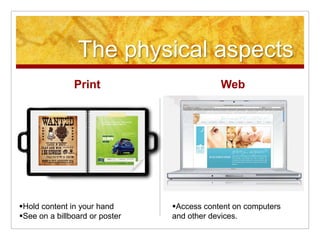
The physical aspects
Print Web
Hold content in your hand
See on a billboard or poster
Access content on computers
and other devices.
What do print type and web
type have in common?
 Both have form and content
 Both should be well designed
 Both should communicate the intended message
 Both should utilize rules of readability:
 Avoid wide columns of text
 Avoid all caps for body copy
 Avoid Widows, Orphans, Ladders and Rivers
 Watch background and text combinations
 Carefully plan and limit typefaces (2-3)
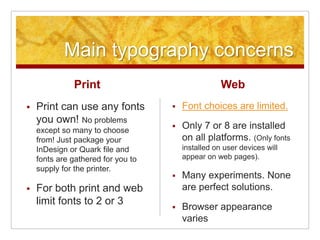
Main typography concerns
Print
 Print can use any fonts
you own! No problems
except so many to choose
from! Just package your
InDesign or Quark file and
fonts are gathered for you to
supply for the printer.
 For both print and web
limit fonts to 2 or 3
Web
 Font choices are limited.
 Only 7 or 8 are installed
on all platforms. (Only fonts
installed on user devices will
appear on web pages).
 Many experiments. None
are perfect solutions.
 Browser appearance
varies
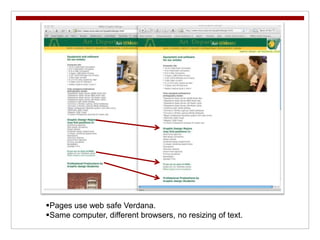
Pages use web safe Verdana.
Same computer, different browsers, no resizing of text.
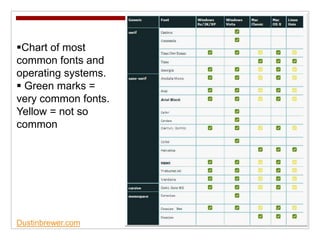
Dustinbrewer.com
Chart of most
common fonts and
operating systems.
 Green marks =
very common fonts.
Yellow = not so
common
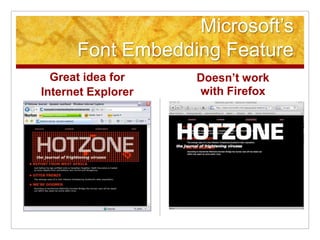
Microsoft’s
Font Embedding Feature
Great idea for
Internet Explorer
Doesn’t work
with Firefox
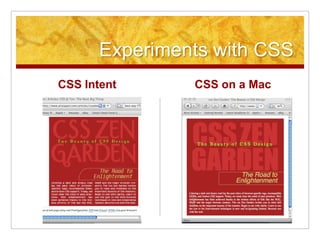
Experiments with CSS
CSS Intent CSS on a Mac
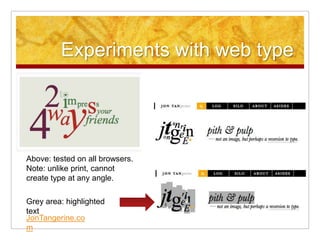
Experiments with web type
Grey area: highlighted
text
Above: tested on all browsers.
Note: unlike print, cannot
create type at any angle.
JonTangerine.co
m
Controlling Widows, Orphans,
Ladders and Rivers
Print
 Adobe InDesign and
QuarkXPress have elaborate
panels for controlling type.
 Can use
kerning, tracking, leading, auto
hyphenation, full
justification, right align, left
align and even top and bottom
justification.
 Can use manual or automatic
text flow.
Web
 Adobe Dreamweaver (and hand
coding with CSS and HTML) has
minimal control options.
 Can use tracking, line height
(called leading in print), left align,
right align, and center spacing.
Justified text creates “rivers.”
 NO auto hyphenation to control
“ladders” (3 or more hyphens in
a row).
 NO kerning (between the letters)
 NO text flowing
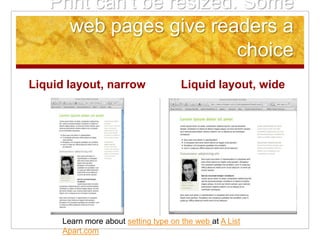
Print can’t be resized. Some
web pages give readers a
choice
Liquid layout, narrow Liquid layout, wide
Learn more about setting type on the web at A List
Apart.com
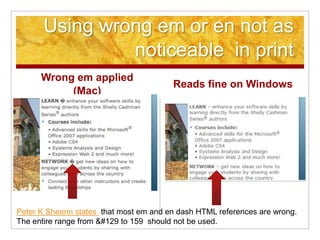
Using wrong em or en not as
noticeable in print
Wrong em applied
(Mac)
Reads fine on Windows
Peter K Sheerin states that most em and en dash HTML references are wrong.
The entire range from &#129 to 159 should not be used.
Print can’t be resized. Web
browsers give readers a
choice
Print
 Once an item is printed, users
can’t change or control size of
text except by using a
magnifying glass.
 Some printers publish large
print versions for visually
challenged. Voluntary.
Web
 Viewers can resize web pages
to see text better.
 Visually challenged can use
screen readers to view web
pages.
 It’s up to the web
designer/programmer to provide
proper alt tags. Section 508
Closing thoughts
Print
 Can’t be changed once printed.
 Costly to redo a botched job.
 Can’t be altered or fixed by
users (exception is graffiti ;-)
 Catalogued by librarians
 Has to be scanned to archive
Web
 Can be changed in an instant if
you use web text and not
image maps.
 Searchable and available to all
 Anyone can have a Blog
 Social bookmarking sites like
Digg and del.ico.us
Important to learn the important details of both
media.

Print vs web

  • 1.
    Typography: Print versus Web ByPam Harris for Broward College 2009
  • 2.
    The physical aspects PrintWeb Hold content in your hand See on a billboard or poster Access content on computers and other devices.
  • 3.
    What do printtype and web type have in common?  Both have form and content  Both should be well designed  Both should communicate the intended message  Both should utilize rules of readability:  Avoid wide columns of text  Avoid all caps for body copy  Avoid Widows, Orphans, Ladders and Rivers  Watch background and text combinations  Carefully plan and limit typefaces (2-3)
  • 4.
    Main typography concerns Print Print can use any fonts you own! No problems except so many to choose from! Just package your InDesign or Quark file and fonts are gathered for you to supply for the printer.  For both print and web limit fonts to 2 or 3 Web  Font choices are limited.  Only 7 or 8 are installed on all platforms. (Only fonts installed on user devices will appear on web pages).  Many experiments. None are perfect solutions.  Browser appearance varies
  • 5.
    Pages use websafe Verdana. Same computer, different browsers, no resizing of text.
  • 6.
    Dustinbrewer.com Chart of most commonfonts and operating systems.  Green marks = very common fonts. Yellow = not so common
  • 7.
    Microsoft’s Font Embedding Feature Greatidea for Internet Explorer Doesn’t work with Firefox
  • 8.
    Experiments with CSS CSSIntent CSS on a Mac
  • 9.
    Experiments with webtype Grey area: highlighted text Above: tested on all browsers. Note: unlike print, cannot create type at any angle. JonTangerine.co m
  • 10.
    Controlling Widows, Orphans, Laddersand Rivers Print  Adobe InDesign and QuarkXPress have elaborate panels for controlling type.  Can use kerning, tracking, leading, auto hyphenation, full justification, right align, left align and even top and bottom justification.  Can use manual or automatic text flow. Web  Adobe Dreamweaver (and hand coding with CSS and HTML) has minimal control options.  Can use tracking, line height (called leading in print), left align, right align, and center spacing. Justified text creates “rivers.”  NO auto hyphenation to control “ladders” (3 or more hyphens in a row).  NO kerning (between the letters)  NO text flowing
  • 11.
    Print can’t beresized. Some web pages give readers a choice Liquid layout, narrow Liquid layout, wide Learn more about setting type on the web at A List Apart.com
  • 12.
    Using wrong emor en not as noticeable in print Wrong em applied (Mac) Reads fine on Windows Peter K Sheerin states that most em and en dash HTML references are wrong. The entire range from &#129 to 159 should not be used.
  • 13.
    Print can’t beresized. Web browsers give readers a choice Print  Once an item is printed, users can’t change or control size of text except by using a magnifying glass.  Some printers publish large print versions for visually challenged. Voluntary. Web  Viewers can resize web pages to see text better.  Visually challenged can use screen readers to view web pages.  It’s up to the web designer/programmer to provide proper alt tags. Section 508
  • 14.
    Closing thoughts Print  Can’tbe changed once printed.  Costly to redo a botched job.  Can’t be altered or fixed by users (exception is graffiti ;-)  Catalogued by librarians  Has to be scanned to archive Web  Can be changed in an instant if you use web text and not image maps.  Searchable and available to all  Anyone can have a Blog  Social bookmarking sites like Digg and del.ico.us Important to learn the important details of both media.