VMWare
Alvin Ausi
Virtualization Overview
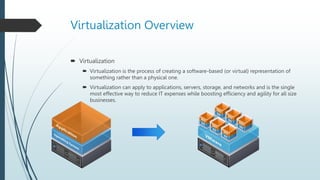
 Virtualization
 Virtualization is the process of creating a software-based (or virtual) representation of
something rather than a physical one.
 Virtualization can apply to applications, servers, storage, and networks and is the single
most effective way to reduce IT expenses while boosting efficiency and agility for all size
businesses.
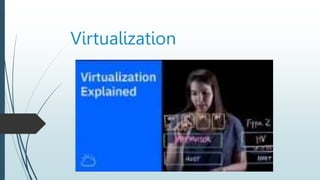
Virtualization
Virtualization vs Baremetal
Benefit of Virtualization
 Reduced capital and operating costs.
 Minimized or eliminated downtime.
 Increased IT productivity, efficiency, agility, scalability and responsiveness.
 Faster provisioning of applications and resources.
 Greater business continuity and disaster recovery.
 Simplified data center management.
Hypervisors
Hypervisor is software that creates and runs virtual machines (VMs).
A hypervisor allows one host computer to support multiple guest VMs by virtually
sharing its resources, such as memory and processing.
Hypervisors
Component of virtualization
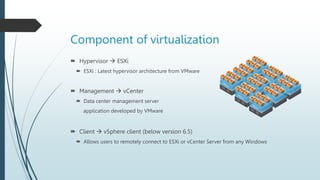
 Hypervisor  ESXi
 ESXi : Latest hypervisor architecture from VMware
 Management  vCenter
 Data center management server
application developed by VMware
 Client  vSphere client (below version 6.5)
 Allows users to remotely connect to ESXi or vCenter Server from any Windows
Component of virtualization
Key Features of VMWare
VMWare vShpere vMotion
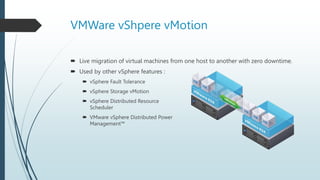
 Live migration of virtual machines from one host to another with zero downtime.
 Used by other vSphere features :
 vSphere Fault Tolerance
 vSphere Storage vMotion
 vSphere Distributed Resource
Scheduler
 VMware vSphere Distributed Power
Management™
vSphere Storage vMotion
 Relocate a running virtual machine from one
datastore to another datastore with zero
downtime.
 Relocate across different storage types.
 Change virtual machine disk format (thick or
thin).
OS
APP
VMware ESX/ESXi
OS
APP
OS
APP
vSphere vMotion with vSphere Storage
vMotion
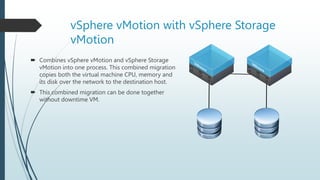
 Combines vSphere vMotion and vSphere Storage
vMotion into one process. This combined migration
copies both the virtual machine CPU, memory and
its disk over the network to the destination host.
 This combined migration can be done together
without downtime VM.
vSphere vMotion with vSphere Storage
vMotion
 Benefits :
• Zero downtime migration
• No dependency on shared storage
• Lower operating cost
• Helps meet service level and performance SLAs
vSphere Distributed Resources, Storage,
and Power Features
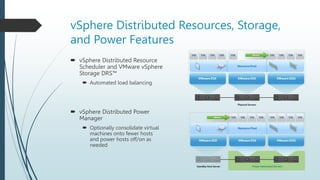
 vSphere Distributed Resource
Scheduler and VMware vSphere
Storage DRS™
 Automated load balancing
 vSphere Distributed Power
Manager
 Optionally consolidate virtual
machines onto fewer hosts
and power hosts off/on as
needed
vSphere Storage DRS
 Overview :
• Group like datastores in a datastore cluster
• Initial placement of virtual machines/VMDKs
• Datastore maintenance mode
• Space and I/O load balancing
• Affinity and anti-affinity rules
vSphere Storage DRS
 Benefits :
• Scalable storage management
• Reduce time for virtual machine provisioning
• Eliminate virtual machine downtime for storage maintenance
• Automated out-of-space avoidance
• Automated I/O bottleneck avoidance
What Does VMware vSphere Storage DRS
Solve?
Without VMware vSphere Storage DRS™
 Identify the datastore with the most disk space and lowest latency.
 Confirm which virtual machines are placed on the datastore and avoid
conflicts.
 Create virtual machine and hope for the best.
With vSphere Storage DRS
 Automatic selection of the best placement for your virtual machine.
 Advanced balancing mechanism to avoid storage performance bottlenecks
or lack of space problems.
 VM or VMDK affinity rules.
VMware vSphere Thin Provisioning
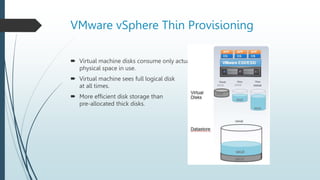
 Virtual machine disks consume only actual
physical space in use.
 Virtual machine sees full logical disk
at all times.
 More efficient disk storage than
pre-allocated thick disks.
VMware vSphere High Availability
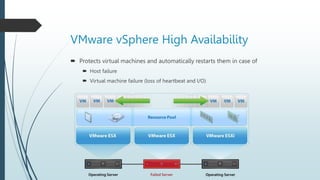
 Protects virtual machines and automatically restarts them in case of
 Host failure
 Virtual machine failure (loss of heartbeat and I/O)
VMware vSphere Fault Tolerance
 A protected virtual machine has a shadow virtual machine in lockstep on another
host.
 Zero downtime in the event of primary host failure.
 Automatic secondary protection after initial failover.
VMware vSphere
OS
APP
OS
APP
Hot Add
 Hot add virtual devices
 Hot add
 CPU
 Memory
 Hot add or remove
 Storage devices
 Network devices
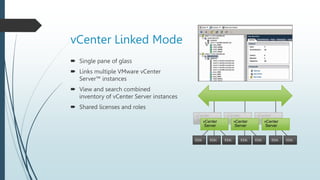
vCenter Linked Mode
 Single pane of glass
 Links multiple VMware vCenter
Server™ instances
 View and search combined
inventory of vCenter Server instances
 Shared licenses and roles
ESXi ESXi ESXi ESXi ESXi ESXi ESXi
vCenter
Server
vCenter
Server
vCenter
Server
vCenter
Server
vCenter
Server
vCenter
Server
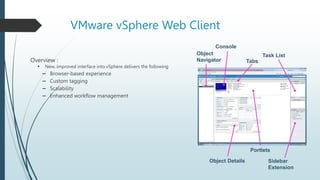
VMware vSphere Web Client
Overview :
• New, improved interface into vSphere delivers the following
– Browser-based experience
– Custom tagging
– Scalability
– Enhanced workflow management
Object
Navigator
Console
Tabs
Task List
Sidebar
Extension
Portlets
Object Details
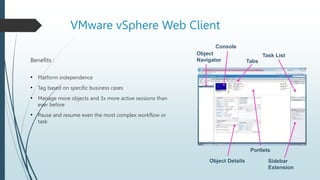
VMware vSphere Web Client
Benefits :
• Platform independence
• Tag based on specific business cases
• Manage more objects and 3x more active sessions than
ever before
• Pause and resume even the most complex workflow or
task
Object
Navigator
Console
Tabs
Task List
Sidebar
Extension
Portlets
Object Details
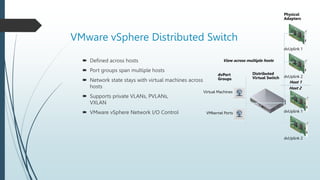
VMware vSphere Distributed Switch
 Defined across hosts
 Port groups span multiple hosts
 Network state stays with virtual machines across
hosts
 Supports private VLANs, PVLANs,
VXLAN
 VMware vSphere Network I/O Control
Virtual Machines
VMkernel Ports
dvPort
Groups
View across multiple hosts
Distributed
Virtual Switch
Host 1
Host 2
Physical
Adapters
dvUplink 1
dvUplink 2
dvUplink 2
dvUplink 1
VMware vSphere Distributed Switch
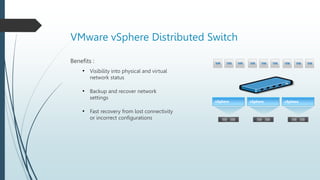
Benefits :
• Visibility into physical and virtual
network status
• Backup and recover network
settings
• Fast recovery from lost connectivity
or incorrect configurations
vSphere vSphere
vSphere
THANK YOU

Pengertian Virtualisasi.pptx

  • 1.
  • 2.
    Virtualization Overview  Virtualization Virtualization is the process of creating a software-based (or virtual) representation of something rather than a physical one.  Virtualization can apply to applications, servers, storage, and networks and is the single most effective way to reduce IT expenses while boosting efficiency and agility for all size businesses.
  • 3.
  • 4.
  • 5.
    Benefit of Virtualization Reduced capital and operating costs.  Minimized or eliminated downtime.  Increased IT productivity, efficiency, agility, scalability and responsiveness.  Faster provisioning of applications and resources.  Greater business continuity and disaster recovery.  Simplified data center management.
  • 6.
    Hypervisors Hypervisor is softwarethat creates and runs virtual machines (VMs). A hypervisor allows one host computer to support multiple guest VMs by virtually sharing its resources, such as memory and processing.
  • 7.
  • 8.
    Component of virtualization Hypervisor  ESXi  ESXi : Latest hypervisor architecture from VMware  Management  vCenter  Data center management server application developed by VMware  Client  vSphere client (below version 6.5)  Allows users to remotely connect to ESXi or vCenter Server from any Windows
  • 9.
  • 10.
  • 11.
    VMWare vShpere vMotion Live migration of virtual machines from one host to another with zero downtime.  Used by other vSphere features :  vSphere Fault Tolerance  vSphere Storage vMotion  vSphere Distributed Resource Scheduler  VMware vSphere Distributed Power Management™
  • 12.
    vSphere Storage vMotion Relocate a running virtual machine from one datastore to another datastore with zero downtime.  Relocate across different storage types.  Change virtual machine disk format (thick or thin). OS APP VMware ESX/ESXi OS APP OS APP
  • 13.
    vSphere vMotion withvSphere Storage vMotion  Combines vSphere vMotion and vSphere Storage vMotion into one process. This combined migration copies both the virtual machine CPU, memory and its disk over the network to the destination host.  This combined migration can be done together without downtime VM.
  • 14.
    vSphere vMotion withvSphere Storage vMotion  Benefits : • Zero downtime migration • No dependency on shared storage • Lower operating cost • Helps meet service level and performance SLAs
  • 15.
    vSphere Distributed Resources,Storage, and Power Features  vSphere Distributed Resource Scheduler and VMware vSphere Storage DRS™  Automated load balancing  vSphere Distributed Power Manager  Optionally consolidate virtual machines onto fewer hosts and power hosts off/on as needed
  • 16.
    vSphere Storage DRS Overview : • Group like datastores in a datastore cluster • Initial placement of virtual machines/VMDKs • Datastore maintenance mode • Space and I/O load balancing • Affinity and anti-affinity rules
  • 17.
    vSphere Storage DRS Benefits : • Scalable storage management • Reduce time for virtual machine provisioning • Eliminate virtual machine downtime for storage maintenance • Automated out-of-space avoidance • Automated I/O bottleneck avoidance
  • 18.
    What Does VMwarevSphere Storage DRS Solve? Without VMware vSphere Storage DRS™  Identify the datastore with the most disk space and lowest latency.  Confirm which virtual machines are placed on the datastore and avoid conflicts.  Create virtual machine and hope for the best. With vSphere Storage DRS  Automatic selection of the best placement for your virtual machine.  Advanced balancing mechanism to avoid storage performance bottlenecks or lack of space problems.  VM or VMDK affinity rules.
  • 19.
    VMware vSphere ThinProvisioning  Virtual machine disks consume only actual physical space in use.  Virtual machine sees full logical disk at all times.  More efficient disk storage than pre-allocated thick disks.
  • 20.
    VMware vSphere HighAvailability  Protects virtual machines and automatically restarts them in case of  Host failure  Virtual machine failure (loss of heartbeat and I/O)
  • 21.
    VMware vSphere FaultTolerance  A protected virtual machine has a shadow virtual machine in lockstep on another host.  Zero downtime in the event of primary host failure.  Automatic secondary protection after initial failover. VMware vSphere OS APP OS APP
  • 22.
    Hot Add  Hotadd virtual devices  Hot add  CPU  Memory  Hot add or remove  Storage devices  Network devices
  • 23.
    vCenter Linked Mode Single pane of glass  Links multiple VMware vCenter Server™ instances  View and search combined inventory of vCenter Server instances  Shared licenses and roles ESXi ESXi ESXi ESXi ESXi ESXi ESXi vCenter Server vCenter Server vCenter Server vCenter Server vCenter Server vCenter Server
  • 24.
    VMware vSphere WebClient Overview : • New, improved interface into vSphere delivers the following – Browser-based experience – Custom tagging – Scalability – Enhanced workflow management Object Navigator Console Tabs Task List Sidebar Extension Portlets Object Details
  • 25.
    VMware vSphere WebClient Benefits : • Platform independence • Tag based on specific business cases • Manage more objects and 3x more active sessions than ever before • Pause and resume even the most complex workflow or task Object Navigator Console Tabs Task List Sidebar Extension Portlets Object Details
  • 26.
    VMware vSphere DistributedSwitch  Defined across hosts  Port groups span multiple hosts  Network state stays with virtual machines across hosts  Supports private VLANs, PVLANs, VXLAN  VMware vSphere Network I/O Control Virtual Machines VMkernel Ports dvPort Groups View across multiple hosts Distributed Virtual Switch Host 1 Host 2 Physical Adapters dvUplink 1 dvUplink 2 dvUplink 2 dvUplink 1
  • 27.
    VMware vSphere DistributedSwitch Benefits : • Visibility into physical and virtual network status • Backup and recover network settings • Fast recovery from lost connectivity or incorrect configurations vSphere vSphere vSphere
  • 28.

Editor's Notes

  • #3 Virtualisasi adalah proses menciptakan representasi berbasis perangkat lunak (atau virtual) dari sesuatu daripada yang fisik. Virtualisasi dapat diterapkan pada aplikasi, server, penyimpanan, dan jaringan dan merupakan satu-satunya cara paling efektif untuk mengurangi biaya TI sekaligus meningkatkan efisiensi dan kelincahan untuk semua ukuran bisnis.
  • #6 Mengurangi modal dan biaya operasional. Diminimalkan atau dihilangkan downtime. Meningkatkan produktivitas, efisiensi, kelincahan, skalabilitas, dan daya tanggap TI. Penyediaan aplikasi dan sumber daya yang lebih cepat. Kesinambungan bisnis dan pemulihan bencana yang lebih baik. Manajemen pusat data yang disederhanakan.
  • #7 Hypervisor adalah perangkat lunak yang membuat dan menjalankan mesin virtual (VM). Hypervisor memungkinkan satu komputer host untuk mendukung beberapa VM tamu dengan berbagi sumber dayanya secara virtual, seperti memori dan pemrosesan.
  • #9 ESXi : Arsitektur hypervisor terbaru dari Vmware vCenter : Server manajemen pusat data. aplikasi yang dikembangkan oleh Vmware Clients : Memungkinkan pengguna untuk terhubung dari jarak jauh ke ESXi atau Server vCenter dari Windows mana pun.
  • #12 Migrasi langsung mesin virtual dari satu host ke host lain tanpa downtime. Digunakan oleh fitur vSphere lainnya : vSphere Fault Tolerance vSphere Storage vMotion vSphere Distributed Resource Scheduler VMware vSphere Distributed Power Management™
  • #13 Pindahkan mesin virtual yang sedang berjalan dari satu datastore ke datastore lain tanpa downtime. Relokasi di berbagai jenis penyimpanan. Ubah format disk mesin virtual (tebal atau tipis).
  • #14 Menggabungkan vSphere vMotion dan vSphere Storage vMotion menjadi satu proses. Migrasi gabungan ini menyalin CPU mesin virtual, memori, dan disknya melalui jaringan ke host tujuan. Migrasi gabungan ini dapat dilakukan bersama-sama tanpa VM downtime.
  • #15 Manfaat : Migrasi tanpa waktu henti Tidak ada ketergantungan pada penyimpanan Bersama Biaya operasi yang lebih rendah Membantu memenuhi tingkat layanan dan SLA kinerja
  • #16 vSphere Distributed Resource Scheduler and VMware vSphere Storage DRS : Penyeimbangan beban otomatis. vSphere Distributed Power Manager : Secara opsional, gabungkan mesin virtual ke lebih sedikit host dan matikan/hidupkan host sesuai kebutuhan
  • #17 Ringkasan : Kelompokkan seperti datastore dalam cluster datastore Penempatan awal mesin virtual/VMDK Mode pemeliharaan penyimpanan data Penyeimbangan beban ruang dan I/O Aturan afinitas dan anti-afinitas
  • #18 Manfaat : Manajemen penyimpanan yang dapat diskalakan Kurangi waktu untuk penyediaan mesin virtual Hilangkan waktu henti mesin virtual untuk pemeliharaan penyimpanan Penghindaran keluar-ruang otomatis Penghindaran kemacetan I/O otomatis
  • #19 Tanpa VMware vSphere Storage DRS™ : Identifikasi penyimpanan data dengan ruang disk paling banyak dan latensi terendah Konfirmasikan mesin virtual mana yang ditempatkan di penyimpanan data dan hindari konflik Buat mesin virtual dan berharap yang terbaik Dengan DRS Penyimpanan vSphere : Pemilihan otomatis penempatan terbaik untuk mesin virtual Anda Mekanisme penyeimbangan tingkat lanjut untuk menghindari kemacetan kinerja penyimpanan atau masalah kurangnya ruang. Aturan afinitas VM atau VMDK
  • #20 Disk mesin virtual hanya menggunakan ruang fisik aktual yang digunakan. Mesin virtual melihat disk logis penuh setiap saat. Penyimpanan disk yang lebih efisien daripada disk tebal yang telah dialokasikan sebelumnya
  • #21 Melindungi mesin virtual dan secara otomatis memulai ulang jika terjadi Kegagalan Host Kegagalan mesin virtual (kehilangan detak jantung dan I/O)
  • #22 Mesin virtual yang dilindungi memiliki mesin virtual bayangan yang terkunci di host lain. Nol downtime jika terjadi kegagalan host utama. Perlindungan sekunder otomatis setelah failover awal
  • #24 Panel kaca tunggal. Menautkan beberapa instans VMware vCenter Server™ Lihat dan cari inventaris gabungan dari instance vCenter Server Lisensi dan peran bersama
  • #25 Ringkasan : Antarmuka baru yang ditingkatkan ke vSphere memberikan yang berikut: Pengalaman berbasis browser Penandaan khusus Skalabilitas Manajemen alur kerja yang ditingkatkan
  • #26 Manfaat : Independensi platform Tag berdasarkan kasus bisnis tertentu Kelola lebih banyak objek dan 3x lebih banyak sesi aktif dari sebelumnya Jeda dan lanjutkan bahkan alur kerja atau tugas yang paling rumit
  • #27 Didefinisikan di seluruh host Grup port menjangkau banyak host Status jaringan tetap dengan mesin virtual di seluruh host Mendukung VLAN pribadi, PVLAN, VXLAN Kontrol I/O Jaringan VMware vSphere
  • #28 Manfaat : Visibilitas ke status jaringan fisik dan virtual Cadangkan dan pulihkan pengaturan jaringan Pemulihan cepat dari konektivitas yang hilang atau konfigurasi yang salah