MODES IN OS
Comparison between RTOS and non real time OS
DUAL MODE
When using an OS, the processor in the system runs in two modes
 User Mode
also known as less privileged mode, slave mode or restricted mode.
 Kernel Mode
also known as system mode,privileged mode,Supervisory mode
• A bit called mode bit,is added to the hardware of the computer to indicate
the current mode.
• With the mode bit,we can distinguish between a task that is executed on
behalf of the operating system and one that is executed on behalf of the user.
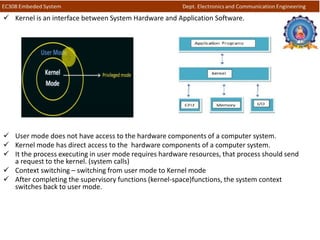
 Kernel is an interface between System Hardware and Application Software.
 User mode does not have access to the hardware components of a computer system.
 Kernel mode has direct access to the hardware components of a computer system.
 It the process executing in user mode requires hardware resources, that process should send
a request to the kernel. (system calls)
 Context switching – switching from user mode to Kernel mode
 After completing the supervisory functions (kernel-space)functions, the system context
switches back to user mode.
 When the computer system is executing behalf of a user application ,the system is in User
mode.
 Whenever the operating system gain control of the computer ,it is in kernel mode.
 The system starts in kernel mode when it boots and after the operating system is loaded, it
executes applications in user mode.
 The user process executes in the user mode until it gets a system call.
 Then a system trap is generated and the mode bit is set to zero.
 The system call gets executed in kernel mode.
 After the execution is completed, again a system trap is generated and the mode bit is set to 1.
 The system control returns to user mode and the process execution continues.
User Mode
 When the computer system is run by user applications then the system is in user mode.
Example: word application, PowerPoint, reading a PDF file and browsing the internet.
 In user mode Processes get their own address space and cannot access the address space which
belongs to the kernel.
 So the failure of one process will not affect the operating system.
 If there is an interrupt, it only affects that particular process.
 The user process is permitted to run and use only a subset of functions and instructions in OS.
 This is done in the user mode either by sending a message to a waiting process associated with
the OS kernel or by initiating a system call(call by an OS function)
Note: To switch from kernel mode to user mode, the mode bit should be 1.
Kernel Mode
 A kernel is a software program which is used to access hardware components of a computer
system.
 The system starts in kernel mode when it boots and after the operating system is loaded, it
executes applications in user mode.
 There are some privileged instructions that can only be executed in kernel mode.
 These are interrupt instructions, input output management etc.
 If the privileged instructions are executed in user mode, it is illegal and a trap is generated.
 In the supervisory mode the kernel code run in protected mode.
 Only a system call is permitted to read and write in to the protected memory allocated to the OS
functions.
 The kernel space function execute faster than OS functions.
Note: To switch from user mode to kernel mode bit should be 0
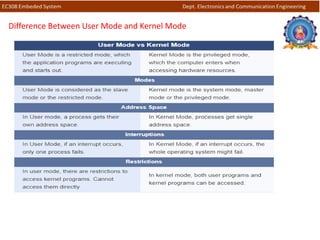
Difference Between User Mode and Kernel Mode
REAL TIME OPERATING SYSTEM
 A real-time operating system is a system that reacts upon outside events and
performs a function based on these and gives a response within a certain time or
within certain deadlines.
 output depends not only on the logical correctness but also on the time at which it is
being produced.
 Time deterministic in nature and output behaviour is predictable.
NON REAL TIME OPERATIONG SYSTEM
 A non-real time operating system is one in which we cannot guarantee the response
time of a task.
 These systems are non-deterministic in nature and we cannot predict the behavior of
the system with respect to time.
eg: Desktop, PC running GPOS, Mobile running Android, online web services etc.
Comparison between RTOS and non real time OS
RTOS Non real time OS
Real-time OS is associated with time bound. Non-real-time OS is not associated with time
bound.
It can be expressed as quantitative expression
of time.
It can’t be expressed as function of time.
Time deterministic in nature Non deterministic in nature
It is of two types – Hard and Soft. It is not further classified.
Deadline of real-time tasks are in the order of
seconds.
Deadline of non-real-time tasks may be
minutes, hours or even days.
output behaviour is predictable. cannot predict the behavior of the system with
respect to time.
Application: Airlines reservation system,
Air traffic control system, airbag, robotic
systems
Application : Desktop computers, workstations,
accounting systems, e-mail, , web services .

Presentation1

  • 1.
    MODES IN OS Comparisonbetween RTOS and non real time OS
  • 2.
    DUAL MODE When usingan OS, the processor in the system runs in two modes  User Mode also known as less privileged mode, slave mode or restricted mode.  Kernel Mode also known as system mode,privileged mode,Supervisory mode • A bit called mode bit,is added to the hardware of the computer to indicate the current mode. • With the mode bit,we can distinguish between a task that is executed on behalf of the operating system and one that is executed on behalf of the user.
  • 3.
     Kernel isan interface between System Hardware and Application Software.  User mode does not have access to the hardware components of a computer system.  Kernel mode has direct access to the hardware components of a computer system.  It the process executing in user mode requires hardware resources, that process should send a request to the kernel. (system calls)  Context switching – switching from user mode to Kernel mode  After completing the supervisory functions (kernel-space)functions, the system context switches back to user mode.
  • 4.
     When thecomputer system is executing behalf of a user application ,the system is in User mode.  Whenever the operating system gain control of the computer ,it is in kernel mode.  The system starts in kernel mode when it boots and after the operating system is loaded, it executes applications in user mode.  The user process executes in the user mode until it gets a system call.  Then a system trap is generated and the mode bit is set to zero.  The system call gets executed in kernel mode.  After the execution is completed, again a system trap is generated and the mode bit is set to 1.  The system control returns to user mode and the process execution continues.
  • 5.
    User Mode  Whenthe computer system is run by user applications then the system is in user mode. Example: word application, PowerPoint, reading a PDF file and browsing the internet.  In user mode Processes get their own address space and cannot access the address space which belongs to the kernel.  So the failure of one process will not affect the operating system.  If there is an interrupt, it only affects that particular process.  The user process is permitted to run and use only a subset of functions and instructions in OS.  This is done in the user mode either by sending a message to a waiting process associated with the OS kernel or by initiating a system call(call by an OS function) Note: To switch from kernel mode to user mode, the mode bit should be 1.
  • 6.
    Kernel Mode  Akernel is a software program which is used to access hardware components of a computer system.  The system starts in kernel mode when it boots and after the operating system is loaded, it executes applications in user mode.  There are some privileged instructions that can only be executed in kernel mode.  These are interrupt instructions, input output management etc.  If the privileged instructions are executed in user mode, it is illegal and a trap is generated.  In the supervisory mode the kernel code run in protected mode.  Only a system call is permitted to read and write in to the protected memory allocated to the OS functions.  The kernel space function execute faster than OS functions. Note: To switch from user mode to kernel mode bit should be 0
  • 7.
    Difference Between UserMode and Kernel Mode
  • 8.
    REAL TIME OPERATINGSYSTEM  A real-time operating system is a system that reacts upon outside events and performs a function based on these and gives a response within a certain time or within certain deadlines.  output depends not only on the logical correctness but also on the time at which it is being produced.  Time deterministic in nature and output behaviour is predictable. NON REAL TIME OPERATIONG SYSTEM  A non-real time operating system is one in which we cannot guarantee the response time of a task.  These systems are non-deterministic in nature and we cannot predict the behavior of the system with respect to time. eg: Desktop, PC running GPOS, Mobile running Android, online web services etc.
  • 9.
    Comparison between RTOSand non real time OS RTOS Non real time OS Real-time OS is associated with time bound. Non-real-time OS is not associated with time bound. It can be expressed as quantitative expression of time. It can’t be expressed as function of time. Time deterministic in nature Non deterministic in nature It is of two types – Hard and Soft. It is not further classified. Deadline of real-time tasks are in the order of seconds. Deadline of non-real-time tasks may be minutes, hours or even days. output behaviour is predictable. cannot predict the behavior of the system with respect to time. Application: Airlines reservation system, Air traffic control system, airbag, robotic systems Application : Desktop computers, workstations, accounting systems, e-mail, , web services .