DIGITAL PAYMENTS
STEP BY STEP INSTRUCTIONS FOR VARIOUS
MODES OF PAYMENT:
UPI, Wallets, PoS, and SMS banking (USSD)
POINTS OF SALE (POS)
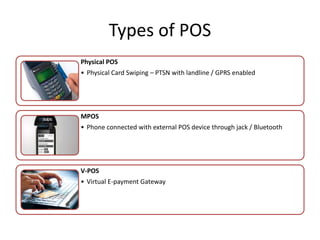
Types of POS
Physical POS
• Physical Card Swiping – PTSN with landline / GPRS enabled
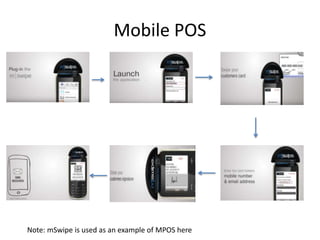
MPOS
• Phone connected with external POS device through jack / Bluetooth
V-POS
• Virtual E-payment Gateway
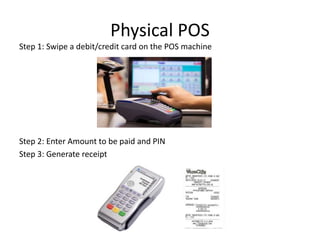
Physical POS
Step 1: Swipe a debit/credit card on the POS machine
Step 2: Enter Amount to be paid and PIN
Step 3: Generate receipt
Mobile POS
Note: mSwipe is used as an example of MPOS here
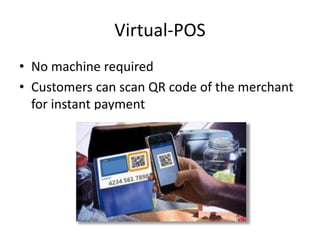
Virtual-POS
• No machine required
• Customers can scan QR code of the merchant
for instant payment
Installation of POS Terminal
• Open / identify current account for transactions
• Fill in the application form (online / at the branch)
• Identify type of POS required (landline / GPRS)
• Submit following documents:
– Proof of business
• Shop & establishment registration certificate
• VAT certificate
• Sales tax…..
– Proof of address
– Photo identity proof of proprietor / partner
– Financial details
• Bank statement
• Income tax return
• Acceptance of MDR by merchant
• Execution of Merchant Establishment Agreement
UNSTRUCTURED SUPPLEMENTARY
SERVICE DATA (USSD) BASED MOBILE
BANKING
National Unified USSD Platform (NUUP)
Required for activation
• Works on every mobile phone on GSM
network
• Simple SMS-type system
• Visit your branch or ATM to link mobile
number and bank account
– Details can be updated online or on SMS
• Can be used for payments upto Rs 5000 per
day, per user
Simple fund transfer system
• You will get your Mobile Money Identifier
(MMID) and Mobile PIN (MPIN) upon
registration
• Remember your MMID and MPIN
• Make payments in few steps (*99#)
• To make the system more user friendly,
several new features are proposed to be
introduced
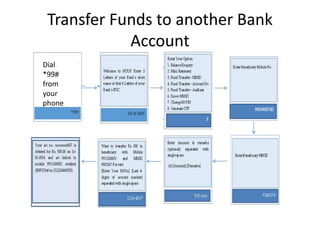
Transfer Funds to another Bank
Account
Dial
*99#
from
your
phone
Proposed new USSD features
• Using account number instead of MMID
• Can work with only Aadhar number also
UPI
Unified Payment Interface
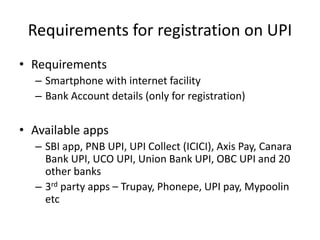
Requirements for registration on UPI
• Requirements
– Smartphone with internet facility
– Bank Account details (only for registration)
• Available apps
– SBI app, PNB UPI, UPI Collect (ICICI), Axis Pay, Canara
Bank UPI, UCO UPI, Union Bank UPI, OBC UPI and 20
other banks
– 3rd party apps – Trupay, Phonepe, UPI pay, Mypoolin
etc
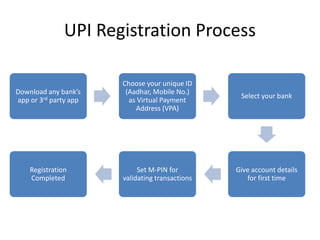
UPI Registration Process
Download any bank’s
app or 3rd party app
Choose your unique ID
(Aadhar, Mobile No.)
as Virtual Payment
Address (VPA)
Select your bank
Give account details
for first time
Set M-PIN for
validating transactions
Registration
Completed
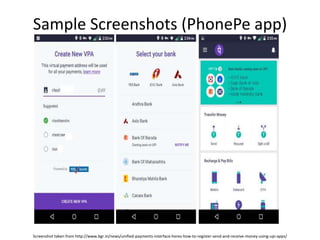
Sample Screenshots (PhonePe app)
Screenshot taken from http://www.bgr.in/news/unified-payments-interface-heres-how-to-register-send-and-receive-money-using-upi-apps/
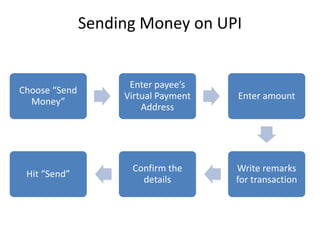
Sending Money on UPI
Choose “Send
Money”
Enter payee’s
Virtual Payment
Address
Enter amount
Write remarks
for transaction
Confirm the
details
Hit “Send”
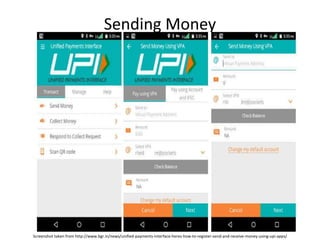
Sending Money
Screenshot taken from http://www.bgr.in/news/unified-payments-interface-heres-how-to-register-send-and-receive-money-using-upi-apps/
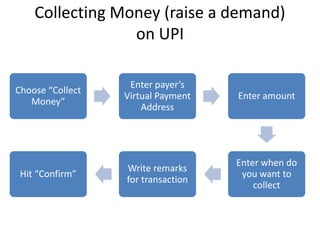
Collecting Money (raise a demand)
on UPI
Choose “Collect
Money”
Enter payer’s
Virtual Payment
Address
Enter amount
Enter when do
you want to
collect
Write remarks
for transaction
Hit “Confirm”
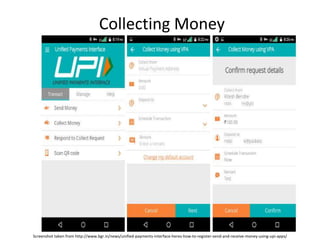
Collecting Money
Screenshot taken from http://www.bgr.in/news/unified-payments-interface-heres-how-to-register-send-and-receive-money-using-upi-apps/
WALLETS
What are e-wallets
• Electronic pre-paid payment system, mobile-
first
• Used in purchasing items on-line with a
computer or a smartphone at a store.
• An individual's account is required to be linked
to the digital wallet to load money in it.
• Provided by many banks and private companies
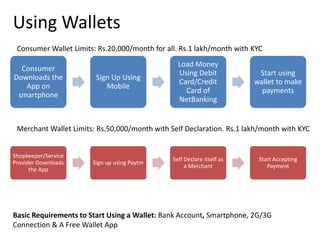
Using Wallets
Consumer
Downloads the
App on
smartphone
Sign Up Using
Mobile
Load Money
Using Debit
Card/Credit
Card of
NetBanking
Start using
wallet to make
payments
Shopkeeper/Service
Provider Downloads
the App
Sign up using Paytm
Self Declare itself as
a Merchant
Start Accepting
Payment
Consumer Wallet Limits: Rs.20,000/month for all. Rs.1 lakh/month with KYC
Merchant Wallet Limits: Rs.50,000/month with Self Declaration. Rs.1 lakh/month with KYC
Basic Requirements to Start Using a Wallet: Bank Account, Smartphone, 2G/3G
Connection & A Free Wallet App
AADHAR ENABLED PAYMENT
SYSTEM (AEPS)
Aadhaar Enabled Payment System (AEPS)
• AEPS allows bank-to-bank transaction at PoS
(MicroATM) with the help of BC
• Only Aadhar needed
• Aadhar enabled Services
– Balance Enquiry
– Cash Withdrawal
– Cash Deposit
– Aadhaar to Aadhaar Funds Transfer
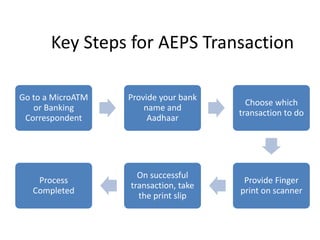
Key Steps for AEPS Transaction
Go to a MicroATM
or Banking
Correspondent
Provide your bank
name and
Aadhaar
Choose which
transaction to do
Provide Finger
print on scanner
On successful
transaction, take
the print slip
Process
Completed
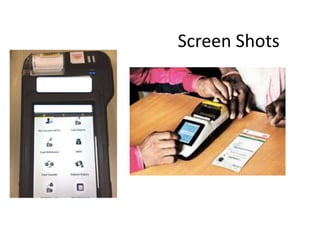
Screen Shots
THANK YOU

Presentation of digital payments

  • 1.
    DIGITAL PAYMENTS STEP BYSTEP INSTRUCTIONS FOR VARIOUS MODES OF PAYMENT: UPI, Wallets, PoS, and SMS banking (USSD)
  • 2.
  • 3.
    Types of POS PhysicalPOS • Physical Card Swiping – PTSN with landline / GPRS enabled MPOS • Phone connected with external POS device through jack / Bluetooth V-POS • Virtual E-payment Gateway
  • 4.
    Physical POS Step 1:Swipe a debit/credit card on the POS machine Step 2: Enter Amount to be paid and PIN Step 3: Generate receipt
  • 5.
    Mobile POS Note: mSwipeis used as an example of MPOS here
  • 6.
    Virtual-POS • No machinerequired • Customers can scan QR code of the merchant for instant payment
  • 7.
    Installation of POSTerminal • Open / identify current account for transactions • Fill in the application form (online / at the branch) • Identify type of POS required (landline / GPRS) • Submit following documents: – Proof of business • Shop & establishment registration certificate • VAT certificate • Sales tax….. – Proof of address – Photo identity proof of proprietor / partner – Financial details • Bank statement • Income tax return • Acceptance of MDR by merchant • Execution of Merchant Establishment Agreement
  • 8.
    UNSTRUCTURED SUPPLEMENTARY SERVICE DATA(USSD) BASED MOBILE BANKING National Unified USSD Platform (NUUP)
  • 9.
    Required for activation •Works on every mobile phone on GSM network • Simple SMS-type system • Visit your branch or ATM to link mobile number and bank account – Details can be updated online or on SMS • Can be used for payments upto Rs 5000 per day, per user
  • 10.
    Simple fund transfersystem • You will get your Mobile Money Identifier (MMID) and Mobile PIN (MPIN) upon registration • Remember your MMID and MPIN • Make payments in few steps (*99#) • To make the system more user friendly, several new features are proposed to be introduced
  • 11.
    Transfer Funds toanother Bank Account Dial *99# from your phone
  • 12.
    Proposed new USSDfeatures • Using account number instead of MMID • Can work with only Aadhar number also
  • 13.
  • 14.
    Requirements for registrationon UPI • Requirements – Smartphone with internet facility – Bank Account details (only for registration) • Available apps – SBI app, PNB UPI, UPI Collect (ICICI), Axis Pay, Canara Bank UPI, UCO UPI, Union Bank UPI, OBC UPI and 20 other banks – 3rd party apps – Trupay, Phonepe, UPI pay, Mypoolin etc
  • 15.
    UPI Registration Process Downloadany bank’s app or 3rd party app Choose your unique ID (Aadhar, Mobile No.) as Virtual Payment Address (VPA) Select your bank Give account details for first time Set M-PIN for validating transactions Registration Completed
  • 16.
    Sample Screenshots (PhonePeapp) Screenshot taken from http://www.bgr.in/news/unified-payments-interface-heres-how-to-register-send-and-receive-money-using-upi-apps/
  • 17.
    Sending Money onUPI Choose “Send Money” Enter payee’s Virtual Payment Address Enter amount Write remarks for transaction Confirm the details Hit “Send”
  • 18.
    Sending Money Screenshot takenfrom http://www.bgr.in/news/unified-payments-interface-heres-how-to-register-send-and-receive-money-using-upi-apps/
  • 19.
    Collecting Money (raisea demand) on UPI Choose “Collect Money” Enter payer’s Virtual Payment Address Enter amount Enter when do you want to collect Write remarks for transaction Hit “Confirm”
  • 20.
    Collecting Money Screenshot takenfrom http://www.bgr.in/news/unified-payments-interface-heres-how-to-register-send-and-receive-money-using-upi-apps/
  • 21.
  • 22.
    What are e-wallets •Electronic pre-paid payment system, mobile- first • Used in purchasing items on-line with a computer or a smartphone at a store. • An individual's account is required to be linked to the digital wallet to load money in it. • Provided by many banks and private companies
  • 23.
    Using Wallets Consumer Downloads the Appon smartphone Sign Up Using Mobile Load Money Using Debit Card/Credit Card of NetBanking Start using wallet to make payments Shopkeeper/Service Provider Downloads the App Sign up using Paytm Self Declare itself as a Merchant Start Accepting Payment Consumer Wallet Limits: Rs.20,000/month for all. Rs.1 lakh/month with KYC Merchant Wallet Limits: Rs.50,000/month with Self Declaration. Rs.1 lakh/month with KYC Basic Requirements to Start Using a Wallet: Bank Account, Smartphone, 2G/3G Connection & A Free Wallet App
  • 24.
  • 25.
    Aadhaar Enabled PaymentSystem (AEPS) • AEPS allows bank-to-bank transaction at PoS (MicroATM) with the help of BC • Only Aadhar needed • Aadhar enabled Services – Balance Enquiry – Cash Withdrawal – Cash Deposit – Aadhaar to Aadhaar Funds Transfer
  • 26.
    Key Steps forAEPS Transaction Go to a MicroATM or Banking Correspondent Provide your bank name and Aadhaar Choose which transaction to do Provide Finger print on scanner On successful transaction, take the print slip Process Completed
  • 27.
  • 28.