Presentation of ComputerPresentation of Computer
Table of ContentsTable of Contents
 What is aWhat is a ComputerComputer
 Computer HardwareComputer Hardware
 Examples of Computer HardwareExamples of Computer Hardware
 Computer SoftwareComputer Software
 Computer Input DevicesComputer Input Devices
 Computer Output DevicesComputer Output Devices
Definition of ComputerDefinition of Computer
 A device that computes,A device that computes,
especially a programmableespecially a programmable
electronic machine thatelectronic machine that
performs high-speedperforms high-speed
mathematical or logicalmathematical or logical
operations or thatoperations or that
assembles, stores,assembles, stores,
correlates, or otherwisecorrelates, or otherwise
processes information.processes information.
 Go back to Table of ContentsGo back to Table of Contents
Computers Have Two Main PartsComputers Have Two Main Parts
1.1. Computer HardwareComputer Hardware
2.2. Computer SoftwareComputer Software
What is Computer Hardware?What is Computer Hardware?
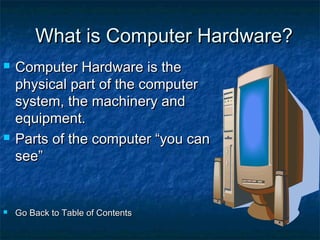
 Computer Hardware is theComputer Hardware is the
physical part of the computerphysical part of the computer
system, the machinery andsystem, the machinery and
equipment.equipment.
 Parts of the computer “you canParts of the computer “you can
see”see”
 Go Back to Table of ContentsGo Back to Table of Contents
Examples of Computer HardwareExamples of Computer Hardware
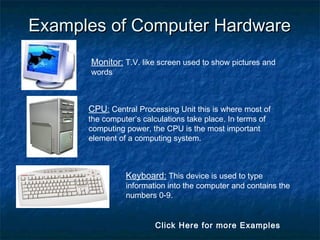
Monitor: T.V. like screen used to show pictures and
words
CPU: Central Processing Unit this is where most of
the computer’s calculations take place. In terms of
computing power, the CPU is the most important
element of a computing system.
Keyboard: This device is used to type
information into the computer and contains the
numbers 0-9.
Click Here for more Examples
More Computer HardwareMore Computer Hardware
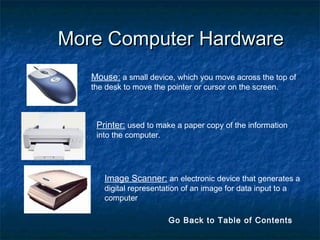
Mouse: a small device, which you move across the top of
the desk to move the pointer or cursor on the screen.
Printer: used to make a paper copy of the information
into the computer.
Image Scanner: an electronic device that generates a
digital representation of an image for data input to a
computer
Go Back to Table of Contents
What is Computer Software?What is Computer Software?
 Computer Software are programs that tell theComputer Software are programs that tell the
computer what to do.computer what to do.
ExamplesExamples
 Microsoft Word-word processing programMicrosoft Word-word processing program
 Microsoft PowerPoint-presentation programMicrosoft PowerPoint-presentation program
 Microsoft Excel-work book program used toMicrosoft Excel-work book program used to
track, calculate, and analyze numeric datatrack, calculate, and analyze numeric data
 Go Back to Table of ContentsGo Back to Table of Contents
Computer Input DevicesComputer Input Devices
 Computer Devices that input information in theComputer Devices that input information in the
computercomputer
ExamplesExamples
 Key BoardKey Board
 MouseMouse
 ScannerScanner
 Digital CameraDigital Camera
 Go Back to Table of ContentsGo Back to Table of Contents
Computer Output DevicesComputer Output Devices
 Computer Devices that output informationComputer Devices that output information
from the computer.from the computer.
ExamplesExamples
 MonitorMonitor
 PrinterPrinter
 Go Back to Table of ContentsGo Back to Table of Contents
 PREPARED BY : KHUSHI YADUVANSHIPREPARED BY : KHUSHI YADUVANSHI
 CALSS : 6-CCALSS : 6-C
 ROOL NO. : 15ROOL NO. : 15

Presentation of computer

  • 1.
  • 2.
    Table of ContentsTableof Contents  What is aWhat is a ComputerComputer  Computer HardwareComputer Hardware  Examples of Computer HardwareExamples of Computer Hardware  Computer SoftwareComputer Software  Computer Input DevicesComputer Input Devices  Computer Output DevicesComputer Output Devices
  • 3.
    Definition of ComputerDefinitionof Computer  A device that computes,A device that computes, especially a programmableespecially a programmable electronic machine thatelectronic machine that performs high-speedperforms high-speed mathematical or logicalmathematical or logical operations or thatoperations or that assembles, stores,assembles, stores, correlates, or otherwisecorrelates, or otherwise processes information.processes information.  Go back to Table of ContentsGo back to Table of Contents
  • 4.
    Computers Have TwoMain PartsComputers Have Two Main Parts 1.1. Computer HardwareComputer Hardware 2.2. Computer SoftwareComputer Software
  • 5.
    What is ComputerHardware?What is Computer Hardware?  Computer Hardware is theComputer Hardware is the physical part of the computerphysical part of the computer system, the machinery andsystem, the machinery and equipment.equipment.  Parts of the computer “you canParts of the computer “you can see”see”  Go Back to Table of ContentsGo Back to Table of Contents
  • 6.
    Examples of ComputerHardwareExamples of Computer Hardware Monitor: T.V. like screen used to show pictures and words CPU: Central Processing Unit this is where most of the computer’s calculations take place. In terms of computing power, the CPU is the most important element of a computing system. Keyboard: This device is used to type information into the computer and contains the numbers 0-9. Click Here for more Examples
  • 7.
    More Computer HardwareMoreComputer Hardware Mouse: a small device, which you move across the top of the desk to move the pointer or cursor on the screen. Printer: used to make a paper copy of the information into the computer. Image Scanner: an electronic device that generates a digital representation of an image for data input to a computer Go Back to Table of Contents
  • 8.
    What is ComputerSoftware?What is Computer Software?  Computer Software are programs that tell theComputer Software are programs that tell the computer what to do.computer what to do. ExamplesExamples  Microsoft Word-word processing programMicrosoft Word-word processing program  Microsoft PowerPoint-presentation programMicrosoft PowerPoint-presentation program  Microsoft Excel-work book program used toMicrosoft Excel-work book program used to track, calculate, and analyze numeric datatrack, calculate, and analyze numeric data  Go Back to Table of ContentsGo Back to Table of Contents
  • 9.
    Computer Input DevicesComputerInput Devices  Computer Devices that input information in theComputer Devices that input information in the computercomputer ExamplesExamples  Key BoardKey Board  MouseMouse  ScannerScanner  Digital CameraDigital Camera  Go Back to Table of ContentsGo Back to Table of Contents
  • 10.
    Computer Output DevicesComputerOutput Devices  Computer Devices that output informationComputer Devices that output information from the computer.from the computer. ExamplesExamples  MonitorMonitor  PrinterPrinter  Go Back to Table of ContentsGo Back to Table of Contents
  • 11.
     PREPARED BY: KHUSHI YADUVANSHIPREPARED BY : KHUSHI YADUVANSHI  CALSS : 6-CCALSS : 6-C  ROOL NO. : 15ROOL NO. : 15