• Web-based 
collaboration tools 
• Blogs 
Carlos Rodrigo Marquez
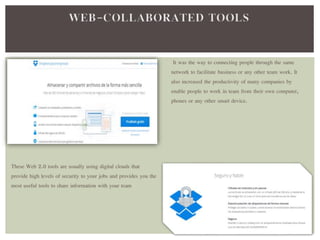
It was the way to connecting people through the same 
network to facilitate business or any other team work. It 
also increased the productivity of many companies by 
enable people to work in team from their own computer, 
phones or any other smart device. 
These Web 2.0 tools are usually using digital clouds that 
provide high levels of security to your jobs and provides you the 
most useful tools to share information with your team
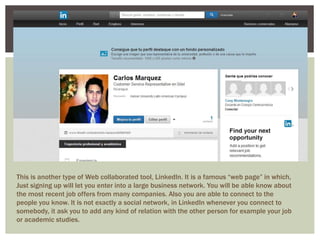
This is another type of Web collaborated tool, LinkedIn. It is a famous “web page” in which, 
Just signing up will let you enter into a large business network. You will be able know about 
the most recent job offers from many companies. Also you are able to connect to the 
people you know. It is not exactly a social network, in LinkedIn whenever you connect to 
somebody, it ask you to add any kind of relation with the other person for example your job 
or academic studies.
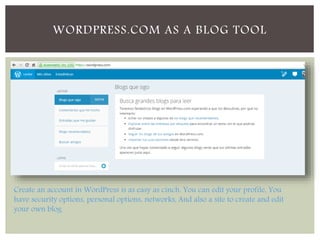
WORDPRESS.COM AS A BLOG TOOL 
Create an account in WordPress is as easy as cinch. You can edit your profile, You 
have security options, personal options, networks, And also a site to create and edit 
your own blog
CREATING A BLOG 
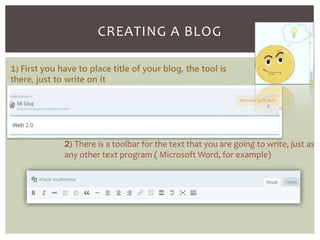
1) First you have to place title of your blog, the tool is 
there, just to write on it 
2) There is a toolbar for the text that you are going to write, just as 
any other text program ( Microsoft Word, for example)
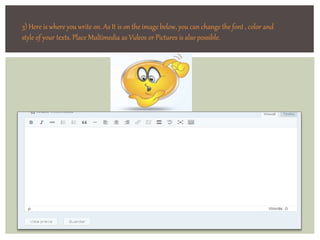
3) Here is where you write on. As It is on the image below, you can change the font , color and 
style of your texts. Place Multimedia as Videos or Pictures is also possible.
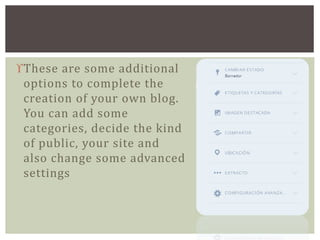
These are some additional 
options to complete the 
creation of your own blog. 
You can add some 
categories, decide the kind 
of public, your site and 
also change some advanced 
settings
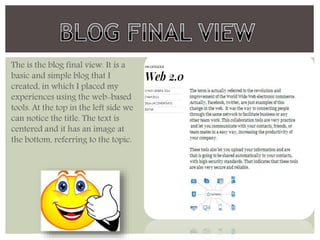
The is the blog final view. It is a 
basic and simple blog that I 
created, in which I placed my 
experiences using the web-based 
tools. At the top in the left side we 
can notice the title. The text is 
centered and it has an image at 
the bottom, referring to the topic.

Web 2.0

  • 1.
    • Web-based collaborationtools • Blogs Carlos Rodrigo Marquez
  • 2.
    It was theway to connecting people through the same network to facilitate business or any other team work. It also increased the productivity of many companies by enable people to work in team from their own computer, phones or any other smart device. These Web 2.0 tools are usually using digital clouds that provide high levels of security to your jobs and provides you the most useful tools to share information with your team
  • 3.
    This is anothertype of Web collaborated tool, LinkedIn. It is a famous “web page” in which, Just signing up will let you enter into a large business network. You will be able know about the most recent job offers from many companies. Also you are able to connect to the people you know. It is not exactly a social network, in LinkedIn whenever you connect to somebody, it ask you to add any kind of relation with the other person for example your job or academic studies.
  • 4.
    WORDPRESS.COM AS ABLOG TOOL Create an account in WordPress is as easy as cinch. You can edit your profile, You have security options, personal options, networks, And also a site to create and edit your own blog
  • 5.
    CREATING A BLOG 1) First you have to place title of your blog, the tool is there, just to write on it 2) There is a toolbar for the text that you are going to write, just as any other text program ( Microsoft Word, for example)
  • 6.
    3) Here iswhere you write on. As It is on the image below, you can change the font , color and style of your texts. Place Multimedia as Videos or Pictures is also possible.
  • 7.
    These are someadditional options to complete the creation of your own blog. You can add some categories, decide the kind of public, your site and also change some advanced settings
  • 8.
    The is theblog final view. It is a basic and simple blog that I created, in which I placed my experiences using the web-based tools. At the top in the left side we can notice the title. The text is centered and it has an image at the bottom, referring to the topic.