INTRODUCTION TO
CLOUD COMPUTING
Adnan Malak
15 june, 2016.
Outline of the Presentation
• What is Cloud Computing ?
• Why Cloud Computing ?
• The back Story
• Types of Cloud Computing
• Applications
• Advantages and Disadvatages
• Conclusion
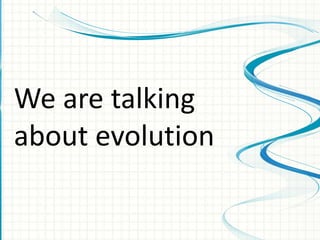
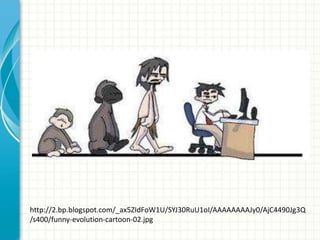
We are talking
about evolution
http://2.bp.blogspot.com/_ax5ZIdFoW1U/SYJ30RuU1oI/AAAAAAAAJy0/AjC4490Jg3Q
/s400/funny-evolution-cartoon-02.jpg
What is Cloud Computing
• Computers in the Sky?
• Computers over Network?
• Computers somewhere on the internet
What is Cloud Computing
• Network of Remote
Servers
•Accessed via Internet to
•Store
•Manage
•Process
Data
* rather than a local server
What is Cloud Computing
cloud computing means "a type of Internet-based
computing," where different services such as servers,
storage and applications are delivered to an organization's
computers and devices through the Internet1.
http://www.webopedia.com/TERM/C/cloud_computing.html
What is Cloud Computing
When you store your photos
online , use webmail or social
networking site you are using a
“cloud computing service”
http://www.slideshare.net/ProfEdge/introduction-to-cloud-computing-
23970527
Why Cloud Computing
 Dr. Ranganathan’s fourth principle very much
applied when we say Cloud Computing. Save
the time of reader by providing information
anytime anywhere.
 More efficient and speedy distribution of
library services with lower cost
To be continue…
Continue…
 American multinational Computer Technology
Company Dell is currently working on a project
called “Ophelia”, a potentially game changing
device that is essentially a virtual computer that
can be accessed anywhere. Project Ophelia
would allow a user to access their own
computer and its applications on any connected
devices.
 Simultaneously multiple users can use provided
resources and services
 Constant performance that is monitored by the
service provider
From ground to
cloudThe Back Story
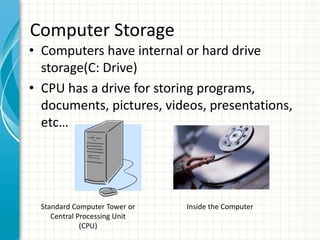
• Computers have internal or hard drive
storage(C: Drive)
• CPU has a drive for storing programs,
documents, pictures, videos, presentations,
etc…
Computer Storage
Standard Computer Tower or
Central Processing Unit
(CPU)
Inside the Computer
• Purchase programs
• Load to the computer
• Each computer would need the program
loaded and stored on the internal drive
Programs
• Content is stored on THAT computer
• To use content must return to THAT
computer
• Cannot access this content from another
device or computer
Internal Storage
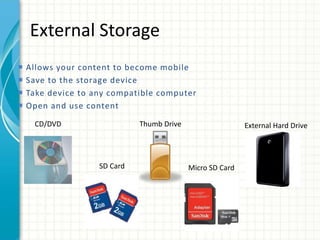
External Storage
External Hard DriveCD/DVD Thumb Drive
SD Card Micro SD Card
 Allows your content to become mobile
 Save to the storage device
 Take device to any compatible computer
 Open and use content
• Create an Account –
User name and
password
• Content lives with the
account in the cloud
• Log onto any computer
with Internet to find
your content
Cloud Storage
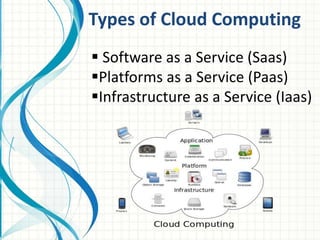
Types of Cloud Computing
 Software as a Service (Saas)
Platforms as a Service (Paas)
Infrastructure as a Service (Iaas)
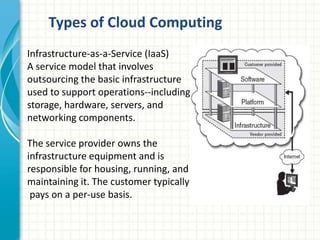
Infrastructure-as-a-Service (IaaS)
A service model that involves
outsourcing the basic infrastructure
used to support operations--including
storage, hardware, servers, and
networking components.
The service provider owns the
infrastructure equipment and is
responsible for housing, running, and
maintaining it. The customer typically
pays on a per-use basis.
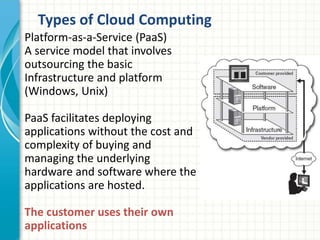
Types of Cloud Computing
Platform-as-a-Service (PaaS)
A service model that involves
outsourcing the basic
Infrastructure and platform
(Windows, Unix)
PaaS facilitates deploying
applications without the cost and
complexity of buying and
managing the underlying
hardware and software where the
applications are hosted.
The customer uses their own
applications
Types of Cloud Computing
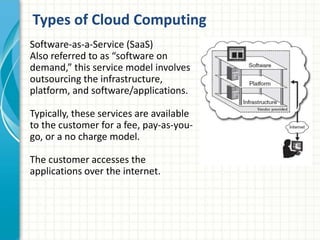
Software-as-a-Service (SaaS)
Also referred to as “software on
demand,” this service model involves
outsourcing the infrastructure,
platform, and software/applications.
Typically, these services are available
to the customer for a fee, pay-as-you-
go, or a no charge model.
The customer accesses the
applications over the internet.
Types of Cloud Computing
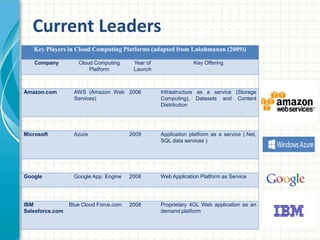
Current Leaders
Key Players in Cloud Computing Platforms (adapted from Lakshmanan (2009))
Company Cloud Computing
Platform
Year of
Launch
Key Offering
Amazon.com AWS (Amazon Web
Services)
2006 Infrastructure as a service (Storage
Computing), Datasets and Content
Distribution
Microsoft Azure 2009 Application platform as a service (.Net,
SQL data services )
Google Google App. Engine 2008 Web Application Platform as Service
IBM
Salesforce.com
Blue Cloud Force.com 2008 Proprietary 4GL Web application as an
demand platform
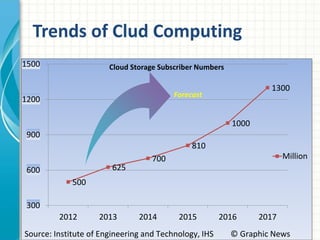
Trends of Clud Computing
500
625
700
810
1000
1300
300
600
900
1200
1500
2012 2013 2014 2015 2016 2017
Cloud Storage Subscriber Numbers
Million
Forecast
Source: Institute of Engineering and Technology, IHS © Graphic News
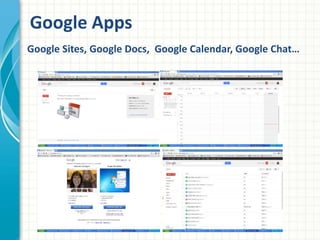
Google Apps
Google Sites, Google Docs, Google Calendar, Google Chat…
Let’s Use Dropbox!
Powered by www.freshmindideas.com | ajay@freshmindideas.com
DROPBOX
• It helps you to use your files where ever you
are..
• Which means no need to carry your files with
you in any device..
• Dropbox is eazy to use and trusted by
Millions
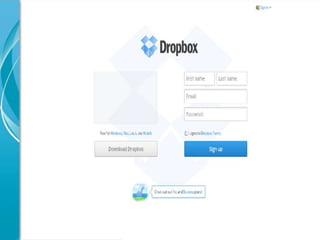
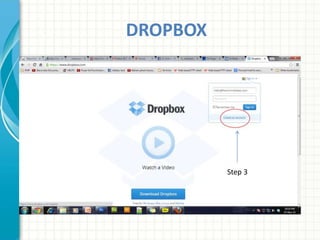
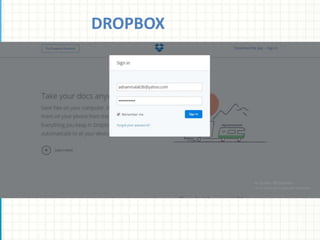
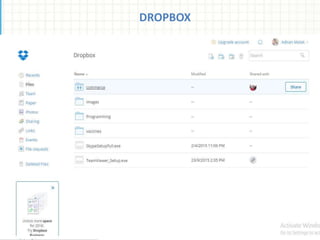
• Following Steps will help you to get into the
Box!
DROPBOX
Step 3
DROPBOX
DROPBOX
Advantages
 Cost saving: You pay for what you use
 Easy on installation and maintenance
 Increased storage
• Saving Large Files
• Multiple file types – Photos, videos, presentations, docs
• Back-up of stored files
• File Sharing
• Access from devices
• Nothing to forget (thumb drive, cd) Back up and
restoration
• Data security and privacy
• Network connectivity and bandwidth
• Service unavailability due to power outage
• Dependence on outside agencies
• Terms of Service
• Privacy Policies
• Cost
Disadvantages
 Cloud Computing is in a period of strong growth, but this
technology is still has some issues of security and
somewhat it is immature. Government Technology
Research Alliance (GTRA) research showed that the most
common concern about implementing Cloud Computing
technology was security.
 The real value of cloud computing is that it makes your
library related software and data available transparently
and everywhere including in latest available smart phone
devices.
 But definitely, over a period of time Cloud Computing will
become the most promising technology in next few years.
Conclusion
QUESTIONS?
THANK YOU

Pres cloud computing

  • 1.
  • 2.
    Outline of thePresentation • What is Cloud Computing ? • Why Cloud Computing ? • The back Story • Types of Cloud Computing • Applications • Advantages and Disadvatages • Conclusion
  • 3.
  • 4.
  • 5.
    What is CloudComputing • Computers in the Sky? • Computers over Network? • Computers somewhere on the internet
  • 6.
    What is CloudComputing • Network of Remote Servers •Accessed via Internet to •Store •Manage •Process Data * rather than a local server
  • 7.
    What is CloudComputing cloud computing means "a type of Internet-based computing," where different services such as servers, storage and applications are delivered to an organization's computers and devices through the Internet1. http://www.webopedia.com/TERM/C/cloud_computing.html
  • 8.
    What is CloudComputing When you store your photos online , use webmail or social networking site you are using a “cloud computing service” http://www.slideshare.net/ProfEdge/introduction-to-cloud-computing- 23970527
  • 9.
    Why Cloud Computing Dr. Ranganathan’s fourth principle very much applied when we say Cloud Computing. Save the time of reader by providing information anytime anywhere.  More efficient and speedy distribution of library services with lower cost To be continue…
  • 10.
    Continue…  American multinationalComputer Technology Company Dell is currently working on a project called “Ophelia”, a potentially game changing device that is essentially a virtual computer that can be accessed anywhere. Project Ophelia would allow a user to access their own computer and its applications on any connected devices.  Simultaneously multiple users can use provided resources and services  Constant performance that is monitored by the service provider
  • 11.
  • 12.
    • Computers haveinternal or hard drive storage(C: Drive) • CPU has a drive for storing programs, documents, pictures, videos, presentations, etc… Computer Storage Standard Computer Tower or Central Processing Unit (CPU) Inside the Computer
  • 13.
    • Purchase programs •Load to the computer • Each computer would need the program loaded and stored on the internal drive Programs
  • 14.
    • Content isstored on THAT computer • To use content must return to THAT computer • Cannot access this content from another device or computer Internal Storage
  • 15.
    External Storage External HardDriveCD/DVD Thumb Drive SD Card Micro SD Card  Allows your content to become mobile  Save to the storage device  Take device to any compatible computer  Open and use content
  • 16.
    • Create anAccount – User name and password • Content lives with the account in the cloud • Log onto any computer with Internet to find your content Cloud Storage
  • 17.
    Types of CloudComputing  Software as a Service (Saas) Platforms as a Service (Paas) Infrastructure as a Service (Iaas)
  • 18.
    Infrastructure-as-a-Service (IaaS) A servicemodel that involves outsourcing the basic infrastructure used to support operations--including storage, hardware, servers, and networking components. The service provider owns the infrastructure equipment and is responsible for housing, running, and maintaining it. The customer typically pays on a per-use basis. Types of Cloud Computing
  • 19.
    Platform-as-a-Service (PaaS) A servicemodel that involves outsourcing the basic Infrastructure and platform (Windows, Unix) PaaS facilitates deploying applications without the cost and complexity of buying and managing the underlying hardware and software where the applications are hosted. The customer uses their own applications Types of Cloud Computing
  • 20.
    Software-as-a-Service (SaaS) Also referredto as “software on demand,” this service model involves outsourcing the infrastructure, platform, and software/applications. Typically, these services are available to the customer for a fee, pay-as-you- go, or a no charge model. The customer accesses the applications over the internet. Types of Cloud Computing
  • 21.
    Current Leaders Key Playersin Cloud Computing Platforms (adapted from Lakshmanan (2009)) Company Cloud Computing Platform Year of Launch Key Offering Amazon.com AWS (Amazon Web Services) 2006 Infrastructure as a service (Storage Computing), Datasets and Content Distribution Microsoft Azure 2009 Application platform as a service (.Net, SQL data services ) Google Google App. Engine 2008 Web Application Platform as Service IBM Salesforce.com Blue Cloud Force.com 2008 Proprietary 4GL Web application as an demand platform
  • 22.
    Trends of CludComputing 500 625 700 810 1000 1300 300 600 900 1200 1500 2012 2013 2014 2015 2016 2017 Cloud Storage Subscriber Numbers Million Forecast Source: Institute of Engineering and Technology, IHS © Graphic News
  • 23.
    Google Apps Google Sites,Google Docs, Google Calendar, Google Chat…
  • 26.
    Let’s Use Dropbox! Poweredby www.freshmindideas.com | ajay@freshmindideas.com
  • 27.
    DROPBOX • It helpsyou to use your files where ever you are.. • Which means no need to carry your files with you in any device.. • Dropbox is eazy to use and trusted by Millions • Following Steps will help you to get into the Box!
  • 28.
  • 29.
  • 30.
  • 31.
    Advantages  Cost saving:You pay for what you use  Easy on installation and maintenance  Increased storage • Saving Large Files • Multiple file types – Photos, videos, presentations, docs • Back-up of stored files • File Sharing • Access from devices • Nothing to forget (thumb drive, cd) Back up and restoration
  • 32.
    • Data securityand privacy • Network connectivity and bandwidth • Service unavailability due to power outage • Dependence on outside agencies • Terms of Service • Privacy Policies • Cost Disadvantages
  • 33.
     Cloud Computingis in a period of strong growth, but this technology is still has some issues of security and somewhat it is immature. Government Technology Research Alliance (GTRA) research showed that the most common concern about implementing Cloud Computing technology was security.  The real value of cloud computing is that it makes your library related software and data available transparently and everywhere including in latest available smart phone devices.  But definitely, over a period of time Cloud Computing will become the most promising technology in next few years. Conclusion
  • 34.
  • 35.

Editor's Notes

  • #2 This template can be used as a starter file for presenting training materials in a group setting. Sections Right-click on a slide to add sections. Sections can help to organize your slides or facilitate collaboration between multiple authors. Notes Use the Notes section for delivery notes or to provide additional details for the audience. View these notes in Presentation View during your presentation. Keep in mind the font size (important for accessibility, visibility, videotaping, and online production) Coordinated colors Pay particular attention to the graphs, charts, and text boxes. Consider that attendees will print in black and white or grayscale. Run a test print to make sure your colors work when printed in pure black and white and grayscale. Graphics, tables, and graphs Keep it simple: If possible, use consistent, non-distracting styles and colors. Label all graphs and tables.
  • #3 Give a brief overview of the presentation. Describe the major focus of the presentation and why it is important. Introduce each of the major topics. To provide a road map for the audience, you can repeat this Overview slide throughout the presentation, highlighting the particular topic you will discuss next.
  • #4 This is another option for an Overview slides using transitions.
  • #10 What will the audience be able to do after this training is complete? Briefly describe each objective how the audience will benefit from this presentation.
  • #11 What will the audience be able to do after this training is complete? Briefly describe each objective how the audience will benefit from this presentation.
  • #12 To understand how we got into the cloud, you need to understand a little about computer storage.
  • #16 In addition to internal storage we have external storage. This comes in many shapes and sizes as you can see from the examples on this slide.
  • #17 Each brand of cloud storage offers different levels of service. You can find your content and read it from any device with an Internet connection, but you may not be able to edit it from any computer.
  • #22 Add slides to each topic section as necessary, including slides with tables, graphs, and images. See next section for sample table, graph, image, and video layouts.
  • #23 Microsoft Confidential
  • #24 Add a case study or class simulation to encourage discussion and apply lessons.
  • #25 Discuss outcomes of the case study or class simulation. Cover best practices.
  • #26 Discuss outcomes of the case study or class simulation. Cover best practices.
  • #32 Summarize presentation content by restating the important points from the lessons. What do you want the audience to remember when they leave your presentation? Save your presentation to a video for easy distribution (To create a video, click the File tab, and then click Share.  Under File Types, click Create a Video.)
  • #33 Microsoft Confidential
  • #34 Microsoft Confidential
  • #35 Microsoft Confidential
  • #36 Microsoft Confidential