Copyright © Extra Technology Ltd. All Rights Reserved. All trademarks, trade names, service marks, and logos referenced herein belong to their respective companies.
Understanding the Basics of CA Workload
Automation iDash
Mark Mannion
DevOps: Continuous Delivery
Extra Technology
DO4X114E
Bhupinder Janjuha Daniel Chidgey
Extra Technology Extra Technology
Copyright © Extra Technology Ltd. All Rights Reserved. All trademarks, trade names, service marks, and logos referenced herein belong to their respective companies.
2
Understanding the Basics of CA Workload Automation iDash
Copyright © Extra Technology Ltd. All Rights Reserved. All trademarks, trade names, service marks, and logos referenced herein belong to their respective companies.
3
Welcome
Welcome to CA Workload Automation iDash (CA WA iDash) Training by, CA
Preferred Services Partner, Extra Technology.
This session is for those who are new to CA WA iDash.
Examples and demonstrations will be using CA WA iDash for CA Workload
Automation AE (CA AutoSys®).
Copyright © Extra Technology Ltd. All Rights Reserved. All trademarks, trade names, service marks, and logos referenced herein belong to their respective companies.
4
Course Objectives:
• Understand concepts of CA Workload Automation iDash
• Product Demonstration
• Discover the Business Benefits available
• Learn where to get more Help & Information
Copyright © Extra Technology Ltd. All Rights Reserved. All trademarks, trade names, service marks, and logos referenced herein belong to their respective companies.
5
About Extra Technology
• Founded in 2007 by ex-Platinum Technology staff
• Our Workload Automation SMEs are experienced in Financial Services, Retail,
Manufacturing, Public Services & Government sectors
• Global coverage
• Our in-depth CA WA iDash experience precedes CA’s Acquisition
• CA Worldwide CA WA iDash Services and Education Partner
Copyright © Extra Technology Ltd. All Rights Reserved. All trademarks, trade names, service marks, and logos referenced herein belong to their respective companies.
6
Mark Mannion
• CA AutoSys SME for
Platinum Technology
• Workload Automation
Subject Matter Expert
for leading financial
services companies
• Co-Founder of Extra
Technology
Bhupinder Janjuha
• Workload Automation
SME for manufacturing,
financial services and
software companies
• Support leader at
Platinum Technology
• Co-Founder of Extra
Technology
Daniel Chidgey
• Senior CA Workload
Automation Consultant
and Educator
• Designs and delivers ET’s
CA WA iDash Education
Courses
• CA Certified AutoSys, CA
DE (dSeries) & CA WA
iDash Subject Matter
Expert
Copyright © Extra Technology Ltd. All Rights Reserved. All trademarks, trade names, service marks, and logos referenced herein belong to their respective companies.
7
Overview of CA WA iDash
Using CA WA iDash
CA WA iDash Reports
CA WA iDash SLAs
Scenarios and Use Cases
Wrap Up
Agenda
Copyright © Extra Technology Ltd. All Rights Reserved. All trademarks, trade names, service marks, and logos referenced herein belong to their respective companies.
8
Lesson 1
CA WA iDash Overview
Copyright © Extra Technology Ltd. All Rights Reserved. All trademarks, trade names, service marks, and logos referenced herein belong to their respective companies.
9
What is CA WA iDash? Why do we need it?
• Additional Product for CA AutoSys, CA 7 (and soon DE (dSeries)
• Read Only
• Exception Based Monitoring
• Two Main Purposes:
1. Workload Reporting for CA AutoSys / CA 7
2. Workload Monitoring - SLA Management for CA AutoSys / CA 7
Copyright © Extra Technology Ltd. All Rights Reserved. All trademarks, trade names, service marks, and logos referenced herein belong to their respective companies.
10
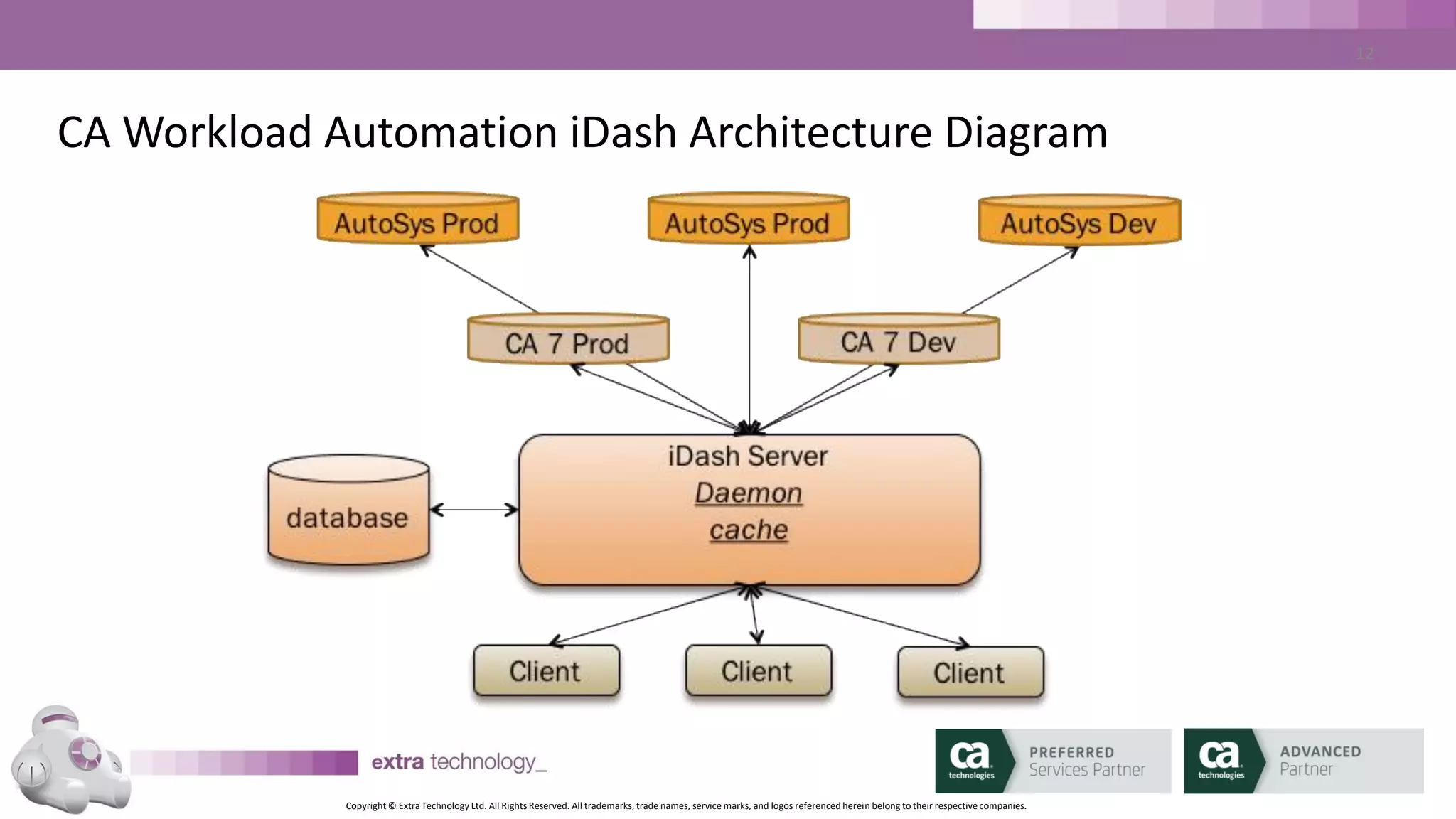
CA Workload Automation iDash Architecture Diagram
Copyright © Extra Technology Ltd. All Rights Reserved. All trademarks, trade names, service marks, and logos referenced herein belong to their respective companies.
11
CA WA iDash Components
• CA WA iDash Daemon – monitoring AutoSys, tracking SLAs,
generating ALARMS
• CA WA iDash Database – Stores all history and configuration
• CA WA iDash GUI – Java based (1.6/1.7), Web Launched, no local
installation
• CA WA iDash CLI – Java based, no installation
Copyright © Extra Technology Ltd. All Rights Reserved. All trademarks, trade names, service marks, and logos referenced herein belong to their respective companies.
12
CA WA iDash Operation
• Mixture of Real Time (in AutoSys) and Historical (in CA WA iDash
Database)
• CA WA iDash Database populated from CA AutoSys
archive_events files (output from DBMaint)
• CA WA iDash computes run time averages, tracks critical paths
and dependencies
• CA WA iDash Predicts!
Copyright © Extra Technology Ltd. All Rights Reserved. All trademarks, trade names, service marks, and logos referenced herein belong to their respective companies.
13
CA WA iDash SLAs
Copyright © Extra Technology Ltd. All Rights Reserved. All trademarks, trade names, service marks, and logos referenced herein belong to their respective companies.
14
SLA Basics
• What is an SLA?
– Deadline
– Start Deadline
– End Deadline
– Or Both
– Based on a Job Run
Copyright © Extra Technology Ltd. All Rights Reserved. All trademarks, trade names, service marks, and logos referenced herein belong to their respective companies.
15
SLA Basics – When Would You Use an SLA?
• The entire job stream must complete successfully by a particular time.
• A job within the job stream must start by a particular time.
• A job or a set of jobs within a job stream must start and finish by a
particular date and time
– CA WA iDash will predict SLA breaches and send ALARMS in advance
Copyright © Extra Technology Ltd. All Rights Reserved. All trademarks, trade names, service marks, and logos referenced herein belong to their respective companies.
16
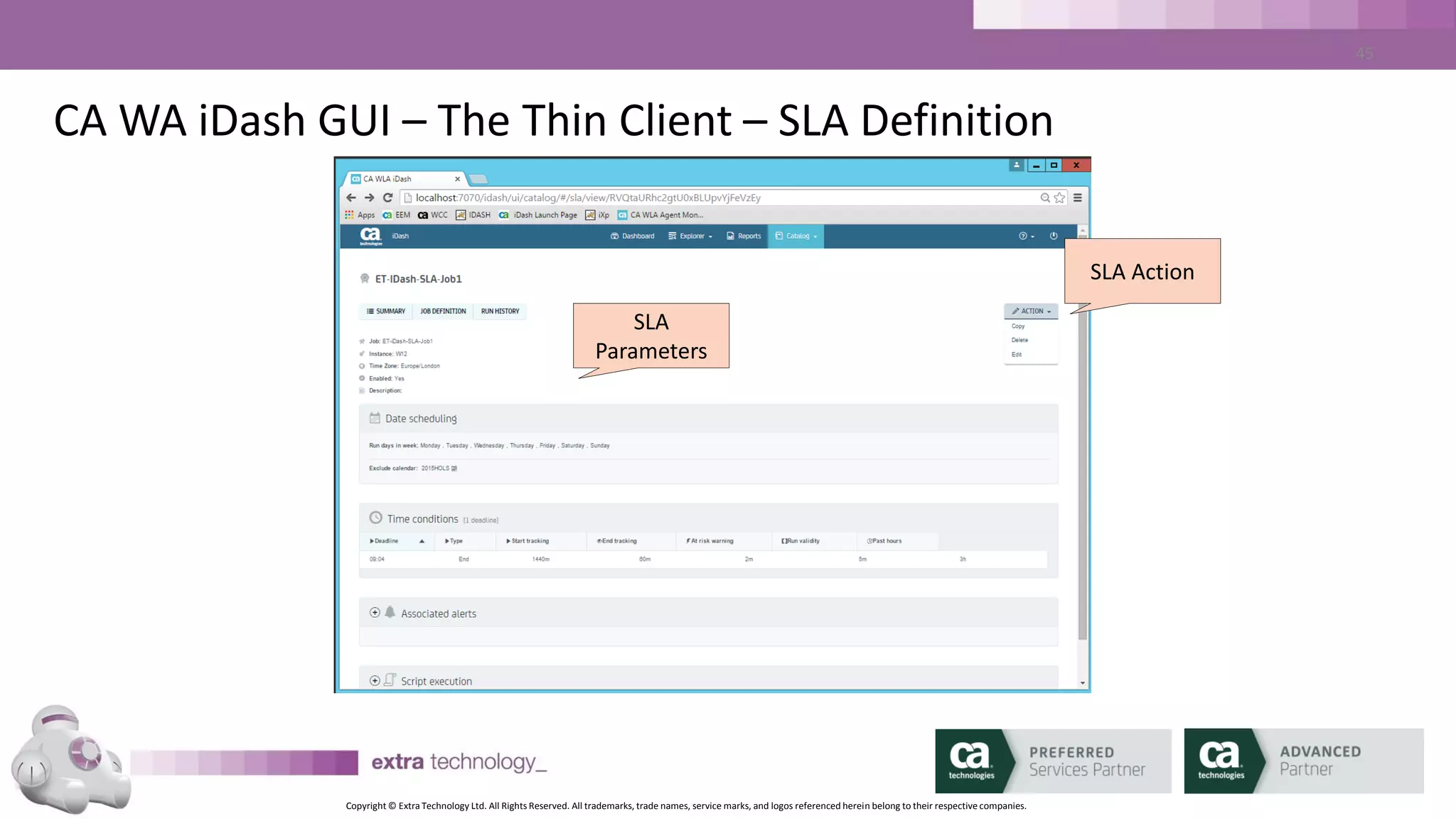
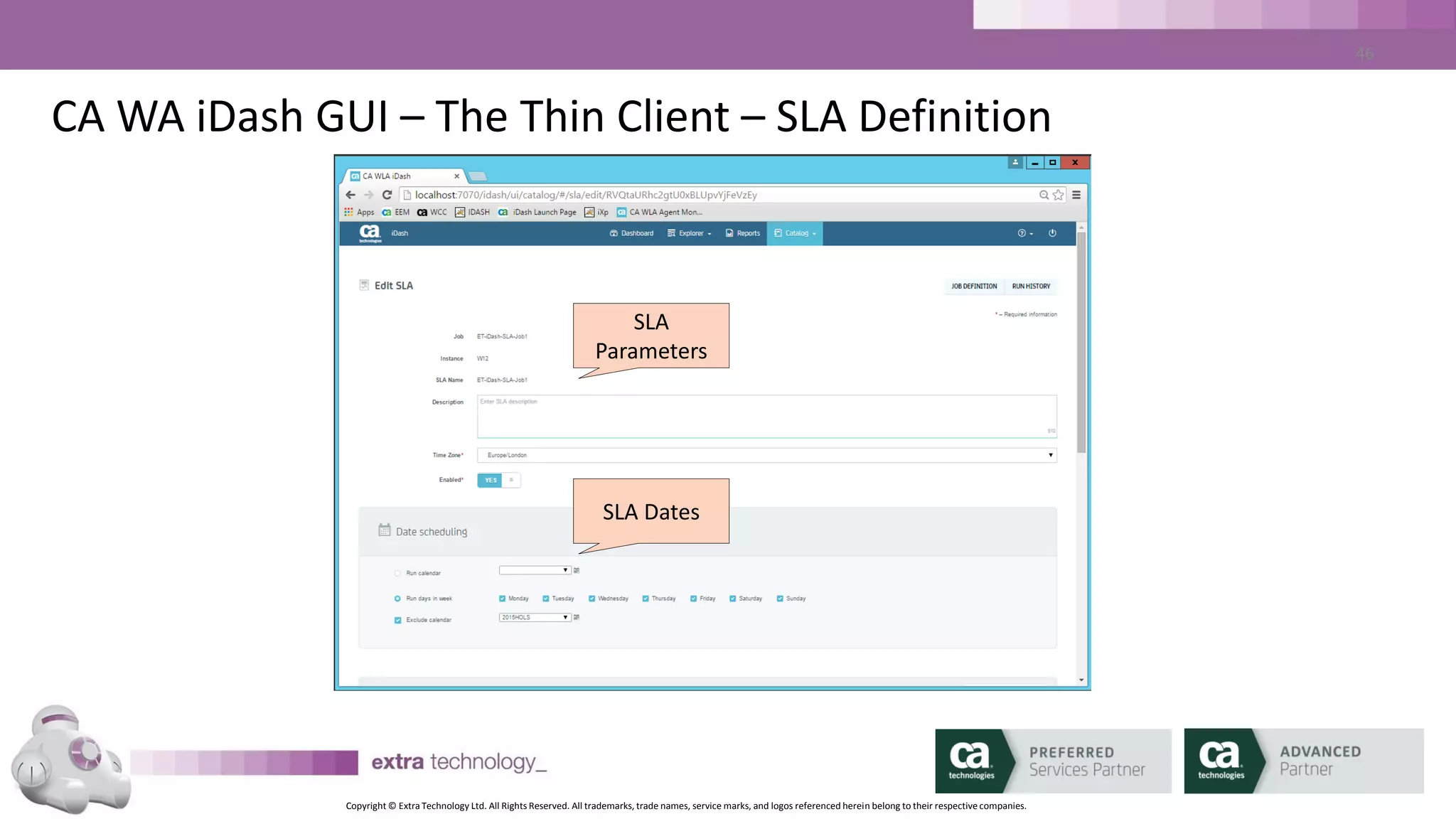
SLA Basics – SLA Parameters
• SLA Name: may be different to Job Name
• Run Days / Run Calendar: the days on which the SLA applies
• Exclude Calendar: days when SLA does not apply
• Start Tracking (minutes): how far in advance to start tracking the SLA
• End Tracking (minutes): End SLA tracking post job completion
• Past Hours (hours): how much history of SLA and critical path jobs to show
in the Critical Job list
Copyright © Extra Technology Ltd. All Rights Reserved. All trademarks, trade names, service marks, and logos referenced herein belong to their respective companies.
17
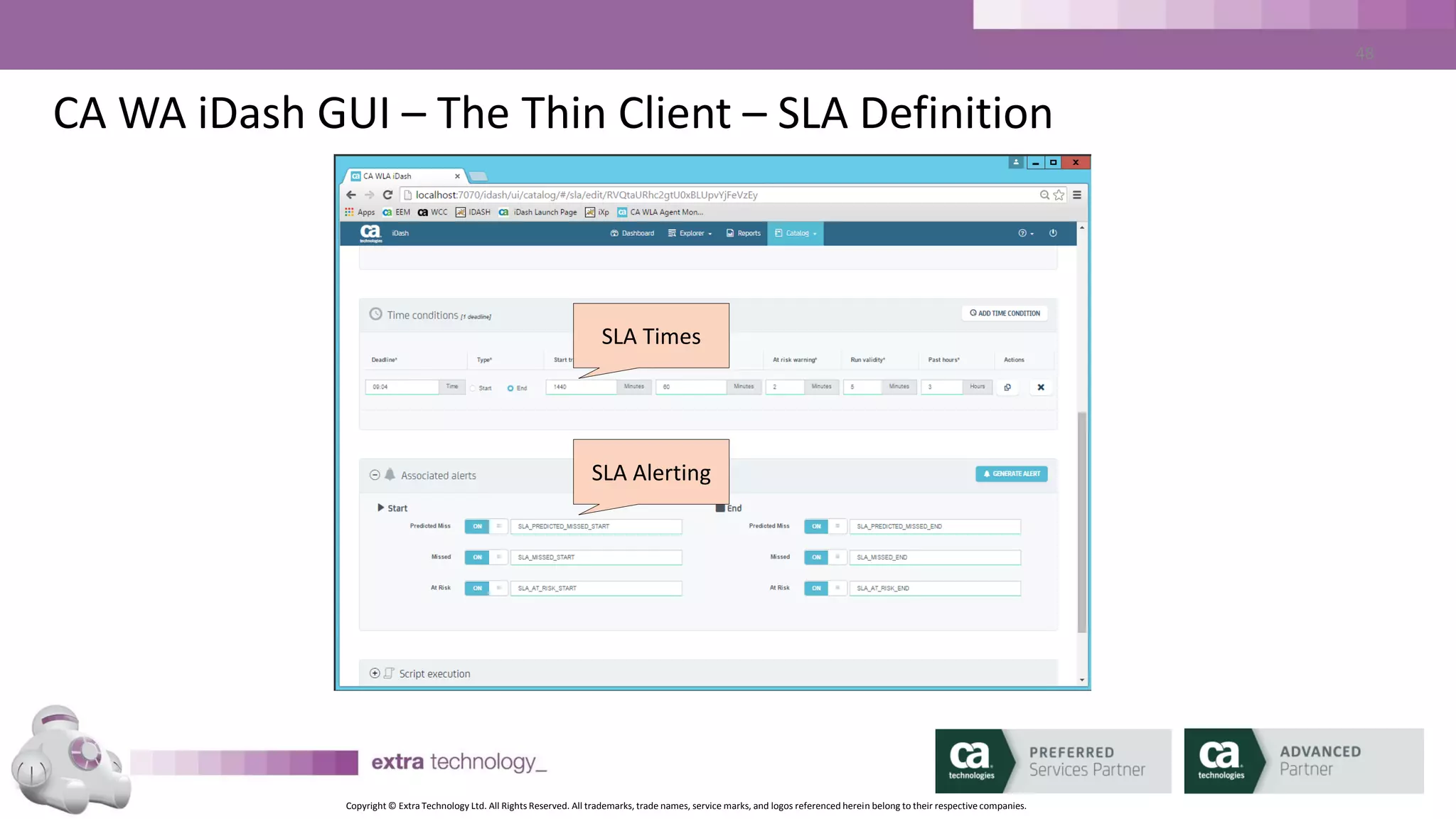
SLA Basics – ALARMS
• Using the same mechanism as CA AutoSys
• Multiple ALARMS available per SLA:
– SLA_MISSED_START
– SLA_PREDICTED_MISSED_START
– SLA_AT_RISK_START
– SLA_MISSED_END
– SLA_PREDICTED_MISSED_END
– SLA_AT_RISK_END
Copyright © Extra Technology Ltd. All Rights Reserved. All trademarks, trade names, service marks, and logos referenced herein belong to their respective companies.
18
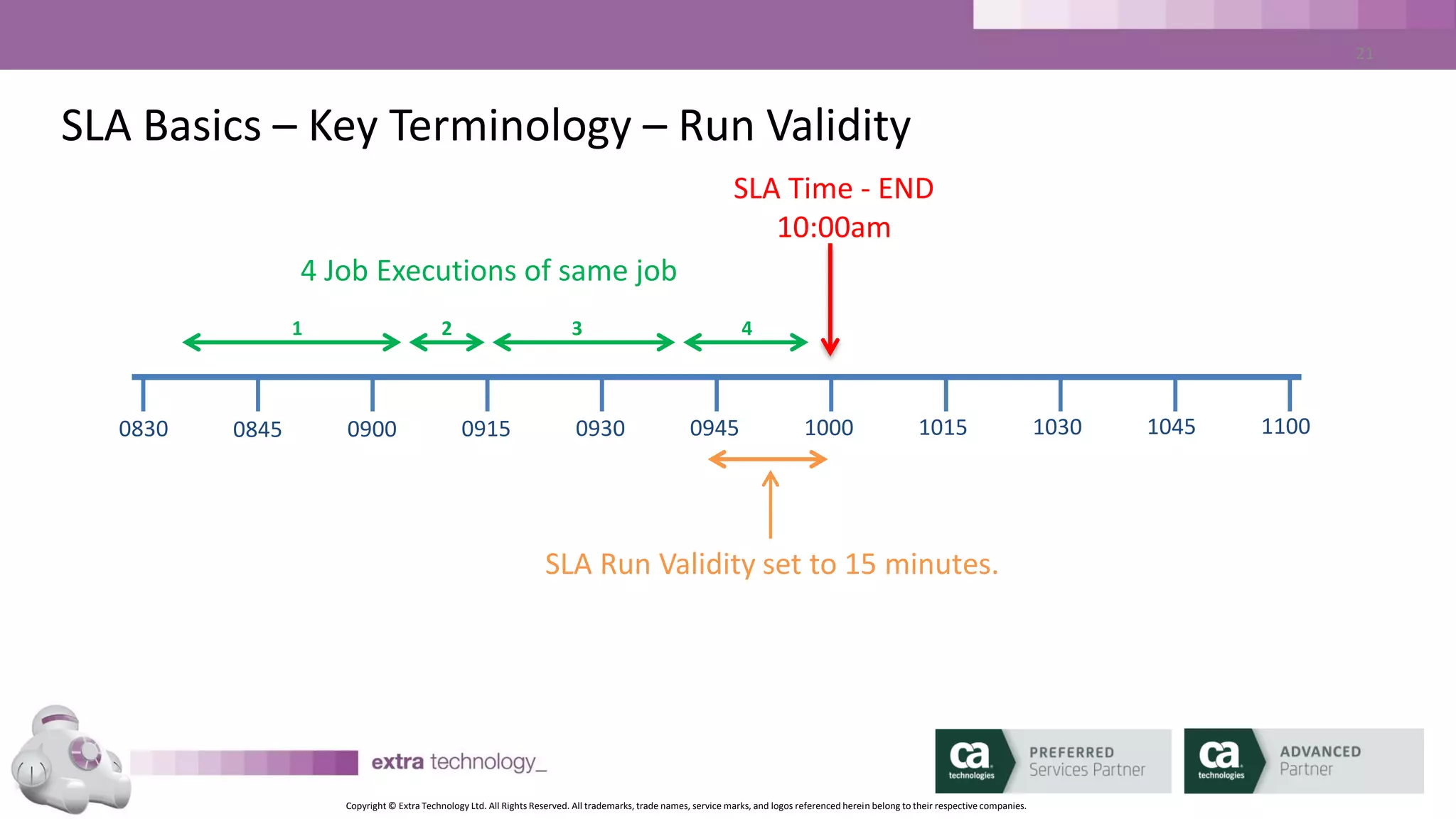
SLA Basics – Run Validity
• Per-SLA Parameter
• Must be defined
• Defined in minutes relative to SLA time
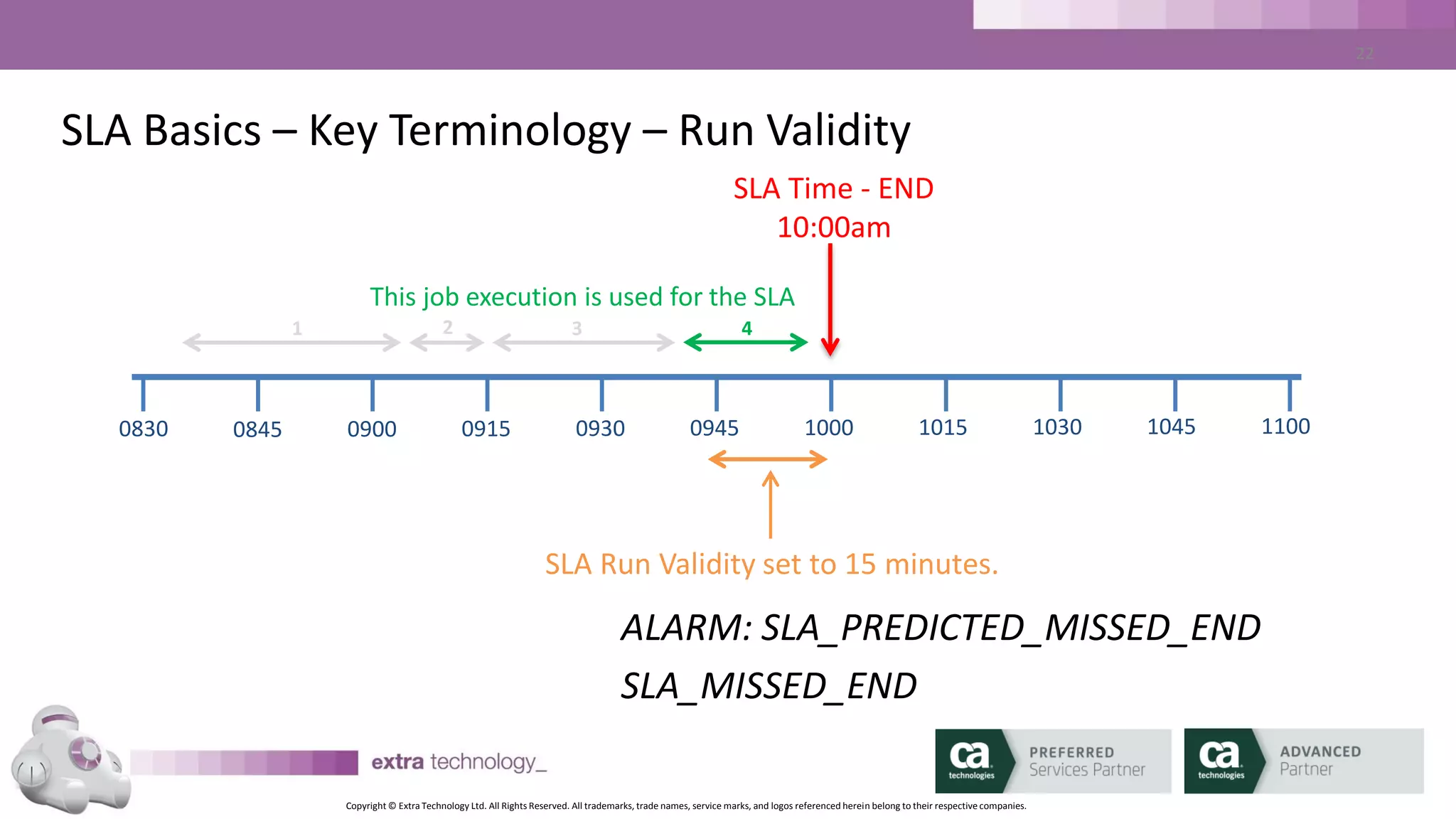
• To meet SLA, job must start or end between Run Validity Start, and
SLA time
• Used to match job run to SLA (usually with jobs that run multiple
times per day)
Copyright © Extra Technology Ltd. All Rights Reserved. All trademarks, trade names, service marks, and logos referenced herein belong to their respective companies.
19
SLA Basics – Key Terminology – Run Validity
SLA Time - END
10:00am
SLA Run Validity set to 15 minutes.
0830 0845 0900 0915 0930 0945 1000 1015 1030 1045 1100
4 Job Executions of same job
2 31 4
Copyright © Extra Technology Ltd. All Rights Reserved. All trademarks, trade names, service marks, and logos referenced herein belong to their respective companies.
20
SLA Basics – Key Terminology – Run Validity
SLA Time - END
10:00am
SLA Run Validity set to 15 minutes.
0830 0845 0900 0915 0930 0945 1000 1015 1030 1045 1100
2
This job execution is used for the SLA
31 4
ALARM: SLA_PREDICTED_MISSED_END
SLA_MISSED_END
Copyright © Extra Technology Ltd. All Rights Reserved. All trademarks, trade names, service marks, and logos referenced herein belong to their respective companies.
21
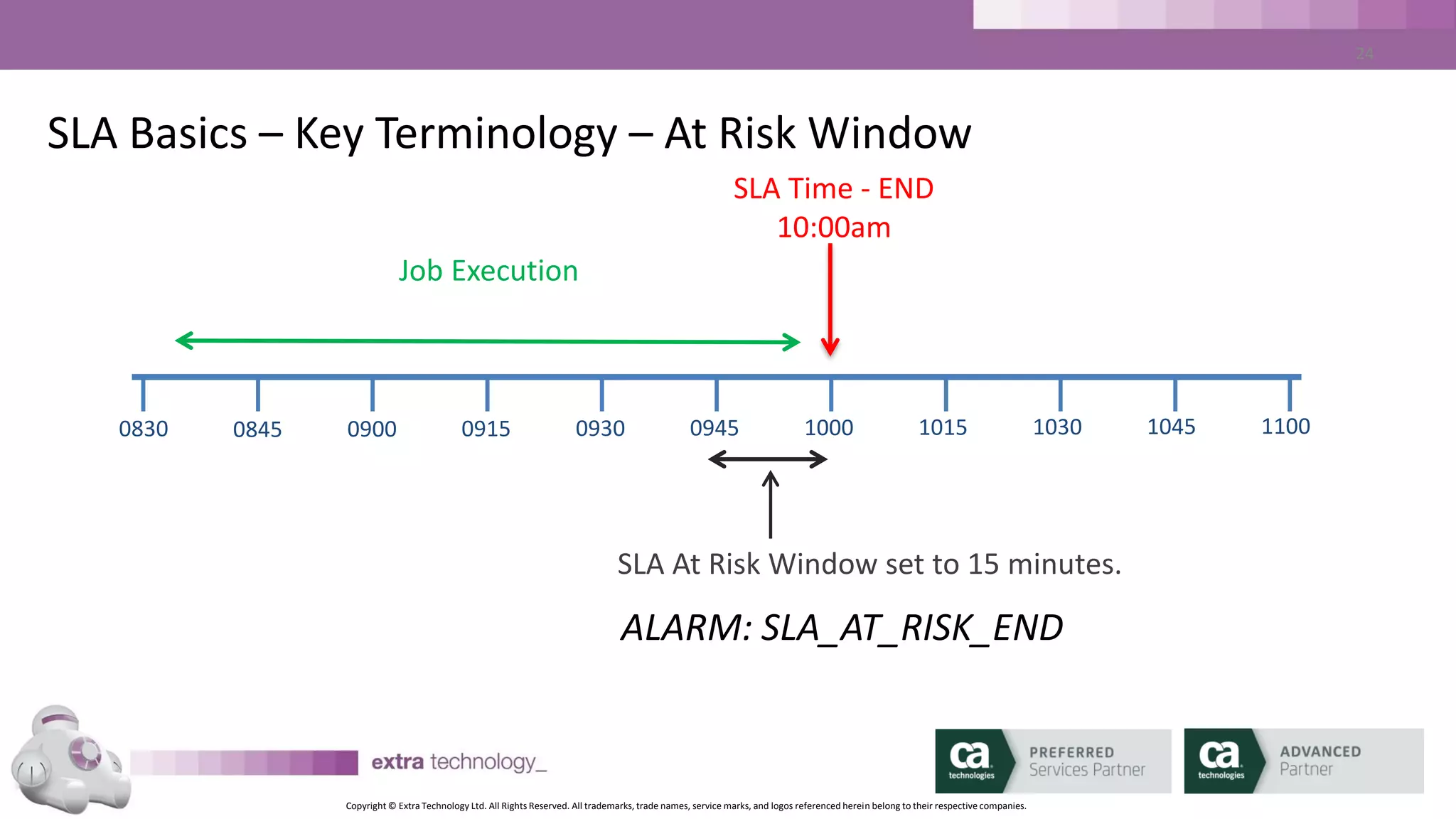
SLA Basics – At Risk Window
• Per-SLA Parameter
• Optional
• Defined in minutes relative to SLA time
• Used to generate ALARM if you will meet SLA, but you are getting close
Copyright © Extra Technology Ltd. All Rights Reserved. All trademarks, trade names, service marks, and logos referenced herein belong to their respective companies.
22
SLA Basics – Key Terminology – At Risk Window
SLA Time - END
10:00am
SLA At Risk Window set to 15 minutes.
0830 0845 0900 0915 0930 0945 1000 1015 1030 1045 1100
Job Execution
ALARM: SLA_AT_RISK_END
Copyright © Extra Technology Ltd. All Rights Reserved. All trademarks, trade names, service marks, and logos referenced herein belong to their respective companies.
23
SLA Basics – Other Functionality
• Script Execution
– Per-SLA Setting
– Invoke a script/program/batch file when SLA is breached
– Script is executed on CA WA iDash Server
• Job Link
– Used to link the execution of jobs outside CA AutoSys
– Coded just like CA AutoSys ‘condition:’ parameters
Copyright © Extra Technology Ltd. All Rights Reserved. All trademarks, trade names, service marks, and logos referenced herein belong to their respective companies.
24
SLA - Questions
I have a job that starts on the hour, every hour. It runs for about 25
minutes. I need to know if the run that starts at 17:00 is not
predicted to complete by 17:30. I also need to know if the job is
predicted to complete between after 17:25 but before 17:30.
Q1: What should my SLA End Time value be?
Q2: What should my SLA Run Validity value be?
Q3: What should my At Risk Window value be?
Copyright © Extra Technology Ltd. All Rights Reserved. All trademarks, trade names, service marks, and logos referenced herein belong to their respective companies.
25
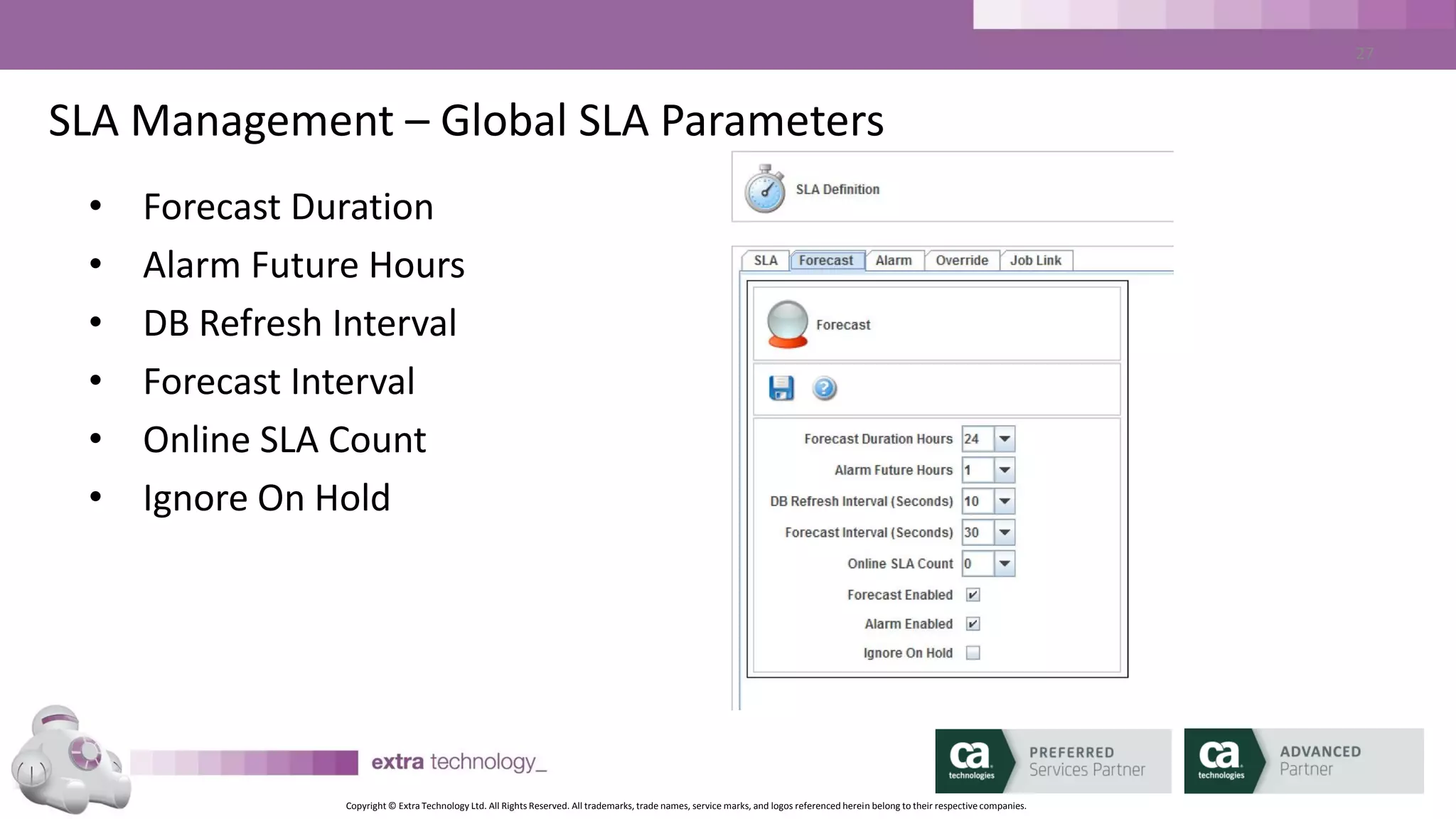
SLA Management – Global SLA Parameters
• Forecast Duration
• Alarm Future Hours
• DB Refresh Interval
• Forecast Interval
• Online SLA Count
• Ignore On Hold
Copyright © Extra Technology Ltd. All Rights Reserved. All trademarks, trade names, service marks, and logos referenced herein belong to their respective companies.
26
SLA Management –SLA Parameters
• Forecast Duration Hours specifies how far in advance CA WA iDash
will compute the predicted execution of job streams.
• Any SLA deadline that falls outside the current forecast duration
will not be predicted until it falls within the window.
• Typically, this value is set between 12 and 24 hours
Copyright © Extra Technology Ltd. All Rights Reserved. All trademarks, trade names, service marks, and logos referenced herein belong to their respective companies.
27
SLA Management –SLA Parameters
• A predicted miss further in the future than this will not be
generated.
• Example: If Alarm Future Hours is set to 5, an 8 PM SLA that is
predicted to miss will not generate an alarm until 3 PM
Copyright © Extra Technology Ltd. All Rights Reserved. All trademarks, trade names, service marks, and logos referenced herein belong to their respective companies.
28
SLA Management – Defining SLAs – THIN CLIENT DEMO
• <demo>
• Create End Deadline SLA
– Search for Job
– Choose SLA Name
– Set Date and Time Parameters
– Set ALERTS
– Create SLA
Copyright © Extra Technology Ltd. All Rights Reserved. All trademarks, trade names, service marks, and logos referenced herein belong to their respective companies.
29
SLA Management – Viewing SLAs – THIN CLIENT DEMO
• <demo>
• SLA List
• SLA Detail
– Summary
– Flow View - Critical Path / All Jobs
– Time View
– Table View of all jobs in Flow
Copyright © Extra Technology Ltd. All Rights Reserved. All trademarks, trade names, service marks, and logos referenced herein belong to their respective companies.
30
The CA WA iDash GUI
Copyright © Extra Technology Ltd. All Rights Reserved. All trademarks, trade names, service marks, and logos referenced herein belong to their respective companies.
31
CA WA iDash GUI – Thin Client
• Web / Browser Based
• Dashboard for overall SLA Health
• Drill Down on SLAs
• Create / Edit / Delete SLAs
• Create / Edit / Delete and Download Reports
Copyright © Extra Technology Ltd. All Rights Reserved. All trademarks, trade names, service marks, and logos referenced herein belong to their respective companies.
32
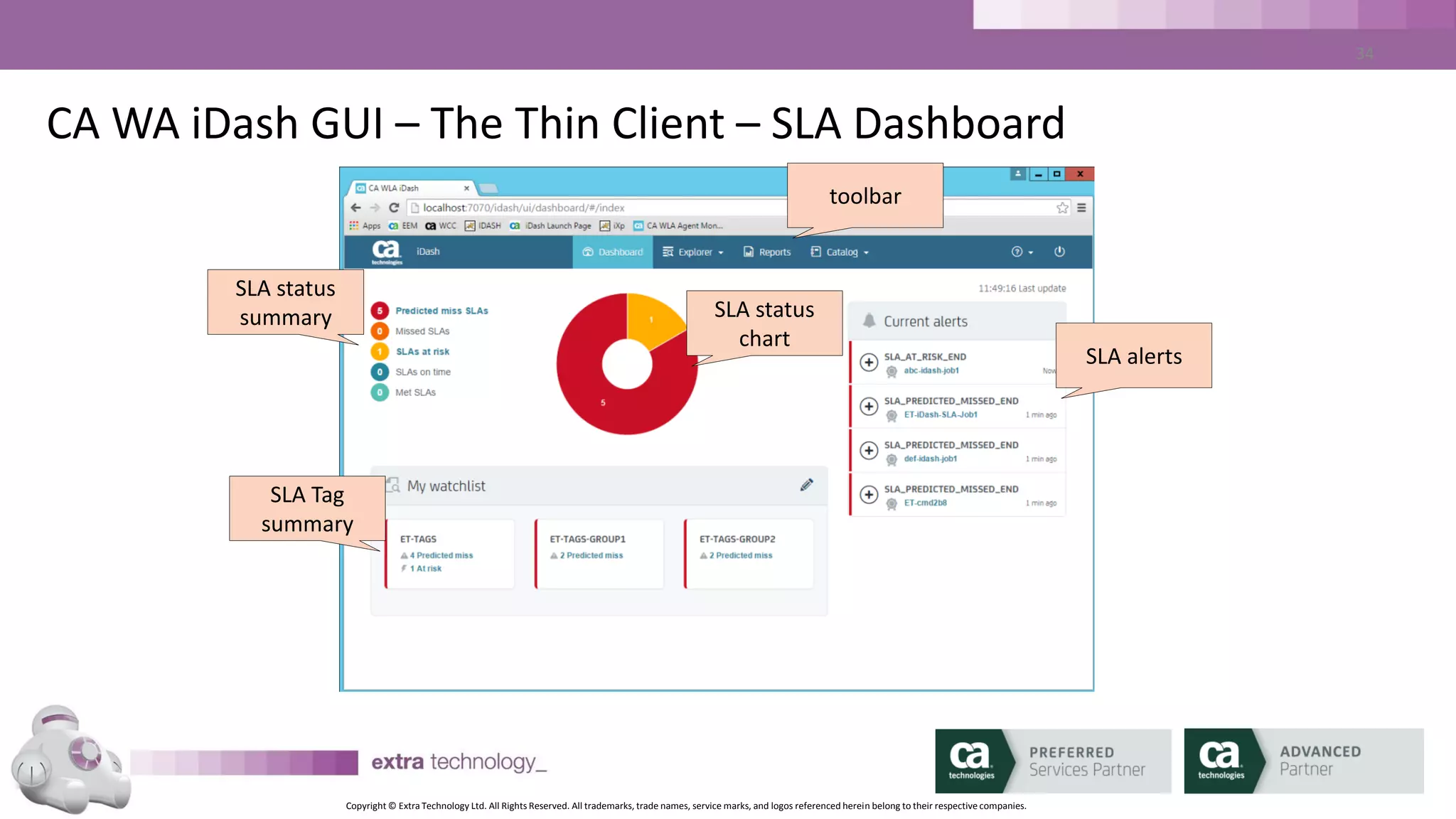
CA WA iDash GUI – The Thin Client – SLA Dashboard
SLA status
summary
SLA alerts
SLA status
chart
SLA Tag
summary
toolbar
Copyright © Extra Technology Ltd. All Rights Reserved. All trademarks, trade names, service marks, and logos referenced herein belong to their respective companies.
33
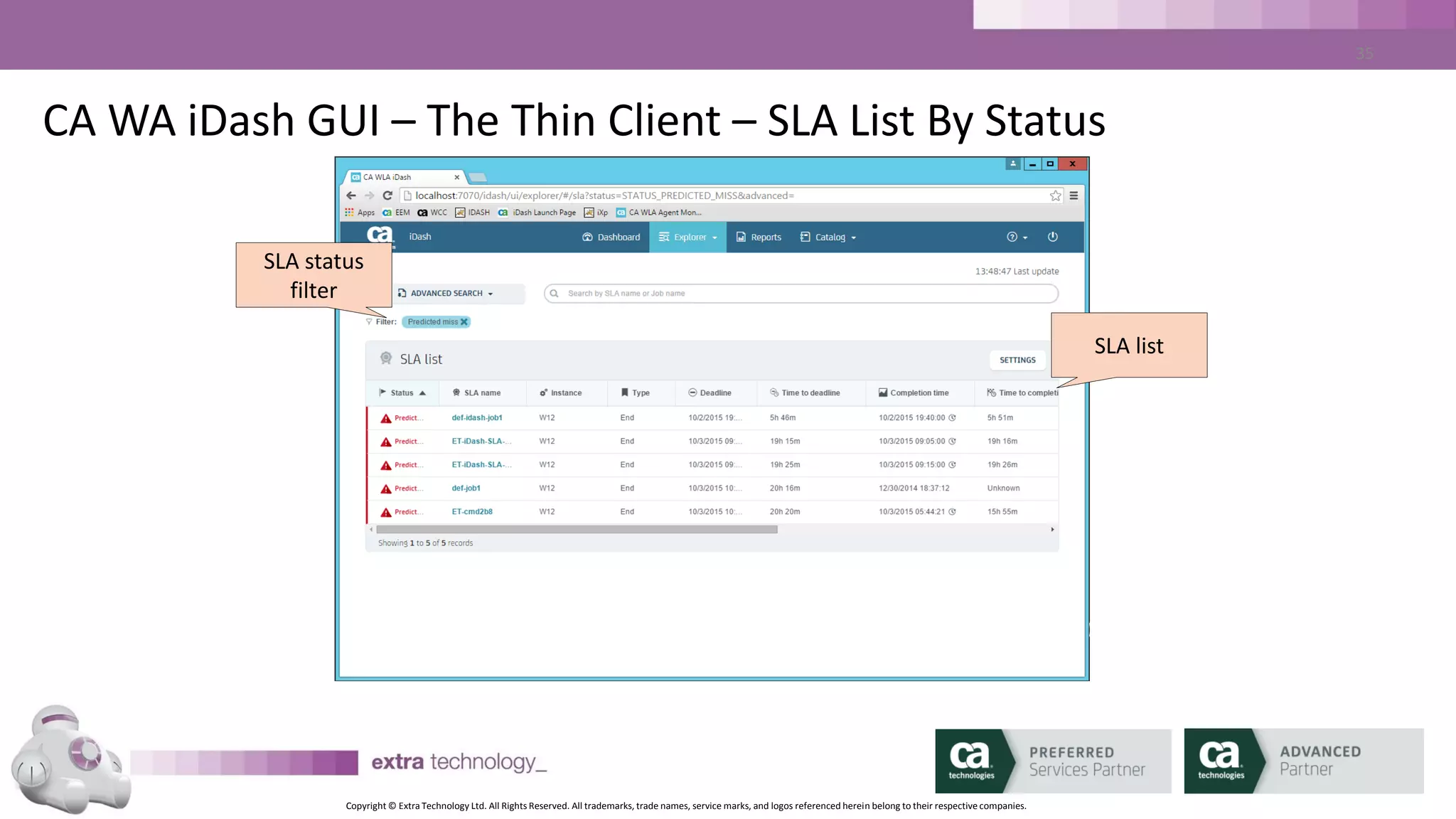
CA WA iDash GUI – The Thin Client – SLA List By Status
SLA status
filter
SLA list
Copyright © Extra Technology Ltd. All Rights Reserved. All trademarks, trade names, service marks, and logos referenced herein belong to their respective companies.
34
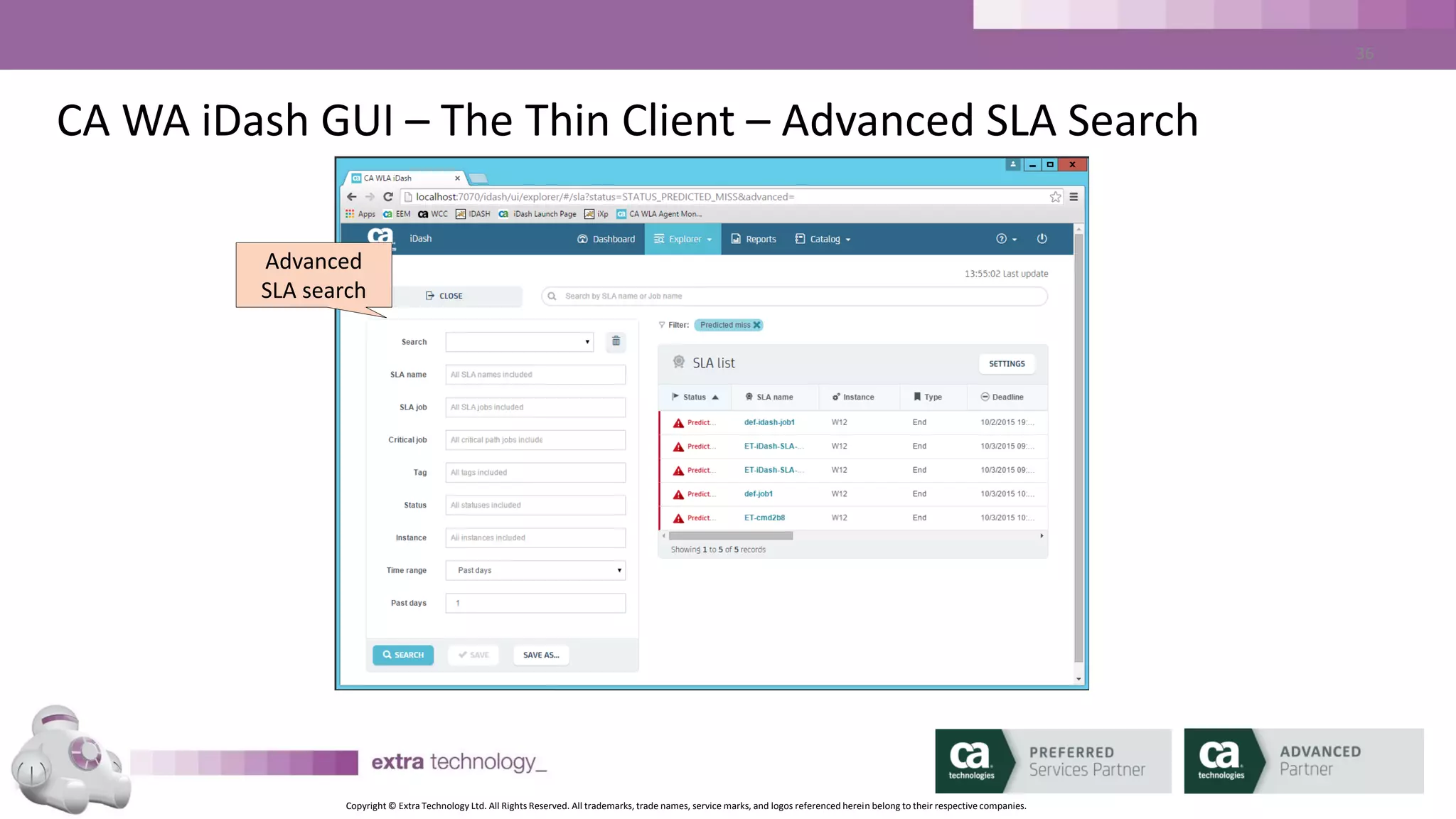
CA WA iDash GUI – The Thin Client – Advanced SLA Search
Advanced
SLA search
Copyright © Extra Technology Ltd. All Rights Reserved. All trademarks, trade names, service marks, and logos referenced herein belong to their respective companies.
35
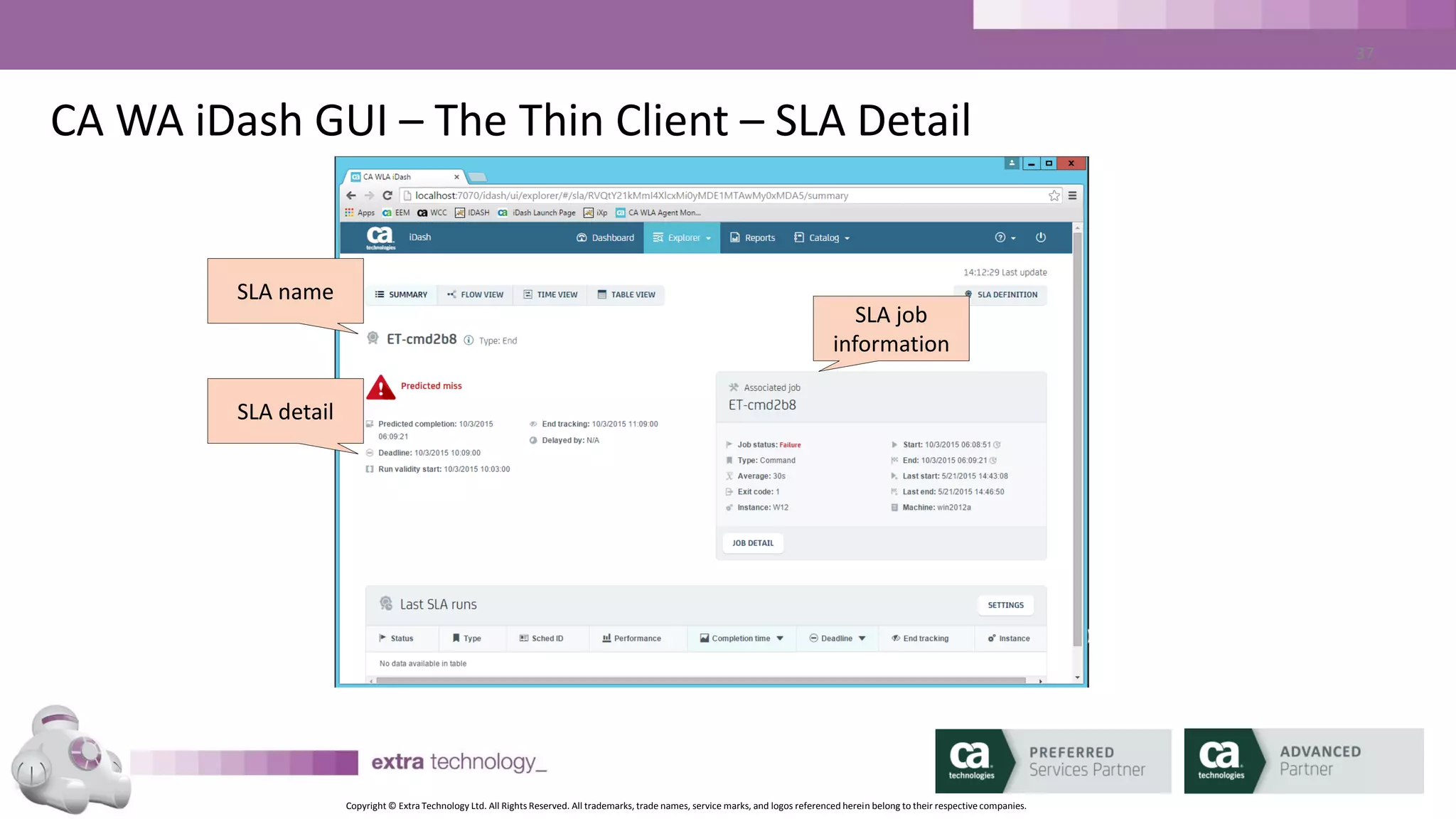
CA WA iDash GUI – The Thin Client – SLA Detail
SLA name
SLA job
information
SLA detail
Copyright © Extra Technology Ltd. All Rights Reserved. All trademarks, trade names, service marks, and logos referenced herein belong to their respective companies.
36
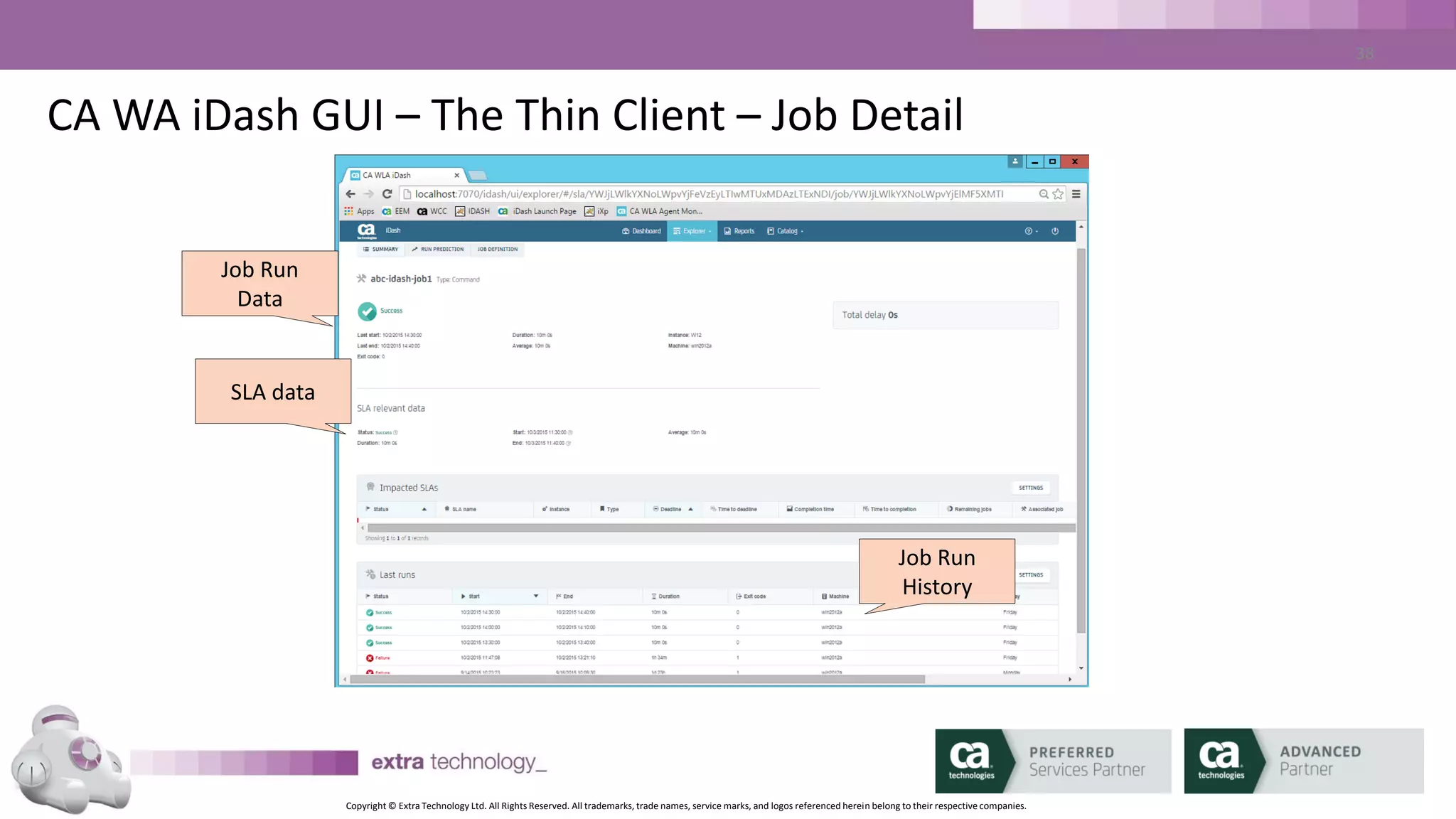
CA WA iDash GUI – The Thin Client – Job Detail
Job Run
Data
Job Run
History
SLA data
Copyright © Extra Technology Ltd. All Rights Reserved. All trademarks, trade names, service marks, and logos referenced herein belong to their respective companies.
37
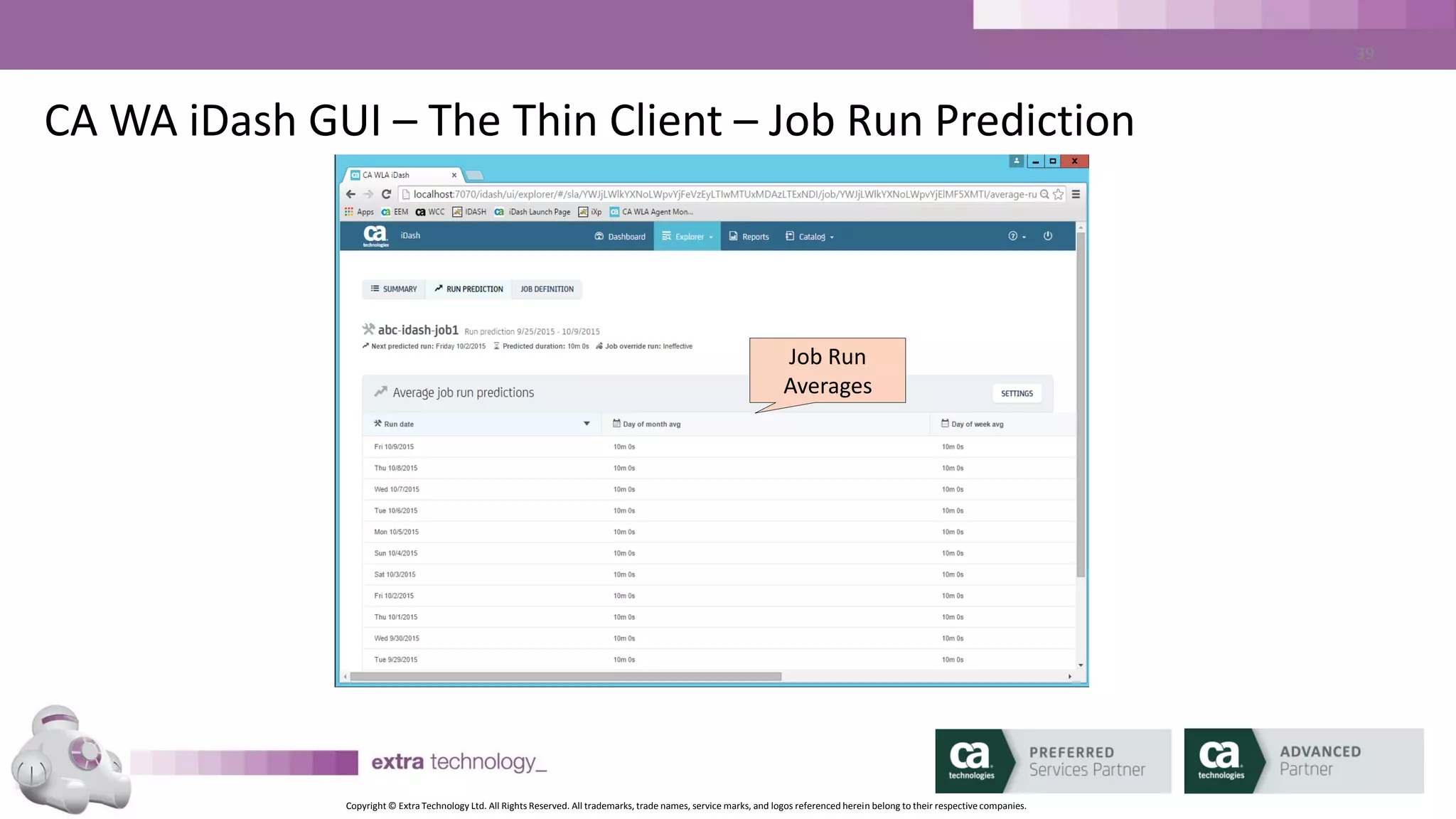
CA WA iDash GUI – The Thin Client – Job Run Prediction
Job Run
Averages
Copyright © Extra Technology Ltd. All Rights Reserved. All trademarks, trade names, service marks, and logos referenced herein belong to their respective companies.
38
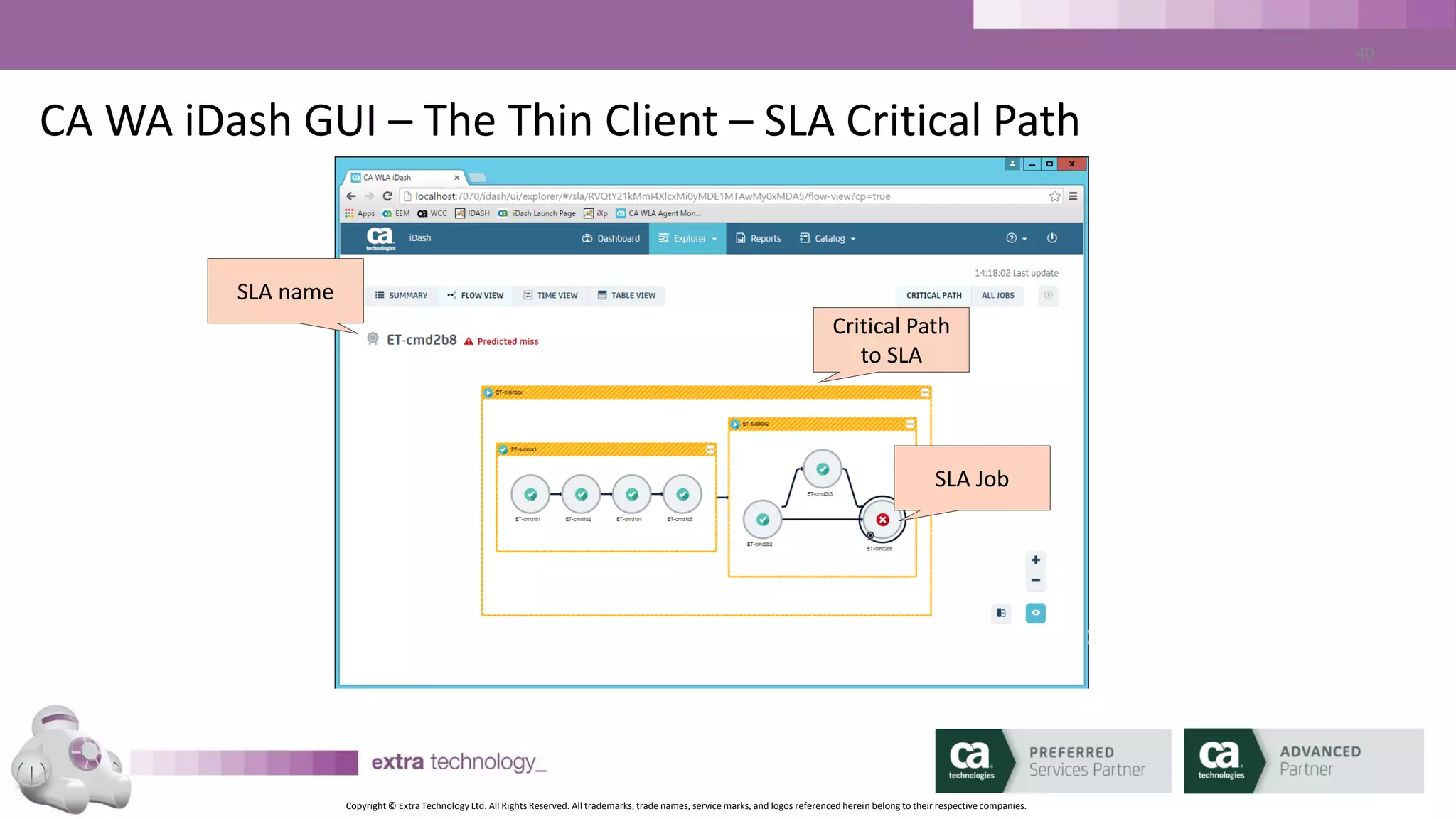
CA WA iDash GUI – The Thin Client – SLA Critical Path
SLA name
Critical Path
to SLA
SLA Job
Copyright © Extra Technology Ltd. All Rights Reserved. All trademarks, trade names, service marks, and logos referenced herein belong to their respective companies.
39
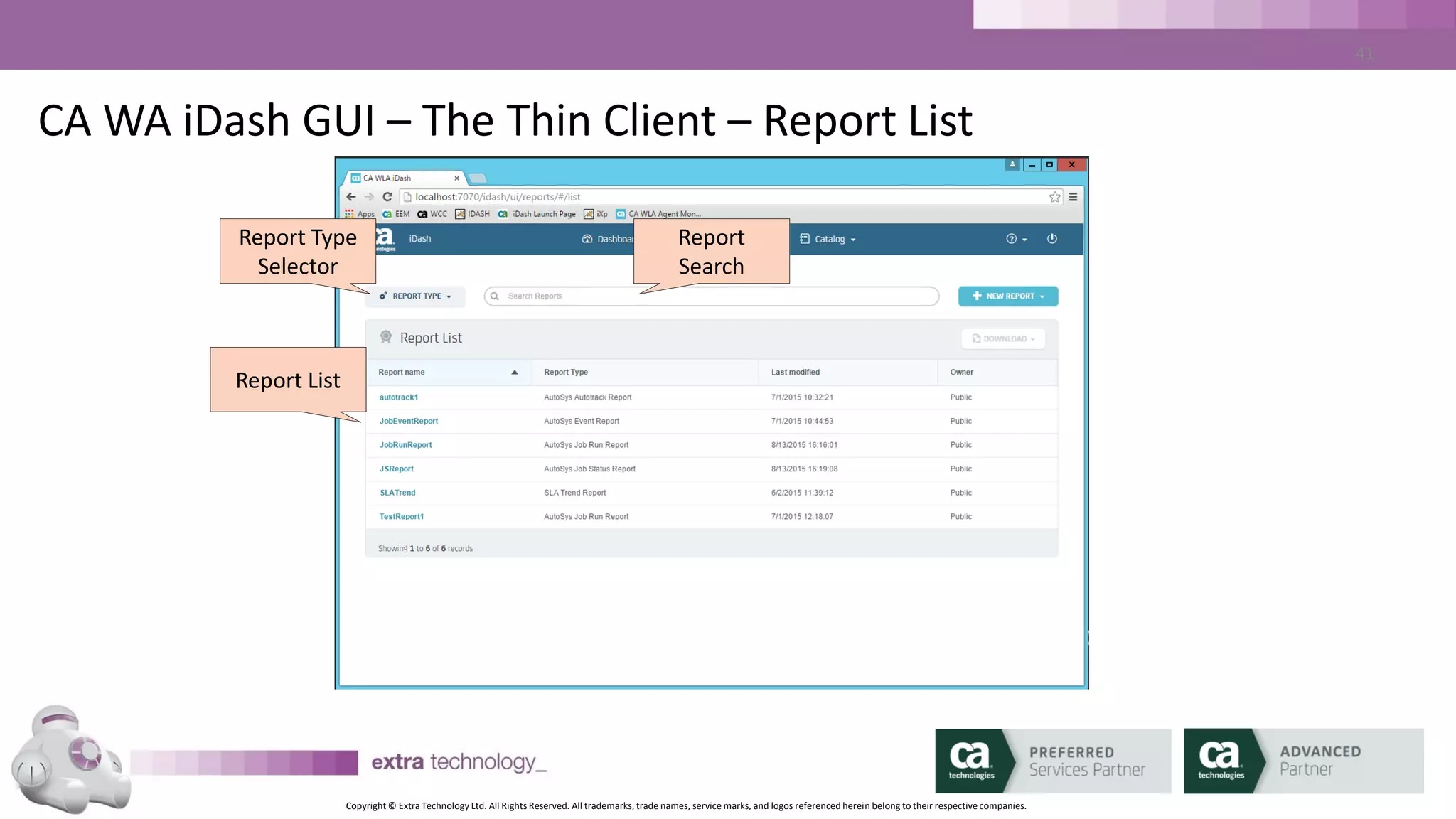
CA WA iDash GUI – The Thin Client – Report List
Report Type
Selector
Report
Search
Report List
Copyright © Extra Technology Ltd. All Rights Reserved. All trademarks, trade names, service marks, and logos referenced herein belong to their respective companies.
40
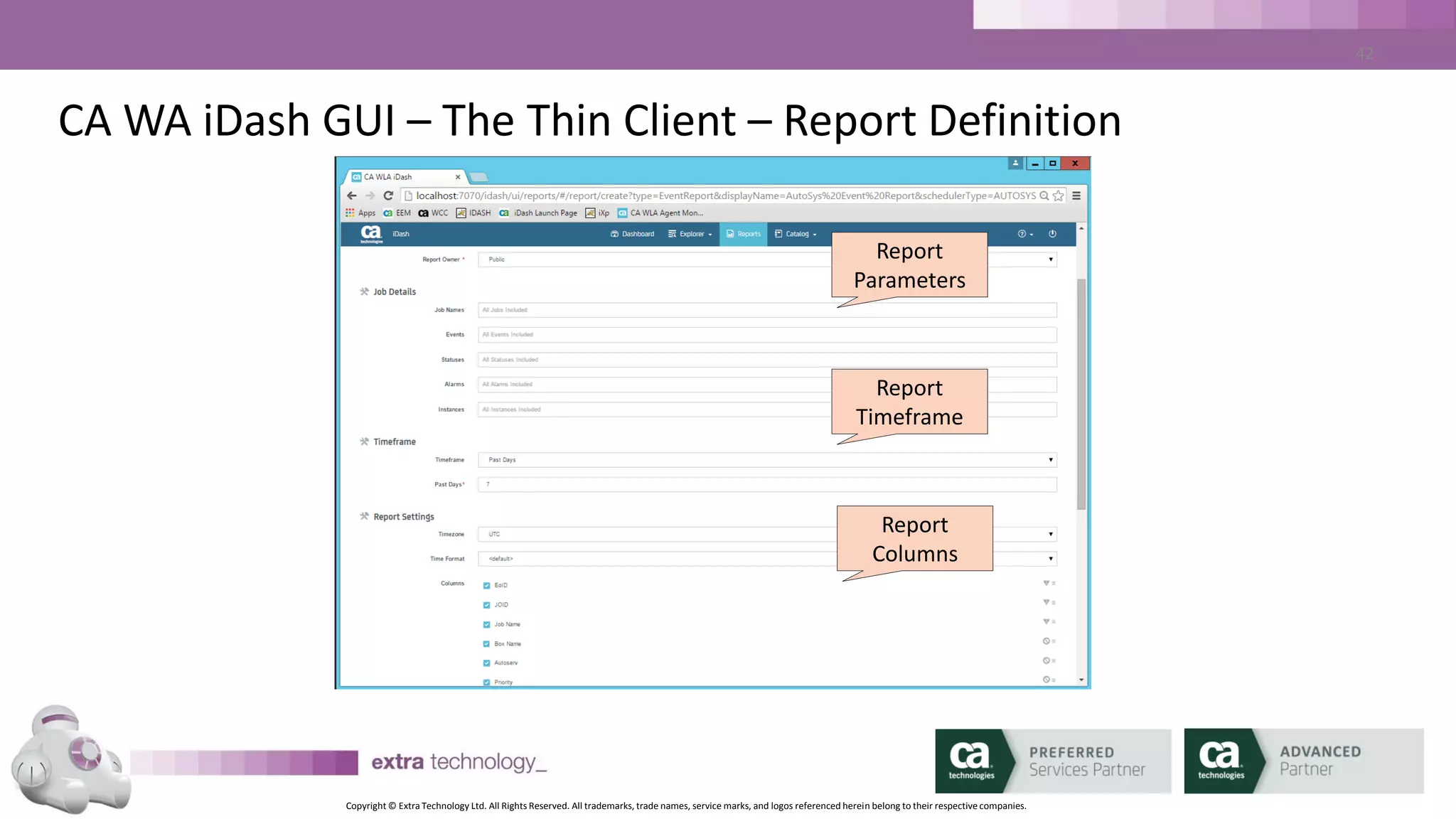
CA WA iDash GUI – The Thin Client – Report Definition
Report
Parameters
Report
Timeframe
Report
Columns
Copyright © Extra Technology Ltd. All Rights Reserved. All trademarks, trade names, service marks, and logos referenced herein belong to their respective companies.
41
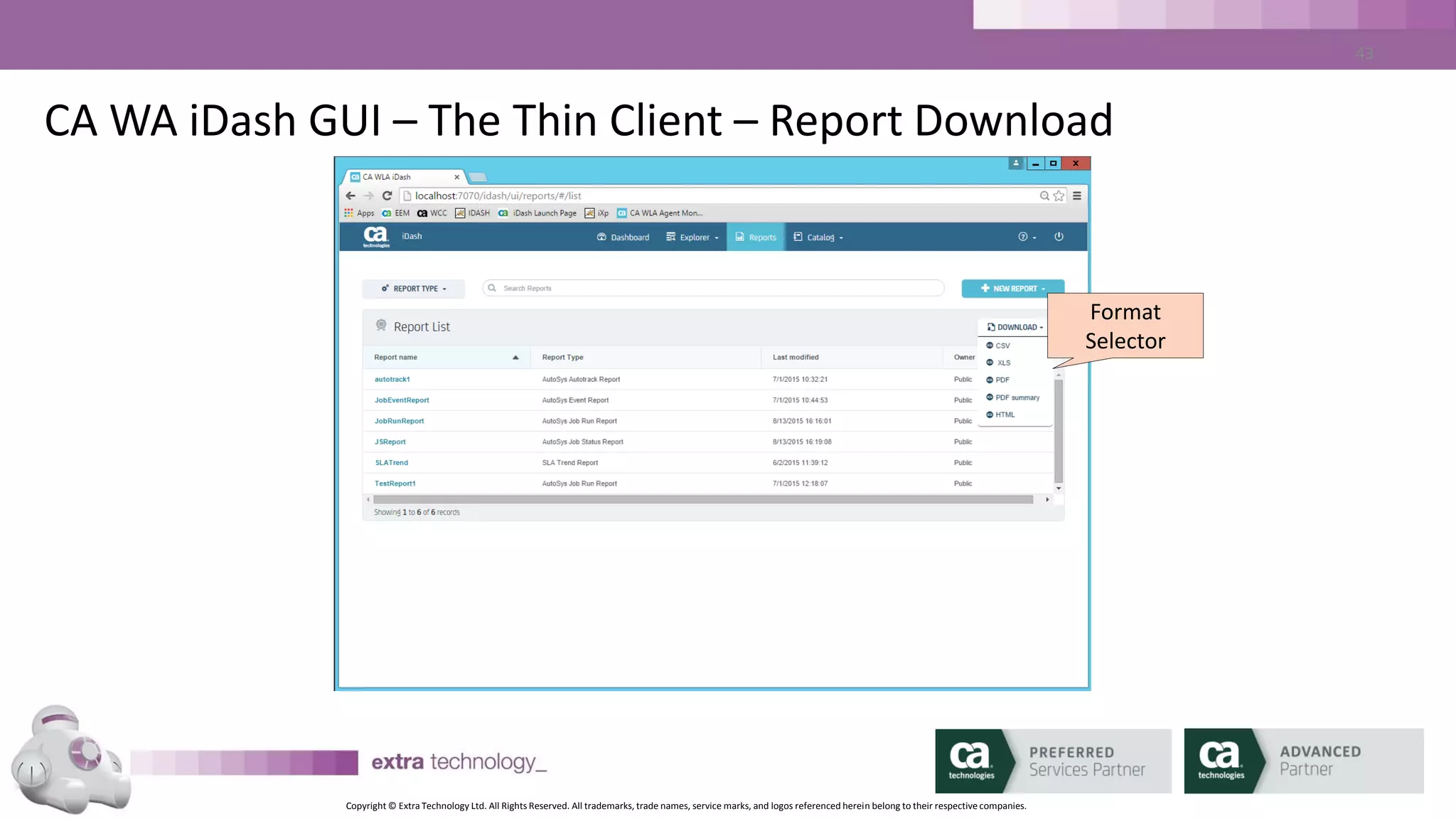
CA WA iDash GUI – The Thin Client – Report Download
Report
Parameters
Format
Selector
Copyright © Extra Technology Ltd. All Rights Reserved. All trademarks, trade names, service marks, and logos referenced herein belong to their respective companies.
42
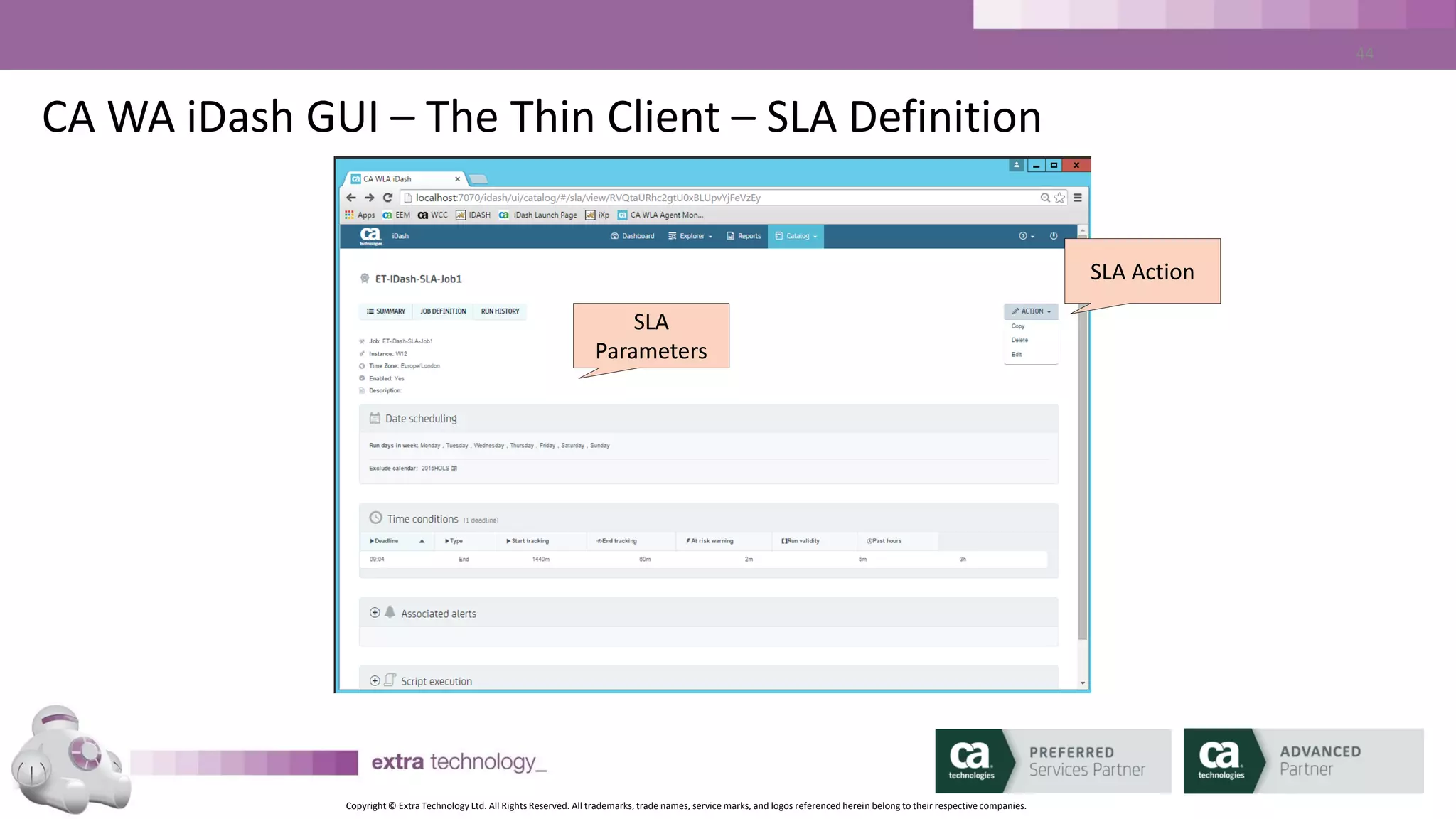
CA WA iDash GUI – The Thin Client – SLA Definition
SLA Action
SLA
Parameters
Copyright © Extra Technology Ltd. All Rights Reserved. All trademarks, trade names, service marks, and logos referenced herein belong to their respective companies.
43
CA WA iDash GUI – The Thin Client – SLA Definition
SLA Action
SLA
Parameters
Copyright © Extra Technology Ltd. All Rights Reserved. All trademarks, trade names, service marks, and logos referenced herein belong to their respective companies.
44
CA WA iDash GUI – The Thin Client – SLA Definition
SLA Dates
SLA
Parameters
Copyright © Extra Technology Ltd. All Rights Reserved. All trademarks, trade names, service marks, and logos referenced herein belong to their respective companies.
45
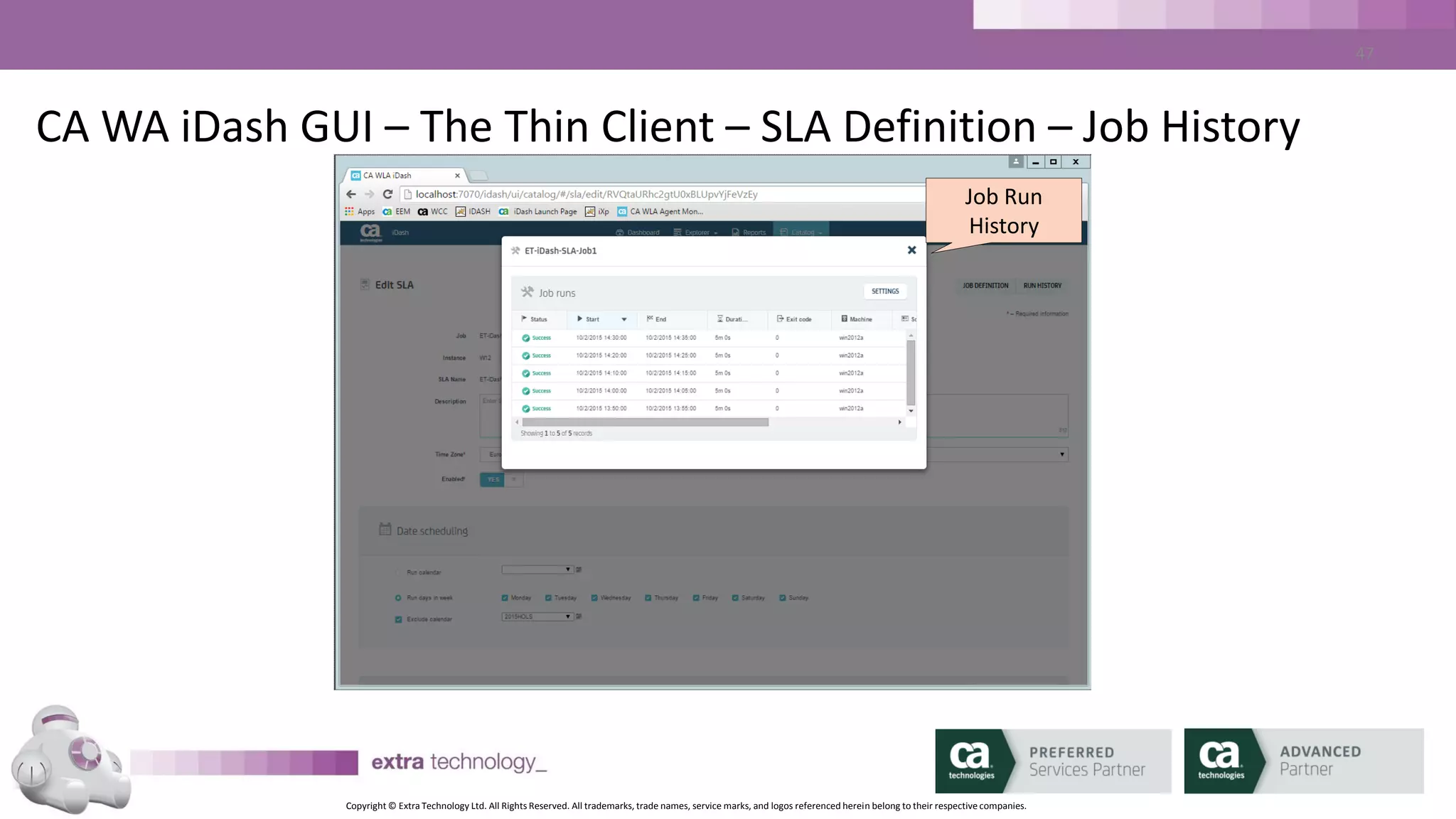
CA WA iDash GUI – The Thin Client – SLA Definition – Job History
Job Run
History
Copyright © Extra Technology Ltd. All Rights Reserved. All trademarks, trade names, service marks, and logos referenced herein belong to their respective companies.
46
CA WA iDash GUI – The Thin Client – SLA Definition
SLA Alerting
SLA Times
Copyright © Extra Technology Ltd. All Rights Reserved. All trademarks, trade names, service marks, and logos referenced herein belong to their respective companies.
47
Lesson 3
CA WA iDash Reports
Copyright © Extra Technology Ltd. All Rights Reserved. All trademarks, trade names, service marks, and logos referenced herein belong to their respective companies.
48
CA WA iDash Reports - Data
• CA WA iDash offers an offline repository of CA AutoSys data
– Keeps live CA AutoSys database size manageable
• CA WA iDash database is populated from archived data, generated
by DBMaint
• Data can be added manually (GUI) or using CA WA iDash client
command line tools (idarchive)
Copyright © Extra Technology Ltd. All Rights Reserved. All trademarks, trade names, service marks, and logos referenced herein belong to their respective companies.
49
CA WA iDash Reports - Data
• CA WA iDash stores the following data for reporting:
– CA AutoSys EVENTS
– CA AutoSys Job Runs
– CA AutoSys Job Status
– CA AutoSys “autotrack”
• CA WA iDash generates the following additional reports:
– SLA Trend Report
– Server Statistics Report
Copyright © Extra Technology Ltd. All Rights Reserved. All trademarks, trade names, service marks, and logos referenced herein belong to their respective companies.
50
CA WA iDash Reports - Types
• CA WA iDash permits the generation of the following report
formats:
– CSV
– XLS
– HTML
– PDF
– PDF Summary
Copyright © Extra Technology Ltd. All Rights Reserved. All trademarks, trade names, service marks, and logos referenced herein belong to their respective companies.
51
CA WA iDash Reports - EVENTS
• CA WA iDash EVENT Report:
– Report on All jobs or Selections
– Report on All CA AutoSys EVENTS or Selections
– Report on All CA AutoSys Job Statuses or Selections
– Report on All ALARMS or Selections
– Report on one or multiple CA AutoSys Instances
Copyright © Extra Technology Ltd. All Rights Reserved. All trademarks, trade names, service marks, and logos referenced herein belong to their respective companies.
52
CA WA iDash Reports - EVENTS
• CA WA iDash EVENT Report:
– Report on Past Days or within Date Range
– Selectable list of columns
– Sortable list of Columns
• Report may be defined as Public or Personal
Copyright © Extra Technology Ltd. All Rights Reserved. All trademarks, trade names, service marks, and logos referenced herein belong to their respective companies.
53
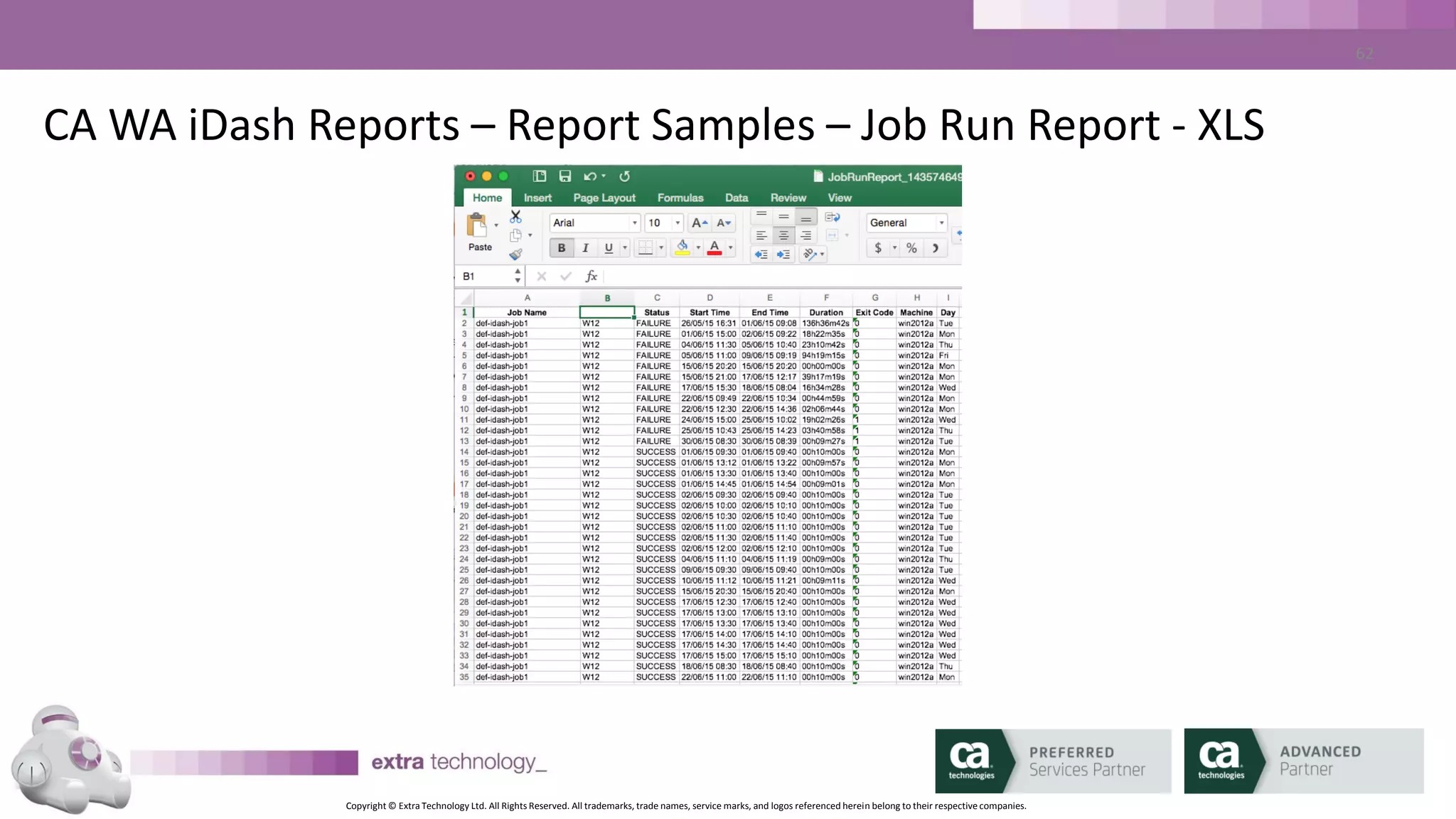
CA WA iDash Reports – Job Run Report
• CA WA iDash Job Run Report:
– Report on all job names or Selections
– Report on Selected STATUSES
– Report on one or multiple CA AutoSys Instances
– Report on one or multiple Agent machines
– Report on Past Days or within Date Range
– Selectable list of columns
– Sortable list of Columns
Copyright © Extra Technology Ltd. All Rights Reserved. All trademarks, trade names, service marks, and logos referenced herein belong to their respective companies.
54
CA WA iDash Reports – Job Status Report
• CA WA iDash Job Status Report:
– Report on all job names or Selections
– Report on Selected STATUSES
– Report on one or multiple CA AutoSys Instances
– Report on one or multiple Agent machines
– Report on one or more Job owners
– Report on one or more Job Apps/Groups
– Report by box name/box level
Copyright © Extra Technology Ltd. All Rights Reserved. All trademarks, trade names, service marks, and logos referenced herein belong to their respective companies.
55
CA WA iDash Reports – Job Status Report
• CA WA iDash Job Status Report:
– Report on Past Days or within Date Range
– Selectable list of columns
– Sortable list of Columns
Copyright © Extra Technology Ltd. All Rights Reserved. All trademarks, trade names, service marks, and logos referenced herein belong to their respective companies.
56
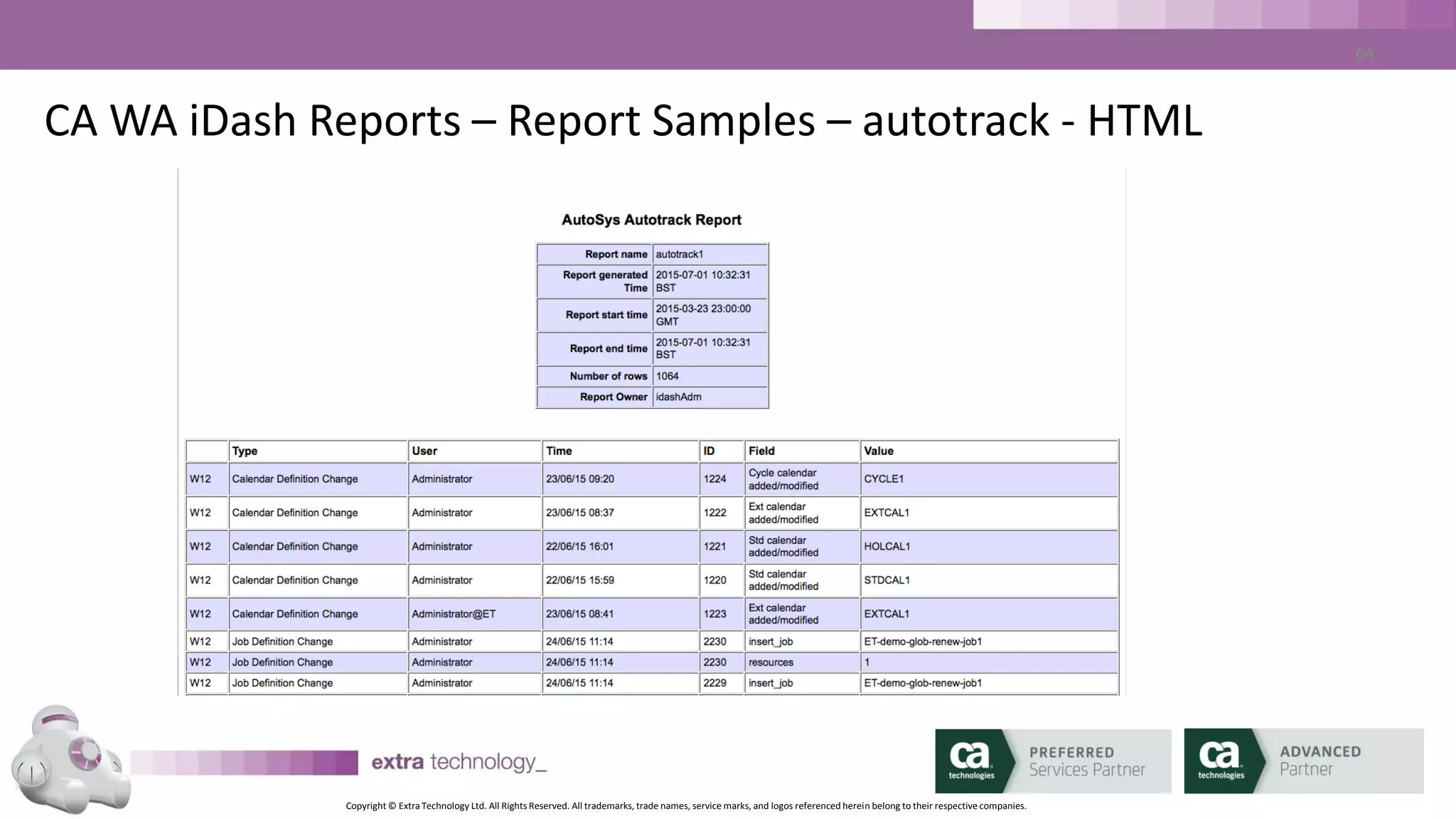
CA WA iDash Reports – autotrack Report
• CA WA iDash autotrack Report:
– Report on all job names or Selections
– Report on one or more user names
– Report on one or multiple CA AutoSys Instances
– Report on one or more autotrack types
– Report at autotracl level 1 or 2
Copyright © Extra Technology Ltd. All Rights Reserved. All trademarks, trade names, service marks, and logos referenced herein belong to their respective companies.
57
CA WA iDash Reports – autotrack Report
• CA WA iDash autotrack Report:
– Report on Past Days or within Date Range
– Selectable list of columns
– Sortable list of Columns
Copyright © Extra Technology Ltd. All Rights Reserved. All trademarks, trade names, service marks, and logos referenced herein belong to their respective companies.
58
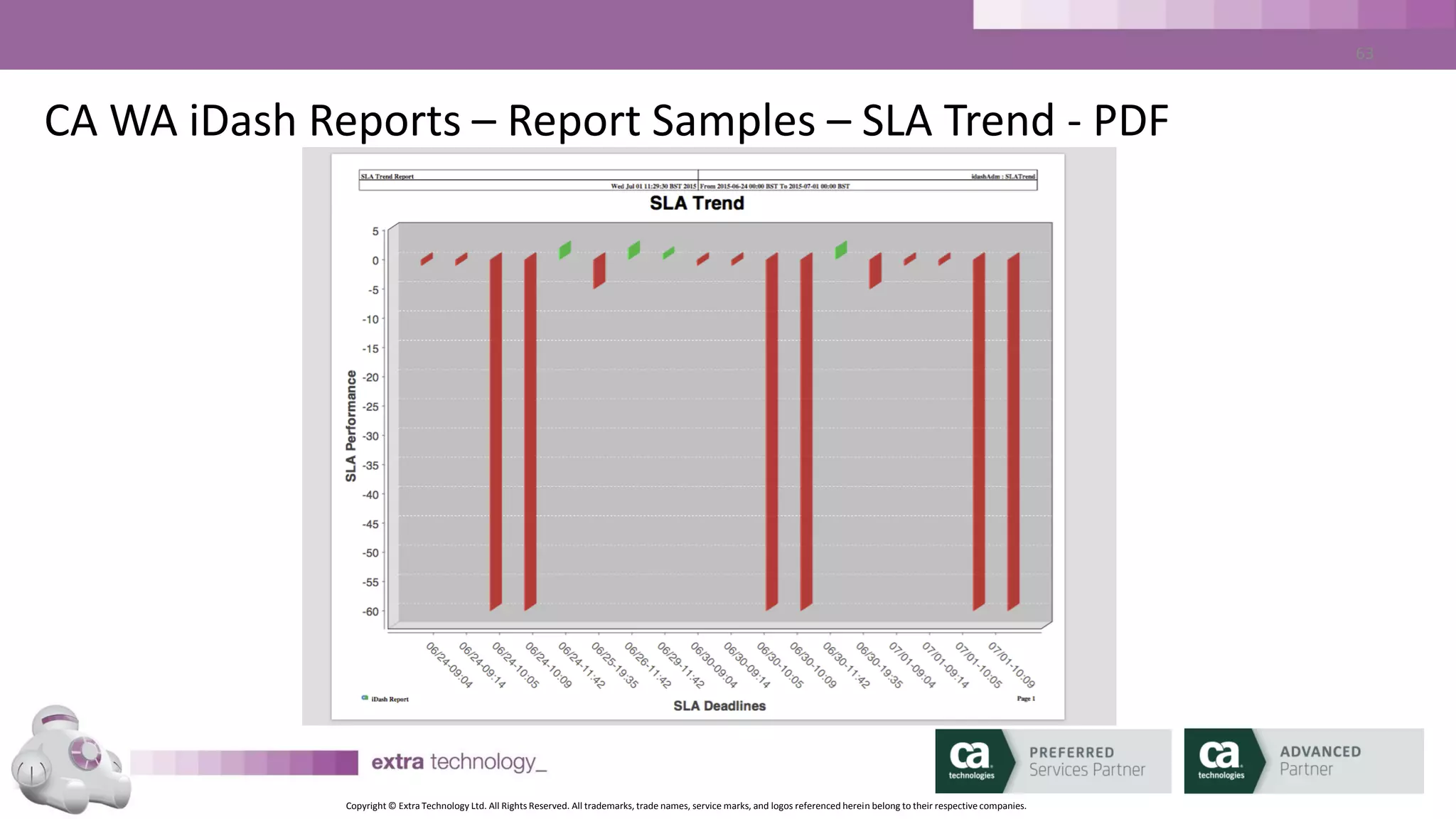
CA WA iDash Reports – SLA Trend Report
• CA WA iDash autotrack Report:
– Report on all SLA names or Selections
– Report on one or multiple CA AutoSys Instances
– Report on Past Days or within Date Range
– Selectable list of columns
– Sortable list of Columns
Copyright © Extra Technology Ltd. All Rights Reserved. All trademarks, trade names, service marks, and logos referenced herein belong to their respective companies.
59
CA WA iDash Reports – Suggested Reports
• Report on all JOBFAILURE Events for the previous day
• Report on all Job executions per Agent machine over a month
• Report on all jobs that have been ON_HOLD, ON_ICE or ON_NOEXEC for more
than 14 days
• Report on all ‘sendevent’ activity
• Report on all job changes over Change Freeze period
• Report on performance v SLA targets
Copyright © Extra Technology Ltd. All Rights Reserved. All trademarks, trade names, service marks, and logos referenced herein belong to their respective companies.
60
CA WA iDash Reports – Report Samples – Job Run Report - XLS
Copyright © Extra Technology Ltd. All Rights Reserved. All trademarks, trade names, service marks, and logos referenced herein belong to their respective companies.
61
CA WA iDash Reports – Report Samples – SLA Trend - PDF
Copyright © Extra Technology Ltd. All Rights Reserved. All trademarks, trade names, service marks, and logos referenced herein belong to their respective companies.
62
CA WA iDash Reports – Report Samples – autotrack - HTML
Copyright © Extra Technology Ltd. All Rights Reserved. All trademarks, trade names, service marks, and logos referenced herein belong to their respective companies.
63
Lesson 6
CA WA iDash CLI
Copyright © Extra Technology Ltd. All Rights Reserved. All trademarks, trade names, service marks, and logos referenced herein belong to their respective companies.
64
SLA Management – CLI
• Java based command line tools
• Runs on virtually anywhere with Java:
• AIX, HP-UX, Linux, Solaris (x86/SPARC), Windows, zLinux
• Commands begin with ‘id*’
Copyright © Extra Technology Ltd. All Rights Reserved. All trademarks, trade names, service marks, and logos referenced herein belong to their respective companies.
65
SLA Management – CLI
• Unzip Client package anywhere
• Set %IDASH_HOME%/$IDASH_HOME to unzip location
• Edit IDASH_HOME/etc/idash.conf paramter ‘idash.server.url’ to point to
iDash server URL host and port
• Execute commands!
Copyright © Extra Technology Ltd. All Rights Reserved. All trademarks, trade names, service marks, and logos referenced herein belong to their respective companies.
66
SLA Management – CLI
• Unzip Client package anywhere
• Set %IDASH_HOME%/$IDASH_HOME to unzip location
• Edit IDASH_HOME/etc/idash.conf paramter ‘idash.server.url’ to point to
iDash server URL host and port
• Execute commands!
Copyright © Extra Technology Ltd. All Rights Reserved. All trademarks, trade names, service marks, and logos referenced herein belong to their respective companies.
67
SLA Management – CLI - Commands
• idarchive – load/delete CA WA iDash database data
• idaverage – compute job run time averages
• iddelete – delete report definitions, SLA definitions, users
• idflags – print software version
• idgencsv|htm|pdf|xls – generate saved reports
• idjobid – index job names and job IDs
• idlist – print report definitions, SLA definitions, users
• idupdate – update report definitions, SLA definitions, users
Copyright © Extra Technology Ltd. All Rights Reserved. All trademarks, trade names, service marks, and logos referenced herein belong to their respective companies.
68
SLA Management – CLI - Commands
• idarchive – load/delete CA WA iDash database data
• idaverage – compute job run time averages
• iddelete – delete report definitions, SLA definitions, users
• idflags – print software version
• idgencsv|htm|pdf|xls – generate saved reports
• idjobid – index job names and job IDs
• idlist – print report definitions, SLA definitions, users
• idupdate – update report definitions, SLA definitions, users
Copyright © Extra Technology Ltd. All Rights Reserved. All trademarks, trade names, service marks, and logos referenced herein belong to their respective companies.
69
SLA Management – CLI – Commands - Example
• <Demo>
• Generate a report
• List a report definition
• Update a report definition
Copyright © Extra Technology Ltd. All Rights Reserved. All trademarks, trade names, service marks, and logos referenced herein belong to their respective companies.
70
Lesson 7
Best Practices / Tips
Copyright © Extra Technology Ltd. All Rights Reserved. All trademarks, trade names, service marks, and logos referenced herein belong to their respective companies.
71
Best Practices / Tips
• Enable “autotrack” and save the data in CA WA iDash
• Sell it with Reporting
• Consider High Availability
– 2 Databases
– 2 Daemon Processes
Copyright © Extra Technology Ltd. All Rights Reserved. All trademarks, trade names, service marks, and logos referenced herein belong to their respective companies.
72
Best Practices / Tips
• Keep Control of your SLAs
• Don’t enable SLAs until you have some history
Copyright © Extra Technology Ltd. All Rights Reserved. All trademarks, trade names, service marks, and logos referenced herein belong to their respective companies.
73
Best Practices / Tips
• Daily:
– DBMaint > Create Archive Data
– Copy Archive Data to CA WA iDash Server
– Load data using ‘idarchive’
– Trim old data using ‘idarchive’
– Run ‘idaverage’
Copyright © Extra Technology Ltd. All Rights Reserved. All trademarks, trade names, service marks, and logos referenced herein belong to their respective companies.
74
Lesson 8
Wrap Up
Copyright © Extra Technology Ltd. All Rights Reserved. All trademarks, trade names, service marks, and logos referenced herein belong to their respective companies.
75
Wrap up – Further Information Sources
• Read the Product Documentation
Copyright © Extra Technology Ltd. All Rights Reserved. All trademarks, trade names, service marks, and logos referenced herein belong to their respective companies.
76
Wrap up – Further Information Sources
• https://support.ca.com/
• https://wiki.ca.com/
• https://ca.com/techinsider/
• https://communities.ca.com/
Copyright © Extra Technology Ltd. All Rights Reserved. All trademarks, trade names, service marks, and logos referenced herein belong to their respective companies.
77
Disclaimer
This documentation and any related computer software program (hereinafter referred to as the “Documentation”) is for the end user’s
informational purposes only and is subject to change or withdrawal by Extra Technology Ltd at any time.
This documentation may not be copied, transferred, reproduced, disclosed or duplicated, in whole or in part, without the prior written consent
of Extra Technology Ltd. This documentation is proprietary information of Extra Technology Ltd.
Notwithstanding the foregoing, licensed users may print a reasonable number of copies of this documentation for their own internal use,
provided that all Extra Technology Ltd copyright notices and legends are affixed to each reproduced copy. Only authorized employees,
consultants, or agents of the user who are bound by the confidentiality provisions of the license for the software are permitted to have access
to such copies.
This right to print copies is limited to the period during which the contracted service remains in full force and effect. Should the contracted
service terminate for any reason, it shall be the user’s responsibility to return to Extra Technology Ltd the reproduced copies or to certify to
Extra Technology Ltd that the same have been destroyed.
To the extent permitted by applicable law, Extra Technology Ltd provides this documentation “as is” without warranty of any kind, including
without limitation, any implied warranties of merchantability, fitness for a particular purpose or non-infringement. In no event will Extra
Technology Ltd be liable to the end user or any third party for any loss or damage, direct or indirect, from the use of this documentation,
including without limitation, lost profits, business interruption, goodwill, or lost data, even if Extra Technology Ltd is expressly advised of such
loss or damage.
The use of any product referenced in this documentation and this documentation is governed by the end user’s applicable license agreement.
The manufacturer of this documentation is Extra Technology Ltd.
All trademarks, trade names, service marks, and logos referenced herein belong to their respective companies
Copyright © Extra Technology Ltd. All Rights Reserved. All trademarks, trade names, service marks, and logos referenced herein belong to their respective companies.
Q & A
Copyright © Extra Technology Ltd. All Rights Reserved. All trademarks, trade names, service marks, and logos referenced herein belong to their respective companies.
For More Information
To learn more, please visit:
http://cainc.to/Nv2VOe
CA World ’15

Understanding the Basics of CA Workload Automation iDash

  • 1.
    Copyright © ExtraTechnology Ltd. All Rights Reserved. All trademarks, trade names, service marks, and logos referenced herein belong to their respective companies. Understanding the Basics of CA Workload Automation iDash Mark Mannion DevOps: Continuous Delivery Extra Technology DO4X114E Bhupinder Janjuha Daniel Chidgey Extra Technology Extra Technology
  • 2.
    Copyright © ExtraTechnology Ltd. All Rights Reserved. All trademarks, trade names, service marks, and logos referenced herein belong to their respective companies. 2 Understanding the Basics of CA Workload Automation iDash
  • 3.
    Copyright © ExtraTechnology Ltd. All Rights Reserved. All trademarks, trade names, service marks, and logos referenced herein belong to their respective companies. 3 Welcome Welcome to CA Workload Automation iDash (CA WA iDash) Training by, CA Preferred Services Partner, Extra Technology. This session is for those who are new to CA WA iDash. Examples and demonstrations will be using CA WA iDash for CA Workload Automation AE (CA AutoSys®).
  • 4.
    Copyright © ExtraTechnology Ltd. All Rights Reserved. All trademarks, trade names, service marks, and logos referenced herein belong to their respective companies. 4 Course Objectives: • Understand concepts of CA Workload Automation iDash • Product Demonstration • Discover the Business Benefits available • Learn where to get more Help & Information
  • 5.
    Copyright © ExtraTechnology Ltd. All Rights Reserved. All trademarks, trade names, service marks, and logos referenced herein belong to their respective companies. 5 About Extra Technology • Founded in 2007 by ex-Platinum Technology staff • Our Workload Automation SMEs are experienced in Financial Services, Retail, Manufacturing, Public Services & Government sectors • Global coverage • Our in-depth CA WA iDash experience precedes CA’s Acquisition • CA Worldwide CA WA iDash Services and Education Partner
  • 6.
    Copyright © ExtraTechnology Ltd. All Rights Reserved. All trademarks, trade names, service marks, and logos referenced herein belong to their respective companies. 6 Mark Mannion • CA AutoSys SME for Platinum Technology • Workload Automation Subject Matter Expert for leading financial services companies • Co-Founder of Extra Technology Bhupinder Janjuha • Workload Automation SME for manufacturing, financial services and software companies • Support leader at Platinum Technology • Co-Founder of Extra Technology Daniel Chidgey • Senior CA Workload Automation Consultant and Educator • Designs and delivers ET’s CA WA iDash Education Courses • CA Certified AutoSys, CA DE (dSeries) & CA WA iDash Subject Matter Expert
  • 7.
    Copyright © ExtraTechnology Ltd. All Rights Reserved. All trademarks, trade names, service marks, and logos referenced herein belong to their respective companies. 7 Overview of CA WA iDash Using CA WA iDash CA WA iDash Reports CA WA iDash SLAs Scenarios and Use Cases Wrap Up Agenda
  • 8.
    Copyright © ExtraTechnology Ltd. All Rights Reserved. All trademarks, trade names, service marks, and logos referenced herein belong to their respective companies. 8 Lesson 1 CA WA iDash Overview
  • 9.
    Copyright © ExtraTechnology Ltd. All Rights Reserved. All trademarks, trade names, service marks, and logos referenced herein belong to their respective companies. 9 What is CA WA iDash? Why do we need it? • Additional Product for CA AutoSys, CA 7 (and soon DE (dSeries) • Read Only • Exception Based Monitoring • Two Main Purposes: 1. Workload Reporting for CA AutoSys / CA 7 2. Workload Monitoring - SLA Management for CA AutoSys / CA 7
  • 10.
    Copyright © ExtraTechnology Ltd. All Rights Reserved. All trademarks, trade names, service marks, and logos referenced herein belong to their respective companies. 10 CA Workload Automation iDash Architecture Diagram
  • 11.
    Copyright © ExtraTechnology Ltd. All Rights Reserved. All trademarks, trade names, service marks, and logos referenced herein belong to their respective companies. 11 CA WA iDash Components • CA WA iDash Daemon – monitoring AutoSys, tracking SLAs, generating ALARMS • CA WA iDash Database – Stores all history and configuration • CA WA iDash GUI – Java based (1.6/1.7), Web Launched, no local installation • CA WA iDash CLI – Java based, no installation
  • 12.
    Copyright © ExtraTechnology Ltd. All Rights Reserved. All trademarks, trade names, service marks, and logos referenced herein belong to their respective companies. 12 CA WA iDash Operation • Mixture of Real Time (in AutoSys) and Historical (in CA WA iDash Database) • CA WA iDash Database populated from CA AutoSys archive_events files (output from DBMaint) • CA WA iDash computes run time averages, tracks critical paths and dependencies • CA WA iDash Predicts!
  • 13.
    Copyright © ExtraTechnology Ltd. All Rights Reserved. All trademarks, trade names, service marks, and logos referenced herein belong to their respective companies. 13 CA WA iDash SLAs
  • 14.
    Copyright © ExtraTechnology Ltd. All Rights Reserved. All trademarks, trade names, service marks, and logos referenced herein belong to their respective companies. 14 SLA Basics • What is an SLA? – Deadline – Start Deadline – End Deadline – Or Both – Based on a Job Run
  • 15.
    Copyright © ExtraTechnology Ltd. All Rights Reserved. All trademarks, trade names, service marks, and logos referenced herein belong to their respective companies. 15 SLA Basics – When Would You Use an SLA? • The entire job stream must complete successfully by a particular time. • A job within the job stream must start by a particular time. • A job or a set of jobs within a job stream must start and finish by a particular date and time – CA WA iDash will predict SLA breaches and send ALARMS in advance
  • 16.
    Copyright © ExtraTechnology Ltd. All Rights Reserved. All trademarks, trade names, service marks, and logos referenced herein belong to their respective companies. 16 SLA Basics – SLA Parameters • SLA Name: may be different to Job Name • Run Days / Run Calendar: the days on which the SLA applies • Exclude Calendar: days when SLA does not apply • Start Tracking (minutes): how far in advance to start tracking the SLA • End Tracking (minutes): End SLA tracking post job completion • Past Hours (hours): how much history of SLA and critical path jobs to show in the Critical Job list
  • 17.
    Copyright © ExtraTechnology Ltd. All Rights Reserved. All trademarks, trade names, service marks, and logos referenced herein belong to their respective companies. 17 SLA Basics – ALARMS • Using the same mechanism as CA AutoSys • Multiple ALARMS available per SLA: – SLA_MISSED_START – SLA_PREDICTED_MISSED_START – SLA_AT_RISK_START – SLA_MISSED_END – SLA_PREDICTED_MISSED_END – SLA_AT_RISK_END
  • 18.
    Copyright © ExtraTechnology Ltd. All Rights Reserved. All trademarks, trade names, service marks, and logos referenced herein belong to their respective companies. 18 SLA Basics – Run Validity • Per-SLA Parameter • Must be defined • Defined in minutes relative to SLA time • To meet SLA, job must start or end between Run Validity Start, and SLA time • Used to match job run to SLA (usually with jobs that run multiple times per day)
  • 19.
    Copyright © ExtraTechnology Ltd. All Rights Reserved. All trademarks, trade names, service marks, and logos referenced herein belong to their respective companies. 19 SLA Basics – Key Terminology – Run Validity SLA Time - END 10:00am SLA Run Validity set to 15 minutes. 0830 0845 0900 0915 0930 0945 1000 1015 1030 1045 1100 4 Job Executions of same job 2 31 4
  • 20.
    Copyright © ExtraTechnology Ltd. All Rights Reserved. All trademarks, trade names, service marks, and logos referenced herein belong to their respective companies. 20 SLA Basics – Key Terminology – Run Validity SLA Time - END 10:00am SLA Run Validity set to 15 minutes. 0830 0845 0900 0915 0930 0945 1000 1015 1030 1045 1100 2 This job execution is used for the SLA 31 4 ALARM: SLA_PREDICTED_MISSED_END SLA_MISSED_END
  • 21.
    Copyright © ExtraTechnology Ltd. All Rights Reserved. All trademarks, trade names, service marks, and logos referenced herein belong to their respective companies. 21 SLA Basics – At Risk Window • Per-SLA Parameter • Optional • Defined in minutes relative to SLA time • Used to generate ALARM if you will meet SLA, but you are getting close
  • 22.
    Copyright © ExtraTechnology Ltd. All Rights Reserved. All trademarks, trade names, service marks, and logos referenced herein belong to their respective companies. 22 SLA Basics – Key Terminology – At Risk Window SLA Time - END 10:00am SLA At Risk Window set to 15 minutes. 0830 0845 0900 0915 0930 0945 1000 1015 1030 1045 1100 Job Execution ALARM: SLA_AT_RISK_END
  • 23.
    Copyright © ExtraTechnology Ltd. All Rights Reserved. All trademarks, trade names, service marks, and logos referenced herein belong to their respective companies. 23 SLA Basics – Other Functionality • Script Execution – Per-SLA Setting – Invoke a script/program/batch file when SLA is breached – Script is executed on CA WA iDash Server • Job Link – Used to link the execution of jobs outside CA AutoSys – Coded just like CA AutoSys ‘condition:’ parameters
  • 24.
    Copyright © ExtraTechnology Ltd. All Rights Reserved. All trademarks, trade names, service marks, and logos referenced herein belong to their respective companies. 24 SLA - Questions I have a job that starts on the hour, every hour. It runs for about 25 minutes. I need to know if the run that starts at 17:00 is not predicted to complete by 17:30. I also need to know if the job is predicted to complete between after 17:25 but before 17:30. Q1: What should my SLA End Time value be? Q2: What should my SLA Run Validity value be? Q3: What should my At Risk Window value be?
  • 25.
    Copyright © ExtraTechnology Ltd. All Rights Reserved. All trademarks, trade names, service marks, and logos referenced herein belong to their respective companies. 25 SLA Management – Global SLA Parameters • Forecast Duration • Alarm Future Hours • DB Refresh Interval • Forecast Interval • Online SLA Count • Ignore On Hold
  • 26.
    Copyright © ExtraTechnology Ltd. All Rights Reserved. All trademarks, trade names, service marks, and logos referenced herein belong to their respective companies. 26 SLA Management –SLA Parameters • Forecast Duration Hours specifies how far in advance CA WA iDash will compute the predicted execution of job streams. • Any SLA deadline that falls outside the current forecast duration will not be predicted until it falls within the window. • Typically, this value is set between 12 and 24 hours
  • 27.
    Copyright © ExtraTechnology Ltd. All Rights Reserved. All trademarks, trade names, service marks, and logos referenced herein belong to their respective companies. 27 SLA Management –SLA Parameters • A predicted miss further in the future than this will not be generated. • Example: If Alarm Future Hours is set to 5, an 8 PM SLA that is predicted to miss will not generate an alarm until 3 PM
  • 28.
    Copyright © ExtraTechnology Ltd. All Rights Reserved. All trademarks, trade names, service marks, and logos referenced herein belong to their respective companies. 28 SLA Management – Defining SLAs – THIN CLIENT DEMO • <demo> • Create End Deadline SLA – Search for Job – Choose SLA Name – Set Date and Time Parameters – Set ALERTS – Create SLA
  • 29.
    Copyright © ExtraTechnology Ltd. All Rights Reserved. All trademarks, trade names, service marks, and logos referenced herein belong to their respective companies. 29 SLA Management – Viewing SLAs – THIN CLIENT DEMO • <demo> • SLA List • SLA Detail – Summary – Flow View - Critical Path / All Jobs – Time View – Table View of all jobs in Flow
  • 30.
    Copyright © ExtraTechnology Ltd. All Rights Reserved. All trademarks, trade names, service marks, and logos referenced herein belong to their respective companies. 30 The CA WA iDash GUI
  • 31.
    Copyright © ExtraTechnology Ltd. All Rights Reserved. All trademarks, trade names, service marks, and logos referenced herein belong to their respective companies. 31 CA WA iDash GUI – Thin Client • Web / Browser Based • Dashboard for overall SLA Health • Drill Down on SLAs • Create / Edit / Delete SLAs • Create / Edit / Delete and Download Reports
  • 32.
    Copyright © ExtraTechnology Ltd. All Rights Reserved. All trademarks, trade names, service marks, and logos referenced herein belong to their respective companies. 32 CA WA iDash GUI – The Thin Client – SLA Dashboard SLA status summary SLA alerts SLA status chart SLA Tag summary toolbar
  • 33.
    Copyright © ExtraTechnology Ltd. All Rights Reserved. All trademarks, trade names, service marks, and logos referenced herein belong to their respective companies. 33 CA WA iDash GUI – The Thin Client – SLA List By Status SLA status filter SLA list
  • 34.
    Copyright © ExtraTechnology Ltd. All Rights Reserved. All trademarks, trade names, service marks, and logos referenced herein belong to their respective companies. 34 CA WA iDash GUI – The Thin Client – Advanced SLA Search Advanced SLA search
  • 35.
    Copyright © ExtraTechnology Ltd. All Rights Reserved. All trademarks, trade names, service marks, and logos referenced herein belong to their respective companies. 35 CA WA iDash GUI – The Thin Client – SLA Detail SLA name SLA job information SLA detail
  • 36.
    Copyright © ExtraTechnology Ltd. All Rights Reserved. All trademarks, trade names, service marks, and logos referenced herein belong to their respective companies. 36 CA WA iDash GUI – The Thin Client – Job Detail Job Run Data Job Run History SLA data
  • 37.
    Copyright © ExtraTechnology Ltd. All Rights Reserved. All trademarks, trade names, service marks, and logos referenced herein belong to their respective companies. 37 CA WA iDash GUI – The Thin Client – Job Run Prediction Job Run Averages
  • 38.
    Copyright © ExtraTechnology Ltd. All Rights Reserved. All trademarks, trade names, service marks, and logos referenced herein belong to their respective companies. 38 CA WA iDash GUI – The Thin Client – SLA Critical Path SLA name Critical Path to SLA SLA Job
  • 39.
    Copyright © ExtraTechnology Ltd. All Rights Reserved. All trademarks, trade names, service marks, and logos referenced herein belong to their respective companies. 39 CA WA iDash GUI – The Thin Client – Report List Report Type Selector Report Search Report List
  • 40.
    Copyright © ExtraTechnology Ltd. All Rights Reserved. All trademarks, trade names, service marks, and logos referenced herein belong to their respective companies. 40 CA WA iDash GUI – The Thin Client – Report Definition Report Parameters Report Timeframe Report Columns
  • 41.
    Copyright © ExtraTechnology Ltd. All Rights Reserved. All trademarks, trade names, service marks, and logos referenced herein belong to their respective companies. 41 CA WA iDash GUI – The Thin Client – Report Download Report Parameters Format Selector
  • 42.
    Copyright © ExtraTechnology Ltd. All Rights Reserved. All trademarks, trade names, service marks, and logos referenced herein belong to their respective companies. 42 CA WA iDash GUI – The Thin Client – SLA Definition SLA Action SLA Parameters
  • 43.
    Copyright © ExtraTechnology Ltd. All Rights Reserved. All trademarks, trade names, service marks, and logos referenced herein belong to their respective companies. 43 CA WA iDash GUI – The Thin Client – SLA Definition SLA Action SLA Parameters
  • 44.
    Copyright © ExtraTechnology Ltd. All Rights Reserved. All trademarks, trade names, service marks, and logos referenced herein belong to their respective companies. 44 CA WA iDash GUI – The Thin Client – SLA Definition SLA Dates SLA Parameters
  • 45.
    Copyright © ExtraTechnology Ltd. All Rights Reserved. All trademarks, trade names, service marks, and logos referenced herein belong to their respective companies. 45 CA WA iDash GUI – The Thin Client – SLA Definition – Job History Job Run History
  • 46.
    Copyright © ExtraTechnology Ltd. All Rights Reserved. All trademarks, trade names, service marks, and logos referenced herein belong to their respective companies. 46 CA WA iDash GUI – The Thin Client – SLA Definition SLA Alerting SLA Times
  • 47.
    Copyright © ExtraTechnology Ltd. All Rights Reserved. All trademarks, trade names, service marks, and logos referenced herein belong to their respective companies. 47 Lesson 3 CA WA iDash Reports
  • 48.
    Copyright © ExtraTechnology Ltd. All Rights Reserved. All trademarks, trade names, service marks, and logos referenced herein belong to their respective companies. 48 CA WA iDash Reports - Data • CA WA iDash offers an offline repository of CA AutoSys data – Keeps live CA AutoSys database size manageable • CA WA iDash database is populated from archived data, generated by DBMaint • Data can be added manually (GUI) or using CA WA iDash client command line tools (idarchive)
  • 49.
    Copyright © ExtraTechnology Ltd. All Rights Reserved. All trademarks, trade names, service marks, and logos referenced herein belong to their respective companies. 49 CA WA iDash Reports - Data • CA WA iDash stores the following data for reporting: – CA AutoSys EVENTS – CA AutoSys Job Runs – CA AutoSys Job Status – CA AutoSys “autotrack” • CA WA iDash generates the following additional reports: – SLA Trend Report – Server Statistics Report
  • 50.
    Copyright © ExtraTechnology Ltd. All Rights Reserved. All trademarks, trade names, service marks, and logos referenced herein belong to their respective companies. 50 CA WA iDash Reports - Types • CA WA iDash permits the generation of the following report formats: – CSV – XLS – HTML – PDF – PDF Summary
  • 51.
    Copyright © ExtraTechnology Ltd. All Rights Reserved. All trademarks, trade names, service marks, and logos referenced herein belong to their respective companies. 51 CA WA iDash Reports - EVENTS • CA WA iDash EVENT Report: – Report on All jobs or Selections – Report on All CA AutoSys EVENTS or Selections – Report on All CA AutoSys Job Statuses or Selections – Report on All ALARMS or Selections – Report on one or multiple CA AutoSys Instances
  • 52.
    Copyright © ExtraTechnology Ltd. All Rights Reserved. All trademarks, trade names, service marks, and logos referenced herein belong to their respective companies. 52 CA WA iDash Reports - EVENTS • CA WA iDash EVENT Report: – Report on Past Days or within Date Range – Selectable list of columns – Sortable list of Columns • Report may be defined as Public or Personal
  • 53.
    Copyright © ExtraTechnology Ltd. All Rights Reserved. All trademarks, trade names, service marks, and logos referenced herein belong to their respective companies. 53 CA WA iDash Reports – Job Run Report • CA WA iDash Job Run Report: – Report on all job names or Selections – Report on Selected STATUSES – Report on one or multiple CA AutoSys Instances – Report on one or multiple Agent machines – Report on Past Days or within Date Range – Selectable list of columns – Sortable list of Columns
  • 54.
    Copyright © ExtraTechnology Ltd. All Rights Reserved. All trademarks, trade names, service marks, and logos referenced herein belong to their respective companies. 54 CA WA iDash Reports – Job Status Report • CA WA iDash Job Status Report: – Report on all job names or Selections – Report on Selected STATUSES – Report on one or multiple CA AutoSys Instances – Report on one or multiple Agent machines – Report on one or more Job owners – Report on one or more Job Apps/Groups – Report by box name/box level
  • 55.
    Copyright © ExtraTechnology Ltd. All Rights Reserved. All trademarks, trade names, service marks, and logos referenced herein belong to their respective companies. 55 CA WA iDash Reports – Job Status Report • CA WA iDash Job Status Report: – Report on Past Days or within Date Range – Selectable list of columns – Sortable list of Columns
  • 56.
    Copyright © ExtraTechnology Ltd. All Rights Reserved. All trademarks, trade names, service marks, and logos referenced herein belong to their respective companies. 56 CA WA iDash Reports – autotrack Report • CA WA iDash autotrack Report: – Report on all job names or Selections – Report on one or more user names – Report on one or multiple CA AutoSys Instances – Report on one or more autotrack types – Report at autotracl level 1 or 2
  • 57.
    Copyright © ExtraTechnology Ltd. All Rights Reserved. All trademarks, trade names, service marks, and logos referenced herein belong to their respective companies. 57 CA WA iDash Reports – autotrack Report • CA WA iDash autotrack Report: – Report on Past Days or within Date Range – Selectable list of columns – Sortable list of Columns
  • 58.
    Copyright © ExtraTechnology Ltd. All Rights Reserved. All trademarks, trade names, service marks, and logos referenced herein belong to their respective companies. 58 CA WA iDash Reports – SLA Trend Report • CA WA iDash autotrack Report: – Report on all SLA names or Selections – Report on one or multiple CA AutoSys Instances – Report on Past Days or within Date Range – Selectable list of columns – Sortable list of Columns
  • 59.
    Copyright © ExtraTechnology Ltd. All Rights Reserved. All trademarks, trade names, service marks, and logos referenced herein belong to their respective companies. 59 CA WA iDash Reports – Suggested Reports • Report on all JOBFAILURE Events for the previous day • Report on all Job executions per Agent machine over a month • Report on all jobs that have been ON_HOLD, ON_ICE or ON_NOEXEC for more than 14 days • Report on all ‘sendevent’ activity • Report on all job changes over Change Freeze period • Report on performance v SLA targets
  • 60.
    Copyright © ExtraTechnology Ltd. All Rights Reserved. All trademarks, trade names, service marks, and logos referenced herein belong to their respective companies. 60 CA WA iDash Reports – Report Samples – Job Run Report - XLS
  • 61.
    Copyright © ExtraTechnology Ltd. All Rights Reserved. All trademarks, trade names, service marks, and logos referenced herein belong to their respective companies. 61 CA WA iDash Reports – Report Samples – SLA Trend - PDF
  • 62.
    Copyright © ExtraTechnology Ltd. All Rights Reserved. All trademarks, trade names, service marks, and logos referenced herein belong to their respective companies. 62 CA WA iDash Reports – Report Samples – autotrack - HTML
  • 63.
    Copyright © ExtraTechnology Ltd. All Rights Reserved. All trademarks, trade names, service marks, and logos referenced herein belong to their respective companies. 63 Lesson 6 CA WA iDash CLI
  • 64.
    Copyright © ExtraTechnology Ltd. All Rights Reserved. All trademarks, trade names, service marks, and logos referenced herein belong to their respective companies. 64 SLA Management – CLI • Java based command line tools • Runs on virtually anywhere with Java: • AIX, HP-UX, Linux, Solaris (x86/SPARC), Windows, zLinux • Commands begin with ‘id*’
  • 65.
    Copyright © ExtraTechnology Ltd. All Rights Reserved. All trademarks, trade names, service marks, and logos referenced herein belong to their respective companies. 65 SLA Management – CLI • Unzip Client package anywhere • Set %IDASH_HOME%/$IDASH_HOME to unzip location • Edit IDASH_HOME/etc/idash.conf paramter ‘idash.server.url’ to point to iDash server URL host and port • Execute commands!
  • 66.
    Copyright © ExtraTechnology Ltd. All Rights Reserved. All trademarks, trade names, service marks, and logos referenced herein belong to their respective companies. 66 SLA Management – CLI • Unzip Client package anywhere • Set %IDASH_HOME%/$IDASH_HOME to unzip location • Edit IDASH_HOME/etc/idash.conf paramter ‘idash.server.url’ to point to iDash server URL host and port • Execute commands!
  • 67.
    Copyright © ExtraTechnology Ltd. All Rights Reserved. All trademarks, trade names, service marks, and logos referenced herein belong to their respective companies. 67 SLA Management – CLI - Commands • idarchive – load/delete CA WA iDash database data • idaverage – compute job run time averages • iddelete – delete report definitions, SLA definitions, users • idflags – print software version • idgencsv|htm|pdf|xls – generate saved reports • idjobid – index job names and job IDs • idlist – print report definitions, SLA definitions, users • idupdate – update report definitions, SLA definitions, users
  • 68.
    Copyright © ExtraTechnology Ltd. All Rights Reserved. All trademarks, trade names, service marks, and logos referenced herein belong to their respective companies. 68 SLA Management – CLI - Commands • idarchive – load/delete CA WA iDash database data • idaverage – compute job run time averages • iddelete – delete report definitions, SLA definitions, users • idflags – print software version • idgencsv|htm|pdf|xls – generate saved reports • idjobid – index job names and job IDs • idlist – print report definitions, SLA definitions, users • idupdate – update report definitions, SLA definitions, users
  • 69.
    Copyright © ExtraTechnology Ltd. All Rights Reserved. All trademarks, trade names, service marks, and logos referenced herein belong to their respective companies. 69 SLA Management – CLI – Commands - Example • <Demo> • Generate a report • List a report definition • Update a report definition
  • 70.
    Copyright © ExtraTechnology Ltd. All Rights Reserved. All trademarks, trade names, service marks, and logos referenced herein belong to their respective companies. 70 Lesson 7 Best Practices / Tips
  • 71.
    Copyright © ExtraTechnology Ltd. All Rights Reserved. All trademarks, trade names, service marks, and logos referenced herein belong to their respective companies. 71 Best Practices / Tips • Enable “autotrack” and save the data in CA WA iDash • Sell it with Reporting • Consider High Availability – 2 Databases – 2 Daemon Processes
  • 72.
    Copyright © ExtraTechnology Ltd. All Rights Reserved. All trademarks, trade names, service marks, and logos referenced herein belong to their respective companies. 72 Best Practices / Tips • Keep Control of your SLAs • Don’t enable SLAs until you have some history
  • 73.
    Copyright © ExtraTechnology Ltd. All Rights Reserved. All trademarks, trade names, service marks, and logos referenced herein belong to their respective companies. 73 Best Practices / Tips • Daily: – DBMaint > Create Archive Data – Copy Archive Data to CA WA iDash Server – Load data using ‘idarchive’ – Trim old data using ‘idarchive’ – Run ‘idaverage’
  • 74.
    Copyright © ExtraTechnology Ltd. All Rights Reserved. All trademarks, trade names, service marks, and logos referenced herein belong to their respective companies. 74 Lesson 8 Wrap Up
  • 75.
    Copyright © ExtraTechnology Ltd. All Rights Reserved. All trademarks, trade names, service marks, and logos referenced herein belong to their respective companies. 75 Wrap up – Further Information Sources • Read the Product Documentation
  • 76.
    Copyright © ExtraTechnology Ltd. All Rights Reserved. All trademarks, trade names, service marks, and logos referenced herein belong to their respective companies. 76 Wrap up – Further Information Sources • https://support.ca.com/ • https://wiki.ca.com/ • https://ca.com/techinsider/ • https://communities.ca.com/
  • 77.
    Copyright © ExtraTechnology Ltd. All Rights Reserved. All trademarks, trade names, service marks, and logos referenced herein belong to their respective companies. 77 Disclaimer This documentation and any related computer software program (hereinafter referred to as the “Documentation”) is for the end user’s informational purposes only and is subject to change or withdrawal by Extra Technology Ltd at any time. This documentation may not be copied, transferred, reproduced, disclosed or duplicated, in whole or in part, without the prior written consent of Extra Technology Ltd. This documentation is proprietary information of Extra Technology Ltd. Notwithstanding the foregoing, licensed users may print a reasonable number of copies of this documentation for their own internal use, provided that all Extra Technology Ltd copyright notices and legends are affixed to each reproduced copy. Only authorized employees, consultants, or agents of the user who are bound by the confidentiality provisions of the license for the software are permitted to have access to such copies. This right to print copies is limited to the period during which the contracted service remains in full force and effect. Should the contracted service terminate for any reason, it shall be the user’s responsibility to return to Extra Technology Ltd the reproduced copies or to certify to Extra Technology Ltd that the same have been destroyed. To the extent permitted by applicable law, Extra Technology Ltd provides this documentation “as is” without warranty of any kind, including without limitation, any implied warranties of merchantability, fitness for a particular purpose or non-infringement. In no event will Extra Technology Ltd be liable to the end user or any third party for any loss or damage, direct or indirect, from the use of this documentation, including without limitation, lost profits, business interruption, goodwill, or lost data, even if Extra Technology Ltd is expressly advised of such loss or damage. The use of any product referenced in this documentation and this documentation is governed by the end user’s applicable license agreement. The manufacturer of this documentation is Extra Technology Ltd. All trademarks, trade names, service marks, and logos referenced herein belong to their respective companies
  • 78.
    Copyright © ExtraTechnology Ltd. All Rights Reserved. All trademarks, trade names, service marks, and logos referenced herein belong to their respective companies. Q & A
  • 79.
    Copyright © ExtraTechnology Ltd. All Rights Reserved. All trademarks, trade names, service marks, and logos referenced herein belong to their respective companies. For More Information To learn more, please visit: http://cainc.to/Nv2VOe CA World ’15