INTERNET MULTIFEED CO.Copyright ©
Practical Operation Automation with
StackStorm
Shu Sugimoto
Software Development Manager, JPNAP
2018-11-05(Mon)
INTERNET MULTIFEED CO.Copyright ©
What you will learn
• Why StackStorm is suitable for automating day to day
operation tasks
• The actual method that helps you implement automation
for your current procedures with StackStorm
• Will not cover
• Southbound implementation to network equipment
• All features of StackStorm
2
INTERNET MULTIFEED CO.Copyright ©
Background of “Automation”
• ”Automation” is becoming more and more important
• Business agility
• Time saving
• etc...
• In reality
• “We know that automation is important.”
• “We think now we put more effort into this ever.”
• “But its progress is far less than ideal.”
• Why?
3
INTERNET MULTIFEED CO.Copyright ©
Automation is difficult: Why?
• A: Your current operation is NOT computer friendly
• 1. Your procedures are so complicated that you can’t simply
write a shell script that does it
• Which also leads you having many partial scripts,
unmanaged, here and there
• 2. There exists steps that requires human interaction within
your procedure documents like:
• ”Check that the result is sane.”
• “Confirm the output is intended.”
• How can computer tell it’s “sane” or “intended”?
4
INTERNET MULTIFEED CO.Copyright ©
Automation is difficult: Why?
• A: Your current operation is NOT computer friendly
• -> “To achieve automation, we first need to rebuild our
whole operation from scratch...”
• => Scope become too huge, impossible to estimate, can’t
set proper goal, brain freeze
• StackStorm might help solving them
5
INTERNET MULTIFEED CO.Copyright ©
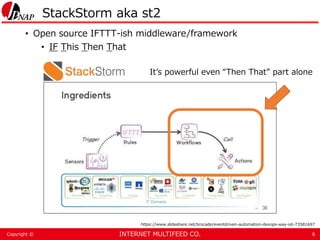
StackStorm aka st2
• Open source IFTTT-ish middleware/framework
• IF This Then That
6
It’s powerful even “Then That” part alone
https://www.slideshare.net/brocade/eventdriven-automation-devops-way-iot-73581697
INTERNET MULTIFEED CO.Copyright ©
How StackStorm fits in
• 1. Powerful Workflow engine
• It’s possible to implement a fairly complex procedure
7
INTERNET MULTIFEED CO.Copyright ©
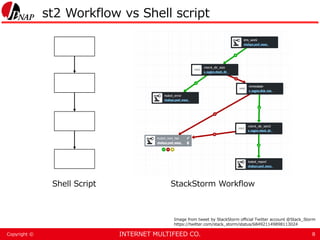
st2 Workflow vs Shell script
8
Shell Script StackStorm Workflow
Image from tweet by StackStorm official Twitter account @Stack_Storm
https://twitter.com/stack_storm/status/684921149898113024
INTERNET MULTIFEED CO.Copyright ©
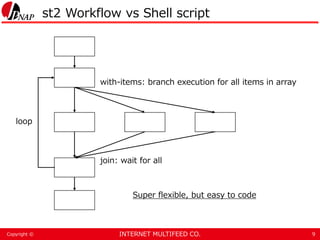
st2 Workflow vs Shell script
9
with-items: branch execution for all items in array
join: wait for all
loop
Super flexible, but easy to code
INTERNET MULTIFEED CO.Copyright ©
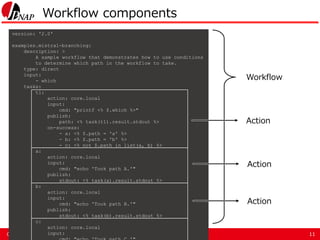
Workflow components
10
Workflow
Action
INTERNET MULTIFEED CO.Copyright ©
Workflow components
11
version: '2.0'
examples.mistral-branching:
description: >
A sample workflow that demonstrates how to use conditions
to determine which path in the workflow to take.
type: direct
input:
- which
tasks:
t1:
action: core.local
input:
cmd: "printf <% $.which %>"
publish:
path: <% task(t1).result.stdout %>
on-success:
- a: <% $.path = 'a' %>
- b: <% $.path = 'b' %>
- c: <% not $.path in list(a, b) %>
a:
action: core.local
input:
cmd: "echo 'Took path A.'"
publish:
stdout: <% task(a).result.stdout %>
b:
action: core.local
input:
cmd: "echo 'Took path B.'"
publish:
stdout: <% task(b).result.stdout %>
c:
action: core.local
input:
Workflow
Action
Action
Action
INTERNET MULTIFEED CO.Copyright ©
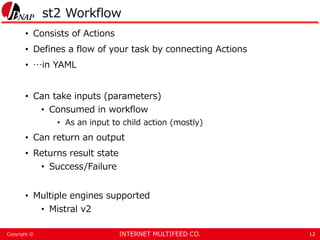
st2 Workflow
• Consists of Actions
• Defines a flow of your task by connecting Actions
• …in YAML
• Can take inputs (parameters)
• Consumed in workflow
• As an input to child action (mostly)
• Can return an output
• Returns result state
• Success/Failure
• Multiple engines supported
• Mistral v2
12
INTERNET MULTIFEED CO.Copyright ©
st2 Action
• Unit in workflow
• The place where actual work is done
• e.g. Creating directories, run `make`, etc
• Can take input/return output
• Returns result
• There are several ways to implement actions
• Write python code -> most popular
• Use built-in runners*
• Super useful built-in runner: `remote-shell-cmd`
13
* Actions are interpreted and run by corresponding runners
e.g. python action -> written in python, run by “python-script” runner
INTERNET MULTIFEED CO.Copyright ©
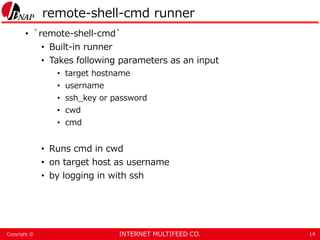
remote-shell-cmd runner
• `remote-shell-cmd`
• Built-in runner
• Takes following parameters as an input
• target hostname
• username
• ssh_key or password
• cwd
• cmd
• Runs cmd in cwd
• on target host as username
• by logging in with ssh
14
INTERNET MULTIFEED CO.Copyright ©
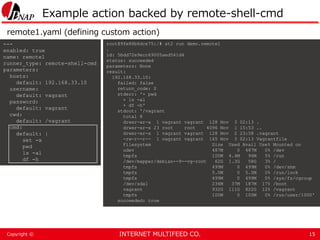
Example action backed by remote-shell-cmd
15
---
enabled: true
name: remote1
runner_type: remote-shell-cmd
parameters:
hosts:
default: 192.168.33.10
username:
default: vagrant
password:
default: vagrant
cwd:
default: /vagrant
cmd:
default: |
set -x
pwd
ls -al
df -h
root@9fe86b6dce75:/# st2 run demo.remote1
.
id: 5bdd72e9ecc69005aed541d4
status: succeeded
parameters: None
result:
192.168.33.10:
failed: false
return_code: 0
stderr: '+ pwd
+ ls -al
+ df -h'
stdout: '/vagrant
total 8
drwxr-xr-x 1 vagrant vagrant 128 Nov 3 02:13 .
drwxr-xr-x 23 root root 4096 Nov 1 15:53 ..
drwxr-xr-x 1 vagrant vagrant 128 Nov 2 23:58 .vagrant
-rw-r--r-- 1 vagrant vagrant 165 Nov 3 02:13 Vagrantfile
Filesystem Size Used Avail Use% Mounted on
udev 487M 0 487M 0% /dev
tmpfs 100M 4.4M 96M 5% /run
/dev/mapper/debian--9--vg-root 62G 1.3G 58G 3% /
tmpfs 499M 0 499M 0% /dev/shm
tmpfs 5.0M 0 5.0M 0% /run/lock
tmpfs 499M 0 499M 0% /sys/fs/cgroup
/dev/sda1 236M 37M 187M 17% /boot
vagrant 932G 111G 822G 12% /vagrant
tmpfs 100M 0 100M 0% /run/user/1000'
succeeded: true
remote1.yaml (defining custom action)
INTERNET MULTIFEED CO.Copyright ©
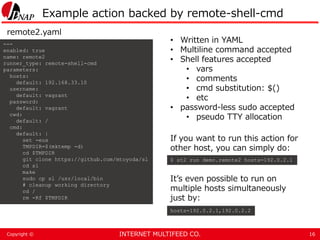
Example action backed by remote-shell-cmd
16
---
enabled: true
name: remote2
runner_type: remote-shell-cmd
parameters:
hosts:
default: 192.168.33.10
username:
default: vagrant
password:
default: vagrant
cwd:
default: /
cmd:
default: |
set -eux
TMPDIR=$(mktemp -d)
cd $TMPDIR
git clone https://github.com/mtoyoda/sl
cd sl
make
sudo cp sl /usr/local/bin
# cleanup working directory
cd /
rm -Rf $TMPDIR
remote2.yaml
• Written in YAML
• Multiline command accepted
• Shell features accepted
• vars
• comments
• cmd substitution: $()
• etc
• password-less sudo accepted
• pseudo TTY allocation
If you want to run this action for
other host, you can simply do:
$ st2 run demo.remote2 hosts=192.0.2.1
hosts=192.0.2.1,192.0.2.2
It’s even possible to run on
multiple hosts simultaneously
just by:
INTERNET MULTIFEED CO.Copyright ©
st2 Workflow features
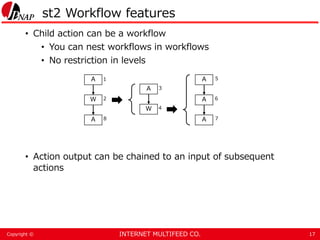
• Child action can be a workflow
• You can nest workflows in workflows
• No restriction in levels
• Action output can be chained to an input of subsequent
actions
17
A
W
A
A
W
A
A
A
1
2
3
4
5
6
78
INTERNET MULTIFEED CO.Copyright ©
Output/Input chaining
18
version: '2.0'
demo.input-output-chaining:
type: direct
tasks:
mktemp:
action: demo.remote-mktemp
publish:
tmpdir: "{{ jsonpath_query(task('mktemp').result, '*.stdout')[0] }}"
on-success:
- build
build:
action: demo.remote-build
input:
cwd: "{{ _.tmpdir }}"
on-success:
- cleanup
cleanup:
action: demo.remote-cleanup
input:
target_path: "{{ _.tmpdir }}"
---
enabled: true
name: remote-mktemp
runner_type: remote-shell-cmd
parameters:
hosts:
default: 192.168.33.10
username:
default: vagrant
password:
default: vagrant
cmd:
default: mktemp -d
---
enabled: true
name: remote-build
runner_type: remote-shell-cmd
parameters:
hosts:
default: 192.168.33.10
username:
default: vagrant
password:
default: vagrant
cmd:
default: |
git clone https://github.com/mtoyoda/sl
cd sl
make
sudo cp sl /usr/local/bin
input-output-chaining.yaml
remote-mktemp.yaml
remote-build.yaml
INTERNET MULTIFEED CO.Copyright ©
Other useful features
• Action execution concurrency policy
• You can enforces the number of executions that can run
simultaneously for a specified action
• Either delay/cancel
• Jinja templating in YAML
• Intended for parameter manipulation
• Datastore (st2kv)
• The place that you can store any key-value data
• Encryption support
• Config parameters, transient data that needs to be
shared between workflows
19
INTERNET MULTIFEED CO.Copyright ©
How StackStorm fits in
• 1. Powerful Workflow engine
• It’s possible to implement a fairly complex procedure
• remote-shell-cmd helps converting existing steps in
procedure document into st2 actions
• Action can encapsulate a set of steps
• e.g.) git clone ~ make ~ make install
• Good isolation makes actions highly reusable
• There are many actions ready for use (Community
packs*)
• https://exchange.stackstorm.org/
• 100+ available
20
INTERNET MULTIFEED CO.Copyright ©
How StackStorm fits in
• 1. Powerful Workflow engine
• 2. Inquiries feature
• Pause a workflow and wait for human interaction
• “Hey, does this look right?”
• “If so, please return true”
• “if not, please return false”
• Implemented as a built-in action “core.ask”
21
INTERNET MULTIFEED CO.Copyright ©
Inquiries
22
Pause here and wait for input
“Would you like to continue? (yes/no)”
Resume the workflow / abort
core.ask
abort!
yes no
Give a response
INTERNET MULTIFEED CO.Copyright ©
Inquiries
23
version: '2.0'
demo.inquiry-simple:
type: direct
tasks:
mktemp:
action: demo.remote-mktemp
publish:
tmpdir: "{{ jsonpath_query(task('mktemp').result, '*.stdout')[0] }}"
on-success:
- pause-workflow
pause-workflow:
action: core.ask
on-success:
- build
build:
action: demo.remote-build
input:
cwd: "{{ _.tmpdir }}"
on-success:
- cleanup
cleanup:
action: demo.remote-cleanup
input:
target_path: "{{ _.tmpdir }}"
root@9fe86b6dce75:/# st2 execution get 5bdf1631ecc6900824f95afd
id: 5bdf1631ecc6900824f95afd
action.ref: demo.inquiry-simple
parameters: None
status: paused
result_task: mktemp
result:
192.168.33.10:
failed: false
return_code: 0
stderr: ''
stdout: /tmp/tmp.bFbYga6wDz
succeeded: true
start_timestamp: Sun, 04 Nov 2018 15:54:25 UTC
end_timestamp:
+--------------------------+------------------------+----------------+
| id | status | task |
+--------------------------+------------------------+----------------+
| 5bdf1634ecc6900824f95b00 | succeeded (2s elapsed) | mktemp |
| 5bdf1636ecc6900824f95b02 | pending | pause-workflow |
+--------------------------+------------------------+----------------+
root@9fe86b6dce75:/# st2 inquiry respond 5bdf1636ecc6900824f95b02
continue (boolean): yes
Response accepted for inquiry 5bdf1636ecc6900824f95b02.
INTERNET MULTIFEED CO.Copyright ©
Inquiries
24
“What is your favorite editor?”
(vi/vim/emacs/nano)
core.ask
abort!
vi
You can even branch actions based on input value
Oops...
vim emacs nano
INTERNET MULTIFEED CO.Copyright ©
How StackStorm fits in
• 1. Powerful Workflow engine
• 2. “Inquiries”
• With these features, you can start automating daily
operations without changing any existing processes or
tools
• StackStorm helps you “start small”
25
INTERNET MULTIFEED CO.Copyright ©
Our case
• Target: Changing configurations of monitoring servers
(ping/mrtg/etc...) when add/modify/delete-ing IXP
customer
26
300+ lines of diff to check
This example is rather easy
Excerpt of proc doc
300+ lines
“Is intended config added?”
INTERNET MULTIFEED CO.Copyright ©
Our case
• Target: Changing configurations of monitoring servers
(ping/mrtg/etc...) when add/modify/delete-ing IXP
customer
• Before
• There is a procedure document for human ops
• Steps summary
• ssh into specific server
• cd to tool dir
• Run `rake`
• Generate configs
• Check diff
• Run `rake deploy`
• Apply configs to servers
28
INTERNET MULTIFEED CO.Copyright ©
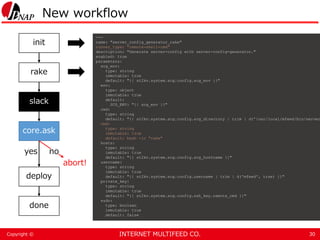
Workflow strategy
• Replace all steps with custom actions using remote-shell-
cmd runner
• Pause with core.ask when workflow reaches the point that
requires human decision
• Check diff
• (Plus) Send a diff to Slack
• So that operators can check it easily
• Straightforward 
29
INTERNET MULTIFEED CO.Copyright ©
New workflow
30
slack
core.ask
deploy
done
abort!
yes no
init
rake
---
name: "server_config_generator_rake"
runner_type: "remote-shell-cmd"
description: "Generate server-config with server-config-generator."
enabled: true
parameters:
scg_env:
type: string
immutable: true
default: "{{ st2kv.system.scg.config.scg_env }}"
env:
type: object
immutable: true
default:
SCG_ENV: "{{ scg_env }}"
cwd:
type: string
default: "{{ st2kv.system.scg.config.scg_directory | trim | d('/usr/local/mfeed/bin/server
cmd:
type: string
immutable: true
default: bash -lc "rake"
hosts:
type: string
immutable: true
default: "{{ st2kv.system.scg.config.scg_hostname }}"
username:
type: string
immutable: true
default: "{{ st2kv.system.scg.config.username | trim | d('mfeed', true) }}"
private_key:
type: string
immutable: true
default: "{{ st2kv.system.scg.config.ssh_key.remote_cmd }}"
sudo:
type: boolean
immutable: true
default: false
INTERNET MULTIFEED CO.Copyright ©
New workflow
31
Use `slack.files.upload` action from community
Diff is uploaded as snippet
slack
core.ask
deploy
done
abort!
yes no
init
rake
INTERNET MULTIFEED CO.Copyright ©
New workflow
32
“Does this diff look right? (yes/no)”
$ st2 inquiry respond 5bdbe0395c48de01de0f84cd -r
'{"continue": true}'
slack
core.ask
deploy
done
yes no
init
rake
abort!
INTERNET MULTIFEED CO.Copyright ©
New workflow
33
slack
core.ask
deploy
done
yes no
init
rake
---
name: "server_config_generator_deploy"
runner_type: "remote-shell-cmd"
description: "Deploy configs to servers"
enabled: true
parameters:
scg_env:
type: string
immutable: true
default: "{{ st2kv.system.scg.config.scg_env }}"
env:
type: object
immutable: true
default:
SCG_ENV: "{{ scg_env }}"
deploy_main:
type: boolean
default: false
description: "Choose a deploy target system. Can choose backup( = false ) or main( = true
cwd:
type: string
default: "{{ st2kv.system.scg.config.scg_directory | trim | d('/usr/local/mfeed/bin/server
cmd:
type: string
immutable: true
default: bash -lc "rake deploy_{% if deploy_main %}main{% else %}backup{% endif %}"
hosts:
type: string
immutable: true
default: "{{ st2kv.system.scg.config.scg_hostname }}"
username:
type: string
immutable: true
default: "{{ st2kv.system.scg.config.username | trim | d('mfeed', true) }}"
private_key:
type: string
immutable: true
default: "{{ st2kv.system.scg.config.ssh_key.remote_cmd }}"
sudo:
type: boolean
immutable: true
default: false
abort!
INTERNET MULTIFEED CO.Copyright ©
Findings
• We could implement our workflow in very short time
• Pretty straightforward thanks to `remote-shell-cmd`
and inquiries
• I’m confident that this approach is effective
• Everything is in YAML: Good
• We could apply the exact same methodology for
software development
• git
• Branch > PR > Code review > Merge
• CI/CD
• Staging/Production
• Disposable environment
• Easy to reproduce: just setup everything from git
• no “export/import”
34
INTERNET MULTIFEED CO.Copyright ©
Findings
• Development of st2 is active and open
• Fast release cycle: once in 3 months
• They widely accept PR from anyone
• You can find many active members at community Slack
• Direct channel to developers/product manager
• Many contributors who can help you
• Adopting StackStorm will not eliminate the need of
software engineers
• You still need them to achieve sustainable development
35
INTERNET MULTIFEED CO.Copyright ©
Conclusion
• With StackStorm, you can “small start” your long journey of
automation
• This can be achieved by its 1. powerful workflow engine,
and 2. inquiries feature
• Once you get there, it will naturally start advancing
• `core.ask` is where you should work on next
36
INTERNET MULTIFEED CO.Copyright ©
How to get started
• Building StackStorm environment into your dev machine
• vagrant-st2
• st2-docker
• (oneline installer)
• Tutorials
• Still does not exist a best one...
• https://github.com/StackStorm/st2-
docker/blob/master/docs/tutorial.md
• Official document
• https://docs.stackstorm.com
• For busy people: Skip to ”Actions”, “Workflows”, “Packs”
• Workflow examples
• https://github.com/stackstorm/st2/tree/master/contrib/examples
• Community Slack
• https://stackstorm.com/community-signup
37
INTERNET MULTIFEED CO.Copyright ©
StackStorm Tips
• You should use ”orquesta” workflow engine if you start now
• Although all examples in this presentation use mistral
• There are various reasons to this, but the major one is, orquesta is developed
by st2 team by own, mistral not (it’s a part of OpenStack project)
• Can expect much better support and faster bugfix
• Still in beta, but planned to be GA in Nov. 2018
• You should never include any sensitive data like passwords/private_keys in workflows
or actions
• Use st2kv or pack config to split them out
• You should avoid persisting any business data to st2kv
• Keep source of truth in other place
• Keep st2 disposable
• If you require HA deployment, you should check Kubernetes support
38

Practical Operation Automation with StackStorm

  • 1.
    INTERNET MULTIFEED CO.Copyright© Practical Operation Automation with StackStorm Shu Sugimoto Software Development Manager, JPNAP 2018-11-05(Mon)
  • 2.
    INTERNET MULTIFEED CO.Copyright© What you will learn • Why StackStorm is suitable for automating day to day operation tasks • The actual method that helps you implement automation for your current procedures with StackStorm • Will not cover • Southbound implementation to network equipment • All features of StackStorm 2
  • 3.
    INTERNET MULTIFEED CO.Copyright© Background of “Automation” • ”Automation” is becoming more and more important • Business agility • Time saving • etc... • In reality • “We know that automation is important.” • “We think now we put more effort into this ever.” • “But its progress is far less than ideal.” • Why? 3
  • 4.
    INTERNET MULTIFEED CO.Copyright© Automation is difficult: Why? • A: Your current operation is NOT computer friendly • 1. Your procedures are so complicated that you can’t simply write a shell script that does it • Which also leads you having many partial scripts, unmanaged, here and there • 2. There exists steps that requires human interaction within your procedure documents like: • ”Check that the result is sane.” • “Confirm the output is intended.” • How can computer tell it’s “sane” or “intended”? 4
  • 5.
    INTERNET MULTIFEED CO.Copyright© Automation is difficult: Why? • A: Your current operation is NOT computer friendly • -> “To achieve automation, we first need to rebuild our whole operation from scratch...” • => Scope become too huge, impossible to estimate, can’t set proper goal, brain freeze • StackStorm might help solving them 5
  • 6.
    INTERNET MULTIFEED CO.Copyright© StackStorm aka st2 • Open source IFTTT-ish middleware/framework • IF This Then That 6 It’s powerful even “Then That” part alone https://www.slideshare.net/brocade/eventdriven-automation-devops-way-iot-73581697
  • 7.
    INTERNET MULTIFEED CO.Copyright© How StackStorm fits in • 1. Powerful Workflow engine • It’s possible to implement a fairly complex procedure 7
  • 8.
    INTERNET MULTIFEED CO.Copyright© st2 Workflow vs Shell script 8 Shell Script StackStorm Workflow Image from tweet by StackStorm official Twitter account @Stack_Storm https://twitter.com/stack_storm/status/684921149898113024
  • 9.
    INTERNET MULTIFEED CO.Copyright© st2 Workflow vs Shell script 9 with-items: branch execution for all items in array join: wait for all loop Super flexible, but easy to code
  • 10.
    INTERNET MULTIFEED CO.Copyright© Workflow components 10 Workflow Action
  • 11.
    INTERNET MULTIFEED CO.Copyright© Workflow components 11 version: '2.0' examples.mistral-branching: description: > A sample workflow that demonstrates how to use conditions to determine which path in the workflow to take. type: direct input: - which tasks: t1: action: core.local input: cmd: "printf <% $.which %>" publish: path: <% task(t1).result.stdout %> on-success: - a: <% $.path = 'a' %> - b: <% $.path = 'b' %> - c: <% not $.path in list(a, b) %> a: action: core.local input: cmd: "echo 'Took path A.'" publish: stdout: <% task(a).result.stdout %> b: action: core.local input: cmd: "echo 'Took path B.'" publish: stdout: <% task(b).result.stdout %> c: action: core.local input: Workflow Action Action Action
  • 12.
    INTERNET MULTIFEED CO.Copyright© st2 Workflow • Consists of Actions • Defines a flow of your task by connecting Actions • …in YAML • Can take inputs (parameters) • Consumed in workflow • As an input to child action (mostly) • Can return an output • Returns result state • Success/Failure • Multiple engines supported • Mistral v2 12
  • 13.
    INTERNET MULTIFEED CO.Copyright© st2 Action • Unit in workflow • The place where actual work is done • e.g. Creating directories, run `make`, etc • Can take input/return output • Returns result • There are several ways to implement actions • Write python code -> most popular • Use built-in runners* • Super useful built-in runner: `remote-shell-cmd` 13 * Actions are interpreted and run by corresponding runners e.g. python action -> written in python, run by “python-script” runner
  • 14.
    INTERNET MULTIFEED CO.Copyright© remote-shell-cmd runner • `remote-shell-cmd` • Built-in runner • Takes following parameters as an input • target hostname • username • ssh_key or password • cwd • cmd • Runs cmd in cwd • on target host as username • by logging in with ssh 14
  • 15.
    INTERNET MULTIFEED CO.Copyright© Example action backed by remote-shell-cmd 15 --- enabled: true name: remote1 runner_type: remote-shell-cmd parameters: hosts: default: 192.168.33.10 username: default: vagrant password: default: vagrant cwd: default: /vagrant cmd: default: | set -x pwd ls -al df -h root@9fe86b6dce75:/# st2 run demo.remote1 . id: 5bdd72e9ecc69005aed541d4 status: succeeded parameters: None result: 192.168.33.10: failed: false return_code: 0 stderr: '+ pwd + ls -al + df -h' stdout: '/vagrant total 8 drwxr-xr-x 1 vagrant vagrant 128 Nov 3 02:13 . drwxr-xr-x 23 root root 4096 Nov 1 15:53 .. drwxr-xr-x 1 vagrant vagrant 128 Nov 2 23:58 .vagrant -rw-r--r-- 1 vagrant vagrant 165 Nov 3 02:13 Vagrantfile Filesystem Size Used Avail Use% Mounted on udev 487M 0 487M 0% /dev tmpfs 100M 4.4M 96M 5% /run /dev/mapper/debian--9--vg-root 62G 1.3G 58G 3% / tmpfs 499M 0 499M 0% /dev/shm tmpfs 5.0M 0 5.0M 0% /run/lock tmpfs 499M 0 499M 0% /sys/fs/cgroup /dev/sda1 236M 37M 187M 17% /boot vagrant 932G 111G 822G 12% /vagrant tmpfs 100M 0 100M 0% /run/user/1000' succeeded: true remote1.yaml (defining custom action)
  • 16.
    INTERNET MULTIFEED CO.Copyright© Example action backed by remote-shell-cmd 16 --- enabled: true name: remote2 runner_type: remote-shell-cmd parameters: hosts: default: 192.168.33.10 username: default: vagrant password: default: vagrant cwd: default: / cmd: default: | set -eux TMPDIR=$(mktemp -d) cd $TMPDIR git clone https://github.com/mtoyoda/sl cd sl make sudo cp sl /usr/local/bin # cleanup working directory cd / rm -Rf $TMPDIR remote2.yaml • Written in YAML • Multiline command accepted • Shell features accepted • vars • comments • cmd substitution: $() • etc • password-less sudo accepted • pseudo TTY allocation If you want to run this action for other host, you can simply do: $ st2 run demo.remote2 hosts=192.0.2.1 hosts=192.0.2.1,192.0.2.2 It’s even possible to run on multiple hosts simultaneously just by:
  • 17.
    INTERNET MULTIFEED CO.Copyright© st2 Workflow features • Child action can be a workflow • You can nest workflows in workflows • No restriction in levels • Action output can be chained to an input of subsequent actions 17 A W A A W A A A 1 2 3 4 5 6 78
  • 18.
    INTERNET MULTIFEED CO.Copyright© Output/Input chaining 18 version: '2.0' demo.input-output-chaining: type: direct tasks: mktemp: action: demo.remote-mktemp publish: tmpdir: "{{ jsonpath_query(task('mktemp').result, '*.stdout')[0] }}" on-success: - build build: action: demo.remote-build input: cwd: "{{ _.tmpdir }}" on-success: - cleanup cleanup: action: demo.remote-cleanup input: target_path: "{{ _.tmpdir }}" --- enabled: true name: remote-mktemp runner_type: remote-shell-cmd parameters: hosts: default: 192.168.33.10 username: default: vagrant password: default: vagrant cmd: default: mktemp -d --- enabled: true name: remote-build runner_type: remote-shell-cmd parameters: hosts: default: 192.168.33.10 username: default: vagrant password: default: vagrant cmd: default: | git clone https://github.com/mtoyoda/sl cd sl make sudo cp sl /usr/local/bin input-output-chaining.yaml remote-mktemp.yaml remote-build.yaml
  • 19.
    INTERNET MULTIFEED CO.Copyright© Other useful features • Action execution concurrency policy • You can enforces the number of executions that can run simultaneously for a specified action • Either delay/cancel • Jinja templating in YAML • Intended for parameter manipulation • Datastore (st2kv) • The place that you can store any key-value data • Encryption support • Config parameters, transient data that needs to be shared between workflows 19
  • 20.
    INTERNET MULTIFEED CO.Copyright© How StackStorm fits in • 1. Powerful Workflow engine • It’s possible to implement a fairly complex procedure • remote-shell-cmd helps converting existing steps in procedure document into st2 actions • Action can encapsulate a set of steps • e.g.) git clone ~ make ~ make install • Good isolation makes actions highly reusable • There are many actions ready for use (Community packs*) • https://exchange.stackstorm.org/ • 100+ available 20
  • 21.
    INTERNET MULTIFEED CO.Copyright© How StackStorm fits in • 1. Powerful Workflow engine • 2. Inquiries feature • Pause a workflow and wait for human interaction • “Hey, does this look right?” • “If so, please return true” • “if not, please return false” • Implemented as a built-in action “core.ask” 21
  • 22.
    INTERNET MULTIFEED CO.Copyright© Inquiries 22 Pause here and wait for input “Would you like to continue? (yes/no)” Resume the workflow / abort core.ask abort! yes no Give a response
  • 23.
    INTERNET MULTIFEED CO.Copyright© Inquiries 23 version: '2.0' demo.inquiry-simple: type: direct tasks: mktemp: action: demo.remote-mktemp publish: tmpdir: "{{ jsonpath_query(task('mktemp').result, '*.stdout')[0] }}" on-success: - pause-workflow pause-workflow: action: core.ask on-success: - build build: action: demo.remote-build input: cwd: "{{ _.tmpdir }}" on-success: - cleanup cleanup: action: demo.remote-cleanup input: target_path: "{{ _.tmpdir }}" root@9fe86b6dce75:/# st2 execution get 5bdf1631ecc6900824f95afd id: 5bdf1631ecc6900824f95afd action.ref: demo.inquiry-simple parameters: None status: paused result_task: mktemp result: 192.168.33.10: failed: false return_code: 0 stderr: '' stdout: /tmp/tmp.bFbYga6wDz succeeded: true start_timestamp: Sun, 04 Nov 2018 15:54:25 UTC end_timestamp: +--------------------------+------------------------+----------------+ | id | status | task | +--------------------------+------------------------+----------------+ | 5bdf1634ecc6900824f95b00 | succeeded (2s elapsed) | mktemp | | 5bdf1636ecc6900824f95b02 | pending | pause-workflow | +--------------------------+------------------------+----------------+ root@9fe86b6dce75:/# st2 inquiry respond 5bdf1636ecc6900824f95b02 continue (boolean): yes Response accepted for inquiry 5bdf1636ecc6900824f95b02.
  • 24.
    INTERNET MULTIFEED CO.Copyright© Inquiries 24 “What is your favorite editor?” (vi/vim/emacs/nano) core.ask abort! vi You can even branch actions based on input value Oops... vim emacs nano
  • 25.
    INTERNET MULTIFEED CO.Copyright© How StackStorm fits in • 1. Powerful Workflow engine • 2. “Inquiries” • With these features, you can start automating daily operations without changing any existing processes or tools • StackStorm helps you “start small” 25
  • 26.
    INTERNET MULTIFEED CO.Copyright© Our case • Target: Changing configurations of monitoring servers (ping/mrtg/etc...) when add/modify/delete-ing IXP customer 26
  • 27.
    300+ lines ofdiff to check This example is rather easy Excerpt of proc doc 300+ lines “Is intended config added?”
  • 28.
    INTERNET MULTIFEED CO.Copyright© Our case • Target: Changing configurations of monitoring servers (ping/mrtg/etc...) when add/modify/delete-ing IXP customer • Before • There is a procedure document for human ops • Steps summary • ssh into specific server • cd to tool dir • Run `rake` • Generate configs • Check diff • Run `rake deploy` • Apply configs to servers 28
  • 29.
    INTERNET MULTIFEED CO.Copyright© Workflow strategy • Replace all steps with custom actions using remote-shell- cmd runner • Pause with core.ask when workflow reaches the point that requires human decision • Check diff • (Plus) Send a diff to Slack • So that operators can check it easily • Straightforward  29
  • 30.
    INTERNET MULTIFEED CO.Copyright© New workflow 30 slack core.ask deploy done abort! yes no init rake --- name: "server_config_generator_rake" runner_type: "remote-shell-cmd" description: "Generate server-config with server-config-generator." enabled: true parameters: scg_env: type: string immutable: true default: "{{ st2kv.system.scg.config.scg_env }}" env: type: object immutable: true default: SCG_ENV: "{{ scg_env }}" cwd: type: string default: "{{ st2kv.system.scg.config.scg_directory | trim | d('/usr/local/mfeed/bin/server cmd: type: string immutable: true default: bash -lc "rake" hosts: type: string immutable: true default: "{{ st2kv.system.scg.config.scg_hostname }}" username: type: string immutable: true default: "{{ st2kv.system.scg.config.username | trim | d('mfeed', true) }}" private_key: type: string immutable: true default: "{{ st2kv.system.scg.config.ssh_key.remote_cmd }}" sudo: type: boolean immutable: true default: false
  • 31.
    INTERNET MULTIFEED CO.Copyright© New workflow 31 Use `slack.files.upload` action from community Diff is uploaded as snippet slack core.ask deploy done abort! yes no init rake
  • 32.
    INTERNET MULTIFEED CO.Copyright© New workflow 32 “Does this diff look right? (yes/no)” $ st2 inquiry respond 5bdbe0395c48de01de0f84cd -r '{"continue": true}' slack core.ask deploy done yes no init rake abort!
  • 33.
    INTERNET MULTIFEED CO.Copyright© New workflow 33 slack core.ask deploy done yes no init rake --- name: "server_config_generator_deploy" runner_type: "remote-shell-cmd" description: "Deploy configs to servers" enabled: true parameters: scg_env: type: string immutable: true default: "{{ st2kv.system.scg.config.scg_env }}" env: type: object immutable: true default: SCG_ENV: "{{ scg_env }}" deploy_main: type: boolean default: false description: "Choose a deploy target system. Can choose backup( = false ) or main( = true cwd: type: string default: "{{ st2kv.system.scg.config.scg_directory | trim | d('/usr/local/mfeed/bin/server cmd: type: string immutable: true default: bash -lc "rake deploy_{% if deploy_main %}main{% else %}backup{% endif %}" hosts: type: string immutable: true default: "{{ st2kv.system.scg.config.scg_hostname }}" username: type: string immutable: true default: "{{ st2kv.system.scg.config.username | trim | d('mfeed', true) }}" private_key: type: string immutable: true default: "{{ st2kv.system.scg.config.ssh_key.remote_cmd }}" sudo: type: boolean immutable: true default: false abort!
  • 34.
    INTERNET MULTIFEED CO.Copyright© Findings • We could implement our workflow in very short time • Pretty straightforward thanks to `remote-shell-cmd` and inquiries • I’m confident that this approach is effective • Everything is in YAML: Good • We could apply the exact same methodology for software development • git • Branch > PR > Code review > Merge • CI/CD • Staging/Production • Disposable environment • Easy to reproduce: just setup everything from git • no “export/import” 34
  • 35.
    INTERNET MULTIFEED CO.Copyright© Findings • Development of st2 is active and open • Fast release cycle: once in 3 months • They widely accept PR from anyone • You can find many active members at community Slack • Direct channel to developers/product manager • Many contributors who can help you • Adopting StackStorm will not eliminate the need of software engineers • You still need them to achieve sustainable development 35
  • 36.
    INTERNET MULTIFEED CO.Copyright© Conclusion • With StackStorm, you can “small start” your long journey of automation • This can be achieved by its 1. powerful workflow engine, and 2. inquiries feature • Once you get there, it will naturally start advancing • `core.ask` is where you should work on next 36
  • 37.
    INTERNET MULTIFEED CO.Copyright© How to get started • Building StackStorm environment into your dev machine • vagrant-st2 • st2-docker • (oneline installer) • Tutorials • Still does not exist a best one... • https://github.com/StackStorm/st2- docker/blob/master/docs/tutorial.md • Official document • https://docs.stackstorm.com • For busy people: Skip to ”Actions”, “Workflows”, “Packs” • Workflow examples • https://github.com/stackstorm/st2/tree/master/contrib/examples • Community Slack • https://stackstorm.com/community-signup 37
  • 38.
    INTERNET MULTIFEED CO.Copyright© StackStorm Tips • You should use ”orquesta” workflow engine if you start now • Although all examples in this presentation use mistral • There are various reasons to this, but the major one is, orquesta is developed by st2 team by own, mistral not (it’s a part of OpenStack project) • Can expect much better support and faster bugfix • Still in beta, but planned to be GA in Nov. 2018 • You should never include any sensitive data like passwords/private_keys in workflows or actions • Use st2kv or pack config to split them out • You should avoid persisting any business data to st2kv • Keep source of truth in other place • Keep st2 disposable • If you require HA deployment, you should check Kubernetes support 38