techupskills.com | techskillstransformations.com
© 2021 Brent C. Laster &
@techupskills
1
© 2022 Brent C. Laster &
Tech Skills Transformations & Brent Laster
Introduction to GitHub Actions
techupskills.com | techskillstransformations.com
© 2021 Brent C. Laster &
@techupskills
2
© 2022 Brent C. Laster &
About me
• R&D Director, DevOps
• Global trainer – training (Git,
Jenkins, Gradle, CI/CD,
pipelines, Kubernetes,
Helm, ArgoCD, operators)
• Author -
§ OpenSource.com
§ Professional Git book
§ Jenkins 2 – Up and
Running book
§ Continuous Integration
vs. Continuous Delivery
vs. Continuous
Deployment mini-book
on Safari
techskillstransformations.com
getskillsnow.com
https://www.linkedin.com/in/brentlaster
@BrentCLaster
GitHub: brentlaster
techupskills.com | techskillstransformations.com
© 2021 Brent C. Laster &
@techupskills
3
© 2022 Brent C. Laster &
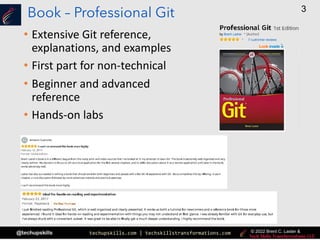
Book – Professional Git
• Extensive Git reference,
explanations, and examples
• First part for non-technical
• Beginner and advanced
reference
• Hands-on labs
techupskills.com | techskillstransformations.com
© 2021 Brent C. Laster &
@techupskills
4
© 2022 Brent C. Laster &
Jenkins 2 Book
• Jenkins 2 – Up and Running
• “It’s an ideal book for those who are
new to CI/CD, as well as those who
have been using Jenkins for many
years. This book will help you discover
and rediscover Jenkins.” By Kohsuke
Kawaguchi, Creator of Jenkins
techupskills.com | techskillstransformations.com
© 2021 Brent C. Laster &
@techupskills
5
© 2022 Brent C. Laster &
O’Reilly Training
techupskills.com | techskillstransformations.com
© 2021 Brent C. Laster &
@techupskills
6
© 2022 Brent C. Laster &
Agenda
• What are GitHub Actions?
• How do they work?
• The GitHub interface to Actions
• About Actions Runners and Virtual Environments
• Using public Actions
• Workflow runs
• Custom Actions
• Manually running workflows
• Monitoring and Troubleshooting
• Creating secrets for Actions
• Chaining workflows together
• Using GitHub API calls with Actions
techupskills.com | techskillstransformations.com
© 2021 Brent C. Laster &
@techupskills
7
© 2022 Brent C. Laster &
What are GitHub Actions?
• Way to create custom, automated workflows in GitHub
• Executed based on repository operations
• Building blocks - can be combined & shared
• Used for usual SDLC tasks
• Can be used for CI/CD as alternatives to other apps
techupskills.com | techskillstransformations.com
© 2021 Brent C. Laster &
@techupskills
8
© 2022 Brent C. Laster &
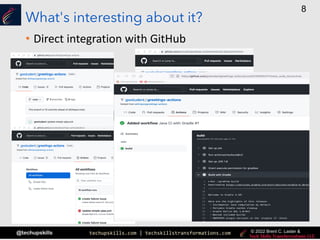
What's interesting about it?
• Direct integration with GitHub
techupskills.com | techskillstransformations.com
© 2021 Brent C. Laster &
@techupskills
9
© 2022 Brent C. Laster &
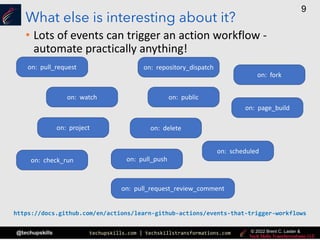
What else is interesting about it?
• Lots of events can trigger an action workflow -
automate practically anything!
on: project
on: watch
on: repository_dispatch
on: delete
on: check_run
on: page_build
on: scheduled
on: pull_request
on: public
on: pull_request_review_comment
on: pull_push
on: fork
https://docs.github.com/en/actions/learn-github-actions/events-that-trigger-workflows
techupskills.com | techskillstransformations.com
© 2021 Brent C. Laster &
@techupskills
10
© 2022 Brent C. Laster &
Types of triggers for events
• single event - on: push
• list of events - on: [push, pull_request]
• specify activity types or configuration - on:
push:
branches:
- main
• scheduled events - on:
scheduled:
- cron: '30 5,15 * * *'
• manual events - on: workflow-dispatch
on: repository-dispatch
[opened, deleted]
• workflow reuse events - on: workflow-call
(can be called from another workflow)
• webhook events - on: issue_comment
on: pull_request
techupskills.com | techskillstransformations.com
© 2021 Brent C. Laster &
@techupskills
11
© 2022 Brent C. Laster &
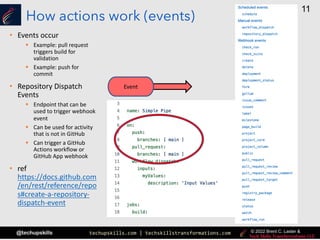
How actions work (events)
• Events occur
§ Example: pull request
triggers build for
validation
§ Example: push for
commit
• Repository Dispatch
Events
§ Endpoint that can be
used to trigger webhook
event
§ Can be used for activity
that is not in GitHub
§ Can trigger a GitHub
Actions workflow or
GitHub App webhook
• ref
https://docs.github.com
/en/rest/reference/repo
s#create-a-repository-
dispatch-event
Event
techupskills.com | techskillstransformations.com
© 2021 Brent C. Laster &
@techupskills
12
© 2022 Brent C. Laster &
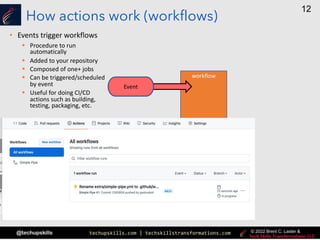
How actions work (workflows)
• Events trigger workflows
workflow
Event
§ Procedure to run
automatically
§ Added to your repository
§ Composed of one+ jobs
§ Can be triggered/scheduled
by event
§ Useful for doing CI/CD
actions such as building,
testing, packaging, etc.
techupskills.com | techskillstransformations.com
© 2021 Brent C. Laster &
@techupskills
13
© 2022 Brent C. Laster &
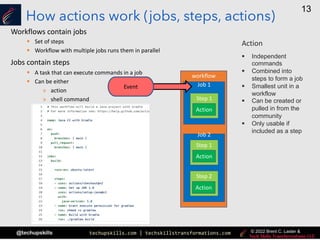
How actions work (jobs, steps, actions)
Workflows contain jobs
§ Set of steps
§ Workflow with multiple jobs runs them in parallel
Jobs contain steps
§ A task that can execute commands in a job
§ Can be either
» action
» shell command
workflow
Job 1
Job 2
Event
Step 1
Step 1
Step 2
Action
Action
Action
Action
§ Independent
commands
§ Combined into
steps to form a job
§ Smallest unit in a
workflow
§ Can be created or
pulled in from the
community
§ Only usable if
included as a step
techupskills.com | techskillstransformations.com
© 2021 Brent C. Laster &
@techupskills
14
© 2022 Brent C. Laster &
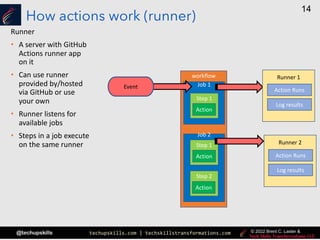
How actions work (runner)
Runner
• A server with GitHub
Actions runner app
on it
• Can use runner
provided by/hosted
via GitHub or use
your own
• Runner listens for
available jobs
• Steps in a job execute
on the same runner
workflow
Job 1
Job 2
Event
Step 1
Step 1
Step 2
Action
Action
Action
Runner 1
Action Runs
Log results
Runner 2
Action Runs
Log results
techupskills.com | techskillstransformations.com
© 2021 Brent C. Laster &
@techupskills
15
© 2022 Brent C. Laster &
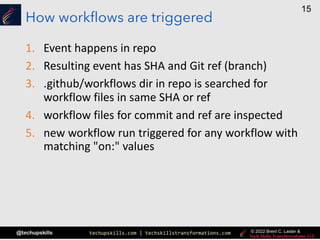
How workflows are triggered
1. Event happens in repo
2. Resulting event has SHA and Git ref (branch)
3. .github/workflows dir in repo is searched for
workflow files in same SHA or ref
4. workflow files for commit and ref are inspected
5. new workflow run triggered for any workflow with
matching "on:" values
techupskills.com | techskillstransformations.com
© 2021 Brent C. Laster &
@techupskills
16
© 2022 Brent C. Laster &
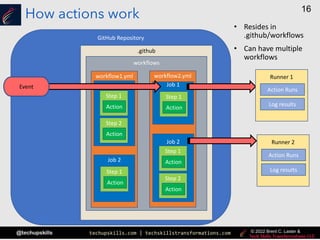
How actions work
GitHub Repository
.github
workflows
workflow1.yml
Job 1
Step 1
Action
Step 2
Action
Job 2
Step 1
Action
workflow2.yml
Job 1
Step 1
Action
Job 2
Step 1
Action
Step 2
Action
Runner 1
Action Runs
Log results
Runner 2
Action Runs
Log results
Event
• Resides in
.github/workflows
• Can have multiple
workflows
techupskills.com | techskillstransformations.com
© 2021 Brent C. Laster &
@techupskills
17
© 2022 Brent C. Laster &
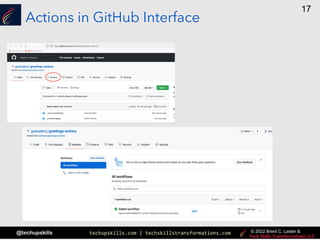
Actions in GitHub Interface
techupskills.com | techskillstransformations.com
© 2021 Brent C. Laster &
@techupskills
18
© 2022 Brent C. Laster &
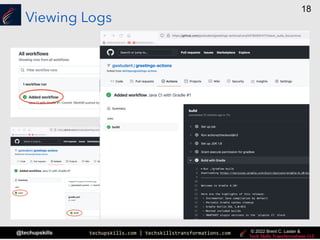
Viewing Logs
techupskills.com | techskillstransformations.com
© 2021 Brent C. Laster &
@techupskills
19
© 2022 Brent C. Laster &
|
Lab 1 – Creating a simple example
Purpose: In this lab, we’ll get a quick start learning about GitHub Actions by creating a simple project that uses
them. We’ll also see what a first run of a workflow with actions looks like.
techupskills.com | techskillstransformations.com
© 2021 Brent C. Laster &
@techupskills
20
© 2022 Brent C. Laster &
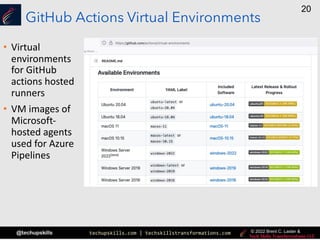
GitHub Actions Virtual Environments
• Virtual
environments
for GitHub
actions hosted
runners
• VM images of
Microsoft-
hosted agents
used for Azure
Pipelines
techupskills.com | techskillstransformations.com
© 2021 Brent C. Laster &
@techupskills
21
© 2022 Brent C. Laster &
Self-hosted Runners
• Useful when you need more configurability and control
• Allows you to choose and customize configuration, system
resources, available software, etc.
• Can be physical systems, VMs, containers, on-prem or cloud
• Can be mapped in at different levels
§ Repository-level - intended for a single repo
§ Organization-level - intended for a GitHub organization
» processing of multiple jobs across multiple repositories
§ Enterprise-level - assigned to multiple organizations for an enterprise
account
• Runner system connects to GitHub via GitHub Actions self-
hosted runner
• Automatically kicked off of GitHub if no connection to GitHub
Actions after 30 days
techupskills.com | techskillstransformations.com
© 2021 Brent C. Laster &
@techupskills
22
© 2022 Brent C. Laster &
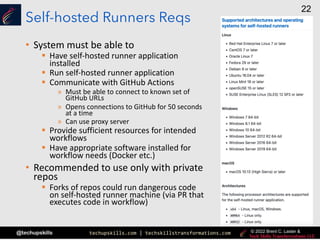
Self-hosted Runners Reqs
• System must be able to
§ Have self-hosted runner application
installed
§ Run self-hosted runner application
§ Communicate with GitHub Actions
» Must be able to connect to known set of
GitHub URLs
» Opens connections to GitHub for 50 seconds
at a time
» Can use proxy server
§ Provide sufficient resources for intended
workflows
§ Have appropriate software installed for
workflow needs (Docker etc.)
• Recommended to use only with private
repos
§ Forks of repos could run dangerous code
on self-hosted runner machine (via PR that
executes code in workflow)
techupskills.com | techskillstransformations.com
© 2021 Brent C. Laster &
@techupskills
23
© 2022 Brent C. Laster &
Usage limits for Actions on Self-hosted Runners
• Workflow run time - max 72 hours; afterwards cancelled
• Job queue time - max 24 hours; if self-hosted runner does
not start executing job, gets terminated
• API requests - up to 1000 API requests/hour across all
actions in a repo
• Job matrix - limit of 256 jobs per workflow run
• Workflow run queue - max of 500 runs queued in 10
second interval
• Availability issues - if Actions are temporarily unavailable,
run is discarded if not queued within 30 minutes of being
triggered
techupskills.com | techskillstransformations.com
© 2021 Brent C. Laster &
@techupskills
24
© 2022 Brent C. Laster &
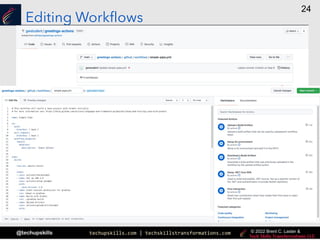
Editing Workflows
techupskills.com | techskillstransformations.com
© 2021 Brent C. Laster &
@techupskills
25
© 2022 Brent C. Laster &
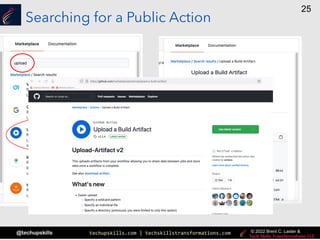
Searching for a Public Action
techupskills.com | techskillstransformations.com
© 2021 Brent C. Laster &
@techupskills
26
© 2022 Brent C. Laster &
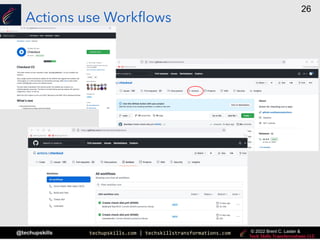
Actions use Workflows
techupskills.com | techskillstransformations.com
© 2021 Brent C. Laster &
@techupskills
27
© 2022 Brent C. Laster &
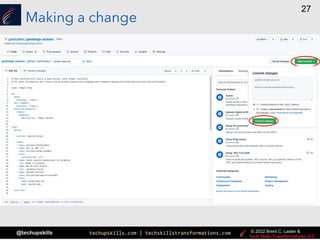
Making a change
techupskills.com | techskillstransformations.com
© 2021 Brent C. Laster &
@techupskills
28
© 2022 Brent C. Laster &
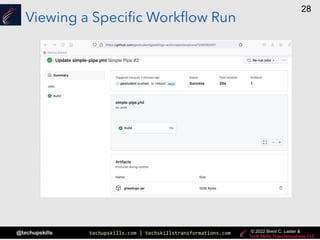
Viewing a Specific Workflow Run
techupskills.com | techskillstransformations.com
© 2021 Brent C. Laster &
@techupskills
29
© 2022 Brent C. Laster &
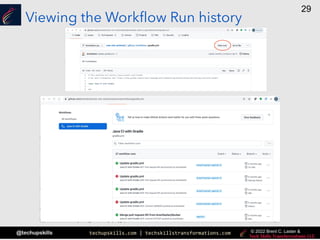
Viewing the Workflow Run history
techupskills.com | techskillstransformations.com
© 2021 Brent C. Laster &
@techupskills
30
© 2022 Brent C. Laster &
|
Lab 2 – Learning more about Actions
Purpose: In this lab, we’ll see how to get more information about Actions and how to update our workflow to use
others.
techupskills.com | techskillstransformations.com
© 2021 Brent C. Laster &
@techupskills
31
© 2022 Brent C. Laster &
Custom Actions
• Can be created by you
• Can result from customizing community actions
• Can be put on Marketplace and shared
• repository must be public
• Can integrate with any public API
• Can run directly on a machine or in Docker
container
• Can define inputs, outputs, and environment
variables
• Require metadata file
• defines inputs, outputs, and entrypoint
• must be named either action.yaml or
action.yml
• Should be tagged with a label and then pushed to
GitHub
• To use:
• In file in .github/workflows/main.yml
• In steps
• "uses: <github path to action>@<label>
$ <create GitHub repo>
$ <clone repo>
$ <create files>
$ git add action.yml <other files>
$ git commit -m "action files"
$ git tag -a -m "first release of action" v1
$ git push --follow-tags
on: [push]
jobs:
example_job:
runs on: ubuntu-latest
name: An example job
steps:
- name: Example step
id: example_step
uses: <repo name>/<action name>@<tag>
...
.github/workflows/example.yml
techupskills.com | techskillstransformations.com
© 2021 Brent C. Laster &
@techupskills
32
© 2022 Brent C. Laster &
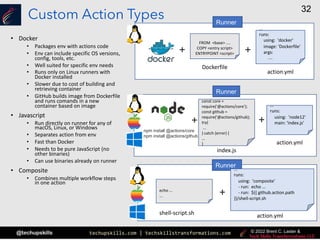
Custom Action Types
• Docker
• Packages env with actions code
• Env can include specific OS versions,
config, tools, etc.
• Well suited for specific env needs
• Runs only on Linux runners with
Docker installed
• Slower due to cost of building and
retrieving container
• GitHub builds image from Dockerfile
and runs comands in a new
container based on image
• Javascript
• Run directly on runner for any of
macOS, Linux, or Windows
• Separates action from env
• Fast than Docker
• Needs to be pure JavaScript (no
other binaries)
• Can use binaries already on runner
• Composite
• Combines multiple workflow steps
in one action
Runner
FROM <base> ....
COPY <entry script>
ENTRYPOINT <script>
Dockerfile
...
runs:
using: 'docker'
image: 'Dockerfile'
args:
....
action.yml
+ +
Runner
+ +
...
runs:
using: 'node12'
main: 'index.js'
action.yml
npm install @actions/core
npm install @actions/github
const core =
require('@actions/core');
const github =
require('@actions/github);
try{
...
} catch (error) {
...
}
index.js
Runner
...
runs:
using: 'composite'
- run: echo ...
- run: ${{ github.action.path
}}/shell-script.sh
action.yml
+
echo ...
...
shell-script.sh
techupskills.com | techskillstransformations.com
© 2021 Brent C. Laster &
@techupskills
33
© 2022 Brent C. Laster &
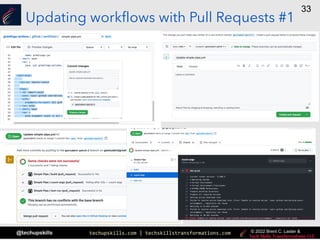
Updating workflows with Pull Requests #1
techupskills.com | techskillstransformations.com
© 2021 Brent C. Laster &
@techupskills
34
© 2022 Brent C. Laster &
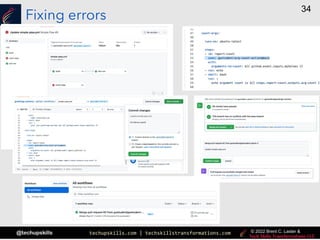
Fixing errors
techupskills.com | techskillstransformations.com
© 2021 Brent C. Laster &
@techupskills
35
© 2022 Brent C. Laster &
|
Lab 3 – Adding your own action
Purpose: In this lab, we’ll see how to create how to add and use a custom GitHub Action.
techupskills.com | techskillstransformations.com
© 2021 Brent C. Laster &
@techupskills
36
© 2022 Brent C. Laster &
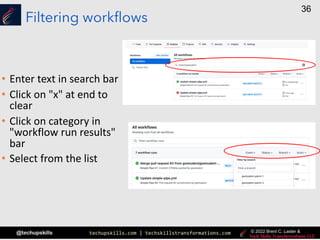
Filtering workflows
• Enter text in search bar
• Click on "x" at end to
clear
• Click on category in
"workflow run results"
bar
• Select from the list
techupskills.com | techskillstransformations.com
© 2021 Brent C. Laster &
@techupskills
37
© 2022 Brent C. Laster &
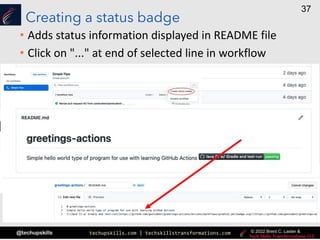
Creating a status badge
• Adds status information displayed in README file
• Click on "..." at end of selected line in workflow
techupskills.com | techskillstransformations.com
© 2021 Brent C. Laster &
@techupskills
38
© 2022 Brent C. Laster &
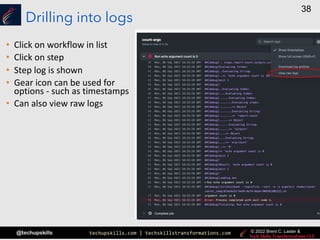
Drilling into logs
• Click on workflow in list
• Click on step
• Step log is shown
• Gear icon can be used for
options - such as timestamps
• Can also view raw logs
techupskills.com | techskillstransformations.com
© 2021 Brent C. Laster &
@techupskills
39
© 2022 Brent C. Laster &
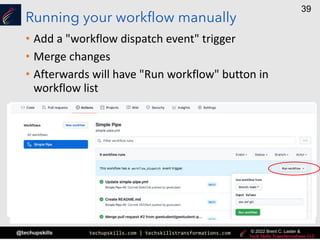
Running your workflow manually
• Add a "workflow dispatch event" trigger
• Merge changes
• Afterwards will have "Run workflow" button in
workflow list
techupskills.com | techskillstransformations.com
© 2021 Brent C. Laster &
@techupskills
40
© 2022 Brent C. Laster &
|
Lab 4 – Exploring logs
Purpose: In this lab, we’ll take a closer look at the different options for getting information from logs.
techupskills.com | techskillstransformations.com
© 2021 Brent C. Laster &
@techupskills
41
© 2022 Brent C. Laster &
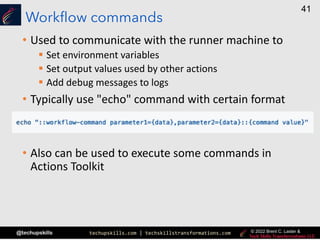
Workflow commands
• Used to communicate with the runner machine to
§ Set environment variables
§ Set output values used by other actions
§ Add debug messages to logs
• Typically use "echo" command with certain format
• Also can be used to execute some commands in
Actions Toolkit
techupskills.com | techskillstransformations.com
© 2021 Brent C. Laster &
@techupskills
42
© 2022 Brent C. Laster &
Actions Toolkit
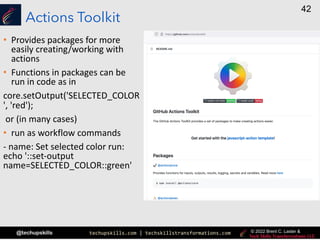
• Provides packages for more
easily creating/working with
actions
• Functions in packages can be
run in code as in
core.setOutput('SELECTED_COLOR
', 'red');
or (in many cases)
• run as workflow commands
- name: Set selected color run:
echo '::set-output
name=SELECTED_COLOR::green'
techupskills.com | techskillstransformations.com
© 2021 Brent C. Laster &
@techupskills
43
© 2022 Brent C. Laster &
Actions Toolkit packages
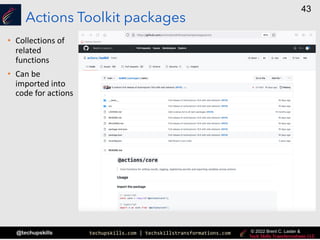
• Collections of
related
functions
• Can be
imported into
code for actions
techupskills.com | techskillstransformations.com
© 2021 Brent C. Laster &
@techupskills
44
© 2022 Brent C. Laster &
Monitoring and Troubleshooting
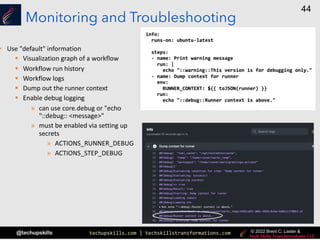
• Use "default" information
§ Visualization graph of a workflow
§ Workflow run history
§ Workflow logs
§ Dump out the runner context
§ Enable debug logging
» can use core.debug or "echo
"::debug:: <message>"
» must be enabled via setting up
secrets
» ACTIONS_RUNNER_DEBUG
» ACTIONS_STEP_DEBUG
techupskills.com | techskillstransformations.com
© 2021 Brent C. Laster &
@techupskills
45
© 2022 Brent C. Laster &
Enabling/Creating Secrets for Actions
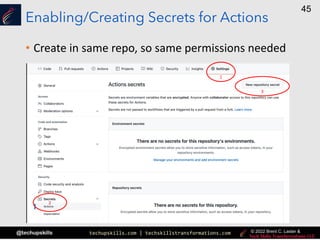
• Create in same repo, so same permissions needed
1
2
3
techupskills.com | techskillstransformations.com
© 2021 Brent C. Laster &
@techupskills
46
© 2022 Brent C. Laster &
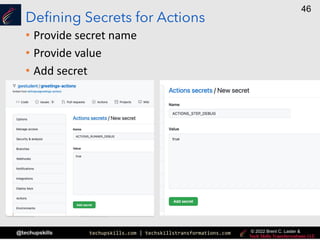
Defining Secrets for Actions
• Provide secret name
• Provide value
• Add secret
techupskills.com | techskillstransformations.com
© 2021 Brent C. Laster &
@techupskills
47
© 2022 Brent C. Laster &
|
Lab 5 – Looking at debug info
Purpose: In this lab, we’ll look at some ways to get more debugging info from our workflows.
techupskills.com | techskillstransformations.com
© 2021 Brent C. Laster &
@techupskills
48
© 2022 Brent C. Laster &
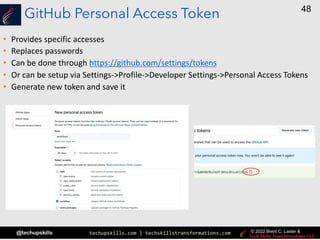
GitHub Personal Access Token
• Provides specific accesses
• Replaces passwords
• Can be done through https://github.com/settings/tokens
• Or can be setup via Settings->Profile->Developer Settings->Personal Access Tokens
• Generate new token and save it
techupskills.com | techskillstransformations.com
© 2021 Brent C. Laster &
@techupskills
49
© 2022 Brent C. Laster &
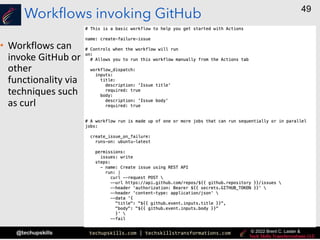
Workflows invoking GitHub
• Workflows can
invoke GitHub or
other
functionality via
techniques such
as curl
techupskills.com | techskillstransformations.com
© 2021 Brent C. Laster &
@techupskills
50
© 2022 Brent C. Laster &
Chaining Workflows Together
• Can be done via GitHub API calls
• Requires API Token saved as a secret
• One workflow then invokes the other via API call
create-issue-on-failure:
runs-on: ubuntu-latest
needs: [test-run, count-args]
if: always() && failure()
steps:
- name: invoke workflow to create issue
run: >
curl -X POST
-H "authorization: Bearer ${{ secrets.WORKFLOW_USE }}"
-H "Accept: application/vnd.github.v3+json"
"https://api.github.com/repos/${{ github.repository }}/actions/workflows/create-failure-issue.yml/dispatches"
-d '{"ref":"main",
"inputs":
{"title":"Automated workflow failure issue for commit ${{ github.sha }}",
"body":"This issue was automatically created by the GitHub Action workflow ** ${{ github.workflow }} **"}
}'
techupskills.com | techskillstransformations.com
© 2021 Brent C. Laster &
@techupskills
51
© 2022 Brent C. Laster &
|
Lab 6 – Chaining workflows, using conditionals, and working
with REST APIs in workflows.
Purpose: In this lab, we’ll learn one way to drive one workflow from another.
techupskills.com | techskillstransformations.com
© 2021 Brent C. Laster &
@techupskills
52
© 2022 Brent C. Laster &
That’s all - thanks!
techskillstransformations.com
getskillsnow.com

Intro to GitHub Actions

  • 1.
    techupskills.com | techskillstransformations.com ©2021 Brent C. Laster & @techupskills 1 © 2022 Brent C. Laster & Tech Skills Transformations & Brent Laster Introduction to GitHub Actions
  • 2.
    techupskills.com | techskillstransformations.com ©2021 Brent C. Laster & @techupskills 2 © 2022 Brent C. Laster & About me • R&D Director, DevOps • Global trainer – training (Git, Jenkins, Gradle, CI/CD, pipelines, Kubernetes, Helm, ArgoCD, operators) • Author - § OpenSource.com § Professional Git book § Jenkins 2 – Up and Running book § Continuous Integration vs. Continuous Delivery vs. Continuous Deployment mini-book on Safari techskillstransformations.com getskillsnow.com https://www.linkedin.com/in/brentlaster @BrentCLaster GitHub: brentlaster
  • 3.
    techupskills.com | techskillstransformations.com ©2021 Brent C. Laster & @techupskills 3 © 2022 Brent C. Laster & Book – Professional Git • Extensive Git reference, explanations, and examples • First part for non-technical • Beginner and advanced reference • Hands-on labs
  • 4.
    techupskills.com | techskillstransformations.com ©2021 Brent C. Laster & @techupskills 4 © 2022 Brent C. Laster & Jenkins 2 Book • Jenkins 2 – Up and Running • “It’s an ideal book for those who are new to CI/CD, as well as those who have been using Jenkins for many years. This book will help you discover and rediscover Jenkins.” By Kohsuke Kawaguchi, Creator of Jenkins
  • 5.
    techupskills.com | techskillstransformations.com ©2021 Brent C. Laster & @techupskills 5 © 2022 Brent C. Laster & O’Reilly Training
  • 6.
    techupskills.com | techskillstransformations.com ©2021 Brent C. Laster & @techupskills 6 © 2022 Brent C. Laster & Agenda • What are GitHub Actions? • How do they work? • The GitHub interface to Actions • About Actions Runners and Virtual Environments • Using public Actions • Workflow runs • Custom Actions • Manually running workflows • Monitoring and Troubleshooting • Creating secrets for Actions • Chaining workflows together • Using GitHub API calls with Actions
  • 7.
    techupskills.com | techskillstransformations.com ©2021 Brent C. Laster & @techupskills 7 © 2022 Brent C. Laster & What are GitHub Actions? • Way to create custom, automated workflows in GitHub • Executed based on repository operations • Building blocks - can be combined & shared • Used for usual SDLC tasks • Can be used for CI/CD as alternatives to other apps
  • 8.
    techupskills.com | techskillstransformations.com ©2021 Brent C. Laster & @techupskills 8 © 2022 Brent C. Laster & What's interesting about it? • Direct integration with GitHub
  • 9.
    techupskills.com | techskillstransformations.com ©2021 Brent C. Laster & @techupskills 9 © 2022 Brent C. Laster & What else is interesting about it? • Lots of events can trigger an action workflow - automate practically anything! on: project on: watch on: repository_dispatch on: delete on: check_run on: page_build on: scheduled on: pull_request on: public on: pull_request_review_comment on: pull_push on: fork https://docs.github.com/en/actions/learn-github-actions/events-that-trigger-workflows
  • 10.
    techupskills.com | techskillstransformations.com ©2021 Brent C. Laster & @techupskills 10 © 2022 Brent C. Laster & Types of triggers for events • single event - on: push • list of events - on: [push, pull_request] • specify activity types or configuration - on: push: branches: - main • scheduled events - on: scheduled: - cron: '30 5,15 * * *' • manual events - on: workflow-dispatch on: repository-dispatch [opened, deleted] • workflow reuse events - on: workflow-call (can be called from another workflow) • webhook events - on: issue_comment on: pull_request
  • 11.
    techupskills.com | techskillstransformations.com ©2021 Brent C. Laster & @techupskills 11 © 2022 Brent C. Laster & How actions work (events) • Events occur § Example: pull request triggers build for validation § Example: push for commit • Repository Dispatch Events § Endpoint that can be used to trigger webhook event § Can be used for activity that is not in GitHub § Can trigger a GitHub Actions workflow or GitHub App webhook • ref https://docs.github.com /en/rest/reference/repo s#create-a-repository- dispatch-event Event
  • 12.
    techupskills.com | techskillstransformations.com ©2021 Brent C. Laster & @techupskills 12 © 2022 Brent C. Laster & How actions work (workflows) • Events trigger workflows workflow Event § Procedure to run automatically § Added to your repository § Composed of one+ jobs § Can be triggered/scheduled by event § Useful for doing CI/CD actions such as building, testing, packaging, etc.
  • 13.
    techupskills.com | techskillstransformations.com ©2021 Brent C. Laster & @techupskills 13 © 2022 Brent C. Laster & How actions work (jobs, steps, actions) Workflows contain jobs § Set of steps § Workflow with multiple jobs runs them in parallel Jobs contain steps § A task that can execute commands in a job § Can be either » action » shell command workflow Job 1 Job 2 Event Step 1 Step 1 Step 2 Action Action Action Action § Independent commands § Combined into steps to form a job § Smallest unit in a workflow § Can be created or pulled in from the community § Only usable if included as a step
  • 14.
    techupskills.com | techskillstransformations.com ©2021 Brent C. Laster & @techupskills 14 © 2022 Brent C. Laster & How actions work (runner) Runner • A server with GitHub Actions runner app on it • Can use runner provided by/hosted via GitHub or use your own • Runner listens for available jobs • Steps in a job execute on the same runner workflow Job 1 Job 2 Event Step 1 Step 1 Step 2 Action Action Action Runner 1 Action Runs Log results Runner 2 Action Runs Log results
  • 15.
    techupskills.com | techskillstransformations.com ©2021 Brent C. Laster & @techupskills 15 © 2022 Brent C. Laster & How workflows are triggered 1. Event happens in repo 2. Resulting event has SHA and Git ref (branch) 3. .github/workflows dir in repo is searched for workflow files in same SHA or ref 4. workflow files for commit and ref are inspected 5. new workflow run triggered for any workflow with matching "on:" values
  • 16.
    techupskills.com | techskillstransformations.com ©2021 Brent C. Laster & @techupskills 16 © 2022 Brent C. Laster & How actions work GitHub Repository .github workflows workflow1.yml Job 1 Step 1 Action Step 2 Action Job 2 Step 1 Action workflow2.yml Job 1 Step 1 Action Job 2 Step 1 Action Step 2 Action Runner 1 Action Runs Log results Runner 2 Action Runs Log results Event • Resides in .github/workflows • Can have multiple workflows
  • 17.
    techupskills.com | techskillstransformations.com ©2021 Brent C. Laster & @techupskills 17 © 2022 Brent C. Laster & Actions in GitHub Interface
  • 18.
    techupskills.com | techskillstransformations.com ©2021 Brent C. Laster & @techupskills 18 © 2022 Brent C. Laster & Viewing Logs
  • 19.
    techupskills.com | techskillstransformations.com ©2021 Brent C. Laster & @techupskills 19 © 2022 Brent C. Laster & | Lab 1 – Creating a simple example Purpose: In this lab, we’ll get a quick start learning about GitHub Actions by creating a simple project that uses them. We’ll also see what a first run of a workflow with actions looks like.
  • 20.
    techupskills.com | techskillstransformations.com ©2021 Brent C. Laster & @techupskills 20 © 2022 Brent C. Laster & GitHub Actions Virtual Environments • Virtual environments for GitHub actions hosted runners • VM images of Microsoft- hosted agents used for Azure Pipelines
  • 21.
    techupskills.com | techskillstransformations.com ©2021 Brent C. Laster & @techupskills 21 © 2022 Brent C. Laster & Self-hosted Runners • Useful when you need more configurability and control • Allows you to choose and customize configuration, system resources, available software, etc. • Can be physical systems, VMs, containers, on-prem or cloud • Can be mapped in at different levels § Repository-level - intended for a single repo § Organization-level - intended for a GitHub organization » processing of multiple jobs across multiple repositories § Enterprise-level - assigned to multiple organizations for an enterprise account • Runner system connects to GitHub via GitHub Actions self- hosted runner • Automatically kicked off of GitHub if no connection to GitHub Actions after 30 days
  • 22.
    techupskills.com | techskillstransformations.com ©2021 Brent C. Laster & @techupskills 22 © 2022 Brent C. Laster & Self-hosted Runners Reqs • System must be able to § Have self-hosted runner application installed § Run self-hosted runner application § Communicate with GitHub Actions » Must be able to connect to known set of GitHub URLs » Opens connections to GitHub for 50 seconds at a time » Can use proxy server § Provide sufficient resources for intended workflows § Have appropriate software installed for workflow needs (Docker etc.) • Recommended to use only with private repos § Forks of repos could run dangerous code on self-hosted runner machine (via PR that executes code in workflow)
  • 23.
    techupskills.com | techskillstransformations.com ©2021 Brent C. Laster & @techupskills 23 © 2022 Brent C. Laster & Usage limits for Actions on Self-hosted Runners • Workflow run time - max 72 hours; afterwards cancelled • Job queue time - max 24 hours; if self-hosted runner does not start executing job, gets terminated • API requests - up to 1000 API requests/hour across all actions in a repo • Job matrix - limit of 256 jobs per workflow run • Workflow run queue - max of 500 runs queued in 10 second interval • Availability issues - if Actions are temporarily unavailable, run is discarded if not queued within 30 minutes of being triggered
  • 24.
    techupskills.com | techskillstransformations.com ©2021 Brent C. Laster & @techupskills 24 © 2022 Brent C. Laster & Editing Workflows
  • 25.
    techupskills.com | techskillstransformations.com ©2021 Brent C. Laster & @techupskills 25 © 2022 Brent C. Laster & Searching for a Public Action
  • 26.
    techupskills.com | techskillstransformations.com ©2021 Brent C. Laster & @techupskills 26 © 2022 Brent C. Laster & Actions use Workflows
  • 27.
    techupskills.com | techskillstransformations.com ©2021 Brent C. Laster & @techupskills 27 © 2022 Brent C. Laster & Making a change
  • 28.
    techupskills.com | techskillstransformations.com ©2021 Brent C. Laster & @techupskills 28 © 2022 Brent C. Laster & Viewing a Specific Workflow Run
  • 29.
    techupskills.com | techskillstransformations.com ©2021 Brent C. Laster & @techupskills 29 © 2022 Brent C. Laster & Viewing the Workflow Run history
  • 30.
    techupskills.com | techskillstransformations.com ©2021 Brent C. Laster & @techupskills 30 © 2022 Brent C. Laster & | Lab 2 – Learning more about Actions Purpose: In this lab, we’ll see how to get more information about Actions and how to update our workflow to use others.
  • 31.
    techupskills.com | techskillstransformations.com ©2021 Brent C. Laster & @techupskills 31 © 2022 Brent C. Laster & Custom Actions • Can be created by you • Can result from customizing community actions • Can be put on Marketplace and shared • repository must be public • Can integrate with any public API • Can run directly on a machine or in Docker container • Can define inputs, outputs, and environment variables • Require metadata file • defines inputs, outputs, and entrypoint • must be named either action.yaml or action.yml • Should be tagged with a label and then pushed to GitHub • To use: • In file in .github/workflows/main.yml • In steps • "uses: <github path to action>@<label> $ <create GitHub repo> $ <clone repo> $ <create files> $ git add action.yml <other files> $ git commit -m "action files" $ git tag -a -m "first release of action" v1 $ git push --follow-tags on: [push] jobs: example_job: runs on: ubuntu-latest name: An example job steps: - name: Example step id: example_step uses: <repo name>/<action name>@<tag> ... .github/workflows/example.yml
  • 32.
    techupskills.com | techskillstransformations.com ©2021 Brent C. Laster & @techupskills 32 © 2022 Brent C. Laster & Custom Action Types • Docker • Packages env with actions code • Env can include specific OS versions, config, tools, etc. • Well suited for specific env needs • Runs only on Linux runners with Docker installed • Slower due to cost of building and retrieving container • GitHub builds image from Dockerfile and runs comands in a new container based on image • Javascript • Run directly on runner for any of macOS, Linux, or Windows • Separates action from env • Fast than Docker • Needs to be pure JavaScript (no other binaries) • Can use binaries already on runner • Composite • Combines multiple workflow steps in one action Runner FROM <base> .... COPY <entry script> ENTRYPOINT <script> Dockerfile ... runs: using: 'docker' image: 'Dockerfile' args: .... action.yml + + Runner + + ... runs: using: 'node12' main: 'index.js' action.yml npm install @actions/core npm install @actions/github const core = require('@actions/core'); const github = require('@actions/github); try{ ... } catch (error) { ... } index.js Runner ... runs: using: 'composite' - run: echo ... - run: ${{ github.action.path }}/shell-script.sh action.yml + echo ... ... shell-script.sh
  • 33.
    techupskills.com | techskillstransformations.com ©2021 Brent C. Laster & @techupskills 33 © 2022 Brent C. Laster & Updating workflows with Pull Requests #1
  • 34.
    techupskills.com | techskillstransformations.com ©2021 Brent C. Laster & @techupskills 34 © 2022 Brent C. Laster & Fixing errors
  • 35.
    techupskills.com | techskillstransformations.com ©2021 Brent C. Laster & @techupskills 35 © 2022 Brent C. Laster & | Lab 3 – Adding your own action Purpose: In this lab, we’ll see how to create how to add and use a custom GitHub Action.
  • 36.
    techupskills.com | techskillstransformations.com ©2021 Brent C. Laster & @techupskills 36 © 2022 Brent C. Laster & Filtering workflows • Enter text in search bar • Click on "x" at end to clear • Click on category in "workflow run results" bar • Select from the list
  • 37.
    techupskills.com | techskillstransformations.com ©2021 Brent C. Laster & @techupskills 37 © 2022 Brent C. Laster & Creating a status badge • Adds status information displayed in README file • Click on "..." at end of selected line in workflow
  • 38.
    techupskills.com | techskillstransformations.com ©2021 Brent C. Laster & @techupskills 38 © 2022 Brent C. Laster & Drilling into logs • Click on workflow in list • Click on step • Step log is shown • Gear icon can be used for options - such as timestamps • Can also view raw logs
  • 39.
    techupskills.com | techskillstransformations.com ©2021 Brent C. Laster & @techupskills 39 © 2022 Brent C. Laster & Running your workflow manually • Add a "workflow dispatch event" trigger • Merge changes • Afterwards will have "Run workflow" button in workflow list
  • 40.
    techupskills.com | techskillstransformations.com ©2021 Brent C. Laster & @techupskills 40 © 2022 Brent C. Laster & | Lab 4 – Exploring logs Purpose: In this lab, we’ll take a closer look at the different options for getting information from logs.
  • 41.
    techupskills.com | techskillstransformations.com ©2021 Brent C. Laster & @techupskills 41 © 2022 Brent C. Laster & Workflow commands • Used to communicate with the runner machine to § Set environment variables § Set output values used by other actions § Add debug messages to logs • Typically use "echo" command with certain format • Also can be used to execute some commands in Actions Toolkit
  • 42.
    techupskills.com | techskillstransformations.com ©2021 Brent C. Laster & @techupskills 42 © 2022 Brent C. Laster & Actions Toolkit • Provides packages for more easily creating/working with actions • Functions in packages can be run in code as in core.setOutput('SELECTED_COLOR ', 'red'); or (in many cases) • run as workflow commands - name: Set selected color run: echo '::set-output name=SELECTED_COLOR::green'
  • 43.
    techupskills.com | techskillstransformations.com ©2021 Brent C. Laster & @techupskills 43 © 2022 Brent C. Laster & Actions Toolkit packages • Collections of related functions • Can be imported into code for actions
  • 44.
    techupskills.com | techskillstransformations.com ©2021 Brent C. Laster & @techupskills 44 © 2022 Brent C. Laster & Monitoring and Troubleshooting • Use "default" information § Visualization graph of a workflow § Workflow run history § Workflow logs § Dump out the runner context § Enable debug logging » can use core.debug or "echo "::debug:: <message>" » must be enabled via setting up secrets » ACTIONS_RUNNER_DEBUG » ACTIONS_STEP_DEBUG
  • 45.
    techupskills.com | techskillstransformations.com ©2021 Brent C. Laster & @techupskills 45 © 2022 Brent C. Laster & Enabling/Creating Secrets for Actions • Create in same repo, so same permissions needed 1 2 3
  • 46.
    techupskills.com | techskillstransformations.com ©2021 Brent C. Laster & @techupskills 46 © 2022 Brent C. Laster & Defining Secrets for Actions • Provide secret name • Provide value • Add secret
  • 47.
    techupskills.com | techskillstransformations.com ©2021 Brent C. Laster & @techupskills 47 © 2022 Brent C. Laster & | Lab 5 – Looking at debug info Purpose: In this lab, we’ll look at some ways to get more debugging info from our workflows.
  • 48.
    techupskills.com | techskillstransformations.com ©2021 Brent C. Laster & @techupskills 48 © 2022 Brent C. Laster & GitHub Personal Access Token • Provides specific accesses • Replaces passwords • Can be done through https://github.com/settings/tokens • Or can be setup via Settings->Profile->Developer Settings->Personal Access Tokens • Generate new token and save it
  • 49.
    techupskills.com | techskillstransformations.com ©2021 Brent C. Laster & @techupskills 49 © 2022 Brent C. Laster & Workflows invoking GitHub • Workflows can invoke GitHub or other functionality via techniques such as curl
  • 50.
    techupskills.com | techskillstransformations.com ©2021 Brent C. Laster & @techupskills 50 © 2022 Brent C. Laster & Chaining Workflows Together • Can be done via GitHub API calls • Requires API Token saved as a secret • One workflow then invokes the other via API call create-issue-on-failure: runs-on: ubuntu-latest needs: [test-run, count-args] if: always() && failure() steps: - name: invoke workflow to create issue run: > curl -X POST -H "authorization: Bearer ${{ secrets.WORKFLOW_USE }}" -H "Accept: application/vnd.github.v3+json" "https://api.github.com/repos/${{ github.repository }}/actions/workflows/create-failure-issue.yml/dispatches" -d '{"ref":"main", "inputs": {"title":"Automated workflow failure issue for commit ${{ github.sha }}", "body":"This issue was automatically created by the GitHub Action workflow ** ${{ github.workflow }} **"} }'
  • 51.
    techupskills.com | techskillstransformations.com ©2021 Brent C. Laster & @techupskills 51 © 2022 Brent C. Laster & | Lab 6 – Chaining workflows, using conditionals, and working with REST APIs in workflows. Purpose: In this lab, we’ll learn one way to drive one workflow from another.
  • 52.
    techupskills.com | techskillstransformations.com ©2021 Brent C. Laster & @techupskills 52 © 2022 Brent C. Laster & That’s all - thanks! techskillstransformations.com getskillsnow.com