What is Word Processing ?
 It is also known as
a d o c u m e n t
preparation
System
 It is a programme
where you c a n
type a n d print
documents
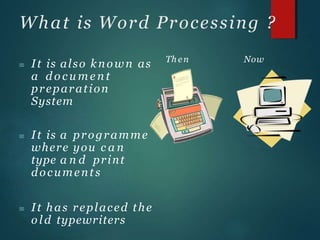
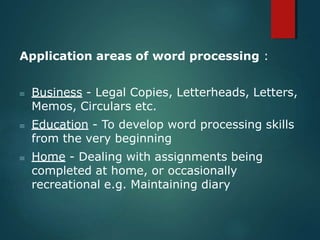
 It has replaced the
o l d typewriters
Th en Now
Application areas of word processing :
 Business - Legal Copies, Letterheads, Letters,
Memos, Circulars etc.
 Education - To develop word processing skills
from the very beginning
 Home - Dealing with assignments being
completed at home, or occasionally
recreational e.g. Maintaining diary
Word Processing
 Disadvantages
 Advantages
1. Faster
2. Can edit documents 1.
3. Change font style, 2.
size, colour
4. Change layout
3.
5. Print many copies 4.
6. Less noise 5.
7. Add pictures
8. Make tables
9. Email documents
Equipment costs
Upgrade software
Train staff
More complicated
Virus, popup
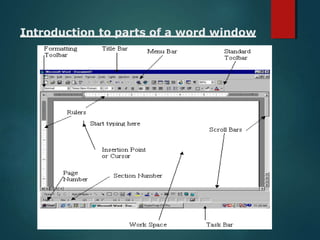
Introduction to parts of a word window
Below is the table, describing parts of Word Windows:
Title Bar
Ruler Bar
Tool Bars
Status Bar
Scroll Bar
Displays the name of the currently active word
document.
Allows you to format the vertical and horizontal
alignment of text in a document.
Word has a number of tool bars that help you
perform task faster and with great ease. Example :
Standard Tool Bar, Formatting Tool Bar
Displays information about the currently active
document.
Allows scrolling the content or body of document.
Workspace
Menu Bar
Area in the document window where text can be
entered.
Contains menus doing separate tasks.
How to enter a n d edit text
 You can enter text by using the
keyboard
 Editing text may involve
inserting, deleting, or
amending
 Other pos iblemethodsare
using ascanner and optical
character recognition (OCR)
 You can do thisby speaking
into amicrophoneor using
voicerecognition software
Word Wrap
 With aword proces or, when you reach theend of aline
you don’t ne d to usethereturn key to makeanew line.
 Word proces or will makeanew lineautomatically and
it will movepartly completed wordsat theend of one
lineto thestart of thenext line
Word Count
 It is very useful if you are writing
a n essay or a n article containing a
certain amount of words
 Instead of using spell checker to
count words use word count it saves
time.
Inserting Clip Art
To insert
clip art
Click on
insert a n d
then picture
Then
click on
Clip art
Some pictures from Clip art
M a i l merge
The processof linking
the fieldsin a
database to a
standard letter.
It can be accessed
by pressing the
“Tools” tab and
selecting Mail Merge.
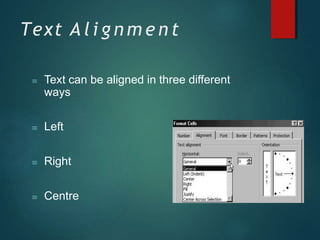
Text A l i g n m e n t
 Text can be aligned in three different
ways
 Left
 Right
 Centre
Featuresof Word
Processor


Search and Replace
We use thisfeature to replace a word a
number of times in a document.
Spell Checker
The spell checker worksby comparing the
typed word to wordsin the computer’s
internal dictionary, any word it does not
recognise it will place a red line underneath.
Featuresof Word Processor





GrammarCheck
Thisfeature works by highlighting
sentences with grammatical errors, for
example
Iseen everyone coming along
Standard Paragraph
A standard paragraph isa piece of
text that hasbeen typed up, saved to
backing storage and inserted into a
document a number of times
Featuresof Word Processor
 Template
 A template isa ready
made document, with
placeholdersfor items
like text and graphics
WYSIWYG
 Development of higher-resolution monitors allowed
them to provide limited WYSIWYG - What You See Is
What You Get, to the extent that typographical
features like bold and italics, indentation,
justification and margins were approximated on
screen.
 MacWrite, Microsoft Word and other word
processing programs for the bit-mapped Apple
Macintosh screen, introduced in 1984, were
probably the first true WYSIWYG word processors to
become known to many people until the
introduction of Microsoft Windows.
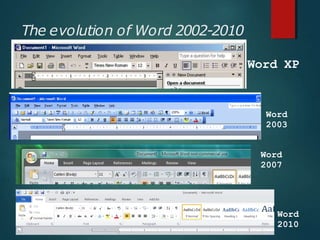
The evolution of Word 2002-2010
17
Word XP
Word
2003
Word
2007
Word
2010
New featuresin Word 2007
 The Microsoft Office Button
 The Quick AccessToolbar
Customizable
 The Ribbon
THANK
YOU

PPT-1.pptx

  • 2.
    What is WordProcessing ?  It is also known as a d o c u m e n t preparation System  It is a programme where you c a n type a n d print documents  It has replaced the o l d typewriters Th en Now
  • 3.
    Application areas ofword processing :  Business - Legal Copies, Letterheads, Letters, Memos, Circulars etc.  Education - To develop word processing skills from the very beginning  Home - Dealing with assignments being completed at home, or occasionally recreational e.g. Maintaining diary
  • 4.
    Word Processing  Disadvantages Advantages 1. Faster 2. Can edit documents 1. 3. Change font style, 2. size, colour 4. Change layout 3. 5. Print many copies 4. 6. Less noise 5. 7. Add pictures 8. Make tables 9. Email documents Equipment costs Upgrade software Train staff More complicated Virus, popup
  • 5.
    Introduction to partsof a word window
  • 6.
    Below is thetable, describing parts of Word Windows: Title Bar Ruler Bar Tool Bars Status Bar Scroll Bar Displays the name of the currently active word document. Allows you to format the vertical and horizontal alignment of text in a document. Word has a number of tool bars that help you perform task faster and with great ease. Example : Standard Tool Bar, Formatting Tool Bar Displays information about the currently active document. Allows scrolling the content or body of document. Workspace Menu Bar Area in the document window where text can be entered. Contains menus doing separate tasks.
  • 7.
    How to entera n d edit text  You can enter text by using the keyboard  Editing text may involve inserting, deleting, or amending  Other pos iblemethodsare using ascanner and optical character recognition (OCR)  You can do thisby speaking into amicrophoneor using voicerecognition software
  • 8.
    Word Wrap  Withaword proces or, when you reach theend of aline you don’t ne d to usethereturn key to makeanew line.  Word proces or will makeanew lineautomatically and it will movepartly completed wordsat theend of one lineto thestart of thenext line
  • 9.
    Word Count  Itis very useful if you are writing a n essay or a n article containing a certain amount of words  Instead of using spell checker to count words use word count it saves time.
  • 10.
    Inserting Clip Art Toinsert clip art Click on insert a n d then picture Then click on Clip art Some pictures from Clip art
  • 11.
    M a il merge The processof linking the fieldsin a database to a standard letter. It can be accessed by pressing the “Tools” tab and selecting Mail Merge.
  • 12.
    Text A li g n m e n t  Text can be aligned in three different ways  Left  Right  Centre
  • 13.
    Featuresof Word Processor   Search andReplace We use thisfeature to replace a word a number of times in a document. Spell Checker The spell checker worksby comparing the typed word to wordsin the computer’s internal dictionary, any word it does not recognise it will place a red line underneath.
  • 14.
    Featuresof Word Processor      GrammarCheck Thisfeatureworks by highlighting sentences with grammatical errors, for example Iseen everyone coming along Standard Paragraph A standard paragraph isa piece of text that hasbeen typed up, saved to backing storage and inserted into a document a number of times
  • 15.
    Featuresof Word Processor Template  A template isa ready made document, with placeholdersfor items like text and graphics
  • 16.
    WYSIWYG  Development ofhigher-resolution monitors allowed them to provide limited WYSIWYG - What You See Is What You Get, to the extent that typographical features like bold and italics, indentation, justification and margins were approximated on screen.  MacWrite, Microsoft Word and other word processing programs for the bit-mapped Apple Macintosh screen, introduced in 1984, were probably the first true WYSIWYG word processors to become known to many people until the introduction of Microsoft Windows.
  • 17.
    The evolution ofWord 2002-2010 17 Word XP Word 2003 Word 2007 Word 2010
  • 18.
    New featuresin Word2007  The Microsoft Office Button  The Quick AccessToolbar Customizable  The Ribbon
  • 19.